Page 192 of 565
Continued191
uuInterior Lights/Interior Convenience Items uInterior Convenience Items
Controls
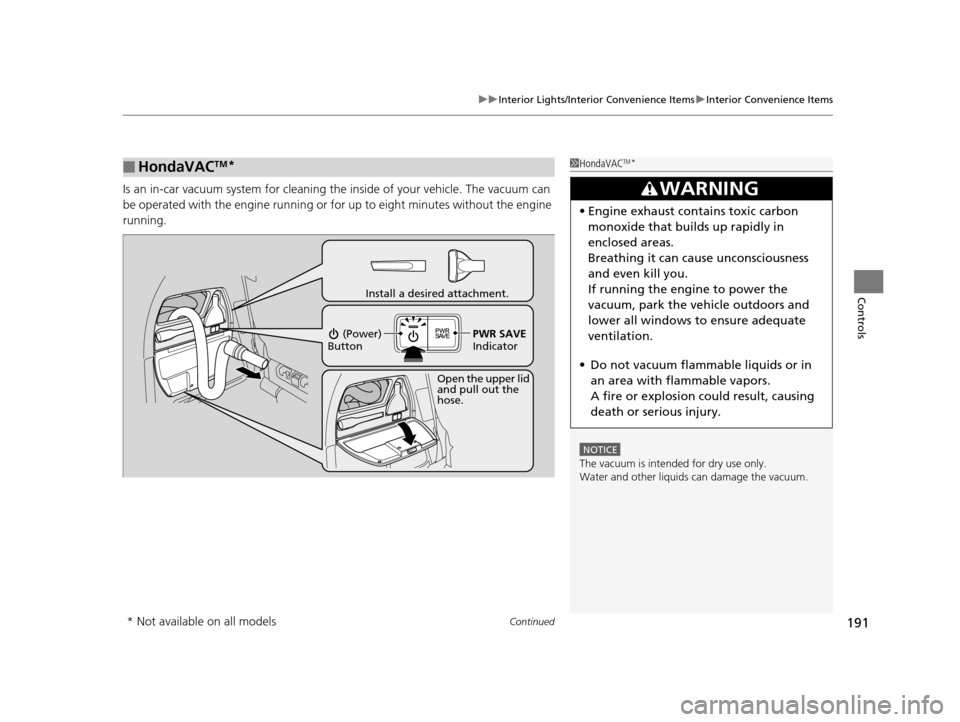
Is an in-car vacuum system for cleaning th e inside of your vehicle. The vacuum can
be operated with the engine running or for up to eight minutes without the engine
running.
■HondaVACTM*1 HondaVACTM*
NOTICE
The vacuum is intended for dry use only.
Water and other liquids can damage the vacuum.
3WARNING
•Engine exhaust contains toxic carbon
monoxide that builds up rapidly in
enclosed areas.
Breathing it can cause unconsciousness
and even kill you.
If running the engine to power the
vacuum, park the vehicle outdoors and
lower all windows to ensure adequate
ventilation.
• Do not vacuum flammable liquids or in
an area with flammable vapors.
A fire or explosion could result, causing
death or serious injury.
Open the upper lid
and pull out the
hose.
Install a desired attachment.
(Power)
Button
PWR SAVE
Indicator
* Not available on all models
17 US ODYSSEY (KA KC)-31TK86600.book 191 ページ 2016年10月24日 月曜日 午後4時2分
Page 310 of 565
309
uuCustomized Features u
Continued
Features
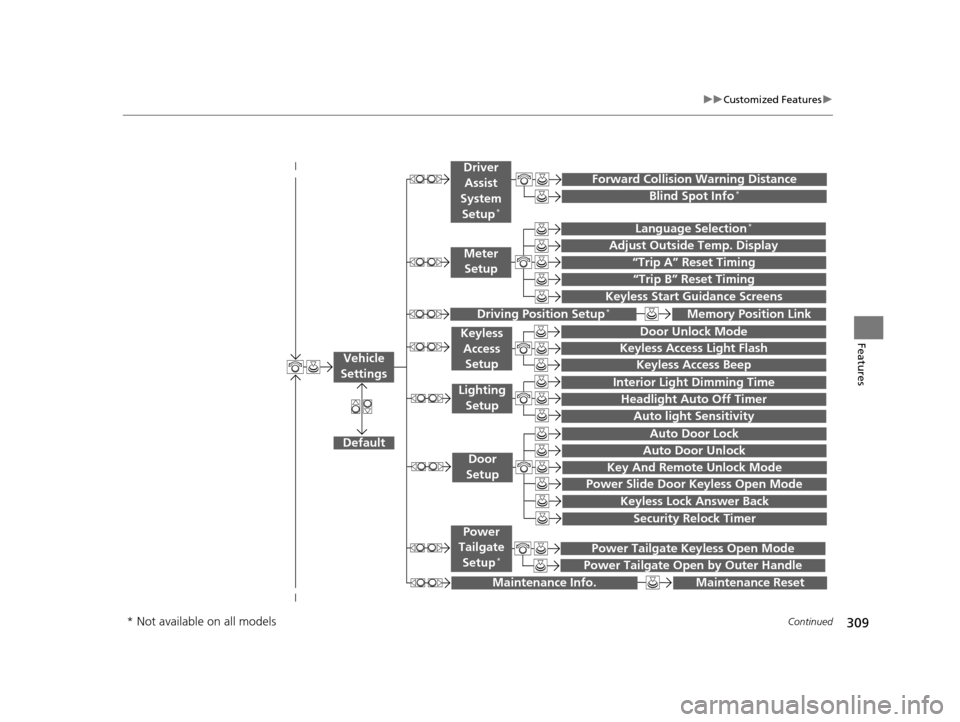
“Trip A” Reset Timing
“Trip B” Reset Timing
Language Selection*
Adjust Outside Temp. Display
Forward Collision Warning Distance
Keyless Start Guidance Screens
Default
Memory Position Link
Door Unlock Mode
Keyless Access Light Flash
Interior Light Dimming Time
Headlight Auto Off Timer
Auto light Sensitivity
Key And Remote Unlock Mode
Keyless Lock Answer Back
Security Relock Timer
Auto Door Lock
Auto Door Unlock
Maintenance Reset
Meter
Setup
Driver
Assist
System
Setup
*
Driving Position Setup*
Keyless Access Setup
Lighting Setup
Door
Setup
Maintenance Info.
Keyless Access Beep
Blind Spot Info*
Power Slide Door Keyless Open Mode
Power Tailgate Keyless Open Mode
Power Tailgate Open by Outer Handle
Power
Tailgate
Setup
*
Vehicle
Settings
* Not available on all models
17 US ODYSSEY (KA KC)-31TK86600.book 309 ページ 2016年10月24日 月曜日 午後4時2分
Page 422 of 565
421
uuWhen Driving uForward Collision Warning (FCW)*
Driving
FCW may not activate or may not detect a ve hicle in front of your vehicle, and may
activate even when you are aware of a ve hicle ahead of you, or when there is no
vehicle ahead under the following conditions.
■FCW Limitations
Condition
●The distance between your vehicle and the vehicle ahead of you is too short.●A vehicle cuts in front of you at a slow speed, and it brakes suddenly.●A vehicle suddenly crosses in front of you.●When either your vehicle or the vehicle ahead of you a ccelerates rapidly.●The vehicle ahead of you is a motorcycle, a small vehicle, or a unique vehicle such as a
tractor.
●When you drive off-road or on a mountain road, or curved and winding road for an
extended period that makes it difficult for the camera to properly dete ct a vehicle in front
of you.
●When there are pedestrians or an imals in front of your vehicle.●When you drive in bad weather (rain, fog, etc.).●A heavy load in the rear or modificati ons to the suspension tilts your vehicle.●An abnormal tire condition is detected (wrong tire size, flat tire, etc.).●When the windshield is blocked by dirt, mud, leaves, wet snow, etc.●When the temperature inside the system is high.●A sudden change between light and dark such as an entrance or exit of a tunnel.●You drive into the sunlight (e.g. at dawn or dusk).●When the windshield is dirty or cloudy.●When streetlights are perceived as the ta illight of a vehicle in front of yours.●When driving at night, the vehi cle ahead of you is running with either taillight bulb burned
out.
●When you drive in the shadows of trees, buildings, etc.●When your vehicle is towing a trailer.
17 US ODYSSEY (KA KC)-31TK86600.book 421 ページ 2016年10月24日 月曜日 午後4時2分
Page 424 of 565
Continued423
uuWhen Driving uLane Departure Warning (LDW)*
Driving
The system begins to search for lane marki ngs when all the following conditions are met:
• The vehicle is traveling between 40-90 mph (64-145 km/h).
• The vehicle is on a straight or slightly curved road.
• The turn signals are off.
• The brake pedal is not depressed.
■How the System Activates1How the System Activates
LDW may automaticall y shut off and the LDW
indicator comes and stays on.
2 Indicators P. 70
17 US ODYSSEY (KA KC)-31TK86600.book 423 ページ 2016年10月24日 月曜日 午後4時2分
Page 426 of 565

425
uuWhen Driving uLane Departure Warning (LDW)*
Driving
LDW may not activate or may not recognize lanes, and may activate even when
keeping in the middle of a lane under the following conditions.
■LDW Limitations
Condition
●When you drive in bad weather (rain, fog, etc.).●A heavy load in the rear or modificati ons to the suspension tilts your vehicle.●An abnormal tire condition is detected (wrong tire size, flat tire, etc.).●When the windshield is blocked by dirt, mud, leaves, wet snow, etc.●When the temperature inside the system is high.●A sudden change between light and dark such as an entrance or exit of a tunnel.●You drive into the sunlight (e.g. at dawn or dusk).●When the windshield is dirty or cloudy.●When you drive in the shadows of trees, buildings, etc.●When your vehicle is towing a trailer.●When you drive on a wet road su rface following another vehicle.
uThe camera may perceive the tire tracks in the water as lane lines.●When there is snow or wheel tracks on the side of the road.●When the road has many repaired areas or erased lines.●When the vehicle is running over pa inted signs or crosswalk markings.●When you drive in a lane with worn-out lane markings.
17 US ODYSSEY (KA KC)-31TK86600.book 425 ページ 2016年10月24日 月曜日 午後4時2分
Page 435 of 565
434
uuWhen Driving uLaneWatchTM*
Driving
LaneWatchTM*
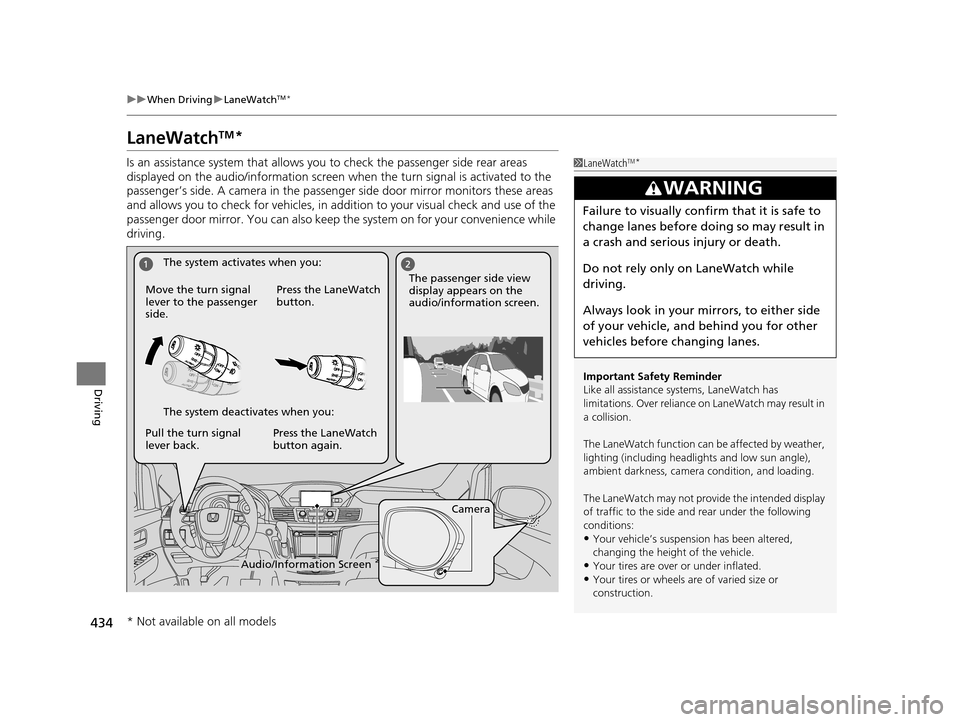
Is an assistance system that allows y ou to check the passenger side rear areas
displayed on the audio/information screen when the turn signal is activated to the
passenger’s side. A camera in the passenger side door mirror monitors these areas
and allows you to check for vehicles, in addition to your visual check and use of the
passenger door mirror. You can also keep th e system on for your convenience while
driving.1 LaneWatchTM*
Important Safety Reminder
Like all assistance systems, LaneWatch has
limitations. Over reliance on LaneWatch may result in
a collision.
The LaneWatch func tion can be affected by weather,
lighting (including headli ghts and low sun angle),
ambient darkness, camera condition, and loading.
The LaneWatch may not prov ide the intended display
of traffic to the side and rear under the following
conditions:
•Your vehicle’s suspension has been altered,
changing the height of the vehicle.
•Your tires are over or under inflated.
•Your tires or wheels are of varied size or
construction.
3WARNING
Failure to visually confirm that it is safe to
change lanes before doing so may result in
a crash and serious injury or death.
Do not rely only on LaneWatch while
driving.
Always look in your mirrors, to either side
of your vehicle, and behind you for other
vehicles before changing lanes.
Camera
Audio/Information Screen
Move the turn signal
lever to the passenger
side.
Press the LaneWatch
button.
Pull the turn signal
lever back. Press the LaneWatch
button again. The passenger side view
display appears on the
audio/information screen.
The system activates when you:
The system deactivates when you:
* Not available on all models
17 US ODYSSEY (KA KC)-31TK86600.book 434 ページ 2016年10月24日 月曜日
午後4時2分
Page 512 of 565

511Continued
Handling the Unexpected
If a Tire Goes Flat
Changing a Flat Tire
If a tire goes flat while driving, grasp the steering wheel firmly, and brake gradually
to reduce speed. Then, stop in a safe plac e. Replace the flat tire with a compact
spare tire. Go to a dealer as soon as possib le to have the full-size tire repaired or
replaced.
1. Park the vehicle on firm, level, non-slip pery surface and apply the parking brake.
2. Move the shift lever to
(P.
3. Turn on the hazard warning lights an d turn the ignition switch to LOCK
(0*1.
*1: Models with the smart entry system have an ENGINE START/STOP button instead of an
ignition switch.
1 Changing a Flat Tire
Periodically check the tire pressure of the compact
spare. It should be set to the specified pressure.
Specified Pressure: 60 psi (420 kPa, 4.2 kgf/cm
2)
When driving with the compact spare tire, keep the
vehicle speed under 50 mph (80 km/h). Replace with
a full-size tire as soon as possible.
The compact spare tire and wheel in your vehicle are
specifically for this model. Do not use them with
another vehicle. Do not us e another type of compact
spare tire or wheel with your vehicle.
Do not mount tire chains on a compact spare tire.
If a chain-mounted front tire goes flat, remove one of
the full-size rear tires and replace it with the compact
spare tire. Remove the flat front tire and replace it
with the full-size tire that was removed from the rear.
Mount the tire chains on the front tire.
Do not use a puncture-repairi ng agent on a flat tire,
as it can damage the tire pressure sensor.
17 US ODYSSEY (KA KC)-31TK86600.book 511 ページ 2016年10月24日 月曜日 午後4時2分
Page 524 of 565
523Continued
Handling the Unexpected
Jump Starting
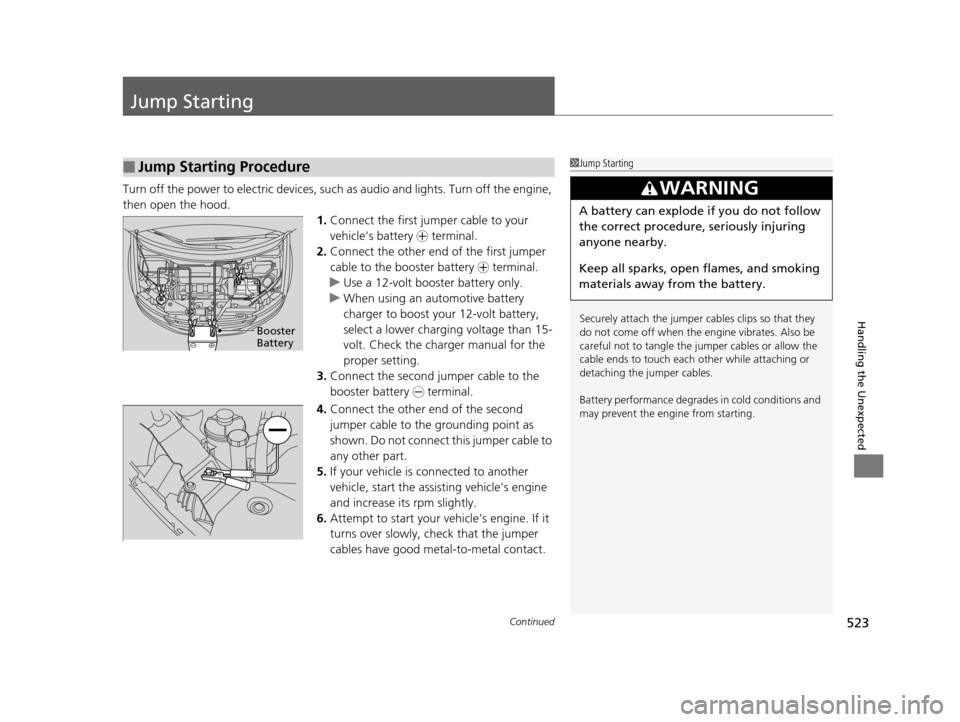
Turn off the power to electric devices, such as audio and lights. Turn off the engine,
then open the hood. 1.Connect the first jumper cable to your
vehicle's battery + terminal.
2. Connect the other end of the first jumper
cable to the booster battery + terminal.
u Use a 12-volt booster battery only.
u When using an automotive battery
charger to boost your 12-volt battery,
select a lower charging voltage than 15-
volt. Check the charger manual for the
proper setting.
3. Connect the second jumper cable to the
booster battery - terminal.
4. Connect the other end of the second
jumper cable to the grounding point as
shown. Do not connect this jumper cable to
any other part.
5. If your vehicle is connected to another
vehicle, start the assisting vehicle's engine
and increase its rpm slightly.
6. Attempt to start your ve hicle's engine. If it
turns over slowly, check that the jumper
cables have good metal-to-metal contact.
■Jump Starting Procedure1 Jump Starting
Securely attach the jumper cables clips so that they
do not come off when the e ngine vibrates. Also be
careful not to tangle the ju mper cables or allow the
cable ends to touch each other while attaching or
detaching the jumper cables.
Battery performance degrades in cold conditions and
may prevent the engi ne from starting.
3WARNING
A battery can explode if you do not follow
the correct procedure, seriously injuring
anyone nearby.
Keep all sparks, open flames, and smoking
materials away from the battery.
Booster
Battery
17 US ODYSSEY (KA KC)-31TK86600.book 523 ページ 2016年10月24日 月曜日 午後4時2分