Page 300 of 565
299
uuCustomized Features u
Continued
Features
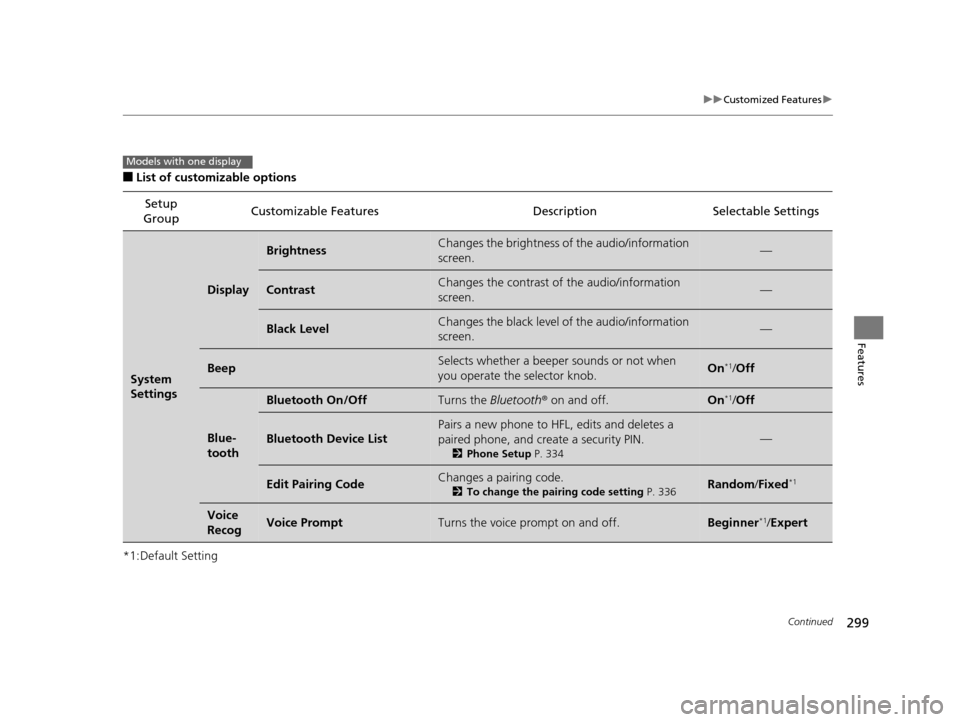
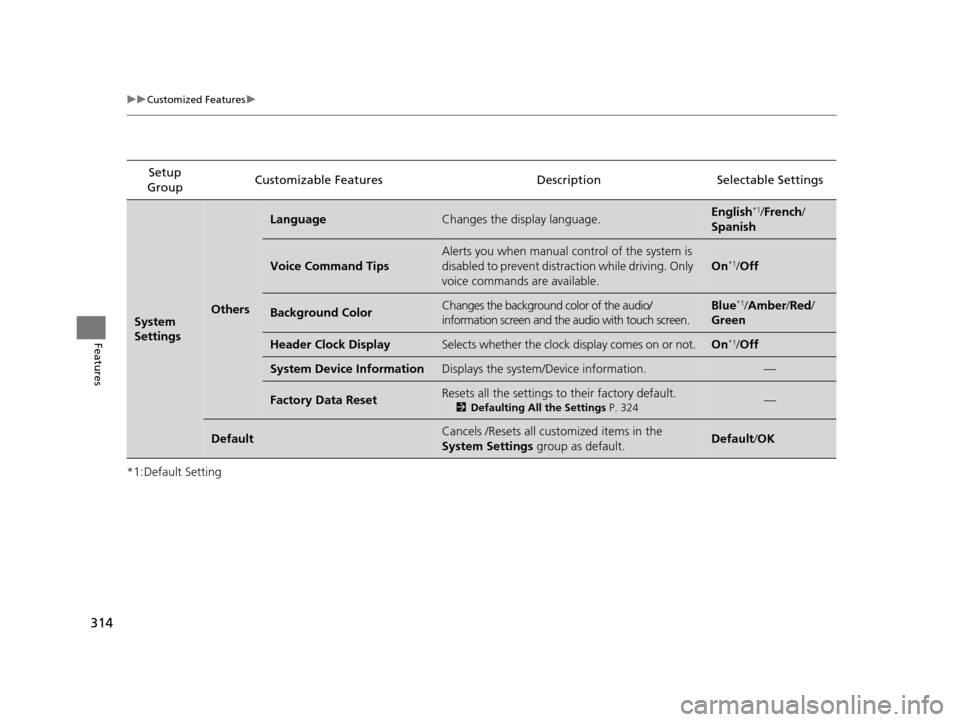
■List of customizable options
*1:Default Setting Setup
Group Customizable Features Description Selectable Settings
System
Settings
Display
BrightnessChanges the brightness of the audio/information
screen.—
ContrastChanges the contrast of the audio/information
screen.—
Black LevelChanges the black level of the audio/information
screen.—
BeepSelects whether a beeper
sounds or not when
you operate the selector knob.On*1/ Off
Blue-
tooth
Bluetooth On/OffTurns the Bluetooth® on and off.On*1/Off
Bluetooth Device List
Pairs a new phone to HFL, edits and deletes a
paired phone, and create a security PIN.
2 Phone Setup P. 334
—
Edit Pairing CodeChanges a pairing code.
2To change the pairing code setting P. 336Random/Fixed*1
Voice
RecogVoice PromptTurns the voice prompt on and off.Beginner*1/ Expert
Models with one display
17 US ODYSSEY (KA KC)-31TK86600.book 299 ページ 2016年10月24日 月曜日 午後4時2分
Page 301 of 565
300
uuCustomized Features u
Features
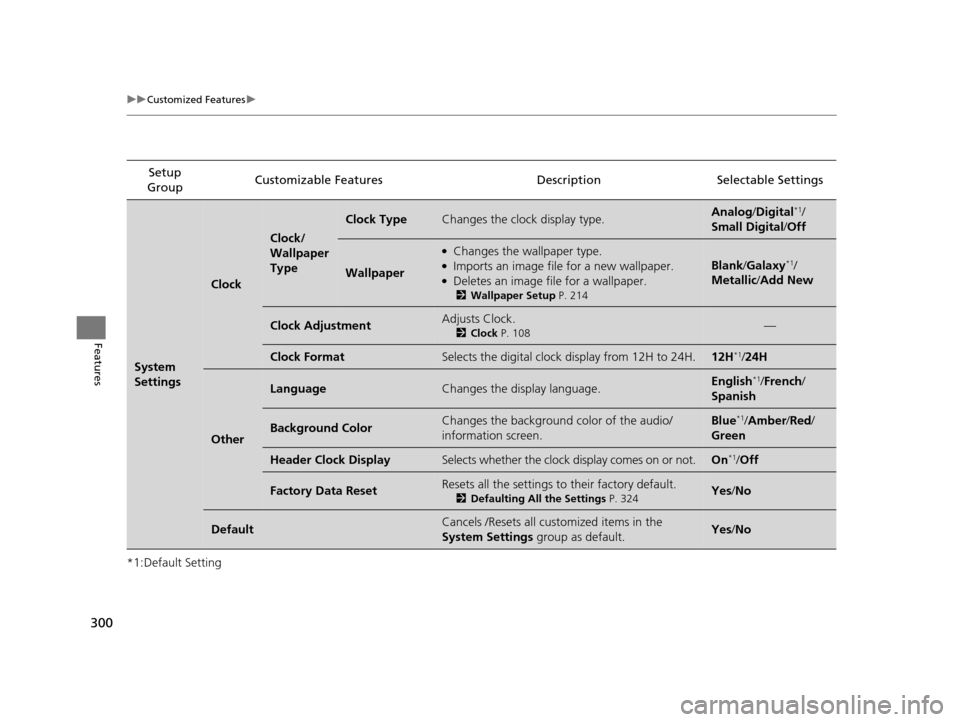
*1:Default SettingSetup
Group Customizable Features Descri
ption Selectable Settings
System
Settings
Clock
Clock/
Wallpaper
Type
Clock TypeChanges the clock display type.Analog/Digital*1/
Small Digital /Off
Wallpaper
●Changes the wallpaper type.●Imports an image file for a new wallpaper.●Deletes an image file for a wallpaper.
2 Wallpaper Setup P. 214
Blank/Galaxy*1/
Metallic /Add New
Clock AdjustmentAdjusts Clock.
2 Clock P. 108—
Clock FormatSelects the digital clock display from 12H to 24H.12H*1/24H
Other
LanguageChanges the display language.English*1/French /
Spanish
Background ColorChanges the background color of the audio/
information screen.Blue*1/ Amber /Red/
Green
Header Clock DisplaySelects whether the clock display comes on or not.On*1/ Off
Factory Data ResetResets all the settings to their factory default.
2 Defaulting All the Settings P. 324Yes/No
DefaultCancels /Resets all customized items in the
System Settings group as default.Yes/No
17 US ODYSSEY (KA KC)-31TK86600.book 300 ページ 2016年10月24日 月曜日 午後4時2分
Page 304 of 565
303
uuCustomized Features u
Continued
Features
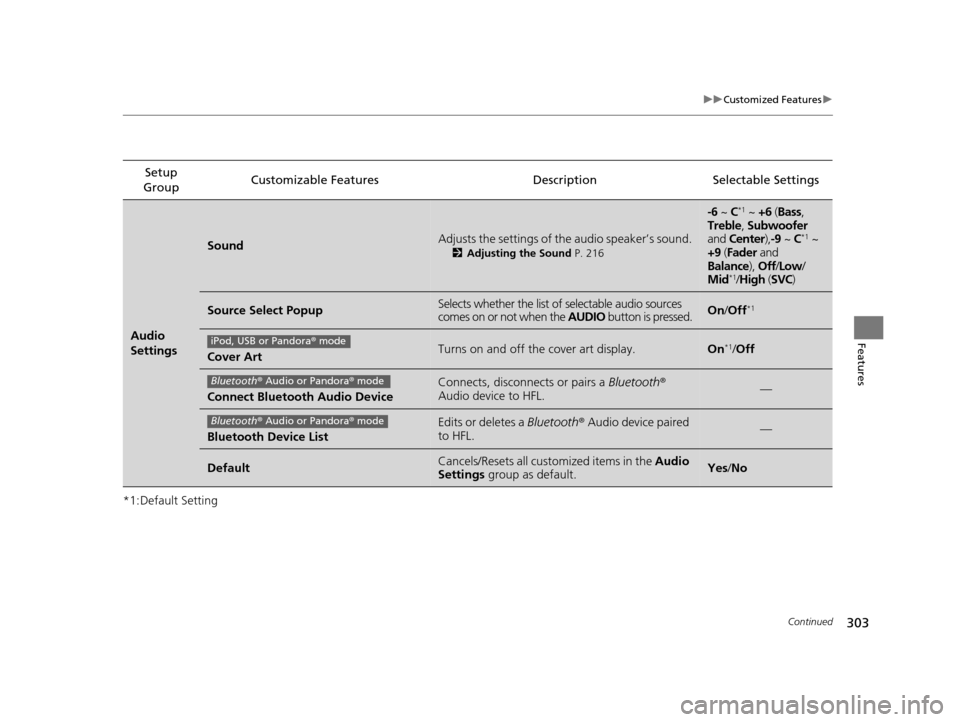
*1:Default SettingSetup
Group Customizable Features Description Selectable Settings
Audio
Settings
SoundAdjusts the settings of th
e audio speaker’s sound.
2Adjusting the Sound P. 216
-6 ~ C*1 ~ +6 (Bass,
Treble , Subwoofer
and Center ),-9 ~ C
*1 ~
+9 (Fader and
Balance ), Off/Low /
Mid
*1/ High (SVC)
Source Select PopupSelects whether the list of selectable audio sources
comes on or not when the AUDIO button is pressed.On/Off*1
Cover ArtTurns on and off the cover art display.On*1/Off
Connect Bluetooth Audio Device
Connects, disconnects or pairs a Bluetooth®
Audio device to HFL.—
Bluetooth Device List
Edits or deletes a Bluetooth® Audio device paired
to HFL.—
DefaultCancels/Resets all customized items in the Audio
Settings group as default.Yes/No
iPod, USB or Pandora ® mode
Bluetooth ® Audio or Pandora ® mode
Bluetooth ® Audio or Pandora ® mode
17 US ODYSSEY (KA KC)-31TK86600.book 303 ページ 2016年10月24日 月曜日 午後4時2分
Page 308 of 565
Continued307
uuCustomized Features u
Features
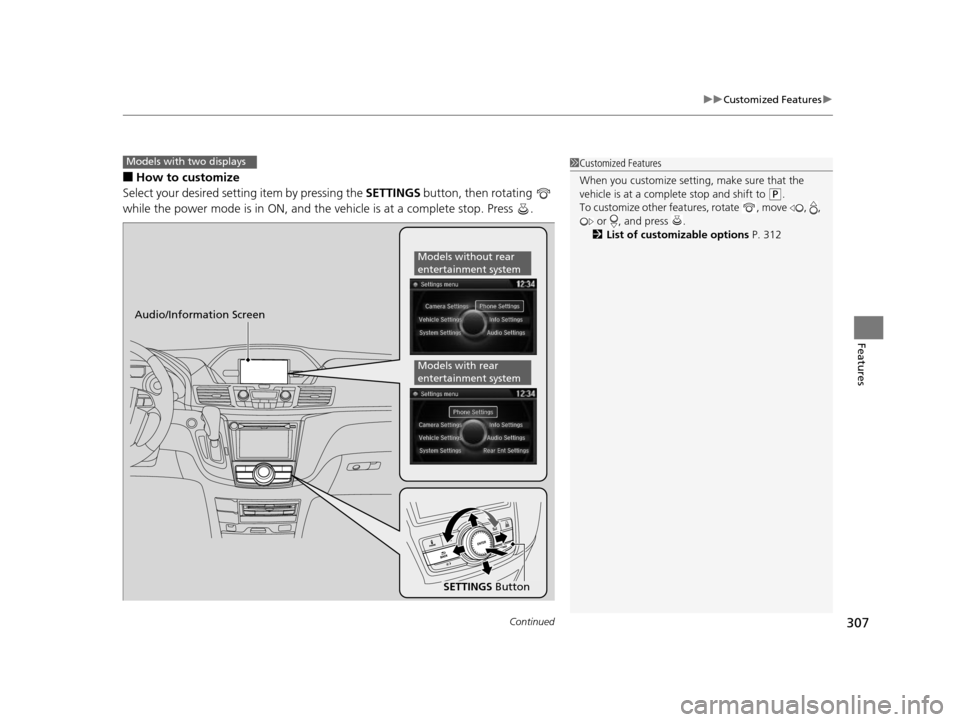
■How to customize
Select your desired setting item by pressing the SETTINGS button, then rotating
while the power mode is in ON, and the vehicle is at a complete stop. Press .
Models with two displays1 Customized Features
When you customize setting, make sure that the
vehicle is at a complete stop and shift to
(P.
To customize other featur es, rotate , move , ,
or , and press .
2 List of customizable options P. 312
Audio/Information Screen
SETTINGS Button
Models without rear
entertainment system
Models with rear
entertainment system
17 US ODYSSEY (KA KC)-31TK86600.book 307 ページ 2016年10月24日 月曜日 午後4時2分
Page 311 of 565
310
uuCustomized Features u
Features
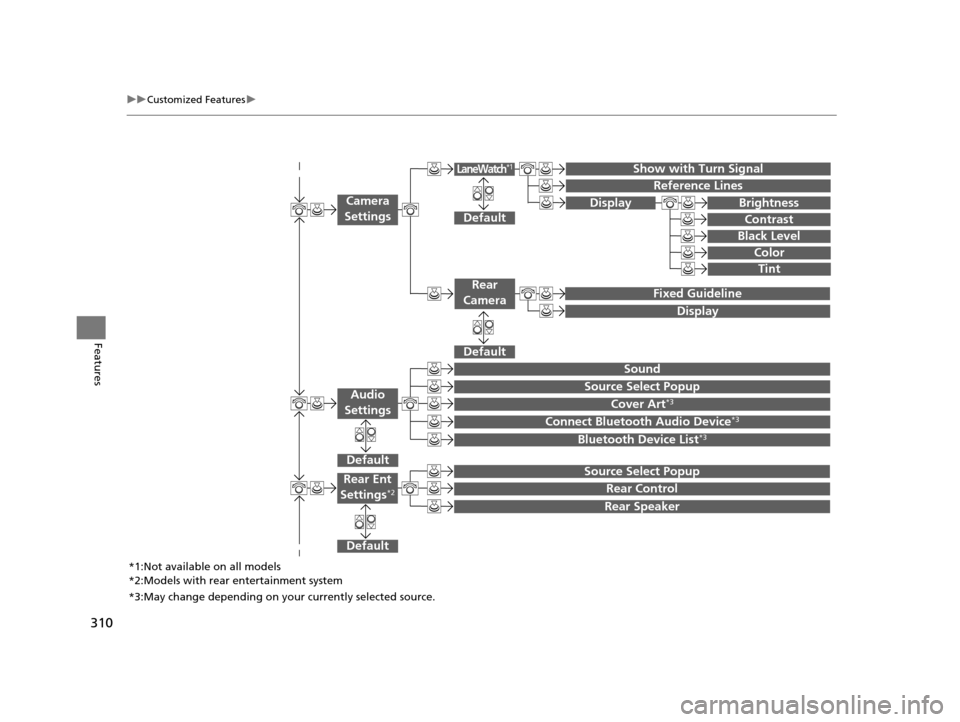
Show with Turn Signal
Reference Lines
Default
Fixed Guideline
Default
Default
Sound
Source Select Popup
Cover Art*3
Connect Bluetooth Audio Device*3
Bluetooth Device List*3
Camera
Settings
Rear
Camera
LaneWatch*1
Audio
Settings
Display Brightness
Contrast
Black Level
Color
Tint
Display
Default
Source Select Popup
Rear Control
Rear Speaker
Rear Ent
Settings*2
*1:Not available on all models
*2:Models with rear entertainment system
*3:May change depending on your currently selected source.
17 US ODYSSEY (KA KC)-31TK86600.book 310 ページ 2016年10月24日 月曜日 午後4時2分
Page 313 of 565
312
uuCustomized Features u
Features
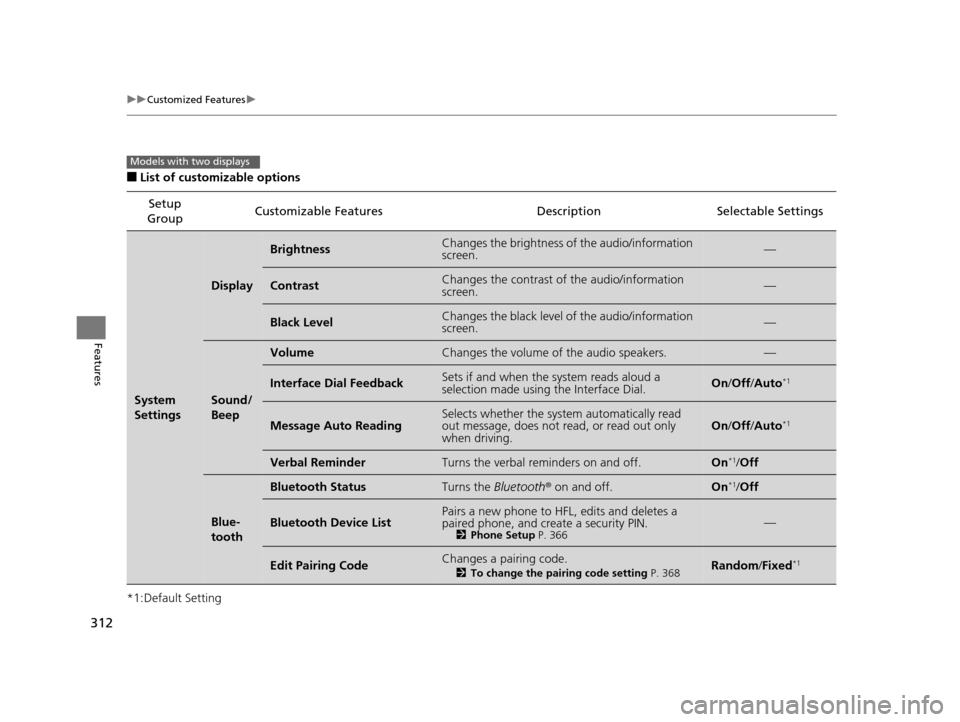
■List of customizable options
*1:Default Setting Setup
Group Customizable Features Descri
ption Selectable Settings
System
Settings
Display
BrightnessChanges the brightness of the audio/information
screen.—
ContrastChanges the contrast of the audio/information
screen.—
Black LevelChanges the black level of the audio/information
screen.—
Sound/
Beep
VolumeChanges the volume of the audio speakers.—
Interface Dial FeedbackSets if and when the system reads aloud a
selection made using the Interface Dial.On/Off /Auto*1
Message Auto ReadingSelects whether the system automatically read
out message, does not read, or read out only
when driving.On /Off /Auto*1
Verbal ReminderTurns the verbal reminders on and off.On*1/Off
Blue-
tooth
Bluetooth StatusTurns the Bluetooth ® on and off.On*1/Off
Bluetooth Device ListPairs a new phone to HFL, edits and deletes a
paired phone, and create a security PIN.
2 Phone Setup P. 366—
Edit Pairing CodeChanges a pairing code.
2To change the pairing code setting P. 368Random/Fixed*1
Models with two displays
17 US ODYSSEY (KA KC)-31TK86600.book 312 ページ 2016年10月24日 月曜日 午後4時2分
Page 315 of 565
314
uuCustomized Features u
Features
*1:Default SettingSetup
Group Customizable Features Descri
ption Selectable Settings
System
SettingsOthers
LanguageChanges the display language.English*1/French /
Spanish
Voice Command Tips
Alerts you when manual control of the system is
disabled to prevent distraction while driving. Only
voice commands are available.
On*1/ Off
Background ColorChanges the background color of the audio/
information screen and the audio with touch screen.Blue*1/Amber /Red/
Green
Header Clock DisplaySelects whether the clock display comes on or not.On*1/ Off
System Device InformationDisplays the system /Device information.—
Factory Data ResetResets all the settings to their factory default.
2Defaulting All the Settings P. 324—
DefaultCancels /Resets all customized items in the
System Settings group as default.Default/OK
17 US ODYSSEY (KA KC)-31TK86600.book 314 ページ 2016年10月24日 月曜日 午後4時2分
Page 321 of 565
320
uuCustomized Features u
Features
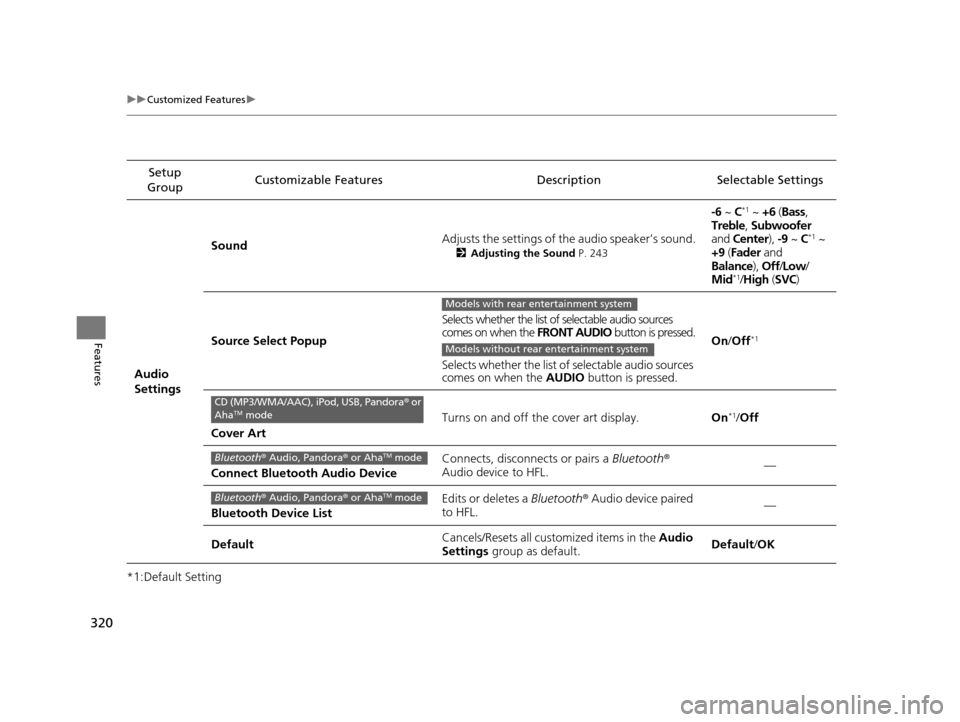
*1:Default SettingSetup
Group Customizable Features Descri
ption Selectable Settings
Audio
Settings Sound
Adjusts the settings of th
e audio speaker’s sound.
2Adjusting the Sound P. 243
-6 ~ C*1 ~ +6 (Bass ,
Treble , Subwoofer
and Center ), -9 ~ C
*1 ~
+9 (Fader and
Balance ), Off/Low /
Mid
*1/ High (SVC)
Source Select Popup Selects whether the list of selectable audio sources
comes on when the
FRONT AUDIO button is pressed.
Selects whether the list of selectable audio sources
comes on when the AUDIO button is pressed. On
/Off
*1
Cover Art Turns on and off the cover art display.
On
*1/Off
Connect Bluetooth Audio Device Connects, disconnects or pairs a
Bluetooth®
Audio device to HFL. —
Bluetooth Device List Edits or deletes a
Bluetooth® Audio device paired
to HFL. —
Default Cancels/Resets all cust
omized items in the Audio
Settings group as default. Default
/OK
Models with rear entertainment system
Models without rear entertainment system
CD (MP3/WMA/AAC), iPod, USB, Pandora ® or
AhaTM mode
Bluetooth ® Audio, Pandora ® or AhaTM mode
Bluetooth ® Audio, Pandora ® or AhaTM mode
17 US ODYSSEY (KA KC)-31TK86600.book 320 ページ 2016年10月24日 月曜日 午後4時2分