2017 HONDA FIT warning
[x] Cancel search: warningPage 46 of 76
84 || 85
DRIVING
DRIVING
Improper accessories or modifications can affect your vehicle’s handling, and
stability, and performance, and cause a crash in which you can be seriously hurt
or killed.
Follow all instructions in the vehicle owner’s guide regarding accessories and
modifications.
WARNING
In addition:
•
During the first 600 miles (1,000 km) of operation, avoid sudden acc\
eleration or
full throttle operation so as not to damage the engine or powertrain.
•
Avoid hard braking for the first 200 miles (300 km). You should also follow this
when the brake pads are replaced.
Maximum Load Limit
Carrying too much cargo or improperly storing it can affect your vehicle\
’s handling,
stability, stopping distance, and tires, and make it unsafe.
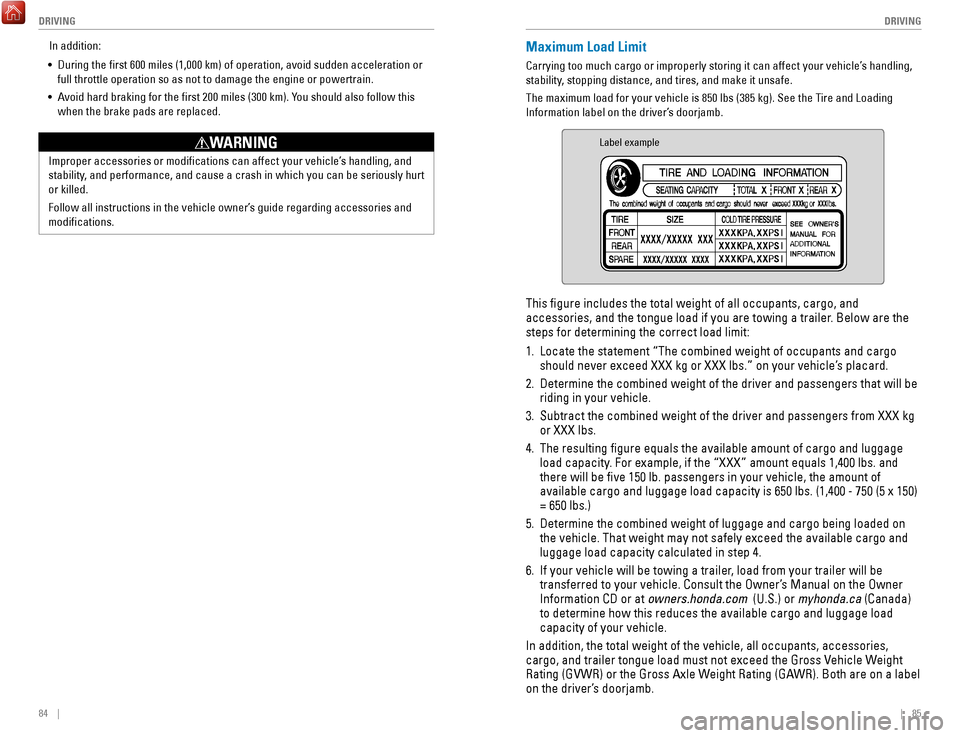
The maximum load for your vehicle is 850 lbs (385 kg). See the Tire and Loading
Information label on the driver’s doorjamb.
Label example
This figure includes the total weight of all occupants, cargo, and
accessories, and the tongue load if you are towing a trailer. Below are the
steps for determining the correct load limit:
1.
Locate the statement “The combined weight of occupants and cargo
should never exceed XXX kg or XXX lbs.” on your vehicle’s placard.
2.
Determine the combined weight of the driver and passengers that will be \
riding in your vehicle.
3.
Subtract the combined weight of the driver and passengers from XXX kg
or XXX lbs.
4.
The resulting figure equals the available amount of cargo and luggage \
load capacity. For example, if the “XXX” amount equals 1,400 lbs. and
there will be five 150 lb. passengers in your vehicle, the amount of
available cargo and luggage load capacity is 650 lbs. (1,400 - 750 (5 \
x 150)
= 650 lbs.)
5.
Determine the combined weight of luggage and cargo being loaded on
the vehicle. That weight may not safely exceed the available cargo and
luggage load capacity calculated in step 4.
6.
If your vehicle will be towing a trailer, load from your trailer will be
transferred to your vehicle. Consult the Owner’s Manual on the Owner
Information CD or at
owners.honda.com (U.S.) or myhonda.ca (Canada)
to determine how this reduces the available cargo and luggage load
capacity of your vehicle.
In addition, the total weight of the vehicle, all occupants, accessories\
,
cargo, and trailer tongue load must not exceed the Gross Vehicle Weight
Rating (GVWR) or the Gross Axle Weight Rating (GAWR). Both are on a label
on the driver’s doorjamb.
Page 47 of 76
86 || 87
DRIVING
DRIVING
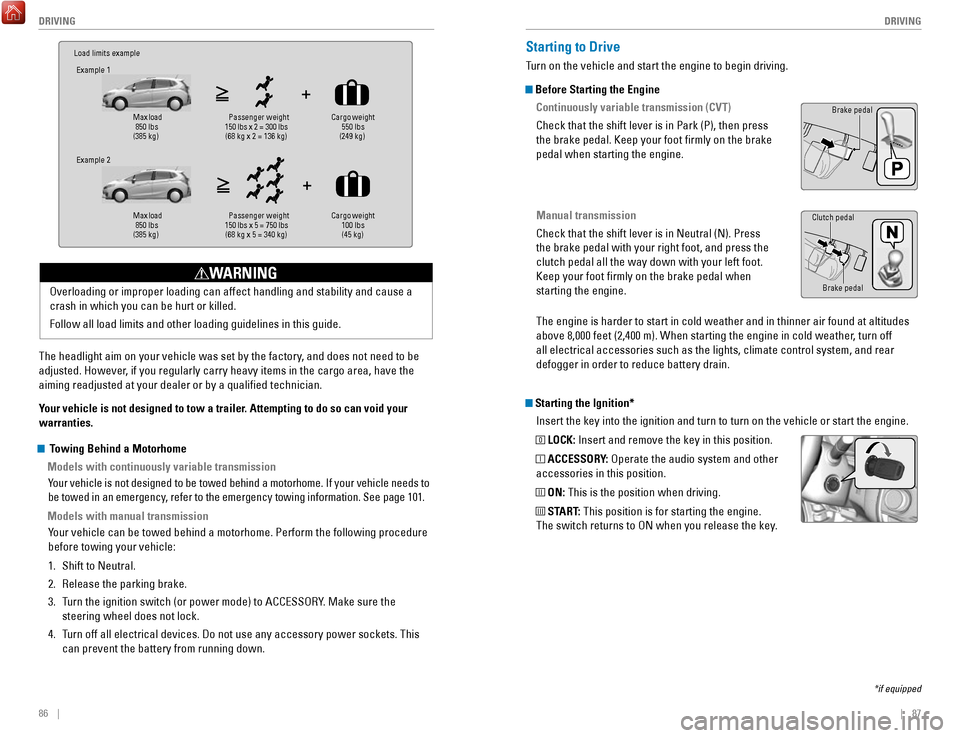
Load limits example
Example 1
Max load
850 lbs
(385 kg) Pass
enger weight
150 lbs x 2 = 300 lbs (68 kg x 2 = 136 kg) Cargo weight
550 lbs
(249 kg)
Example 2
Max load
850 lbs
(385 kg) Pa
ssenger w eight
150 lbs x 5 = 750 lbs (68 kg x 5 = 340 kg) Cargo weight
100 lbs
(45 kg)
The headlight aim on your vehicle was set by the factory, and does not need to be
adjusted. However, if you regularly carry heavy items in the cargo area, have the
aiming readjusted at your dealer or by a qualified technician.
Your vehicle is not designed to tow a trailer. Attempting to do so can void your
warranties. Overloading or improper loading can affect handling and stability and ca\
use a
crash in which you can be hurt or killed.
Follow all load limits and other loading guidelines in this guide.
WARNING
Starting the Ignition*
Insert the key into the ignition and turn to turn on the vehicle or star\
t the engine.
0 LOCK: Insert and remove the key in this position.
I ACCESSORY: Operate the audio system and other
accessories in this position.
II ON: This is the position when driving.
III START: This position is for starting the engine.
The switch returns to ON when you release the key.
Starting to Drive
Turn on the vehicle and start the engine to begin driving.
Before Starting the Engine
Continuously variable transmission (CVT)
Check that the shift lever is in Park (P), then press
the brake pedal. Keep your foot firmly on the brake
pedal when starting the engine.
Manual transmission
Check that the shift lever is in Neutral (N). Press
the brake pedal with your right foot, and press the
clutch pedal all the way down with your left foot.
Keep your foot firmly on the brake pedal when
starting the engine.
Brake pedal
The engine is harder to start in cold weather and in thinner air found a\
t altitudes
above 8,000 feet (2,400 m). When starting the engine in cold weather, turn off
all electrical accessories such as the lights, climate control system, a\
nd rear
defogger in order to reduce battery drain.
*if equipped
Brake pedal
Clutch pedal
Towing Behind a Motorhome
Models with continuously variable transmission
Your vehicle is not designed to be towed behind a motorhome. If your vehi\
cle needs to
be towed in an emergency, refer to the emergency towing information. See page 101.
Models with manual transmissionYour vehicle can be towed behind a motorhome. Perform the following proce\
dure
before towing your vehicle:
1.
Shift to Neutral.
2.
Release the parking brake.
3.
Turn the ignition switch (or power mode) to ACCESSORY. Make sure the
steering wheel does not lock.
4.
Turn off all electrical devices. Do not use any accessory power sockets. This
can prevent the battery from running down.
Page 50 of 76

Also known as Electronic Stability Control (ESC), VSA helps to stabili\
ze the vehicle
during cornering if the vehicle turns mor")
92 || 93
DRIVING
DRIVING
Vehicle Stability Assist (VSA®)
Also known as Electronic Stability Control (ESC), VSA helps to stabili\
ze the vehicle
during cornering if the vehicle turns more or less than what was intende\
d. It
assists in maintaining traction on slippery surfaces by regulating engin\
e output and
selectively applying the brakes.
Turning VSA On or Off
VSA is turned on every time you start the engine,
even if you previously turned it off. If you turn VSA
off, your vehicle has normal braking and cornering
ability, but VSA traction and stability enhancement
become less effective.
Press and hold the VSA OFF button until you hear a
beep to turn VSA on or off. The VSA OFF indicator
appears when the system is off.
When VSA is turned off, traction control stops functioning, which may ma\
ke it
easier when trying to free your vehicle if it is stuck in mud or snow.
VSA OFF indicator
VSA OFF button
Cruise Control*
Maintain a constant vehicle speed without having to keep your foot on th\
e
accelerator pedal. Use cruise control on freeways or open roads where yo\
u can
travel at a constant speed with little acceleration or deceleration.
CRUISE button
RES/+ button
-/SET button CANCEL button
Improper use of the cruise control can lead to a crash.
Use cruise control only when traveling on open highways in good weather.
WARNING
Activating and Setting the Vehicle Speed 1.
Press CRUISE. The CRUISE MAIN indicator appears.
2.
Accelerate to the desired speed (above 25 mph/
40 km/h). Take your foot off the pedal and press
-/SET to set the speed. The CRUISE CONTROL indicator
appears.
Adjusting the Vehicle Speed
Press RES/+ to increase or -/SET to decrease.
Each time you press the button, the vehicle speed is
increased or decreased by about 1 mph (1.6 km/h). If you
keep the button pressed, the vehicle speed increases or
decreases until you release it.
Canceling Cruise ControlPress CANCEL or the brake pedal. The CRUISE CONTROL
indicator goes off.
After cruise control has been canceled, you can still
resume the prior set speed by pressing RES/+ while
driving at a speed of at least 25 mph (40 km/h).
Press CRUISE to turn the system off.
ECON Button*
Can help improve your fuel economy by adjusting the performance of the e\
ngine,
transmission, air conditioning, and cruise control*.
Press the ECON button to turn the system on or off.
The ECON Mode indicator appears when the system
is turned on.
*if equipped
Page 51 of 76

94 || 95
DRIVING
DRIVING
LaneWatch™*
Check the passenger-side rear areas in the upper display when the right turn signal
is activated.
LaneWatch display
Activating LaneWatch
Activate the right turn signal. The LaneWatch display
appears. Check the display for blind spots, and
visually confirm that it is safe to change lanes.
You can also press the LaneWatch button on the end
of the turn signal switch to view a constant real-time
display. Press it again to turn the display off.
Changing SettingsCustomize the display and how and when the display appears.
1.
From the HOME screen, select Settings.
2.
Select Camera.
3.
Select LaneWatch.
4.
Select an option and make the preferred changes.
5.
Press BACK to exit the menu.
Important Safety Reminder
Like all assistance systems, LaneWatch has limitations. Over-reliance on the
system may result in a collision.
Failure to visually confirm that it is safe to change lanes before doi\
ng so may
result in a crash and serious injury or death.
Do not rely only on LaneWatch while driving. Always look in your mirrors, to
either side of your vehicle, and behind you for other vehicles before ch\
anging
lanes.
WARNING
*if equipped
Multi-View Rear Camera
When you shift into Reverse (R), a real-time image of the area behind \
your vehicle is
shown in the display, along with helpful parking guidelines.
Models with color audio system
Wide view Normal viewTop down view
Changing Camera Settings
Turn the guidelines on or off. Use the selector knob to make and enter se\
lections.
1.
Press the MENU/CLOCK button.
2.
Select Settings.
3.
Select Rear Camera.
4.
Select Camera Guideline.
5.
Select On or Off.
6.
Press the Back button to exit the menu.
Press the selector knob to change views.
Page 52 of 76

96 || 97
DRIVING
DRIVING
The rear camera view is restricted. You cannot see the corner ends of the bumper or what is
underneath the bumper. Its unique lens also makes objects appear closer or farther than they \
actually are.
Visually confirm that it is safe to drive before backing up. Certain c\
onditions (such as weather,
lighting, and high temperatures) may also restrict the rear view. Do not rely on the rearview display,
which does not give you all information about conditions at the rear of \
your vehicle.
Changing Camera Settings
Turn the guidelines on or off.
1.
From the HOME screen, select Settings.
2.
Select Camera.
3.
Select Rear Wide Camera.
4.
Select one of the options.
Fixed Guideline: Guidelines appear when you
shift into Reverse. Select On or Off.
Dynamic Guideline
: Guidelines move as you turn
the steering wheel. Select On or Off.
5.
Press BACK to exit the menu.
Models with touchscreen
Press the icons on the touchscreen to change views.
Wide view Normal view Top down view
Refueling
Use the proper fuel and refueling procedure to ensure the best performan\
ce and
safety of your vehicle.
Fuel Information
Use of unleaded gasoline of 87 octane or higher is recommended.
•
Honda recommends TOP TIER Detergent Gasoline where available.
•
Do NOT use gasoline containing more than 15% ethanol.
•
Do NOT use gasoline containing methanol.
•
Do NOT use gasoline containing MMT.
How to Refuel
1.
The fuel fill door is located at the left rear of the
vehicle. Park next to the service pump that is
most accessible.
2.
Turn off the engine.
3.
Pull the fuel fill door release handle under the
lower left corner of the dashboard. The fuel fill
door opens.
4.
Turn the fuel fill cap slowly to open. Place the fuel
fill cap in the holder.
5.
Insert the filler nozzle fully. When the tank is full,
the fuel nozzle clicks off automatically.
6.
Replace the fuel fill cap. Tighten it until you hear
at least one click. Close the fuel fill door.
W
e recommend quality gasoline containing detergent additives that help
prevent fuel system and engine deposits. In addition, in order to mainta\
in good
performance, fuel economy, and emissions control, we strongly recommend the
use of gasoline that does NOT contain harmful manganese-based fuel addit\
ives
such as MMT, if such gasoline is available.
NOTICE
Gasoline is highly flammable and explosive. You can be burned or seriously
injured when handling fuel.
•
Stop the engine, and keep heat, sparks, and flame away.
•
Handle fuel only outdoors.
•
Wipe up spills immediately.
WARNING
Holder Cap
Page 53 of 76

98 || 99
HANDLING THE UNEXPECTED
HANDLING THE UNEXPECTED
Learn about what to do in critical or emergency situations.
Smart Entry Remote Battery Strength*
If the battery life in your remote transmitter is weak, follow the below\
steps to start
the engine.
1.
Touch the back of the remote transmitter to the
ENGINE START/STOP button while the indicator is
flashing.
2.
With the brake pedal pressed (and the clutch
pedal for manual transmission), press the ENGINE
START/STOP button within 10 seconds.
Jump Starting
Turn off the power to electric devices, such as audio and lights. Turn off the engine,
then open the hood.
1.
Remove the under-hood fuse box cover (see
page 108). Connect the first jumper cable to your
vehicle’s battery (+) terminal.
2.
Connect the other end of the first jumper cable
to the booster battery (+) terminal. Use a 12-volt
booster battery only.
3.
Connect the second jumper cable to the booster
battery (-) terminal.
4.
Connect the other end of the second jumper cable
to the stud bolt as shown. Do not connect this
jumper cable to any other part.
5.
If your vehicle is connected to another vehicle,
start the assisting vehicle’s engine and increase its
rpm slightly.
6.
Attempt to start your vehicle’s engine. If it turns over slowly, make sure that the
jumper cables have good metal-to-metal contact.
HANDLING THE UNEXPECTED
*if equipped
A battery can explode if you do not follow the correct procedure, seriou\
sly
injuring anyone nearby.
Keep all sparks, open flames, and smoking materials away from the batt\
ery.
WARNING
Booster
battery
WARNING: Battery posts, terminals, and related accessories contain lead and lead\
compounds. Wash your hands after handling.
After the Engine Starts Once your vehicle’s engine has started, remove the jumper cables in the following
order:
1.
Disconnect the jumper cable from your vehicle’s stud bolt.
2.
Disconnect the other end of the jumper cable from the booster battery (\
-)
terminal.
3.
Disconnect the jumper cable from your vehicle’s battery (+) terminal.
4.
Disconnect the other end of the jumper cable from the booster battery (\
+)
terminal.
5.
Have your vehicle inspected by a nearby service station or a dealer.
Shift Lever Does Not Move*
Follow the procedure below if you cannot move the shift lever out of Par\
k (P).
1.
Set the parking brake.
2.
Remove the key from the ignition, or remove the
built-in key from the remote transmitter.
3.
Wrap a cloth around the tip of a small flat-tip
screwdriver. Put it into the shift lock release slot as
shown in the image, and remove the cover
.
4.
Insert the key into the shift release lock.
5.
While pushing the key down, press the shift lever
release button and place the shift lever into Neutral
(N). The lock is now released. Have the shift lever
checked by a dealer as soon as possible.
*if equipped
Slot
Release button Shift lock
release slot
Cover
Page 54 of 76

100 || 101
HANDLING THE UNEXPECTED
HANDLING THE UNEXPECTED
Overheating
If the high temperature indicator comes on, the engine suddenly loses po\
wer, or
steam or spray comes out from under the hood, your engine is overheating\
.
1.
Immediately park the vehicle in a safe place. Turn
off all accessories and turn on the hazard warning
lights.
2.
If steam or spray is not present: Keep the engine
running and open the hood.
If steam or spray is present: Turn off the engine and
wait until it subsides. Then, open the hood.
3.
Check that the cooling fan is operating and stop the engine once the hig\
h
temperature indicator goes off. If the cooling fan is not operating, imm\
ediately
stop the engine.
4.
Once the engine has cooled down, inspect the coolant level and check the\
cooling system components for leaks. If the coolant level in the reserve\
tank
is low, add coolant until it reaches the MAX mark. If there is no coolant in t\
he
reserve tank, make sure the radiator is cool, then cover the radiator ca\
p
with a
heavy cloth and open the cap. If necessary, add coolant up to the base of the
filler neck, and put the cap back on.
Once the engine has cooled sufficiently, restart it and check the high temperature
indicator. If the indicator is off, resume driving. If it stays on, contact a dealer for
repairs.
Steam and spray from an overheated engine can seriously scald you.
Do not open the hood if steam is coming out.
WARNING
Removing the radiator cap while the engine is hot can cause the coolant \
to
spray out, seriously scalding you.
Always let the engine and radiator cool down before removing the radiato\
r cap.
WARNING
Continuing to drive with the temperature gauge needle at the H mark may \
damage
the engine.
NOTICE
Reserve tank MAX
MIN
Emergency Engine Stop*
The ENGINE START/STOP button may be used to stop the engine due to an
emergency situation even while driving. Do not press the button while driving unless
it is absolutely necessary for the engine to be switched off. If you mus\
t stop the
engine, choose one of the following operations:
•
Press and hold the ENGINE START/STOP button for
two seconds, or
•
Firmly press the ENGINE START/STOP button two
times.
The steering wheel will remain unlocked. However, turning off the engine disables
the power assist to the steering and braking systems, so the vehicle wil\
l
require
significantly more effort and time to steer and slow. Downshift gears and use both
feet on the brake pedal, if necessary, to slow the vehicle and stop immediately in a
safe place.
For CVT models, the power mode changes to ACCESSORY. Manual transmission
models change to OFF.
Canadian CVT models
Then press the ENGINE START/STOP button two times without pressing the brake
pedal.
Emergency Towing
Call a professional towing service if you need to tow your vehicle.
Flat bed equipment: The operator loads your vehicle on the back of a tru\
ck. This is
the best way to transport your vehicle.
Wheel lift equipment: The tow truck uses two pivoting arms that go under\
the front
tires and lift them off the ground. The rear tires remain on the ground.\
This is an
acceptable way to tow your vehicle.
Trying to lift or tow your vehicle by the bumpers will cause serious dama\
ge. The
bumpers are not designed to support the vehicle’s weight.
Improper towing such as towing behind a motorhome or other motor vehicle\
can
damage the transmission.
NOTICE
*if equipped
Page 56 of 76

104 || 105
HANDLING THE UNEXPECTED
HANDLING THE UNEXPECTED
Changing a Flat Tire
If a tire goes flat while driving, grasp the steering wheel firmly, and brake gradually
to reduce speed. Then, stop in a safe place. Replace the flat tire wit\
h the compact
spare tire. Go to a dealer as soon as possible to have the full-size tir\
e repaired or
replaced.
Getting Ready to Change the Tire
Park the vehicle on a firm, level, non-slippery surface. Apply the par\
king brake,
shift to Park (CVT models) or Reverse (manual transmission models), \
and turn the
vehicle off. Turn on the hazard warning lights.
1.
Open the cargo area floor lid.
2.
Take the tool case out of the cargo area. Take out
the wheel nut wrench, jack handle bar
, and jack.
3.
Unscrew the wing bolt and remove the spacer
cone. Then remove the spare tire.
4.
Place a wheel block or rock in front and rear of
the wheel diagonal to the flat tire.
5.
Place the compact spare tire (wheel side up)
under the vehicle body, near the tire that needs
to be replaced.
6.
If necessary, put the flat tip of the jack handle bar
into the edge of the wheel cover*. Carefully pry
the edge and remove the cover.
7.
Loosen each wheel nut about one turn using the
wheel nut wrench.
Tool case Spare tire
Jack
Wheel nut
Jack handle bar
Wheel
cover
Floor lid
Setting Up the Jack1.
Place the jack under the jacking point closest to
the tire to be changed.
2.
Turn the end bracket (as shown in the image)
until the top of the jack contacts the jacking
point. Make sure that the jacking point tab is
resting in the jack notch.
3.
Raise the vehicle, using the jack handle bar and
the jack handle, until the tire is off the ground.
The following instructions must be followed to use the jack safely:
•
Do not use the jack with people or luggage in the vehicle.
•
Use the jack provided in your vehicle. Other jacks may not support the w\
eight
(“load”) or fit the jacking point.
•
Do not use while the engine is running.
•
Use only where the ground is firm and level.
•
Use only at the jacking points.
•
Do not get in the vehicle while using the jack.
•
Do not put anything on top of or underneath the jack. The vehicle can easily roll off the jack, seriously injuring anyone unde\
rneath.
Follow the directions for changing a tire exactly, and never get under the
vehicle when it is supported only by the jack.
WARNING
Jack
handle
bar
Wheel nut
Wrench as jack handle
*if equipped