Page 148 of 465
147Continued
Controls
Interior Lights/Interior Convenience Items
Interior Lights
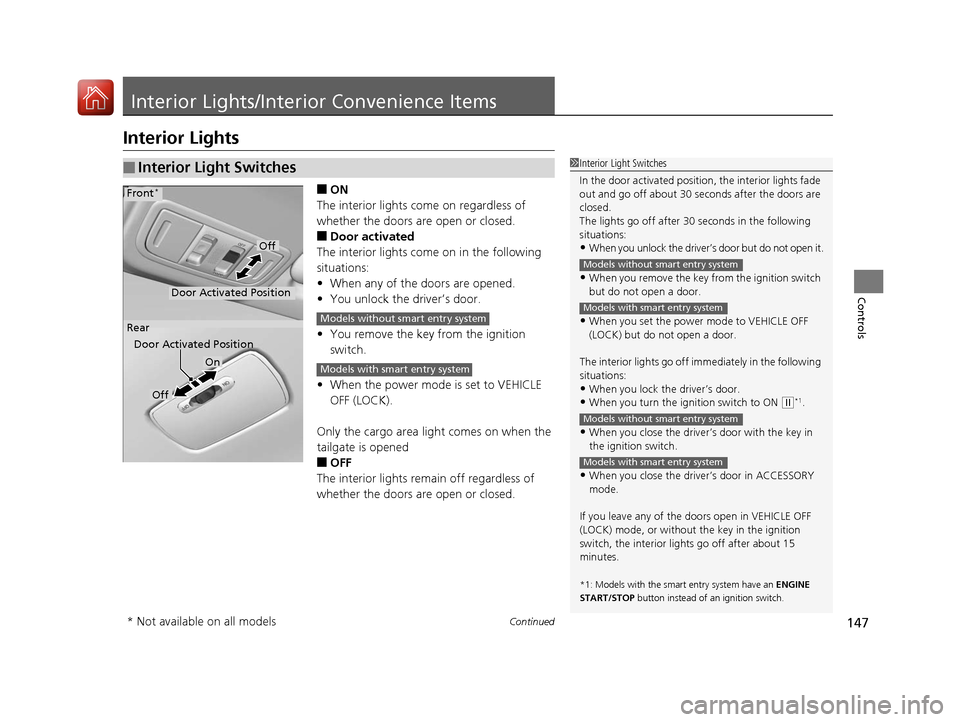
■ON
The interior lights come on regardless of
whether the doors are open or closed.
■Door activated
The interior lights come on in the following
situations:
• When any of the doors are opened.
• You unlock the driver’s door.
• You remove the key from the ignition
switch.
• When the power mode is set to VEHICLE
OFF (LOCK).
Only the cargo area light comes on when the
tailgate is opened
■OFF
The interior lights remain off regardless of
whether the doors are open or closed.
■Interior Light Switches1 Interior Light Switches
In the door activated position, the interior lights fade
out and go off about 30 se conds after the doors are
closed.
The lights go off after 30 seconds in the following
situations:
•When you unlock the driver’s door but do not open it.
•When you remove the key from the ignition switch
but do not open a door.
•When you set the power mode to VEHICLE OFF
(LOCK) but do not open a door.
The interior lights go off i mmediately in the following
situations:
•When you lock the driver’s door.
•When you turn the ignition switch to ON ( w*1.
•When you close the driver’s door with the key in
the ignition switch.
•When you close the driver’s door in ACCESSORY
mode.
If you leave any of the doors open in VEHICLE OFF
(LOCK) mode, or without the key in the ignition
switch, the interior li ghts go off after about 15
minutes.
*1: Models with the sma rt entry system have an ENGINE
START/STOP button instead of an ignition switch.
Models without smart entry system
Models with smart entry system
Models without smart entry system
Models with smart entry system
On
Off
Door Activated Position
Front*
Rear
Door Activated Position
Off
Models without smart entry system
Models with smart entry system
* Not available on all models
17 FIT -31T5A6200.book 147 ページ 2016年5月27日 金曜日 午後6時33分
Page 153 of 465
uuInterior Lights/Interior Convenience Items uInterior Convenience Items
152
Controls
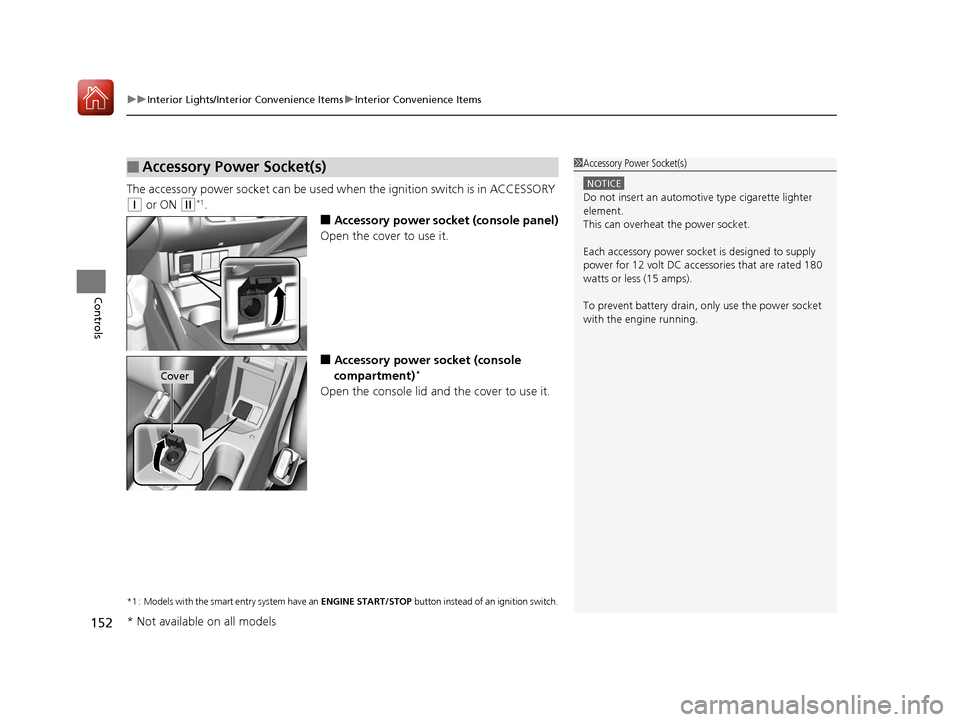
The accessory power socket can be used wh en the ignition switch is in ACCESSORY
(q or ON (w*1.
■Accessory power socket (console panel)
Open the cover to use it.
■Accessory power socket (console
compartment)*
Open the console lid and the cover to use it.
*1 : Models with the smart entry system have an ENGINE START/STOP button instead of an ignition switch.
■Accessory Power Socket(s)1Accessory Power Socket(s)
NOTICE
Do not insert an automotive type cigarette lighter
element.
This can overheat the power socket.
Each accessory power soc ket is designed to supply
power for 12 volt DC access ories that are rated 180
watts or less (15 amps).
To prevent battery drain, only use the power socket
with the engine running.
Cover
* Not available on all models
17 FIT -31T5A6200.book 152 ページ 2016年5月27日 金曜日 午後6時33分
Page 157 of 465
uuInterior Lights/Interior Convenience Items uInterior Convenience Items
156
Controls
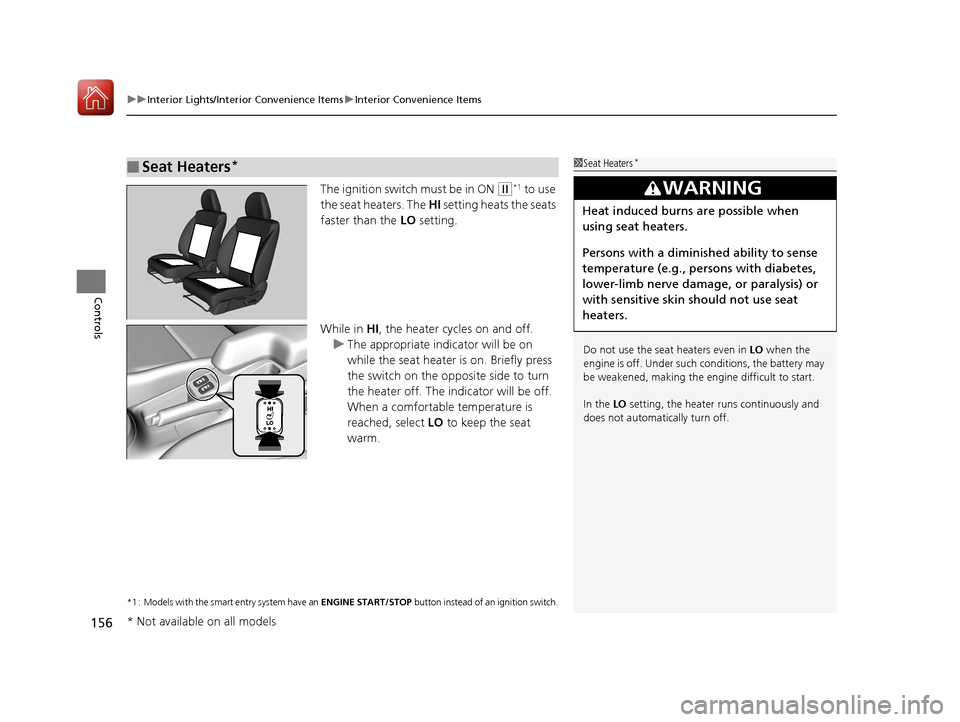
The ignition switch must be in ON (w*1 to use
the seat heaters. The HI setting heats the seats
faster than the LO setting.
While in HI, the heater cycles on and off.
u The appropriate indicator will be on
while the seat heater is on. Briefly press
the switch on the opposite side to turn
the heater off. The in dicator will be off.
When a comfortable temperature is
reached, select LO to keep the seat
warm.
*1 : Models with the smart entry system have an ENGINE START/STOP button instead of an ignition switch.
■Seat Heaters*1Seat Heaters*
Do not use the seat heaters even in LO when the
engine is off. Under such conditions, the battery may
be weakened, making the engine difficult to start.
In the LO setting, the heater runs continuously and
does not automatically turn off.
3WARNING
Heat induced burns are possible when
using seat heaters.
Persons with a diminished ability to sense
temperature (e.g., persons with diabetes,
lower-limb nerve damage, or paralysis) or
with sensitive skin should not use seat
heaters.
* Not available on all models
17 FIT -31T5A6200.book 156 ページ 2016年5月27日 金曜日 午後6時33分
Page 159 of 465
uuHeating and Cooling System*uUsing Vents, Heating and A/C*
158
Controls
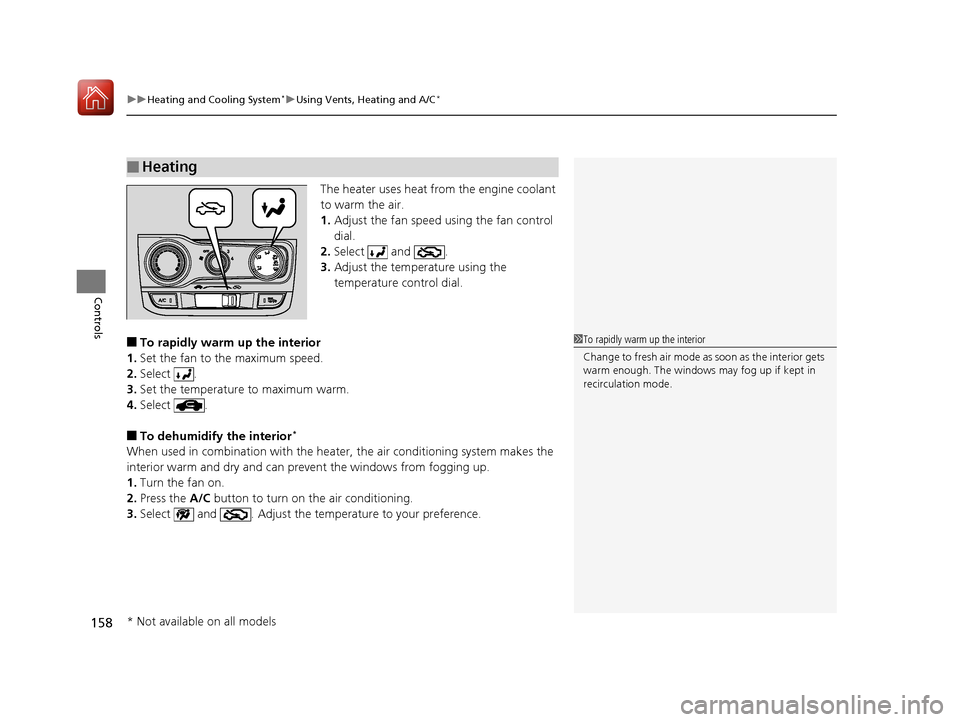
The heater uses heat from the engine coolant
to warm the air.
1. Adjust the fan speed using the fan control
dial.
2. Select and .
3. Adjust the temperature using the
temperature control dial.
■To rapidly warm up the interior
1. Set the fan to the maximum speed.
2. Select .
3. Set the temperature to maximum warm.
4. Select .
■To dehumidify the interior*
When used in combination with the heater , the air conditioning system makes the
interior warm and dry and can prevent the windows from fogging up.
1. Turn the fan on.
2. Press the A/C button to turn on the air conditioning.
3. Select and . Adjust the temp erature to your preference.
■Heating
1To rapidly warm up the interior
Change to fresh air mode as soon as the interior gets
warm enough. The windows may fog up if kept in
recirculation mode.
* Not available on all models
17 FIT -31T5A6200.book 158 ページ 2016年5月27日 金曜日 午後6時33分
Page 161 of 465
160
Controls
Climate Control System*
Using Automatic Climate Control
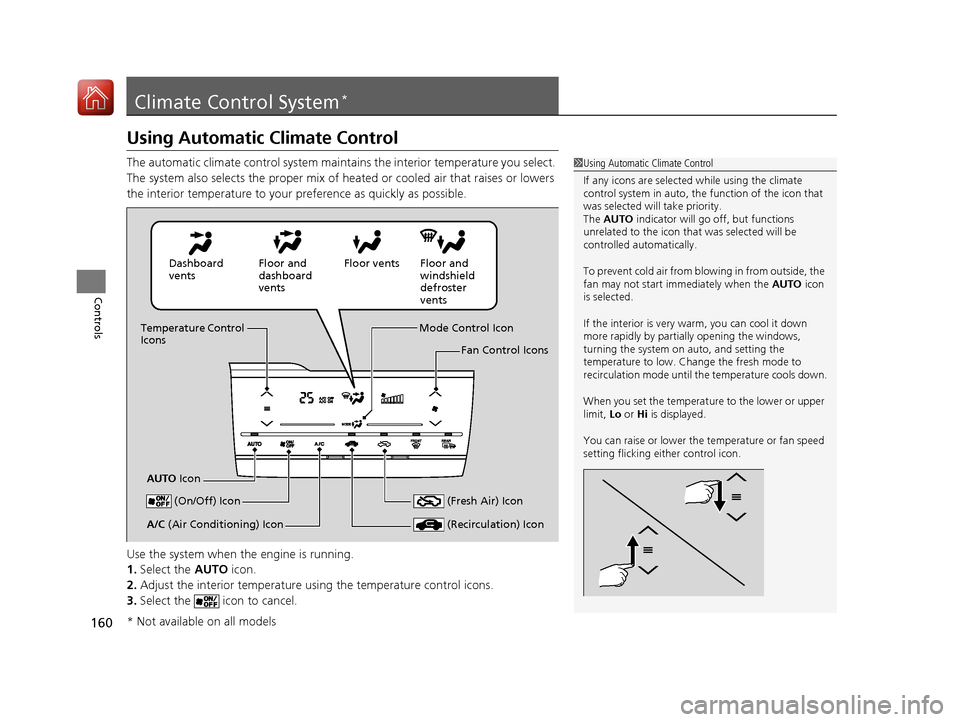
The automatic climate control system maintains the interior temperature you select.
The system also selects the proper mix of heated or cooled air that raises or lowers
the interior temperature to your preference as quickly as possible.
Use the system when the engine is running.
1. Select the AUTO icon.
2. Adjust the interior temperature us ing the temperature control icons.
3. Select the icon to cancel.1Using Automatic Climate Control
If any icons are selected while using the climate
control system in auto, the function of the icon that
was selected will take priority.
The AUTO indicator will go off, but functions
unrelated to the icon that was selected will be
controlled automatically.
To prevent cold air from bl owing in from outside, the
fan may not start i mmediately when the AUTO icon
is selected.
If the interior is very warm, you can cool it down
more rapidly by partial ly opening the windows,
turning the system on auto, and setting the
temperature to low. Change the fresh mode to
recirculation mode until the temperature cools down.
When you set the temperat ure to the lower or upper
limit, Lo or Hi is displayed.
You can raise or lower the temperature or fan speed
setting flicking either control icon.
Dashboard
vents Floor and
dashboard
ventsFloor vents Floor and
windshield
defroster
vents
Temperature Control
Icons
AUTO Icon Mode Control Icon
Fan Control Icons
(On/Off) Icon
(Recirculation) IconA/C (Air Conditioning) Icon (Fresh Air) Icon
* Not available on all models
17 FIT -31T5A6200.book 160 ページ 2016年5月27日 金曜日 午後6時33分
Page 171 of 465
170
uuAudio System uAudio System Theft Protection
Features
Audio System Theft Protection
The audio system is disabled when it is di sconnected from the power source, such as
when the battery is disconnected or goes dead. In certain conditions, the system
may display a code entry screen. If this occurs, reactivate the audio system.
■Reactivating th e audio system
1. Turn the ignition switch to ON
(w*1.
2. Turn on the audio system.
3. Press and hold the audio system power button for more than two seconds.
u The audio system is reac tivated when the audio co ntrol unit establishes a
connection with the vehicle control unit. If the control unit fails to recognize
the audio unit, you must go to a dealer and have the audio unit checked.
*1 : Models with the smart entry system have an ENGINE START/STOP button instead of an ignition switch.
17 FIT -31T5A6200.book 170 ページ 2016年5月27日 金曜日 午後6時33分
Page 195 of 465
194
Features
Audio System Basic Operation
To use the audio system function, the ignition switch must be in ACCESSORY (q or
ON
(w*1.
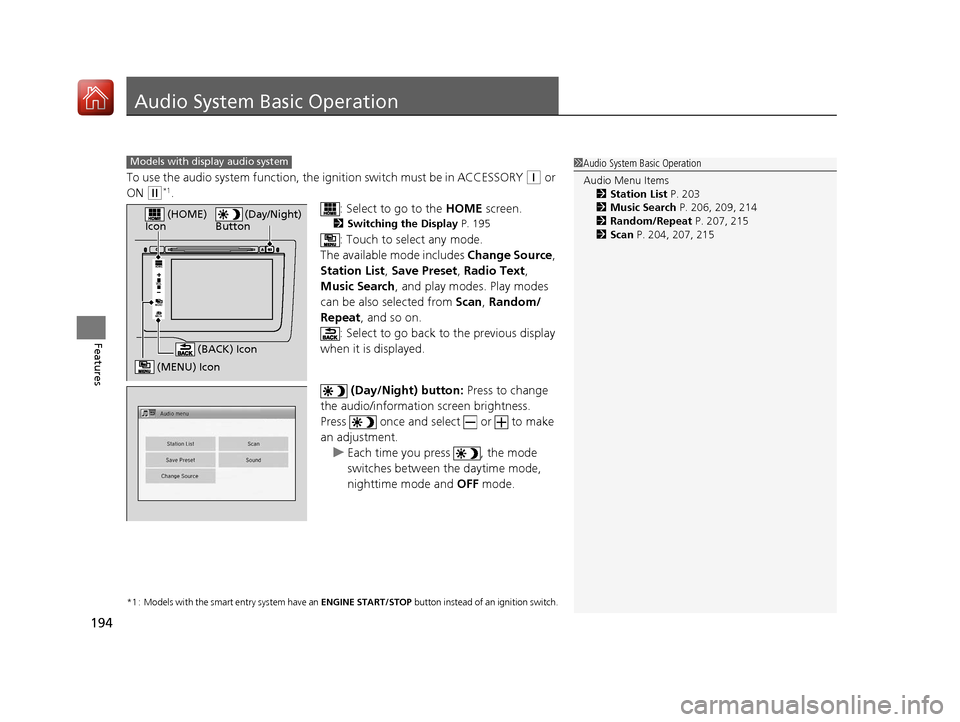
: Select to go to the HOME screen.
2Switching the Display P. 195
: Touch to select any mode.
The available mode includes Change Source ,
Station List , Save Preset , Radio Text,
Music Search, and play modes. Play modes
can be also selected from Scan, Random/
Repeat , and so on.
: Select to go back to the previous display
when it is displayed.
(Day/Night) button: Press to change
the audio/information screen brightness.
Press once and select or to make
an adjustment. u Each time you press , the mode
switches between the daytime mode,
nighttime mode and OFF mode.
*1 : Models with the smart entry system have an ENGINE START/STOP button instead of an ignition switch.
1Audio System Basic Operation
Audio Menu Items
2 Station List P. 203
2 Music Search P. 206, 209, 214
2 Random/Repeat P. 207, 215
2 Scan P. 204, 207, 215Models with display audio system
VOL
HOME
MENU
BACK
(Day/Night)
Button (HOME)
Icon
(MENU) Icon
(BACK) Icon
17 FIT -31T5A6200.book 194 ページ 2016年5月27日 金曜日 午後6時33分
Page 237 of 465
uuCustomized Features u
236
Features
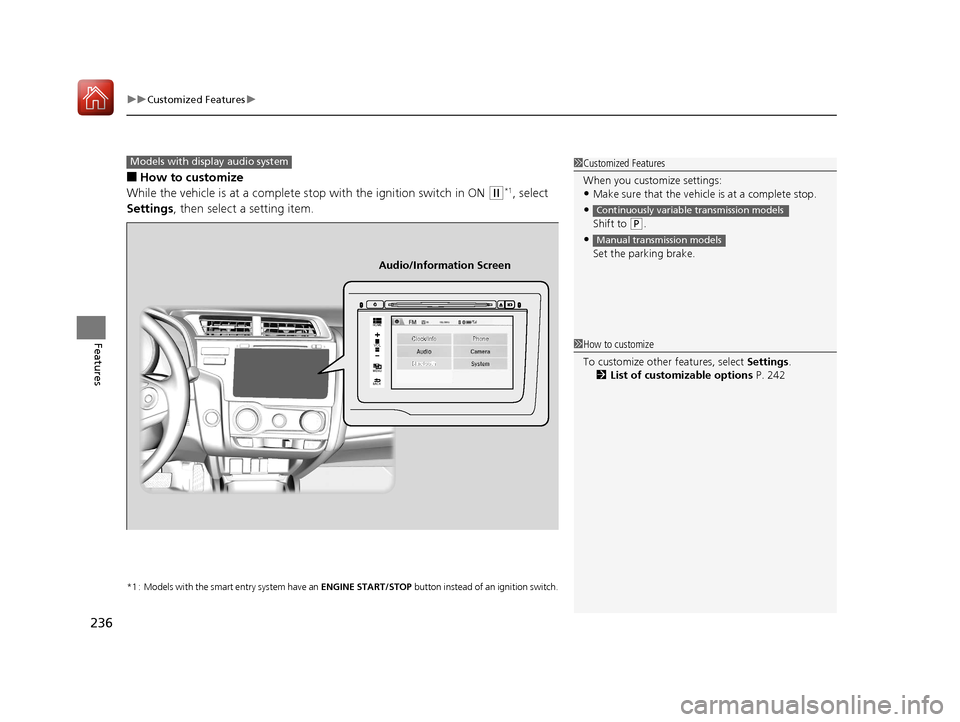
■How to customize
While the vehicle is at a complete stop with the ignition switch in ON
(w*1, select
Settings , then select a setting item.
*1 : Models with the smart entry system have an ENGINE START/STOP button instead of an ignition switch.
1Customized Features
When you customize settings:
•Make sure that the vehicle is at a complete stop.
•
Shift to (P.
•
Set the parking brake.
Continuously variable transmission models
Manual transmission models
Models with display audio system
92/
+20(
0(18
%$&.
Clock/Info Phone
Audio/Information Screen
1How to customize
To customize other features, select Settings .
2 List of customizable options P. 242
17 FIT -31T5A6200.book 236 ページ 2016年5月27日 金曜日 午後6時33分