Page 195 of 465
194
Features
Audio System Basic Operation
To use the audio system function, the ignition switch must be in ACCESSORY (q or
ON
(w*1.
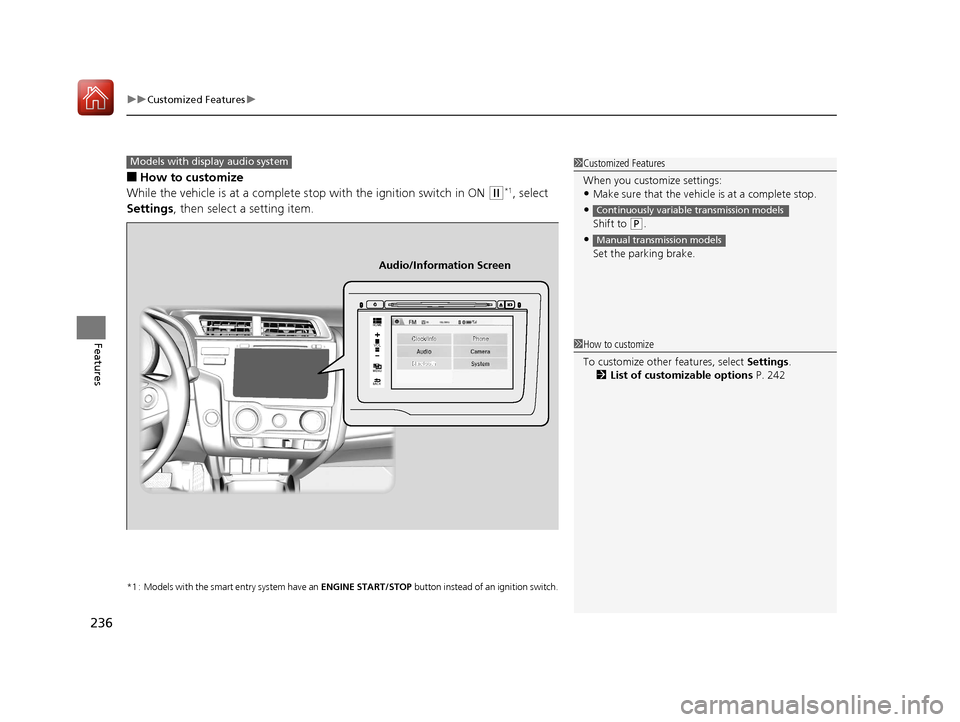
: Select to go to the HOME screen.
2Switching the Display P. 195
: Touch to select any mode.
The available mode includes Change Source ,
Station List , Save Preset , Radio Text,
Music Search, and play modes. Play modes
can be also selected from Scan, Random/
Repeat , and so on.
: Select to go back to the previous display
when it is displayed.
(Day/Night) button: Press to change
the audio/information screen brightness.
Press once and select or to make
an adjustment. u Each time you press , the mode
switches between the daytime mode,
nighttime mode and OFF mode.
*1 : Models with the smart entry system have an ENGINE START/STOP button instead of an ignition switch.
1Audio System Basic Operation
Audio Menu Items
2 Station List P. 203
2 Music Search P. 206, 209, 214
2 Random/Repeat P. 207, 215
2 Scan P. 204, 207, 215Models with display audio system
VOL
HOME
MENU
BACK
(Day/Night)
Button (HOME)
Icon
(MENU) Icon
(BACK) Icon
17 FIT -31T5A6200.book 194 ページ 2016年5月27日 金曜日 午後6時33分
Page 237 of 465
uuCustomized Features u
236
Features
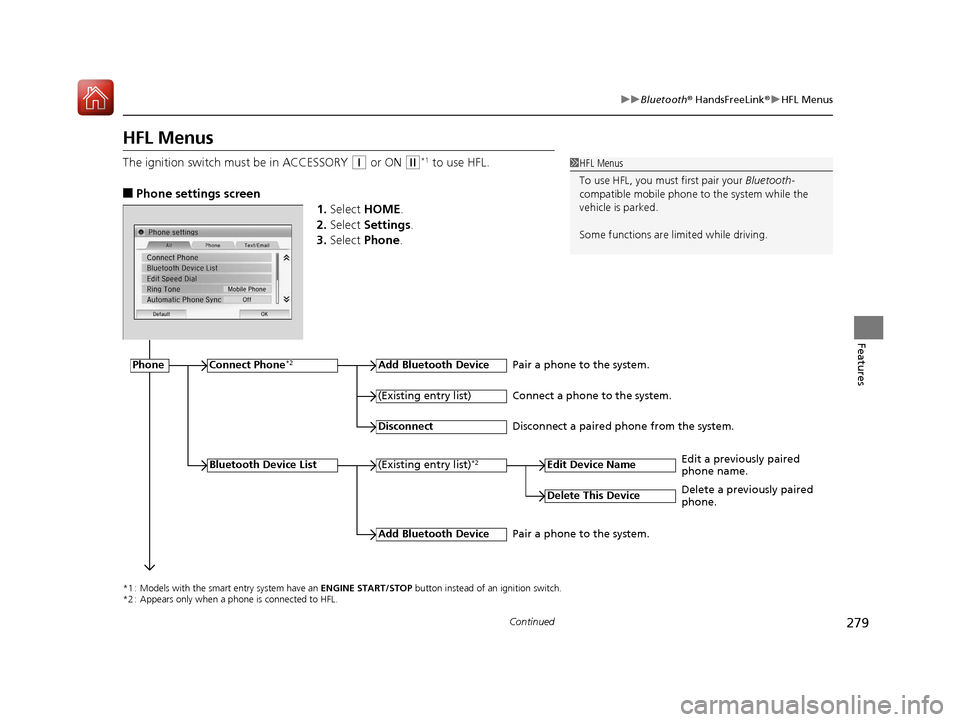
■How to customize
While the vehicle is at a complete stop with the ignition switch in ON
(w*1, select
Settings , then select a setting item.
*1 : Models with the smart entry system have an ENGINE START/STOP button instead of an ignition switch.
1Customized Features
When you customize settings:
•Make sure that the vehicle is at a complete stop.
•
Shift to (P.
•
Set the parking brake.
Continuously variable transmission models
Manual transmission models
Models with display audio system
92/
+20(
0(18
%$&.
Clock/Info Phone
Audio/Information Screen
1How to customize
To customize other features, select Settings .
2 List of customizable options P. 242
17 FIT -31T5A6200.book 236 ページ 2016年5月27日 金曜日 午後6時33分
Page 280 of 465
279
uuBluetooth ® HandsFreeLink ®u HFL Menus
Continued
Features
HFL Menus
The ignition switch mu st be in ACCESSORY (q or ON (w*1 to use HFL.
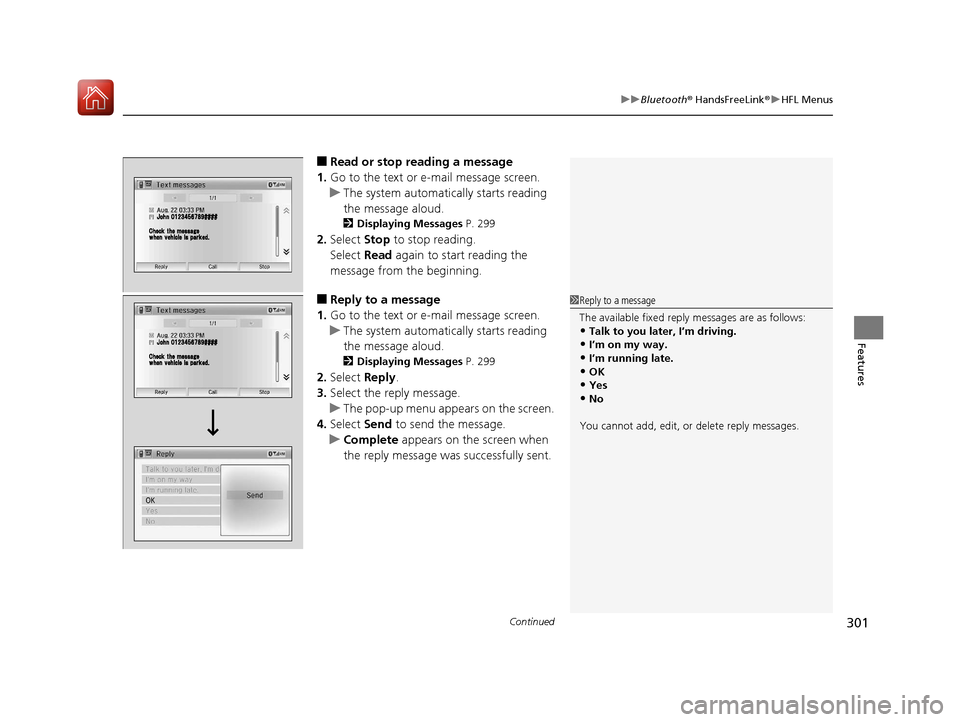
■Phone settings screen
1.Select HOME .
2. Select Settings .
3. Select Phone .
1HFL Menus
To use HFL, you must first pair your Bluetooth-
compatible mobile phone to the system while the
vehicle is parked.
Some functions are limited while driving.
*1 : Models with the smart entry system have an ENGINE START/STOP button instead of an ignition switch.
*2 : Appears only when a phone is connected to HFL.
PhoneConnect Phone*2Add Bluetooth Device
(Existing entry list)*2
(Existing entry list)
Disconnect
Edit Device Name
Add Bluetooth Device
Bluetooth Device List
Delete This Device
Pair a phone to the system.
Connect a phone to the system.
Disconnect a paired phone from the system.
Edit a previously paired
phone name.
Pair a phone to the system. Delete a previously paired
phone.
17 FIT -31T5A6200.book 279 ページ 2016年5月27日 金曜日 午後6時33分
Page 298 of 465
Continued297
uuBluetooth ® HandsFreeLink ®u HFL Menus
Features
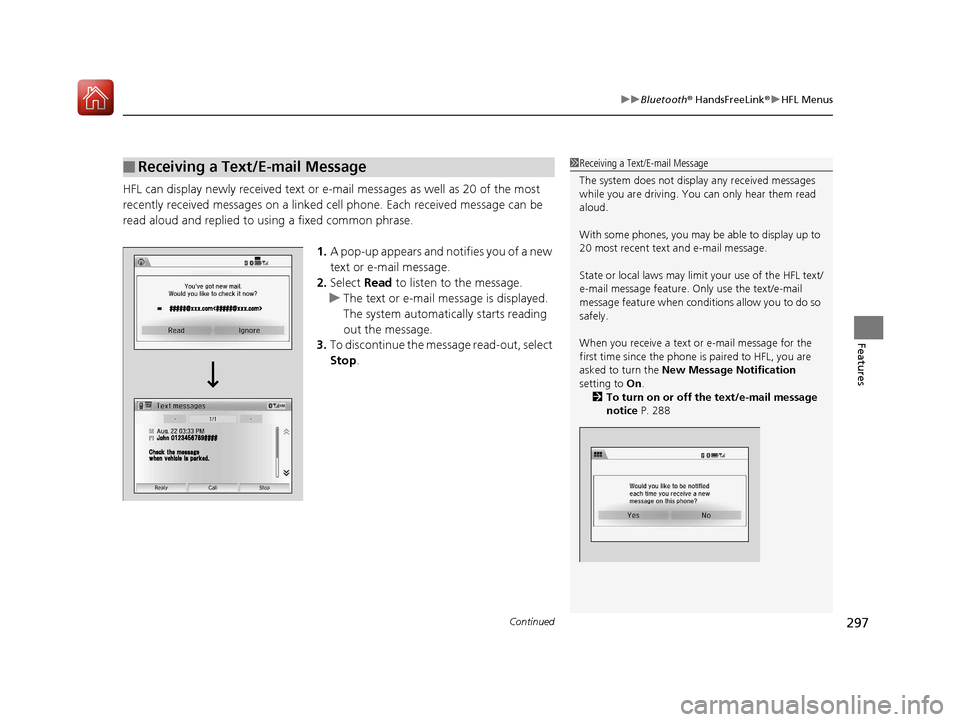
HFL can display newly received text or e-mail messages as well as 20 of the most
recently received messages on a linked cell phone. Each received message can be
read aloud and replied to using a fixed common phrase.
1.A pop-up appears and notifies you of a new
text or e-mail message.
2. Select Read to listen to the message.
u The text or e-mail message is displayed.
The system automatica lly starts reading
out the message.
3. To discontinue the mess age read-out, select
Stop .
■Receiving a Text/E-mail Message1Receiving a Text/E-mail Message
The system does not display any received messages
while you are driving. You can only hear them read
aloud.
With some phones, you may be able to display up to
20 most recent text and e-mail message.
State or local laws may limit your use of the HFL text/
e-mail message feature. Only use the text/e-mail
message feature when conditions allow you to do so
safely.
When you receive a text or e-mail message for the
first time since the phone is paired to HFL, you are
asked to turn the New Message Notification
setting to On .
2 To turn on or off the text/e-mail message
notice P. 288
17 FIT -31T5A6200.book 297 ページ 2016年5月27日 金曜日 午後6時33分
Page 302 of 465
Continued301
uuBluetooth ® HandsFreeLink ®u HFL Menus
Features
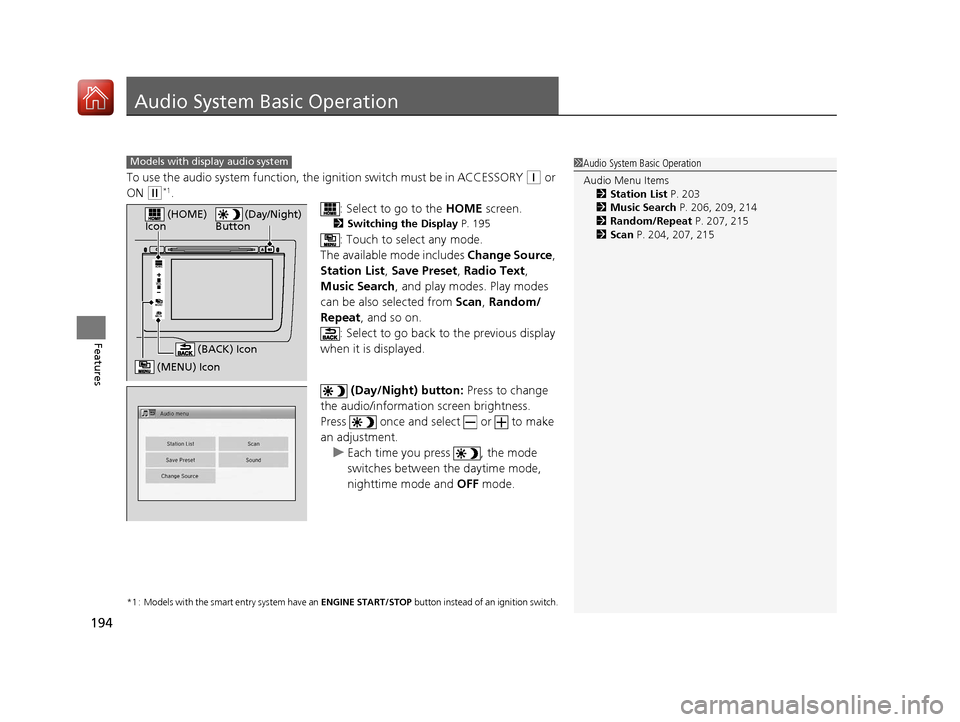
■Read or stop reading a message
1. Go to the text or e-mail message screen.
u The system automatica lly starts reading
the message aloud.
2 Displaying Messages P. 299
2.Select Stop to stop reading.
Select Read again to start reading the
message from the beginning.
■Reply to a message
1. Go to the text or e-mail message screen.
u The system automatica lly starts reading
the message aloud.
2 Displaying Messages P. 299
2.Select Reply.
3. Select the reply message.
u The pop-up menu appears on the screen.
4. Select Send to send the message.
u Complete appears on the screen when
the reply message was successfully sent.
1 Reply to a message
The available fixed reply messages are as follows:
•Talk to you later, I’m driving.•I’m on my way.
•I’m running late.
•OK•Yes
•No
You cannot add, edit, or delete reply messages.
17 FIT -31T5A6200.book 301 ページ 2016年5月27日 金曜日 午後6時33分
Page 306 of 465

305
Driving
This chapter discusses driving, refueling, and information on items such as accessories.
Before Driving
Driving Preparation .............................. 306
Maximum Load Limit............................ 309
Towing a Trailer Towing Your Vehicle ............................ 312
When Driving
Starting the Engine .............................. 315
Starting the Engine .............................. 317
Precautions While Driving..................... 321
Continuously Variable Transmission
*.... 322
Shifting ................................................ 323
Models without smart entry system
Models with smart entry system
Continuously variable transmission models
without paddle shifters
Shifting................................................ 325
Shifting................................................ 329
ECON Button
*..................................... 332
Cruise Control*................................... 333
Forward Collision Warning (FCW)*...... 336
Lane Departure Warning (LDW)*......... 340Vehicle Stability Assist (VSA®), aka Electronic
Stability Control (ESC), System ............... 343
LaneWatchTM*...................................... 345
Tire Pressure Monitoring System (TPMS) .. 347
Tire Pressure Monitoring System (TPMS) - Required Federal Explanation ............. 349
Continuously variable transmission models
with paddle shifters
Manual transmission models
Braking Brake System ........................................ 351
Anti-lock Brake System (ABS) ................ 353
Brake Assist System .............................. 354
Parking Your Vehicle When Stopped ..................................... 355
Multi-View Rear Camera ....................... 356
Refueling
Fuel Information ................................... 358
How to Refuel ...................................... 359
Fuel Economy and CO
2 Emissions ......... 361
Improving Fuel Economy and Reducing CO2
Emissions ............................................. 361
Accessories and Modifications Accessories ........................................... 362
Modifications ....................................... 362
* Not available on all models
17 FIT -31T5A6200.book 305 ページ 2016年5月27日 金曜日 午後6時33分
Page 313 of 465
312
uuTowing a Trailer uTowing Your Vehicle
Driving
Towing Your Vehicle
Your vehicle is not designed to be towed be hind a motorhome. If your vehicle needs
to be towed in an emergency, refe r to the emergency towing information.
2Emergency Towing P. 438
Your vehicle can be towed behind a motorhome.
Perform the following procedure before towing your vehicle.
1. Shift to
(N.
2. Release the parking brake.
3. Turn the ignition sw itch to ACCESSORY
(q*1.
u Make sure the steering wheel does not lock.
4. Turn off all the electric devices. Do not use any accessory power sockets.
u This can prevent the battery from running down.
*1 : Models with the smart entry system have an ENGINE START/STOP button instead of an ignition switch.
■When Your Vehicle is Towed Behind a Motorhome
1Towing Your Vehicle
Do not exceed 65 mph (100 km/h).
Consult your towing parts sales or rental agency if
any other items are recommended or required for
your towing situation.Continuously variable transmission models
Manual transmission models
17 FIT -31T5A6200.book 312 ページ 2016年5月27日 金曜日 午後6時33分
Page 315 of 465

314
uuTowing a Trailer uTowing Your Vehicle
Driving
1. Remove the 20 A accessory power socket and 7. 5 A ACC fuses. These fuses are located in the
interior fuse box.
2 Interior Fuse Boxes P. 435
2.Remove the 15 A Back up fuse. This fuse is located in the engine compartment fuse box.
2Engine Compartment Fuse Box P. 4333.Store the fuses in a safe place so you do not lose them.
u Make sure to reinstall the fuses be fore you start driving your vehicle.
4. Push the ENGINE START/STOP button without depressing the clutch pedal.
u The indicator on the ENGINE START/STOP button blinks.
5. Touch the center of the ENGINE START/STOP button with the H logo on the smart entry remote
while the indicator is blinking.
u The indicator stop blinking, then stays on.
6. Shift to
(N.
7. Push the ENGINE START/STOP button once without depressing the clutch pedal.
u Make sure the steering wheel does not lock.
Engine Compartment Fuse Box
15 A Back Up Fuse
Interior Fuse Box
20 A Accessory
Power Socket Fuse
7.5 A ACC fuseModels with smart entry system
17 FIT -31T5A6200.book 314 ページ 2016年5月27日 金曜日 午後6時33分