2017 HONDA FIT steering
[x] Cancel search: steeringPage 173 of 465

uuAudio System uAudio Remote Controls*
172
Features
Steering Wheel (Menu) Button
• When listening to the radio
Press : To display the menu items. You can select Scan, Save Preset , or
Seek.
• When listening to a CD or USB flash drive
Press : To display the menu it ems. You can select Scan, Repeat , or Random .
• When listening to an iPod
Press : To display the menu items. You can select Repeat or Shuffle.
• When listening to a Bluetooth® Audio
Press : To display the menu items. You can select Pause or Play .
• When listening to a Pandora ®
*
Press : To display the menu items. You can select Bookmark, or Play/Pause .
1Audio Remote Controls*
The button is available only when the audio
mode is FM, AM, CD, USB, iPod, Pandora®*, AhaTM *,
or Bluetooth ® Audio.
Models with display audio system
* Not available on all models
17 FIT -31T5A6200.book 172 ページ 2016年5月27日 金曜日 午後6時33分
Page 174 of 465

173
Features
Audio System Basic Operation
To use the audio system, the ignition switch must be in ACCESSORY (q or ON (w.
Use the selector knob or MENU/CLOCK
button to access some audio functions.
Press to switch between the normal and
extended display fo r some functions.
Selector knob: Rotate left or right to scroll
through the available choices. Press to set
your selection.
MENU/CLOCK button: Press to select any
mode.
The available mode in cludes the wallpaper,
display, clock, language setup, and play
modes. Play modes can be also selected from
scan, random, repeat, and so on.
(Back) button: Press to go back to the previous display.
(Sound) button: Press to select the sound setting mode.
(Day/Night) button:
Press to change the audio/information screen brightness.
Press , then adjust the brightness using . u Each time you press , the mode switches between the daytime mode,
nighttime mode and OFF mode.
Models with color audio system1Audio System Basic Operation
These indications are used to show how to operate
the selector knob.
Rotate to select.
Press to enter.
Menu Items 2 Adjust Clock P. 91
2 Wallpaper Setup P. 176
2 Display Setup P. 179
2 Scan P. 181, 184, 190
2 Play Mode P. 184, 187, 190
2 RDS Settings P. 181
2 Bluetooth P. 233, 257
Press the SOURCE , , , or button on the
steering wheel to cha nge any audio setting.
2 Audio Remote Controls
* P. 171
One of the operating system s used in this unit is
eCos.
For software license terms and condition, visit their
website (eCos license URL:
http://ecos.sourceware.org/license-overview.html )
For source code disclo sure and other details
regarding eCos, visit:
http://www.hondaopensource2.com
Models with audio remote controls
(Back)
Button
Selector Knob MENU/
CLOCK
Button
(Day/Night)
Button
(Sound)
Button
Menu Display
* Not available on all models
17 FIT -31T5A6200.book 173 ページ 2016年5月27日 金曜日 午後6時33分
Page 182 of 465
181
uuAudio System Basic Operation uPlaying AM/FM Radio
Features
Provides text data information related to your selected RDS capable FM station.
■To find an RDS station from Station List
1. Press while listening to an FM station.
2. Rotate to select the station, then press .
■Update List
Updates your available st ation list at any time.
1. Press while listening to an FM station.
2. Rotate to select Update List, then press .
■Radio text
Displays the radio text information of the selected RDS station.
1. Press the MENU/CLOCK button.
2. Rotate to select Settings, then press .
3. Rotate to select RDS Settings, then press .
4. Rotate to select Radio Text, then press .
■Scan
Samples each of the strongest stations on the selected band for 10 seconds.
1. Press the MENU/CLOCK button.
2. Rotate to select Scan, then press .
To turn off scan, press .
■Radio Data System (RDS)1 Playing AM/FM Radio
The ST indicator appears on the display indicating
stereo FM broadcasts.
Stereo reproduction in AM is not available.
You can store 6 AM stations and 12 FM stations into
the preset memory.
Switching the Audio Mode
Press the SOURCE button on the steering wheel.
2 Audio Remote Controls
* P. 171
Models with audio remote controls
1Radio Data System (RDS)
When you select an RDS-capable FM station, the RDS
automatically turns on, and the frequency display
changes to the station name. However, when the
signals of that station become weak, the display
changes from the statio n name to the frequency.
* Not available on all models
17 FIT -31T5A6200.book 181 ページ 2016年5月27日 金曜日 午後6時33分
Page 204 of 465
Continued203
uuAudio System Basic Operation uPlaying AM/FM Radio
Features
To store a station:
1. Tune to the selected station.
2. Select MENU .
3. Select Save Preset .
4. Select the preset number you want to store that station.
You can also store a preset station by the following procedure.
1. Select open/close icon to display a channel list.
2. Select Preset tab.
3. Press and hold the preset number for the station you want to store until you hear
a beep.
Provides text data information related to your selected RDS-capable FM station.
■To find an RDS station from Station List
1. Select MENU while listening to an FM station.
2. Select Station List .
3. Select the station.
■Manual update
Updates your available st ation list at any time.
1. Select MENU while listening to an FM station.
2. Select Station List .
3. Select Refresh .
■Preset Memory
■Radio Data System (RDS)
1Playing AM/FM Radio
The ST indicator appears on the display indicating
stereo FM broadcasts.
Stereo reproduction in AM is not available.
Switching the Audio Mode
Press the SOURCE button on the steering wheel or
select SOURCE on the list.
2 Audio Remote Controls
* P. 171
You can also switch the mode by selecting Change
Source on the MENU screen.
You can store 6 AM stations and 12 FM stations into
the preset memory.
1 Radio Data System (RDS)
When you select an RDS-capable FM station, the RDS
automatically turns on, and the frequency display
changes to the station name. However, when the
signals of that station become weak, the display
changes from the statio n name to the frequency.
* Not available on all models
17 FIT -31T5A6200.book 203 ページ 2016年5月27日 金曜日 午後6時33分
Page 222 of 465
221
uuAudio System Basic Operation uSiri ® Eyes Free
Features
Siri® Eyes Free
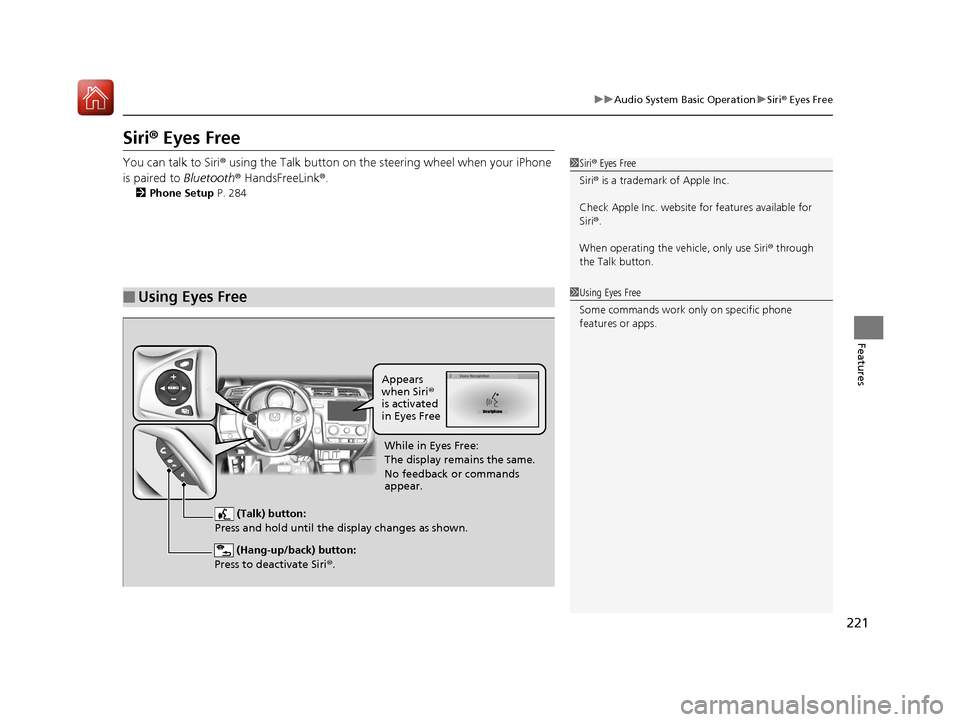
You can talk to Siri® using the Talk button on the steering wheel when your iPhone
is paired to Bluetooth® HandsFreeLink ®.
2Phone Setup P. 284
■Using Eyes Free
1Siri ® Eyes Free
Siri ® is a trademark of Apple Inc.
Check Apple Inc. website for features available for
Siri ®.
When operating the ve hicle, only use Siri® through
the Talk button.
1 Using Eyes Free
Some commands work only on specific phone
features or apps.
(Hang-up/back) button:
Press to deactivate Siri ®.
(Talk) button:
Press and hold until the display changes as shown.
Appears
when Siri®
is activated
in Eyes Free
While in Eyes Free:
The display remains the same.
No feedback or commands
appear.
17 FIT -31T5A6200.book 221 ページ 2016年5月27日 金曜日 午後6時33分
Page 252 of 465
251Continued
Features
Bluetooth® HandsFreeLink ®
See the navigation system manual for how to operate the Bluetooth® HandsFreeLink®.
Bluetooth ® HandsFreeLink ® (HFL) allows you to place and receive phone calls using
your vehicle’s audio system, without handling your cell phone.
Using HFL
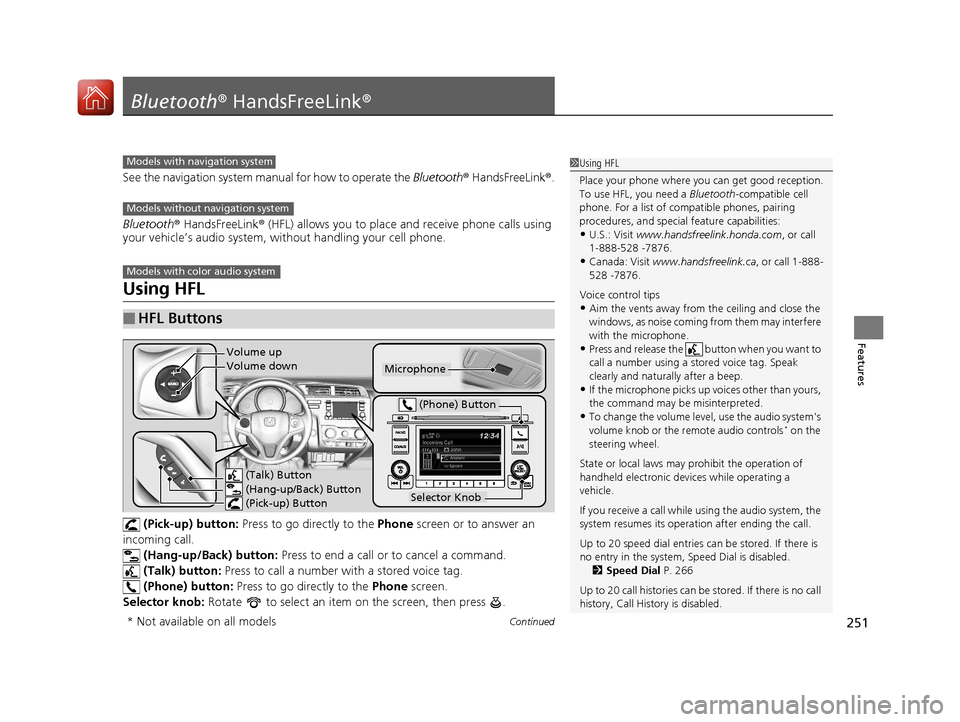
(Pick-up) button: Press to go directly to the Phone screen or to answer an
incoming call.
(Hang-up/Back) button: Press to end a call or to cancel a command.
(Talk) button: Press to call a number with a stored voice tag.
(Phone) button: Press to go directly to the Phone screen.
Selector knob: Rotate to select an item on the screen, then press .
■HFL Buttons
1Using HFL
Place your phone where y ou can get good reception.
To use HFL, you need a Bluetooth-compatible cell
phone. For a list of compatible phones, pairing
procedures, and special feature capabilities:
•U.S.: Visit www.handsfreelink.honda.com , or call
1-888-528 -7876.
•Canada: Visit www.handsfreelink.ca , or call 1-888-
528 -7876.
Voice control tips
•Aim the vents away from the ceiling and close the
windows, as noise coming fr om them may interfere
with the microphone.
•Press and release the button when you want to
call a number using a st ored voice tag. Speak
clearly and naturally after a beep.
•If the microphone picks up vo ices other than yours,
the command may be misinterpreted.
•To change the volume level, use the audio system's
volume knob or the remote audio controls* on the
steering wheel.
State or local laws may prohibit the operation of
handheld electronic devices while operating a
vehicle.
If you receive a call while using the audio system, the
system resumes its operati on after ending the call.
Up to 20 speed dial entries can be stored. If there is
no entry in the system, Speed Dial is disabled. 2 Speed Dial P. 266
Up to 20 call histories can be stored. If there is no call
history, Call History is disabled.
Models with navigation system
Models without navigation system
Models with color audio system
Microphone
(Talk) Button
(Hang-up/Back) Button
(Pick-up) Button
Selector Knob
(Phone) Button
Volume up
Volume down
* Not available on all models
17 FIT -31T5A6200.book 251 ページ 2016年5月27日 金曜日 午後6時33分
Page 277 of 465
276
uuBluetooth ® HandsFreeLink ®u Using HFL
Features
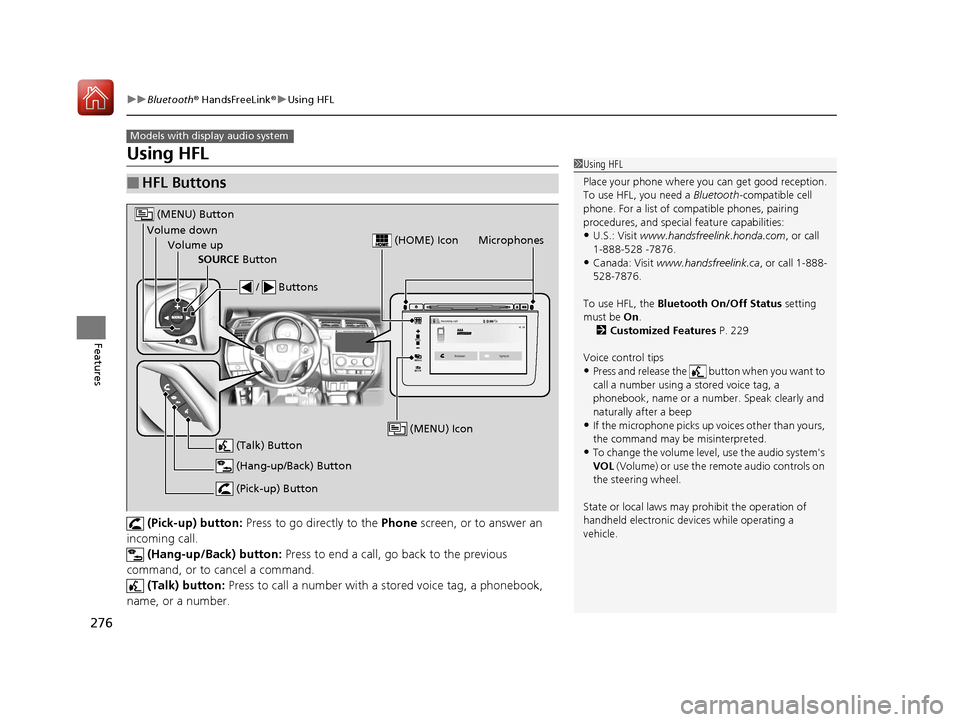
Using HFL
(Pick-up) button: Press to go directly to the Phone screen, or to answer an
incoming call.
(Hang-up/Back) button: Press to end a call, go back to the previous
command, or to cancel a command. (Talk) button: Press to call a number with a stored voice tag, a phonebook,
name, or a number.
■HFL Buttons
Models with display audio system
1 Using HFL
Place your phone where y ou can get good reception.
To use HFL, you need a Bluetooth-compatible cell
phone. For a list of compatible phones, pairing
procedures, and special feature capabilities:
•U.S.: Visit www.handsfreelink.honda.com , or call
1-888-528 -7876.
•Canada: Visit www.handsfreelink.ca , or call 1-888-
528-7876.
To use HFL, the Bluetooth On/Off Status setting
must be On .
2 Customized Features P. 229
Voice control tips
•Press and release the button when you want to
call a number using a stored voice tag, a
phonebook, name or a numbe r. Speak clearly and
naturally after a beep
•If the microphone picks up vo ices other than yours,
the command may be misinterpreted.
•To change the volume level, use the audio system's
VOL (Volume) or use the remote audio controls on
the steering wheel.
State or local laws may prohibit the operation of
handheld electronic devices while operating a
vehicle.
VOL
HOME
MENU
BACK
Microphones
(Pick-up) Button
(Hang-up/Back) Button
Volume up (Talk) Button
(MENU) Button
Volume downSOURCE Button / Buttons
(MENU) Icon
(HOME) Icon
17 FIT -31T5A6200.book 276 ページ 2016年5月27日 金曜日 午後6時33分
Page 283 of 465
282
uuBluetooth ® HandsFreeLink ®u HFL Menus
Features
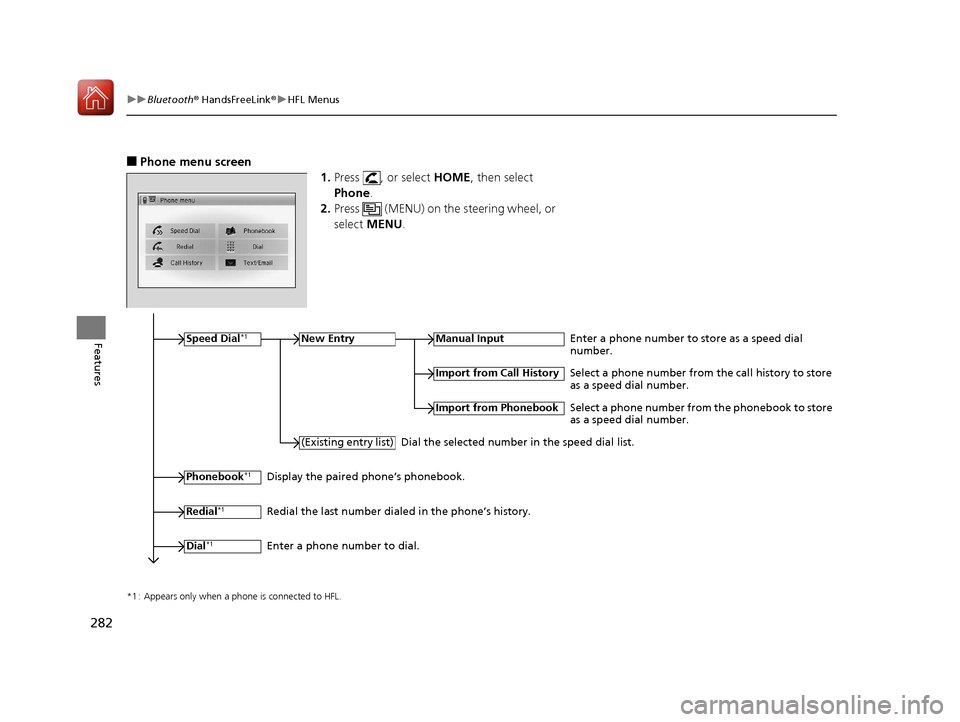
■Phone menu screen
1.Press , or select HOME, then select
Phone .
2. Press (MENU) on the steering wheel, or
select MENU .
*1 : Appears only when a phone is connected to HFL.
Speed Dial*1New EntryManual InputEnter a phone number to store as a speed dial
number.
Phonebook*1
(Existing entry list)
Import from Call History
Import from Phonebook
Select a phone number from the call history to store
as a speed dial number.
Select a phone number from the phonebook to store
as a speed dial number.
Dial the selected number in the speed dial list.
Display the paired phone’s phonebook.
Redial
*1Redial the last number dialed in the phone’s history.
Dial
*1Enter a phone number to dial.
17 FIT -31T5A6200.book 282 ページ 2016年5月27日 金曜日 午後6時33分