Page 141 of 465

uuAdjusting the Seats uRear Seats
140
Controls
The rear seats can be folded down separate ly to allow for additional storage space.
■To fold down the seat
1. Store the center seat belt first. Insert the
latch plate into the slot on the side of the
anchor buckle.
2. Retract the seat belt into the holder on the
ceiling.
2 Seat Belt with Detachable Anchor P. 38
3.Lower the head restra int to its lowest
position.
4. Pull the release lever and fold down the
seat-back.
To return the seat to th e original position, pull
up the seat-back in the upright position.
■Folding Down the Rear Seats1 Folding Down the Rear Seats
Make sure all items in the cargo area or items
extending to the rear seats are properly
secured. Loose items can fly forward if you have
to brake hard.
Remove any items from th e rear seat cushion and
floor before you fold down the rear seat.
To lock the seat-back upri ght, push it backwards until
it locks.
Make sure the seat-back, head restraints and seat
cushion are securely latche d back into place before
driving. Also, make sure all rear shoulder belts are
positioned in front of the seat-back, and the center
shoulder belt is re-posit ioned in the holding slot.
Make sure that the folded seat-back does not press
against the front passenger seat, as this can cause the
weight sensors in the front passenger seat to work
improperly.
2 Passenger Airbag Off Indicator P. 52
Anchor
Buckle
Latch Plate
Release Lever
17 FIT -31T5A6200.book 140 ページ 2016年5月27日 金曜日 午後6時33分
Page 142 of 465
141
uuAdjusting the Seats uRear Seats
Controls
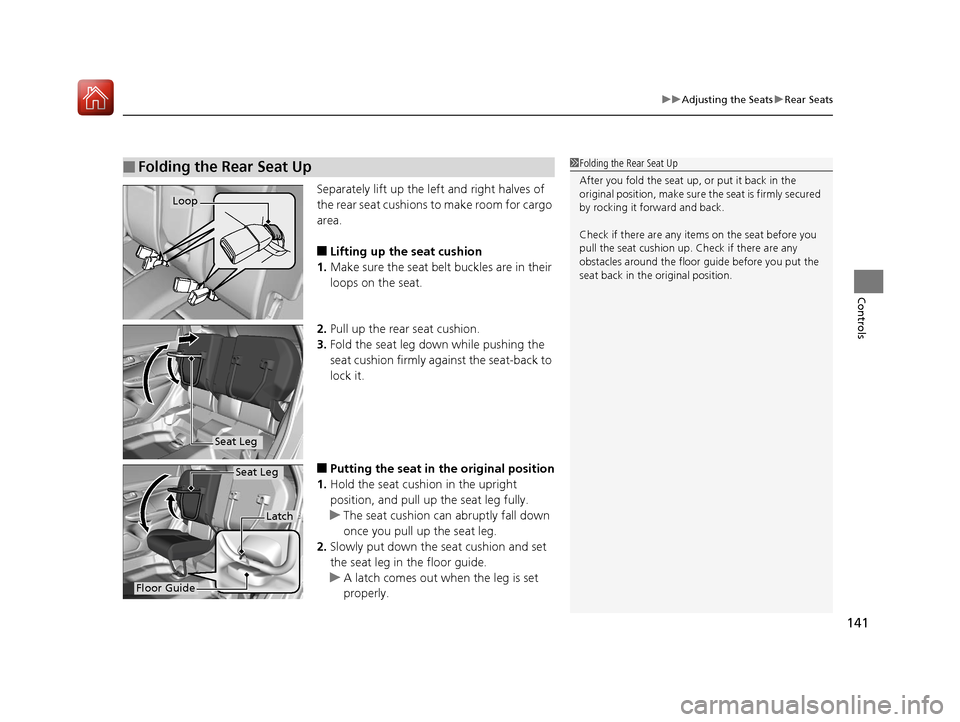
Separately lift up the left and right halves of
the rear seat cushions to make room for cargo
area.
■Lifting up the seat cushion
1. Make sure the seat belt buckles are in their
loops on the seat.
2. Pull up the rear seat cushion.
3. Fold the seat leg do wn while pushing the
seat cushion firmly against the seat-back to
lock it.
■Putting the seat in the original position
1. Hold the seat cushion in the upright
position, and pull up the seat leg fully.
u The seat cushion can abruptly fall down
once you pull up the seat leg.
2. Slowly put down the seat cushion and set
the seat leg in the floor guide.
u A latch comes out when the leg is set
properly.
■Folding the Rear Seat Up1Folding the Rear Seat Up
After you fold the seat up, or put it back in the
original position, make sure the seat is firmly secured
by rocking it forward and back.
Check if there are any items on the seat before you
pull the seat cushion up. Check if there are any
obstacles around the floor guide before you put the
seat back in the original position.
Loop
Seat Leg
Floor Guide
Latch
Seat Leg
17 FIT -31T5A6200.book 141 ページ 2016年5月27日 金曜日 午後6時33分
Page 155 of 465
154
uuInterior Lights/Interior Convenience Items uInterior Convenience Items
Controls
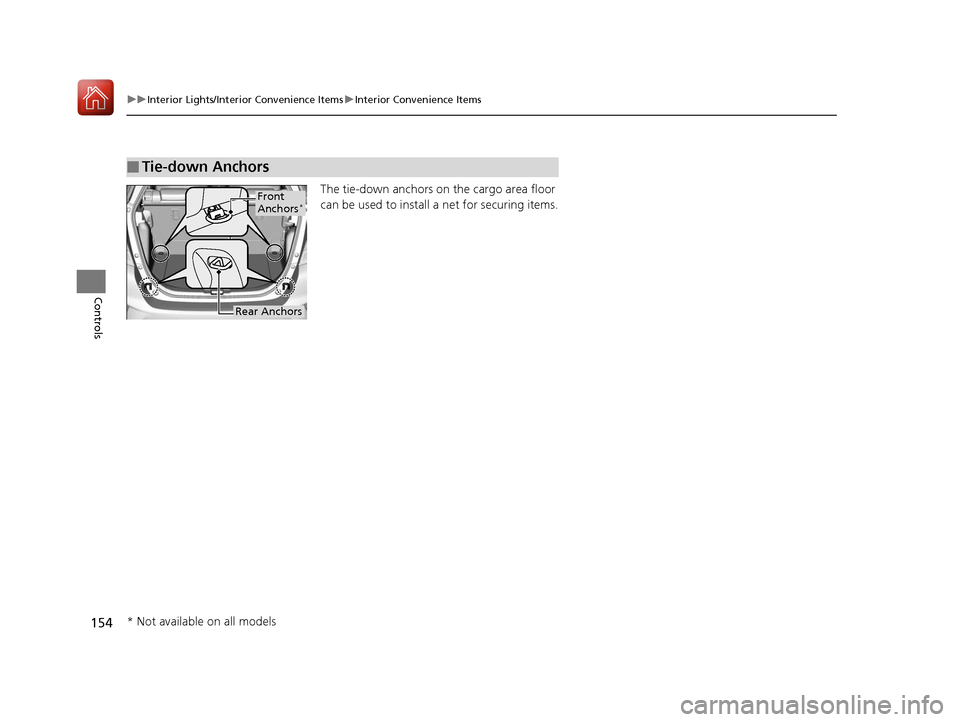
The tie-down anchors on the cargo area floor
can be used to install a net for securing items.
■Tie-down Anchors
Front
Anchors*
Rear Anchors
* Not available on all models
17 FIT -31T5A6200.book 154 ページ 2016年5月27日 金曜日 午後6時33分
Page 156 of 465
Continued155
uuInterior Lights/Interior Convenience Items uInterior Convenience Items
Controls
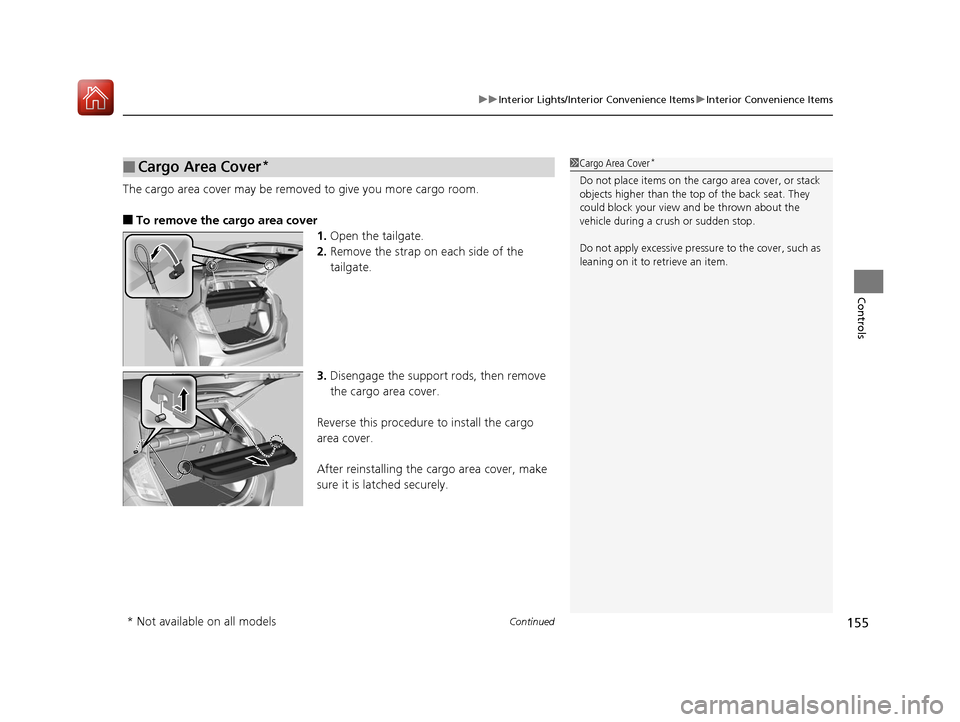
The cargo area cover may be removed to give you more cargo room.
■To remove the cargo area cover
1.Open the tailgate.
2. Remove the strap on each side of the
tailgate.
3. Disengage the support rods, then remove
the cargo area cover.
Reverse this procedure to install the cargo
area cover.
After reinstalling the cargo area cover, make
sure it is latched securely.
■Cargo Area Cover*1 Cargo Area Cover*
Do not place items on the cargo area cover, or stack
objects higher than the top of the back seat. They
could block your view and be thrown about the
vehicle during a crush or sudden stop.
Do not apply excessive pressure to the cover, such as
leaning on it to retrieve an item.
* Not available on all models
17 FIT -31T5A6200.book 155 ページ 2016年5月27日 金曜日 午後6時33分
Page 229 of 465

228
uuGeneral Information on the Audio System uCompatible iPod, iPhone, and USB Flash Drives
Features
Compatible iPod, iPhone, and USB Flash Drives
• A USB flash drive of 256 MB or higher is recommended.
• Some digital audio players may not be compatible.
• Some USB flash drives (e.g., a device with security lockout) may not work.
• Some software files may not allow for audio play or text data display.
• Some versions of MP3, WMA, or AAC formats may be unsupported.
■iPod and iPhone Model Compatibility
Model
iPod (5th generation)
iPod classic 80GB/160GB (launch in 2007)
iPod classic 120GB (launch in 2008)
iPod classic 160GB (launch in 2009)
iPod nano (1st to 7th generation) released between 2005 and 2012
iPod touch (1st to 5th generation) released between 2005 and 2012
iPhone 3G/iPhone 3GS/iPhone 4/iPhone 4s/iPhone 5
■USB Flash Drives
1iPod and iPhone Model Compatibility
This system may not work with all software versions
of these devices.
1USB Flash Drives
Files on the USB flash drive are played in their stored
order. This order may be different from the order
displayed on your PC or device.
17 FIT -31T5A6200.book 228 ページ 2016年5月27日 金曜日 午後6時33分
Page 250 of 465
249
uuCustomized Features u
Features
*1 : Default Setting
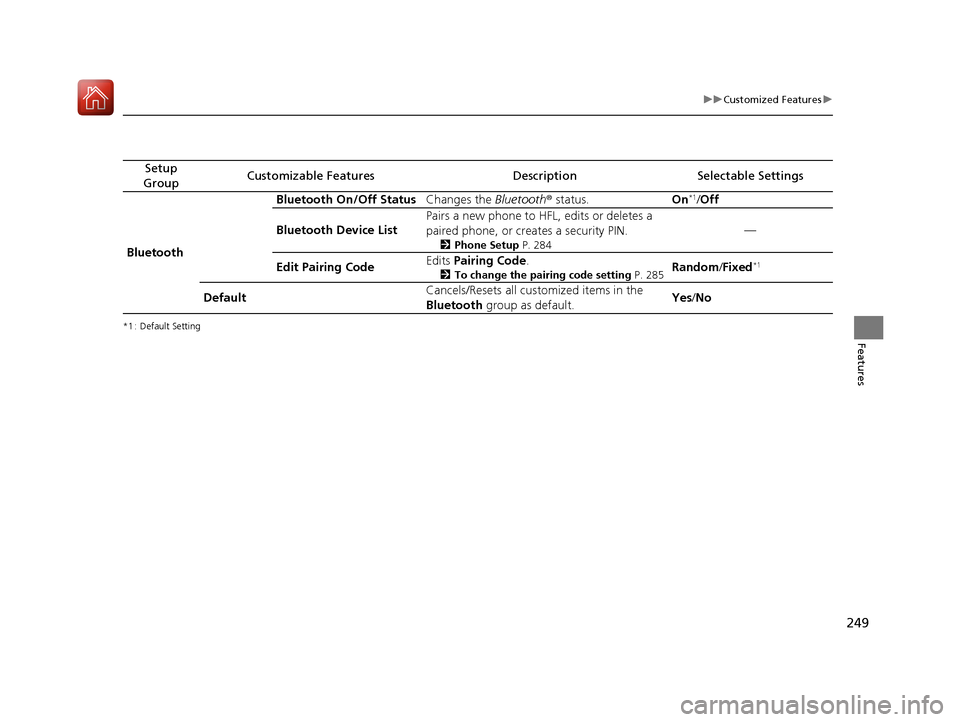
Setup
GroupCustomizable FeaturesDescriptionSelectable Settings
Bluetooth Bluetooth On/Off Status
Changes the Bluetooth® status. On
*1/Off
Bluetooth Device List Pairs a new phone to HFL, edits or deletes a
paired phone, or creates a security PIN.
2
Phone Setup P. 284
—
Edit Pairing Code Edits
Pairing Code .
2To change the pairing code setting P. 285Random/Fixed*1
Default Cancels/Resets all customized items in the
Bluetooth
group as default. Yes
/No
17 FIT -31T5A6200.book 249 ページ 2016年5月27日 金曜日 午後6時33分
Page 257 of 465
256
uuBluetooth ® HandsFreeLink ®u HFL Menus
Features
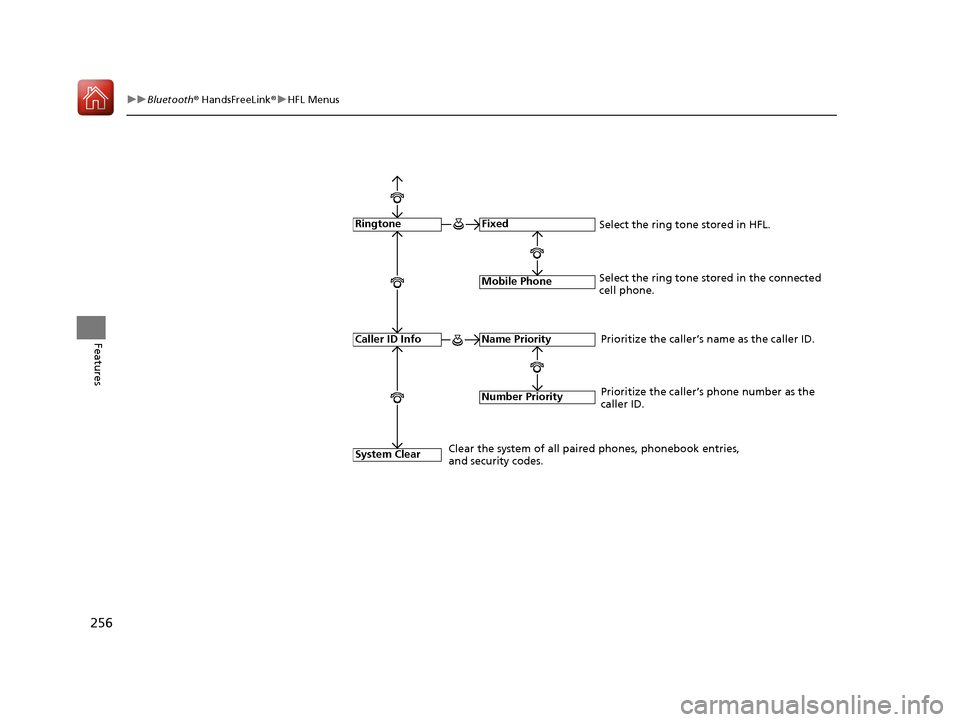
Fixed
Mobile Phone
System Clear
Ringtone
Select the ring tone stored in the connected
cell phone.
Name Priority
Number Priority
Caller ID InfoPrioritize the caller’s name as the caller ID.
Clear the system of all paired phones, phonebook entries,
and security codes. Prioritize the caller’s phone number as the
caller ID.
Select the ring tone stored in HFL.
17 FIT -31T5A6200.book 256 ページ 2016年5月27日 金曜日 午後6時33分
Page 307 of 465

306
Driving
Before Driving
Driving Preparation
Check the following items before you start driving.
• Make sure there are no obstructions on the windows, door mirrors, exterior
lights, or other parts of the vehicle.
u Remove any frost, snow, or ice.
u Remove any snow on the roof, as this can slip down and obstruct your field of
vision while driving. If frozen solid , remove ice once it has softened.
u When removing ice from around the wheels, be sure not to damage the wheel
or wheel components.
• Make sure the hood is securely closed.
u If the hood opens while driving, your front view will be blocked.
• Make sure the tires are in good condition.
u Check air pressure, check for damage and excessive wear.
2 Checking and Maintaining Tires P. 394
•Make sure there are no people or ob jects behind or around the vehicle.
u There are blind spots from the inside.
■Exterior Checks1Exterior Checks
NOTICE
When doors are frozen s hut, use warm water around
the door edges to melt any ice. Do not try to force
them open, as this can damage the rubber trim
around the doors. When done, wipe dry to avoid
further freezing.
Do not pour warm water into the key cylinder.
You will be unable to insert the key if the water
freezes in the hole.
Heat from the engine and exhaust can ignite
flammable material s left under the hood, causing a
fire. If you've parked y our vehicle for an extended
period, inspect and remove any debris that may have
collected, such as dried grass and leaves that have
fallen or have been carried in for use as a nest by a
small animal. Also check under the hood for leftover
flammable materials after you or someone else has
performed maintenance on your vehicle.
17 FIT -31T5A6200.book 306 ページ 2016年5月27日 金曜日 午後6時33分