2017 HONDA FIT display
[x] Cancel search: displayPage 91 of 465

90
Controls
Clock
Adjusting the Clock
You can adjust the time in the clock display with the ignition switch is in ON (w*1.
■Display audio system*
1.Select the ( HOME) icon, then select
Settings .
2. Select Clock/Info , then Clock
Adjustment .
3. Adjust the hours and minutes by selecting
/.
4. Select OK to set the time.
*1 : Models with the smart entry system have an ENGINE START/STOP button instead of an ignition switch.
■Adjusting the Time
1Adjusting the Time
The clock in the information display is automatically
adjusted along with the audio system’s clock display.
The clock is automatica lly updated through the
navigation system, so the ti me does not need to be
adjusted.
You can customize the clock display to show the 12
hour clock or 24 hour clock. 2 Customized Features P. 229
You can turn the clock display on and off. 2 Customized Features P. 229
Models with navigation system
Models without navigation system
Models without navigation system
VOL
HOME
MENU
BACK
34
* Not available on all models
17 FIT -31T5A6200.book 90 ページ 2016年5月27日 金曜日 午後6時33分
Page 120 of 465

119
uuOperating the Switches Around the Steering Wheel uENGINE START/STOP Button
Continued
Controls
ENGINE START/STOP Button
*1 : Except U.S. models with continuously variable transmission
■Changing the Power Mode
Models with smart entry system
1ENGINE START/STOP Button
ENGINE START/STOP Button Operating Range
You can start the engine when the smart entry
remote is inside the vehicl e.The engine may also run
if the smart entry remote is close to the door or
window, even if it is outside the vehicle.
ON mode:
Indicator in the button is of f, if the engine is running.
If the smart entry remote battery is weak, beeper
sounds and the message appears in the
information display. 2 If the Smart Entry Remote Battery is Weak
P. 422
Do not leave the power mode in ACCESSORY or ON
when you get out.
If the power mode does not change from VEHICLE
OFF to ACCESSORY, press the ENGINE START/STOP
button while moving the st eering wheel left and
right. The steering wheel will unlock, allowing the
mode to change.
Operating Range
Except U.S. models with cont inuously variable transmission
ACCESSORY
Indicator in the button is on.
Indicator in the button blinks
(from ON to ACCESSORY).
Operate the audio system and
other accessories in this position.
Continuously Variable Transmission Manual Transmission
VEHICLE OFF (LOCK)
Indicator in the button is off.
The steering wheel is locked.
*1
The power to all electrical
components is turned off.
ON
Indicator in the button is on.
All electrical components can
be used.
Press the button withou t the shift lever in
(P.
Shift to
( P then press the button.
Press the button.
Without depressing
the brake pedal
Without depressing
the clutch pedal
Indicator Indicator
Shift to (
P.U.S. models
17 FIT -31T5A6200.book 119 ページ 2016年5月27日 金曜日 午後6時33分
Page 122 of 465
121
uuOperating the Switches Around the Steering Wheel uENGINE START/STOP Button
Controls
If you open the driver’s door when the power mode is set to ACCESSORY, a warning
buzzer sounds.
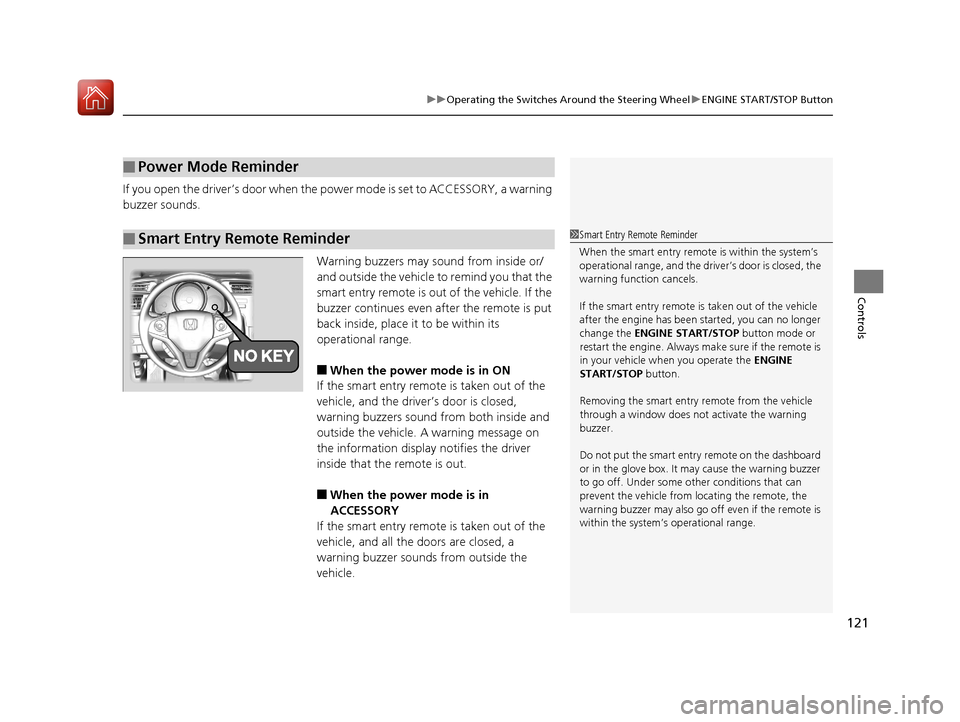
Warning buzzers may sound from inside or/
and outside the vehicle to remind you that the
smart entry remote is out of the vehicle. If the
buzzer continues even after the remote is put
back inside, place it to be within its
operational range.
■When the power mode is in ON
If the smart entry remote is taken out of the
vehicle, and the driver’s door is closed,
warning buzzers sound from both inside and
outside the vehicle. A warning message on
the information display notifies the driver
inside that the remote is out.
■When the power mode is in
ACCESSORY
If the smart entry remote is taken out of the
vehicle, and all the doors are closed, a
warning buzzer sounds from outside the
vehicle.
■Power Mode Reminder
■Smart Entry Remote Reminder1 Smart Entry Remote Reminder
When the smart entry remote is within the system’s
operational range, and the driv er’s door is closed, the
warning function cancels.
If the smart entry remote is taken out of the vehicle
after the engine has been started, you can no longer
change the ENGINE START/STOP button mode or
restart the engine. Always make sure if the remote is
in your vehicle when you operate the ENGINE
START/STOP button.
Removing the smart entry remote from the vehicle
through a window does not activate the warning
buzzer.
Do not put the smart entr y remote on the dashboard
or in the glove box. It may cause the warning buzzer
to go off. Under some other conditions that can
prevent the vehicle from locating the remote, the
warning buzzer may al so go off even if the remote is
within the system’s operational range.
17 FIT -31T5A6200.book 121 ページ 2016年5月27日 金曜日 午後6時33分
Page 131 of 465
130
uuOperating the Switches Around the Steering Wheel uBrightness Control
Controls
Brightness Control
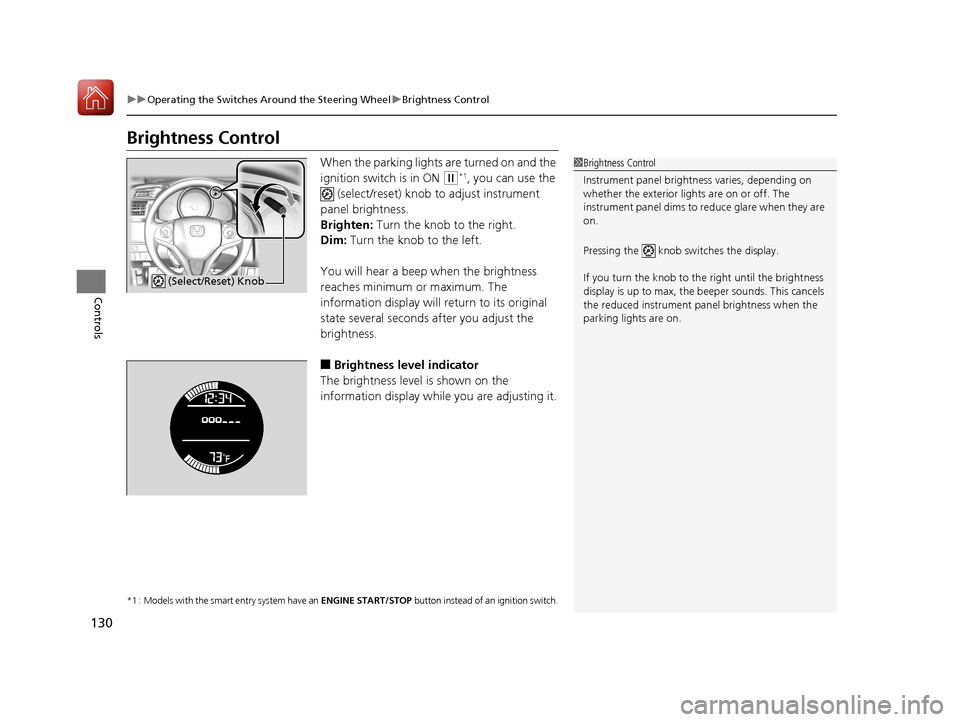
When the parking lights are turned on and the
ignition switch is in ON
(w*1, you can use the
(select/reset) knob to adjust instrument
panel brightness.
Brighten: Turn the knob to the right.
Dim: Turn the knob to the left.
You will hear a beep when the brightness
reaches minimum or maximum. The
information display will return to its original
state several seconds after you adjust the
brightness.
■Brightness level indicator
The brightness level is shown on the
information display while you are adjusting it.
*1 : Models with the smart entry system have an ENGINE START/STOP button instead of an ignition switch.
1Brightness Control
Instrument panel brightne ss varies, depending on
whether the exterior lights are on or off. The
instrument panel dims to reduce glare when they are
on.
Pressing the knob switches the display.
If you turn the knob to the right until the brightness
display is up to max, the beeper sounds. This cancels
the reduced instrument panel brightness when the
parking lights are on.
(Select/Reset) Knob
17 FIT -31T5A6200.book 130 ページ 2016年5月27日 金曜日 午後6時33分
Page 161 of 465
160
Controls
Climate Control System*
Using Automatic Climate Control
The automatic climate control system maintains the interior temperature you select.
The system also selects the proper mix of heated or cooled air that raises or lowers
the interior temperature to your preference as quickly as possible.
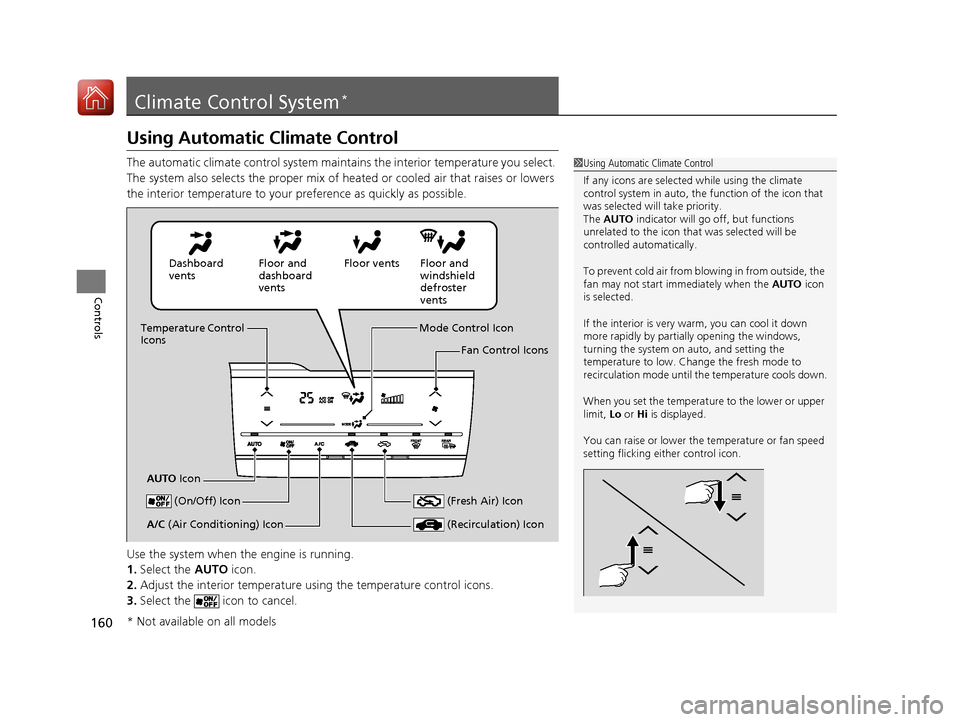
Use the system when the engine is running.
1. Select the AUTO icon.
2. Adjust the interior temperature us ing the temperature control icons.
3. Select the icon to cancel.1Using Automatic Climate Control
If any icons are selected while using the climate
control system in auto, the function of the icon that
was selected will take priority.
The AUTO indicator will go off, but functions
unrelated to the icon that was selected will be
controlled automatically.
To prevent cold air from bl owing in from outside, the
fan may not start i mmediately when the AUTO icon
is selected.
If the interior is very warm, you can cool it down
more rapidly by partial ly opening the windows,
turning the system on auto, and setting the
temperature to low. Change the fresh mode to
recirculation mode until the temperature cools down.
When you set the temperat ure to the lower or upper
limit, Lo or Hi is displayed.
You can raise or lower the temperature or fan speed
setting flicking either control icon.
Dashboard
vents Floor and
dashboard
ventsFloor vents Floor and
windshield
defroster
vents
Temperature Control
Icons
AUTO Icon Mode Control Icon
Fan Control Icons
(On/Off) Icon
(Recirculation) IconA/C (Air Conditioning) Icon (Fresh Air) Icon
* Not available on all models
17 FIT -31T5A6200.book 160 ページ 2016年5月27日 金曜日 午後6時33分
Page 163 of 465
uuClimate Control System*uUsing Automatic Climate Control
162
Controls
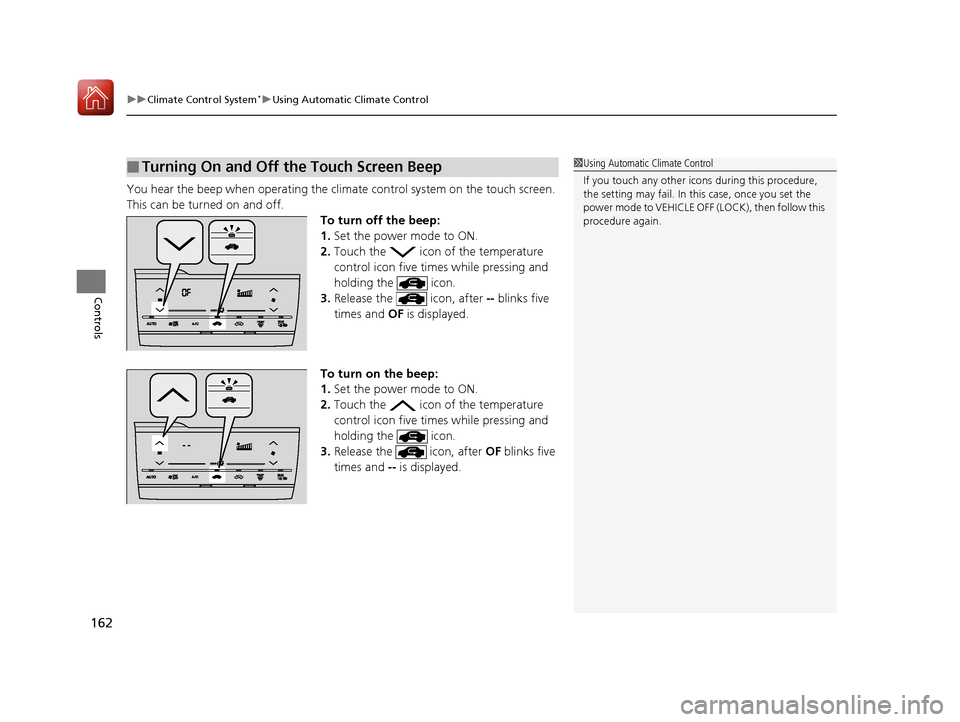
You hear the beep when operating the clim ate control system on the touch screen.
This can be turned on and off. To turn off the beep:
1.Set the power mode to ON.
2. Touch the icon of the temperature
control icon five times while pressing and
holding the icon.
3. Release the icon, after -- blinks five
times and OF is displayed.
To turn on the beep:
1. Set the power mode to ON.
2. Touch the icon of the temperature
control icon five times while pressing and
holding the icon.
3. Release the icon, after OF blinks five
times and -- is displayed.
■Turning On and Off the Touch Screen Beep1Using Automatic Climate Control
If you touch any other icon s during this procedure,
the setting may fail. In th is case, once you set the
power mode to VEHICLE OFF (LOCK), then follow this
procedure again.
17 FIT -31T5A6200.book 162 ページ 2016年5月27日 金曜日 午後6時33分
Page 166 of 465

165
Features
This chapter describes how to operate technology features.
Audio SystemAbout Your Audio System .................... 166
USB Port(s) ........................................... 167
HDMI ® Port
*........................................ 168
Auxiliary Input Jack*............................. 168
Audio Antenna .................................... 169
Audio System Theft Protection ............. 170
Audio Remote Controls
*...................... 171
Audio System Basic Operation ............. 173
Audio/Information Screen .................... 174
Adjusting the Sound ............................ 178
Display Setup ....................................... 179
Playing AM/FM Radio ........................... 180
Playing a CD ........................................ 182
Models with color audio system
Playing an iPod .................................... 185
Playing a USB Flash Drive ..................... 188
Playing Bluetooth® Audio..................... 191
Audio System Basic Operation ............ 194
Audio/Information Screen .................... 195
Adjusting the Sound ............................ 200
Display Setup ....................................... 201
Playing AM/FM Radio........................... 202
Playing a CD ........................................ 205
Playing an iPod .................................... 208
Playing Internet Radio .......................... 211
Playing a USB Flash Drive ..................... 213
Playing Bluetooth® Audio..................... 216
Playing a Video Using the HDMI ®......... 218
Models with display audio system
Smartphone Apps................................. 220
Siri ® Eyes Free ....................................... 221
Audio Error Messages ........................... 222
General Information on the Audio
System ............................................. 226
Customized Features ............................. 229
Bluetooth ® HandsFreeLink ®
Using HFL ............................................. 251
Using HFL ............................................. 276
Models with color audio system
Models with display audio system
* Not available on all models
17 FIT -31T5A6200.book 165 ページ 2016年5月27日 金曜日 午後6時33分
Page 168 of 465
167
uuAudio System uUSB Port(s)
Features
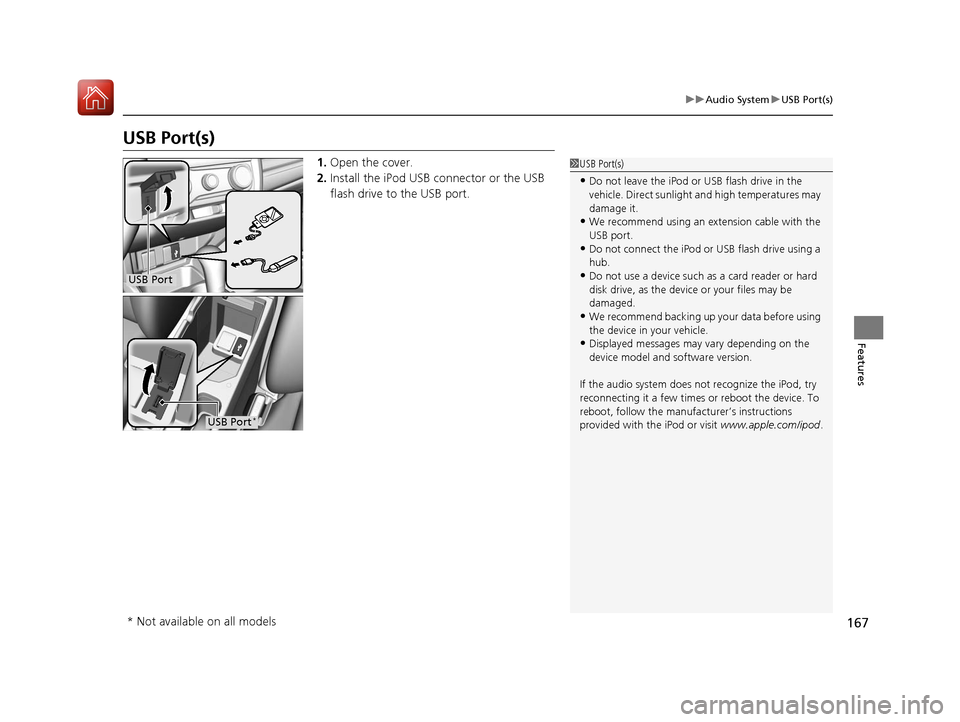
USB Port(s)
1. Open the cover.
2. Install the iPod USB connector or the USB
flash drive to the USB port.1USB Port(s)
•Do not leave the iPod or USB flash drive in the
vehicle. Direct sunlight and high temperatures may
damage it.
•We recommend using an ex tension cable with the
USB port.
•Do not connect the iPod or USB flash drive using a
hub.
•Do not use a device such as a card reader or hard
disk drive, as the device or your files may be
damaged.
•We recommend backing up yo ur data before using
the device in your vehicle.
•Displayed messages may vary depending on the
device model and software version.
If the audio system does not recognize the iPod, try
reconnecting it a few times or reboot the device. To
reboot, follow the manufac turer’s instructions
provided with the iPod or visit www.apple.com/ipod.
USB Port
USB Port*
* Not available on all models
17 FIT -31T5A6200.book 167 ページ 2016年5月27日 金曜日 午後6時33分