2017 HONDA CR-V brake
[x] Cancel search: brakePage 508 of 657

Continued507
uuBraking uBrake System
Driving
■Automatic operation
When you turn the igni tion switch to LOCK
(0*1, the parking brake is applied
automatically.
To confirm that the parking brake is applie d, check if the parking brake indicator is
on.
2 Activating and deactivating the automatic parking brake feature P. 508
■To release automatically
Use the accelerator pedal to release the parking brake when you are starting the
vehicle facing uphill, or in a traffic jam.
Depressing the accelerator pedal releases the parking brake.
Gently depress the accelerator pedal.u The parking brake indicator goes off.
The parking brake automatically releases as you depress the accelerator pedal when:
• You are wearing the driver’s seat belt.
• The engine is running.
• The transmission is not in
(P or (N.
*1: Models with the smart entry system have an ENGINE START/STOP button instead of an
ignition switch.
1 Parking Brake
If the parking brake cannot be released
automatically, release it manually.
When the vehicle is travel ing uphill, the accelerator
pedal may need to be pressed farther to
automatically release the electric parking brake.
The parking brake cannot be released automatically
while the following indicators are on:
•Malfunction indicator lamp•Transmission indicator
The parking brake may not be released automatically
while the following indicators are on:
•Brake system indicator
•VSA® system indicator•ABS indicator
•Supplemental restraint system indicator
Accelerator Pedal
17 CR-V-31TLA6000.book 507 ページ 2016年10月11日 火曜日 午後6時37分
Page 509 of 657

uuBraking uBrake System
508
Driving
■Activating and d eactivating the automatic parking brake feature
With the ignition switch is in ON
(w*1, carry out the following steps to either activate
or deactivate the automatic parking brake feature.
1. Shift the select lever to
(P.
2. Without depressing the brake pedal, pull up and release the parking brake switch.
u Check that the parking brake indicator has come on.
3. Pull up and hold the parking brake switch. When you hear a beeping sound,
release the switch and wi thin 3 seconds pull up and hold the switch again.
4. When you hear a sound indicating that the procedure is completed, release the
switch.
u Two beeps indicates that the feature has been activated.
u One beep indicates that the feature has been deactivated.
u When you have completed activating the feature, the parking brake will
remain applied after you turn off the engine.
u Deactivate the feature only if it is absolutely necessary.
u To confirm that the parking brake is applied, check if the parking brake
indicator is on.
If you need to temporarily deactivate the feature for when putting your vehicle
through a conveyor type car wash or when having your vehicle towed. You can
follow the procedure explained below.
1. Depress the brake pedal and bring the vehicle to a stop.
2. Turn the ignition switch to LOCK
(0*1 and then within 2 seconds push down the
parking brake switch.
u Activation and deactivation settings fo r the feature will not be affected.
u Before temporarily deactivating the feat ure, make sure to first turn off both
ACC with LSF and the automatic brake hold system.
u To confirm that the parking brake is applied, check if the parking brake
indicator is on.
*1: Models with the smart entry system have an ENGINE START/STOP button instead of an
ignition switch.
1 Parking brake system
In cold climates, the parking brake may freeze in
place if applied.
When parking the vehicle, chock the wheels and
make sure the automatic parking brake feature is
deactivated.
Also, when putting your vehicle through a conveyor-
type car wash or when ha ving your vehicle towed,
deactivate the automatic parking brake feature and
leave the parking brake released.
17 CR-V-31TLA6000.book 508 ページ 2016年10月11日 火曜日 午後6時37分
Page 510 of 657

Continued509
uuBraking uBrake System
Driving
Your vehicle is equipped with disc brakes at all four wheels. The brake assist system
increases the stopping force when you depress the brake pedal hard in an
emergency situation. The an ti-lock brake system (ABS) helps you retain steering
control when brak ing very hard.
2Brake Assist System P. 513
2 Anti-lock Brake System (ABS) P. 512
■Foot Brake1Foot Brake
Check the brakes after driving through deep water,
or if there is a buildup of road surface water. If
necessary, dry the brakes by lightly depressing the
pedal several times.
If you hear a continuous me tallic friction sound when
applying the brakes, this is caused by the brake wear
indicator rubbing on the brake rotor and indicates
that the brake pads need to be replaced. Have the
vehicle checked by a deal er. If you hear only an
occasional squeak or squeal when you initially apply
the brake pedal, this may be normal and caused by
high frequency vibr ation of the brake pads against
the rotating brake disc.
Constantly using the brak e pedal while going down a
long hill builds up heat, which reduces the brake
effectiveness. Apply engine braking by taking your
foot off the accelerator pe dal and downshifting to a
lower gear/speed position. With manual transmission
use a lower gear for gr eater engine braking.
Do not rest your foot on the brake pedal while
driving, as it will lightly apply the brakes and cause
them to lose effectiveness over time and reduce pad
life. It will also conf use drivers behind you.
Whenever the brakes are activated by CMBS
TM * or
another system that automa tically controls braking,
the brake pedal is depressed and released in
accordance with braking function.
* Not available on all models
17 CR-V-31TLA6000.book 509 ページ 2016年10月11日 火曜日 午後6時37分
Page 511 of 657
uuBraking uBrake System
510
Driving
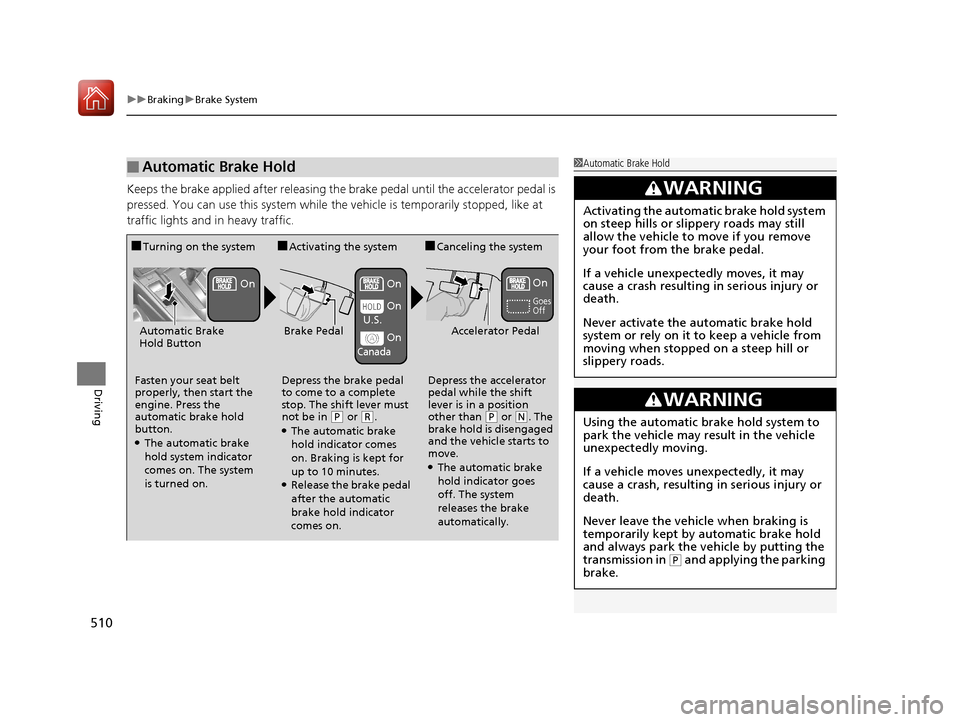
Keeps the brake applied after releasing the br ake pedal until the accelerator pedal is
pressed. You can use this system while th e vehicle is temporarily stopped, like at
traffic lights and in heavy traffic.
■Automatic Brake Hold1 Automatic Brake Hold
3WARNING
Activating the automatic brake hold system
on steep hills or slippery roads may still
allow the vehicle to move if you remove
your foot from the brake pedal.
If a vehicle unexpectedly moves, it may
cause a crash resulting in serious injury or
death.
Never activate the automatic brake hold
system or rely on it to keep a vehicle from
moving when stopped on a steep hill or
slippery roads.
3WARNING
Using the automatic brake hold system to
park the vehicle may result in the vehicle
unexpectedly moving.
If a vehicle moves unexpectedly, it may
cause a crash, resulting in serious injury or
death.
Never leave the vehicle when braking is
temporarily kept by automatic brake hold
and always park the vehicle by putting the
transmission in
( P and applying the parking
brake.
■Turning on the system
Fasten your seat belt
properly, then start the
engine. Press the
automatic brake hold
button.
●The automatic brake
hold system indicator
comes on. The system
is turned on.
■Activating the system
Depress the brake pedal
to come to a complete
stop. The shift lever must
not be in
( P or (R.●The automatic brake
hold indicator comes
on. Braking is kept for
up to 10 minutes.
●Release the brake pedal
after the automatic
brake hold indicator
comes on.
■Canceling the system
Depress the accelerator
pedal while the shift
lever is in a position
other than
( P or (N. The
brake hold is disengaged
and the vehicle starts to
move.
●The automatic brake
hold indicator goes
off. The system
releases the brake
automatically.
Accelerator PedalBrake PedalAutomatic Brake
Hold Button
Goes
Off
On OnOn
On
On
U.S.
Canada
17 CR-V-31TLA6000.book 510 ページ 2016年10月11日 火曜日 午後6時37分
Page 512 of 657

511
uuBraking uBrake System
Driving
■The system automatically cancels when:
• You engage the parking brake.
• You depress the brake pedal and move the shift lever to
(P or (R.
Under the following conditions, the system automatically cancels, and the parking
brake is applied:
• Braking is kept for more than 10 minutes.
• The driver’s seat belt is unfastened.
• The engine is turned off.
• There is a problem with automatic brake hold system.
■Turning off the automa tic brake hold system
While the system is on, press the automatic
brake hold button again.u The automatic brake hold system
indicator goes off.
If you want to turn off automatic brake hold
while the system is in operation, press the
automatic brake hold button with the brake
pedal depressed.
1 Automatic Brake Hold
While the system is activated, you can turn off the
engine or park the ve hicle through the same
procedure as you normally do. 2 When Stopped P. 524
Whether the system is on, or the system is activated,
the automatic brake hold turn s off once the engine is
off.
1 Turning off the automatic brake hold system
Make sure to turn off the automatic brake hold
system before using an automated car wash.
You may hear an operating noi se if the vehicle moves
while the automatic brake hold system is in
operation.
Automatic Brake
Hold Button
Goes
Off
17 CR-V-31TLA6000.book 511 ページ 2016年10月11日 火曜日 午後6時37分
Page 513 of 657

512
uuBraking uAnti-lock Brake System (ABS)
Driving
Anti-lock Brake System (ABS)
Helps prevent the wheels from locking up, an d helps you retain steering control by
pumping the brakes rapidly, much faster than you.
The electronic brake distribution (EBD) system, which is part of the ABS, also
balances the front-to-rear braking distri bution according to vehicle loading.
You should never pump the brake pedal. Let the ABS work for you by always
keeping firm, steady pressure on the brake pe dal. This is sometimes referred to as
“stomp and steer.“
■ABS operation
The brake pedal may pulsate slightly when the ABS is working. Keep holding the
pedal firmly down. On dry pavement, you need to press on the brake pedal very
hard before the ABS activates. However, you may feel the ABS activate immediately
if you are trying to stop on snow or ice.
When the vehicle speed goes unde r 6 mph (10 km/h), the ABS stops.
1Anti-lock Brake System (ABS)
NOTICE
The ABS may not function correctly if you use an
incorrect tire type and size.
When the ABS indicator comes on while driving,
there may be a problem with the system.
While normal braking is not affected, there is a
possibility of the ABS not operating. Have the vehicle
checked by a dealer immediately.
The ABS does not reduce the ti me or distance it takes
to stop the vehicle. It only helps with steering control
during hard braking.
In the following cases, yo ur vehicle may need more
stopping distance than a vehicle without the ABS:
•When driving on rough road surfaces, including
when driving on uneven surf aces, such as gravel or
snow.
•When tire chains are installed.
You may hear a motor sound coming from the
engine compartment while system checks are being
performed immediately after starting the engine or
while driving. This is normal.
17 CR-V-31TLA6000.book 512 ページ 2016年10月11日 火曜日 午後6時37分
Page 514 of 657
513
uuBraking uBrake Assist System
Driving
Brake Assist System
Designed to assist the driver by generati ng greater braking force when you depress
the brake pedal hard during emergency braking.
■Brake assist system operation
Press the brake pedal firmly for more powerful braking.
When brake assist operates, the pedal may wiggle slightly and an operating noise
may be heard. This is normal. Keep holding the brake pedal firmly down.
17 CR-V-31TLA6000.book 513 ページ 2016年10月11日 火曜日 午後6時37分
Page 515 of 657

514
uuBraking uCollision Mitigation Braking SystemTM (CMBSTM)*
Driving
Collision Mitigati on Braking SystemTM (CMBSTM)*
Can assist you when there is a possibility of your vehicle colliding with a vehicle or a
pedestrian detected in front of yours. The CMBSTM is designed to alert you when a
potential collision is determined, as well as to reduce your vehicle speed to help
minimize collision severity when a collision is deemed unavoidable.
1 Collision Mitigation Braking SystemTM (CMBSTM)*
Important Safety Reminder
The CMBSTM is designed to reduce the severity of an
unavoidable collision. It does not prevent collision nor
stop the vehicle automatically. It is still your
responsibility to operate the brake pedal and steering
wheel appropriately acco rding to the driving
conditions.
The CMBS
TM may not activate or may not detect a
vehicle in front of y our vehicle under certain
conditions: 2 CMBS
TM Conditions and Limitations P. 520
You can read about handling information for the
camera equipped with this system. 2 Front Sensor Camera
* P. 463
Be careful not to have ra dar sensor cover strongly
impacted.
* Not available on all models
17 CR-V-31TLA6000.book 514 ページ 2016年10月11日 火曜日 午後6時37分