Page 345 of 657
344
uuCustomized Features u
FeaturesBluetooth On/Off Status
Bluetooth Device List
Edit Pairing Code
Wi-Fi On/Off Status
Wi-Fi Device List
Wi-Fi
BluetoothBluetooth / Wi-Fi
Wi-Fi Information
Text/Email
Bluetooth Device List
Edit Speed Dial
Ring Tone
Phone
Automatic Phone Sync
HondaLink Assist
Enable Text/Email
Select Account
New Message Notification
Phone
LaneWatch*
Fixed Guideline
Dynamic Guideline
Show with Turn Signal
Rear CameraCamera
Display Time after Turn Signal Off
Reference Line
Cross Traffic
Monitor*
Default
Default
Default
* Not available on all models
17 CR-V-31TLA6000.book 344 ページ 2016年10月11日 火曜日 午後6時37分
Page 348 of 657
347
uuCustomized Features u
Continued
Features
Voice Recog.
Voice Prompt
Voice Recog. Volume
Song by Voice
Song by Voice Phonetic Modification
Phonebook Phonetic Modification
Automatic Phone Sync
ClockClock/Wallpaper Type*1/
Clock Type*2
Clock Adjustment
Clock Format
Auto Time Zone*
Manual Time Zone*
Auto Daylight Saving Time
Clock Display
Overlay Clock Location
Clock Reset
Clock
Wallpaper
One Press Voice Operation
*1 : Does not appear when you chan ge the screen interface design.
*2 : Appears only when you change the screen interface design.
* Not available on all models
17 CR-V-31TLA6000.book 347 ページ 2016年10月11日 火曜日 午後6時37分
Page 351 of 657
350
uuCustomized Features u
Features
Hand Free Access Function
Keyless Open Mode
Lighting SetupInterior Light Dimming Time
Headlight Auto Off Timer
Auto Light Sensitivity
Auto Interior Illumination Sensitivity
Auto Door Lock
Key and Remote Unlock Mode
Door/Window Setup
Apple CarPlay
Maintenance Info.
Android Auto
Keyless Lock Answer Back
Security Relock Timer
Walk Away Auto Lock
Keyless Access Setup*
Keyless Access Light Flash
Door Unlock Mode
Remote Start System On/Off
Keyless Access Beep
Smartphone
Power Tailgate Setup
Power Open By Outer Handle
Default
Auto Door Unlock
Auto Headlight ON With Wiper ON
* Not available on all models
17 CR-V-31TLA6000.book 350 ページ 2016年10月11日 火曜日 午後6時37分
Page 355 of 657

354
uuCustomized Features u
Features
*1:Default SettingSetup
Group Customizable Features Description Selectable Settings
CameraLaneWatch*
Reference LineSelects whether the reference lines come on
the LaneWatch monitor.On*1/
Off
DefaultCancels/Resets all cust omized items in the
LaneWatch group as default.Yes/No
Cross Traffic Monitor*Turns on and off the cross traffic monitor.On*1/ Off
Bluetooth /
Wi-Fi Bluetooth
Bluetooth On/Off Status
Changes the Bluetooth® status. On
*1/Off
Bluetooth Device List Pairs a new phone to HF
L, edits or deletes a
paired phone.
2 Phone Setup P. 402
—
Edit Pairing Code Edits a pairing code.
2
To change the pairing code setting P. 403Random/Fixed*1
Wi-Fi Wi-Fi On/Off Status
Changes the Wi-Fi mode. On/Off
*1
Wi-Fi Device List Connects, disconnects, or deletes the Wi-Fi
device.
—
Wi-Fi Information Shows the Wi-Fi information of the head unit. —
Default Cancels/Resets all cust
omized items in the
Bluetooth / Wi-Fi group as default. Yes
/No
* Not available on all models
17 CR-V-31TLA6000.book 354 ページ 2016年10月11日 火曜日 午後6時37分
Page 356 of 657

355
uuCustomized Features u
Continued
Features
*1:Default SettingSetup
Group Customizable Features Desc
ription Selectable Settings
Phone Phone
Bluetooth Device List
Pairs a new phone to HFL, connects or
disconnects a paired phone.
2
Phone Setup P. 402
—
Edit Speed Dial Edits, adds or deletes a speed dial entry.
2
Speed Dial P. 408—
Ring Tone Selects the ring tone. Fixed
/Mobile
Phone
*1
Automatic Phone Sync Sets a phonebook and call history data to be
automatically imported when a phone is paired
to HFL. On*1/
Off
HondaLink Assist Turns HondaLink Assist on and off. On
*1/Off
Text/Email Enable Text/Email
Turns the text/e-mail message function on and
off. On
*1/
Off
Select Account Selects a text or e-mail message account. —
New Message Notification Selects whether a pop-up
alert comes on the
screen when HFL receives a new text/e-mail
message. On
/Off
*1
Default Cancels/Resets all customized items in the
Phone
settings group as default. Yes
/No
17 CR-V-31TLA6000.book 355 ページ 2016年10月11日 火曜日 午後6時37分
Page 358 of 657

357
uuCustomized Features u
Continued
Features
*1:Default Setting
*2:Appears only when you change the screen interface design.
Setup
Group Customizable Features Description Selectable Settings
Audio
BluetoothBluetooth Device List
Pairs a new phone to HFL, edits or deletes a
paired phone.
2
Phone Setup P. 402
—
Other
[Your selected media]
Cover ArtTurns the cover art display on and off.On*1/Off
Audio Source Pop-Up
Selects whether the list of selectable audio source
comes on when Audio is selected on the home
screen.
On /Off*1
DefaultCancels/Resets all customized items in the Audio
settings group as default.Yes /No
System Home Home Screen Edit Order
Changes the home screen icon layout. —
Menu Icon Position*2Changes the position of the menu icons on the
Audio, Phone, and Info screen.—
Configuration of
Instrument Panel Changes the
Instrument Panel screen icon
layout. —
Tachometer Setting Turns on and off the tachometer display. On
*1/Off
Bluetooth® mode
iPod or USB mode
17 CR-V-31TLA6000.book 357 ページ 2016年10月11日 火曜日 午後6時37分
Page 360 of 657
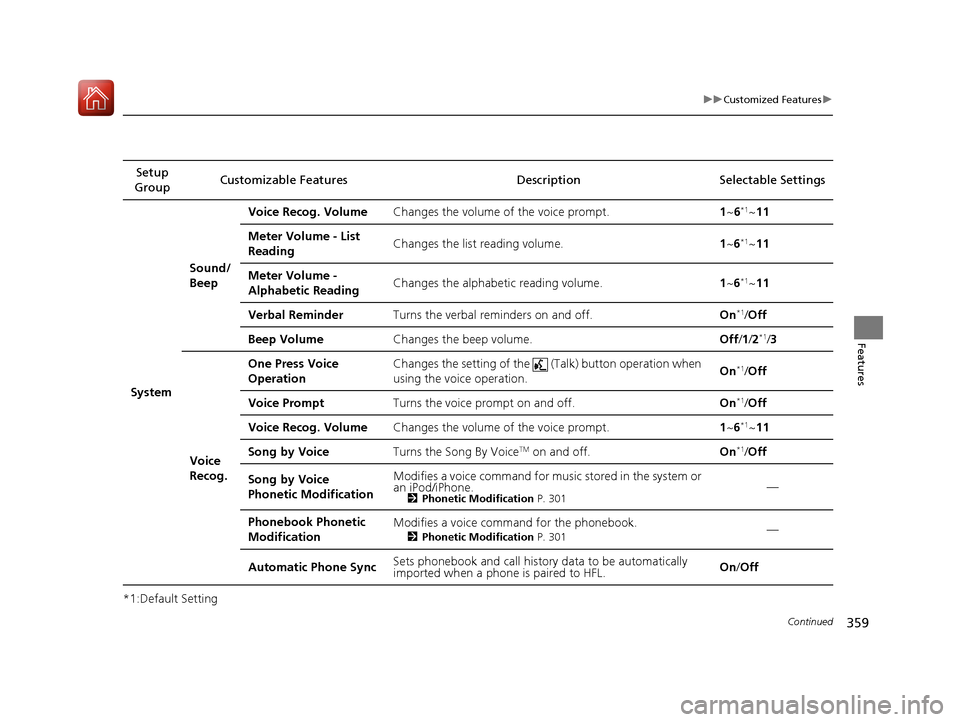
359
uuCustomized Features u
Continued
Features
*1:Default SettingSetup
Group Customizable Features Description Selectable Settings
System Sound/
Beep
Voice Recog. Volume
Changes the volume of the voice prompt. 1~6
*1~11
Meter Volume - List
Reading Changes the list reading volume.
1~6
*1~11
Meter Volume -
Alphabetic Reading Changes the alphabetic reading volume.
1~6
*1~11
Verbal Reminder Turns the verbal reminders on and off. On
*1/Off
Beep Volume Changes the beep volume. Off/1 /2
*1/3
Voice
Recog. One Press Voice
Operation
Changes the setting of the (
Talk) button operation when
using the voice operation. On
*1/
Off
Voice Prompt Turns the voice prompt on and off. On
*1/Off
Voice Recog. Volume Changes the volume of the voice prompt. 1~6
*1~11
Song by Voice Turns the Song By Voice
TM on and off. On*1/Off
Song by Voice
Phonetic Modification Modifies a voice command for music stored in the system or
an iPod/iPhone.
2
Phonetic Modification P. 301—
Phonebook Phonetic
Modification Modifies a voice command for the phonebook.
2
Phonetic Modification P. 301—
Automatic Phone Sync Sets phonebook and call history data to be automatically
imported when a phone is paired to HFL. On
/Off
17 CR-V-31TLA6000.book 359 ページ 2016年10月11日 火曜日 午後6時37分
Page 367 of 657
366
uuCustomized Features u
Features
Setup Group Customizabl e Features Description Selectable Settings
Vehicle
Power
Tailgate
Setup
*
Hand Free Access
FunctionChanges the setting to open power tailgate by a
swift forward in and out kicking motion under
the rear bumper.
On*1/Off
Keyless Open ModeChanges the keyless setting for when the power
tailgate opens.Anytime*1/When
Unlocked
Power Open By Outer
HandleChanges the setting to open power tailgate by
tailgate outer handle.Off (Manual only)*1/
On (Power/Manual)
Maintenance Info.Used to reset the engine oil life display when the
maintenance service has been performed.—
DefaultCancels/Resets all customized items in the Vehicle
settings group as default.Yes /No
Smartphone Apple CarPlay
Sets up the Apple CarPlay
TM connection.—
Android Auto Sets up the Android Auto
TM connection.—
* Not available on all models
17 CR-V-31TLA6000.book 366 ページ 2016年10月11日 火曜日 午後6時37分


