Page 213 of 657
uuInterior Lights/Interior Convenience Items uInterior Convenience Items
212
Controls
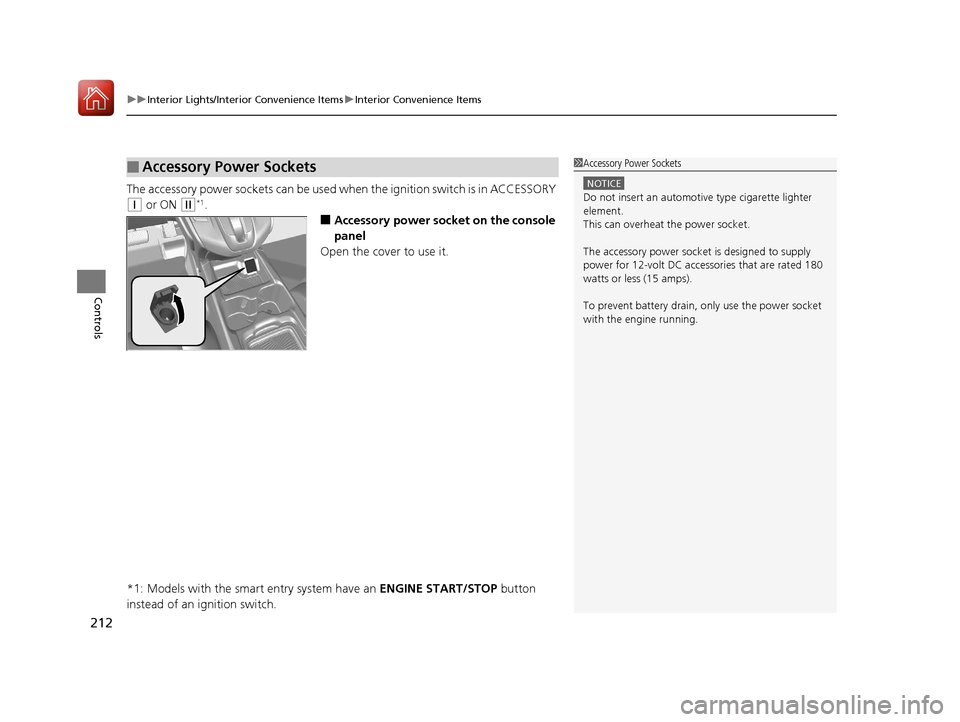
The accessory power sockets can be used wh en the ignition switch is in ACCESSORY
(q or ON (w*1.
■Accessory power socket on the console
panel
Open the cover to use it.
*1: Models with the smart entry system have an ENGINE START/STOP button
instead of an ignition switch.
■Accessory Power Sockets1 Accessory Power Sockets
NOTICE
Do not insert an automotive type cigarette lighter
element.
This can overheat the power socket.
The accessory power socket is designed to supply
power for 12-volt DC accessories that are rated 180
watts or less (15 amps).
To prevent battery drain, only use the power socket
with the engine running.
17 CR-V-31TLA6000.book 212 ページ 2016年10月11日 火曜日 午後6時37分
Page 230 of 657

229
uuAudio System uUSB Port(s)
Features
USB Port(s)
Install the iPod USB connector or the USB flash
drive to the USB port.
u The USB port (1.0A) is for playing audio
files on a USB flash drive, connecting a
cellular phone, and charging devices.
u The USB port (1.5A) is for charging
devices, playing audio files and
connecting compatib le phones with
Apple CarPlay
TM or Android AutoTM.
■On the back of the center console
compartment*
The USB ports (2.5A) are only for charging
devices.
*1: Models with the smart entry system have an ENGINE START/STOP button instead of an
ignition switch.
1 USB Port(s)
•Do not leave the iPod or USB flash drive in the vehicle.
Direct sunlight and high te mperatures may damage it.
•We recommend using an extension cable with the
USB port.
•Do not connect the iPod or USB flash drive using a
hub.
•Do not use a device such as a card reader or hard disk
drive, as the device or your files may be damaged.
•We recommend keeping y our data backed up
before using the device in your vehicle.
•Displayed messages may vary depending on the
device model and software version.
If the audio system does not recognize the iPod, try
reconnecting it a few times or reboot the device. To
reboot, follow the manufac turer’s instructions
provided with the iPod or visit www.apple.com/ipod.
The USB port can supply up to 1.0A/1.5A/2.5A of
power. It does not output 1.0 A/1.5A/2.5A unless the
device requests.
For amperage details, read the operating manual of
the device that ne eds to be charged.
Turn the ignition switch to ACCESSORY
( q or ON
(w*1 first.
This port is for battery charge only. You cannot play
music even if you have conne cted a music player to it.
Under certain conditions, a de vice connected to the port
may generate noise in the radio you are listening to.
USB Port (2.5A)
In the console compartment
Models
with
Display
Audio
Models
with color
audio
systemModels
with
Display
Audio
Models with Display Audio
On the back of the center console
compartment
* Not available on all models
17 CR-V-31TLA6000.book 229 ページ 2016年10月11日 火曜日 午後6時37分
Page 231 of 657
230
uuAudio System uAudio System Theft Protection
Features
Audio System Theft Protection
The audio system is disabled when it is di sconnected from the power source, such as
when the battery is disconnected or goes dead. In certain conditions, the system
may display a code entry screen. If this occurs, reactivate the audio system.
■Reactivating the audio system
1. Turn the ignition switch to ON
(w*1.
2. Turn on the audio system.
3. Press and hold the audio system power button for more than two seconds.
u The audio system is reac tivated when the audio co ntrol unit establishes a
connection with the vehicle control unit. If the control unit fails to recognize
the audio unit, you must go to a dealer and have the audio unit checked.
*1: Models with the smart entry system have an ENGINE START/STOP button instead of an
ignition switch.
17 CR-V-31TLA6000.book 230 ページ 2016年10月11日 火曜日 午後6時37分
Page 236 of 657

235
Features
Audio System Basic Operation
To use the audio system, the ignition switch must be in ACCESSORY (q or ON (w.
Use the selector knob or MENU/CLOCK
button to access some audio functions.
Press to switch between the normal and
extended display fo r some functions.
Selector knob: Rotate left or right to scroll
through the available ch oices. Press to set
your selection.
MENU/CLOCK button: Press to select any
mode.
The available mode in cludes the wallpaper,
display, clock, language setup, and play
modes. Play modes can be also selected from
scan, random, repeat, and so on.
(Back) button: Press to go back to the previous display.
(Sound) button: Press to select the sound setting mode.
(Day/Night) button: Press to change the audio/information screen
brightness.
Press the button, then adjust the brightness using . u Each time you press the button, the mode switches between the daytime
mode, nighttime mode and off mode.
Models with color audio system1 Audio System Basic Operation
These indications are used to show how to operate
the selector knob.
Rotate to select.
Press to enter.
Menu Items 2 Adjust Clock P. 132
2 Wallpaper Setup P. 238
2 Display Setup P. 241
2 Scan P. 243, 251
2 Play Mode P. 246, 251
2 RDS Settings P. 243
2 Bluetooth P. 252
Press the SOURCE , , , or button on the
steering wheel to cha nge any audio setting.
2 Audio Remote Controls P. 231
(Back)
Button
Selector Knob MENU/
CLOCK
Button
(Day/Night) Button
(Sound) Button
Menu Display
17 CR-V-31TLA6000.book 235 ページ 2016年10月11日 火曜日 午後6時37分
Page 336 of 657
335Continued
Features
Customized Features
Use the audio/information screen to customize certain features.
■How to customize
While the vehicle is at a complete st op with the ignition switch in ON
(w, press the
MENU/CLOCK button, then select Settings. To customize the phone settings,
press the button, then select Phone Setup.
1Customized Features
When you customize settings:
•Make sure that the vehicle is at a complete stop.
•Shift to (P.
1 How to customize
These indications are used to show how to operate
the selector knob.
Rotate to select.
Press to enter.
To customize other features, select Settings, rotate
, then press .
2 List of customizable options P. 351
Models with color audio system
Audio/Information Screen
MENU/CLOCK Button
Selector Knob
(Phone) Button
17 CR-V-31TLA6000.book 335 ページ 2016年10月11日 火曜日 午後6時37分
Page 366 of 657

365
uuCustomized Features u
Continued
Features
*1:Default SettingSetup
Group Customizable Features Descri
ption Selectable Settings
Vehicle
Lighting
SetupAuto Headlight ON
With Wiper ONChanges the settings for the wiper operation
when the headlights automatically come on while
the headlight switch is in the AUTO position.
On*1/Off
Door/
Window
Setup
Auto Door LockUsed to change the se tting for when the doors
automatically lock.With Vehicle Speed /Shift
from P*1/ Off
Auto Door UnlockChanges the setting for when the doors unlock
automatically.
All Doors When Driver’s
Door Opens*1/ All Doors
When Shifted to Park /All
Doors When Ignition
Switched Off /Off
Key and Remote
Unlock ModeSets up the driver’s door or all the doors to unlock
on the first push of the remote.Driver Door*1/All Doors
Keyless Lock Answer
BackLOCK/UNLOCK- The exterior lights flash.
LOCK (2nd push)- The beeper sounds.On*1/Off
Security Relock
TimerChanges the time it takes for the doors to relock
and the security system to set after you unlock
the vehicle without opening any door.90seconds /60seconds /
30seconds*1
Walk Away Auto
LockChanges the settings for the auto lock function
when you walk away from the vehicle.On /Off*1
17 CR-V-31TLA6000.book 365 ページ 2016年10月11日 火曜日 午後6時37分
Page 374 of 657

373
uuBluetooth ® HandsFreeLink ®u HFL Menus
Continued
Features
HFL Menus
The ignition switch mu st be in ACCESSORY (q or ON (w to use HFL.1HFL Menus
To use HFL, you must first pair your Bluetooth-
compatible cell phone to th e system while the vehicle
is parked.
Some functions are limited while driving. A message
appears on the screen when the vehicle is moving
and the operation is canceled.
or
Display the last 20 outgoing calls.
Display the last 20 incoming calls.
Display the last 20 missed calls.
*1 : Appears only when a phone is connected to HFL.
Speed Dial*1Add New
Select a phone number from the call history to
store as a speed dial number.
Call History
PhonebookSelect a phone number from the phonebook to
store as a speed dial number.
Phone Number
Enter a phone number to store as a speed dial
number.
Dialed Calls
Received Calls
Missed Calls
Phonebook*1
Dial*1
Call History*1
Display the paired phones’s phonebook.
Enter a phone number to dial. (Existing entry list)
17 CR-V-31TLA6000.book 373 ページ 2016年10月11日 火曜日 午後6時37分
Page 429 of 657

428
Features
Compass*
When you turn the ignition switch to ON (w, the compass self-calibrates, and the
compass display appears.
Compass Calibration
If the compass indicates the wrong direction, or the CAL indicator blinks, you need
to manually calibrate the system.
1.Turn the ignition switch to ON
(w.
2. Press and hold the (day/night) button
until the display shows the compass setting
menu.
3. Rotate to select Calibration, then press
.
4. When the display changes to Push CAL
Start, press .
5. Drive the vehicle slowly in two circles.
u The compass starts to show a direction
after the calibration. The CAL indicator
goes off.
1 Compass*
Compass operation can be affected under the
following conditions:
•Driving near power lines or stations
•Crossing a bridge•Passing a large vehicle, or driving near a large
object that can cause a magnetic disturbance
•When accessories such as antennas and roof racks
are mounted by magnets
1 Compass Calibration
Calibrate the compass in an open area.
While setting the compass:
•The (Back) button returns to the previous
screen.
Compass Setting Menu Items
* Not available on all models
17 CR-V-31TLA6000.book 428 ページ 2016年10月11日 火曜日 午後6時37分