Page 361 of 657
360
uuCustomized Features u
Features
*1:Default Setting
*2:Does not appear when you change the screen interface design.
*3:Appears only when you change the screen interface design.Setup
Group Customizable Features Description Selectable Settings
System ClockClock/Wallpaper
Type
*2/
Clock
Type*3
Clock
See
Info on P. 352
Wallpaper
Clock Adjustment
Auto Time Zone
*
Manual Time Zone*
Auto Daylight Saving Time
Clock Format
Clock Display
Overlay Clock Location
Clock Reset
Others Language Change the display language. English (United
States)
*1/
Français /
Español
* Not available on all models
17 CR-V-31TLA6000.book 360 ページ 2016年10月11日 火曜日 午後6時37分
Page 362 of 657

361
uuCustomized Features u
Continued
Features
*1:Default Setting
*2:Does not appear when you chan ge the screen interface design.
Setup
Group Customizable Features Descri
ption Selectable Settings
System Others Voice Command Tips
Alerts you when manual co
ntrol of the system is
disabled to prevent distraction while driving.
Only voice commands are available. On
*1/
Off
Remember Last Screen
*2Selects whether the device remembers the last
screen. On
/Off*1
Memory Refresh Turns on the audio system
automatically and restores
the fragmentation of a memory when the power
mode is VEHICLE OFF (LOCK). On*1/
Off
Refresh Time Adjustment Sets the time for Memory Refresh . —
Swipe Direction Sets the vertical swipe direction on the audio remote
controls. Normal
*1/
Invert
4way Switch Gesture Turns the vertical swipe direction on the audio
remote controls on or off. On
*1/
Off
Volume Gestures Turns the volume swipe direction on the audio
remote controls on or off.
On
*1/
Off
Change Skin Changes the screen interface design. Yes/No
Factory Data Reset Resets all the settings to their factory default.
2
Defaulting All the Settings P. 367Yes/No
17 CR-V-31TLA6000.book 361 ページ 2016年10月11日 火曜日 午後6時37分
Page 363 of 657

362
uuCustomized Features u
Features
*1:Default SettingSetup
Group Customizable Features Description Selectable Settings
System OthersClimate Screen
Timeout
Changes the length of time the climate control display
stays on when you press the
CLIMATE button. Never/
5 Seconds /10
Seconds
*1/ 20 Seconds
Detail Information Displays the details of th
e head unit and operating
system information. —
Default Cancels /Resets all cust
omized items in the System
group as default. Yes
/No
Vehicle
TPMS Calibration*Cancels/Calibrates the tire pressure monitoring system
(TPMS).Cancel*1/ Calibrate
Driver
Assist
System
Setup
*
Forward Collision
Warning DistanceChanges CMBSTM alert distance.Long /Normal*1/ Short
ACC Forward Vehicle
Detect BeepCauses the system to beep when the system detects a
vehicle, or when the vehicle goes out of the ACC range.On/Off*1
Blind Spot InfoChanges the setting for th e blind spot information.Audible and Visual
Alert*1/Visual Alert /Off
Lane Keeping Assist
Suspend BeepCauses the system to beep when LKAS is suspended.On/Off*1
Road Departure
Mitigation SettingChanges the setting for the road departure mitigation
system.Normal*1/Wide /Warning
Only
Driver Attention
MonitorChanges the setting for the driver attention monitor.Tactile And Audible
Alert*1/ Tactile Alert/ OFF
* Not available on all models
17 CR-V-31TLA6000.book 362 ページ 2016年10月11日 火曜日 午後6時37分
Page 364 of 657
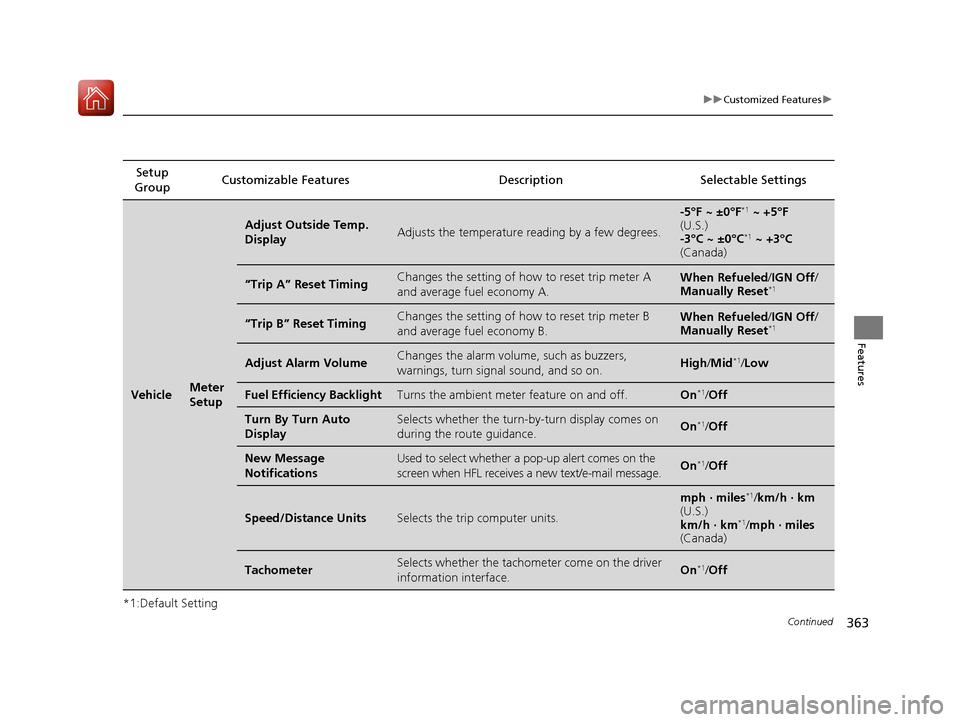
363
uuCustomized Features u
Continued
Features
*1:Default SettingSetup
Group Customizable Features Descri
ption Selectable Settings
VehicleMeter
Setup
Adjust Outside Temp.
DisplayAdjusts the temperature reading by a few degrees.
-5°F ~ ±0°F*1 ~ +5°F
(U.S.)
-3°C ~ ±0°C
*1 ~ +3°C
(Canada)
“Trip A” Reset TimingChanges the setting of how to reset trip meter A
and average fuel economy A.When Refueled /IGN Off /
Manually Reset*1
“Trip B” Reset TimingChanges the setting of how to reset trip meter B
and average fuel economy B.When Refueled /IGN Off /
Manually Reset*1
Adjust Alarm VolumeChanges the alarm volume , such as buzzers,
warnings, turn signal sound, and so on.High /Mid*1/Low
Fuel Efficiency BacklightTurns the ambient meter feature on and off.On*1/Off
Turn By Turn Auto
DisplaySelects whether the turn-b y-turn display comes on
during the route guidance.On*1/ Off
New Message
NotificationsUsed to select whether a pop-up alert comes on the
screen when HFL receives a new text/e-mail message.On*1/Off
Speed/Distance UnitsSelects the trip computer units.
mph · miles*1/ km/h · km
(U.S.)
km/h · km
*1/ mph · miles
(Canada)
TachometerSelects whether the tachometer come on the driver
information interface.On*1/ Off
17 CR-V-31TLA6000.book 363 ページ 2016年10月11日 火曜日 午後6時37分
Page 367 of 657
366
uuCustomized Features u
Features
Setup Group Customizabl e Features Description Selectable Settings
Vehicle
Power
Tailgate
Setup
*
Hand Free Access
FunctionChanges the setting to open power tailgate by a
swift forward in and out kicking motion under
the rear bumper.
On*1/Off
Keyless Open ModeChanges the keyless setting for when the power
tailgate opens.Anytime*1/When
Unlocked
Power Open By Outer
HandleChanges the setting to open power tailgate by
tailgate outer handle.Off (Manual only)*1/
On (Power/Manual)
Maintenance Info.Used to reset the engine oil life display when the
maintenance service has been performed.—
DefaultCancels/Resets all customized items in the Vehicle
settings group as default.Yes /No
Smartphone Apple CarPlay
Sets up the Apple CarPlay
TM connection.—
Android Auto Sets up the Android Auto
TM connection.—
* Not available on all models
17 CR-V-31TLA6000.book 366 ページ 2016年10月11日 火曜日 午後6時37分
Page 368 of 657
367
uuCustomized Features uDefaulting All the Settings
Features
Defaulting All the Settings
Reset all the menu and customized settings as the factory defaults.
1.Select .
2. Select Settings .
3. Select System.
4. Select the Others tab.
5. Select Factory Data Reset .
u A confirmation message appears on the
screen.
6. Select Next, then select Yes to reset the
settings.
7. Select Yes again to reset the settings.
u A confirmation message appears on the
screen. Select OK.
u After selecting OK, the system will
reboot.
Models with Display Audio
1 Defaulting All the Settings
When you transfer the vehicle to a third party, reset
all settings to default a nd delete all personal data.
If you perform Factory Data Reset , it will reset the
preinstalled apps to their factory default.
If you perform Factory Data Reset , you cannot use
the HondaLink ® because it becomes off line.
2 HondaLink® P. 310
17 CR-V-31TLA6000.book 367 ページ 2016年10月11日 火曜日 午後6時37分
Page 386 of 657

Continued385
uuBluetooth ® HandsFreeLink ®u HFL Menus
Features
Up to 20 speed dial numbers can be stored per phone.
To store a speed dial number:
1.Press the button or the button.
2. Rotate to select Speed Dial, then press
.
3. Rotate to select Add New, then press
.
4. Rotate to select a place to choose a
number from, then press .
From Call History :
u Select a number from the call history.
From Phonebook:
u Select a number from the connected cell
phone’s imported phonebook.
From Phone Number :
u Input the number manually.
5. When the speed dial is successfully stored,
you are asked to create a voice tag for the
number. Rotate to select Yes or No,
then press .
6. Using the button, follow the prompts to
say the name for the speed dial entry.
■Speed Dial1Speed Dial
When any preset button is pressed, the Speed Dial
screen is displayed.
When a voice tag is stored, you can press the
button and call the numbe r using voice commands.
17 CR-V-31TLA6000.book 385 ページ 2016年10月11日 火曜日 午後6時37分
Page 392 of 657
Continued391
uuBluetooth ® HandsFreeLink ®u HFL Menus
Features
■To make a call using a speed dial entry
1. Press the button or the button.
2. Rotate to select Speed Dial, then press
.
3. Rotate to select a number, then press
.
u Dialing starts automatically.1To make a call using a speed dial entry
When any preset button is pressed, the Speed Dial
screen is displayed.
Select Others to view another paired phone’s speed
dial list.
When a voice tag is stored, press the button and
call the number using voice commands.
2 Speed Dial P. 385
Any voice-tagged speed dial entry can be dialed by
voice from any screen. Press the button and
follow the prompts.
17 CR-V-31TLA6000.book 391 ページ 2016年10月11日 火曜日 午後6時37分


