2017 HONDA CR-V radio
[x] Cancel search: radioPage 346 of 657

345
uuCustomized Features u
Continued
Features
Audio Source Pop-Up
Cover Art
HD Radio Mode (FM)*
RDS INFO
TuneStart
SportsFlash Setup
Traffic & Weather Setup
Audio
Other
FM/AM
SXM*
Default
Bluetooth Device ListBluetooth
Multiple Channel Mix Preset
HD Radio Mode (AM)*
* Not available on all models
17 CR-V-31TLA6000.book 345 ページ 2016年10月11日 火曜日 午後6時37分
Page 357 of 657
356
uuCustomized Features u
Features
*1:Default SettingSetup
Group Customizable Features Desc
ription Selectable Settings
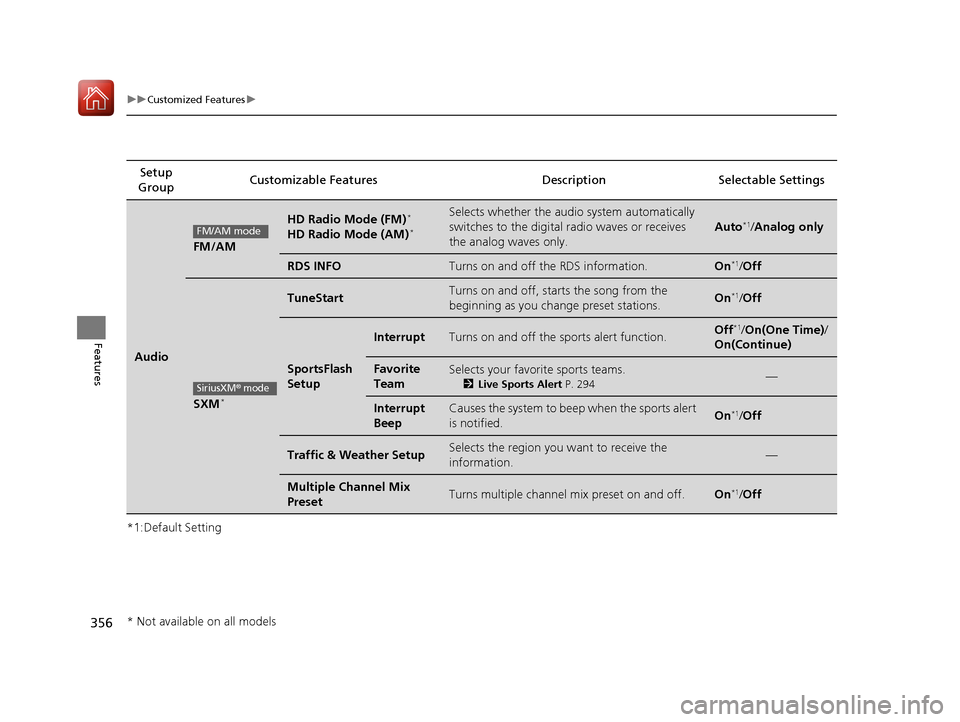
Audio
FM/AM
HD Radio Mode (FM)*
HD Radio Mode (AM)*
Selects whether the audio system automatically
switches to the digital radio waves or receives
the analog waves only.
Auto*1/Analog only
RDS INFOTurns on and off the RDS information.On*1/ Off
SXM*
TuneStartTurns on and off, starts the song from the
beginning as you change preset stations.On*1/Off
SportsFlash
Setup
InterruptTurns on and off the sports alert function.Off*1/On(One Time) /
On(Continue)
Favorite
TeamSelects your favorite sports teams.
2 Live Sports Alert P. 294—
Interrupt
BeepCauses the system to beep when the sports alert
is notified.On*1/ Off
Traffic & Weather SetupSelects the region you want to receive the
information.—
Multiple Channel Mix
PresetTurns multiple channel mix preset on and off.On*1/Off
FM/AM mode
SiriusXM® mode
* Not available on all models
17 CR-V-31TLA6000.book 356 ページ 2016年10月11日 火曜日 午後6時37分
Page 448 of 657

Continued447
uuWhen Driving uStarting the Engine
Driving
3. Press the ENGINE START/STOP button
without depressing the accelerator pedal.
You can turn the engine off when the vehicle is completely stopped.
1. Shift to
(P.
2. Press the ENGINE START/STOP button.
■Stopping the Engine
1Starting the Engine
Bring the smart entry remote close to the ENGINE
START/STOP button if the battery in the smart entry
remote is weak.
2 If the Smart Entry Remote Battery is Weak
P. 609
The engine may not start if the smart entry remote is
subjected to strong radio waves.
Do not hold the ENGINE START/STOP button to
start the engine.
If the engine does not start, wait at least 30 seconds
before trying again.
17 CR-V-31TLA6000.book 447 ページ 2016年10月11日 火曜日 午後6時37分
Page 497 of 657
uuWhen Driving uBlind spot information (BSI) System*
496
Driving
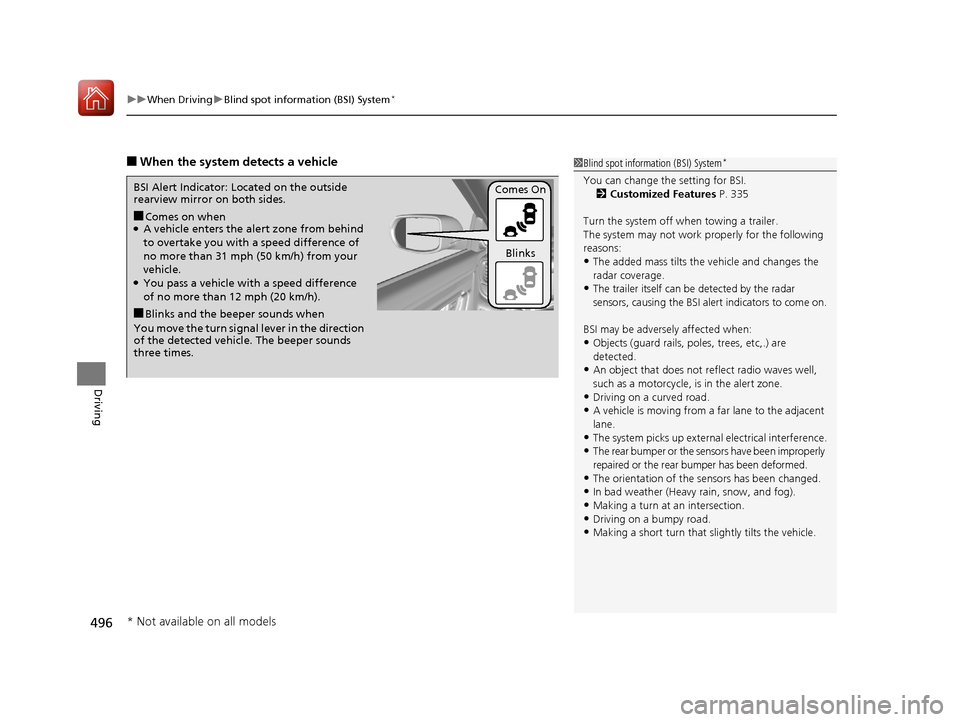
■When the system detects a vehicle1Blind spot inform ation (BSI) System*
You can change the setting for BSI.
2 Customized Features P. 335
Turn the system off when towing a trailer.
The system may not work properly for the following
reasons:
•The added mass tilts the vehicle and changes the
radar coverage.
•The trailer itself can be detected by the radar
sensors, causing the BSI al ert indicators to come on.
BSI may be adversel y affected when:
•Objects (guard rails, poles, trees, etc,.) are
detected.
•An object that does not re flect radio waves well,
such as a motorcycle, is in the alert zone.
•Driving on a curved road.
•A vehicle is moving from a far lane to the adjacent
lane.
•The system picks up external electrical interference.•The rear bumper or the sens ors have been improperly
repaired or the rear bu mper has been deformed.
•The orientation of the sensors has been changed.•In bad weather (Heavy rain, snow, and fog).
•Making a turn at an intersection.
•Driving on a bumpy road.•Making a short turn that slightly tilts the vehicle.
■Comes on when●A vehicle enters the ale rt zone from behind
to overtake you with a speed difference of
no more than 31 mph (50 km/h) from your
vehicle.
●You pass a vehicle with a speed difference
of no more than 12 mph (20 km/h).
BSI Alert Indicator: Located on the outside
rearview mirror on both sides.
■Blinks and the beeper sounds when
You move the turn signal lever in the direction
of the detected vehicle. The beeper sounds
three times. Comes On
Blinks
* Not available on all models
17 CR-V-31TLA6000.book 496 ページ 2016年10月11日 火曜日 午後6時37分
Page 527 of 657

uuParking Your Vehicle uCross Traffic Monitor*
526
Driving
The system activates when:
• The power mode is in ON.
• The Cross Traffic Monitor system is turned
on.
2 Cross Traffic Monitor On and Off P. 528
•The transmission is in (R.
• Your vehicle is moving at 3 mph (5 km/h) or
lower.
When a vehicle is detected approaching from a rear corner, Cross Traffic Monitor
alerts you with a buzzer and a displayed warning.
The system will not detect a vehicle that approaches from directly behind your
vehicle, nor will it provide alerts about a detected vehicle when it moves directly
behind your vehicle.
The system does not detect or provide aler ts for a vehicle that is moving away from
your vehicle, and it may not detect or ale rt for pedestrians, bicycles, or stationary
objects.
■How the System Works1 Cross Traffic Monitor*
Cross Traffic Monitor may not detect an approaching
vehicle, or may delay aler ting you under the following
conditions:
•An obstacle, such as a nother vehicle and a wall,
near your vehicle’s rear bumper, is blocking the
radar sensor’s scope.
•Your vehicle is moving at the speed of about 3 mph
(5 km/h) or higher.
•A vehicle is approaching at the speed other than
between about 6 mph (10 km/h) and 16 mph (25
km/h).
•The system picks up external interference such as
other radar sensors from an other vehicle or strong
radio wave transmitted fr om a facility nearby.
•Either corner of the rear bumper is covered with
snow, ice, mud or dirt.
•When there is bad weather.
•Your vehicle is on an incline.
•Your vehicle is tilt ed due to a heavy load in the rear.
•Your vehicle is reversing towards a wall, a pole, a
vehicle, and so on.
•The rear bumper or the sensors have been
improperly repaired or the rear bumper has been
deformed. Have your vehi cle checked by a dealer.
For proper operation, always keep the rear bumper
corner area clean.
Do not cover the rear bumper corner area with labels
or stickers of any kind.
Radar sensors:
Underneath the rear bumper
corners
* Not available on all models
17 CR-V-31TLA6000.book 526 ページ 2016年10月11日 火曜日 午後6時37分
Page 634 of 657

633
Information
This chapter includes your vehicle's specifications, locations of identification numbers, and other
information required by regulation.
Specifications.................................... 634
Identification Numbers Vehicle Identification Number (VIN), Engine Number, and Transmission
Number ......................................... 636
Devices that Emit Radio Waves ....... 638
Reporting Safety Defects ................. 639Emissions Testing
Testing of Readiness Codes.............. 640
Warranty Coverages ........................ 642
Authorized Manuals ......................... 644
Customer Service Information ......... 645
17 CR-V-31TLA6000.book 633 ページ 2016年10月11日 火曜日 午後6時37分
Page 639 of 657

638
Information
Devices that Emit Radio Waves
The following products and systems on your vehicle emit radio waves when in operation.
Each of the above complies with the appropriate requirements or the required
standards of FCC (Federal Communications Commission) and Industry Canada
Standard, described below:
As required by the FCC:
This device complies with Part 15 of the FCC rules. Operation is
subject to the following two cond itions: (1) This device may not
cause harmful interference, and (2 ) this device must accept any
interference received, including interference that may cause
undesired operation.
Changes or modifications not expressly approved by the party
responsible for compli ance could void the user's authority to
operate the equipment.
This device complies with industry Canada licence-exempt RSS standard(s).
Operation is subject to the following two conditions: (1) this device may not cause
interference, and (2) this device must acce pt any interference, including interference
that may cause undesired operation of the device.
Audio System
Bluetooth ® Audio
Bluetooth ® HandsFreeLink ®
HomeLink® Universal Transceiver*
HondaLink*
Immobilizer System
Remote Transmitter
Smart Entry System*
Collision Mitigation Braking SystemTM *
* Not available on all models
17 CR-V-31TLA6000.book 638 ページ 2016年10月11日 火曜日 午後6時37分
Page 648 of 657

Index
647
Index
Index
Numbers
4WD.......................................................... 500
A
ABS (Anti-lock Brake System) .................. 512
Accessories and Modifications ................ 598
Accessory Power Sockets ......................... 212
Adaptive Cruise Control (ACC) with Low Speed Follow (LSF) ........................... 97, 465
Adding the Coolant ................................. 562
Additives Coolant .......................................... 561, 563
Engine Oil ............................................... 554
Washer ................................................... 567
Additives, Engine Oil ............................... 554
Adjusting Armrest .................................................. 202
Front Seats.............................................. 194
Head Restraints ....................................... 198
Mirrors.................................................... 192
Rear Seats ............................................... 201
Steering Wheel ....................................... 191
Temperature ................................... 120, 128
Adjusting the Sound ........................ 240, 278
Agile Handling Assist ............................... 494
Air Conditioning System (Climate
Control System) ...................................... 221
Changing the Mode................................ 222
Defrosting the Windshield and
Windows .............................................. 222 Dust and Pollen Filter ............................... 592
Recirculation/Fresh Air Mode ................... 222
Sensor ..................................................... 225
Synchronized Mode ................................. 224
Using Automatic Climate Control ............ 221
Air Pressure ....................................... 580, 635
Airbags ........................................................ 49
Advanced Airbags ..................................... 55
Airbag Care ............................................... 62
Event Data Recorder .................................... 0
Front Airbags (SRS) .................................... 52
Indicator .............................................. 60, 85
Passenger Airbag Off Indicator .................. 61
Sensors ...................................................... 49
Side Airbags .............................................. 56
Side Curtain Airbags .................................. 58
All-Wheel Drive (AWD) ............................ 500
AM/FM Radio .................................... 242, 285
Android Auto
TM........................................ 321
Anti-lock Brake System (ABS) .................. 512
Indicator .................................................... 85
Apple CarPlay
TM........................................ 318
Armrest ..................................................... 202
Audio Remote Controls ............................ 231
Audio System ............................ 228, 235, 256
Adjusting the Sound ........................ 240, 278
AM/FM Radio .................................. 242, 285
Android Auto
TM....................................... 321
Apple CarPlayTM....................................... 318
Audio/Information Screen ................ 236, 257
Changing the Home Screen Icon Layout .. 261 Changing the Screen Interface ................ 275
Closing Apps ........................................... 277
Customizing the Meter............................ 262
Display Setup .................................. 241, 279
Error Messages ........................................ 325
General Information ................................ 330
Home Screen........................................... 268
HondaLink
®............................................. 310
How to use Siri ® Eyes Free .............. 255, 317
iPod ................................................ 244, 296
Limitations for Manual Operation ............ 280
Menu Customize ..................................... 276
MP3/WMA/AAC .............................. 249, 305
Pandora ®......................................... 247, 303
Playing Bluetooth ® Audio ................ 252, 308
Playing SiriusXM ® Radio .......................... 289
Reactivating ............................................ 230
Recommended Devices............................ 331
Remote Controls ..................................... 231
Security Code .......................................... 230
Selecting an Audio Source ....................... 280
Song By Voice
TM (SBV) ............................. 299
Status Area ............................................. 274
Theft Protection ...................................... 230
USB Flash Drives ...................... 249, 305, 331
USB Port(s) .............................................. 229
Voice Control Operation.......................... 281
Wallpaper Setup.............................. 238, 266
Wi-Fi Connection .................................... 315
Audio/Information Screen ............... 236, 257
Authorized Manuals ................................ 644
17 CR-V-31TLA6000.book 647 ページ 2016年10月11日 火曜日 午後6時37分