Page 268 of 657

Continued267
uuAudio System Basic Operation uAudio/Information Screen
Features
■Select wallpaper
1. Select Settings .
2. Select Clock.
3. Select Clock/Wallpaper Type , select Next, then open the Wallpaper tab.
u The screen changes to the wallpaper list.
4. Select a desired wallpaper.
u The preview is displayed on the left side on the screen.
u The pop-up menu appears on the screen.
5. Select Set.
u The display will return to the wallpaper list.
■To view wallpaper once it is set
1. Select .
2. Select Info.
3. Select MENU .
4. Select Clock/Wallpaper .
■Delete wallpaper
1. Select Settings .
2. Select Clock.
3. Select Clock/Wallpaper Type , select Next, then open the Wallpaper tab.
u The screen changes to the wallpaper list.
4. Select a wallpaper that you want to delete.
u The preview is displayed on the left side on the screen.
u The pop-up menu appears on the screen.
5. Select Delete .
u A confirmation message appears on the screen.
6. Select Yes to delete completely.
u The display will return to the wallpaper list.
1Wallpaper Setup
From the pop-up menu, select Preview to see a
preview at full-size screen.
To go back to the previous screen, select OK, or
select .
When the file size is large, it takes a while to be
previewed.
To delete all wallpapers you add, select Delete All,
then Yes.
17 CR-V-31TLA6000.book 267 ページ 2016年10月11日 火曜日 午後6時37分
Page 276 of 657
Continued275
uuAudio System Basic Operation uAudio/Information Screen
Features
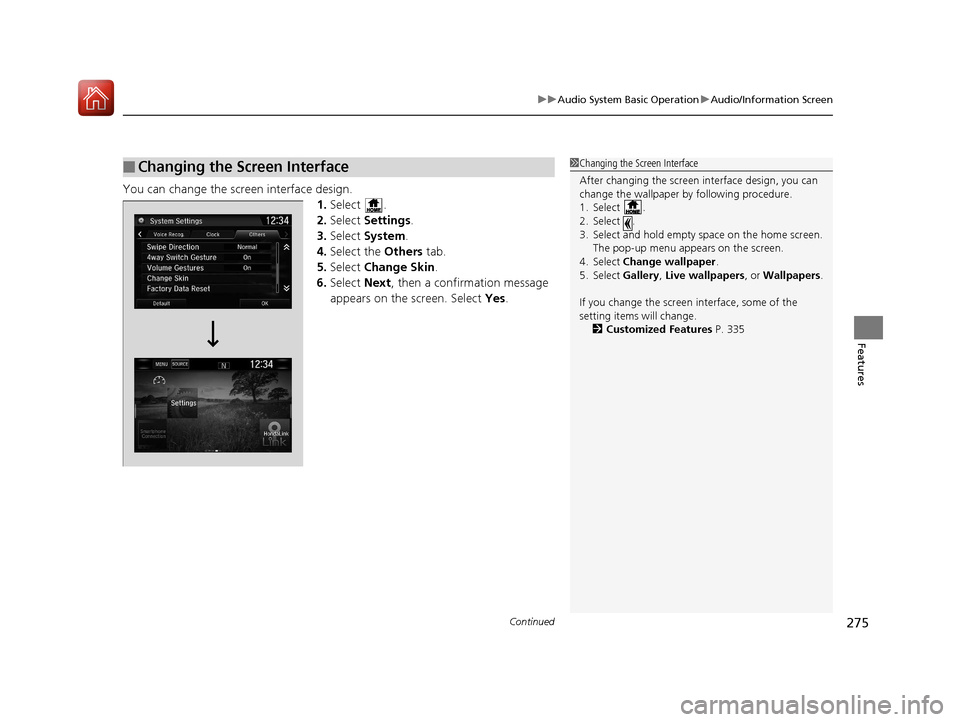
You can change the screen interface design.
1.Select .
2. Select Settings .
3. Select System.
4. Select the Others tab.
5. Select Change Skin.
6. Select Next, then a confirmation message
appears on the screen. Select Yes.
■Changing the Screen Interface1Changing the Screen Interface
After changing the screen interface design, you can
change the wallpaper by following procedure.
1. Select .
2. Select .
3. Select and hold empty space on the home screen.
The pop-up menu appears on the screen.
4. Select Change wallpaper .
5. Select Gallery , Live wallpapers , or Wallpapers.
If you change the screen interface, some of the
setting items will change.
2 Customized Features P. 335
17 CR-V-31TLA6000.book 275 ページ 2016年10月11日 火曜日 午後6時37分
Page 338 of 657
337
uuCustomized Features u
Continued
Features
Display ChangeAudio
Wallpaper
WallpaperSelect
Import
Delete
Color ThemeBlue
Red
Amber
Violet
Language
Clock Format12h
24h
License
Bluegreen
17 CR-V-31TLA6000.book 337 ページ 2016年10月11日 火曜日 午後6時37分
Page 341 of 657
340
uuCustomized Features u
Features
*1:Default Setting
Setup
GroupCustomizable FeaturesDescriptionSelectable Settings
Settings Display Change
Changes the display type. Audio
*1/Wallpaper
Wallpaper Select
Changes the wallpaper type. Clock*1/
Image 1/ Image 2/
Image 3
Import Imports an image file for a new wallpaper.
2
Wallpaper Setup P. 238—
Delete Deletes an image file for a wallpaper. Image 1
*1/Image 2/Image 3
Color Theme Changes the background color of the audio/
information screen. Blue*1/
Red/ Amber /Violet/
Bluegreen
Language Changes the display language. English
*1/French /Spanish
Clock Format Selects the digital clock display from 12H to
24H. 12h
*1/
24h
License Shows the legal information. —
17 CR-V-31TLA6000.book 340 ページ 2016年10月11日 火曜日 午後6時37分
Page 344 of 657
343
uuCustomized Features u
Continued
Features
■Customization flow
Models with Display Audio
Select Settings .Clock
Wallpaper
Others
Clock/Wallpaper Type*1/Clock Type*2
Clock Adjustment
Clock Format
ClockClock
Auto Time Zone*
Manual Time Zone*
Auto Daylight Saving Time
Clock Display
Overlay Clock Location
Clock Reset
Info Screen Preference
Clock
Wallpaper
Others
Clock/Wallpaper Type*1/Clock Type*2
Clock Adjustment
Clock Format
Clock
Auto Time Zone*
Manual Time Zone*
Auto Daylight Saving Time
Clock Display
Overlay Clock Location
Clock Reset
Info Screen Preference
Info
HondaLinkDiagnostic & Location Data
HondaLinkDiagnostic & Location Data
*1 : Does not appear when you chan ge the screen interface design.
*2 : Appears only when you change the screen interface design.
Default
Default
* Not available on all models
17 CR-V-31TLA6000.book 343 ページ 2016年10月11日 火曜日 午後6時37分
Page 348 of 657
347
uuCustomized Features u
Continued
Features
Voice Recog.
Voice Prompt
Voice Recog. Volume
Song by Voice
Song by Voice Phonetic Modification
Phonebook Phonetic Modification
Automatic Phone Sync
ClockClock/Wallpaper Type*1/
Clock Type*2
Clock Adjustment
Clock Format
Auto Time Zone*
Manual Time Zone*
Auto Daylight Saving Time
Clock Display
Overlay Clock Location
Clock Reset
Clock
Wallpaper
One Press Voice Operation
*1 : Does not appear when you chan ge the screen interface design.
*2 : Appears only when you change the screen interface design.
* Not available on all models
17 CR-V-31TLA6000.book 347 ページ 2016年10月11日 火曜日 午後6時37分
Page 352 of 657
351
uuCustomized Features u
Continued
Features
■List of customizable options
*1:Does not appear when you chan ge the screen interface design.
*2:Appears only when you change the screen interface design.
Setup Group Customizable Features
Description Selectable Settings
Clock
Clock
Clock/
Wallpaper
Type
*1/Clock
Type*2
Clock
See Info on P. 352
Wallpaper
Clock Adjustment
Auto Time Zone*
Manual Time Zone*
Auto Daylight Saving Time
Clock Format
Clock Display
Overlay Clock Location
Clock Reset
HondaLinkDiagnostic & Location Data
OthersInfo Screen Preference
DefaultCancels/Resets all customized items in the
Clock settings group as default.Yes/No
Models with Display Audio
* Not available on all models
17 CR-V-31TLA6000.book 351 ページ 2016年10月11日 火曜日 午後6時37分
Page 353 of 657

352
uuCustomized Features u
Features
*1:Default Setting
*2:Does not appear when you change the screen interface design.
*3:Appears only when you change the screen interface design.Setup
Group Customizable Features Desc
ription Selectable Settings
Info Clock Clock/
Wallpaper
Type
*2/
Clock
Type
*3
Clock Changes the clock display type. Analog
/Digital*1/
Small Digital /Off
Wallpaper
●Changes the wallpaper type.●Imports an image file for a new wallpaper.●Deletes an image file for a wallpaper. Blank
/Galaxy
*1/
Metallic /Time Zone
Clock Adjustment Adjusts Clock. —
Auto Time Zone
*Automatically adjusts th e clock when driving
through different time zones. On*1/
Off
Manual Time Zone
*Changes the time zone manually. —
Auto Daylight Saving Time Select
On to have the GPS automatically adjust
the clock to daylight savings time. Select Off to
cancel this function. On
*1/
Off
Clock Format Selects the digital clock display from 12H to 24H. 12H
*1/24H
Clock Display Selects whether the clock display comes on. On
*1/Off
Overlay Clock Location Changes the clock display layout. Upper Right
*1/
Upper
Left/ Lower Right /
Lower Left /Off
Clock Reset Resets the clock settings to the factory default. Yes/No
* Not available on all models
17 CR-V-31TLA6000.book 352 ページ 2016年10月11日 火曜日 午後6時37分