2017 HONDA CR-V tow
[x] Cancel search: towPage 181 of 657

uuOperating the Switches Around the Steering Wheel uAuto High-Beam System*
180
Controls
■To manually cancel the system temporarily
You can cancel the operation when you manually change the headlights to high
beams. Push the lever forward until you hear a click, or lightly pull the lever towards
you to flash high beams. The auto hi gh-beam system indicator goes off.
If you want the auto high-beam system ope ration to resume at once, pull the lever
towards you.
Disable the system when the vehicle is parked
with the power mode in ON and the light
switch is in the AUTO position.
To disable the system: Pull the light switch
lever towards you and hold it for 40 seconds.
The auto high-beam indica tor in the meter will
blink twice.
To enable the system: Pull the light switch
lever towards you and hold it for 30 seconds.
The auto high-beam indica tor in the meter will
blink once.
■To Disable the System
1 To Operate the System
If the message appears:
•Park your vehicle in a sa fe place, and clean the
windshield. If the message does not disappear after
you have cleaned the winds hield and driven for a
while, have your vehicle checked by a dealer.
1 To Disable the System
The auto high-beam system will remain in the
selected disabled or enab led setting each time you
start the engine.
17 CR-V-31TLA6000.book 180 ページ 2016年10月11日 火曜日 午後6時37分
Page 183 of 657

182
uuOperating the Switches Around the Steering Wheel uWipers and Washers
Controls
Wipers and Washers
The windshield wipers and washers can be
used when the ignition switch is in ON
(w*1.
■MIST
The wipers run at high speed until you release
the lever.
■Wiper switch (OFF, INT*2/AUTO*3, LO,
HI)
Move the lever up or down to change the
wiper settings.
■Adjusting wiper operation*
Turn the adjustment ring to adjust the wiper
operation.
■Washer
Sprays while you pull the lever toward you.
When you release the lever for more than one
second, the spray stops, the wipers sweep two
or three more times to clear the windshield,
then stop.
*1: Models with the smart entry system have an ENGINE START/STOP button
instead of an ignition switch.
*2: Models with manual intermittent operation
*3: Models with automati c intermittent operation
■Windshield Wipers/Washers1Wipers and Washers
NOTICE
Do not use the wipers when the windshield is dry.
The windshield will get sc ratched, or the rubber
blades will get damaged.
NOTICE
In cold weather, the blades may freeze to the
windshield.
Operating the wipers in th is condition may damage
the wipers. Use the defogger to warm the
windshield, then turn the wipers on.
Turn the washers off if no washer fluid comes out.
The pump may get damaged.
If the vehicle speeds up while the wipers are
operating intermittently, the length of the wipe
interval shortens. When the vehicle starts moving, the
wipers make a single sweep.
When the vehicle speeds up, the wiper operation’s
shortest delay setting ( ) and the LO setting become
the same.
If the wiper stops operating due to an obstacle such
as the build-up of snow, pa rk the vehicle in a safe
place. Rotate the wiper switch to OFF, and turn the
ignition switch to ACCESSORY
( q or LOCK ( 0*1,
then remove the obstacle.
Models with intermittent time adjustment ring
Intermittent Time
Adjustment Ring*
MIST
INT
*2/AUTO*3
OFF
LO : Low speed wipe Pull to
use
washer.
HI: High speed wipe
Lower speed, fewer sweeps
Higher speed, more sweeps
* Not available on all models
17 CR-V-31TLA6000.book 182 ページ 2016年10月11日 火曜日 午後6時37分
Page 210 of 657
209
uuInterior Lights/Interior Convenience Items uInterior Convenience Items
Continued
Controls
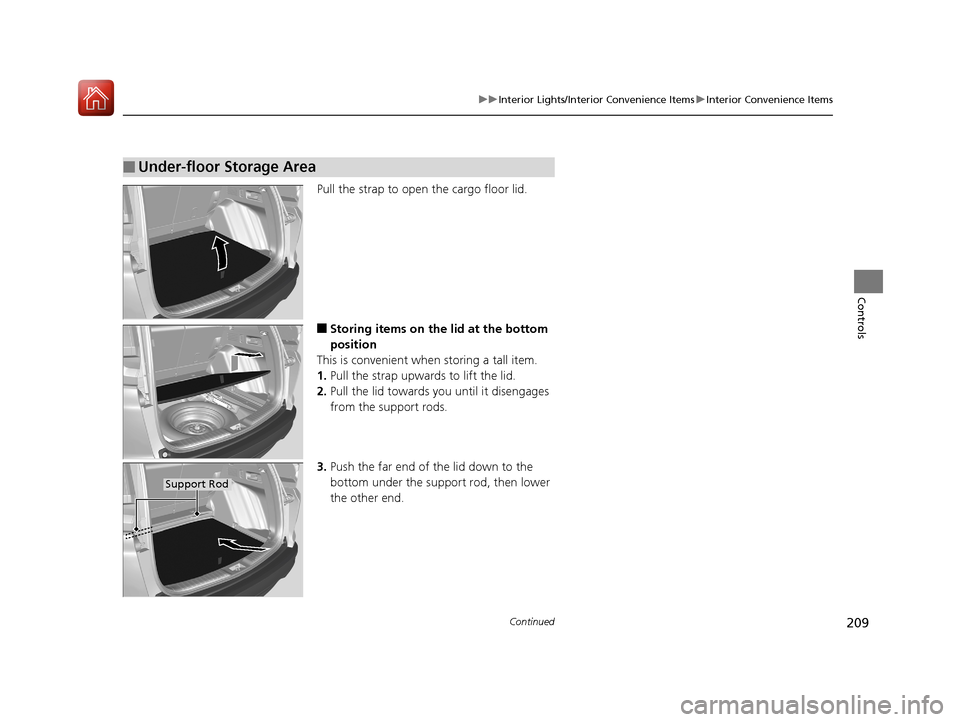
Pull the strap to open the cargo floor lid.
■Storing items on the lid at the bottom
position
This is convenient when storing a tall item.
1. Pull the strap upwards to lift the lid.
2. Pull the lid towards you until it disengages
from the support rods.
3. Push the far end of the lid down to the
bottom under the support rod, then lower
the other end.
■Under-floor Storage Area
Support Rod
17 CR-V-31TLA6000.book 209 ページ 2016年10月11日 火曜日 午後6時37分
Page 432 of 657

431
Driving
This chapter discusses driving, refueling, and information on items such as accessories.
Before Driving................................... 432
Towing a Trailer Towing Preparation .......................... 437
Driving Safely with a Trailer .............. 440
Towing Your Vehicle ........................ 441
Off-Highway Driving Guidelines
General Information ......................... 442
Important Safety Precautions............ 442
Avoiding Trouble ............................. 443
When Driving
Starting the Engine .......................... 444
Starting the Engine .......................... 446
Precautions While Driving................. 451
Models without smart entry system
Models with smart entry system
Continuously Variable Transmission... 452
Shifting ............................................ 453
ECON Button ................................... 455
Cruise Control
*............................... 456
Front Sensor Camera*..................... 463
Adaptive Cruise Control (ACC) with Low
Speed Follow (LSF)
*....................... 465Road Departure Mitigation (RDM) System*..................................... 480Lane Keeping Assist System (LKAS)*.. 484Vehicle Stability Assist (VSA®), aka Electronic
Stability Control (ESC), System............. 492
LaneWatchTM*.................................. 498
Real Time AWD with Intelligent Control System
TM*...................................... 500
Tire Pressure Monitoring System (TPMS) ... 501Tire Pressure Monitoring System (TPMS) - Required Federal Explanation ......... 504
Braking Brake System ................................... 506
Anti-lock Brake System (ABS) ........... 512
Brake Assist System ......................... 513
Collision Mitigation Braking System
TM
(CMBSTM)*..................................... 514
Parking Your Vehicle When Stopped ................................ 524
Multi-View Rear Camera .................. 529
Refueling ........................................... 531
Fuel Economy and CO
2 Emissions .... 534
Turbo Engine Vehicle*...................... 535
* Not available on all models
17 CR-V-31TLA6000.book 431 ページ 2016年10月11日 火曜日 午後6時37分
Page 434 of 657

Continued433
uuBefore Driving uDriving Preparation
Driving
• Store or secure all items on board properly.
u Carrying too much cargo, or improperly storing it, can affect your vehicle's
handling, stability, sto pping distance, and tires, and make it unsafe.
2Maximum Load Limit P. 435
•Do not pile items higher than the seat height.
u They can block your view and may be thrown forward in the event of sudden
braking.
• Do not place anything in the front seat footwells. Make sure to secure the floor
mat.
u An object or unsecured floor mat can in terfere with your brake and accelerator
pedal operation while driving.
• If you have any animals on board, do not let them move around in the vehicle.
u They may interfere with driv ing and a crash could occur.
• Securely close and lock al l doors and the tailgate.
2Locking/Unlocking the Doors from the Inside P. 144
•Adjust your seating position properly.
u Adjust the head restraint, too.
2Adjusting the Seats P. 194
2 Adjusting the Front Head Restraints P. 198
•Adjust the mirrors and steering wh eel properly for your driving.
u Adjust them while sitting in the proper driving position.
2 Adjusting the Steering Wheel P. 191
2 Adjusting the Mirrors P. 192
■Interior Checks1Interior Checks
The headlight aim is set by the factory, and does not
need to be adjusted. Howeve r, if you regularly carry
heavy items in the cargo area or tow a trailer, have
the aiming readjusted at a dealer or by a qualified
technician.
17 CR-V-31TLA6000.book 433 ページ 2016年10月11日 火曜日 午後6時37分
Page 436 of 657

435
uuBefore Driving uMaximum Load Limit
Continued
Driving
Maximum Load Limit
The maximum load for your vehicle is 850 lbs (385 kg). See the Tire
and Loading Information label atta ched to the driver’s doorjamb.
This figure includes the total weig ht of all occupants, cargo, and
accessories, and the tongue load if you are towing a trailer.
Steps for Determining Correct Load Limit -
(1) Locate the statement “The comb ined weight of occupants and
cargo should never exceed XXX kg or XXX lbs.” on your
vehicle’s placard.
(2) Determine the combined weight of the driver and passengers
that will be riding in your vehicle.
(3) Subtract the combined weight of the driver and passengers
from XXX kg or XXX lbs.
(4) The resulting figure equals the available amount of cargo and
luggage load capacity. For example, if the “XXX” amount
equals 1,400 lbs. and there will be five 150 lb. passengers in
your vehicle, the am ount of available cargo and luggage load
capacity is 650 lbs.
(1,400 - 750 (5 x 150) = 650 lbs.)1 Maximum Load Limit
Gross Vehicle Weight Rating (GVWR):
The maximum allowable weight of the vehicle, all
occupants, all a ccessories, all cargo, and the tongue
load. 2 Specifications P. 634
Gross Axle Weight Rating (GAWR):
The maximum allowable weight of the vehicle axle. 2 Specifications P. 634
3WARNING
Overloading or improper loading
can affect handling and stability
and cause a crash in which you
can be hurt or killed.
Follow all load limits and other
loading guidelines in this manual.Label Example
17 CR-V-31TLA6000.book 435 ページ 2016年10月11日 火曜日 午後6時37分
Page 437 of 657

436
uuBefore Driving uMaximum Load Limit
Driving
(5) Determine the combined weight of luggage and cargo being
loaded on the vehicle. That we ight may not safely exceed the
available cargo and luggage load capacity calculated in step 4.
(6) If your vehicle will be towing a tra iler, load from your trailer will
be transferred to your vehicl e. Consult this manual to
determine how this reduces the available cargo and luggage
load capacity of your vehicle.
In addition, the total weight of the vehicle, all occupants,
accessories, cargo, and trailer tongue load must not exceed the
Gross Vehicle Weight Rating (GVW R) or the Gross Axle Weight
Rating (GAWR). Both are on a label on the driver’s doorjamb.
Load Limits Example
Example1
Max Load 850 lbs
(385 kg) Passenger Weight
150 lbs x 2 = 300 lbs (68 kg x 2 = 136 kg) Cargo Weight
550 lbs
(249 kg)
Example2
Max Load 850 lbs
(385 kg) Passenger Weight
150 lbs x 5 = 750 lbs (68 kg x 5 = 340 kg) Cargo Weight
100 lbs
(45 kg)
17 CR-V-31TLA6000.book 436 ページ 2016年10月11日 火曜日 午後6時37分
Page 438 of 657

437Continued
Driving
Towing a Trailer
Towing Preparation
Your vehicle can tow a trailer if you carefully observe the load limits, use the proper
equipment, and follow the towing guidelin es. Check the load limits before driving.
■Total trailer weight
Maximum allowable weight of the trailer,
cargo, and everything in or on it must not
exceed 1,500 lbs (680 kg). Towing loads in
excess of this can seriously affect vehicle
handling and performance and can damage
the engine and drivetrain.
■Tongue load
The weight of the tongue with a fully loaded
trailer on the hitch should be approximately
10% of the total trailer weight.
• Excessive tongue load reduces front tire
traction and steering control. Too little
tongue load can make the trailer unstable
and cause it to sway.
• To achieve a proper tongue load, start by
loading 60% of the load toward the front
of the trailer and 40% toward the rear.
Readjust the lo ad as needed.
■Towing Load Limits1Towing Load Limits
Check if all loads are within limits at a public scale.
If a public scale is not available, add the estimated
weight of your cargo load to the weight of your
trailer (as quoted by th e manufacturer), and the
tongue load.
Break-in Period
Avoid towing a trailer duri ng your vehicle's first 600
miles (1,000 km).
Never exceed the gross weight ratings.
Gross weight information 2 Specifications P. 634
3WARNING
Exceeding any load limit or improperly
loading your vehicle and trailer can cause a
crash in which you can be seriously hurt or
killed.
Check the loading of your vehicle and
trailer carefully before starting to drive.
Total Load
To ngue LoadTongue Load
17 CR-V-31TLA6000.book 437 ページ 2016年10月11日 火曜日 午後6時37分