2017 HONDA CR-V wheel
[x] Cancel search: wheelPage 606 of 657

Continued605
uuIf a Tire Goes Flat uChanging a Flat Tire
Handling the Unexpected
1. Remove the wheel nuts and flat tire.
2. Wipe the mounting surfaces of the wheel
with a clean cloth.
3. Mount the compact spare tire.
4. Screw the wheel nuts until they touch the
lips around the mounti ng holes, then stop
rotating.
5. Lower the vehicle and remove the jack.
Tighten the wheel nuts in the order
indicated in the image. Go around,
tightening the nuts, two to three times in
this order.
Wheel nut torque:
80 lbf∙ft (108 N∙m, 11 kgf∙m)
■Replacing the Flat Tire1Replacing the Flat Tire
Do not over tighten the wheel nuts by applying extra
torque using your foot or a pipe.
17 CR-V-31TLA6000.book 605 ページ 2016年10月11日 火曜日 午後6時37分
Page 607 of 657
uuIf a Tire Goes Flat uChanging a Flat Tire
606
Handling the Unexpected
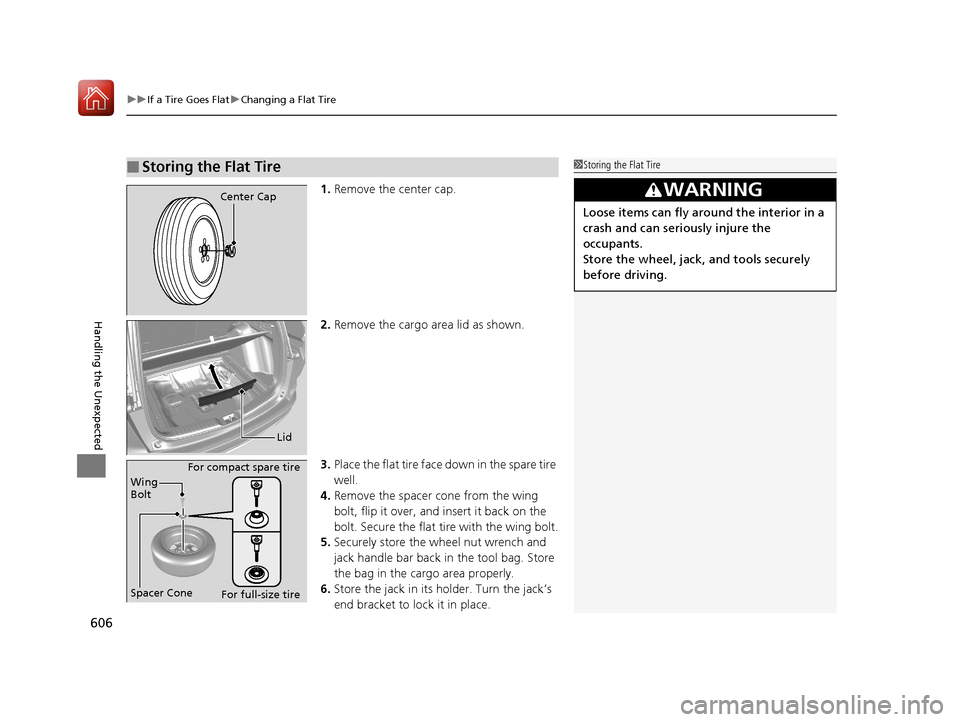
1. Remove the center cap.
2. Remove the cargo area lid as shown.
3. Place the flat tire face down in the spare tire
well.
4. Remove the spacer cone from the wing
bolt, flip it over, and insert it back on the
bolt. Secure the flat tire with the wing bolt.
5. Securely store the wheel nut wrench and
jack handle bar back in the tool bag. Store
the bag in the cargo area properly.
6. Store the jack in its holder. Turn the jack’s
end bracket to lock it in place.
■Storing the Flat Tire1Storing the Flat Tire
3WARNING
Loose items can fly around the interior in a
crash and can seriously injure the
occupants.
Store the wheel, jack, and tools securely
before driving.
Center Cap
Lid
Spacer Cone Wing
Bolt For compact spare tire
For full-size tire
17 CR-V-31TLA6000.book 606 ページ 2016年10月11日 火曜日 午後6時37分
Page 611 of 657

610
uuEngine Does Not StartuEmergency Engine Stop
Handling the Unexpected
Emergency Engine Stop
The ENGINE START/STOP button may be used to st op the engine due to an
emergency situation even while driving. If you must stop the engine, do either of the
following operations:
• Press and hold the ENGINE START/STOP button for about two seconds.
• Firmly press the ENGINE START/STOP button three times.
The steering wheel will not lock. However, because turning off the engine disables
the power assist the engine provides to the steering and braking systems, it will
require significantly more physical effort an d time to steer and slow the vehicle. Use
both feet on the brake pedal to slow down the vehicle and stop immediately in a
safe place.
The power mode is in ACCESSORY when the engine is stopped.
To change the mode to VEHICLE OFF, change the shift lever to
(P after the vehicle
comes to a complete stop.
Then press the ENGINE START/STOP button twice without depressing the brake
pedal.
Models with smart entry system
1 Emergency Engine Stop
Do not press the button while driving unless it is
absolutely necessary for th e engine to be switched
off.
Canadian models
17 CR-V-31TLA6000.book 610 ページ 2016年10月11日 火曜日 午後6時37分
Page 624 of 657

623
uuIndicator, Coming On/Blinking uIf the Electric Power Steering (EPS) System Indicator Comes On
Handling the Unexpected
If the Electric Power Steeri ng (EPS) System Indicator
Comes On
■Reasons for the indicator to come on
• Comes on when there is a problem with the EPS system.
• If you depress the accelerator pedal repeatedly to increase the engine
speed while the engine is idling, the indicator comes on, and
sometimes the steering wheel becomes harder to operate.
• Comes on when EPS steering angle center point memory is lost. This
could be due to a number of problems to include: battery disconnect,
main fuse blow, low battery causing reset of the EPS system, wire
damage to EPS harness. Vehicle Stability Assist (VSA ®), VSA® OFF,
Collision Mitigation Braking System
TM (CMBSTM)*, and low tire
pressure/TPMS* indicators also come on with EPS indicator.
The Drive Carefully Systems Initializing... message appears on the
driver information interface.
■What to do when th e indicator comes on
Stop the vehicle in a safe place and restart the engine.
If the indicator comes on and stays on, immediately have your vehicle
inspected by a dealer.
• If the EPS indicator, VSA ® indicator, VSA® OFF indicator, CMBS
TM
indicator*, and low tire pressure/TPMS indicator* come on
simultaneously, you need to ca librate the VSA and EPS systems.
Drive at a speed of more than 12 mph (20 km/h) for less than 10
seconds to calibrate the VSA and EPS systems.
If the indicators come on and stay on, park your vehicle in a safe
place, turn off and restart the engine, then repeat the above
operation.
If the indicators still come on an d stay on, immediately have your
vehicle inspected by a dealer.
Models with driver information interface
* Not available on all models
17 CR-V-31TLA6000.book 623 ページ 2016年10月11日 火曜日 午後6時37分
Page 628 of 657

627
uuFuses uFuse Locations
Handling the Unexpected
Circuit ProtectedAmps
18Front Driver's Lumber
support*(10 A)
19Moonroof*(20 A)
20Starter10 A
21ACG10 A
22Daytime Running Light10 A
23
Steering Wheel Heater*1
Handsfree Power Tailgate
Sensor
*(10 A)
24Option5 A
25Driver's Door Lock(10 A)
26Passenger's Side Door Unlock10 A
27Rear Passenger's Side Power Window20 A
28Driver's Power Window20 A
29Front Accessory Power
Socket20 A
30Smart Entry*1
STS*210 A5 A
31Driver's Power Seat Reclining*(20 A)
32Front Seat Heater*(20 A)
33Driver's Power Seat Sliding*(20 A)
34ABS/VSA10 A
35SRS10 A
36HAC Option*20 A
*1:Canadian models with steering heater
*2:Models without smart entry system
*3:Canadian models with panoramic roof
*4:Canadian models
37Trailer*15 A
38Driver's Side Door Lock10 A
39Driver's Door Unlock(10 A)
aPower Tailgate Closer*(20 A)
bPassenger's Power Seat
Sliding*(20 A)
cPassenger's Power Seat Reclining*(20 A)
dPanorama Shade Motor*3(20 A)
eRear Blower(20 A)
fEPT L(20 A)
gEPT R(20 A)
hAccessory Power Socket (Cargo Area)*4(20 A)
Circuit ProtectedAmps
* Not available on all models
17 CR-V-31TLA6000.book 627 ページ 2016年10月11日 火曜日 午後6時37分
Page 630 of 657

629
Handling the Unexpected
Emergency Towing
Call a professional towing service if you need to tow your vehicle.
■Flat bed equipment
The operator loads your vehicle on the back of a truck.
This is the best way to transport your vehicle.
■Wheel lift equipment
The tow truck uses two pivoti ng arms that go under the front tires and lift them off
the ground. The rear tires remain on the ground. This is an acceptable way to
tow your vehicle.
1 Emergency Towing
NOTICE
Trying to lift or tow your vehicle by the bumpers will
cause serious damage. The bumpers are not designed
to support the vehicle's weight.
NOTICE
Improper towing, such as towing behind a
motorhome or other motor vehicle can damage the
transmission.
Never tow your vehicle with just a rope or chain.
It is very dangerous since ropes or chains may shift
from side to side or break.
Make sure the parking brake is released. If you
cannot release the parking brake, your vehicle must
be transported by the flat bed equipment.
2 Parking Brake P. 506
All models
2WD models
17 CR-V-31TLA6000.book 629 ページ 2016年10月11日 火曜日 午後6時37分
Page 636 of 657

635
uuSpecifications u
Information
■Brake Fluid
■ Continuously Variable Transmission
Fluid
*1: 2WD models
*2: AWD models
■Rear Differential Fluid*
SpecifiedHonda Heavy Duty Brake Fluid DOT 3
SpecifiedHonda HCF-2 Transmission Fluid
Capacity Change 3.9 US qt (3.7 L)*1
4.5 US qt (4.3 L)*2
SpecifiedHonda DPSF-II
Capacity Change 1.32 US qt (1.25 L)
■ Engine Oil
*1: 2.4 L engine models
*2: 1.5 L engine models
■Engine Coolant
*1: 2.4 L engine models
*2: 1.5 L engine models
Recommended·Genuine Honda Motor Oil 0W-20
·API Premium-grade 0W-20 detergent oil
Capacity Change
4.4 US qt (4.2 L)
*1
3.4 US qt (3.2 L)*2
Change including
filter4.7 US qt (4.4 L)*1
3.7 US qt (3.5 L)*2
SpecifiedHonda Long Life Antifreeze/Coolant Type2
Ratio 50/50 with distilled water
Capacity
1.65 US gal (6.24 L)*1
1.64 US gal (6.20 L)*2
(change including the remaining 0.17 US gal
(0.65 L) in the reserve tank)*1
(change including the remaining 0.2 US gal
(0.75 L) in the reserve tank)*2
■ Tire
*1: Vehicle with 17 inch wheel
*2: Vehicle with 18 inch wheel
Regular
Size*1235/65R17 104HPressure*1
psi (kPa [kgf/cm2])Front32 (220 [2.2])Rear30 (210 [2.1])Size*2235/60R18 103HPressure*2
psi (kPa [kgf/cm2])Front33 (230 [2.3])Rear30 (210 [2.1])
Compact
Spare Size
T155/90D17 112M
Pressure
psi (kPa [kgf/cm
2]) 60 (420 [4.2])
Wheel SizeRegular17 x 7 1/2J*1
18 x 7 1/2J*2
Compact Spare17 x 4T
* Not available on all models
17 CR-V-31TLA6000.book 635 ページ 2016年10月11日 火曜日 午後6時37分
Page 648 of 657

Index
647
Index
Index
Numbers
4WD.......................................................... 500
A
ABS (Anti-lock Brake System) .................. 512
Accessories and Modifications ................ 598
Accessory Power Sockets ......................... 212
Adaptive Cruise Control (ACC) with Low Speed Follow (LSF) ........................... 97, 465
Adding the Coolant ................................. 562
Additives Coolant .......................................... 561, 563
Engine Oil ............................................... 554
Washer ................................................... 567
Additives, Engine Oil ............................... 554
Adjusting Armrest .................................................. 202
Front Seats.............................................. 194
Head Restraints ....................................... 198
Mirrors.................................................... 192
Rear Seats ............................................... 201
Steering Wheel ....................................... 191
Temperature ................................... 120, 128
Adjusting the Sound ........................ 240, 278
Agile Handling Assist ............................... 494
Air Conditioning System (Climate
Control System) ...................................... 221
Changing the Mode................................ 222
Defrosting the Windshield and
Windows .............................................. 222 Dust and Pollen Filter ............................... 592
Recirculation/Fresh Air Mode ................... 222
Sensor ..................................................... 225
Synchronized Mode ................................. 224
Using Automatic Climate Control ............ 221
Air Pressure ....................................... 580, 635
Airbags ........................................................ 49
Advanced Airbags ..................................... 55
Airbag Care ............................................... 62
Event Data Recorder .................................... 0
Front Airbags (SRS) .................................... 52
Indicator .............................................. 60, 85
Passenger Airbag Off Indicator .................. 61
Sensors ...................................................... 49
Side Airbags .............................................. 56
Side Curtain Airbags .................................. 58
All-Wheel Drive (AWD) ............................ 500
AM/FM Radio .................................... 242, 285
Android Auto
TM........................................ 321
Anti-lock Brake System (ABS) .................. 512
Indicator .................................................... 85
Apple CarPlay
TM........................................ 318
Armrest ..................................................... 202
Audio Remote Controls ............................ 231
Audio System ............................ 228, 235, 256
Adjusting the Sound ........................ 240, 278
AM/FM Radio .................................. 242, 285
Android Auto
TM....................................... 321
Apple CarPlayTM....................................... 318
Audio/Information Screen ................ 236, 257
Changing the Home Screen Icon Layout .. 261 Changing the Screen Interface ................ 275
Closing Apps ........................................... 277
Customizing the Meter............................ 262
Display Setup .................................. 241, 279
Error Messages ........................................ 325
General Information ................................ 330
Home Screen........................................... 268
HondaLink
®............................................. 310
How to use Siri ® Eyes Free .............. 255, 317
iPod ................................................ 244, 296
Limitations for Manual Operation ............ 280
Menu Customize ..................................... 276
MP3/WMA/AAC .............................. 249, 305
Pandora ®......................................... 247, 303
Playing Bluetooth ® Audio ................ 252, 308
Playing SiriusXM ® Radio .......................... 289
Reactivating ............................................ 230
Recommended Devices............................ 331
Remote Controls ..................................... 231
Security Code .......................................... 230
Selecting an Audio Source ....................... 280
Song By Voice
TM (SBV) ............................. 299
Status Area ............................................. 274
Theft Protection ...................................... 230
USB Flash Drives ...................... 249, 305, 331
USB Port(s) .............................................. 229
Voice Control Operation.......................... 281
Wallpaper Setup.............................. 238, 266
Wi-Fi Connection .................................... 315
Audio/Information Screen ............... 236, 257
Authorized Manuals ................................ 644
17 CR-V-31TLA6000.book 647 ページ 2016年10月11日 火曜日 午後6時37分