Page 324 of 601
323
uuCustomized Features u
Continued
Features
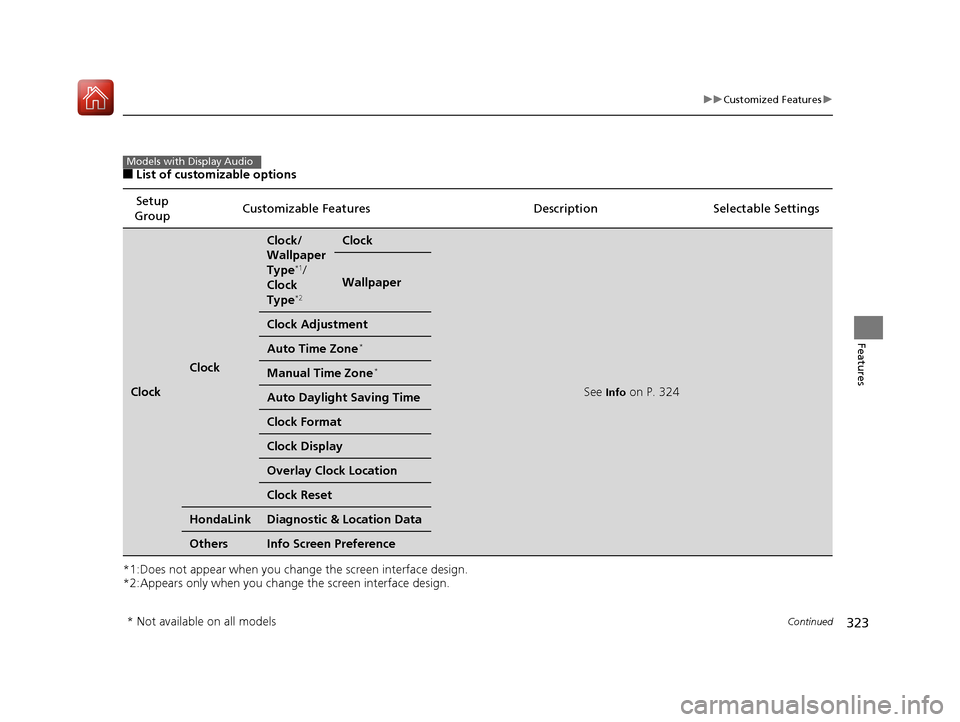
■List of customizable options
*1:Does not appear when you chan ge the screen interface design.
*2:Appears only when you change the screen interface design. Setup
Group Customizable Features
Description Selectable Settings
Clock
Clock
Clock/
Wallpaper
Type
*1/
Clock
Type
*2
Clock
See Info on P. 324
Wallpaper
Clock Adjustment
Auto Time Zone*
Manual Time Zone*
Auto Daylight Saving Time
Clock Format
Clock Display
Overlay Clock Location
Clock Reset
HondaLinkDiagnostic & Location Data
OthersInfo Screen Preference
Models with Display Audio
* Not available on all models
17 CIVIC 4D HCM (KA KC KL)-31TBA6100.book 323 ページ 2016年8月31日 水曜日 午後6時5分
Page 325 of 601
324
uuCustomized Features u
Features
*1:Default Setting
*2:Does not appear when you change the screen interface design.
*3:Appears only when you change the screen interface design.Setup
Group Customizable Features Desc
ription Selectable Settings
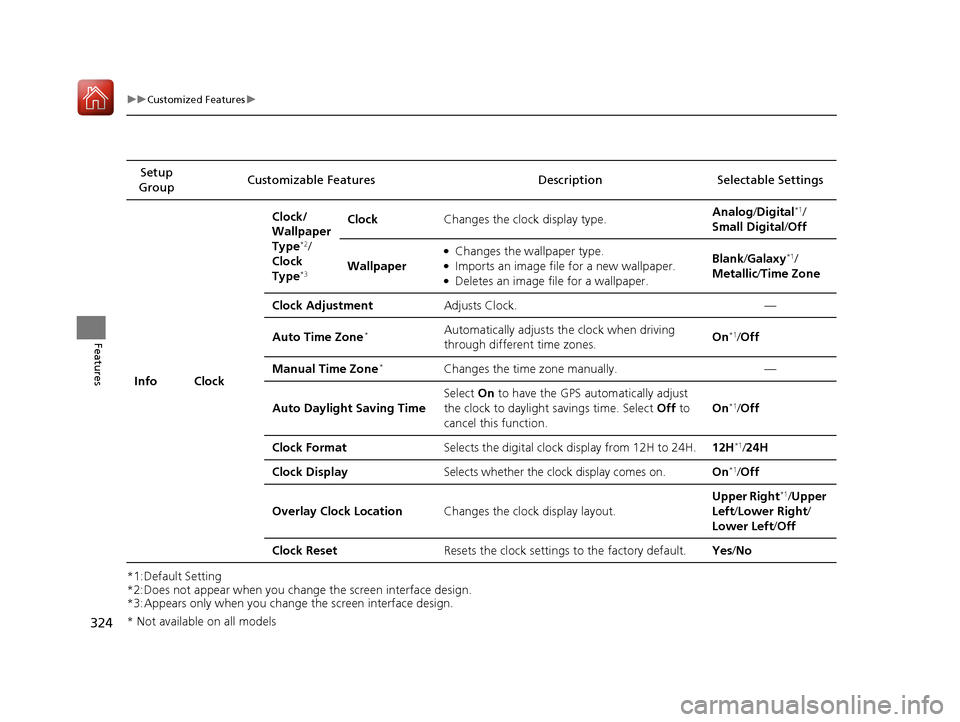
Info Clock Clock/
Wallpaper
Type
*2/
Clock
Type
*3
Clock Changes the clock display type. Analog
/Digital*1/
Small Digital /Off
Wallpaper
●Changes the wallpaper type.●Imports an image file for a new wallpaper.●Deletes an image file for a wallpaper. Blank
/Galaxy
*1/
Metallic /Time Zone
Clock Adjustment Adjusts Clock. —
Auto Time Zone
*Automatically adjusts th e clock when driving
through different time zones. On*1/
Off
Manual Time Zone
*Changes the time zone manually. —
Auto Daylight Saving Time Select
On to have the GPS automatically adjust
the clock to daylight savings time. Select Off to
cancel this function. On
*1/
Off
Clock Format Selects the digital clock display from 12H to 24H. 12H
*1/24H
Clock Display Selects whether the clock display comes on. On
*1/Off
Overlay Clock Location Changes the clock display layout. Upper Right
*1/
Upper
Left/ Lower Right/
Lower Left /Off
Clock Reset Resets the clock settings to the factory default. Yes/No
* Not available on all models
17 CIVIC 4D HCM (KA KC KL)-31TBA6100.book 324 ページ 2016年8月31日 水曜日 午後6時5分
Page 333 of 601
332
uuCustomized Features u
Features
*1:Default Setting
*2:Does not appear when you change the screen interface design.
*3:Appears only when you change the screen interface design.Setup
Group Customizable Features Description Selectable Settings
System Clock Clock/
Wallpaper
Type
*2/
Clock
Type
*3
Clock
See
Info on P. 324
Wallpaper
Clock Adjustment
Auto Time Zone
*
Manual Time Zone*
Auto Daylight Saving Time
Clock Format
Clock Display
Overlay Clock Location
Clock Reset
Others Language Change the display language. English
*1/
Français /
Español
* Not available on all models
17 CIVIC 4D HCM (KA KC KL)-31TBA6100.book 332 ページ 2016年8月31日 水曜日 午後6時5分
Page 503 of 601
502
uuMaintenance Under the Hood uChanging the Engine Oil and Oil Filter
Maintenance
Changing the Engine Oil and Oil Filter
You must change the engine oil and oil f ilter regularly in order to maintain the
engine’s lubrication. The engine may be damaged if they are not changed regularly.
Change the oil and filter in accordan ce with the maintenance message on the
information display
*/driver information interface*.
1. Run the engine until it reaches normal
operating temperature, and then turn the
engine off.
2. Open the hood and remove the engine oil
fill cap.
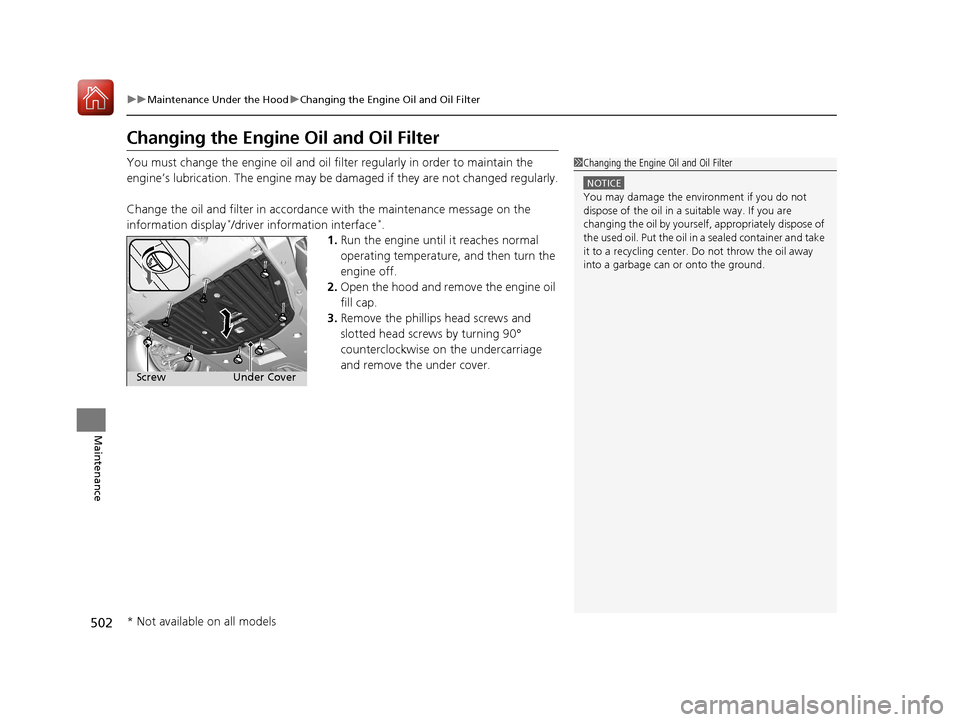
3. Remove the phillips head screws and
slotted head screws by turning 90°
counterclockwise on the undercarriage
and remove the under cover.
1Changing the Engine Oil and Oil Filter
NOTICE
You may damage the environment if you do not
dispose of the oil in a suitable way. If you are
changing the oil by yourself , appropriately dispose of
the used oil. Put the oil in a sealed container and take
it to a recycling center. Do not throw the oil away
into a garbage can or onto the ground.
Under Cover
Screw
* Not available on all models
17 CIVIC 4D HCM (KA KC KL)-31TBA6100.book 502 ページ 2016年8月31日 水曜日 午後6時5分
Page 507 of 601
uuMaintenance Under the Hood uEngine Coolant
506
Maintenance
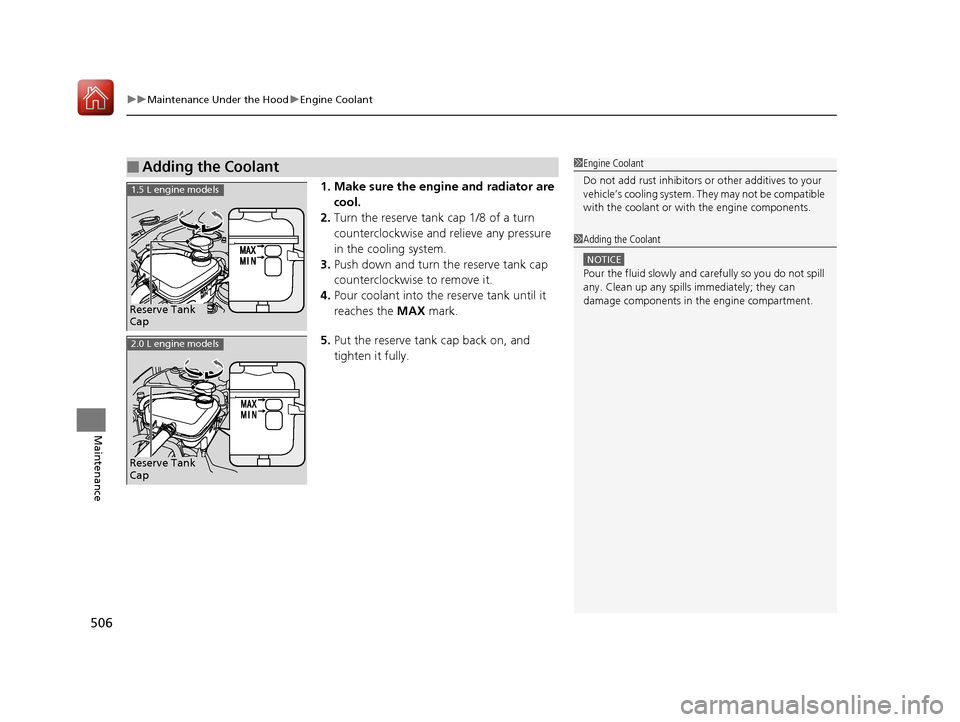
1. Make sure the engine and radiator are
cool.
2. Turn the reserve tank cap 1/8 of a turn
counterclockwise and relieve any pressure
in the cooling system.
3. Push down and turn the reserve tank cap
counterclockwise to remove it.
4. Pour coolant into the reserve tank until it
reaches the MAX mark.
5. Put the reserve tank cap back on, and
tighten it fully.
■Adding the Coolant1Engine Coolant
Do not add rust inhibitors or other additives to your
vehicle’s cooling system. They may not be compatible
with the coolant or with the engine components.
1 Adding the Coolant
NOTICE
Pour the fluid slowly and ca refully so you do not spill
any. Clean up any spills immediately; they can
damage components in the engine compartment.
Reserve Tank
Cap
1.5 L engine models
Reserve Tank
Cap
2.0 L engine models
17 CIVIC 4D HCM (KA KC KL)-31TBA6100.book 506 ページ 2016年8月31日 水曜日 午後6時5分
Page 511 of 601

510
Maintenance
Replacing Light Bulbs
Headlight Bulbs
When replacing, use the following bulbs.1.Push the tab to remove the coupler.
2. Rotate the old bulb counter-clockwise to
remove.
3. Insert a new bulb into the headlight
assembly and turn it clockwise.
4. Insert the coupler into the connector of the
bulb.
High beam headlight:60 W (HB3 for halogen bulb type)*
High beam headlight:LED type*
Low beam headlight:55 W (H11 for halogen bulb type)*
Low beam headlight:LED type*
■High Beam Headlight
1Headlight Bulbs
NOTICE
Halogen bulbs get very hot when lit.
Oil, perspiration, or a scratch on the glass can cause
the bulb to overhe at and shatter.
The headlight aim is set by the factory, and does not
need to be adjusted. Howeve r, if you regularly carry
heavy items in the trunk, have the aiming readjusted
at a dealer or by a qualified technician.
When replacing a halogen bu lb, handle it by its base,
and protect the glass from c ontact with your skin or
hard objects. If you touch the glass, clean it with
denatured alcohol and a clean cloth.
Headlights are LED type. Ha ve an authorized Honda
dealer inspect and replace the light assembly.
Models with halogen headlights
Models with LED headlights
Models with halogen headlights
Tab Coupler
Bulb
* Not available on all models
17 CIVIC 4D HCM (KA KC KL)-31TBA6100.book 510 ページ 2016年8月31日 水曜日 午後6時5分
Page 512 of 601
511
uuReplacing Light Bulbs uHeadlight Bulbs
Maintenance
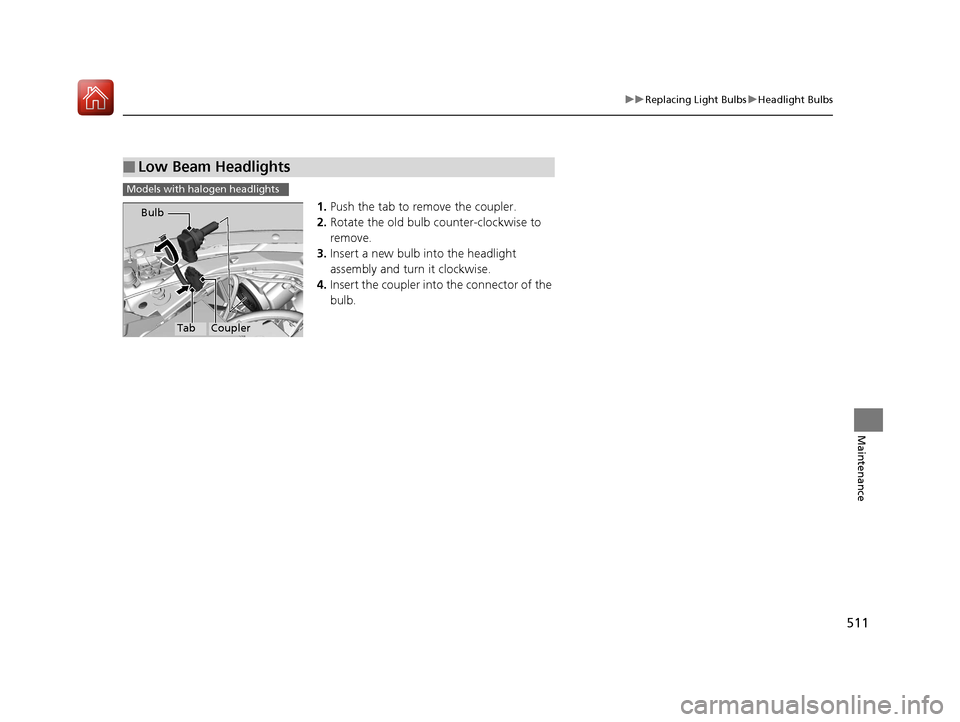
1. Push the tab to remove the coupler.
2. Rotate the old bulb counter-clockwise to
remove.
3. Insert a new bulb into the headlight
assembly and turn it clockwise.
4. Insert the coupler into the connector of the
bulb.
■Low Beam Headlights
Models with halogen headlights
TabCoupler
Bulb
17 CIVIC 4D HCM (KA KC KL)-31TBA6100.book 511 ページ 2016年8月31日 水曜日 午後6時5分
Page 514 of 601
513
uuReplacing Light Bulbs uFog Light Bulbs*
Maintenance
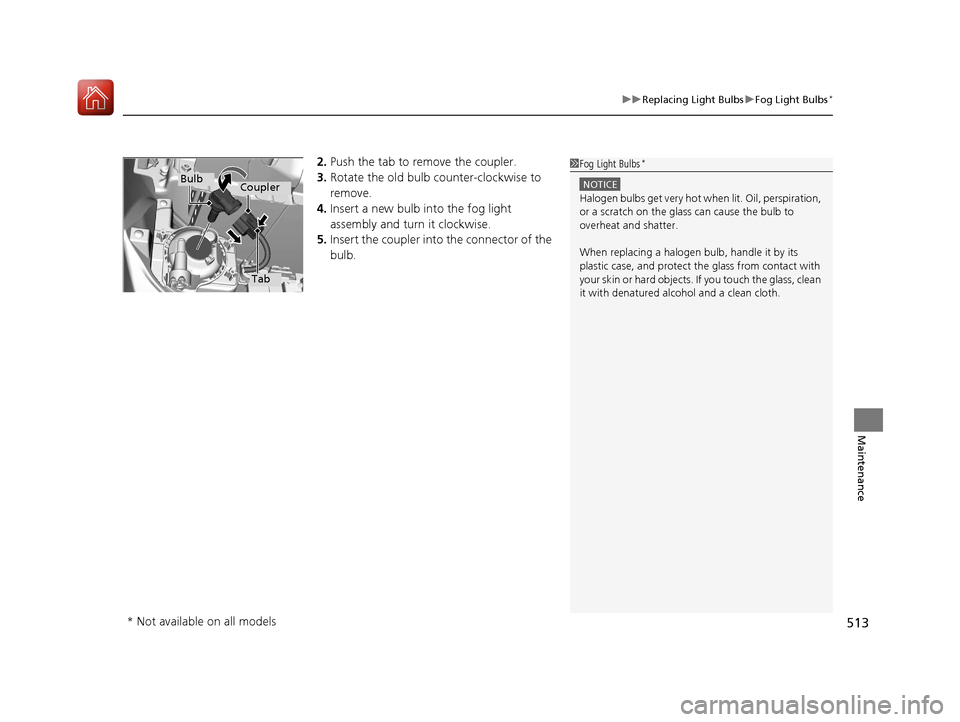
2. Push the tab to remove the coupler.
3. Rotate the old bulb counter-clockwise to
remove.
4. Insert a new bulb into the fog light
assembly and turn it clockwise.
5. Insert the coupler into the connector of the
bulb.1 Fog Light Bulbs*
NOTICE
Halogen bulbs get very hot wh en lit. Oil, perspiration,
or a scratch on the glass can cause the bulb to
overheat and shatter.
When replacing a halogen bulb, handle it by its
plastic case, and protect th e glass from contact with
your skin or hard objects. If you touch the glass, clean
it with denatured alc ohol and a clean cloth.
Tab
CouplerBulb
* Not available on all models
17 CIVIC 4D HCM (KA KC KL)-31TBA6100.book 513 ページ 2016年8月31日 水曜日 午後6時5分