Page 312 of 601
311
uuCustomized Features u
Continued
Features
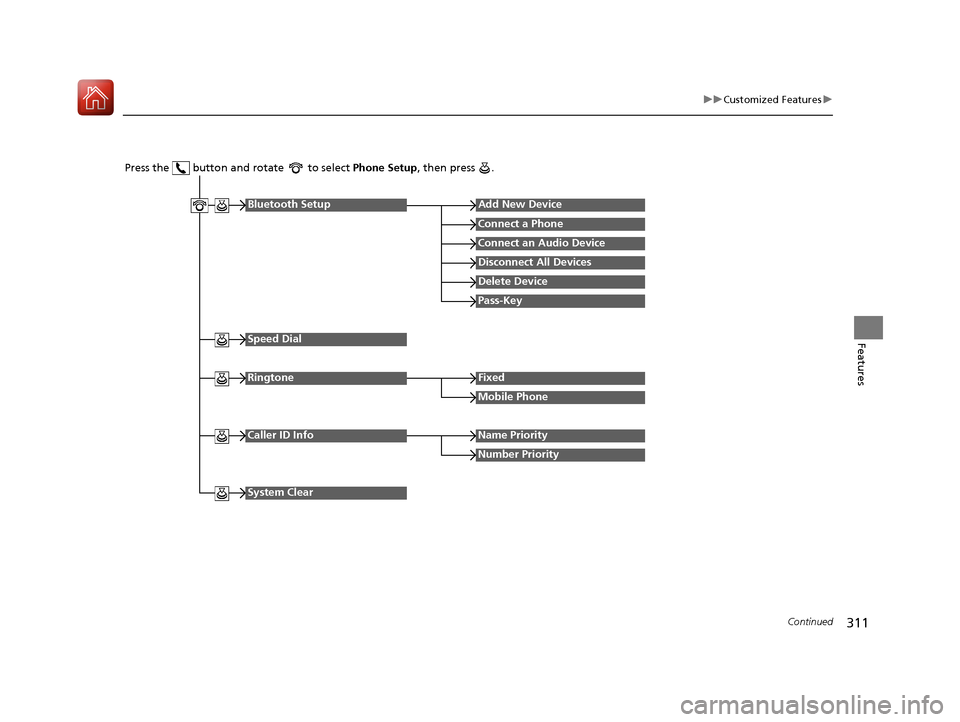
Press the button and rotate to select Phone Setup, then press .
RingtoneFixed
Mobile Phone
Bluetooth SetupAdd New Device
Connect a Phone
Connect an Audio Device
Disconnect All Devices
Delete Device
Pass-Key
Speed Dial
Caller ID InfoName Priority
Number Priority
System Clear
17 CIVIC 4D HCM (KA KC KL)-31TBA6100.book 311 ページ 2016年8月31日 水曜日 午後6時5分
Page 315 of 601
314
uuCustomized Features u
Features
*1:Default Setting
Setup
GroupCustomizable FeaturesDescriptionSelectable Settings
Phone
Setup
Bluetooth
Setup
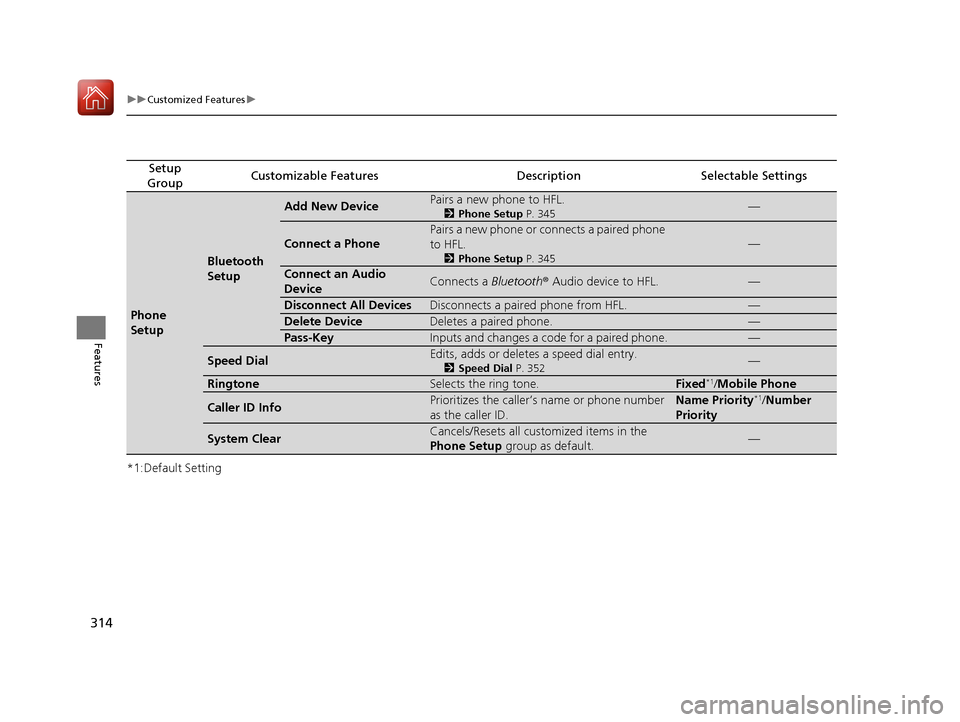
Add New DevicePairs a new phone to HFL.
2 Phone Setup P. 345—
Connect a Phone
Pairs a new phone or connects a paired phone
to HFL.
2Phone Setup P. 345
—
Connect an Audio
DeviceConnects a Bluetooth® Audio device to HFL.—
Disconnect All DevicesDisconnects a paired phone from HFL.—
Delete DeviceDeletes a paired phone.—
Pass-KeyInputs and changes a code for a paired phone.—
Speed DialEdits, adds or deletes a speed dial entry.
2Speed Dial P. 352—
RingtoneSelects the ring tone.Fixed*1/Mobile Phone
Caller ID InfoPrioritizes the caller’s name or phone number
as the caller ID.Name Priority*1/ Number
Priority
System ClearCancels/Resets all customized items in the
Phone Setup group as default.—
17 CIVIC 4D HCM (KA KC KL)-31TBA6100.book 314 ページ 2016年8月31日 水曜日 午後6時5分
Page 323 of 601
322
uuCustomized Features u
Features
Lighting SetupInterior Light Dimming Time
Headlight Auto Off Timer
Auto Light Sensitivity
Auto Interior Illumination Sensitivity
Auto Door Lock
Key And Remote Unlock Mode
Door/Window Setup
Maintenance Info.
Auto Headlight ON With Wiper ON
Keyless Lock Answer Back
Security Relock Timer
Walk Away Auto Lock*
Keyless Access Setup*
Door Unlock Mode
Keyless Access Light Flash
Keyless Access Beep
Remote Start System ON/OFF*
Auto Door Unlock
* Not available on all models
17 CIVIC 4D HCM (KA KC KL)-31TBA6100.book 322 ページ 2016年8月31日 水曜日 午後6時5分
Page 337 of 601

336
uuCustomized Features u
Features
*1:Default SettingSetup
Group Customizable Features Desc
ription Selectable Settings
Vehicle
Keyless
Access
Setup
*
Remote Start System ON/
OFF*Turns the remote engine start feature on and off.On*1/Off
Door Unlock ModeChanges which doors unlock when you grab the
driver’s door handle.Driver Door Only*1/
All Doors
Keyless Access Light FlashCauses some exterior lights to flash when you
unlock/lock the doors.On*1/ Off
Keyless Access BeepCauses the beeper to sound when you unlock/
lock the doors.On*1/Off
Lighting
Setup
Interior Light Dimming
TimeChanges the length of time the interior lights stay
on after you close the doors.15seconds /
30seconds*1/
60seconds
Headlight Auto Off TimerChanges the length of ti me the exterior lights
stay on after you close the driver’s door.
0seconds /
15seconds*1/
30seconds /
60seconds
Auto Light SensitivityChanges the timing for the headlights to come
on.Max /High/ Mid*1/
Low/ Min
Auto Interior Illumination
SensitivityChanges the sensitivity of the brightness of the
instrument panel when the headlight switch is in
the AUTO position.Max/High/ Mid*1/
Low/ Min
* Not available on all models
17 CIVIC 4D HCM (KA KC KL)-31TBA6100.book 336 ページ 2016年8月31日 水曜日 午後6時5分
Page 338 of 601

337
uuCustomized Features u
Features
*1:Default Setting
*2:Continuously variable transmission modelsSetup
Group Customizable Features
DescriptionSelectable Settings
Vehicle
Lighting
SetupAuto Headlight ON With
Wiper ONChanges the settings for the wiper operation
when the headlights automatically come on while
the headlight switch is in the AUTO position.On*1/Off
Door/
Window
Setup
Auto Door LockUsed to change the sett ing for when the doors
automatically lock.With Vehicle
Speed*1/ Shift from
P*2/ Off
Auto Door UnlockChanges the setting for when the doors unlock
automatically.
All Doors When
Driver’s Door
Opens
*1/ All Doors
When Shifted to
Park
*2/ All Doors
When Ignitions
Switched Off /Off
Key And Remote Unlock
ModeSets up the driver’s door or all the doors to unlock
on the first push of the remote.Driver Door*1/ All
Doors
Keyless Lock Answer BackLOCK/UNLOCK- The exterior lights flash.
LOCK (2nd push)- The beeper sounds.On*1/ Off
Security Relock TimerChanges the time it takes for the doors to relock
and the security system to set after you unlock
the vehicle without opening any door.90seconds /
60seconds /
30seconds
*1
Walk Away Auto Lock*Changes the settings for the auto lock function
when you walk away from the vehicle.On /Off*1
Maintenance Info.Used to reset the engine oil life display when the
maintenance service has been performed.—
* Not available on all models
17 CIVIC 4D HCM (KA KC KL)-31TBA6100.book 337 ページ 2016年8月31日 水曜日 午後6時5分
Page 343 of 601
342
uuBluetooth ® HandsFreeLink ®*uHFL Menus
Features
*1 : Appears only when a phone is connected to HFL.
Redial the last number dialed in the phone’s history.
Add New Device
Connect a Phone
Connect an Audio Device
Bluetooth SetupPhone Setup
Redial*1
Pair a phone to the system.
Connect a phone to the system.
Create a code for a paired phone.
Disconnect All Devices
Delete Device
Pass-key
Disconnect a paired phone from the system.
Delete a previously paired phone. Connect a Bluetooth® Audio device to the
system.
17 CIVIC 4D HCM (KA KC KL)-31TBA6100.book 342 ページ 2016年8月31日 水曜日 午後6時5分
Page 348 of 601
347
uuBluetooth ® HandsFreeLink ®*uHFL Menus
Continued
Features
■To change the pairing code setting
1. Press the button or the button.
2. Rotate to select Phone Setup, then
press .
3. Rotate to select Bluetooth Setup , then
press .
4. Rotate to select Pass-Key, then press
.
5. Input a new pairing code, then press .
17 CIVIC 4D HCM (KA KC KL)-31TBA6100.book 347 ページ 2016年8月31日 水曜日 午後6時5分
Page 385 of 601
384
uuBluetooth ® HandsFreeLink ®*uHFL Menus
Features
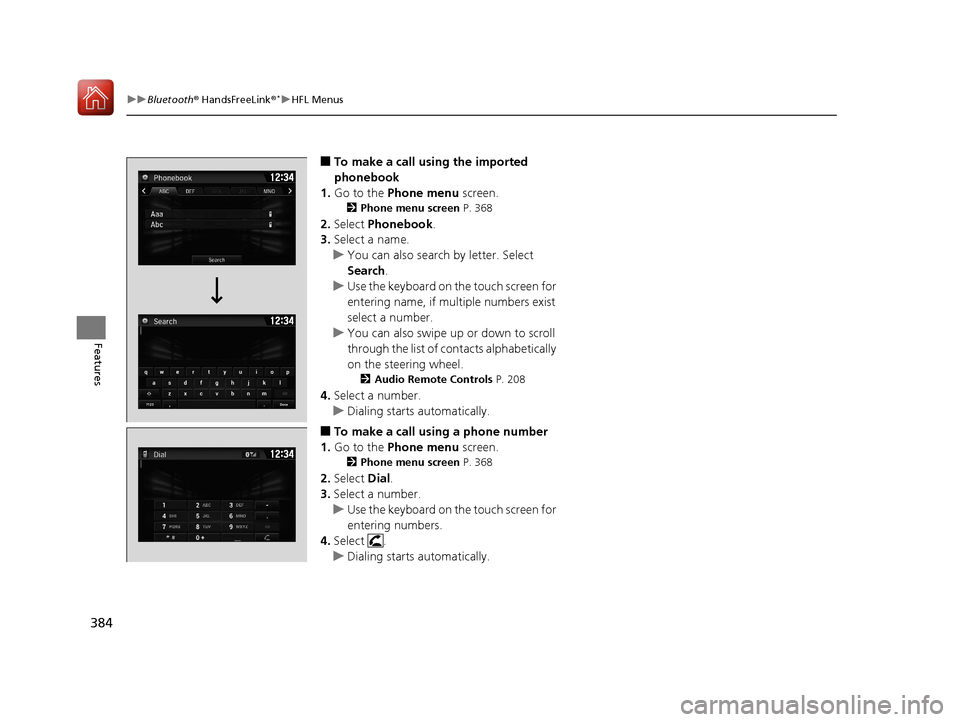
■To make a call using the imported
phonebook
1. Go to the Phone menu screen.
2Phone menu screen P. 368
2.Select Phonebook .
3. Select a name.
u You can also search by letter. Select
Search .
u Use the keyboard on the touch screen for
entering name, if multiple numbers exist
select a number.
u You can also swipe up or down to scroll
through the list of contacts alphabetically
on the steering wheel.
2 Audio Remote Controls P. 208
4.Select a number.
u Dialing starts automatically.
■To make a call using a phone number
1. Go to the Phone menu screen.
2Phone menu screen P. 368
2.Select Dial.
3. Select a number.
u Use the keyboard on the touch screen for
entering numbers.
4. Select .
u Dialing starts automatically.
17 CIVIC 4D HCM (KA KC KL)-31TBA6100.book 384 ページ 2016年8月31日 水曜日 午後6時5分