Page 123 of 601

122
uuGauges and Displays uDriver Information Interface*
Instrument Panel
*1:Default SettingSetup Group Customizable Features Description Selectable Settings
Meter Setup Language Selection
Changes the displayed language. English
*1/French /Spanish
Adjust Outside Temp.
Display Adjusts the temperature reading by a few degrees.
-5°F ~ ±0°F
*1 ~ +5°F
“Trip A” Reset Timing Changes the setting of how to reset trip meter A,
average fuel economy A,
average speed A, and
elapsed time A. When Refueled
/IGN OFF /
Manually Reset
*1
“Trip B” Reset Timing Changes the setting of how to reset trip meter B,
average fuel economy B,
average speed B, and
elapsed time B. When Refueled
/IGN OFF /
Manually Reset*1
Adjust Alarm Volume Changes the alarm volume, such as buzzers,
warnings, turn signal sound, and so on.
High
/Mid*1/Low
Fuel Efficien cy Backlight Turns the ambient meter feature on and off. ON
*1/OFF
Speed/Distance Units Selects the trip computer units. mph∙miles
*1/km/ h∙km
Tachometer Selects whether the tachometer come on the driver
information interface. ON
*1/
OFF
17 CIVIC 4D HCM (KA KC KL)-31TBA6100.book 122 ページ 2016年8月31日 水曜日 午後6時5分
Page 126 of 601
125
uuGauges and Displays uDriver Information Interface*
Continued
Instrument Panel
■Example of customization settings
The steps for changing the “Trip A” Reset Timing setting to When Refueled are
shown below. The default setting for “Trip A” Reset Timing is Manually Reset .
1. Press the button to select Vehicle
Settings , then press the ENTER button.
2. Press the / button until Meter Setup
appears on the display.
3. Press the ENTER button.
u Language Selection appears first in the
display.
34
17 CIVIC 4D HCM (KA KC KL)-31TBA6100.book 125 ページ 2016年8月31日 水曜日 午後6時5分
Page 127 of 601
126
uuGauges and Displays uDriver Information Interface*
Instrument Panel
4. Press the / button until “Trip A”
Reset Timing appears on the display, then
press the ENTER button.
u The display switches to the
customization setup screen, where you
can select When Refueled , IGN Off,
Manually Reset , or Exit .
5. Press the / button and select When
Refueled , then press the ENTER button.
u The When Refueled Setup screen
appears, then the di splay returns to the
customization menu screen.
6. Press the / button until Exit appears
on the display, then press the ENTER
button.
7. Repeat Step 6 until you return to the
normal screen.34
34
34
17 CIVIC 4D HCM (KA KC KL)-31TBA6100.book 126 ページ 2016年8月31日 水曜日 午後6時5分
Page 133 of 601
132
uuLocking and Unlocking the Doors uLow Smart Entry Remote Signal Strength*
Controls
Low Smart Entry Remo te Signal Strength*
The vehicle transmits radio waves to loca te the smart entry remote when locking/
unlocking the doors and fuel fill door, opening the trunk, or starting the engine.
In the following cases, locking/unlocking the doors, opening the trunk, or starting
the engine may be inhibited or operation may be unstable:
• Strong radio waves are being tra nsmitted by nearby equipment.
• You are carrying the smart entry remote together with telecommunications
equipment, laptop computers, ce ll phones, or wireless devices.
• A metallic object is touching or covering the smart entry remote.1Low Smart Entry Remote Signal Strength*
Communication between the smart entry remote and
the vehicle consumes the smart entry remote’s
battery.
Battery life is about two years, but this varies
depending on re gularity of use.
The battery is consumed whenever the smart entry
remote is receivi ng strong radio wave s. Avoid placing
it near electrical appliances such as televisions and
personal computers.
* Not available on all models
17 CIVIC 4D HCM (KA KC KL)-31TBA6100.book 132 ページ 2016年8月31日 水曜日 午後6時5分
Page 134 of 601

133
uuLocking and Unlocking the Doors uLocking/Unlocking the Doors from the Outside
Continued
Controls
Locking/Unlocking the Doors from the Outside
When you carry the sm art entry remote, you
can lock/unlock the doors, fuel fill door, and
open the trunk.
You can lock/unlock the doors and fuel fill
door within a radius of about 32 inches (80
cm) of the outside door handle. You can open
the trunk within about 32 inches (80 cm)
radius from the trunk release button.
■Locking the vehicle Press the door lock button on the front door.u Some exterior lights flash; the beeper
sounds; all the doors and trunk lock; and
the security system sets.
■Using the Smart Entry with Push Button Start System*1Locking/Unlocking the Doors from the Outside
If the interior light switch is in the door activated position,
the interior lights come on when you unlock the doors.
No doors opened: The lights fade out after 30 seconds.Doors relocked: The li ghts go off immediately.
2 Interior Lights P. 181
1Using the Smart Entry with Push Button Start System*
•Do not leave the smart entry remote in the vehicle
when you get out. Carry it with you.
•Even if you are not carrying the smart entry remote,
you can lock/unlock the doors while someone else
with the remote is within range.
•The door may be unlocked if the door handle is
covered with water in heavy rain or in a car wash if
the smart entry remote is within range.
•If you grip a front door handle wearing gloves, the
door sensor may be slow to respond or may not
respond by unlocking the doors.
•After locking the door, you have up to 2 seconds
during which you can pull the door handle to
confirm whether the door is locked. If you need to
unlock the door immediately after locking it, wait
at least 2 seconds befo re gripping the handle,
otherwise the door will not unlock.
•The door might not open if you pull it immediately
after gripping the door ha ndle. Grip the handle
again and confirm that th e door is unlocked before
pulling the handle.
•Even within the 32 inches (80 cm) radius, you may not
be able to lock/unlock the doors with the smart entry
remote if it is above or below the outside handle.
•The smart entry remote may not operate if it is too
close to the door and door glass.
The light flash, beep, a nd door unlock mode settings
can be customized.
2 Customized Features P. 308
Door Lock Button
* Not available on all models
17 CIVIC 4D HCM (KA KC KL)-31TBA6100.book 133 ページ 2016年8月31日 水曜日 午後6時5分
Page 137 of 601
uuLocking and Unlocking the Doors uLocking/Unlocking the Doors from the Outside
136
Controls
■Unlocking the vehicle
Grab the driver’s door handle:u The driver’s door and fuel fill door
unlocks.
u Some exterior lights flash twice and the
beeper sounds twice.
Grab the front passenger’s door handle: u All the doors unlock.
u Some exterior lights flash twice and the
beeper sounds twice.
Press the trunk release button: u The trunk unlocks and opens.
u Some exterior lights flash and the beeper
sounds.
2 Using the Trunk Opener P. 147
1Using the Smart Entry with Push Button Start System*
If you do not open a door within 30 seconds of
unlocking the vehicle with the smart entry system,
the doors will automatically relock.
You can lock or unlock doors using the smart entry
system only when the power mode is in VEHICLE OFF.
Trunk Release Button
* Not available on all models
17 CIVIC 4D HCM (KA KC KL)-31TBA6100.book 136 ページ 2016年8月31日 水曜日 午後6時5分
Page 138 of 601
Continued137
uuLocking and Unlocking the Doors uLocking/Unlocking the Doors from the Outside
Controls
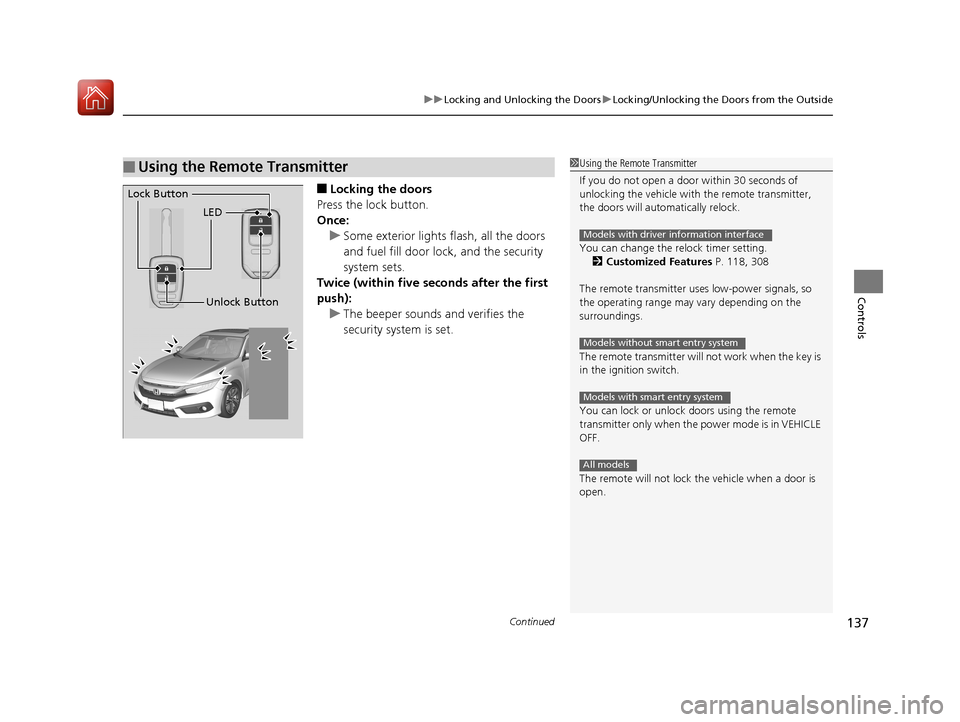
■Locking the doors
Press the lock button.
Once: u Some exterior lights flash, all the doors
and fuel fill door lock , and the security
system sets.
Twice (within five se conds after the first
push):
u The beeper sounds and verifies the
security system is set.
■Using the Remote Transmitter1Using the Remote Transmitter
If you do not open a door within 30 seconds of
unlocking the vehicle with the remote transmitter,
the doors will automatically relock.
You can change the relock timer setting. 2 Customized Features P. 118, 308
The remote transmitter us es low-power signals, so
the operating range may vary depending on the
surroundings.
The remote transmitter will not work when the key is
in the ignition switch.
You can lock or unlock doors using the remote
transmitter only when the power mode is in VEHICLE
OFF.
The remote will not lock the vehicle when a door is
open.
Models with driver information interface
Models without smart entry system
Models with smart entry system
All models
LED
Unlock Button
Lock Button
17 CIVIC 4D HCM (KA KC KL)-31TBA6100.book 137 ページ 2016年8月31日 水曜日 午後6時5分
Page 139 of 601
uuLocking and Unlocking the Doors uLocking/Unlocking the Doors from the Outside
138
Controls
■Unlocking the doors
Press the unlock button.
Once: u Some exterior lights flash twice, and the driver’s door and fuel fill door unlock.
Twice: u The remaining doors unlock.1Using the Remote Transmitter
If the distance at which the remote transmitter works
varies, the batter y is probably low.
If the LED does not come on when you press a
button, the battery is dead.
2 Replacing the Button Battery P. 533
You can customize the door unlock mode setting. 2 Customized Features P. 118, 308
Models with driver information interface
17 CIVIC 4D HCM (KA KC KL)-31TBA6100.book 138 ページ 2016年8月31日 水曜日 午後6時5分