Page 206 of 601

205
uuAudio System uUSB Port(s)
Features
USB Port(s)
Install the iPod USB connector or the USB flash
drive to the front USB port.
u The USB port (1.0A) is for playing audio
files on a USB flash drive and connecting
a cellular phone and charging device.
u The USB port (1.5A) is for charging
devices, playing audio files and
connecting compatib le phones with
Apple CarPlay or Android Auto.
■In the consol e compartment*
The USB port (1.0A) is for playing audio files
on the USB flash drive and connecting a
cellular phone and charging device.
u Move the removable beverage holder
tray rearward.
*1: Models with the smart entry system have an ENGINE START/STOP button instead of an
ignition switch.
1 USB Port(s)
•Do not leave the iPod or USB flash drive in the
vehicle. Direct sunlight and high temperatures may
damage it.
•We recommend using an ex tension cable with the
USB port.
•Do not connect the iPod or USB flash drive using a
hub.
•Do not use a device such as a card reader or hard
disk drive, as the device or your files may be
damaged.
•We recommend k eeping your data backed up
before using the device in your vehicle.
•Displayed messages may vary depending on the
device model and software version.
If the audio system does not recognize the iPod, try
reconnecting it a few times or reboot the device. To
reboot, follow the manufac turer’s instructions
provided with the iPod or visit www.apple.com/ipod.
The front USB port can suppl y up to 1.5A of power.
It does not output 1.5A unless requested by the
device.
For amperage details, read the operating manual of
the device that ne eds to be charged.
Turn the ignition switch to ACCESSORY
( q or ON (w*1 first.
Under certain condi tions, a device connected to the
port may generate noise in the radio you are listening
to.
USB charge (1.5A)
Models with
color audio
systemModels with
Display Audio
Models with color audio system
Models with Display Audio
In the console compartment
* Not available on all models
17 CIVIC 4D HCM (KA KC KL)-31TBA6100.book 205 ページ 2016年8月31日 水曜日 午後6時5分
Page 208 of 601
207
uuAudio System uAudio Remote Controls
Continued
Features
Audio Remote Controls
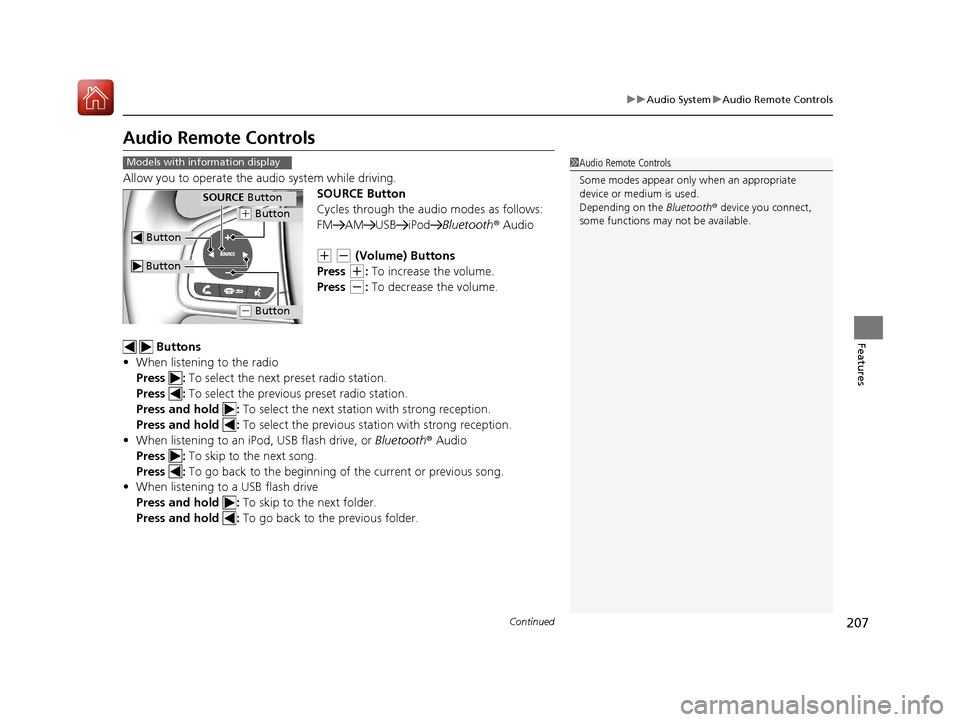
Allow you to operate the au dio system while driving.
SOURCE Button
Cycles through the audio modes as follows:
FM AM USB iPod Bluetooth® Audio
(+ (- (Volume) Buttons
Press
(+: To increase the volume.
Press
(-: To decrease the volume.
Buttons
• When listening to the radio
Press : To select the next preset radio station.
Press : To select the previous preset radio station.
Press and hold : To select the next station with strong reception.
Press and hold : To select the previous station with strong reception.
• When listening to an iPod, USB flash drive, or Bluetooth® Audio
Press : To skip to the next song.
Press : To go back to the beginning of the current or previous song.
• When listening to a USB flash drive
Press and hold : To skip to the next folder.
Press and hold : To go back to the previous folder.
1Audio Remote Controls
Some modes appear only when an appropriate
device or medium is used.
Depending on the Bluetooth® device you connect,
some functions may not be available.Models with information display
Button
SOURCE Button
Button
(+ Button
(- Button
17 CIVIC 4D HCM (KA KC KL)-31TBA6100.book 207 ページ 2016年8月31日 水曜日 午後6時5分
Page 209 of 601
uuAudio System uAudio Remote Controls
208
Features
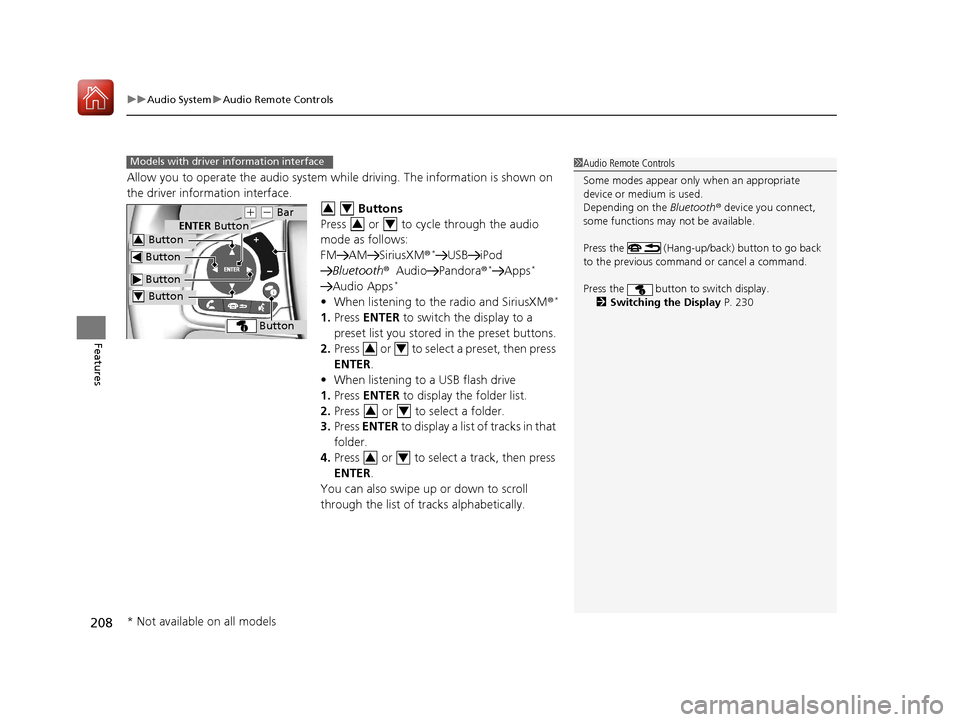
Allow you to operate the audio system wh ile driving. The information is shown on
the driver information interface.
Buttons
Press or to cycle through the audio
mode as follows:
FM AM SiriusXM®
*USB iPod
Bluetooth ®Audio Pandora ®*Apps*
Audio Apps*
•When listening to the radio and SiriusXM ®*
1.Press ENTER to switch the display to a
preset list you stored in the preset buttons.
2. Press or to select a preset, then press
ENTER .
• When listening to a USB flash drive
1. Press ENTER to display the folder list.
2. Press or to select a folder.
3. Press ENTER to display a list of tracks in that
folder.
4. Press or to select a track, then press
ENTER .
You can also swipe up or down to scroll
through the list of tracks alphabetically.
1 Audio Remote Controls
Some modes appear only when an appropriate
device or medium is used.
Depending on the Bluetooth® device you connect,
some functions may not be available.
Press the (Hang-up/back) button to go back
to the previous command or cancel a command.
Press the button to switch display. 2 Switching the Display P. 230Models with driver information interface
Button
ENTER Button
Button
(+ (- Bar
Button
Button3
Button4
34
34
34
34
34
* Not available on all models
17 CIVIC 4D HCM (KA KC KL)-31TBA6100.book 208 ページ 2016年8月31日 水曜日 午後6時5分
Page 210 of 601
209
uuAudio System uAudio Remote Controls
Continued
Features
• When listening to an iPod
1. Press ENTER to display the iPod music list.
2. Press or to select a category.
3. Press ENTER to display a list of items in the
category.
4. Press or to select an item, then press
ENTER .
u Press ENTER and press or
repeatedly until the desired mode you
want to listen to is displayed.
You can also swipe up or down to scroll
through the list of tracks alphabetically.
• When listening to Internet Radio
*
1.Press ENTER to display the station list.
2. Press or to select an item, then press
ENTER .
• When listening to Bluetooth ®Audio
1. Press ENTER to display the track list.
2. Press or to select a track, then press
ENTER .
34
34
34
34
34
* Not available on all models
17 CIVIC 4D HCM (KA KC KL)-31TBA6100.book 209 ページ 2016年8月31日 水曜日 午後6時5分
Page 211 of 601

210
uuAudio System uAudio Remote Controls
Features
(+ (- (Volume) Bar
Press
(+: To increase the volume.
Press
(-: To decrease the volume.
Slide your finger up or down to incr ease or decrease the volume, respectively.
Swipe down quickly to mute the volu me and swipe up to cancel the mute.
Buttons
• When listening to the radio
Press : To select the next preset radio station.
Press : To select the previous preset radio station.
Press and hold : To select the next strong station.
Press and hold : To select the previous strong station.
• When listening to an iPod, USB flash drive, or Bluetooth ® Audio
Press : To skip to the next song.
Press : To go back to the beginning of the current or previous song.
• When listening to a USB flash drive
Press and hold : To skip to the next folder.
Press and hold : To go back to the previous folder.
• When listening to Internet radio
*
Press : To skip to the next song.
Press and hold : To select the next station.
Press and hold : To select the previous station.
Models with Display Audio
* Not available on all models
17 CIVIC 4D HCM (KA KC KL)-31TBA6100.book 210 ページ 2016年8月31日 水曜日 午後6時5分
Page 219 of 601
218
uuAudio System Basic Operation uPlaying the AM/FM Radio
Features
Playing the AM/FM Radio
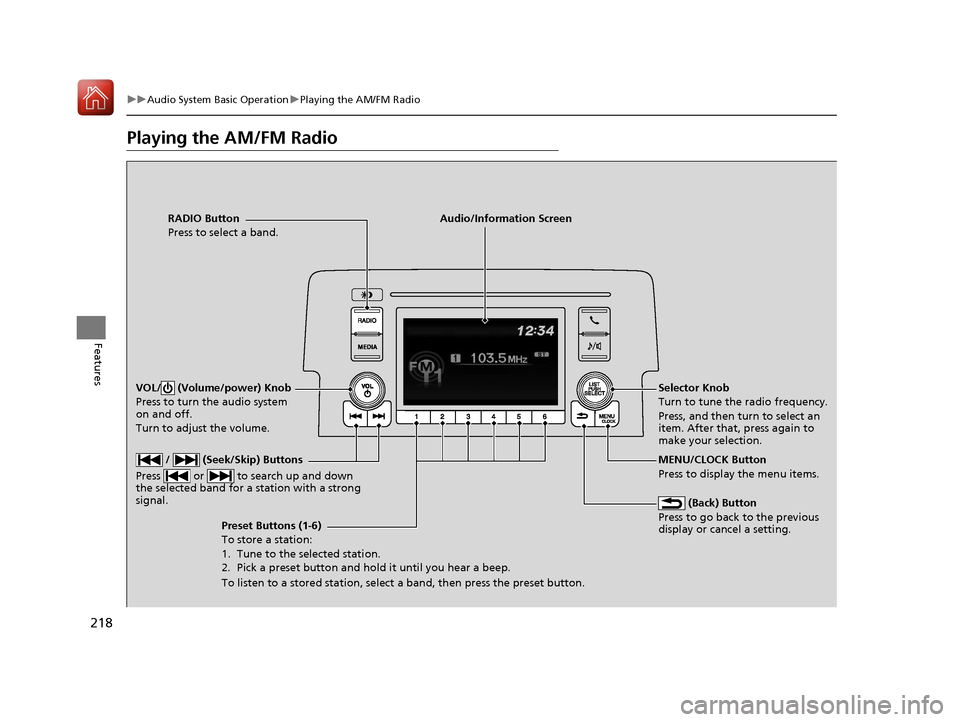
RADIO Button
Press to select a band.
(Back) Button
Press to go back to the previous
display or cancel a setting.
/ (Seek/Skip) Buttons
Press or to search up and down
the selected band for a station with a strong
signal.
VOL/ (Volume/power) Knob
Press to turn the audio system
on and off.
Turn to adjust the volume.
Preset Buttons (1-6)
To store a station:
1. Tune to the selected station.
2. Pick a preset button and hold it until you hear a beep.
To listen to a stored station, select a band, then press the preset button. Selector Knob
Turn to tune the radio frequency.
Press, and then turn to select an
item. After that, press again to
make your selection.
MENU/CLOCK Button
Press to display the menu items.
Audio/Information Screen
17 CIVIC 4D HCM (KA KC KL)-31TBA6100.book 218 ページ 2016年8月31日 水曜日 午後6時5分
Page 220 of 601
219
uuAudio System Basic Operation uPlaying the AM/FM Radio
Features
Provides text data information related to your selected RDS capable FM station.
■To find an RDS station from Station List
1. Press while listening to an FM station.
2. Rotate to select the station, then press .
■Update List
Updates your available st ation list at any time.
1. Press while listening to an FM station.
2. Rotate to select Update List, then press .
■Radio text
Displays the radio text information of the selected RDS station.
1. Press the MENU/CLOCK button.
2. Rotate to select Settings, then press .
3. Rotate to select RDS Settings, then press .
4. Rotate to select Radio Text, then press .
■Scan
Samples each of the strongest stations on the selected band for 10 seconds.
1. Press the MENU/CLOCK button.
2. Rotate to select Scan, then press .
To turn off scan, press .
■Radio Data System (RDS)1 Playing the AM/FM Radio
The ST indicator appears on the display indicating
stereo FM broadcasts.
Stereo reproduction in AM is not available.
You can store 6 AM stations and 12 FM stations into
the preset memory.
Switching the Audio Mode
Press the SOURCE button on the steering wheel.
2 Audio Remote Controls P. 207
1Radio Data System (RDS)
When you select an RDS-capable FM station, the RDS
automatically turns on, and the frequency display
changes to the station name. However, when the
signals of that station become weak, the display
changes from the statio n name to the frequency.
17 CIVIC 4D HCM (KA KC KL)-31TBA6100.book 219 ページ 2016年8月31日 水曜日 午後6時5分
Page 230 of 601

229
Features
Audio System Basic Operation
To use the audio system function, the ignition swit ch must be in ACCESSORY (q or
ON
(w*1.
: Select to go to the home screen.
2Switching the Display P. 230
: Select to display available options
including Sound, View Radio Text , Music
Search , and playback modes.
: Select to go back to the previous screen
when the icon is illuminated.
button: Press to change the audio/
information screen brightness.
Press once and select
(- or (+ to make
an adjustment. u Each time you press , the mode
switches between da ytime, nighttime
and off.
*1: Models with the smart entry system have an ENGINE START/STOP button instead of an
ignition switch.
1 Audio System Basic Operation
Audio Menu Items
2 Station List P. 259, 260
2 Music Search List P. 271, 280
2 Scan P. 260, 261, 269, 281
2 Play Mode P. 272, 281Models with Display Audio
(Day/Night) Button
(Home) Icon
(Back) Icon
(Menu) Icon
17 CIVIC 4D HCM (KA KC KL)-31TBA6100.book 229 ページ 2016年8月31日 水曜日 午後6時5分