2017 HONDA CIVIC stop start
[x] Cancel search: stop startPage 449 of 601

uuWhen Driving uVehicle Stability Assist (VSA® ), aka Electronic Stability Control (ESC), System
448
Driving
This button is on the driver side control panel.
To partially disable VSA® functionality/
features, press and hold it until you hear a
beep.
The traction control stops fully functioning,
allowing the wheels to sp in more freely at low
speed. The VSA ® OFF indicator will also come
on and a message on the driver information
interface
* informs you that the mode is
changed.
To restore VSA ® functionality/features, press
the (VSA ® OFF) button until you hear a
beep.
VSA ® is turned on every time you start the
engine, even if you turned it off the last time
you drove the vehicle.
■VSA ® On and Off1 Vehicle Stability Assist (VSA ®), aka Electronic Stability Control
(ESC), System
With the button pressed, your vehicle will have
normal braking and corn ering ability, but VSA®
traction and stability enhancement becomes less
effective.
In certain unusual conditions when your vehicle gets
stuck in shallow mud or fr esh snow, it may be easier
to free it with the button pressed.
When the button is pressed, the traction control
function becomes less effective. This allows for the
wheels to spin more freely at low speed. You should
only attempt to free your vehicle with the button
pressed if you are not ab le to free it without.
Immediately after freeing your vehicle, be sure to
press the button again. We do not recommend
driving your vehicle wi th the button pressed
(indicator on).
You may hear a motor sound coming from the
engine compartment while system checks are being
performed immediately after starting the engine or
while driving. This is normal.
The VSA ® OFF indicator may come on after re-
connecting the battery. Drive a short distance at
more than 12 mph (20 km/h). The indicator should
go off. If it does not, have your vehicle checked by a
dealer.
VSA ® OFF
Indicator
* Not available on all models
17 CIVIC 4D HCM (KA KC KL)-31TBA6100.book 448 ページ 2016年8月31日 水曜日 午後6時5分
Page 453 of 601

452
uuWhen Driving uTire Pressure Monitoring System (TPMS)
Driving
Tire Pressure Monitoring System (TPMS)
Instead of directly measuring the pressu re in each tire, the TPMS on this vehicle
monitors and compares the rolling radius and rotational characteristics of each
wheel and tire while you are driving to determine if one or more tires are
significantly under-inflated. This will caus e the low tire pressure/TPMS indicator to
come on and a message to appear on the driver information interface
*.
You must start TPMS calibration every time you:
• Adjust the pressure in one or more tires.
• Rotate the tires.
• Replace one or more tires.
Before calibrating the TPMS:
• Set the cold tire pressu re in all four tires.
2Checking Tires P. 522
Make sure:
•The vehicle is at a complete stop.
• The shift lever is in
(N.
• The shift lever is in
(P.
• The ignition switch is in ON
(w*1.
*1: Models with the smart entry system have an ENGINE START/STOP button instead of an
ignition switch.
■TPMS Calibration
U.S. models
1 Tire Pressure Monitoring System (TPMS)
The system does not monitor the tires when driving
at low speed.
Conditions such as low ambient temperature and
altitude change directly a ffect tire pressure and can
trigger the low tire pressure/TPMS indicator to come on.
Tire pressure checked and inflated in:
•Warm weather can beco me under-inflated in
colder weather.
•Cold weather can become over-inflated in warmer
weather.
The low tire pressure indica tor will not come on as a
result of over inflation.
The TPMS may not function pr operly if tire type and
size are mixed. Make sure to use the same size and
type of tire. 2 Checking and Maintaining Tires P. 522
The low tire pressure/TPMS indicator may come on
with a delay or may not come on at all when:
•You rapidly accelerate, decelerate, or turn the
steering wheel.
•You drive on snowy or slippery roads.•Snow chains are used.
The low tire pressure/TPMS indicator may come on
under the following conditions:
•A compact spare tire is used.•There is a heavier and une ven load on the tires,
such as when towing a trailer, than the condition at
calibration.
•Snow chains are used.
Manual transmission models
Continuously variable transmission models
All models
* Not available on all models
17 CIVIC 4D HCM (KA KC KL)-31TBA6100.book 452 ページ 2016年8月31日 水曜日 午後6時5分
Page 458 of 601
457Continued
Driving
Braking
Brake System
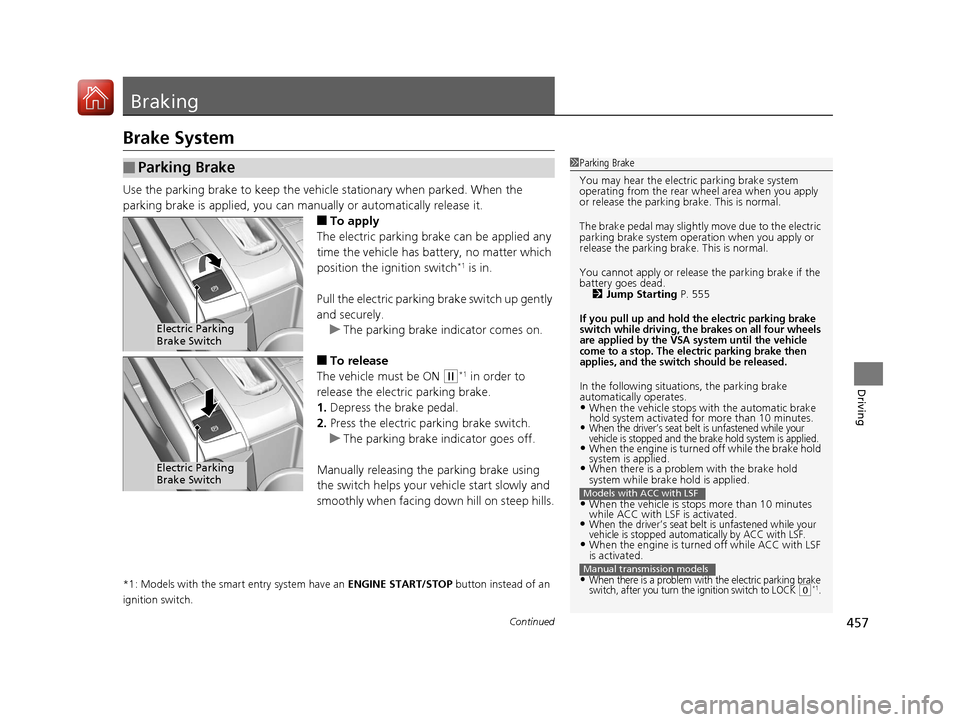
Use the parking brake to keep the vehicle stationary when parked. When the
parking brake is applied, you can manu ally or automatically release it.
■To apply
The electric parking brake can be applied any
time the vehicle has battery, no matter which
position the ignition switch
*1 is in.
Pull the electric parking brake switch up gently
and securely. u The parking brake indicator comes on.
■To release
The vehicle must be ON
(w*1 in order to
release the electric parking brake.
1. Depress the brake pedal.
2. Press the electric parking brake switch.
u The parking brake indicator goes off.
Manually releasing the parking brake using
the switch helps your vehicle start slowly and
smoothly when facing down hill on steep hills.
*1: Models with the smart entry system have an ENGINE START/STOP button instead of an
ignition switch.
■Parking Brake1 Parking Brake
You may hear the electric parking brake system
operating from the rear wh eel area when you apply
or release the parking brake. This is normal.
The brake pedal may slightly move due to the electric
parking brake system opera tion when you apply or
release the parking br ake. This is normal.
You cannot apply or release the parking brake if the
battery goes dead.
2 Jump Starting P. 555
If you pull up and hold the electric parking brake
switch while driving, the brakes on all four wheels
are applied by the VSA system until the vehicle
come to a stop. The electric parking brake then
applies, and the switch should be released.
In the following situations, the parking brake
automatically operates.
•When the vehicle stops with the automatic brake
hold system activated for more than 10 minutes.
•When the driver’s seat belt is unfastened while your
vehicle is stopped and the brake hold system is applied.
•When the engine is turned off while the brake hold
system is applied.
•When there is a problem with the brake hold
system while brake hold is applied.
•When the vehicle is stops more than 10 minutes
while ACC with LSF is activated.
•When the driver’s seat belt is unfastened while your
vehicle is stopped automatically by ACC with LSF.
•When the engine is turned off while ACC with LSF
is activated.
•When there is a problem with the electric parking brake
switch, after you turn the ignition switch to LOCK (0*1.
Models with ACC with LSF
Manual transmission models
Electric Parking
Brake Switch
Electric Parking
Brake Switch
17 CIVIC 4D HCM (KA KC KL)-31TBA6100.book 457 ページ 2016年8月31日 水曜日 午後6時5分
Page 461 of 601

uuBraking uBrake System
460
Driving
Keeps the brake applied after releasing the brake pedal until the accelerator pedal is
pressed. You can use this system while the vehicle is temporarily stopped, like at
traffic lights and in heavy traffic.
■Automatic Brake Hold1Automatic Brake Hold
3WARNING
Activating the automatic brake hold system
on steep hills or slippery roads may still
allow the vehicle to move if you remove
your foot from the brake pedal.
If a vehicle unexpectedly moves, it may
cause a crash resulting in serious injury or
death.
Never activate the automatic brake hold
system or rely on it to keep a vehicle from
moving when stopped on a steep hill or
slippery roads.
3WARNING
Using the automatic brake hold system to
park the vehicle may result in the vehicle
unexpectedly moving.
If a vehicle moves unexpectedly, it may
cause a crash, resulting in serious injury or
death.
Never leave the vehicle when braking is
temporarily kept by automatic brake hold
and always park the vehicle by putting the
transmission in
( P and applying the parking
brake.
Continuously variable transmission models
■Turning on the system
Fasten your seat belt
properly, then start the
engine. Press the
automatic brake hold
button.
●The automatic brake
hold system indicator
comes on. The system
is turned on.
■Activating the system
Depress the brake pedal
to come to a complete
stop. The shift lever must
not be in
( P or (R.●The automatic brake
hold indicator comes
on. Braking is kept for
up to 10 minutes.
●Release the brake pedal
after the automatic
brake hold indicator
comes on.
■Canceling the system
Depress the accelerator
pedal while the shift
lever is in a position
other than
( P or (N. The
brake hold is disengaged
and the vehicle starts to
move.
●The automatic brake
hold indicator goes
off. The system
releases the brake
automatically.
Accelerator PedalBrake PedalAutomatic Brake
Hold Button
Goes
Off
On OnOn
On
On
U.S.
Canada
17 CIVIC 4D HCM (KA KC KL)-31TBA6100.book 460 ページ 2016年8月31日 水曜日 午後6時5分
Page 462 of 601
461
uuBraking uBrake System
Continued
Driving
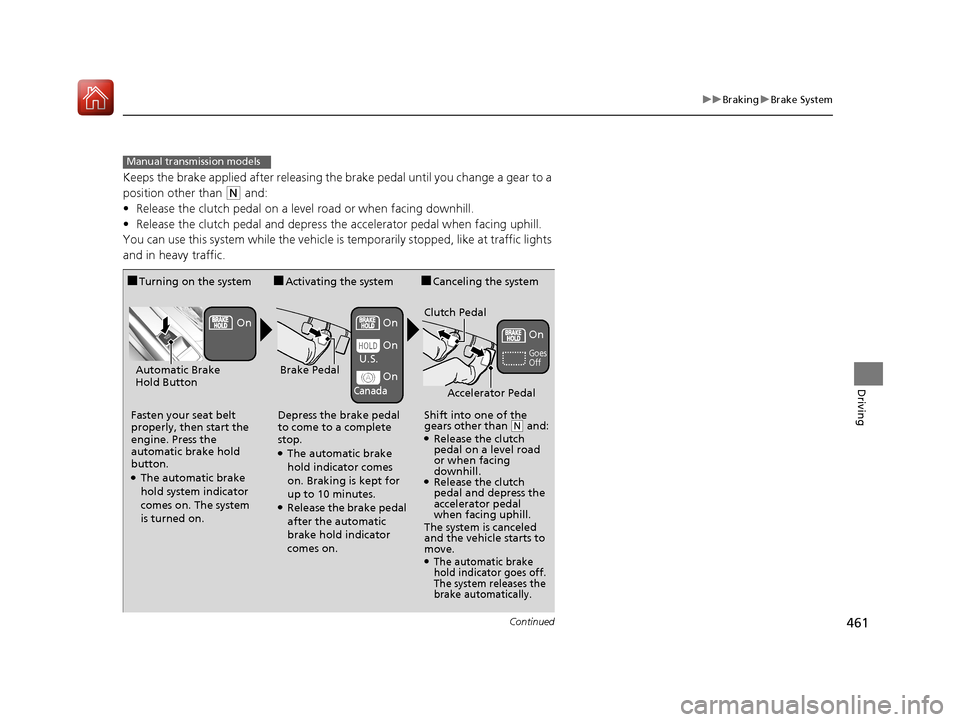
Keeps the brake applied after releasing the brake pedal until you change a gear to a
position other than
(N and:
• Release the clutch pedal on a level road or when facing downhill.
• Release the clutch pedal and depress the accelerator pedal when facing uphill.
You can use this system while the vehicle is temporarily stopped, like at traffic lights
and in heavy traffic.
Manual transmission models
■Turning on the system
Fasten your seat belt
properly, then start the
engine. Press the
automatic brake hold
button.
●The automatic brake
hold system indicator
comes on. The system
is turned on.
■Activating the system
Depress the brake pedal
to come to a complete
stop.
●The automatic brake
hold indicator comes
on. Braking is kept for
up to 10 minutes.
●Release the brake pedal
after the automatic
brake hold indicator
comes on.
■Canceling the system
Shift into one of the
gears other than
( N and: ●Release the clutch
pedal on a level road
or when facing
downhill.
●Release the clutch
pedal and depress the
accelerator pedal
when facing uphill.
The system is canceled
and the vehicle starts to
move.
●The automatic brake
hold indicator goes off.
The system releases the
brake automatically.
Accelerator Pedal
Brake PedalAutomatic Brake
Hold Button
Goes
Off
On On
On
On
On
U.S.
Canada
Clutch Pedal
17 CIVIC 4D HCM (KA KC KL)-31TBA6100.book 461 ページ 2016年8月31日 水曜日 午後6時5分
Page 464 of 601

463
uuBraking uAnti-lock Brake System (ABS)
Driving
Anti-lock Brake System (ABS)
Helps prevent the wheels from locking up, and helps you retain steering control by
pumping the brakes rapidly, much faster than you.
The electronic brake distribu tion (EBD) system, which is part of the ABS, also
balances the front-to-rear braking distribution according to vehicle loading.
You should never pump the brake pedal. Let the ABS work for you by always
keeping firm, steady pressure on the brake pe dal. This is sometimes referred to as
“stomp and steer.”
■ABS operation
The brake pedal may pulsate slightly when the ABS is working. Keep holding the
pedal firmly down. On dry pavement, you will need to press on the brake pedal very
hard before the ABS activates. However, you may feel the ABS activate immediately
if you are trying to stop on snow or ice.
When the vehicle speed goes under 6 mph (10 km/h), the ABS stops.
■ABS1Anti-lock Brake System (ABS)
NOTICE
The ABS may not function correctly if you use an
incorrect tire type and size.
When the ABS indicator comes on while driving,
there may be a problem with the system.
While normal braking is not affected, there is a
possibility of the ABS not operating. Have the vehicle
checked by a dealer immediately.
The ABS does not reduce the ti me or distance it takes
to stop the vehicle. It only helps with steering control
during hard braking.
In the following cases, yo ur vehicle may need more
stopping distance than a vehicle without the ABS:
•When driving on rough road surfaces, including
when driving on uneven surf aces, such as gravel or
snow.
•When snow chains are installed.
You may hear a motor sound coming from the
engine compartment while system checks are being
performed immediately after starting the engine or
while driving. This is normal.
17 CIVIC 4D HCM (KA KC KL)-31TBA6100.book 463 ページ 2016年8月31日 水曜日 午後6時5分
Page 466 of 601
465
uuBraking uCollision Mitigation Braking SystemTM (CMBSTM)*
Continued
Driving
Collision Mitigation Braking SystemTM (CMBSTM)*
Can assist you when there is a possibility of your vehicle colliding with a vehicle or a
pedestrian detected in front of yours. The CMBSTM is designed to alert you when a
potential collision is determined, as well as to reduce your vehicle speed to help
minimize collision severity when a collision is deemed unavoidable.
■How the system works
1 Collision Mitigation Braking SystemTM (CMBSTM)*
Important Safety Reminder
The CMBSTM is designed to reduce the severity of an
unavoidable collision. It does not prevent collision nor
stop the vehicle automatically. It is still your
responsibility to operate the brake pedal and steering
wheel appropriately acco rding to the driving
conditions.
The CMBS
TM may not activate or may not detect a
vehicle in front of y our vehicle under certain
conditions:
2 CMBS
TM Conditions and Limitations P. 469
You can read about handling information for the
camera equipped with this system. 2 Front Sensor Camera
* P. 420
Be careful not to have the radar sensor cover strongly
impacted.
1 How the system works
Rapid vibrations on the steering wheel alert you
when your vehicle speed is between 19 and 62 mph
(30 and 100 km/h) with an oncoming vehicle
detected in front of you.
When the CMBS
TM activates, it may automatically
apply the brake. It will be canceled when your vehicle
stops or a potential coll ision is not determined.
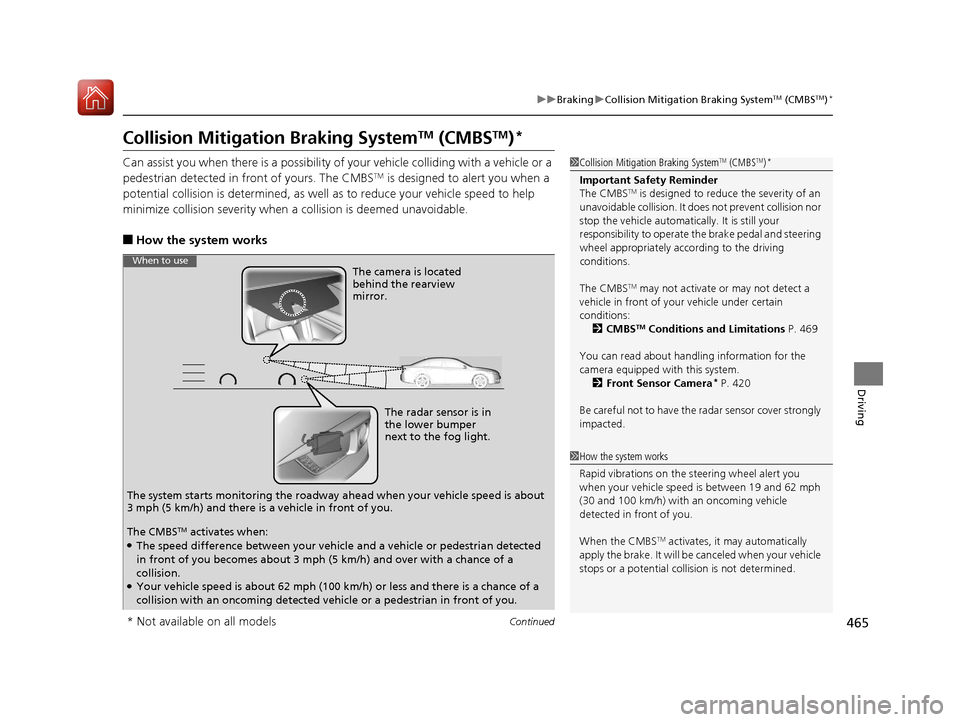
The radar sensor is in
the lower bumper
next to the fog light.
The camera is located
behind the rearview
mirror.
The system starts monitoring the roadway ah ead when your vehicle speed is about
3 mph (5 km/h) and there is a vehicle in front of you.
When to use
The CMBSTM activates when:●The speed difference between your vehicle and a vehicle or pedestrian detected
in front of you becomes about 3 mph (5 km/h) and over with a chance of a
collision.
●Your vehicle speed is about 62 mph (100 km/h) or less and there is a chance of a
collision with an oncoming detected vehicle or a pedestrian in front of you.
* Not available on all models
17 CIVIC 4D HCM (KA KC KL)-31TBA6100.book 465 ページ 2016年8月31日 水曜日 午後6時5分
Page 476 of 601
475
uuMulti-View Rear Camera uAbout Your Multi-View Rear Camera
Driving
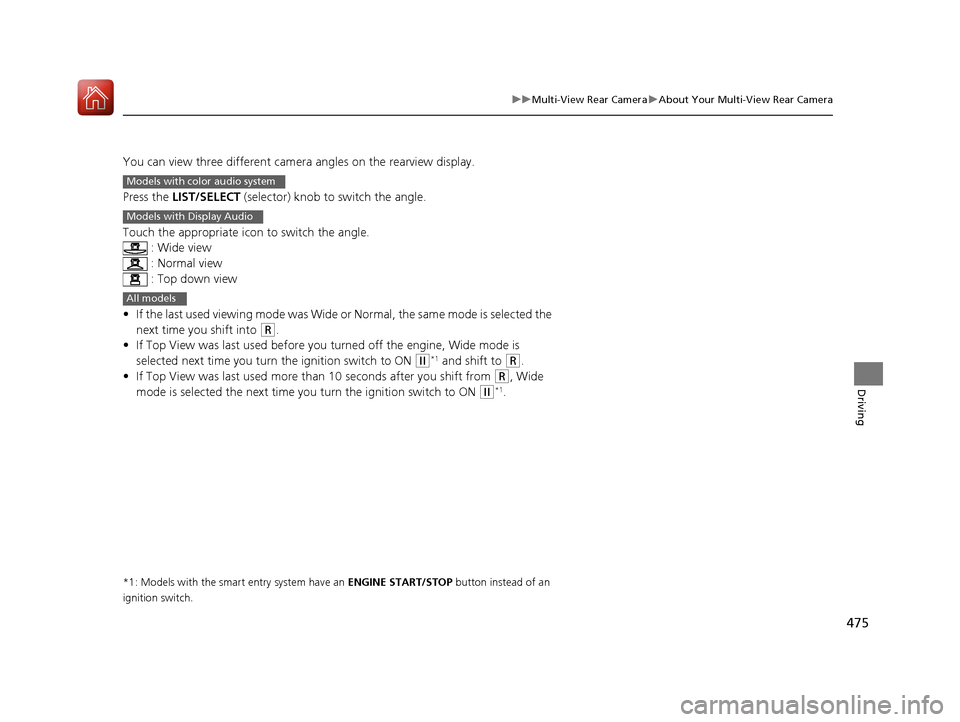
You can view three different camera angles on the rearview display.
Press the LIST/SELECT (selector) knob to switch the angle.
Touch the appropriate icon to switch the angle. : Wide view
: Normal view
: Top down view
• If the last used viewing mode was Wide or Normal, the same mode is selected the
next time you shift into
(R.
• If Top View was last used before you turned off the engine, Wide mode is
selected next time you turn the ignition switch to ON
(w*1 and shift to (R.
• If Top View was last used more than 10 seconds after you shift from
(R, Wide
mode is selected the next time y ou turn the ignition switch to ON
(w*1.
*1: Models with the smart entry system have an ENGINE START/STOP button instead of an
ignition switch.
Models with color audio system
Models with Display Audio
All models
17 CIVIC 4D HCM (KA KC KL)-31TBA6100.book 475 ページ 2016年8月31日 水曜日 午後6時5分