Page 486 of 601

485Continued
Maintenance
Maintenance MinderTM
If the engine oil life is less than 15%, you will see the Maintenance Minder messages
appear on the information display* or the driver information interface* every time
you turn the ignition switch to ON
( w*1. The messages notify you when to change
the engine oil, or when to bring your ve hicle to a dealer for indicated maintenance
services.
To Use Maintenance MinderTM
1. Turn the ignition switch to ON (w.
2. Press the ( TRIP) knob repeatedly until
the engine oil life appears on the
information display.
The Maintenance Minder indicator ( ) stays
on in the instrument panel after the engine oil
life becomes 0% . Have the indicated
maintenance done by a dealer immediately.
*1: Models with the smart entry system have an ENGINE START/STOP button instead of an
ignition switch.
■Displaying the Maintenance Minder Information
Models with info rmation display
1Displaying the Maintena nce Minder Information
Based on the engine opera ting conditions and oil
age, the remaining engine oi l life is calculated and
displayed as a percentage.
Displayed Engine Oil
Life (%)Calculated Engine Oil Life (%)
100 100 to 91
9090 to 81
80 80 to 71
7070 to 61
60 60 to 51
5050 to 41
40 40 to 31
3030 to 21
20 20 to 16
1515 to 11
10 10 to 6
55 to 1
0 0
* Not available on all models
17 CIVIC 4D HCM (KA KC KL)-31TBA6100.book 485 ページ 2016年8月31日 水曜日 午後6時5分
Page 487 of 601

486
uuMaintenance MinderTMuTo Use Maintenance MinderTM
Maintenance
To switch the display, press the (TRIP ) knob.
■Maintenance Minder Messages on the Information Display
Oil Life DisplayExplanationInformationMaintenance Minder Indicator
When you select the Maintenance
Minder screen, it displays codes for
maintenance items due at the next
engine oil change, along with the
percentage of engine oil life
remaining.
Comes on for a few seconds when
you set the ignition switch to ON,
then goes off.
The engine oil life indicator starts
to appear along with other due-
soon maintenance item codes
when the remaining oil life drops
to 15 percent.The engine oil is approaching the
end of its service life.
Starts to come on when the
remaining engine oil life drops to
15 percent.
It goes off when the display is
switched.
The remaining engine oil has
passed its service life, and a
negative distance appears after
driving over 10 miles (U.S. models)
or 10 km (Canadian models). The
negative distance on the display
blinks.The engine oil life has passed.
The maintenance items must be
inspected and serviced
immediately.
Stays on as a reminder even when
the display is switched.
17 CIVIC 4D HCM (KA KC KL)-31TBA6100.book 486 ページ 2016年8月31日 水曜日 午後6時5分
Page 490 of 601

489
uuMaintenance MinderTMuTo Use Maintenance MinderTM
Maintenance
Reset the maintenance minder information display if you have performed the
maintenance service.
1.Turn the ignition switch to ON
(w and have
the vehicle at a complete stop.
2. Display the Maintenance Minder by
repeatedly pressing the ( TRIP) knob.
3. Press and hold the knob for 10 seconds
or more.
u The display will blink to show it is in reset
mode.
4. Rotate the knob to select the item you
wish to reset.
u Reset the selected item by pushing the
knob for five seconds or more.
■Resetting the Display1Resetting the Display
NOTICE
Failure to reset the Maintenance MinderTM display
after a maintenance servic e results in the system
showing incorrect maintenance intervals, which can
lead to serious mechanical problems.
The dealer will reset the Maintenance Minder
TM
display after completing th e required maintenance
service. If someone other than a dealer performs
maintenance service, reset the Maintenance
Minder
TM display yourself.
17 CIVIC 4D HCM (KA KC KL)-31TBA6100.book 489 ページ 2016年8月31日 水曜日 午後6時5分
Page 491 of 601

490
uuMaintenance MinderTMuTo Use Maintenance MinderTM
Maintenance
To Use Maintenance MinderTM
Maintenance items, which should be serviced at the same time that you replace the
engine oil, appear on the driver information interface.
You can view them on the Maintenance Minder screen at any time.
1. Turn the ignition switch to ON
(w*1.
2. Press the button several times until is displayed.
3. Press ENTER to go to the Maintenance Minder screen. The engine oil life
appears on the driver info rmation interface along with maintenance items due
soon.
*1: Models with the smart entry system have an ENGINE START/STOP button instead of an
ignition switch.
■Displaying the Maintenance Minder Information
Models with driver information interface
1 Displaying the Maintena nce Minder Information
Based on the engine opera ting conditions and oil
age, the remaining engine oi l life is calculated and
displayed as a percentage.
There is a list of maintena nce main and sub items you
can view on the driver information interface.
2 Maintenance Service Items P. 492
Displayed Engine Oil
Life (%)Calculated Engine Oil Life (%)
100 100 to 91
9090 to 81
80 80 to 71
7070 to 61
60 60 to 51
5050 to 41
40 40 to 31
3030 to 21
20 20 to 16
1515 to 11
10 10 to 6
55 to 1
0 0
Sub Item
Engine Oil Life
Main Item
ENTER Button
Button
17 CIVIC 4D HCM (KA KC KL)-31TBA6100.book 490 ページ 2016年8月31日 水曜日 午後6時5分
Page 495 of 601

uuMaintenance MinderTMuTo Use Maintenance MinderTM
494
Maintenance
Reset the maintenance minder informat ion display if you have performed the
maintenance service.
1. Turn the ignition switch to ON
(w*1.
2. Press the (display/information) bu tton repeatedly until the appears.
3. Press the ENTER button.
4. Press and hold the ENTER button for about 10 seconds to enter the reset mode.
5. Press / to select a maintenance item to reset, or to select All Due Items
(You can also select Cancel to end the process).
6. Press the ENTER button to reset the selected item.
7. Repeat from step 4 for other items you wish to reset.
■Resetting the Display1Resetting the Display
NOTICE
Failure to reset the Maintenance MinderTM display
after a maintenance servic e results in the system
showing incorrect maintenance intervals, which can
lead to serious mechanical problems.
The dealer will reset the Maintenance Minder
TM
display after completing th e required maintenance
service. If someone other than a dealer performs
maintenance service, reset the Maintenance
Minder
TM display yourself.
You can also reset the Maintenance Minder
TM display
using the customized features on the driver
information interface.
2 Customized Features P. 118
You can also reset the Maintenance Minder
TM display
using the audio/information touch screen.
2 Customized Features P. 308
Models with color audio system
Models with Display Audio
ENTER Button
(Display/Information) Button
34
17 CIVIC 4D HCM (KA KC KL)-31TBA6100.book 494 ページ 2016年8月31日 水曜日 午後6時5分
Page 520 of 601
519Continued
Maintenance
Checking and Maintaining Wiper Blades
Checking Wiper Blades
If the wiper blade rubber has deteriorated, it will leave streaks and the hard surfaces
of the blade may scratch the window glass.
Changing the Wiper Blade Rubber
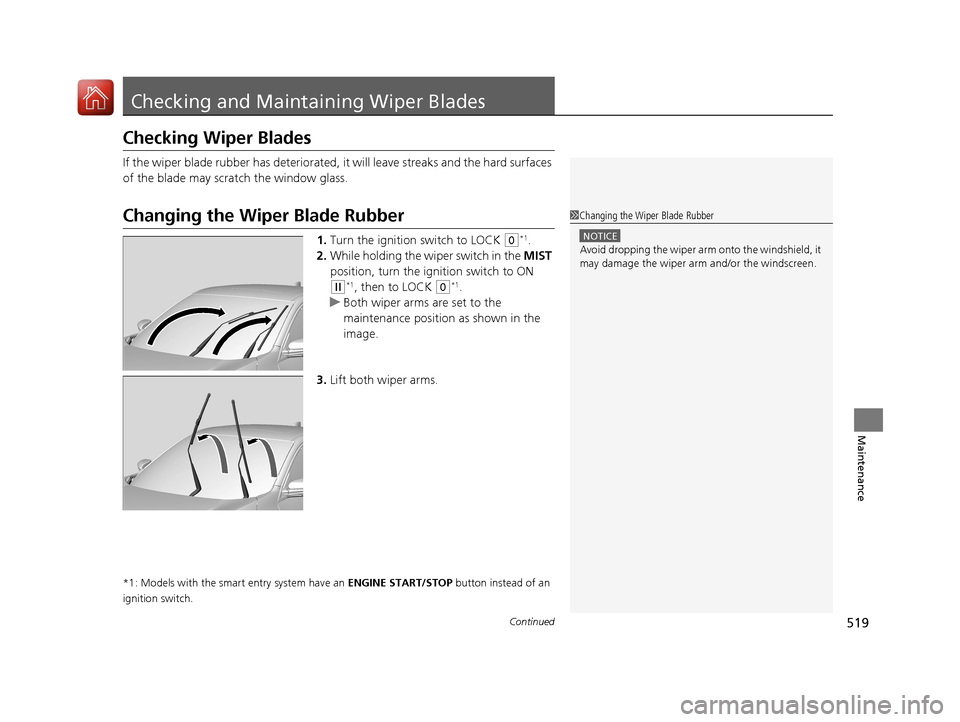
1. Turn the ignition switch to LOCK (0*1.
2. While holding the wiper switch in the MIST
position, turn the ignition switch to ON
(w*1, then to LOCK (0*1.
u Both wiper arms are set to the
maintenance position as shown in the
image.
3. Lift both wiper arms.
*1: Models with the smart entry system have an ENGINE START/STOP button instead of an
ignition switch.
1 Changing the Wiper Blade Rubber
NOTICE
Avoid dropping the wiper arm onto the windshield, it
may damage the wiper arm and/or the windscreen.
17 CIVIC 4D HCM (KA KC KL)-31TBA6100.book 519 ページ 2016年8月31日 水曜日 午後6時5分
Page 522 of 601
521
uuChecking and Maintaining Wiper Blades uChanging the Wiper Blade Rubber
Maintenance
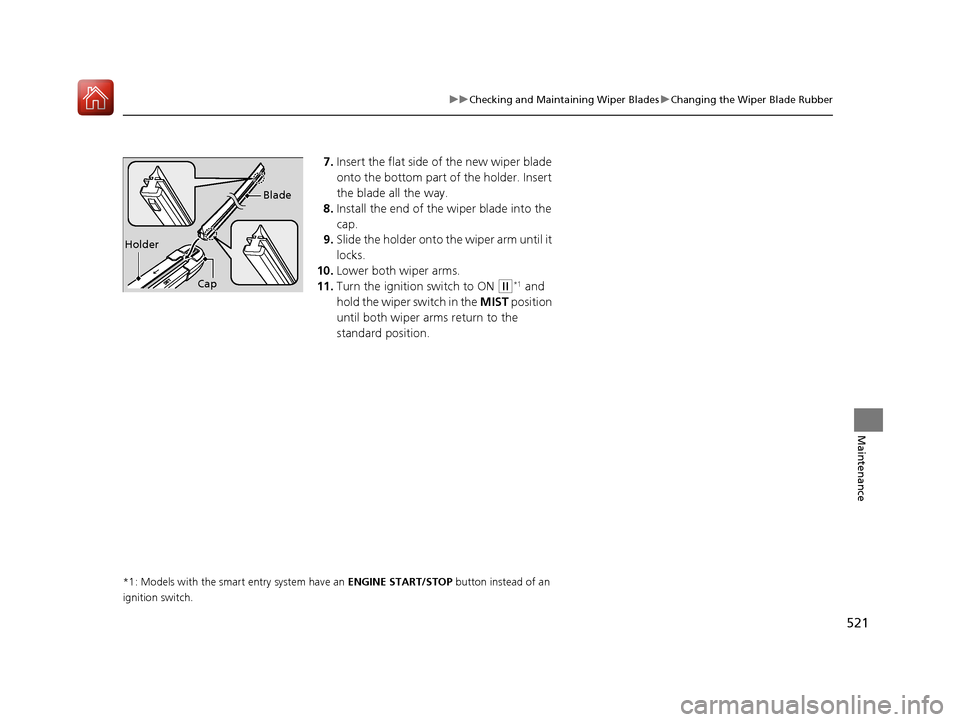
7. Insert the flat side of the new wiper blade
onto the bottom part of the holder. Insert
the blade all the way.
8. Install the end of the wiper blade into the
cap.
9. Slide the holder onto the wiper arm until it
locks.
10. Lower both wiper arms.
11. Turn the ignition switch to ON
(w*1 and
hold the wiper switch in the MIST position
until both wiper arms return to the
standard position.
*1: Models with the smart entry system have an ENGINE START/STOP button instead of an
ignition switch.
Holder Blade
Cap
17 CIVIC 4D HCM (KA KC KL)-31TBA6100.book 521 ページ 2016年8月31日 水曜日 午後6時5分
Page 533 of 601

532
uuBattery uCharging the Battery
Maintenance
Charging the Battery
Disconnect both battery cables to prevent da maging your vehicle’s electrical system.
Always disconnect the negative (–) cable first, and reconnect it last.
*1: Models with the smart entry system have an ENGINE START/STOP button instead of an
ignition switch.
1 Battery
When you find corrosion, cl ean the battery terminals
by applying a baking powder and water solution.
Clean the terminal with a damp towel. Cloth/towel
dry the battery. Coat the terminals with grease to
help prevent future corrosion.
When replacing the battery, the replacement must be
of the same specifications.
Please consult a dealer for more information.
The VSA ® and CMBS
TM * indicators may come on
when your turn the ignition switch to ON
( w*1 after
re-connecting a battery.
Drive a short distance at 12 mph (20 km/h). Each
indicator should go off. If ei ther or both do not, have
your vehicle checked by a dealer.
* Not available on all models
17 CIVIC 4D HCM (KA KC KL)-31TBA6100.book 532 ページ 2016年8月31日 水曜日 午後6時5分