2017 HONDA CIVIC HATCHBACK dead battery
[x] Cancel search: dead batteryPage 28 of 641

Quick Reference Guide
27
Handling the Unexpected (P 583)
Flat Tire (P 585)
● Park in a safe location and replace the
flat tire with the comp act spare tire in the
hatch.
Indicators Come On
(P 602)
● Identify the indica tor and consult the
owner's manual.
Engine Won’t Start
(P 593)
● If the battery is dead, jump start using a
booster battery.
Blown Fuse (P 608)
● Check for a blown fuse if an electrical
device does not operate.
Overheating (P 600)
● Park in a safe location. If you do not see
steam under the hood, open the hood,
and let the engine cool down.
Emergency Towing
(P 612)
●Call a professional towing service if you
need to tow your vehicle.
* Not available on all models
17 CIVIC 5D (KA KC KL)-31TGG6000.book 27 ページ 2016年6月8日 水曜日 午後 2時8分
Page 145 of 641
uuLocking and Unlocking the Doors uLocking/Unlocking the Doors from the Outside
144
Controls
■Unlocking the doors and hatch
Press the unlock button.
Once: u Some exterior lights flash twice, and the driver’s door unlocks.
Twice: u The remaining doors and hatch unlock.1Using the Remote Transmitter
If the distance at which the remote transmitter works
varies, the batter y is probably low.
If the LED does not come on when you press a
button, the battery is dead.
2 Replacing the Button Battery P. 573
You can customize the door unlock mode setting. 2 Customized Features P. 123, 324
Models with driver information interface
17 CIVIC 5D (KA KC KL)-31TGG6000.book 144 ページ 2016年6月8日 水曜日 午 後2時8分
Page 146 of 641
Continued145
uuLocking and Unlocking the Doors uLocking/Unlocking the Doors from the Outside
Controls
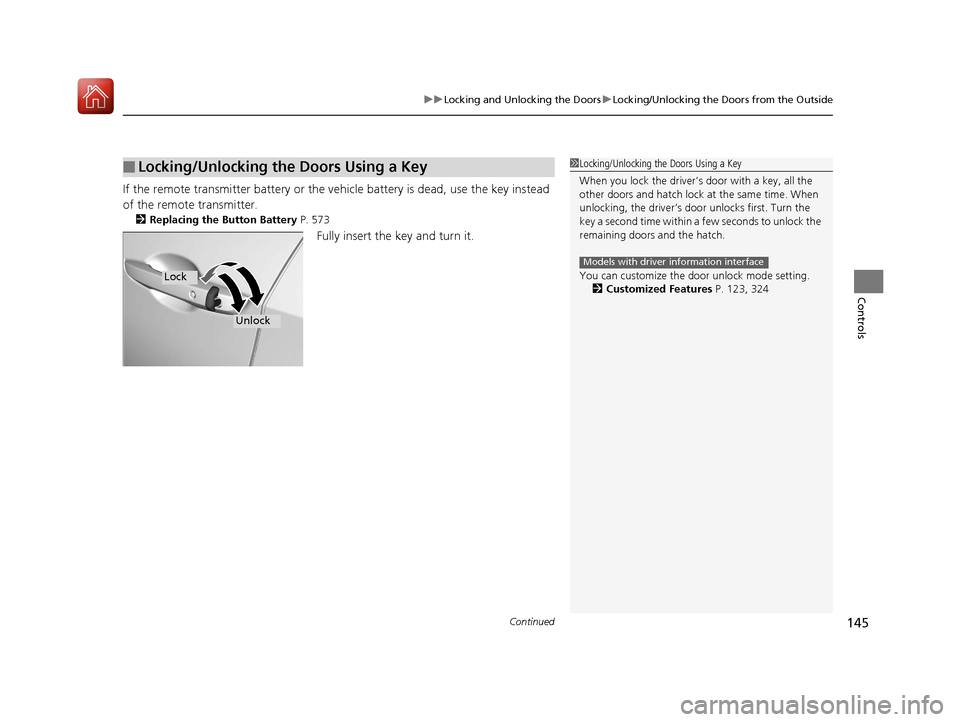
If the remote transmitter battery or the ve hicle battery is dead, use the key instead
of the remote transmitter.
2 Replacing the Button Battery P. 573
Fully insert the key and turn it.
■Locking/Unlocking the Doors Using a Key1Locking/Unlocking the Doors Using a Key
When you lock the driver’s door with a key, all the
other doors and hatch lock at the same time. When
unlocking, the driver’s door unlocks first. Turn the
key a second time within a few seconds to unlock the
remaining doors and the hatch.
You can customize the door unlock mode setting. 2 Customized Features P. 123, 324
Models with driver information interface
Lock
Unlock
17 CIVIC 5D (KA KC KL)-31TGG6000.book 145 ページ 2016年6月8日 水曜日 午 後2時8分
Page 160 of 641

Continued159
uuSecurity System uSecurity System Alarm
Controls
■Setting the security system alarm
The security system alarm automatically sets when the following conditions have
been met:
• The ignition switch is in LOCK
(0*1, and the key has been removed from the
ignition switch.
• The hood is closed.
• All doors and the hatch are locked with the key, the remote transmitter, or smart
entry system
*.
■When the security system alarm sets
The security system alarm indicator in the instrument panel blinks. When the
blinking interval changes after about 15 se conds, the security system alarm is set.
■To cancel the security system alarm
The security system is canc eled when the vehicle is unlocked using the remote
transmitter, smart entry system
*, or the ignition swit ch is turned to ON (w*1. The
security system indicator go es off at the same time.
*1: Models with the smart entry system have an ENGINE START/STOP button instead of an
ignition switch.
1 Security System Alarm
Do not set the security system alarm when someone
is in the vehicle or a window is open. The system can
accidentally activate when:
•Unlocking the door with the lock tab.•Opening the hood with the hood release.
•Moving the shift lever out of ( P.
If the battery goes dead after you have set the
security system alarm, the security alarm may go off
once the battery is re charged or replaced.
If this occurs, deactivate the security system alarm by
unlocking a door using the key, remote transmitter or
smart entry system
*.
Continuously variable transmission models
* Not available on all models
17 CIVIC 5D (KA KC KL)-31TGG6000.book 159 ページ 2016年6月8日 水曜日 午 後2時8分
Page 221 of 641

220
uuAudio System uAudio System Theft Protection
Features
Audio System Theft Protection
The audio system is disabled when it is di sconnected from the power source, such as
when the battery is disconnected or goes dead. In certain conditions, the system
may display a code entry screen. If this occurs, reactivate the audio system.
■Reactivating the audio system
1. Turn the ignition switch to ON
(w*1.
2. Turn on the audio system.
3. Press and hold the audio system power button for more than two seconds.
u The audio system is reac tivated when the audio co ntrol unit establishes a
connection with the vehicle control unit. If the control unit fails to recognize
the audio unit, you must go to a dealer and have the audio unit checked.
*1: Models with the smart entry system have an ENGINE START/STOP button instead of an
ignition switch.
17 CIVIC 5D (KA KC KL)-31TGG6000.book 220 ページ 2016年6月8日 水曜日 午 後2時8分
Page 498 of 641

497Continued
Driving
Braking
Brake System
Use the parking brake to keep the vehicle stationary when parked. You can
manually apply and release, or automatically release it.
■Manual operations
Use the electric parking brake switch to a pply or release the parking brake. Manually
releasing the parking brake using the swit ch helps your vehicle start slowly and
smoothly when facing down hill on steep hills.
■To apply manually
The electric parking brake can be applied any
time the vehicle has battery, no matter which
position the ignition switch
*1 is in.
Pull the electric parking brake switch up gently
and securely. u The parking brake indicator comes on.
■To release manually
The vehicle must be ON
(w*1 in order to
release the electric parking brake.
1. Depress the brake pedal.
2. Press the electric parking brake switch.
u The parking brake indicator goes off.
*1: Models with the smart entry system have an ENGINE START/STOP button instead of an
ignition switch.
■Parking Brake1 Parking Brake
You may hear the electric parking brake system
operating from the rear wh eel area when you apply
or release the parking brake. This is normal.
The brake pedal may slightly move due to the electric
parking brake system opera tion when you apply or
release the parking br ake. This is normal.
You cannot apply or release the parking brake if the
battery goes dead.
2 Jump Starting P. 596
If you pull up and hold the electric parking brake switch while
driving, the brakes on all four wheels are applied by the VSA
system until the vehicle come to a stop. The electric parking
brake then applies, and the switch should be released.
In the following situations, the parking brake
automatically operates.
•When the vehicle stops with the automatic brake
hold system activated for more than 10 minutes.
•When the driver’s seat belt is unfastened while your
vehicle is stopped and the brake hold system is applied.
•When the engine is turned off while the brake hold
system is applied.
•When there is a problem with the brake hold
system while brake hold is applied.
•When the vehicle is stops more than 10 minutes
while ACC with LSF is activated.
•When the driver’s seat belt is unfastened while your
vehicle is stopped automatically by ACC with LSF.
•When the engine is turned off while ACC with LSF
is activated.
•When there is a problem with the electric parking brake
switch, after you turn the ignition switch to LOCK (0*1.
Models with ACC with LSF
Manual transmission models
Electric Parking
Brake Switch
Electric Parking
Brake Switch
17 CIVIC 5D (KA KC KL)-31TGG6000.book 497 ページ 2016年6月8日 水曜日 午 後2時8分
Page 572 of 641

571
Maintenance
Battery
Checking the Battery
The condition of the battery is monitored by a
sensor located on the negative terminal of the
battery. If there is a problem with this sensor,
the information display
*/driver information
interface* will display a warning message. If
this happens, have you vehicle inspected by a
dealer.
Check the battery term inals for corrosion
monthly.
If your vehicle’s battery is disconnected or goes dead:
• The audio system is disabled.
2 Reactivating the audio system P. 220
•The clock* resets.
2 Adjusting the Clock P. 134
•The navigation system* is disabled.
2 Refer to the Navigation System Manual
•
The immobilizer system needs to be reset.
2 Immobilizer System Indicator P. 89
1Battery
WARNING: Battery post, terminals,
and related accessories contain lead
and lead compounds.
Wash your hands after handling.
3WARNING
The battery gives off explosive hydrogen
gas during normal operation.
A spark or flame can cause the battery to
explode with enough force to kill or
seriously hurt you.
When conducting any battery
maintenance, wear prot ective clothing and
a face shield, or have a skilled technician do
it.
Battery
Canadian models only
* Not available on all models
17 CIVIC 5D (KA KC KL)-31TGG6000.book 571 ページ 2016年6月8日 水曜日 午 後2時8分
Page 594 of 641

593
Handling the Unexpected
Engine Does Not Start
Checking the Engine
If the engine does not start, check the starter.
Starter conditionChecklist
Starter doesn’t turn or turns
over slowly.
The battery may be dead. Check
each of the items on the right and
respond accordingly.
Check for a message on the driver information interface.●If the To Start, Hold Remote Near Start Button message appears2If the Smart Entry Remote Battery is Weak P. 594
uMake sure the smart entry remote is in its operating range.2 ENGINE START/STOP Button Operating Range P. 166
Check the brightness of the interior lights.
Turn on the interior lights and check the brightness.
●If the interior lights are dim or do not come on at all2 Battery P. 571●If the interior lights come on normally2 Fuses P. 608
The starter turns over normally
but the engine doesn’t start.
There may be a problem with the
fuse. Check each of the items on
the right and respond accordingly. Review the engine start procedure.
Follow its instructions, and try
to start the engine again.
2 Starting the Engine P. 422
Check the immobilize r system indicator.
When the immobilizer system indicator is blinking, the engine cannot be started.
2 Immobilizer System P. 157
Check the fuel level.
There should be enough fuel in the tank.
2 Fuel Gauge P. 114
Check the fuse.
Check all fuses, or have the vehicle checked by a dealer.
2Inspecting and Changing Fuses P. 611
If the problem continues:2Emergency Towing P. 612
1Checking the Engine
If you must start the vehi cle immediately, use an
assisting vehicle to jump start it.
2 Jump Starting P. 596
Models with smart entry system
17 CIVIC 5D (KA KC KL)-31TGG6000.book 593 ページ 2016年6月8日 水曜日 午 後2時8分