Page 115 of 641

114
Instrument Panel
Gauges and Displays
Gauges
Gauges include the speedometer, tachometer, fuel gauge, and related indicators.
They are displayed when the ignition switch is in ON
(w*1.
Displays your driving speed in mph or km/h.
Shows the number of engine revolutions per minute.
Displays the amount of fuel left in the fuel tank.
Displays the temperature of the engine coolant.
*1: Models with the smart entry system have an ENGINE START/STOP button instead of an
ignition switch.
■Speedometer
■Tachometer
■Fuel Gauge
■Temperature Gauge
1 Gauges
Press and hold the km/mil e change knob until you
hear a beep. The speedometer reading and the
displayed measurements switch between mph and
km/h.
Press the (display /information) button
repeatedly until the ic on is shown on the driver
information interface. Press ENTER , then press and
hold it again. The spee dometer reading and the
displayed measurements wi ll switch between mph
and km/h.
Models with information display
Models with driver information interface
1 Fuel Gauge
NOTICE
You should refuel when the reading approaches .
Running out of fuel can cause the engine to misfire,
damaging the cata lytic converter.
The actual amount of remain ing fuel may differ from
the fuel gauge reading.E
1 Temperature Gauge
NOTICE
Driving with the temperat ure gauge pointer in the
upper zone can cause serious engine damage. Pull
safely to the side of th e road and allow engine
temperature to return to normal. 2 Overheating P. 600
17 CIVIC 5D (KA KC KL)-31TGG6000.book 114 ページ 2016年6月8日 水曜日 午 後2時8分
Page 118 of 641

117
uuGauges and Displays uInformation Display*
Instrument Panel
Shows the outside temperature in Fahrenheit.
■Adjusting the outside temperature indicator
Adjust the temperature reading up to ± 5°F if the temperature reading seems
incorrect.
1. Turn the ignition switch to ON
(w*1.
2. Press and hold the ( TRIP) knob for 10 seconds or more while the outside
temperature is shown on the information display.
u The information display goes into temp erature adjustment mode. The display
starts showing from -5°F to +5°F.
3. Release the knob when the righ t adjustment amount is shown.
u The adjustment is complete.
*1: Models with the smart entry system have an ENGINE START/STOP button instead of an
ignition switch.
■Outside Temperature1 Outside Temperature
The temperature sensor is in the front bumper.
Road heat and exhaust fr om another vehicle can
affect the temperature reading when your vehicle
speed is less than 19 mph (30 km/h).
It may take several minutes for the display to be
updated after the temperature reading has stabilized.
17 CIVIC 5D (KA KC KL)-31TGG6000.book 117 ページ 2016年6月8日 水曜日 午 後2時8分
Page 124 of 641
Continued123
uuGauges and Displays uDriver Information Interface*
Instrument Panel
Use the driver information interface to customize certain features.
■How to customize
Select the Vehicle Settings screen by pressing the button while the ignition
switch is in ON
(w*1, and the vehicle is at a complete stop. Select Vehicle Settings,
then press the ENTER button.
*1: Models with the smart entry system have an ENGINE START/STOP button instead of an
ignition switch.
■Customized Features
Models with color audio system1 Customized Features
To customize other features, press the /
button.
2 List of customizable options P. 126
2 Example of customization settings P. 130
34
Button
Press to go to the next
display.
ENTER Button
Press to set your selection.
Button
Press to go to Vehicle Menu.
Button
Press to scroll upwards.3
Button
Press to go back to the
previous display.
Button
Press to scroll downwards.4
17 CIVIC 5D (KA KC KL)-31TGG6000.book 123 ページ 2016年6月8日 水曜日 午 後2時8分
Page 130 of 641

129
uuGauges and Displays uDriver Information Interface*
Continued
Instrument Panel
*1: Default SettingSetup Group Customizable Features
Description Selectable Settings
Door Setup
Auto Door LockChanges the setting for when the doors
automatically lock.With Vehicle Speed*1/Shift
from P /OFF
Auto Door UnlockChanges the setting for when the doors
automatically unlock.
When Driver’s Door Opens*1/
When Shifting Into Park /
When Ignition Switched
OFF /OFF
Key And Remote Unlock
ModeSets up either the driver’s door or all doors to unlock
on the first operation of the remote or ignition key.Driver Door*1/ All Doors
Keyless Lock Answer
BackLOCK/UNLOCK- The exterior lights flash.
LOCK (2nd push)- The beeper sounds.ON*1/OFF
Security Relock Timer
Changes the time it takes for the doors to relock and
the security system to set after you unlock the
vehicle without op ening any door.
90sec/60sec /30sec*1
Maintenance
Reset —Cancels/Resets the engine oil life display when you
have performed the maintenance service.
Cancel
/Reset
Default All—Cancels/Resets all the customized settings as
default.Cancel /Set
17 CIVIC 5D (KA KC KL)-31TGG6000.book 129 ページ 2016年6月8日 水曜日 午 後2時8分
Page 134 of 641

133
Controls
This chapter explains how to operate the various controls necessary for driving.
Clock.................................................. 134
Locking and Unlocking the Doors
Key Types and Functions .................. 136
Low Smart Entry Remote Signal Strength*.. 137Locking/Unlocking the Doors from the Outside .......................................... 138
Locking/Unlocking the Doors from the Inside ............................................. 147
Childproof Door Locks ..................... 149
Auto Door Locking/Unlocking .......... 150
Opening and Closing the Hatch....... 154
Security System
Immobilizer System .......................... 157
Security System Alarm ...................... 158 Opening and Closing the Windows
... 161
Opening and Closing the Moonroof*.. 164Operating the Switches Around the
Steering Wheel Ignition Switch
*............................... 165
ENGINE START/STOP Button*........... 166
Ignition Switch and Power Mode Comparison ................................... 169
Turn Signals ..................................... 170
Light Switches.................................. 170
Fog Lights
*...................................... 173
Daytime Running Lights ................... 173
Auto High-Beam
*............................ 174
Wipers and Washers ........................ 177 Brightness Control ........................... 180
Rear Defogger/Heated Door Mirror
*
Button ........................................... 181
Adjusting the Steering Wheel .......... 182
Adjusting the Mirrors
Interior Rearview Mirror ................... 183
Power Door Mirrors ......................... 184
Adjusting the Seats .......................... 185
Interior Lights/Interior Convenience Items ................................................ 193
Climate Control System
Using Automatic Climate Control .... 208
Automatic Climate Control Sensors......215
* Not available on all models
17 CIVIC 5D (KA KC KL)-31TGG6000.book 133 ページ 2016年6月8日 水曜日 午 後2時8分
Page 135 of 641

134
Controls
Clock
Adjusting the Clock
You can adjust the time in the clock display with the ignition switch in ON (w*1.
■Using the MENU/CLOCK button
1. Press and hold the MENU/CLOCK button.
u Adjust Clock is selected.
2. Rotate to change hour, then press .
3. Rotate to change minute, then press
.
4. To enter the selection, rotate and select
Set , then press .
*1: Models with the smart entry system have an ENGINE START/STOP button instead of an
ignition switch.
■Adjusting the Time
1 Adjusting the Clock
The clock is automatically updated through the audio
system, so the time does not need to be adjusted.
You can customize the clock display to show the 12
hour clock or 24 hour clock.
2 Customized Features P. 324
Models with navigation system
All models
Models without navigation system
1Using the MENU/CLOCK button
These indications are used to show how to operate
the selector knob.
Rotate to select.
Press to enter.
Models with color audio system
17 CIVIC 5D (KA KC KL)-31TGG6000.book 134 ページ 2016年6月8日 水曜日 午 後2時8分
Page 137 of 641

136
Controls
Locking and Unlocking the Doors
Key Types and Functions
This vehicle comes with the following keys:
Use the keys to start and stop the engine, and to lock and unlock the doors and
hatch. You can also use the remote transmitter or smart entry system
* to lock and
unlock the doors and hatch.
The built-in key can be used to lock/unlock the
doors when the smart entry remote battery
becomes weak and th e power door lock/
unlock operation is disabled.
To remove the built-in key, slide the release
knob and then pull out the key. To reinstall
the built-in key, push th e built-in key into the
smart entry remote until it clicks.
1 Key Types and Functions
All the keys have an immobilizer system. The
immobilizer system helps to protect against vehicle
theft. 2 Immobilizer System P. 157
The keys contain precision electronics.
Adhere to the following advi ce to prevent damage to
the electronics:
•Do not leave the keys in direct sunlight, or in
locations with high temperature or high humidity.
•Do not drop the keys or set heavy objects on them.
•Keep the keys away from liquids.
•Do not take the keys apart except for replacing the
battery.
If the circuits in the keys are damaged, the engine
may not start, and the remote transmitter may not
work.
If the keys do not work properly, have them
inspected by a dealer.
You can remotely start the engine using the one-way
smart entry remote. 2 Remote Engine Start with Vehicle
Feedback
* P. 426
Models with remote engine starter
■Smart Entry Remote*
Ignition key with
remote transmitterSmart entry remoteSmart entry remote with
remote engine starter
Built-in Key
Release Knob
* Not available on all models
17 CIVIC 5D (KA KC KL)-31TGG6000.book 136 ページ 2016年6月8日 水曜日 午
後2時8分
Page 144 of 641
Continued143
uuLocking and Unlocking the Doors uLocking/Unlocking the Doors from the Outside
Controls
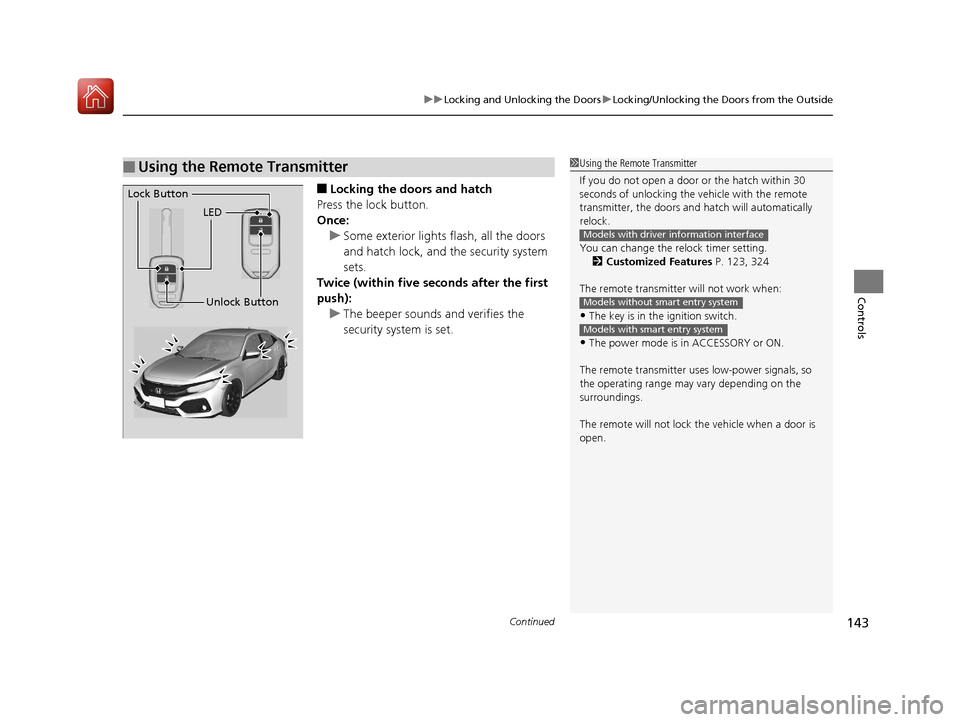
■Locking the doors and hatch
Press the lock button.
Once: u Some exterior lights flash, all the doors
and hatch lock, and the security system
sets.
Twice (within five se conds after the first
push):
u The beeper sounds and verifies the
security system is set.
■Using the Remote Transmitter1Using the Remote Transmitter
If you do not open a door or the hatch within 30
seconds of unlocking the vehicle with the remote
transmitter, the doors and hatch will automatically
relock.
You can change the relock timer setting. 2 Customized Features P. 123, 324
The remote transmitter will not work when:
•The key is in the ignition switch.
•The power mode is in ACCESSORY or ON.
The remote transmitter us es low-power signals, so
the operating range may vary depending on the
surroundings.
The remote will not lock th e vehicle when a door is
open.
Models with driver information interface
Models without smart entry system
Models with smart entry system
LED
Unlock Button
Lock Button
17 CIVIC 5D (KA KC KL)-31TGG6000.book 143 ページ 2016年6月8日 水曜日 午
後2時8分
