2017 HONDA CIVIC HATCHBACK change wheel
[x] Cancel search: change wheelPage 489 of 641

uuWhen Driving uVehicle Stability Assist (VSA® ), aka Electronic Stability Control (ESC), System
488
Driving
This button is on the driver side control panel.
To partially disable VSA ® functionality/
features, press and hold it until you hear a
beep.
The traction control stops fully functioning,
allowing the wheels to sp in more freely at low
speed. The VSA ® OFF indicator will also come
on and a message on the driver information
interface
* informs you that the mode is
changed.
To restore VSA ® functionality/features, press
the (VSA ® OFF) button until you hear a
beep.
VSA ® is turned on every time you start the
engine, even if you turned it off the last time
you drove the vehicle.
■VSA ® On and Off1 Vehicle Stability Assist (VSA ®), aka Electronic Stability Control
(ESC), System
With the button pressed, your vehicle will have
normal braking and corn ering ability, but VSA®
traction and stability enhancement becomes less
effective.
In certain unusual conditions when your vehicle gets
stuck in shallow mud or fr esh snow, it may be easier
to free it with the VSA ® temporarily switched off.
When the button is pressed, the traction control
function becomes less effective. This allows for the
wheels to spin more freely at low speed. You should
only attempt to free your vehicle with the VSA ® off if
you are not able to free it when the VSA ® is on.
Immediately after freeing your vehicle, be sure to
switch VSA ® on again. We do not recommend driving
your vehicle with the VSA ® system switched off.
You may hear a motor sound coming from the
engine compartment while system checks are being
performed immediately after starting the engine or
while driving. This is normal.
The VSA ® OFF indicator may come on after re-
connecting the battery. Dr ive straight for a short
distance at more than 12 mph (20 km/h). The
indicator should go off. If it does not, have your
vehicle checked by a dealer.
VSA ® OFF
Indicator
* Not available on all models
17 CIVIC 5D (KA KC KL)-31TGG6000.book 488 ページ 2016年6月8日 水曜日 午 後2時8分
Page 491 of 641

490
uuWhen Driving uLaneWatchTM*
Driving
LaneWatchTM*
LaneWatch is an assistance system that allows you to check the passenger side rear
areas displayed on the audio/in formation screen when the turn signal is activated to
the passenger’s side. A camera in the passenger side door mirror monitors these
areas and allows you to check for vehicles, in addition to your visual check and use
of the passenger door mirror. You can also keep the system on for your convenience
while driving.1 LaneWatchTM*
Important Safety Reminder
Like all assistance systems, LaneWatch has
limitations. Over reliance on LaneWatch may result in
a collision.
The LaneWatch func tion can be affected by weather,
lighting (including headli ghts and low sun angle),
ambient darkness, camera condition, and loading.
The LaneWatch may not prov ide the intended display
of traffic to the side and rear under the following
conditions:
•Your vehicle’s suspension has been altered,
changing the height of the vehicle.
•Your tires are over or under inflated.•Your tires or wheels are of varied size or
construction.
3WARNING
Failure to visually confirm that it is safe to
change lanes before doing so may result in
a crash and serious injury or death.
Do not rely only on LaneWatch while
driving.
Always look in your mirrors, to either side
of your vehicle, and behind you for other
vehicles before changing lanes.
12
Camera
Audio/Information Screen
Move the turn signal
lever to the passenger
side.
Press the LaneWatch
button.
The passenger side view
display appears on the
audio/information screen.
The system activates when you:
The system deactivates when you press
the LaneWatch button again.
* Not available on all models
17 CIVIC 5D (KA KC KL)-31TGG6000.book 490 ページ 2016年6月8日 水曜日 午
後2時8分
Page 493 of 641

492
uuWhen Driving uTire Pressure Monitoring System (TPMS)
Driving
Tire Pressure Monitoring System (TPMS)
Instead of directly measuring the pressu re in each tire, the TPMS on this vehicle
monitors and compares the rolling radius and rotational characteristics of each
wheel and tire while you are driving to determine if one or more tires are
significantly under-inflated. This will caus e the low tire pressure/TPMS indicator to
come on and a message to appear on the driver information interface
*.
You must start TPMS calibration every time you:
• Adjust the pressure in one or more tires.
• Rotate the tires.
• Replace one or more tires.
Before calibrating the TPMS:
• Set the cold tire pressu re in all four tires.
2Checking Tires P. 561
Make sure:
•The vehicle is at a complete stop.
• The shift lever is in
(N.
• The shift lever is in
(P.
• The ignition switch is in ON
(w*1.
*1: Models with the smart entry system have an ENGINE START/STOP button instead of an
ignition switch.
■TPMS Calibration
U.S. models
1 Tire Pressure Monitoring System (TPMS)
The system does not monitor the tires when driving
at low speed.
Conditions such as low ambient temperature and
altitude change directly a ffect tire pressure and can
trigger the low tire pressure/TPMS indicator to come on.
Tire pressure checked and inflated in:
•Warm weather can beco me under-inflated in
colder weather.
•Cold weather can become over-inflated in warmer
weather.
The low tire pressure indica tor will not come on as a
result of over inflation.
The TPMS may not function pr operly if tire type and
size are mixed. Make sure to use the same size and
type of tire. 2 Checking and Maintaining Tires P. 561
The low tire pressure/TPMS indicator may come on
with a delay or may not come on at all when:
•You rapidly accelerate, decelerate, or turn the
steering wheel.
•You drive on snowy or slippery roads.•Snow chains are used.
The low tire pressure/TPMS indicator may come on
under the following conditions:
•A compact spare tire is used.•There is a heavier and une ven load on the tires,
such as when towing a trailer, than the condition at
calibration.
•Snow chains are used.
Manual transmission models
Continuously variable transmission models
All models
* Not available on all models
17 CIVIC 5D (KA KC KL)-31TGG6000.book 492 ページ 2016年6月8日 水曜日 午 後2時8分
Page 516 of 641

515Continued
Driving
Multi-View Rear Camera
About Your Multi-View Rear Camera
The audio/information screen can display your vehicle’s rear view.
The display automatically changes to a rear view when the shift lever is moved to
(R.
■Multi-View Rear Camera Display Area
1About Your Multi-View Rear Camera
The rear camera view is restricted. You cannot see
the corner ends of the bum per or what is underneath
the bumper. Its unique le ns also makes objects
appear closer or farther than they actually are.
Visually confirm that it is safe to drive before backing
up. Certain conditions (such as weather, lighting, and
high temperatures) may also re strict the rear view. Do
not rely on the rearview display which does not give
you all information about conditions at the back of
your vehicle.
If the camera lens is cove red with dirt or moisture,
use a soft, moist cloth to keep the lens clean and free
of debris.
You can change the Fixed Guideline and Dynamic
Guideline settings. 2 Customized Features P. 324
Fixed Guideline
On: Guidelines appear when you shift into
(R.
Off: Guidelines do not appear.
Dynamic Guidelines
On: Guidelines move according to the steering wheel
direction.
Off: Guidelines do not move.
Models with Display Audio
Guidelines
Bumper Wide View Mode
Normal View Mode
Top Down View Mode
Camera
Approx. 118 inches (3 m)
Approx. 79 inches (2 m)
Approx. 39 inches (1 m)Approx. 20 inches (50 cm)
17 CIVIC 5D (KA KC KL)-31TGG6000.book 515 ページ 2016年6月8日 水曜日 午
後2時8分
Page 590 of 641

Continued589
uuIf a Tire Goes Flat uChanging a Flat Tire
Handling the Unexpected
1. Place the jack under the jacking point
closest to the tire to be changed.
2. Turn the end bracket cl ockwise as shown in
the image until the top of the jack contacts
the jacking point.
u Make sure that the jacking point tab is
resting in the jack notch.
3. Raise the vehicle, using the jack handle bar
and the jack handle, until the tire is off the
ground.
■How to Set Up the Jack1How to Set Up the Jack
Do not use the jack with people or luggage in the
vehicle.
Use the jack provided in your vehicle.
Other jacks may not support the weight (“load”) or
may not fit the jacking point.
The following instructions must be followed to use
the jack safely:
•Do not use while the engine is running.
•Use only where the ground is firm and level.
•Use only at the jacking points.•Do not get in the vehicl e while using the jack.
•Do not put anything on top of or underneath the
jack.
3WARNING
The vehicle can easily roll off the jack,
seriously injuring anyone underneath.
Follow the directions for changing a tire
exactly, and never get under the vehicle
when it is supported only by the jack.
Jacking Points
Jacking Point
Jack
Handle
Bar Wheel Nut
Wrench as Jack Handle
17 CIVIC 5D (KA KC KL)-31TGG6000.book 589 ページ 2016年6月8日 水曜日 午 後2時8分
Page 596 of 641

595
uuEngine Does Not StartuEmergency Engine Stop
Handling the Unexpected
Emergency Engine Stop
The ENGINE START/STOP button may be used to stop the engine due to an
emergency situation even while driving. If you must stop the engine, do either of the
following operations:
• Press and hold the ENGINE START/STOP button for about two seconds.
• Firmly press the ENGINE START/STOP button three times.
The steering wheel will not lock. However, because turning off the engine disables
the power assist the engine provides to the steering and braking systems, it will
require significantly more physical effort an d time to steer and slow the vehicle. Use
both feet on the brake pedal to slow down the vehicle and stop immediately in a
safe place. With manual transmission models you can also downshift the
transmission to utilize engine braking.
The power mode is in ACCESSORY when the engine is stopped.
To change the mode to VEHICLE OFF, move the shift lever to
(P after the vehicle
comes to a complete stop.
Then press the ENGINE START/STOP button twice without depressing the brake
pedal.
The power mode changes to VEHICLE OFF.
Models with smart entry system
1 Emergency Engine Stop
Do not press the button while driving unless it is
absolutely necessary for th e engine to be switched
off.
Continuously variable transmission models
Canadian continuously variable transmission models
Manual transmission models
17 CIVIC 5D (KA KC KL)-31TGG6000.book 595 ページ 2016年6月8日 水曜日 午 後2時8分
Page 620 of 641
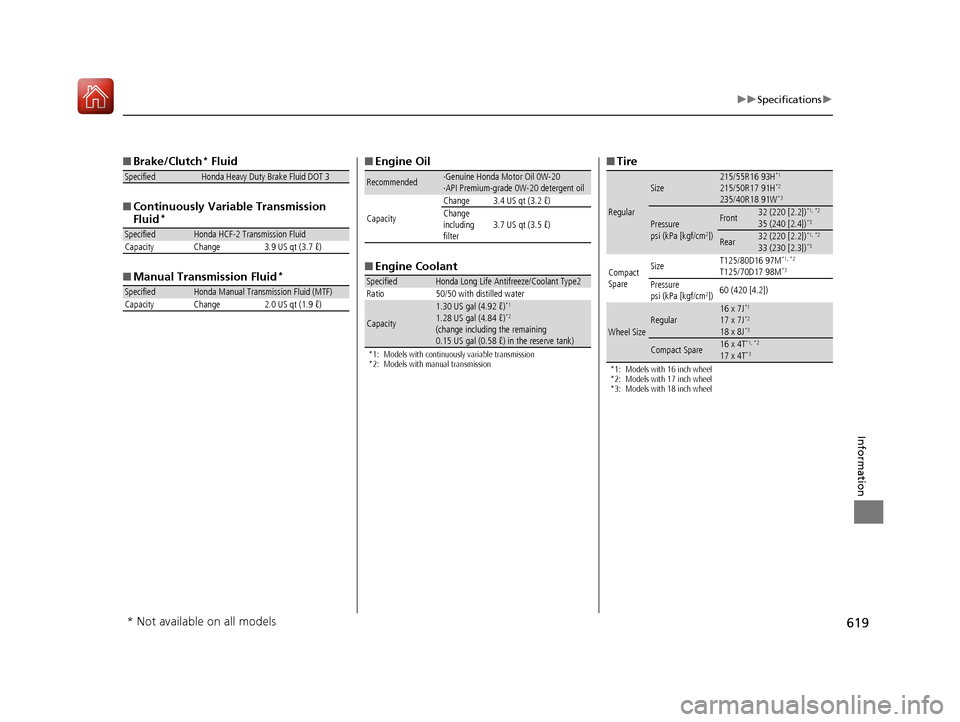
619
uuSpecifications u
Information
■Brake/Clutch* Fluid
■ Continuously Variable Transmission
Fluid
*
■Manual Transmission Fluid*
SpecifiedHonda Heavy Duty Brake Fluid DOT 3
SpecifiedHonda HCF-2 Transmission Fluid
Capacity Change 3.9 US qt (3.7 ℓ)
SpecifiedHonda Manual Transmission Fluid (MTF)
Capacity Change 2.0 US qt (1.9 ℓ)
■ Engine Oil
■ Engine Coolant
*1: Models with continuously variable transmission
*2: Models with manual transmission
Recommended·Genuine Honda Motor Oil 0W-20
·API Premium-grade 0W-20 detergent oil
Capacity Change 3.4 US qt (3.2 ℓ)
Change
including
filter
3.7 US qt (3.5 ℓ)
SpecifiedHonda Long Life Antifreeze/Coolant Type2
Ratio 50/50 with distilled water
Capacity
1.30 US gal (4.92 ℓ)*1
1.28 US gal (4.84 ℓ)*2
(change including the remaining
0.15 US gal (0.58 ℓ) in the reserve tank)
■ Tire
*1: Models with 16 inch wheel
*2: Models with 17 inch wheel
*3: Models with 18 inch wheel
Regular
Size215/55R16 93H*1
215/50R17 91H*2
235/40R18 91W*3
Pressure
psi (kPa [kgf/cm2])
Front32 (220 [2.2])*1, *2
35 (240 [2.4])*3
Rear32 (220 [2.2])*1, *2
33 (230 [2.3])*3
Compact
Spare Size
T125/80D16 97M
*1, *2
T125/70D17 98M*3
Pressure
psi (kPa [kgf/cm2])60 (420 [4.2])
Wheel SizeRegular16 x 7J*1
17 x 7J*2
18 x 8J*3
Compact Spare16 x 4T*1, *2
17 x 4T*3
* Not available on all models
17 CIVIC 5D (KA KC KL)-31TGG6000.book 619 ページ 2016年6月8日 水曜日 午
後2時8分