2017 HONDA CIVIC HATCHBACK carplay
[x] Cancel search: carplayPage 383 of 641

382
Features
Bluetooth® HandsFreeLink ®*
Bluetooth® HandsFreeLink ® (HFL) allows you to place and receive phone calls using
your vehicle’s audio system, without handling your cell phone.
Using HFL
■HFL Buttons
1 Bluetooth ® HandsFreeLink ®*
Place your phone where y ou can get good reception.
To use HFL, you need a Bluetooth-compatible cell
phone. For a list of compatible phones, pairing
procedures, and special feature capabilities:
•U.S.: Visit www.handsfreelink.honda.com , or call
1-888-528 -7876.
•Canada: Visit www.handsfreelink.ca , or call 1-888-
528 -7876.
To use the system, the Bluetooth On/Off setting
must be On . If there is an acti ve connection to Apple
CarPlay, HFL is unavailable. 2 How to customize P. 331
Voice control tips
•Aim the vents away from the ceiling and close the
windows, as noise coming fr om them may interfere
with the microphone.
•Press the button when you want to call a
number using a stored voic e tag. Speak clearly and
naturally after a beep.
•If the microphone picks up vo ices other than yours,
the command may be misinterpreted.
•To change the volume level, select the audio
system’s VOL (Volume) or use the remote audio
controls on the steering wheel.
Up to five speed dial entries can be displayed among
a total of 20 that can be entered. 2 Speed Dial P. 396
Models with Display Audio
(Talk) Button
Volume up Microphone
(Hang-up/Back) Button
(Pick-up) Button
ENTER Button
Button
Buttons34
Volume down
* Not available on all models
17 CIVIC 5D (KA KC KL)-31TGG6000.book 382 ページ 2016年6月8日 水曜日 午 後2時8分
Page 391 of 641

uuBluetooth ® HandsFreeLink ®*uHFL Menus
390
Features
■To pair a cell phone (when there is no
phone paired to the system)
1. Select Phone .
2. Select Yes.
3. Make sure your phone is in search or
discoverable mode, then select Continue.
u HFL automatically searches for a
Bluetooth ® device.
4. Select your phone when it appears on the
list.
u If your phone does not appear, you can
select Refresh to search again.
u If your phone still does not appear, select
Phone Not Found and search for
Bluetooth ® devices using your phone.
From your phone, search for
HandsFreeLink .
5. The system gives you a pairing code on the
audio/information screen.
u Confirm if the pairing code on the screen
and your phone match.
This may vary by phone.
■Phone Setup1Phone Setup
Your Bluetooth -compatible phone must be paired to
the system before you ca n make and receive hands-
free calls.
Phone Pairing Tips:
•You cannot pair your phone while the vehicle is
moving.
•Up to six phones can be paired.
•Your phone's battery may dr ain faster when it is
paired to the system.
•If your phone is not ready for pairing or not found
by the system within three minutes, the system will
time out and return to idle.
Once you have paired a phone, you can see it
displayed on the screen with one or two icons on the
right side.
These icons indicate the following: : The phone can be used with HFL.
: The phone is compatible with Bluetooth® Audio.
If there is an active c onnection to Apple CarPlay,
pairing of additional Bluetooth -compatible devices is
unavailable and Add Bluetooth Device is grayed
out from the Bluetooth Device List screen.
17 CIVIC 5D (KA KC KL)-31TGG6000.book 390 ページ 2016年6月8日 水曜日 午 後2時8分
Page 404 of 641
Continued403
uuBluetooth ® HandsFreeLink ®*uHFL Menus
Features
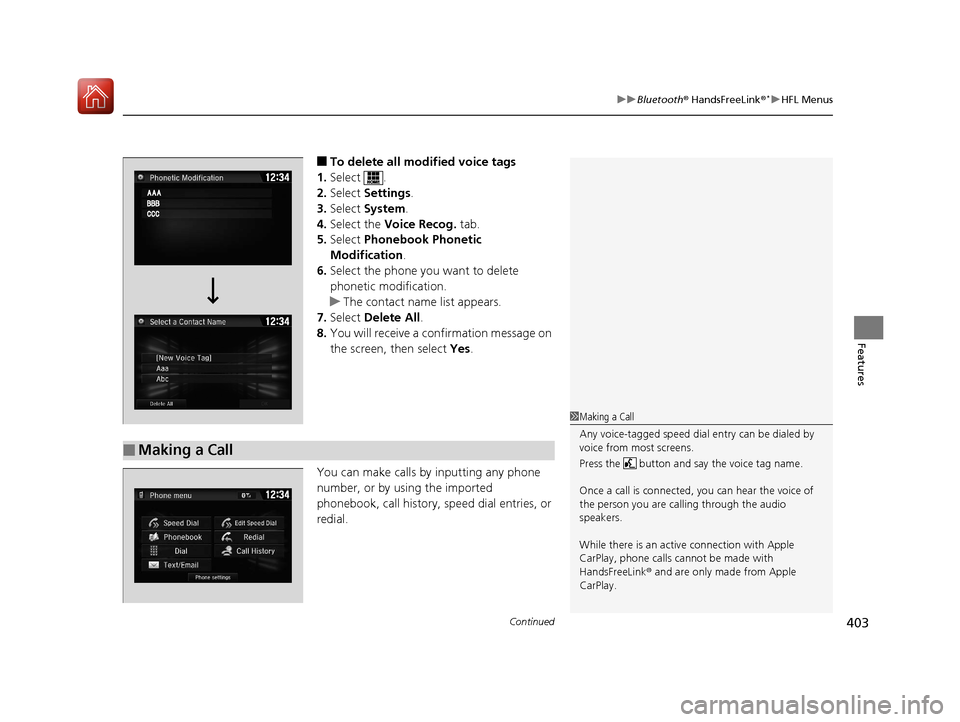
■To delete all modified voice tags
1. Select .
2. Select Settings .
3. Select System.
4. Select the Voice Recog. tab.
5. Select Phonebook Phonetic
Modification .
6. Select the phone you want to delete
phonetic modification.
u The contact name list appears.
7. Select Delete All.
8. You will receive a confirmation message on
the screen, then select Yes.
You can make calls by inputting any phone
number, or by using the imported
phonebook, call history, speed dial entries, or
redial.
■Making a Call
1 Making a Call
Any voice-tagged speed dial entry can be dialed by
voice from most screens.
Press the button and say the voice tag name.
Once a call is connected, you can hear the voice of
the person you are call ing through the audio
speakers.
While there is an active connection with Apple
CarPlay, phone calls ca nnot be made with
HandsFreeLink ® and are only made from Apple
CarPlay.
17 CIVIC 5D (KA KC KL)-31TGG6000.book 403 ページ 2016年6月8日 水曜日 午 後2時8分
Page 631 of 641

Index
630
Index
Index
Numbers
7-Speed Manual Shift Mode.................... 435
A
ABS (Anti-lock Brake System) ................... 504
Accessories and Modifications ................. 582
Accessory Power Socket ........................... 199
Adaptive Cruise Control (ACC) ................. 462
Adaptive Cruise Control (ACC) with
Low Speed Follow (LSF) .................... 94, 448
Adding the Coolant .................................. 544
Additives
Coolant ................................................... 543
Engine Oil ................................................ 538
Washer .................................................... 547
Additives, Engine Oil ................................ 538
Adjusting
Armrest ................................................... 192
Clock ....................................................... 134
Front Head Restraints............................... 188
Front Seats .............................................. 185
Mirrors .................................................... 183
Rear Seats................................................ 191
Steering Wheel ........................................ 182
Temperature .................................... 117, 121
Adjusting the Clock .................................. 134
Adjusting the Sound ................................. 230
Agile Handling Assist ................................ 489 Air Conditioning System (Climate Control
System) .................................................... 208
Changing the Mode ................................ 211
Defrosting the Windshield and Windows ............................................... 212
Dust and Pollen Filter............................... 575
Recirculation/Fresh Air Mode ................... 211
Sensor ..................................................... 215
Using Automatic Climate Control ............ 208
Air Pressure ....................................... 562, 619
Airbags ........................................................ 46
Advanced Airbags ..................................... 52
After a Collision ........................................ 49
Airbag Care............................................... 59
Event Data Recorder .................................... 0
Front Airbags (SRS) .................................... 49
Indicator.............................................. 57, 84
Passenger Front Airbag Off Indicator ......... 58
Sensors ..................................................... 46
Side Airbags .............................................. 53
Side Curtain Airbags.................................. 55
AM/FM Radio ............................................ 272
Android Auto ........................................... 309
Anti-lock Brake System (ABS) .................. 504
Indicator.................................................... 84
Apple CarPlay ........................................... 306
Armrest ..................................................... 192
Audio Remote Controls ........................... 221
Audio System .................................... 218, 243
Adjusting the Sound........................ 230, 265
Audio/Information Screen........................ 244 Changing the Home Screen Icon Layout.. 248
Changing the Screen Interface ................ 262
Closing Apps .......................................... 264
Customizing the Meter ........................... 248
Display Setup .......................................... 266
Error Messages ....................................... 313
General Information................................ 317
Home Screen .......................................... 254
iPod ........................................................ 234
Limitations for Manual Operation ............ 267
Menu Customize .................................... 263
MP3/WMA/AAC ............................. 237, 293
Reactivating ............................................ 220
Recommended Devices ........................... 319
Remote Controls ..................................... 221
Security Code ......................................... 220
Selecting an Audio Source ...................... 267
Status Area ............................................. 261
Theft Protection ...................................... 220
USB Flash Drives...................................... 319
USB Port(s) .............................................. 219
Wallpaper Setup ..................................... 252
Audio/Information Screen ............... 226, 244
Authorized Manuals ................................ 627
Auto Door Locking/Unlocking ................ 150
Customize ...................................... 129, 151
Auto High-Beam ...................................... 174
Automatic Brake Hold ............................. 501
Indicator ........................................... 80, 501
Automatic Brake Hold System Indicator ........................................... 80, 501
17 CIVIC 5D (KA KC KL)-31TGG6000.book 630 ページ 2016年6月8日 水曜日 午 後2時8分