Page 22 of 641
21
Quick Reference Guide
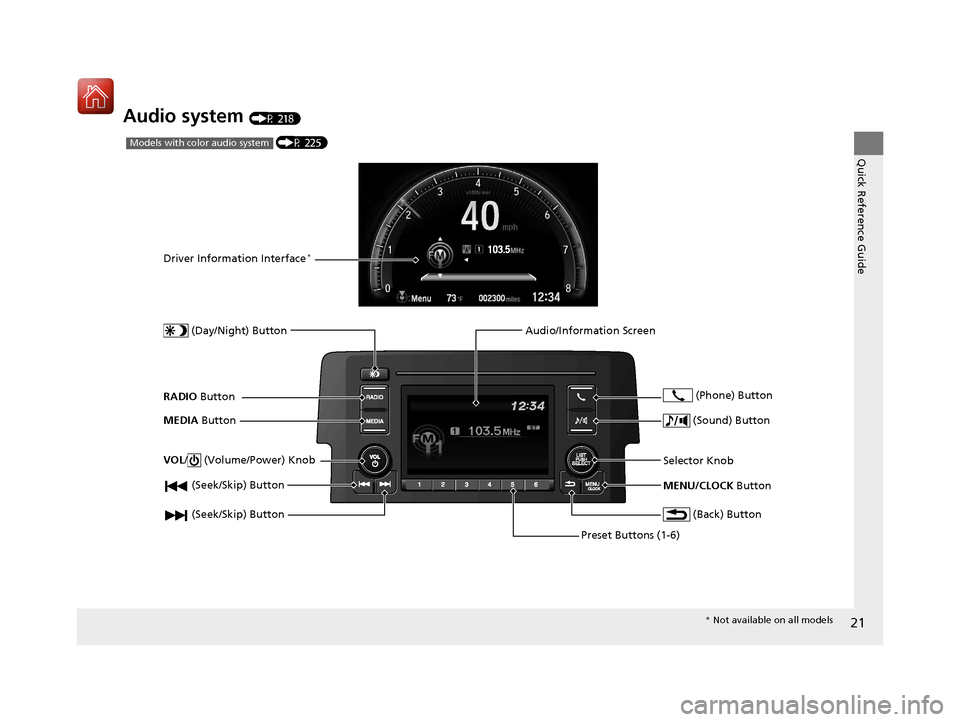
Audio system (P 218)
(P 225)Models with color audio system
(Seek/Skip) Button
RADIO Button
Driver Information Interface*
(Day/Night) Button
MEDIA Button
Preset Buttons (1-6)
(Seek/Skip) Button
VOL
/ (Volume/Power) Knob
Audio/Information Screen
(Back) Button
(Sound) Button
MENU/CLOCK Button
Selector Knob (Phone) Button
*
Not available on all models
17 CIVIC 5D (KA KC KL)-31TGG6000.book 21 ページ 2016年6月8日 水曜日 午後 2時8分
Page 24 of 641
23
Quick Reference Guide
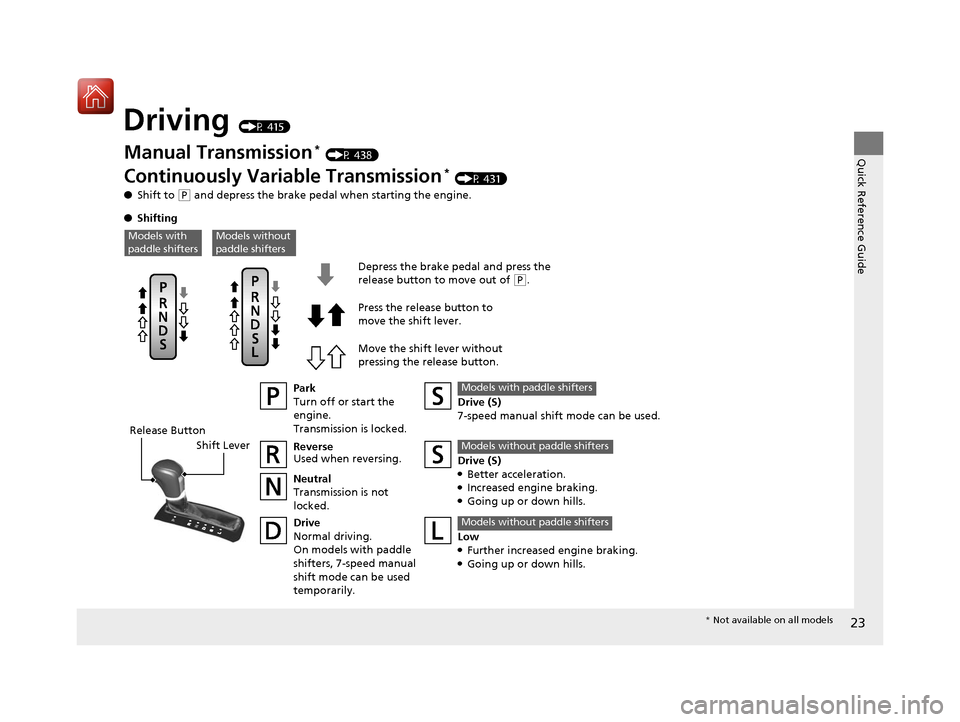
Driving (P 415)
Release ButtonShift Lever Depress the brake pedal and press the
release button to move out of
(
P.
Move the shift lever without
pressing the release button. Press the release button to
move the shift lever.
Manual Transmission* (P 438)
Continuously Variable Transmission* (P 431)
● Shift to
(P and depress the brake pedal when starting the engine.
● Shifting
Park
Turn off or start the
engine.
Transmission is locked.
Reverse
Used when reversing.
Neutral
Transmission is not
locked.
Drive
Normal driving.
On models with paddle
shifters, 7-speed manual
shift mode can be used
temporarily. Drive (S)
7-speed manual shift mode can be used.
Models with paddle shifters
Low●Further increased engine braking.●Going up or down hills.
Models without paddle shifters
Models without
paddle shiftersModels with
paddle shifters
Drive (S)●Better acceleration.●Increased engine braking.●Going up or down hills.
Models without paddle shifters
*
Not available on all models
17 CIVIC 5D (KA KC KL)-31TGG6000.book 23 ページ 2016年6月8日 水曜日 午後 2時8分
Page 26 of 641

25
Quick Reference Guide
VSA® OFF Button (P 488)
● The vehicle stability assist (VSA® ) system
helps stabilize the vehicle during
cornering, and helps maintain traction
while accelerating on loose or slippery
road surfaces.
● VSA ® comes on automatically every time
you start the engine.
● To partially disable or fully restore VSA ®
function, press and ho ld the button until
you hear a beep.
Cruise Control* (P 442)
● Cruise control allows you to maintain a
set speed without keeping your foot on
the accelerator pedal.
● To use cruise control, press the CRUISE
button, then press the –/SET button once
you have achieved the desired speed
(above 25 mph or 40 km/h).
Collision Mitigation
Braking System
TM
(CMBS
TM) OFF Button*
(P 506)
● When a possible collision is likely
unavoidable, the CMBS
TM can help you to
reduce the vehicle speed and the severity
of the collision.
● To turn the CMBS
TM on or off, press and
hold the button until you hear a beep.
Tire Pressure Monitoring System (TPMS) (P 492)
● Detects a change in tire conditions and overall dimensions due to decrease in tire
pressures.
● The TPMS is turned on automatically every time you start the engine.
● A calibration procedure must be performed when certain conditions arise.
Refueling (P 517)
Fuel recommendation:
Unleaded gasoline with a pump octane number 87 or
higher required
Unleaded premium gasoline with a pump octane
number 91 or higher recommended
Fuel tank capacity: 12.39 US gal (46.9 L)
U.S. models
Models without the label “PREMIUM RECOMMENDED”
Models with the label “PREMIUM RECOMMENDED”
aUnlock the driver’s
door.
bPress on the edge of
the fuel fill door to
make it pop up
slightly.
cAfter refueling, wait
for about five
seconds before
removing the filler
nozzle.
Wait for five seconds
* Not available on all models
17 CIVIC 5D (KA KC KL)-31TGG6000.book 25 ページ 2016年6月8日 水曜日 午後 2時8分
Page 27 of 641
26
Quick Reference Guide
Maintenance (P 523)
Under the Hood (P 536)
● Check engine oil, engine coolant, and windshield washer
fluid. Add when necessary.
● Check brake/clutch
* fluid.
● Check the battery condition monthly.
aPull the hood release handle under the corner of the
dashboard.
bLocate the hood latch lever, pus h the lever in the center to
the right, and lift up the hood.
cWhen finished, close the hood and make sure it is firmly
locked in place.
Lights (P 548)
● Inspect all lights regularly.
Wiper Blades (P 556)
● Replace blades if they leave streaks
across the windshield.
Tires (P 561)
● Inspect tires and wheels regularly.
● Check tire pressures regularly.
● Install snow tires for winter driving.
17 CIVIC 5D (KA KC KL)-31TGG6000.book 26 ページ 2016年6月8日 水曜日 午後 2時8分
Page 29 of 641

28
Quick Reference Guide
What to Do If
*1:Except U.S. models with continuously variable transmission
The ignition switch does
not turn from
(0 to (q.
Why?
The power mode does not
change from VEHICLE OFF
(LOCK) to ACCESSORY.
Why?
The steering wheel may be locked.
●Try to turn the steering wheel left and right
while turning the ignition key.
●Move the steering wheel left and right after pressing the
ENGINE START/STOP button.
The ignition switch does
not turn from
(q to (0 and
I cannot remove the key.
Why?
The power mode does not
change from ACCESSORY
to VEHICLE OFF (LOCK).
Why?
The shift lever should be moved to (P.
Why does the brake pedal
pulsate slightly when
applying the brakes?This can occur when the ABS activates, and does not indicate a
problem. Apply firm, steady pressure on the brake pedal. Never
pump the brake pedal.
Models without smart entry system
Models with smart entry system*1
Models without smart entry system
Models with smart entry system*1
Models without smart entry system
Models with smart entry system
17 CIVIC 5D (KA KC KL)-31TGG6000.book 28 ページ 2016年6月8日 水曜日 午後 2時8分
Page 30 of 641
29
Quick Reference Guide
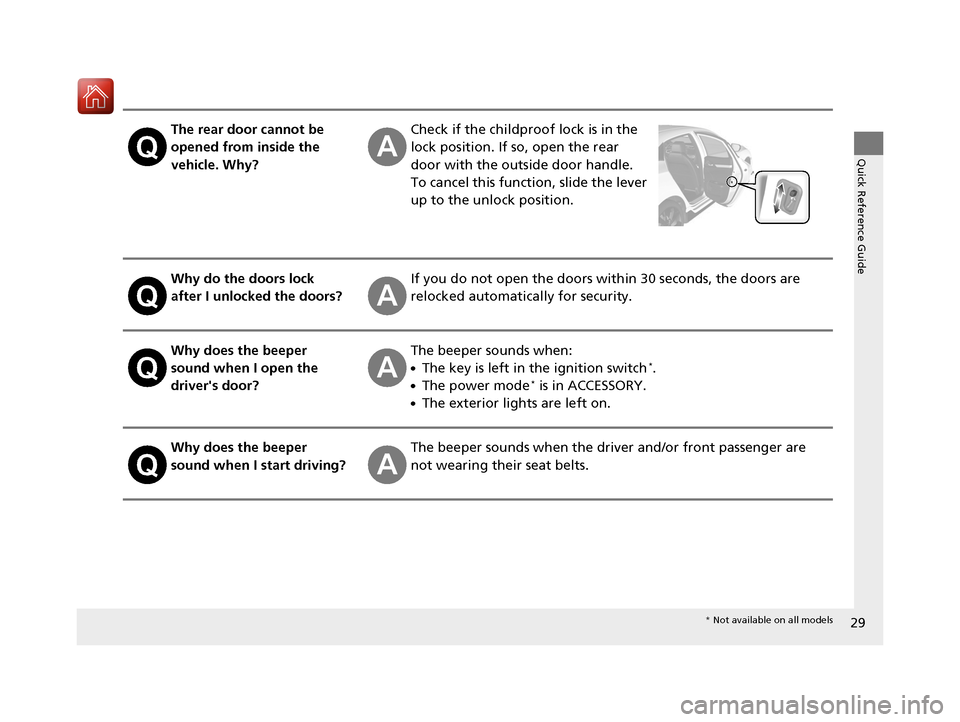
The rear door cannot be
opened from inside the
vehicle. Why?Check if the childproof lock is in the
lock position. If so, open the rear
door with the outside door handle.
To cancel this function, slide the lever
up to the unlock position.
Why do the doors lock
after I unlocked the doors?If you do not open the doors within 30 seconds, the doors are
relocked automatically for security.
Why does the beeper
sound when I open the
driver's door?The beeper sounds when:
●The key is left in the ignition switch*.
●The power mode* is in ACCESSORY.
●The exterior lights are left on.
Why does the beeper
sound when I start driving?The beeper sounds when the driver and/or front passenger are
not wearing their seat belts.
* Not available on all models
17 CIVIC 5D (KA KC KL)-31TGG6000.book 29 ページ 2016年6月8日 水曜日 午後 2時8分
Page 37 of 641
36
uuFor Safe Driving uYour Vehicle’s Safety Features
Safe Driving
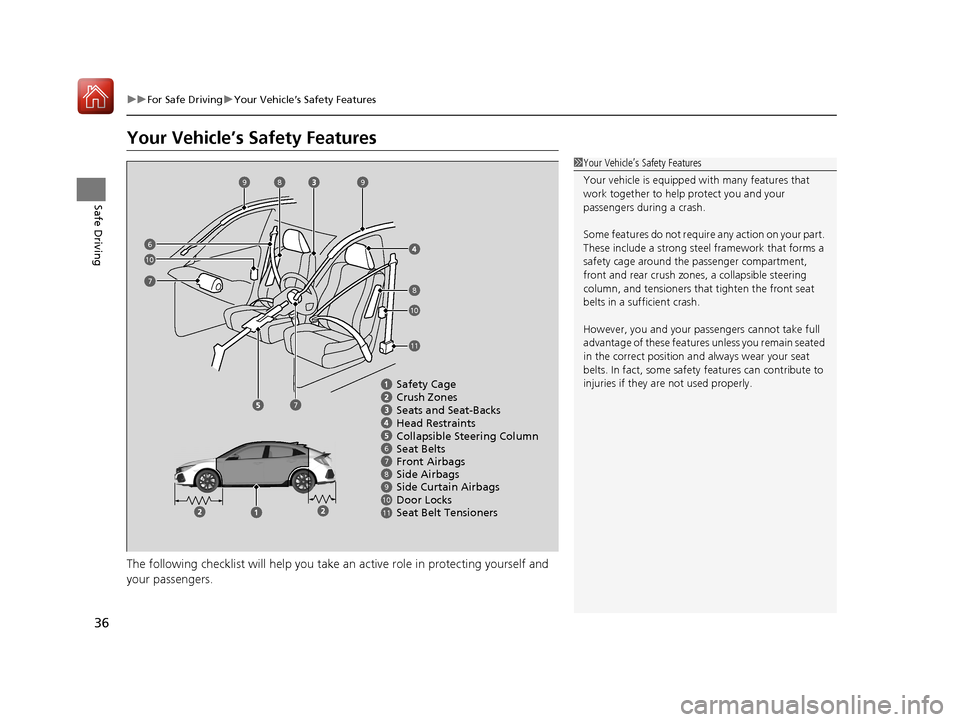
Your Vehicle’s Safety Features
The following checklist will help you take an active role in protecting yourself and
your passengers.
1 Your Vehicle’s Safety Features
Your vehicle is equipped wi th many features that
work together to help protect you and your
passengers during a crash.
Some features do not require any action on your part.
These include a strong steel framework that forms a
safety cage around the passenger compartment,
front and rear crush zones, a collapsi ble steering
column, and tensioners that tighten the front seat
belts in a sufficient crash.
However, you and your passe ngers cannot take full
advantage of these features unless you remain seated
in the correct position and always wear your seat
belts. In fact, some safety features can contribute to
injuries if they are not used properly.
67891011
Safety Cage
Crush Zones
Seats and Seat-Backs
Head Restraints
Collapsible Steering Column
Seat Belts
Front Airbags
Side Curtain Airbags
Door Locks Side Airbags
Seat Belt Tensioners
7
7
99
8
8
10
10
6
11
17 CIVIC 5D (KA KC KL)-31TGG6000.book 36 ページ 2016年6月8日 水曜日 午後 2時8分
Page 38 of 641
37
uuFor Safe Driving uSafety Checklist
Safe Driving
Safety Checklist
For the safety of you and your passengers, make a habit of checking these items
each time before you drive.
• After everyone has entered the vehicle, be sure all doors and the hatch are closed
and locked. Locking the doors and the hatch helps prevent an occupant from
being ejected and an outsider from unexpectedly opening a door or the hatch.
2 Locking/Unlocking the Doors from the Inside P. 147
•Adjust your seat to a position suitable for driving. Be sure the front seats are
adjusted as far to the rear as possible while allowing the driver to control the
vehicle. Sitting too close to a front airbag can result in serious or fatal injury in a
crash.
2 Adjusting the Seats P. 185
•Adjust head restraints to the proper position. Head restraints are most effective
when the center of the head restraint alig ns with the center of your head. Taller
persons should adjust their head restraint to the highest position.
2Adjusting the Front Head Restraints Positions P. 188
•Always wear your seat belt, and make sure you wear it properly. Confirm that any
passengers are properly belted as well.
2 Fastening a Seat Belt P. 42
•Protect children by using seat belts or chil d seats according to a child’s age, height
and weight.
2 Child Safety P. 60
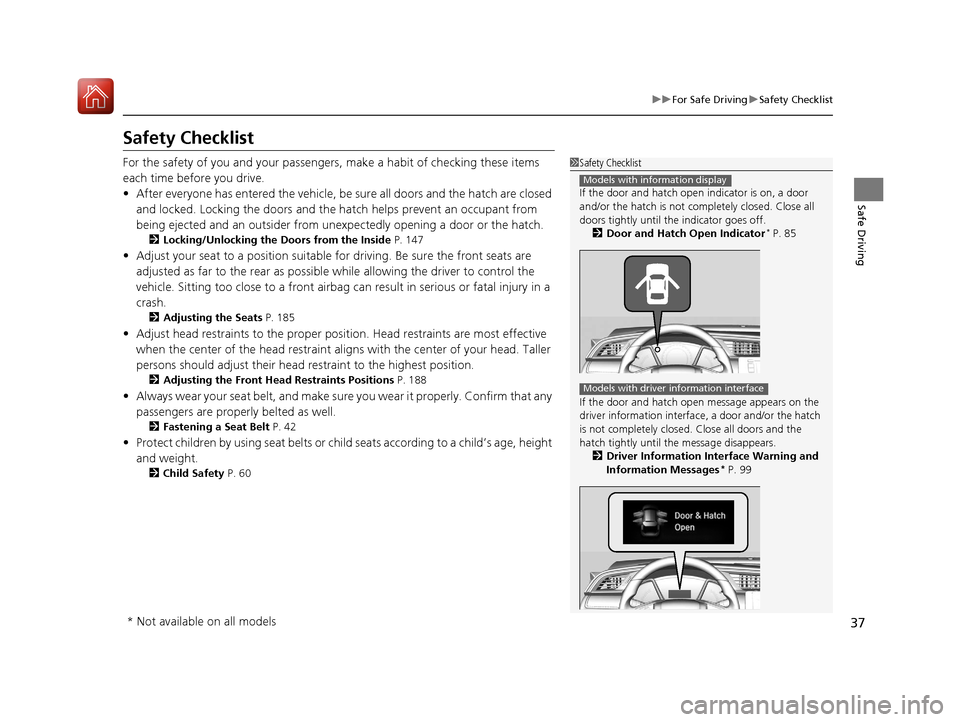
1Safety Checklist
If the door and hatch open indicator is on, a door
and/or the hatch is not completely closed. Close all
doors tightly until the indicator goes off.
2 Door and Hatch Open Indicator
* P. 85
If the door and hatch open message appears on the
driver information interfac e, a door and/or the hatch
is not completely closed. Close all doors and the
hatch tightly until th e message disappears.
2 Driver Information Interface Warning and
Information Messages
* P. 99
Models with information display
Models with driver information interface
* Not available on all models
17 CIVIC 5D (KA KC KL)-31TGG6000.book 37 ページ 2016年6月8日 水曜日 午後 2時8分