2017 HONDA CIVIC HATCHBACK climate control
[x] Cancel search: climate controlPage 95 of 641

94
uuIndicators u
Instrument Panel
*1:Models with the smart entry system have an ENGINE START/STOP button instead of an ignition switch.
IndicatorNameOn/BlinkingExplanationMessage*
Adaptive Cruise
Control (ACC)
with Low Speed
Follow (LSF)
*
Indicator
(Amber)
*
●Comes on for a few seconds when
you turn the ignition switch to ON
(w*1, then goes off.●Comes on if there is a problem
with ACC with LSF*.
●Comes on while driving - Have your
vehicle checked by a dealer.
Adaptive Cruise
Control ( ACC)
with Low Speed
Follow (LSF)
*
Indicator
(Green)
*
●Comes on when you press the
MAIN button.2Adaptive Cruise Control (ACC) with
Low Speed Follow (LSF)* P. 448
2 Adaptive Cruise Control (ACC)* P. 462—
●Comes on when ACC with LSF* is
in operation, but the temperature
inside the front sensor camera is
too high. ACC with LSF
* cancels
automatically. The beeper sounds
simultaneously.
●Use the climate control system to cool
down the camera.
●Goes off - The camera has been cooled
down and the system activates normally.
* Not available on all models
17 CIVIC 5D (KA KC KL)-31TGG6000.book 94 ページ 2016年6月8日 水曜日 午後 2時8分
Page 96 of 641

95
uuIndicators u
Continued
Instrument Panel
*1:Models with the smart entry system have an ENGINE START/STOP button instead of an ignition switch.
IndicatorNameOn/BlinkingExplanationMessage*
Lane Keeping
Assist System
(LKAS ) Indicator
(Amber)
*
●Comes on for a few seconds
when you turn the ignition switch
to ON
(w*1, then goes off.●Comes on if there is a problem
with the LKAS.
●Stays on constantly - Have your vehicle
checked by a dealer.
Lane Keeping
Assist System
( LKAS ) Indicator
(Green)
*
●Comes on when you press the
MAIN button.2Lane Keeping Assist System (LKAS)*
P. 480—
●Comes on when the LKAS is in
operation, or the LKAS button is
pressed, but the temperature
inside the front sensor camera is
too high. The LKAS cancels
automatically. The beeper sounds
simultaneously.●Use the climate control system to cool
down the camera.
●Goes off - The camera has been cooled
down and the system activates normally.
2 Front Sensor Camera* P. 446
●Comes on when the area around
the camera is blocked by dirt,
mud, etc. Stop your vehicle in a
safe place, and wipe it off with a
soft cloth.
●May come on when driving in bad
weather (rain, snow, fog, etc.)
●Have your vehicle checked by a dealer if
the indicator and message come back on
after you cleaned the area around the
camera.
* Not available on all models
17 CIVIC 5D (KA KC KL)-31TGG6000.book 95 ページ 2016年6月8日 水曜日 午後 2時8分
Page 98 of 641

97
uuIndicators u
Instrument Panel
IndicatorNameOn/BlinkingExplanationMessage*
Collision
Mitigation
Braking
System
TM
(CMBSTM)
Indicator*
●Comes on if the CMBSTM is
deactivated temporarily after the
battery has been disconnected,
then re-connected.●Drive straight for a short distance at more
than 12 mph (20 km/h). The indicator
should go off. If it does not, have your
vehicle checked by a dealer.
●Comes on when the CMBSTM
system shuts itself off.●Stays on - The area around the camera is
blocked by dirt, mud, etc. Stop your
vehicle in a safe place, and wipe it off with
a soft cloth.
2 Front Sensor Camera* P. 446
●When the radar sensor gets dirty, stop
your vehicle in a safe place, and wipe off
dirt using a soft cloth.
●Have your vehicle checked by a dealer if
the message does not disappear even after
you clean the sensor cover.
2Collision Mitigation Braking
SystemTM (CMBSTM)* P. 506
●Stays on - The temperature inside the
camera is too high. Use the climate control
system to cool down the camera. The
system activates when the temperature
inside the camera cools down.
2 Front Sensor Camera* P. 446
* Not available on all models
17 CIVIC 5D (KA KC KL)-31TGG6000.book 97 ページ 2016年6月8日 水曜日 午後 2時8分
Page 100 of 641

99
uuIndicators uDriver Information Interface Wa rning and Information Messages*
Continued
Instrument Panel
Driver Information Interface Warning and Information Messages*
The following messages appear only on the driver information interface. Press the (d isplay/information) button to see the message
again with the system message indicator on.
MessageConditionExplanation
●Appears if any door or the hatch is not completely
closed.
●Appears if any door or the hatch is opened while
driving. The beeper sounds.
●Goes off when all doors and the hatch are closed.
●Appears when the washer fluid gets low.●Refill the washer fluid.
2 Refilling Window Washer Fluid P. 547
●Appears when the scheduled maintenance is due
soon.
●Consequently, Maintenance Due Now and
Maintenance Past Due follow.
2Maintenance Minder Messages on the Driver
Information Interface P. 532
●Appears when there is a problem with the sensor on
the battery.●Have your vehicle checked by a dealer.
2Checking the Battery P. 571
●Appears along with the ba ttery charging system
indicator when the battery is not charging.●Turn off the climate control sy stem and rear defogger to
reduce electricity consumption.
2 If the Charging System Indicator Comes On P. 602
Canadian models
* Not available on all models
17 CIVIC 5D (KA KC KL)-31TGG6000.book 99 ページ 2016年6月8日 水曜日 午後 2時8分
Page 108 of 641

107
uuIndicators uDriver Information Interface Wa rning and Information Messages*
Continued
Instrument Panel
MessageConditionExplanation
●Appears if there is a problem with the Auto high-
beam (high beam support system).●Manually operate the headlight switch.●If you are driving with th e high-beam headlights when
this happens, the headlights are changed to low beams.
●Appears when the Auto high-beam is in operation,
or the headlight swit ch is turned in AUTO, but there
the temperature inside the camera is too high. The
Auto high-beam cancels automatically.●Use the climate control system to cool down the camera.●Goes off - The camera has been cooled down. Turing
the headlight switch in AUTO can resume the system.
2Front Sensor Camera* P. 446
●Appears when the area around the camera is
blocked by dirt, mud, etc. Stop your vehicle in a safe
place, and wipe it off with a soft cloth.
●May appear when driving in bad weather (rain,
snow, fog, etc.)
●Have your vehicle checked by a dealer if the message
comes back on after you cleaned the area around the
camera.
Models with Auto high-beam
* Not available on all models
17 CIVIC 5D (KA KC KL)-31TGG6000.book 107 ページ 2016年6月8日 水曜日 午 後2時8分
Page 134 of 641

133
Controls
This chapter explains how to operate the various controls necessary for driving.
Clock.................................................. 134
Locking and Unlocking the Doors
Key Types and Functions .................. 136
Low Smart Entry Remote Signal Strength*.. 137Locking/Unlocking the Doors from the Outside .......................................... 138
Locking/Unlocking the Doors from the Inside ............................................. 147
Childproof Door Locks ..................... 149
Auto Door Locking/Unlocking .......... 150
Opening and Closing the Hatch....... 154
Security System
Immobilizer System .......................... 157
Security System Alarm ...................... 158 Opening and Closing the Windows
... 161
Opening and Closing the Moonroof*.. 164Operating the Switches Around the
Steering Wheel Ignition Switch
*............................... 165
ENGINE START/STOP Button*........... 166
Ignition Switch and Power Mode Comparison ................................... 169
Turn Signals ..................................... 170
Light Switches.................................. 170
Fog Lights
*...................................... 173
Daytime Running Lights ................... 173
Auto High-Beam
*............................ 174
Wipers and Washers ........................ 177 Brightness Control ........................... 180
Rear Defogger/Heated Door Mirror
*
Button ........................................... 181
Adjusting the Steering Wheel .......... 182
Adjusting the Mirrors
Interior Rearview Mirror ................... 183
Power Door Mirrors ......................... 184
Adjusting the Seats .......................... 185
Interior Lights/Interior Convenience Items ................................................ 193
Climate Control System
Using Automatic Climate Control .... 208
Automatic Climate Control Sensors......215
* Not available on all models
17 CIVIC 5D (KA KC KL)-31TGG6000.book 133 ページ 2016年6月8日 水曜日 午 後2時8分
Page 176 of 641
Continued175
uuOperating the Switches Around the Steering Wheel uAuto High-Beam*
Controls
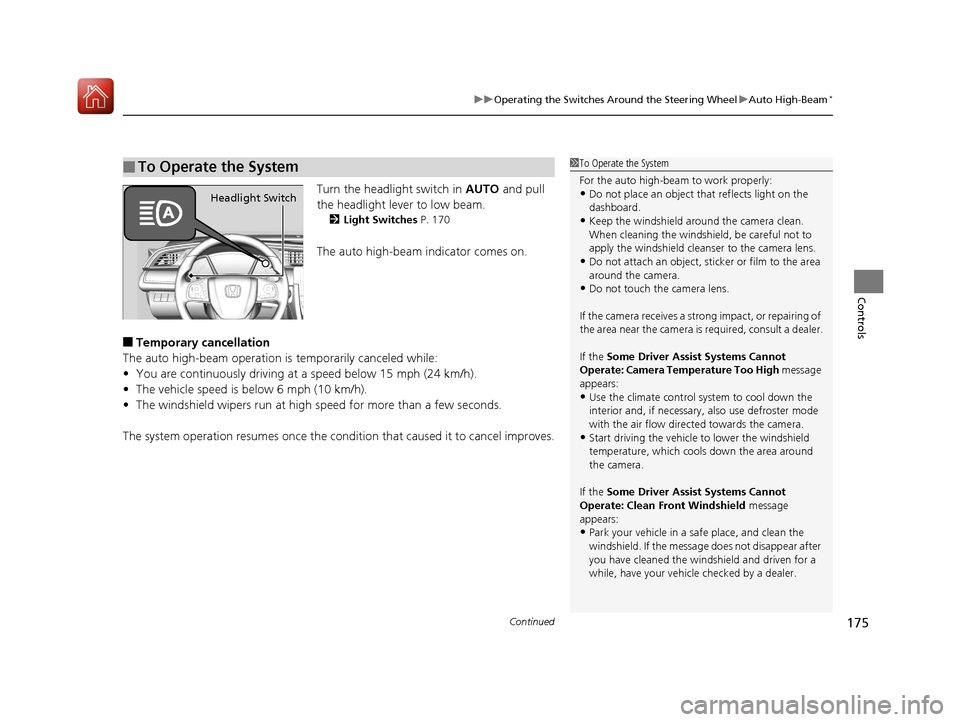
Turn the headlight switch in AUTO and pull
the headlight lever to low beam.
2 Light Switches P. 170
The auto high-beam indicator comes on.
■Temporary cancellation
The auto high-beam operation is temporarily canceled while:
• You are continuously driving at a speed below 15 mph (24 km/h).
• The vehicle speed is below 6 mph (10 km/h).
• The windshield wipers run at high speed for more than a few seconds.
The system operation resumes once the condit ion that caused it to cancel improves.
■To Operate the System1To Operate the System
For the auto high-beam to work properly:
•Do not place an object that reflects light on the
dashboard.
•Keep the windshield around the camera clean.
When cleaning the windshield, be careful not to
apply the windshield cleanser to the camera lens.
•Do not attach an object, sticker or film to the area
around the camera.
•Do not touch the camera lens.
If the camera receives a st rong impact, or repairing of
the area near the camera is required, consult a dealer.
If the Some Driver Assist Systems Cannot
Operate: Camera Temperature Too High message
appears:
•Use the climate control system to cool down the
interior and, if necessary, also use defroster mode
with the air flow directed towards the camera.
•Start driving the vehicle to lower the windshield
temperature, which cool s down the area around
the camera.
If the Some Driver Assist Systems Cannot
Operate: Clean Front Windshield message
appears:
•Park your vehicle in a sa fe place, and clean the
windshield. If the message does not disappear after
you have cleaned the winds hield and driven for a
while, have your vehicle checked by a dealer.
Headlight Switch
17 CIVIC 5D (KA KC KL)-31TGG6000.book 175 ページ 2016年6月8日 水曜日 午 後2時8分
Page 209 of 641

208
Controls
Climate Control System
Using Automatic Climate Control
The automatic climate control system maintains the interior temperature you select.
The system also selects the proper mix of heated or cooled air that raises or lowers
the interior temperature to your pr eference as quickly as possible.
Use the system when the engine is running.
1. Press the AUTO button.
2. Adjust the interior temperature us ing the temperature control dial.
3. Press the (ON/OFF) button to cancel.1Using Automatic Climate Control
If any buttons/icons
* are pressed while using the
climate control system in auto, the function of the
button/icon
* that was pressed will take priority.
The AUTO indicator will go off, but functions
unrelated to the button/icon
* that was pressed will
be controlled automatically.
If the ECON mode is selected, the fan may turn off.
To prevent cold air from bl owing in from outside, the
fan may not start i mmediately when the AUTO
button is pressed.
If the interior is very warm, you can cool it down
more rapidly by partial ly opening the windows,
turning the system on AUTO, and setting the
temperature to low. Change the fresh air mode to
recirculation mode until the temperature cools down.
When you set the temperat ure to the lower or upper
limit, Lo or Hi is displayed.
Models with color audio system
AUTO Button
Temperature
Control Dial
(Recirculation) Button (ON/OFF) Button
Fan Control
Dial
A/C (Air
Conditioning)
Button
Dashboard
vents Dashboard
and floor
vents Floor vents Floor and
defroster
vents
* Not available on all models
17 CIVIC 5D (KA KC KL)-31TGG6000.book 208 ページ 2016年6月8日 水曜日 午 後2時8分