2017 HONDA CIVIC HATCHBACK ABS
[x] Cancel search: ABSPage 192 of 641

191
uuAdjusting the Seats uRear Seats
Controls
Rear Seats
The rear seats can be folded down separa tely to allow for additional storage space.
Pull the release lever and fold down the seat-
back.
■Folding Down the Rear Seats1 Folding Down the Rear Seats
The rear seat-back(s) can be folded down to
accommodate bulkier items in the cargo area.
To lock a seat-back upright, push it backwards until it
locks, so that the red tabs in the release lever go
down.
When returning the seat-back to its original position,
push it firmly back.
Make sure that the folded seat-back does not press
against the front passenger seat, as this can cause the
weight sensors in the front passenger seat to work
improperly. 2 Passenger Front Airbag Off Indicator P. 58
Make sure all items in the cargo area or items
extending to the rear seats are properly
secured. Loose items can fly forward if you have
to brake hard.
The front seat(s) must be far enough forward so they
do not interfere with the rear seats as they fold
down.
Release Lever
Red Tab
17 CIVIC 5D (KA KC KL)-31TGG6000.book 191 ページ 2016年6月8日 水曜日 午 後2時8分
Page 205 of 641
uuInterior Lights/Interior Convenience Items uInterior Convenience Items
204
Controls
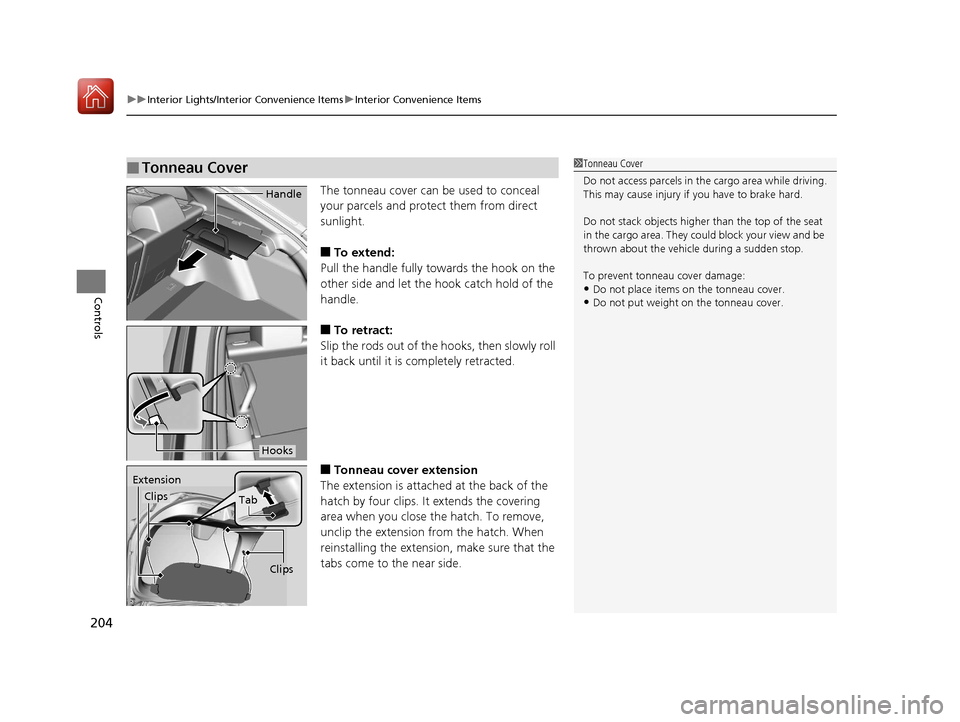
The tonneau cover can be used to conceal
your parcels and protect them from direct
sunlight.
■To extend:
Pull the handle fully towards the hook on the
other side and let the hook catch hold of the
handle.
■To retract:
Slip the rods out of the hooks, then slowly roll
it back until it is completely retracted.
■Tonneau cover extension
The extension is attached at the back of the
hatch by four clips. It extends the covering
area when you close the hatch. To remove,
unclip the extension from the hatch. When
reinstalling the extension, make sure that the
tabs come to the near side.
■Tonneau Cover1 Tonneau Cover
Do not access parcels in the cargo area while driving.
This may cause injury if you have to brake hard.
Do not stack objects higher than the top of the seat
in the cargo area. They could block your view and be
thrown about the vehicle during a sudden stop.
To prevent tonneau cover damage:
•Do not place items on the tonneau cover.
•Do not put weight on the tonneau cover.
Handle
Hooks
Extension
Clips
Tab
Clips
17 CIVIC 5D (KA KC KL)-31TGG6000.book 204 ページ 2016年6月8日 水曜日 午 後2時8分
Page 416 of 641

415
Driving
This chapter discusses driving, refueling, and information on items such as accessories.
Before Driving
Towing a Trailer................................ 421
When Driving
Starting the Engine .................. 422, 424
Precautions While Driving................. 429
Continuously Variable Transmission
*... 430
Shifting ............................ 431, 433, 438
ECON Button ................................... 441
Cruise Control
*................................ 442
Front Sensor Camera*...................... 446
Adaptive Cruise Control (ACC) with Low Speed Follow (LSF)
*........................ 448
Adaptive Cruise Control (ACC)*....... 462
Road Departure Mitigation (RDM) System*.. 476Lane Keeping Assist System (LKAS)*.... 480
Vehicle Stability Assist (VSA®), aka Electronic
Stability Control (ESC), System............. 487
Agile Handling Assist ....................... 489
LaneWatchTM*.................................. 490Tire Pressure Monitoring System (TPMS) ..492Tire Pressure Monitoring System (TPMS) - Required Federal Explanation ........... 495
Braking Brake System ................................... 497
Anti-lock Brake System (ABS) ........... 504
Brake Assist System.......................... 505 Collision Mitigation Braking System
TM
(CMBSTM)*..................................... 506
Parking Your Vehicle
Multi-View Rear Camera .................. 515
Refueling Fuel Information .............................. 517
How to Refuel ................................. 518
Fuel Economy and CO
2 Emissions
Improving Fuel Economy and Reducing
CO
2 Emissions ................................ 521
Turbo Engine Vehicle ....................... 522
* Not available on all models
17 CIVIC 5D (KA KC KL)-31TGG6000.book 415 ページ 2016年6月8日 水曜日 午 後2時8分
Page 460 of 641

Continued459
uuWhen Driving uAdaptive Cruise Control (ACC) with Low Speed Follow (LSF)*
Driving
■Automatic ca ncellation
The beeper sounds and a message appears on the driver information interface when
ACC with LSF is automatically canceled. Any of these conditions may cause the ACC
with LSF to automatically cancel:
• Bad weather (rain, fog, snow, etc.)
• When the radar sensor in the lower bumper next to the fog light
* gets dirty.
• The vehicle ahead of yo u cannot be detected.
• An abnormal tire condition is de tected, or the tires are skidding.
• Driving on a mountainous road, or driving off road for extended periods.
• Abrupt steering wheel movement.
• When the ABS, VSA ® or CMBS
TM is activated.
• When the ABS or VSA ® system indicator comes on.
• When the vehicle is stopped on a very steep slope.
• When you manually apply the parking brake.
• When the detected vehicle within the AC C with LSF range is too close to your
vehicle.
• The camera behind the rearview mirror, or the area around the camera, including
the windshield, gets dirty.
The ACC with LSF automatic cancellation ca n be also triggered by the following
causes. In these cases, the parking brake will be automatically applied.
• The driver’s seat belt is unfastened when the vehicle is stationary.
• The vehicle stops for more than 10 minutes.
• The engine is turned off.
1Automatic cancellation
Even though ACC with LSF has been automatically
canceled, you can still resu me the prior set speed.
Wait until the condition that caused ACC with LSF to
cancel improves, then press the –/SET button.
* Not available on all models
17 CIVIC 5D (KA KC KL)-31TGG6000.book 459 ページ 2016年6月8日 水曜日 午 後2時8分
Page 474 of 641

Continued473
uuWhen Driving uAdaptive Cruise Control (ACC)*
Driving
■Automatic ca ncellation
The beeper sounds and a message appears on the driver information interface when
ACC is automatically cancel ed. Any of these conditions may cause the ACC to
automatically cancel:
• Bad weather (rain, fog, snow, etc.)
• When the radar sensor in the lower bum per next to the fog light gets dirty.
• The vehicle ahead of yo u cannot be detected.
• An abnormal tire condition is de tected, or the tires are skidding.
• Driving on a mountainous road, or driving off road for extended periods.
• Abrupt steering wheel movement.
• When the ABS, VSA ® or CMBS
TM is activated.
• When the ABS or VSA ® system indicator comes on.
• When you manually apply the parking brake.
• When the detected vehicle within the AC C range is too close to your vehicle.
• The camera behind the rearview mirror, or the area around the camera, including
the windshield, gets dirty.
• Ignoring shift down indication shown in the tachometer display will cancel the
ACC after about 10 seconds.
• The engine speed goes into the tachometer’s red zone.
• The engine speed goes to below 1,000 rpm.
• You shift into neutral temporarily when shifting into a higher or lower gear.
1Automatic cancellation
Even though ACC has been automatically canceled,
you can still resume the prior set speed. Wait until the
condition that caused ACC to cancel improves, then
press the –/SET button.
17 CIVIC 5D (KA KC KL)-31TGG6000.book 473 ページ 2016年6月8日 水曜日 午 後2時8分
Page 485 of 641

484
uuWhen Driving uLane Keeping Assist System (LKAS)*
Driving
■The system operation is suspended if
you:
• Set the wipers to continuous operation.
u Turning the wipers off resumes the
LKAS.
• Set the wiper switch to AUTO and the
wipers operate continuously.
u The LKAS resumes when the wipers stop
or operate intermittently.
• Decrease the vehicle speed to 40 mph (64
km/h) or less.
u Increasing the vehicle speed to 45 mph
(72 km/h) or more resumes the LKAS.
• Depress the brake pedal.
u The LKAS resumes and starts detecting
the lane lines again once you release the
brake pedal.
■The LKAS may automatically be suspended when:
• The system fails to detect lane lines.
• The steering wheel is quickly turned.
• You fail to steer the vehicle.
• The vehicle runs on a curved road over the speed limit.
• Driving through a sharp curve.
• Driving at a speed in excess of approximately 90 mph (145 km/h).
• The ABS or VSA system engages.
Once these conditions no longer exis t, the LKAS automatically resumes.
When the LKAS is suspended,
the lane lines on the driver
information interface change to
contour lines, and the beeper
sounds (if activated).
Models with automatic intermittent wipers
All models
17 CIVIC 5D (KA KC KL)-31TGG6000.book 484 ページ 2016年6月8日 水曜日 午 後2時8分
Page 499 of 641
uuBraking uBrake System
498
Driving
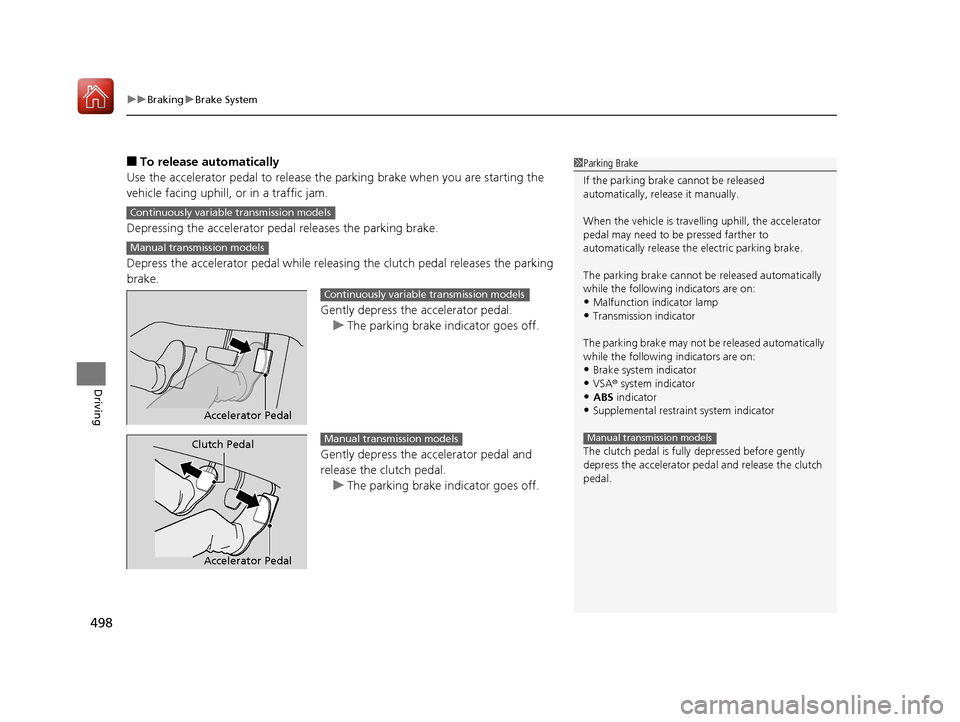
■To release automatically
Use the accelerator pedal to release the parking brake when you are starting the
vehicle facing uphill, or in a traffic jam.
Depressing the accelerator pedal releases the parking brake.
Depress the accelerator pedal while releasi ng the clutch pedal releases the parking
brake.
Gently depress the accelerator pedal.u The parking brake indicator goes off.
Gently depress the accelerator pedal and
release the clutch pedal. u The parking brake indicator goes off.1Parking Brake
If the parking brake cannot be released
automatically, release it manually.
When the vehicle is travelling uphill, the accelerator
pedal may need to be pressed farther to
automatically release the electric parking brake.
The parking brake cannot be released automatically
while the following indicators are on:
•Malfunction indicator lamp•Transmission indicator
The parking brake may not be released automatically
while the following indicators are on:
•Brake system indicator
•VSA® system indicator•ABS indicator
•Supplemental restraint system indicator
The clutch pedal is fully depressed before gently
depress the accelerator peda l and release the clutch
pedal.
Manual transmission models
Continuously variable transmission models
Manual transmission models
Accelerator Pedal
Continuously variable transmission models
Accelerator Pedal
Clutch PedalManual transmission models
17 CIVIC 5D (KA KC KL)-31TGG6000.book 498 ページ 2016年6月8日 水曜日 午 後2時8分
Page 501 of 641

uuBraking uBrake System
500
Driving
Your vehicle is equipped with disc brakes at all four wheels. A vacuum power assist
helps to reduce the effort needed on the brake pedal. The brake assist system
increases the stopping force when you depress the brake pedal hard in an
emergency situation. The an ti-lock brake system (ABS) helps you retain steering
control when braking very hard.
2 Brake Assist System P. 505
2 Anti-lock Brake System (ABS) P. 504
■Foot Brake1Foot Brake
Check the brakes after driving through deep water,
or if there is a buildup of road surface water. If
necessary, dry the brakes by lightly depressing the
pedal several times.
If you hear a continuous me tallic friction sound when
applying the brakes, this is caused by the brake wear
indicator rubbing on the brake rotor and indicates
that the brake pads need to be replaced. Have the
vehicle checked by a deal er. If you hear only an
occasional squeak or squeal when you initially apply
the brake pedal, this may be normal and caused by
high frequency vibration of the brake pads against
the rotating brake disc.
Constantly using the brak e pedal while going down a
long hill builds up heat, which reduces the brake
effectiveness. Apply engine braking by taking your
foot off the accelerator pe dal and downshifting to a
lower gear/speed position. With manual transmission
use a lower gear for gr eater engine braking.
Do not rest your foot on the brake pedal while
driving, as it will lightly apply the brakes and cause
them to lose effectiveness over time and reduce pad
life. It will also conf use drivers behind you.
17 CIVIC 5D (KA KC KL)-31TGG6000.book 500 ページ 2016年6月8日 水曜日 午 後2時8分