2017 HONDA ACCORD seat
[x] Cancel search: seatPage 24 of 83

40 || 41
V
EHICLE CONTROLSVEHICLE CONTROLS
Adjusting the Head Restraints
Your vehicle is equipped with head restraints in all seating positions. H\
ead
restraints are most effective for protection against whiplash and other \
rear-impact
crash injuries.
The center of the back of the occupant’s head
should rest against the center of the restraint. The
tops of the occupant’s ears should be level with the
center height of the restraint.
To raise the head restraint: Pull it upward.
To lower the head restraint: Push it down while
pressing the release button.
To remove the head restraint: Pull the restraint up
as far as it will go. Then push the release button,
and pull the restraint up and out.
To reinstall a head restraint: Insert the legs back
in place, then adjust the head restraint to an
appropriate height while pressing the release
button. Pull up on the restraint to make sure it is
locked in position.
For a head restraint system to work properly:
•
Do not hang any items on the head restraints, or from the restraint legs\
.
•
Do not place any object between an occupant and the seat-back.
•
Install each restraint in its proper location.
Position head in the
center of the head
restraint.
Improperly positioning head restraints reduces their effectiveness and
increases the likelihood of serious injury in a crash.
Make sure head restraints are in place and positioned properly before dr\
iving.
WARNING
Failure to reinstall, or correctly reinstall, the head restraints can re\
sult in
severe injury during a crash.
Always replace the head restraints before driving.
WARNING
Manual Seats*
Floor Mats Position the front- and rear-seat floor mats properly,
and anchor them. If they are not properly positioned,
the floor mats can interfere with the front seat
functions.
Do not put additional floor mats on top of the
anchored mats.
*if equipped
Horizontal position
adjustment
Pull up on the bar to move the
seat, then release the bar.
Height adjustment(driver side only)
Pull up or push down the lever
to raise or lower the seat .
Seat-back angle
adjustment
Pull up the lever to
change the angle.
Sitting improperly or out of position can result in serious injury or de\
ath in a
crash.
Always sit upright, well back in the seat, with your feet on the floor\
.
WARNING
Lock
Unlock
Page 25 of 83

42 || 43
V
EHICLE CONTROLSVEHICLE CONTROLS
Adjusting the Steering Wheel
The steering wheel height and distance from your body can be adjusted so\
that you
can comfortably grip the steering wheel in an appropriate driving postur\
e.
1.
Pull up the steering wheel adjustment lever.
2.
Move the steering wheel up or down, and in
or out.
3.
Push down the steering wheel adjustment
lever to lock the steering wheel in position.
To adjus t
To lock
Lever
Adjusting the steering wheel position while driving may cause you to los\
e
control of the vehicle and be seriously injured in a crash.
Adjust the steering wheel only when the vehicle is stopped.
WARNING
Driving Position Memory System*
You can store two driver’s seat positions into memory when the vehicle is on using
the buttons on the driver’s door.
1.
Adjust the seat to your preferred position.
2.
Press SeT
.
3.
Press and hold memory button 1 or 2. You will hear
two beeps when the memory is set.
4.
Press one of the memory buttons to recall
previously stored positions.
Lumbar positions cannot be stored.
When you unlock and open the driver’s door with a remote transmitter
, the seat
adjusts automatically to one of the two preset positions.
Memory
button 1
Memory
button 2
SET button
*if equipped
Folding Down the Rear Seats
The rear seat-back(s*) can be folded down to make room for large items\
in the
trunk.
1.
remove the center shoulder belt from the guide.
2.
Pull the release lever in the trunk to release the
lock.
3.
Fold down the seat-back. remove the rear head
restraints if necessary (see page 41).
Push the seat-back up firmly until it locks into
place to return it to its original position.
Make sure all items in the trunk or items extending through the opening \
int
o
the rear seats are properly secured. Loose items can fly forward if yo\
u have to
brake hard.
*if equipped
Guide
Center
shoulder belt
Release
lever
Release
lever*
Page 27 of 83

46 || 47
V
EHICLE CONTROLSVEHICLE CONTROLS
*if equipped
Seat Heaters*
Quickly warm the seats when the vehicle is on.
Press the seat heater switch to the L
o or HI position.
An indicator appears for the selected setting.
return
the switch to the middle position to turn off. The
switch for the front seat heaters is located in the front
console.
The switch for the rear seat heaters is located on the
rear door
. The rear middle seat does not have heating.
Heat-induced burns are possible when using seat heaters.
Persons with a diminished ability to sense temperature (e.g., persons w\
ith
diabetes, lower-limb nerve damage, or paralysis) or with sensitive skin should
not use the seat heaters.
WARNING
Climate Control System
The automatic climate control system can maintain your preferred interio\
r
temperature by selecting the proper mix of heated or cooled air and fan \
speed. Use
the buttons on the dashboard to control the system.
AUTO button: Press, then
use the temperature
control buttons to set your
preferred temperature.
Driver’s side
temperature
control
buttons
A/C
button
Fan
control
buttons Recirculation button:
Recirculation mode
(indicator on):
recirculates air from
the vehicle’
s interior.
Fresh air mode
(indicator off):
Maintains outside
ventilation.
Rear
defogger/
heated door
mirrors
button*
Windshield
defroster
button
ON/OFF
button
Mode button:
Change airflow
location.
Passenger’s
side
temperature
control
buttons
SYNC button:
Press to set the
passenger’s side
temperature to
the same as the
driver’s side.
Page 51 of 83
 of operation, avoid sudden acc\
eleration or
full throttle operation so as not to damage the engine or po")
94 || 95
DRIVING
DRIVING
In addition:
•
During the first 600 miles (1,000 km) of operation, avoid sudden acc\
eleration or
full throttle operation so as not to damage the engine or powertrain.
•
Avoid hard braking for the first 200 miles (300 km). Y
ou should also follow this
when the brake pads are replaced.
Improper accessories or modifications can affect your vehicle’s handling, and
stability, and performance, and cause a crash in which you can be seriously
hurt or killed.
Follow all instructions in the vehicle owner’s manual regarding accessories
and modifications.
WARNING
DRIVING
Learn about preparation for driving, as well as other features.
Before Driving
Check the following items before you begin driving.
Exterior Checks •
Make sure there are no obstructions on the windows, door mirrors, exteri\
or
lights, or other parts of the vehicle.
•
remove any frost, snow
, or ice.
•
Make sure the hood is securely closed.
•
Heat from the engine and exhaust can ignite flammable materials left u\
nder
the hood, causing a fire. If you’ve parked your vehicle for an exte\
nded period,
inspect and remove any debris that may have collected, such as dried gra\
ss and leaves that have fallen or have been carried in for use as a nest by\
a
small
animal. Also check under the hood for leftover flammable materials aft\
er you or
someone else has performed maintenance on your vehicle.
•
Make sure the tires are in good condition.
•
Make sure there are no people or objects behind or around the vehicle.
Interior Checks •
Store or secure all items on board properly.
•
Do not pile items higher in the cargo area than the seat-back height.
•
Do not place anything in the front seat footwells. Make sure to secure t\
he floor
mats.
•
If you have any animals on board, do not let them move freely around in \
the
vehicle.
•
Securely close and lock all doors and the trunk.
•
Adjust your seating position, mirrors, and steering wheel properly.
•
Make sure items placed on the floor behind the front seats cannot roll\
under the
seats.
•
everyone in the vehicle must fasten their seat belt.
•
Make sure that the indicators in the instrument panel come on when you s\
tart
the vehicle, and go off soon after.
If the doors are frozen shut, use warm water around the door edges to me\
lt any
ice. Do not try to force them open, as this can damage the rubber trim a\
r
ound the
doors. When done, wipe dry to avoid further freezing.
NOTICE
Page 61 of 83

114 || 115
DRIVING
DRIVING
Refueling
Use the proper fuel and refueling procedure to ensure the best performan\
ce and
safety of your vehicle.
Fuel Information
Use of unleaded gasoline of 87 octane or higher is recommended.
•
Honda recommends ToP TIer Detergent Gasoline where available.
•
Do NoT use gasoline containing more than 15% ethanol.
•
Do NoT use gasoline containing methanol.
•
Do NoT use gasoline containing MMT
.
How to Refuel1.
The fuel fill door is located at the left rear of the
vehicle. Park next to the service pump that is
most accessible.
2.
Turn off the engine.
3.
Push the fuel fill door release handle near the
bottom of the driver’s seat. The fuel fill door
opens.
4.
Turn the fuel fill cap slowly to open. Place the fuel
fill cap in the holder
.
5.
Insert the filler nozzle fully. When the tank is full,
the fuel nozzle clicks off automatically
.
6.
replace the fuel fill cap. T
ighten it until you hear
at least one click. Close the fuel fill door.
Push
Cap
Holder
Gasoline is highly flammable and explosive. You can be burned or seriously
injured when handling fuel.
•
Stop the engine, and keep heat, sparks, and flame away.
•
Handle fuel only outdoors.
•
Wipe up spills immediately.
WARNING
We recommend quality gasoline containing detergent additives that help
prevent fuel system and engine deposits. In addition, in order to mainta\
in good
performance, fuel economy, and emissions control, we strongly recommend the
use of gasoline that does N
oT contain harmful manganese-based fuel additives
such as MMT
, if such gasoline is available.
NOTICE
Multi-View Rear Camera
When you shift into reverse (r), a real-time image of the area behind your vehicle is
shown in the upper display, along with helpful parking guidelines.
Changing Camera Settings
Turn the guidelines on or off.
1.
Models with one display: Press the SeTTINGS button.
Models with touchscreen:
From the H
oMe screen, select Settings.
2.
Select Camera.
3.
Select rear Camera.
4.
Select an option.
Fixed Guidelines:
Guidelines appear when you shift into
reverse.
Dynamic Guidelines:
Guidelines move as you turn the steering wheel.
5.
Select on or off.
6.
Press BACK to exit the menu.
Wide view
Press the selector knob or touch icons on the screen to change views.
Normal viewTop down view
The rear camera view is restricted. You cannot see the corner ends of the bumper or what is
underneath the bumper. Its unique lens also makes objects appear closer or farther than they \
actually are.
Visually confirm that it is safe to drive before backing up. Certain c\
onditions (such as weather,
lighting, and high temperatures) may also restrict the rear view. Do not rely on the rearview display,
which does not give you all information about conditions at the rear of \
your vehicle.
Page 67 of 83
126 || 127
HANDLING THE UNEXPECTED
HANDLING THE UNEXPECTED
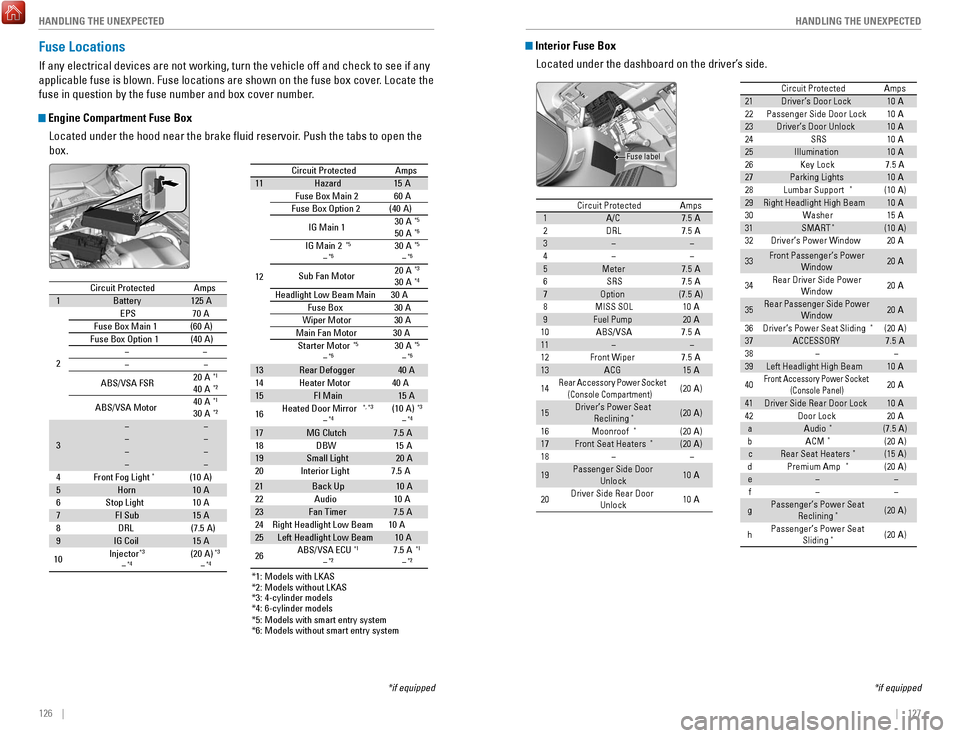
Interior Fuse Box
Located under the dashboard on the driver’s side.
*if equipped
Circuit ProtectedAmps1A/C7.5 A2DRL7.5 A345Meter7.5 A6SRS7.5 A7Optio n(7.5A )8MISS SOL10A9Fuel Pump20A10ABS/VSA7.5A1112Front Wipe r7.5A13ACG15 A
14Rear Accessory Power Socket
(Console Compartment )(20A )
15Driver’s Power Seat
Reclining*(20A )
16Moonroof*(20A )17Front Seat Heaters*(20A )18
19Passenger Side Door
Unlock10A
20 Driver Side Rear Door
Unlock 10
A
21 Driver’s Door Lock 10A
22 Passenger Side Door Lock 10A
23 Driver’s Door Unlock 10A
24 SRS 10A
25 Illumination 10A
26 Key Lock 7.5A
27 Parking Lights 10A
28 Lumbar Support
*(10A )
29 Right Headlight High Beam 10A
30 Washer 15A
31 SMART
*(10A )
32 Driver’s Power Window 20A
33 Front Passenger’s Power
Window 20
A
34 Rear Driver Side Power
Window 20
A
35 Rear Passenger Side Power
Window 20
A
36 Driver’s Power Seat Sliding
*(20 A)
37 ACCESSORY 7.5A
38
39 Left Headlight High Beam 10A
40
Front Accessory Powe r Socket
(Con sole Panel)20A
41 Driver Side Rear Door Lock 10A
42 Door Lock 20A
a Audio
*(7.5 A)
b ACM*(20 A)
c Rear Seat Heaters*(15 A)
d Premium Amp*(20 A)
e
f
g Passenger’s Power Seat
Reclining
*(20 A)
h Passenger’s Power Seat
Sliding
*(20 A)
Circuit Protecte dAmps
Fuse label
Circuit Protected Amps
1 A/C 7.5 A
2 DRL 7.5 A
3
4
5 Meter 7.5 A
6 SRS 7.5 A
7 Option (7.5A)
8 MISS SOL 10A
9 Fuel Pump 20A
10 ABS/VSA 7.5A
11
12 Front Wiper 7.5A
13 ACG 15A
14
Rear Accessory Power Socket
(Console Compartment )(20A )
15 Driver’s Power Seat
Reclining
*(20A )
16 Moonroof
*(2 0A )
17 Front Seat Heaters*(20A )
18
19 Passenger Side Door
Unlock 10
A
20 Driver Side Rear Door
Unlock 10
A
21Driver’s Door Lock10A22Passenger Side Door Lock10A23Driver’s Door Unlock10A24SRS10A25Illuminatio n10A26Key Lock7.5A27Parking Lights10 A28Lumbar Support*(10A )29Right Headlight High Beam10A30Washe r15A31SMART*(10A )32Driver’s Power Window20A
33Front Passenger’s Power
Window20A
34Rear Driver Side Power
Window20A
35Rear Passenger Side Power
Window20A
36Driver’s Power Seat Sliding*(20 A)37ACCESSORY7.5A3839Left Headlight High Beam10A
40Front Accessory Powe r Socket
(Con sole Panel)20A
41Driver Side Rear Door Lock10A42Door Loc k20AaAudio*(7.5 A)bACM*(20 A)cRear Seat Heaters*(15 A)dPremium Amp*(20 A)ef
gPassenger’s Power Seat
Reclining*(20 A)
hPassenger’s Power Seat Sliding*(20 A)
Circuit Protecte dAmps
Fuse Locations
If any electrical devices are not working, turn the vehicle off and chec\
k to see if any
applicable fuse is blown. Fuse locations are shown on the fuse box cover\
. Locate the
fuse in question by the fuse number and box cover number.
Engine Compartment Fuse Box
Located under the hood near the brake fluid reservoir. Push the tabs to open the
box.
*if equipped*1 : Models with LKAS
*2 : Models without LKAS
*3 : 4-cylinder models
*4 : 6-cylinder models
Circuit ProtectedAmps1Battery125A
2
EPS70 A
Fuse Box Main 1(60A)
Fuse Box Option 1(40A )
ABS/VSA FSR 20
A*1
40A*2
ABS/VSA Motor 40
A*1
30A*2
3
4F ront Fog Ligh t*(10A )5Horn10A
6S top Light10A7FI Sub15A
8D RL(7.5 A)
9IG Coil15A
10 Injector*3
*4(2
0A )*3
*4
*5: M odels with smart entry syste m
*6: Models without smart entry system Circuit Protected
Amps
11 Hazard 15A
12 Fuse Box Main
260A
Fuse Box Option 2(40 A)
IG Main 1 30
A
*5
50A*6
IG Main 2*5
*630A*5
*6
Sub Fan Moto r20
A*3
30A*4
Headlight Low Beam Main 30 A
Fuse Box3 0A
Wiper Moto r3 0A
Main Fan Motor 30A
Starter Motor
*5
*630 A*5
*6
13 Rear Defogger 40A
14 Heater Moto r40A
15 FI Main 15A
16 Heated Door Mirror
*, *3
*4(10 A)*3
*4
17
MG Clutch 7.5 A
18 DBW1 5A
19 Small Light 20A
20 Interior Light 7.5A
21 Back Up 10A
22 Audio1 0A
23 Fan Timer 7.5 A
24 Right Headlight Low Beam 10A
25 Left Headlight Low Beam 10A
26 ABS/VSA EC
U
*1
*27.5 A*1
*2
*1: Models with LKAS
*2 : Models without LKAS
*3 : 4-cylinder models
*4 : 6-cylinder models
Circuit Protected Amps
1 Battery 125A
2 EPS
70A
Fuse Box Main 1(60A)
Fuse Box Option 1(40A )
ABS/VSA FSR 20
A
*1
40A*2
ABS/VSA Motor 40
A*1
30A*2
3
4F ront Fog Ligh t
*(10A )
5 Horn 10A
6S top Light1 0A
7 FI Sub 15A
8D RL(7.5 A)
9 IG Coil 15A
10 Injector
*3
*4(2
0A )*3
*4
*5: M odels with smart entry syste m
*6: Models without smart entry system
Circuit ProtectedAmps11Hazard15 A
12 Fuse Box Main 260A
Fuse Box Option 2(40 A)
IG Main 1 30
A
*5
50A*6
IG Main 2*5
*630A*5
*6
Sub Fan Moto r20
A*3
30A*4
Headlight Low Beam Main 30 A
Fuse Box30A
Wiper Motor30A
Main Fan Motor 30A
Starter Motor
*5
*630 A*5
*6
13Rear Defogger40A
14 Heater Motor40A15FI Main15 A
16 Heated Door Mirror*, *3
*4(10 A)*3
*4
17MG Clutch7.5 A
18 DBW15A19Small Light20A
20 Interior Light 7.5A
21Back Up10 A
22 Audio10A23Fan Timer7.5 A
24 Right Headlight Low Beam 10A
25Left Headlight Low Beam10A
26 ABS/VSA EC
U*1
*27.5 A*1
*2
Page 80 of 83

152 || 153
CUSTOMER INFORMATION
CUSTOMER INFORMATION
Warranty Coverages
Below is a brief summary of the warranties covering your new vehicle.
New Vehicle Limited Warranty: Covers your new vehicle, except for the emissions
control system and accessories, against defects in materials and workman\
ship.
Emissions Control Systems Defects Warranty and Emissions Performance
Warranty: Covers your vehicle’s emissions control systems. Time, mileage, and
coverage are conditional.
Seat Belt Limited Warranty: Covers seat belts that fail to function properly.
Rust Perforation Limited Warranty: Covers all exterior body panels that rust through
from the inside.
Accessory Limited Warranty: Covers Honda accessories.
Replacement Parts Limited Warranty: Covers all Honda replacement parts against
defects in materials and workmanship.
Replacement Battery Limited Warranty: Provides prorated coverage for a
replacement battery purchased from a Honda dealer.
Replacement Muffler Lifetime Limited Warranty: Covers a replacement muffler for
the duration of the ownership.
restrictions and exclusions apply to all these warranties. See the W
arranty Manual
on the
owner Information CD or at
owners.honda.com (U.S.) or myhonda.ca
(Canada) for complete descriptions of each warranty, including time, mileage, and
other conditional limitations.
Your vehicle’s original tires are covered by their manufacturer. Tire warranty
information can be found on the
owner Information CD or at
owners.honda.com
(U.S.) or myhonda.ca (Canada).
EPA Contact Information
An owner may obtain further information
concerning emission warranties or report
violations of the terms of the emission
warranties by contacting: U.S.
environmental Protection Agency
office of T
ransportation and Air Quality
Compliance Division,
Light-Duty
vehicles Group
Attn: Warranty Complaints
2000 T
raverwood Drive
Ann Arbor, MI 48105
email: [email protected]
Contact Us
Honda dealer personnel are trained professionals. They should be able to\
answer
all your questions. If you encounter a problem that your dealership does\
not solve
to your satisfaction, please discuss it with the dealership’s service manager or
general manager. If you are dissatisfied with the decision made by the dealership’\
s
management, contact Honda Automobile Customer Service.
U.S. owners
American Honda Motor Co., Inc.
Honda Automobile Customer Service
1919 Torrance Blvd.
Mail Stop 500-2N-7A
Torrance, CA 90501-2746
Tel: (800) 999-1009
In Puerto Rico and
the U.S. Virgin Islands
Bella International
P.
o. Box 190816
San Juan, P
r 00919-0816
T
el: (787) 620-7546
When you call or write, please give us the following information:
•
vehicle Identification Number
•
Date of purchase
•
odometer reading of your vehicle
•
Your name, address, and telephone number
•
A detailed description of the problem
•
Name of the dealer who sold the vehicle to you Canadian owners
Honda Canada, Inc.
Customer
relations
180 Honda Blvd.
Markham,
oN
L6C 0H9
T
el: (888) 946-6329
Fax: (877) 939-0909
e-mail: [email protected]
*if equipped
Honda Roadside Assistance
24-hour emergency road service is available to you in the United States \
and
Canada throughout your 3-year/36,000-mile warranty term. Services include
jump starting, flat tire and lockout assistance, towing, and more (li\
mitations apply).
Call (866) 864-5211 (U.S.) or (800) 465-7587 (Canada).
Page 82 of 83
 ........................... 107
Braking .......")
156 || 157
INDEX
INDEX
Driving ........................................................................\
. 94
Adaptive Cruise Control (ACC) ........................... 107
Braking ................................................................... 104
Collision Mitigation Braking System ................. 112
Continuously variable Transmission (CvT) ...... 101
Cruise Control ....................................................... 106eco Assist System ................................................105eNGINe ST
A
rT/SToP button .............................. 101
Forward Collision W
arning (FCW)
.....109
, 110, 112
Ignition
................................................................... 100
Lane Keeping Assist System (LKAS) ................. 110
LaneW
atch
™ .......................................................... 111
Manual Transmission .......................................... 103
Maximum Load Limit .............................................. 96
Multi-view rear Camera ..................................... 114
Paddle Shifters ..................................................... 102
Parking Sensor System ....................................... 113
Power Mode .......................................................... 101refueling ................................................................ 115remote engine Start ..............................................99road Departure Mitigation (rDM)
..................... 109
Shifting
................................................................... 101
T
owing a Trailer
...................................................... 98vehicle Stability Assist (vSA®) ...........................105
Wiper Blades ........................................................ 140
Driving Position Memory System ........................... 43eco Assist System
................................................... 105
eCoN Button ............................................................ 105eCoN mode ................................................................ 26electric Power Steering (ePS) ................................24e-Mail ........................................................................\
.. 84emergency engine Stop .........................................120emergency T
owing
................................................. 120engine and Fuel ...............................................148
, 150
engine Coolant
......................................................... 137
engine oil
.................................................................. 134
eNGINe ST
A
rT/SToP button ................................ 101exterior Lights ...................................................... 26
, 35
Fastening a Seat Belt
................................................. 7
Flat T
ire
..................................................................... 123
Floor Mats .................................................................. 40
Fluids ................................................................. 149
, 150
FM/AM
radio ....................................................... 55
, 67
FM/AM
radio Commands ...................................... 155
Fog lights .................................................................... 26
Foot Brake ................................................................ 104
Frequently Asked Questions ................................. 151
Front Airbags (SrS) .................................................... 8
Front Door Inner Handle .......................................... 32
Fuel Information ...................................................... 115
Fuse Locations
......................................................... 126
Garage
opener .......................................................... 45
Hazards ....................................................................... 26
Headlight-Wiper Integration ................................... 37
Head restraints ......................................................... 41High beams
................................................................
26
High temperature ...................................................... 24
Home Address ........................................................... 89
HomeLink® Universal Transceiver.......................... 45
HondaLink™ ................................................................ 63
HondaLink™ Assist .................................................... 85
Honda roadside Assistance ................................. 152
Hood ........................................................................\
.. 132
Ignition ...................................................................... 100
Immobilizer ................................................................. 25
Information Display
................................................... 27
Instrument Panel
....................................................... 23
Interior Lights
............................................................. 35
Intermittent Wipers................................................... 37
iPod
® ..................................................................... 57, 70
iPod® Commands .................................................... 155
Jump Starting .......................................................... 117
Key ........................................................................\
....... 30
Lane Keeping Assist System (LKAS)
.............. 25, 110
LaneWatch
™ ............................................................. 111
Lap/Shoulder Seat Belts ............................................ 5
LATCH-Compatible Child Seat ................................. 17
Light Bulbs
........................................................ 148, 150
Light control
............................................................... 24
Lights ..................................................................... 26
, 35
LKAS
...................................................................... 25
, 26
Lock Tab
...................................................................... 32
Low fuel ...................................................................... 25
Low oil pressure ........................................................ 23
Low temperature ....................................................... 24
Low tire pressure ...................................................... 25
Maintenance
............................................................ 129
Battery
.................................................................... 139
Brake Fluid ............................................................. 138
Clutch Fluid ............................................................ 138engine Coolant ......................................................137engine oil ............................................................... 134
Maintenance Minder™ ......................................... 130
Service Codes ....................................................... 131
Under the Hood ..................................................... 132
Window W
asher Fluid
......................................... 139
Making a Call ....................................................... 76
, 82
Malfunction indicator lamp
..................................... 24
Malfunction Indicators
............................................. 23
Manual Seats............................................................. 40 Manual Transmission
............................................. 103
Map Legend ............................................................... 92
Master Door Lock Switch ........................................ 32
Maximum Load Limit................................................. 96
Mirrors
........................................................................\
44
Moonroof .................................................................... 34
Multi-Information Display (MID)
............................. 28
Multi-
view rear Camera ....................................... 114
Music search ........................................................... 155
INDEX
ABS........................................................................\
...... 24
ACC ........................................................................\
24
, 26
Accessory Power Socket
........................................ 50
Adaptive Cruise Control (ACC) ........................ 24
, 107
Address....................................................................... 89 Advanced Airbags
...................................................... 8
Aha™ radio ................................................................. 64
Airbags........................................................................\
.. 8 Airbag Care
............................................................. 13
Airbag System Components ................................. 12
Airbag System Indicators ..................................... 10
Ambient Meter
......................................................... 105
Android Auto
.............................................................. 66
Anti-Lock Brake System (ABS) ....................... 24
, 104
Apple CarPlay
™ .......................................................... 65
Apps ........................................................................\
.... 62
Audio Commands .................................................... 155
Audio operation ........................................................ 50
Aha™ radio .............................................................. 64
Android Auto ........................................................... 66
Apple CarPlay™ ....................................................... 65
Auxiliary Input Jack ............................................... 50
Bluetooth® Audio .............................................. 59, 72
Compact Disc (CD) ........................................... 56,
69
FM/AM
radio .................................................... 55
, 67
HondaLink
™ .............................................................. 63
iPod® ................................................................... 57, 70one Display Audio operation ...............................54
Pandora® ........................................................... 60, 73
SiriusXM® radio ..................................................... 68
Sound ....................................................................... 53
Steering Wheel Controls ....................................... 52
T
ouchscreen
operation ......................................... 61
USB Flash Drive ................................................ 58
, 71
USB Port
.................................................................. 50
Wi-Fi Connection .................................................... 64
Wireless Charger ................................................... 51
Auto High-Beam System
.............................. 24, 26, 36
Automatic Dimming
rearview Mirror .................... 44
Automatic Intermittent Wipers ............................... 38
AUX Commands
....................................................... 155
Auxiliary Input Jack
.................................................. 50
Battery ...................................................................... 139
Bluetooth® Audio ................................................ 59, 72
Bluetooth® Audio Commands ............................... 155Bluetooth
® Handsfreelink® (HFL) ............................
74
Call History ........................................................ 77
, 83
Dialing a Number
.............................................. 76
, 82
e-Mail ....................................................................... 84
HFL Controls ...................................................... 74
, 79
HondaLink
™ Assist .................................................. 85
Making a Call .................................................... 76
, 82
Pairing a Phone
................................................ 75
, 81
Phonebook
......................................................... 77
, 83
Siri
eyes Free .......................................................... 86
SMS T
ext Messaging
....................................... 78,
84
Speed Dial
......................................................... 76
, 82
Talk Button Tips
...................................................... 80
Brake Assist System
............................................... 104
Brake Fluid
............................................................... 138
Brake system ....................................................... 23
, 24
Braking...................................................................... 104 Brightness Control
.................................................... 35
Call History ........................................................... 77
, 83
Carbon Monoxide Gas................................................ 4
Changing a Flat Tire
................................................ 123
Changing Settings ..................................................... 48
Charging system
........................................................ 23
Childproof Door Locks
.............................................. 32
Child Safety ................................................................ 14
Child Seat ................................................................... 16
Adding Security with a T
ether
.............................. 19
LA
TCH-Compatible Child Seat
.............................. 17
Climate Control Commands ................................... 154
Climate Control System ............................................ 46
Clock........................................................................\
.... 49 Clutch Fluid............................................................... 138CMBS
™ ........................................................................\
26
Collision Mitigation Braking System™ ............ 24, 112
Compact Disc (CD) .............................................. 56
, 69
Compact Disc (CD) Commands
............................. 155
Condition Indicators ................................................. 25
Contact Us ................................................................ 152
Continuously variable Transmission (CvT) ......... 101
Cruise Control .......................................................... 106
CrUISe CoNTroL ..................................................... 26
CUSToMer Information
......................................... 151
Customized Features
................................................ 48
Dashboard and other Controls ................................. 2
Daytime running Lights (DrL)
................................. 24
Destination
................................................................. 89
Dialing a Number ................................................ 76
, 82
Door Mirrors
.............................................................. 44
Door open ................................................................... 25
Door operation .......................................................... 32
Doors ........................................................................\
... 31
DoT T
ire Quality Grading
....................................... 145