Page 335 of 613
334
uuCustomized Features u
Features
*1:Default SettingSetup
Group Customizable Features Description Selectable Settings
Clock/
Info
Clock
Clock/
Wallpaper
TypeClock
See System on P. 324
Wallpaper
Clock Adjustment*
Clock Format
Auto Time Zone*
Manual Time Zone*
Auto Daylight
Clock Display
Clock Reset
HondaLinkDiagnostic & Location
DataTurns HondaLink
® on and off.On/Off
OtherInfo Screen
PreferenceChanges the information screen type.Info Menu*1/Off
DefaultCancels/Resets all cust omized items in the Clock/Info
settings group as default.Yes /No
* Not available on all models
17 ACCORD 4D GAS-31T2A6400.book 334 ページ 2016年6月7日 火曜日 午後5時6分
Page 337 of 613

336
uuCustomized Features u
Features
*1:Default SettingSetup
Group Customizable Features Description Selectable Settings
Camera
Rear Camera
Fixed Guideline
Selects whether the fixed guidelines come on the rear
camera monitor.
2
Multi-View Rear Camera P. 497
On*1/Off
Dynamic Guideline
Selects whether the dynamic guidelines come on the
rear camera monitor.
2 Multi-View Rear Camera P. 497
On*1/Off
DefaultCancels/Resets all cust omized items in the Rear
Camera setting group as default.Yes/No
LaneWatch*
Show with Turn
SignalSelects whether the LaneWatch display comes on
when you move the turn signal lever to indicate a
right turn.
On*1/ Off
Display Time after
Turn Signal OffChanges the length of time the LaneWatch display
stays on after the turn signal lever returns to the
center.0 second*1/
2 seconds
Reference LineSelects whether the reference lines come on the
LaneWatch monitor.On*1/ Off
DefaultCancels/Resets all cust omized items in the
LaneWatch group as default.Yes/No
* Not available on all models
17 ACCORD 4D GAS-31T2A6400.book 336 ページ 2016年6月7日 火曜日 午後5時6分
Page 352 of 613
Continued351
uuBluetooth ® HandsFreeLink ®u HFL Menus
Features
■To change the pairing code setting
1. Press the SETTINGS button.
2. Rotate to select System Settings, then
press .
u Repeat the procedure to select
Bluetooth , then Edit Pairing Code .
3. Rotate to select Fixed or Random ,
then press .1 To change the pairing code setting
The pairing code may be si x or four digits depending
on your phone.
The default pair ing code is 0000 until you change the
setting.
To create your own, select Fixed, and delete the
current code, then enter a new one.
For a randomly generated pa iring code each time you
pair a phone, select Random .
Edit Pairing Code
17 ACCORD 4D GAS-31T2A6400.book 351 ページ 2016年6月7日 火曜日 午後5時6分
Page 384 of 613

Continued383
uuBluetooth ® HandsFreeLink ®u HFL Menus
Features
■To change the currently paired phone
1. Go to the Phone settings screen.
2Phone settings screen P. 377
2.Select Bluetooth Device List .
3. Select a phone to connect.
u HFL disconnects the connected phone
and starts searching for another paired
phone.
4. Select Connect , Connect , or
Connect .
■To change the pairing code setting
1. Select .
2. Select Settings .
3. Select Bluetooth/Wi-Fi .
4. Select the Bluetooth tab.
5. Select Edit Pairing Code .
6. Select Random or Fixed .
1To change the currently paired phone
If no other phones are found or paired when trying to
switch to another phone, HFL will inform you that the
original phone is connected again.
To pair other phones, select Add Bluetooth Device
from the Bluetooth device list screen.
1To change the pairing code setting
The default pair ing code is 0000 until you change the
setting.
To create your own, select Fixed, and delete the
current code, then enter a new one.
For a randomly generated pa iring code each time you
pair a phone, select Random .
17 ACCORD 4D GAS-31T2A6400.book 383 ページ 2016年6月7日 火曜日 午後5時6分
Page 407 of 613

uuBluetooth ® HandsFreeLink ®u HFL Menus
406
Features
■Automatic collisi on notification
If your vehicle’s airbags deploy or if the unit
detects that the vehicle is severely impacted,
your vehicle automatically will attempt to
connect to the HondaLink operator. If
connected, information about your vehicle, its
location, and its condition will be sent to the
operator; you also can speak to the operator
when connected.
IMPORTANT: For vehicles equipped with Hond aLink Assist, owner activation
constitutes authorization for Honda to collect information from your vehicle needed
to provide the service, and agr eement to the Terms of Use at www.hondalink.com/
TermsAndConditions . In a crash, HondaLink Assist w ill attempt to notify emergency
services but NEITHER Honda-PRO NOR ITS SERVICE PROVIDERS GUARANTEE THAT
SUCH NOTIFICATION WILL OCCUR.
Honda reserves the right to terminate HondaLink Assist services at any time or for
any reason, and in the future may not be ab le to provide services due to changes in,
or obsolescence of, technology integral to the service or changes in governmental
regulation.
■In Case of Emergency1 In Case of Emergency
Your vehicle may not be able to connect to the
operator if the battery level is low, the line is
disconnected, or you do not have adequate cellular
coverage.
You cannot use this emergency services when:
•You travel outside the H ondaLink service coverage
areas.
•There is a problem with the connecting devices,
such as the microphones, speakers, or the unit
itself.
You cannot operate othe r phone-related functions
using the screen while talking to the operator.
Select Hang Up to terminate the connection to your
vehicle.
1 Automatic collision notification
If the unit fails to connect to the operator, it
repeatedly tries until it succeeds.
17 ACCORD 4D GAS-31T2A6400.book 406 ページ 2016年6月7日 火曜日 午後5時6分
Page 439 of 613

438
uuWhen Driving uShifting
Driving
Shifting
Fully depress the clutch pedal to operate the shift lever and change gears, then
slowly release the pedal.
Depress the clutch pedal, and pause for a few seconds before shifting into
(R, or
shift into one of the forward gears for a moment. This stop s the gears so they do not
“grind.”
■Shift Lever Operation
Manual transmission models
1 Shifting
NOTICE
Do not shift to (R before the vehicle comes to a
complete stop.
Shifting to
( R before stopping can damage the
transmission.
NOTICE
Before downshifting, make su re the engine will not
go into the tachometer's red zone. Should this occur,
it can severely da mage your engine.
There is a metallic part on the shift lever. If you leave
the vehicle parked outside for a long time on a hot
day, be careful before moving the shift lever. Because
of heat, the shift lever may be extremely hot. If the
outside temperature is low, the shift lever may feel
cold.
17 ACCORD 4D GAS-31T2A6400.book 438 ページ 2016年6月7日 火曜日 午後5時6分
Page 443 of 613

442
uuWhen Driving uCruise Control*
Driving
Cruise Control*
Maintains a constant vehicle speed without having to keep your foot on the
accelerator. Use cruise control on freeways or open roads where you can travel at a
constant speed with little acceleration or deceleration.1Cruise Control*
It may not be possible to maintain a constant speed
when driving uphill or downhill.
When not using cruise control:
Turn off cruise control by pressing the CRUISE
button.
While in the ECON mode, it may take relatively more
time to accelerate to maintain the set speed.
When the engine speed slows down, try to
downshift.
You can maintain the set speed if you change gear
within five seconds.
3WARNING
Improper use of the cruise control can lead
to a crash.
Use the cruise control only when traveling
on open highways in good weather.
Manual transmission models
When to use
■Shift positions for cruise control:
In ( D or (S Always keep sufficient distance
between you and the vehicle in
front of you.
Automatic transmission/CVT models
■Vehicle speed for cruise control:
Desired speed in a range above
roughly 25 mph (40 km/h) ~
How to use
CRUISE MAIN is on in the
instrument panel.
Cruise control is ready to use.
■Press the
CRUISE button on
the steering wheel.
* Not available on all models
17 ACCORD 4D GAS-31T2A6400.book 442 ページ 2016年6月7日 火曜日 午後5時6分
Page 456 of 613
455
uuWhen Driving uAdaptive Cruise Control (ACC)*
Continued
Driving
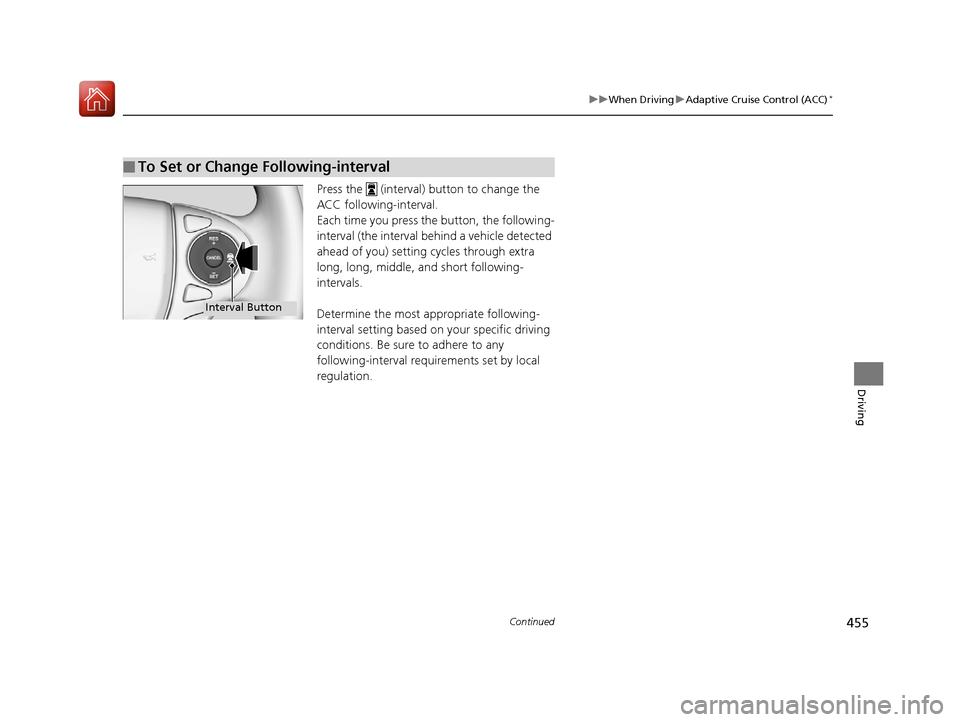
Press the (interval) button to change the
ACC following-interval.
Each time you press th e button, the following-
interval (the interval behind a vehicle detected
ahead of you) setting cycles through extra
long, long, middle, and short following-
intervals.
Determine the most appropriate following-
interval setting based on your specific driving
conditions. Be sure to adhere to any
following-interval requirements set by local
regulation.
■To Set or Change Following-interval
Interval Button
17 ACCORD 4D GAS-31T2A6400.book 455 ページ 2016年6月7日 火曜日 午後5時6分