Page 79 of 613
78
uuIndicators u
Instrument Panel
*1:Models with the smart entry system have an ENGINE START/STOP button instead of an ignition switch.
IndicatorNameOn/BlinkingExplanationMessage*
ECON Mode
Indicator
●Comes on for a few seconds when
you turn the ignition switch to ON
(w*1, then goes off.●Comes on when you press the
ECON button.
2ECON Button P. 441
CRUISE MAIN
Indicator*●Comes on when you press the
CRUISE button.2Cruise Control * P. 442—
CRUISE
CONTROL
Indicator
*
●Comes on if you have set a speed for
cruise control.
2 Cruise Control * P. 442—
Washer Level
Indicator*
●Comes on when the washer fluid
gets low.●Refill the washer fluid.
2Refilling Window Washer Fluid
P. 530—
Maintenance
Minder Indicator*
●Comes on when the scheduled
maintenance is due soon.2 Maintenance MinderTM P. 507—
* Not available on all models
17 ACCORD 4D GAS-31T2A6400.book 78 ページ 2016年6月7日 火曜日 午後5時6分
Page 83 of 613
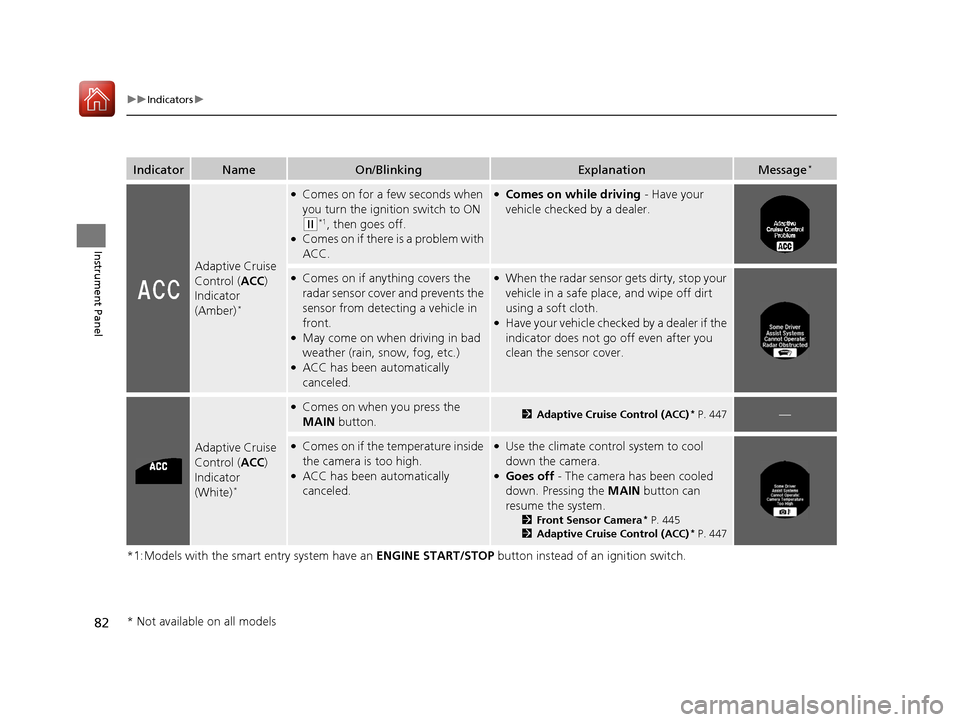
82
uuIndicators u
Instrument Panel
*1:Models with the smart entry system have an ENGINE START/STOP button instead of an ignition switch.
IndicatorNameOn/BlinkingExplanationMessage*
Adaptive Cruise
Control (ACC)
Indicator
(Amber)
*
●Comes on for a few seconds when
you turn the ignition switch to ON
(w*1, then goes off.●Comes on if there is a problem with
ACC.
●Comes on while driving - Have your
vehicle checked by a dealer.
●Comes on if anything covers the
radar sensor cover and prevents the
sensor from detecting a vehicle in
front.
●May come on when driving in bad
weather (rain, snow, fog, etc.)
●ACC has been automatically
canceled.
●When the radar sensor gets dirty, stop your
vehicle in a safe place, and wipe off dirt
using a soft cloth.
●Have your vehicle checked by a dealer if the
indicator does not go off even after you
clean the sensor cover.
Adaptive Cruise
Control ( ACC)
Indicator
(White)
*
●Comes on when you press the
MAIN button.2Adaptive Cruise Control (ACC)* P. 447—
●Comes on if the temperature inside
the camera is too high.
●ACC has been automatically
canceled.
●Use the climate control system to cool
down the camera.
●Goes off - The camera has been cooled
down. Pressing the MAIN button can
resume the system.
2 Front Sensor Camera* P. 445
2 Adaptive Cruise Control (ACC)* P. 447
* Not available on all models
17 ACCORD 4D GAS-31T2A6400.book 82 ページ 2016年6月7日 火曜日 午後5時6分
Page 84 of 613
83
uuIndicators u
Continued
Instrument Panel
*1:Models with the smart entry system have an ENGINE START/STOP button instead of an ignition switch.
IndicatorNameOn/BlinkingExplanationMessage*
Lane Keeping
Assist System
(LKAS ) Indicator
(Amber)
*
●Comes on for a few seconds when
you turn the ignition switch to ON
(w*1, then goes off.●Comes on if there is a problem
with the LKAS.
●Stays on constantly - Have your vehicle
checked by a dealer.
Lane Keeping
Assist System
( LKAS ) Indicator
(White)
*
●Comes on when you press the
MAIN button.
2Lane Keeping Assist System (LKAS)*
P. 465—
* Not available on all models
17 ACCORD 4D GAS-31T2A6400.book 83 ページ 2016年6月7日 火曜日 午後5時6分
Page 88 of 613

87
uuIndicators uMulti-Information Display Warn ing and Information Messages*
Continued
Instrument Panel
Multi-Information Display Warn ing and Information Messages*
The following messages appear only on the multi-information display. Press the (inf ormation) button to see the message again
with the system message indicator on.
MessageConditionExplanation
●Appears when the fuel fill cap is loose or is not
installed.
2 Check/Tighten Fuel Cap Message P. 579
●Appears when the scheduled maintenance is due
soon.
u Consequently, Maintenance Due Now and
Maintenance Past Due follow.
2Maintenance Minder Messages on the Multi-
Information Display P. 512
●Appears when the engine coolant temperature gets
abnormally high.
2Overheating P. 576
●Appears if there is a pr oblem with the automatic
lighting control system.●Appears while driving - Manually turn the lights on,
and have your vehicle checked by a dealer.
●Appears if there is a pr oblem with the low beam
headlights.●Appears while driving - The low beam headlights may
not be on. When conditions allow you to drive safely,
have your vehicle checked by a dealer as soon as
possible.
* Not available on all models
17 ACCORD 4D GAS-31T2A6400.book 87 ページ 2016年6月7日 火曜日 午後5時6分
Page 94 of 613

93
uuIndicators uMulti-Information Display Warn ing and Information Messages*
Continued
Instrument Panel
MessageConditionExplanation
●Appears when the area around the camera is
blocked by dirt, mud, etc. Stop your vehicle in a safe
place, and wipe it off with a soft cloth.
●May appear when driving in bad weather (rain,
snow, fog, etc.).
●Have your vehicle checked by a dealer if the message
appears again after you cleaned the area around the
camera.
●Appears if the temperature inside the camera is too
high.
●ACC/LKAS has been automatically canceled.
●Use the climate control system to cool down the camera.●Goes off - The camera has been cooled down. Pressing
the MAIN/LKAS button can resume the system.
2Front Sensor Camera* P. 445
2 Adaptive Cruise Control (ACC)* P. 447
2 Lane Keeping Assist System (LKAS)* P. 465
●Appears when the vehicle is driving out of a detected
line. The steering wheel vibrates rapidly.
●Keep the vehicle within the lane you are driving.●The color of either line changes from white to amber as
the vehicle gets closer to that side of the lane line.
2Lane Keeping Assist System (LKAS)* P. 465
●Appears when the vehicle is driving out of a detected
line.
- The steering wheel vibr ates rapidly when the
vehicle is drifting out of a detected line.
- The steering wheel vibr ates rapidly when the
vehicle is drifting out of a detected line. The system
also steers the vehicle to help you remain within
your driving lane.
●Keep the vehicle within the lane you are driving.●The color of either line changes from white to amber as
the vehicle gets closer to that side of the lane line.
2Road Departure Mitigation (RDM) System* P. 461●You can change the setting for the road departure
mitigation system. Normal, Wide , and Warning Only
can be selected.
2 Customized Features P. 103, 297, 315
Lane Keeping Assist System (LKAS)
Road Departure Mitigation (RDM) System
When you selected Warning Only
When you selected Normal or Wide
* Not available on all models
17 ACCORD 4D GAS-31T2A6400.book 93 ページ 2016年6月7日 火曜日 午後5時6分
Page 96 of 613

95
Instrument Panel
Gauges and Displays
Gauges
Gauges include the speedometer, tachometer, fuel gauge, and related indicators.
They are displayed when the ignition switch is in ON
(w*1.
Displays your driving speed in mph (U.S.) or km/h (Canada).
Shows the number of engine revolutions per minute.
Displays the amount of fuel left in the fuel tank.
Displays the temperature of the engine coolant.
*1: Models with the smart entry system have an ENGINE START/STOP button instead of an
ignition switch.
■Speedometer
■Tachometer
■Fuel Gauge
■Temperature Gauge
1 Fuel Gauge
NOTICE
You should refuel when the reading approaches .
Running out of fuel can cause the engine to misfire,
damaging the cata lytic converter.
The actual amount of remain ing fuel may differ from
the fuel gauge reading.E
1 Temperature Gauge
NOTICE
Driving with the temperat ure gauge pointer in the
upper zone can cause serious engine damage. Pull
safely to the side of th e road and allow engine
temperature to return to normal. 2 Overheating P. 576
17 ACCORD 4D GAS-31T2A6400.book 95 ページ 2016年6月7日 火曜日 午後5時6分
Page 97 of 613
96
uuGauges and Displays uInformation Display*
Instrument Panel
Information Display*
The information display sh ows the odometer, trip meter, engine oil life and
maintenance service item codes, and other gauges.
Press the (Select/Reset) k nob to change the display.
■Switching the Display
1Switching the Display
Each time you press the knob, the information
display changes as follows:
Some of the items on the information display also
appear on the audio/information screen. They also
change along with the info rmation display changes
while the fuel consumption is shown.
Instant Fuel Economy,
Odometer, Trip Meter A,
Outside Temperature
Instant Fuel Economy,
Range, Trip Meter A,
Outside Temperature
Engine Oil Life
Instant Fuel Economy, Average
Fuel Economy A, Trip Meter A,
Outside Temperature Instant Fuel Economy, Average
Fuel Economy B, Trip Meter B,
Outside TemperatureSelect/Reset
Knob
* Not available on all models
17 ACCORD 4D GAS-31T2A6400.book 96 ページ 2016年6月7日 火曜日 午後5時6分
Page 98 of 613

Continued97
uuGauges and Displays uInformation Display*
Instrument Panel
Shows the total number of miles (U.S.) or kilometers (Canada) that your vehicle has
accumulated.
Shows the total number of miles (U.S.) or k ilometers (Canada) driven since the last
reset. Meters A and B can be used to measure two separate trips.
■Resetting a trip meter
To reset a trip meter, display it, then pr ess and hold the knob. The trip meter is
reset to 0.0.
Shows the estimated average fuel economy of each trip meter in mpg (U.S.) or l/100
km (Canada). The display is updated at set intervals. When a trip meter is reset, the
average fuel economy is also reset.
Shows the instant fuel economy as a bar gr aph in mpg (U.S.) or l/100 km (Canada).
Shows the remaining oil life and Maintenance Minder
TM.
2 Maintenance MinderTM P. 507
■Odometer
■Trip Meter
■Average Fuel Economy
■Instant Fuel Economy
■Engine Oil Life
1Trip Meter
Switch between trip meter A and trip meter B by
pressing the knob.
1Average Fuel Economy
You can change when to reset the average fuel
economy.
2 Customized Features P. 297, 315
17 ACCORD 4D GAS-31T2A6400.book 97 ページ 2016年6月7日 火曜日 午後5時6分


