Page 277 of 613

276
uuAudio System Basic Operation uApple CarPlayTM
Features
Apple CarPlayTM
If you connect an Apple CarPlayTM-compatible iPhone to the system via USB, you can
use the audio/information t ouch screen, instead of the iPhone display, to make a
phone call, listen to music, view ma ps (navigation), and access messages.
2USB Port(s*) P. 187
1 Apple CarPlayTM
Only iPhone 5 or newer versi ons with iOS 8.4 or later
are compatible with Apple CarPlayTM.
Park in a safe place before connecting your iPhone to
Apple CarPlay
TM and when launching any compatible
apps.
To use Apple CarPlay
TM, connect the USB cable to the
front USB port. The USB por t located in the center
console storage will not enable Apple CarPlay
TM
operation.
2 USB Port(s
*) P. 187
To directly access the Apple CarPlay
TM phone
function, select Phone on the home screen. While
connected to Apple CarPlay
TM, calls are only made
through Apple CarPlayTM. If you want to make a call
with Bluetooth ® HandsFreeLink ®, turn Apple
CarPlay
TM OFF or detach the USB cable from your
iPhone.
2 Setting Up Apple CarPlay
TM P. 278
When your iPhone is connected to Apple CarPlay
TM, it
is not possible to use the Bluetooth® Audio or
Bluetooth ® HandsFreeLink ®. However, other
previously paired phones can stream audio via
Bluetooth ® while Apple CarPlay
TM is connected.
2 Phone Setup P. 382
For details on c ountries and regions where Apple
CarPlay
TM is available, as well as information
pertaining to function, refer to the Apple homepage.
* Not available on all models
17 ACCORD 4D GAS-31T2A6400.book 276 ページ 2016年6月7日 火曜日 午後5時6分
Page 281 of 613

280
uuAudio System Basic Operation uAndroid AutoTM
Features
Android AutoTM
When you connect an Android phone to the Display Audio system via USB, Android
AutoTM is automatically initiated. When connected via Android AutoTM, you can use
the audio/information touch screen to access the Phone, Google Maps (Navigation),
Google Play Music, and Google Now functions. When you first use Android Auto
TM,
a tutorial will appear on the screen. We recommend that you complete this tutorial
while safely parked before using Android Auto
TM.
2 USB Port(s*) P. 187
2 Auto Pairing Connection P. 282
1Android AutoTM
To use Android AutoTM, you need to download the
Android AutoTM app from Google Play to your
smartphone.
Only Android 5.0 (Lollipop) or later versions are
compatible with Android Auto
TM. Bluetooth A2DP
cannot be used with Android AutoTM phone.
Park in a safe place befo re connecting your Android
phone to Android Auto
TM and when launching any
compatible apps.
To use Android Auto
TM, connect the USB cable to the
front USB port. The USB port in the center console
storage will not enable Android Auto
TM operation.
2 USB Port(s*) P. 187
When your Android phone is connected to Android
Auto
TM, it is not possible to use Bluetooth® Audio.
However, other previously paired phones can stream
audio via Bluetooth ® while Android Auto
TM is
connected. 2 Phone Setup P. 382
* Not available on all models
17 ACCORD 4D GAS-31T2A6400.book 280 ページ 2016年6月7日 火曜日 午後5時6分
Page 283 of 613

uuAudio System Basic Operation uAndroid AutoTM
282
Features
b Phone (Communication)
Make and receive phone calls as well as listen to voicemail.
c Google Now (Home screen)
Display useful information organized by Android Auto
TM into simple cards that
appear just when they’re needed.
d Music and audio
Play Google Play Music and music apps that are compatible with Android Auto
TM. To
switch between music apps, press this icon.
e Go back to the Home screen
f Voice
Operate Android Auto
TM with your voice.
When you connect an Android phone to the unit via USB, Android Auto
TM is
automatically initiated.
■Enabling Android AutoTM
• Enable Once : Allows only once. (Prompt
shows again next time.)
• Always Enable: Allows anytime. (Prompt
does not show again.)
• Cancel : Does not allo w this consent.
You may change the consent settings under
the Smartphone settings menu.
■Auto Pairing Connection1Enabling Android AutoTM
Only initialize Android AutoTM when you are safely
parked. When Android AutoTM first detects your
phone, you will need to set up your phone so that
auto pairing is possible. Refer to the instruction
manual that came with your phone.
You can use the method below to change Android
Auto
TM settings after you have completed the initial
setup:
Select HOME Settings Smartphone Android
Auto
Use of user and vehicle information
The use and handling of user and vehicle information
transmitted to/from your phone by Android Auto
TM is
governed by Google’s Privacy Policy.
17 ACCORD 4D GAS-31T2A6400.book 282 ページ 2016年6月7日 火曜日 午後5時6分
Page 285 of 613
284
uuAudio System Basic Operation uSiri ® Eyes Free
Features
Siri ® Eyes Free
You can talk to Siri using the (Talk) button on the steering wheel when your
iPhone is paired to the Bluetooth® HandsFreeLink ® (HFL) system.
2Phone Setup P. 382
■Using Siri® Eyes Free
1Siri ® Eyes Free
Siri is a trademark of Apple Inc.
Check Apple Inc. website for features available for
Siri.
We recommend against using Siri other than in Siri ®
Eyes Free while operating a vehicle.
1 Using Siri ® Eyes Free
Some commands work only on specific phone
features or apps.
(Talk) Button
Press and hold until the display
changes as shown.
(Hang-up/back) Button
Press to deactivate Siri ® Eyes Free.
While in Siri ® Eyes Free:
The display remains the same. No
feedback or commands appear. Appears
when Siri is
activated in
Siri
® Eyes Free
17 ACCORD 4D GAS-31T2A6400.book 284 ページ 2016年6月7日 火曜日 午後5時6分
Page 304 of 613
303
uuCustomized Features u
Continued
Features
■List of customizable options
*1:Default Setting Setup
Group Customizable Features Description Selectable Settings
System
Settings
Display
BrightnessChanges the brightness of the audio/information
screen.—
ContrastChanges the contrast of the audio/information
screen.—
Black LevelChanges the black level of the audio/information
screen.—
BeepSelects whether a beep
er sounds when you
operate the selector knob.On*1/ Off
Blue-
tooth
Bluetooth On/OffTurns the Bluetooth® on and off.On*1/Off
Bluetooth Device List
Pairs a new phone to HFL, edits and deletes a
paired phone, and create a security PIN.
2 Phone Setup P. 349
—
Edit Pairing CodeChanges a pairing code.
2To change the pairing code setting P. 351Random/Fixed*1
Voice
RecogVoice PromptTurns the voice prompt on and off.Beginner*1/ Expert
17 ACCORD 4D GAS-31T2A6400.book 303 ページ 2016年6月7日 火曜日 午後5時6分
Page 312 of 613
311
uuCustomized Features u
Continued
Features
*1:Default SettingSetup
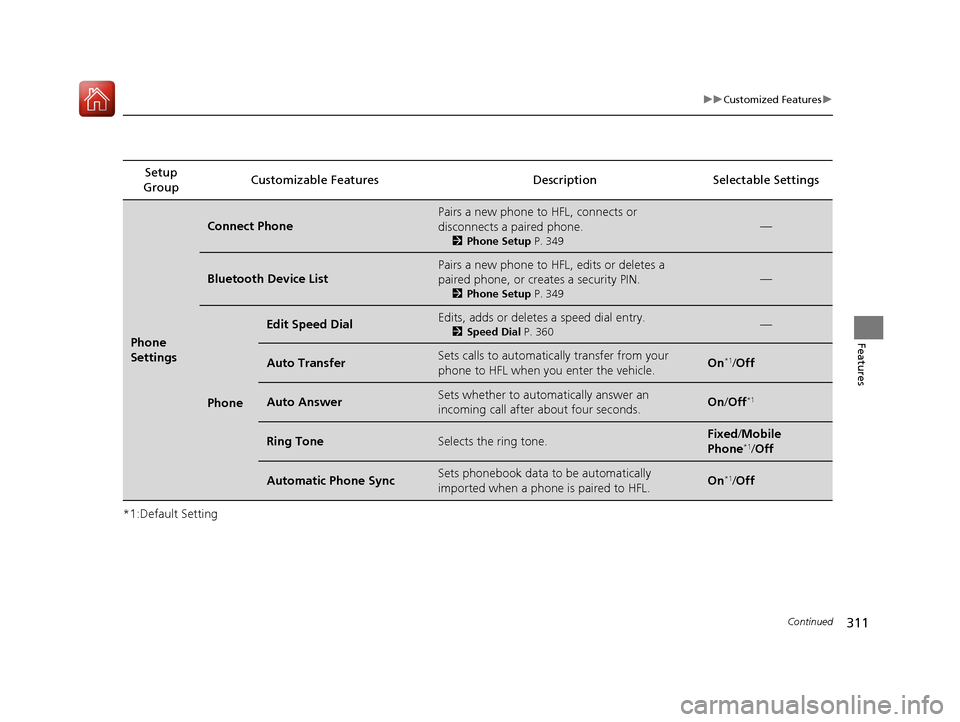
Group Customizable Features Description Selectable Settings
Phone
Settings
Connect Phone
Pairs a new phone to HFL, connects or
disconnects a paired phone.
2
Phone Setup P. 349
—
Bluetooth Device List
Pairs a new phone to HFL, edits or deletes a
paired phone, or creates a security PIN.
2Phone Setup P. 349
—
Phone
Edit Speed DialEdits, adds or deletes a speed dial entry.
2Speed Dial P. 360—
Auto TransferSets calls to automatically transfer from your
phone to HFL when you enter the vehicle.On*1/Off
Auto AnswerSets whether to automatically answer an
incoming call after about four seconds.On /Off*1
Ring ToneSelects the ring tone.Fixed /Mobile
Phone*1/ Off
Automatic Phone SyncSets phonebook data to be automatically
imported when a phone is paired to HFL.On*1/Off
17 ACCORD 4D GAS-31T2A6400.book 311 ページ 2016年6月7日 火曜日 午後5時6分
Page 313 of 613
312
uuCustomized Features u
Features
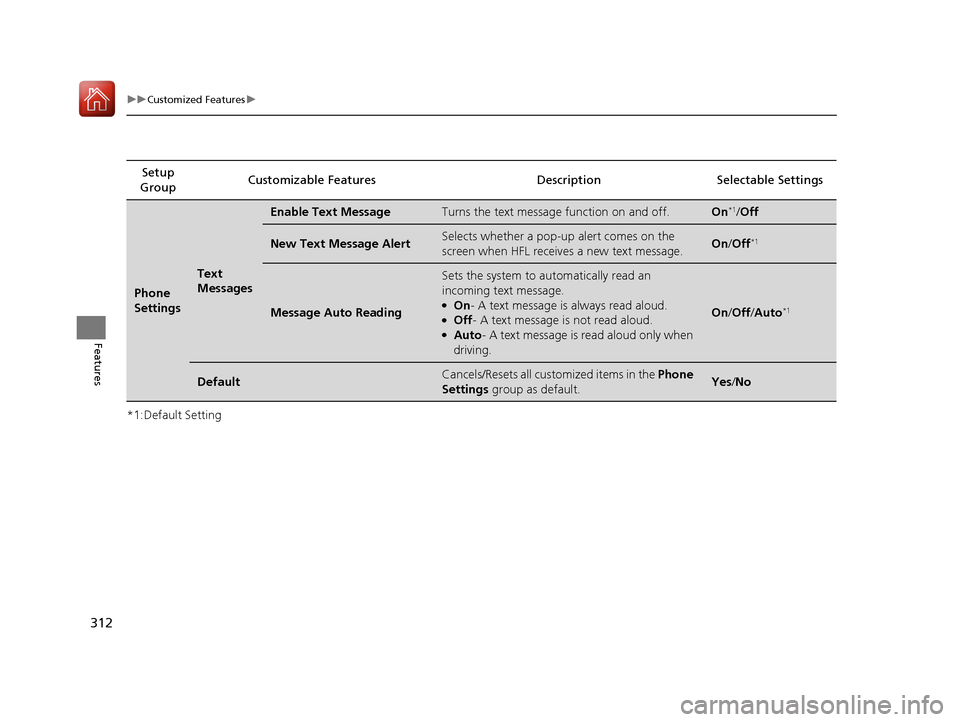
*1:Default SettingSetup
Group Customizable Features Descri
ption Selectable Settings
Phone
Settings
Text
Messages
Enable Text MessageTurns the text message function on and off.On*1/Off
New Text Message AlertSelects whether a pop-up alert comes on the
screen when HFL receives a new text message.On /Off*1
Message Auto Reading
Sets the system to automatically read an
incoming text message.
●On - A text message is always read aloud.●Off - A text message is not read aloud.●Auto - A text message is read aloud only when
driving.
On /Off /Auto*1
DefaultCancels/Resets all customized items in the Phone
Settings group as default.Yes/No
17 ACCORD 4D GAS-31T2A6400.book 312 ページ 2016年6月7日 火曜日 午後5時6分
Page 326 of 613
325
uuCustomized Features u
Continued
Features
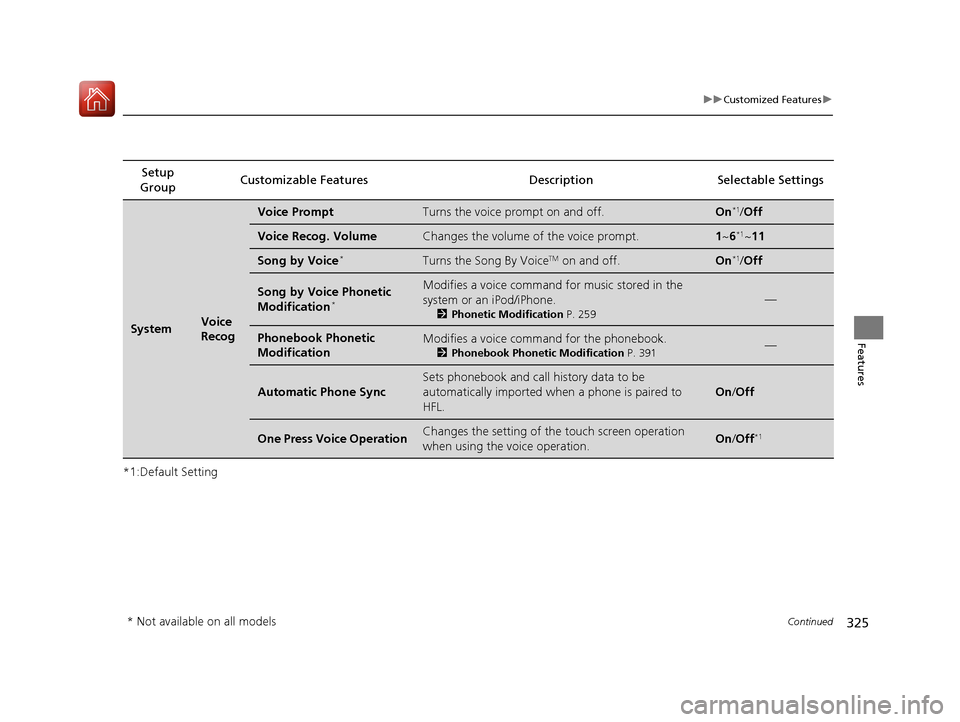
*1:Default SettingSetup
Group Customizable Featur
es Description Sel ectable Settings
SystemVoice
Recog
Voice PromptTurns the voice prompt on and off.On*1/Off
Voice Recog. VolumeChanges the volume of the voice prompt.1 ~6*1~11
Song by Voice*Turns the Song By VoiceTM on and off.On*1/Off
Song by Voice Phonetic
Modification*
Modifies a voice command for music stored in the
system or an iPod/iPhone.
2 Phonetic Modification P. 259
—
Phonebook Phonetic
ModificationModifies a voice command for the phonebook.
2Phonebook Phonetic Modification P. 391—
Automatic Phone Sync
Sets phonebook and call history data to be
automatically imported when a phone is paired to
HFL.
On /Off
One Press Voice OperationChanges the setting of the touch screen operation
when using the voice operation.On/Off*1
* Not available on all models
17 ACCORD 4D GAS-31T2A6400.book 325 ページ 2016年6月7日 火曜日 午後5時6分