Page 149 of 613

uuOperating the Switches Around the Steering Wheel uAuto High-Beam (High Beam Support System)*
148
Controls
Turn the headlight switch in AUTO and pull
the headlight lever to low beam.
2 Light Switches P. 144
The auto high-beam indicator (Green) comes
on.
■Temporary cancellation
The auto high-beam operation is temporarily canceled while:
• You are continuously driving at a speed below 15 mph (24 km/h).
• The vehicle speed is below 6 mph (10 km/h).
• The windshield wipers run at high speed for more than a few seconds.
The system operation resumes once the condit ion that caused it to cancel improves.
■To Operate the System1To Operate the System
For the auto high-beam to work properly:
•Do not place an object that reflects light on the
dashboard.
•Keep the windshield around the camera clean.
When cleaning the windshield, be careful not to
apply the windshield cleanser to the camera lens.
•Do not attach an object, sticker or film in the area
around the camera.
•Do not touch the camera lens.
If the camera receives a st rong impact, or repairing of
the area near the camera is required, consult a dealer.
To help reduce the likel ihood that high interior
temperatures will cause the camera system to shut
off, when parking, find a sh ady area or face the front
of the vehicle away from the sun.
If you use a reflective sun shade, do not allow it to
cover the camera housing. Covering the camera can
concentrate heat on the camera.
If the Can Not Operate: message appears:
Park your vehicle in a safe place. Wipe away debris
blocking the windshield, then start driving again. If
the message remains on even after driving for a while
with the clean windshield, have your vehicle checked
by a dealer.
Models with multi-information display
Headlight
Switch
17 ACCORD 4D GAS-31T2A6400.book 148 ページ 2016年6月7日 火曜日 午後5時6分
Page 303 of 613
302
uuCustomized Features u
Features
Add Bluetooth Device
Disconnect
Edit Speed Dial
Auto Transfer
Auto Answer
Ring Tone
Automatic Phone Sync
Default
Enable Text Message
Message Auto Reading
New Text Message Alert
Phone
Settings
Connect Phone
Text
Messages
Bluetooth Device List
Phone
Default
Fixed Guideline
Dynamic Guideline
Camera
SettingsRear
Camera
17 ACCORD 4D GAS-31T2A6400.book 302 ページ 2016年6月7日 火曜日 午後5時6分
Page 314 of 613
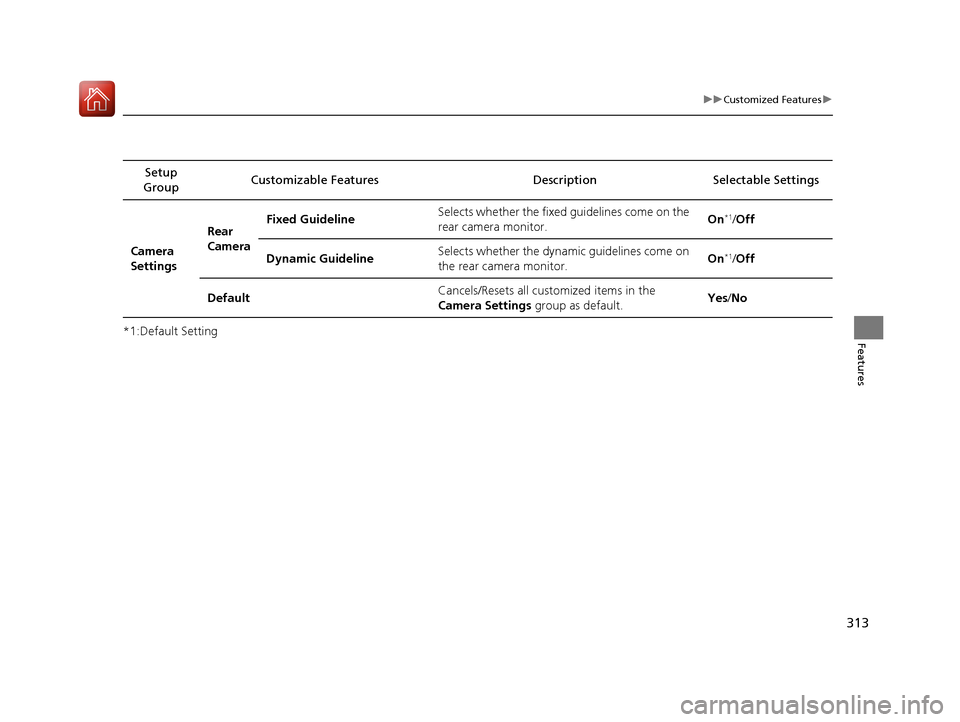
313
uuCustomized Features u
Features*1:Default SettingSetup
Group Customizable Features
DescriptionSelectable Settings
Camera
SettingsRear
Camera
Fixed Guideline
Selects whether the fixed
guidelines come on the
rear camera monitor. On
*1/
Off
Dynamic Guideline Selects whether the dynamic guidelines come on
the rear camera monitor.
On
*1/
Off
Default Cancels/Resets all customized items in the
Camera Settings
group as default. Yes
/No
17 ACCORD 4D GAS-31T2A6400.book 313 ページ 2016年6月7日 火曜日 午後5時6分
Page 323 of 613
322
uuCustomized Features u
Features
Bluetooth Device List
Default
PhonePhone
Edit Speed Dial
Ring Tone
Automatic Phone Sync
HondaLink Assist
Text/EmailEnable Text/Email
Select Account
New Message Notification
Camera
Show with Turn SignalLaneWatch*
Display Time after Turn Signal Off
Reference Line
Default
Rear CameraFixed Guideline
Dynamic Guideline
Default
* Not available on all models
17 ACCORD 4D GAS-31T2A6400.book 322 ページ 2016年6月7日 火曜日 午後5時6分
Page 337 of 613

336
uuCustomized Features u
Features
*1:Default SettingSetup
Group Customizable Features Description Selectable Settings
Camera
Rear Camera
Fixed Guideline
Selects whether the fixed guidelines come on the rear
camera monitor.
2
Multi-View Rear Camera P. 497
On*1/Off
Dynamic Guideline
Selects whether the dynamic guidelines come on the
rear camera monitor.
2 Multi-View Rear Camera P. 497
On*1/Off
DefaultCancels/Resets all cust omized items in the Rear
Camera setting group as default.Yes/No
LaneWatch*
Show with Turn
SignalSelects whether the LaneWatch display comes on
when you move the turn signal lever to indicate a
right turn.
On*1/ Off
Display Time after
Turn Signal OffChanges the length of time the LaneWatch display
stays on after the turn signal lever returns to the
center.0 second*1/
2 seconds
Reference LineSelects whether the reference lines come on the
LaneWatch monitor.On*1/ Off
DefaultCancels/Resets all cust omized items in the
LaneWatch group as default.Yes/No
* Not available on all models
17 ACCORD 4D GAS-31T2A6400.book 336 ページ 2016年6月7日 火曜日 午後5時6分
Page 412 of 613

411
Driving
This chapter discusses driving, refueling, and information on items such as accessories.
Before Driving
Driving Preparation .......................... 412
Maximum Load Limit........................ 415
Towing a Trailer Towing Preparation .......................... 417
Driving Safely with a Trailer .............. 419
Towing Your Vehicle ........................ 420
When Driving Starting the Engine .................. 421, 423
Precautions While Driving................. 428
Automatic Transmission/CVT
*.......... 429
Shifting .................... 430, 432, 436, 438
ECON Button ................................... 441 Cruise Control
*................................ 442
Front Sensor Camera*..................... 445
Adaptive Cruise Control (ACC)*....... 447Road Departure Mitigation (RDM) System*...... 461Lane Keeping Assist System (LKAS)*.... 465
Vehicle Stabilit y Assist (VSA®), aka Electronic
Stability Control (ESC), System........... 472
LaneWatchTM*.................................. 474Tire Pressure Monitoring System (TPMS) ... 476Tire Pressure Monitoring System (TPMS) - Required Federal Explanation ......... 478
Braking Brake System ................................... 480 Anti-lock Brake System (ABS) ........... 482
Brake Assist System ......................... 483
Collision Mitigation Braking System
TM
(CMBSTM)*..................................... 484
Parking Your Vehicle When Stopped ................................ 492
Parking Sensor System
*................... 493
Multi-View Rear Camera .................. 497
Refueling Fuel Information .............................. 499
How to Refuel ................................. 500
Fuel Economy and CO
2 Emissions
Improving Fuel Economy and Reducing
CO
2 Emissions ................................ 501
* Not available on all models
17 ACCORD 4D GAS-31T2A6400.book 411 ページ 2016年6月7日 火曜日 午後5時6分
Page 446 of 613

445
uuWhen Driving uFront Sensor Camera*
Continued
Driving
Front Sensor Camera*
The camera, used in systems su ch as LKAS, RDM, ACC, and CMBSTM, is designed to
detect an object that triggers any of the systems to operate its functions.
This camera is located behind the rearview
mirror.
To help reduce the likelihood that high interior
temperatures will cause the camera’s sensing
s y s t e m t o s h u t o f f , w h e n p a r k i n g , f i n d a s h a d y
area or face the front of the vehicle away from
the sun. If you use a reflective sun shade, do
not allow it to cover the camera housing.
Covering the camera can concentrate heat on
it.
■Camera Location and Handling Tips
1 Front Sensor Camera*
Never apply a film or attach any objects to the
windshield, the hood, or the front grill that could
obstruct the camera’s fiel d of vision and cause the
system to operate abnormally.
Scratches, nicks, and othe r damage to the windshield
within the camera’s fiel d of vision can cause the
system to operate abnormall y. If this occurs, we
recommend that you replac e the windshield with a
genuine Honda replacem ent windshield. Making
even minor repairs within th e camera’s field of vision
or installing an aftermarket replacement windshield
may also cause the system to operate abnormally.
After replacing the winds hield, have a dealer
recalibrate the camera. Pr oper calibration of the
camera is necessary for the system to operate
properly.
Do not place an object on the top of the instrument
panel. It may reflect onto the windshield and prevent
the system from detecting lane lines properly.
Front Sensor
Camera
* Not available on all models
17 ACCORD 4D GAS-31T2A6400.book 445 ページ 2016年6月7日 火曜日 午後5時6分
Page 447 of 613
uuWhen Driving uFront Sensor Camera*
446
Driving
1Front Sensor Camera*
If the Some Driver Assist Systems Cannot
Operate: Camera Temperature Too High message
appears:
•Use the climate control system to cool down the
interior and, if necessary, also use defroster mode
with the airflow directed towards the camera.
•Start driving the vehicle to lower the windshield
temperature, which cool s down the area around
the camera.
If the Some Driver Assist Systems Cannot
Operate: Clean Front Windshield message
appears:
•Park your vehicle in a sa fe place, and clean the
windshield. If the message does not disappear after
you have cleaned the winds hield and driven for a
while, have your vehicle checked by a dealer.
* Not available on all models
17 ACCORD 4D GAS-31T2A6400.book 446 ページ 2016年6月7日 火曜日 午後5時6分