2017 HONDA ACCORD HYBRID ABS
[x] Cancel search: ABSPage 17 of 80

• The emissions control system may have a problem, or the fuel cap is\
loose
or missing")
26 || 27
I
NSTRUMENT PANELINSTRUMENT PANEL
Malfunction indicator lamp (check engine light)
• The emissions control system may have a problem, or the fuel cap is\
loose
or missing.
• (Blinks) A
misfire in the engine’s cylinders is detected. Stop in a safe place,
and wait for the engine to cool down.
Anti-lock Brake System (ABS)
There is a problem with the anti-lock brake system. Y
our vehicle still has
normal braking ability, but no anti-lock function.
Tire Pressure Monitoring System (TPMS)
(Blinks for one minute, then stays on) There is a problem with the tir\
e
pressure monitoring system.
Collision Mitigation Braking System (CMBS)
There is a problem with the system, the temperature is too high, or the \
camera is blocked.
Vehicle Stability Assist (VSA)
There is a problem with the
vSA system.
Brake system
There is a problem with the hybrid brake system.
Electric Power Steering (EPS)
There is a problem with the
ePS system.
Adaptive Cruise Control (ACC)
There is a problem with the system, the temperature is too high, or the \
radar sensor is blocked.
Lane Keeping Assist System (LKAS)
There is a problem with the system, the camera is blocked, or the system\
automatically canceled.
Road Departure Mitigation (RDM)
There is a problem with the system.
Canad a
U.S.
Condition Indicators
These indicators may require you to perform an action.
Parking brake
The brake fluid is low, the parking brake is applied, or there is a problem
with the brake system.
Seat belt reminder
Make sure seat belts are fastened for you and all passengers. The indicator
blinks and beeps sound continuously if you or your front passenger has not
fastened your seat belts when you begin driving. If the indicator remain\
s on
after seat belts are fastened, see your dealer.
Door open
A door is not closed. A beep sounds while driving if a door is open.
Low fuel
refuel as soon as possible. If the indicator blinks, there is a problem w\
ith the
fuel gauge. See your dealer
.
Low tire pressure
Stop in a safe place, check tire pressures, and inflate tire(s) if n\
ecessary.
The indicator also appears if your vehicle is fitted with the compact \
spare
tire. Have your regular tire repaired or replaced as soon as possible.
Washer fluid level (Canadian models)
The washer fluid is low.
refill the washer fluid (see page 134).
System message
When a condition or malfunction indicator comes on, a message also
appears on the multi-information display. Check the display for more
information.
Immobilizer
Y
our key or remote transmitter cannot be recognized by the vehicle. If
the indicator blinks, you may not be able to start the power system. Turn
the vehicle off, and then on again. If it continues to blink, there may \
be a
problem with the system. See your dealer.
Ready
The vehicle is ready to drive.
Power System
The High
voltage battery is too hot, or there is a problem wih the electric
vehicle system.
EV
The vehicle is moving using electric power only.
Canad a
U.S.
Page 31 of 80
54 || 55
AUDIO AND CONNECTIVITY
AUDIO AND CONNECTIVITY
Adjusting the Sound
Adjust various sound settings.
Using the SETTINGS button*
Use the selector knob to make and enter selections.
1.
Press the SeTTINGS button.
2.
Select Audio Settings.
3.
Select Sound.
4.
Select a sound mode to change, and adjust it
using the selector knob.
5.
Press the BACK button to exit the menu.
Using the touchscreen*
Touch items on the screen to make and enter selections.
1.
From the HoMe screen, select Audio.
2.
Select Menu.
3.
Select Sound.
4.
Select the tabs to change the sound mode and
adjust the setting.
5.
Select oK when complete.
*if equipped
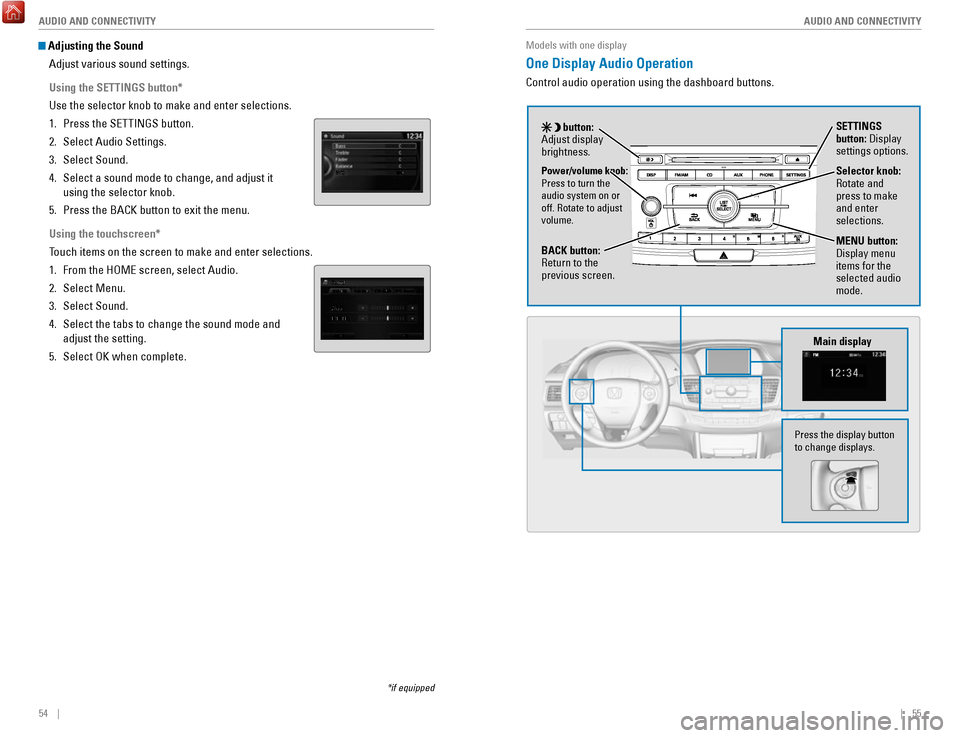
Models with one display
One Display Audio Operation
Control audio operation using the dashboard buttons.
Main display
Selector knob: rotate and
press to make
and enter
selections.
MENU button:
Display menu
items for the
selected audio
mode.Power/volume knob:
Press to turn the
audio system on or
off.
rotate to adjust
volume.
button:
Adjust display
brightness. SETTINGS
button: Display
settings options.
BACK button:
return to the
previous screen.
Press the display button
to change displays.
Page 55 of 80

102 || 103
DRIVING
DRIVING
Braking
Slow down or stop your vehicle, and keep it from moving when parked.
Foot Brake
Press the brake pedal to slow down or stop your
vehicle from moving.
Brake Assist System During hard or emergency braking, the system
increases braking force. The brake pedal may move
slightly or make a noise; this is normal. Continue to
hold the brake pedal firmly down.
Anti-Lock Brake System (ABS) During hard or emergency braking, the system
rapidly pumps the brakes to prevent wheel lockup
and help you maintain steering control. The brake
pedal may pulsate slightly during ABS operation;
this is normal. Do not pump the brake pedal, and
continue to hold it firmly down.
Parking BrakeKeep the vehicle from moving when it is parked.
To apply: Pull the lever up fully without pressing the
release button.
To release: Press and hold the release button, then
lower the lever down all the way.
Brake peda l
Brake pedal
The ABS may not function correctly if you use an incorrect tire type and\
size.
NOTICE
release the parking brake fully before driving. The rear brakes and axle \
can be
damaged if you drive with the parking brake applied.
NOTICE
Acoustic Vehicle Alerting System
Alerts people outside your vehicle when it is powered
solely by electricity and is travelling at about 12 mph
(20 km/h) or less.
Canada models
Press the button to turn the system on and off. The
system defaults to on, even if you turned it off the last
time you drove the vehicle.
Eco Assist System
Can help improve fuel economy by adjusting the performance of the power \
system,
transmission, climate control system, and cruise control.
ECON Button
Press the
eCoN button to turn the system on or off.
The
eCoN Mode indicator and a message in the
multi-information display* appear when the system
is turned on.
Ambient Meter
Color-coded bars change based on your driving
style and brake or accelerator pedal operation.
Green: Fuel-efficient driving
Blue green: Moderate acceleration/deceleration
Blue: Spirited acceleration/deceleration
Ambient Meter
Vehicle Stability Assist (VSA®)
Also known as electronic Stability Control (eSC), vSA helps to stabilize the vehicle
during cornering if the vehicle turns more or less than what was intende\
d. It assists
in maintaining traction on slippery surfaces by regulating power system \
output and
selectively applying the brakes.
Turning VSA On or Off
vSA is turned on every time you start the power
system, even if you previously turned it off. If you
turn
vSA off, your vehicle has normal braking and
cornering ability, but
vSA traction and stability
enhancement become less effective.
Press and hold the
vSA oFF button until you hear
a beep to turn
vSA on or off. The vSA oFF indicator
appears when the system is off.
Traction control becomes less effective, which may make it easier when t
rying to
free your vehicle if it is stuck in mud or snow.
VSA OFF indicator
Page 63 of 80

118 || 119
HANDLING THE UNEXPECTED
HANDLING THE UNEXPECTED
Overheating
If your engine is overheating, one of two messages will appear on the multi-
information display. Immediately park the vehicle in a safe place. Move the shift
lever to (P) and set the parking brake. Turn off all accessories and turn on the hazard
warning lights.
High Temperature. Power Reduced.
Keep the power mode on and wait until the message disappears. Have your \
vehicle checked by a dealer if the message remains on.
Engine Temperature Too Hot.
•
If steam or spray is present: Turn off the power system and wait until the steam
or spray stops. Then, open the hood.
•
No steam or spray present: Keep the power system on and open the hood.
Check that the cooling fan is operating and stop the power system once t\
he
engine Temperature T
oo Hot message disappears. If the cooling fan is not
operating, immediately turn off the vehicle.
once the engine has cooled, inspect the coolant
level and check the cooling system components for
leaks. If the coolant level in the reserve tank is low,
add coolant until it reaches the MAX mark. If there is
no coolant in the reserve tank, make sure the radiator
is cool, then cover the radiator cap with a heavy
cloth and open the cap. If necessary
, add coolant up
to the base of the filler neck, and put the cap back on.
once the engine has cooled sufficiently, turn the power system on. If the
overheating message disappears, resume driving. If it remains on, contac\
t
a
dealer for repairs.
engine
reserve Coolant
Tank
MAX
MIN
Steam and spray from an overheated engine can seriously scald you.
Do not open the hood if steam is coming out.
WARNING
removing the radiator cap while the engine is hot can cause the coolant t\
o
spray out, seriously scalding you.
Always let the engine and radiator cool down before removing the radiato\
r cap.
WARNING
Emergency Power System Stop
The PoWer button may be used to stop the power system due to an emergency
situation even while driving. If you must stop the power system, choose \
one of the
following operations:
•
Press and hold the PoWer button for two seconds,
or
•
Firmly press the PoWer button two times.
The power mode will change to ACC
eSSorY, or to oFF
if the transmission is in Park (P).
The power assist to the steering and braking will be disabled. Therefore\
, it will
require significantly more physical effort and time to steer and slow \
the
vehicle.
Downshift gears and use both feet on the brake pedal, if necessary, to slow the
vehicle and stop immediately in a safe place.
Trying to lift or tow your vehicle by the bumpers will cause serious dama\
ge. The
bumpers are not designed to support the vehicle’s weight.
Improper towing such as towing behind a motorhome or other motor vehicle\
can
damage the transmission.
NOTICE
Emergency Towing
Call a professional towing service if you need to tow your vehicle.
Flat bed equipment: The operator loads your vehicle on the back of a tru\
ck. This is
the best way to transport your vehicle.
Wheel lift equipment: The tow truck uses two pivoting arms that go under the front
tires and lift them off the ground. The rear tires remain on the ground.\
This is an
acceptable way to tow your vehicle. Do not press the button while driving unless it is absolutely necessary \
for the
power system to be switched off.
NOTICE
Page 65 of 80

122 || 123
HANDLING THE UNEXPECTED
HANDLING THE UNEXPECTED
Tire Repair Kit
If a tire has a small puncture, you can use the tire repair kit to tempo\
rarily repair it.
The puncture must be smaller than 3/16-inch (4 mm) and not in the tire\
sidewall. Go
to a dealer to have the full-size tire permanently repaired or replaced.\
This vehicle is
not equipped with a spare tire.
Before Repairing the Tire
1.
Park the vehicle on a firm, level, and non-slippery surface.
2.
Move the shift lever to Park (P).
3.
Turn on the hazard warning lights and set the power mode to veHICLe oFF
(L
oCK).
Getting Ready to Repair the Tire
1.
open the trunk floor lid and take the kit out of the
case.
2.
Place the kit upright on flat ground near the
punctured tire and away from traffic. Do not place
the kit on its side.
3.
Follow the instructions in the kit to repair the tire.
If the required air pressure is not reached within 10 minutes, the tire \
may be too
severely damaged for the kit to provide the necessary seal and your vehi\
cle will need to be towed.
Do not operate the temporary tire repair kit compressor for more than 15\
minut
es.
The accessory power socket and compressor can overheat and become
permanently damaged.
NOTICE
running the engine with the vehicle in an enclosed or even partly enclose\
d
area can cause a rapid build-up of toxic carbon monoxide.
Breathing this colorless, odorless gas can cause unconsciousness and even
death.
only run the engine to power the air compressor with the vehicle
outdoors.
WARNING
Trunk Floor Lid
Tire repair Kit
Fuse Locations
If any electrical devices are not working, turn the vehicle off and chec\
k to see if any
applicable fuse is blown. Fuse locations are shown on the fuse box cover\
. Locate the
fuse in question by the fuse number and box cover number.
Engine Compartment Fuse Box
Located under the hood near the 12-volt battery. Push the tabs to open the box.
*if equipped
Circuit ProtectedAmps
1Battery15 0A
2ePS70 A
eS B40 Aright ePB*(30A )40 A
Fuse Box option 1Shift By Wire*(30A )
rF C4 0A
IG Main 1
3 0A
3
Headlight Low Beam Main 30Aengine electric Water Pump3 0AIG Main 230AWiper Moto r
4 3
0A
FI Main15 A5 PCU electric Water Pump
6 7.
5A
ev TC20 A
710 A
815 A
915 A
1010 A
11
12
10 A rear Defogger
60
A
Fuse Box Main 1 50 A
ABS/vSA FSr 60
A
IG Hol d
DBW
IG Coi l
Stop Light vBU Fuse Box Main 2
40A
Fuse Box
ABS/vSA Motor 3
0A
3 0A
Heater Motor 40A
Left ePB
*
Small Light (3
0A )
20 A40 A
13(40 A)
14(4 0A )
15
16 (1
0A )10A
1715 A
AmpsCircuit Protected
Fuse Box option 2
A/C PTC 4
A/CPTC 2
Front Fog Light + Dr L
Horn
IG Hold 3-L/r
18 Interior Light7. 5A
19−−
20 (20 A)Premium Amp*
21Back Up
22 10
A
Audio15 A
23P-ACT Drive*(7.5 A)
10 A
25 Left Headlight Low Beam26
24 right Headlight Low Bea m10 A
IGPS LAF10 A
Page 66 of 80

124 || 125
HANDLING THE UNEXPECTED
HANDLING THE UNEXPECTED
Interior Fuse Box
Located under the dashboard on the driver’s side.
*if equipped
Amps1Circuit Protecte d
A/C7.5 A2DrL7.5 A
3−−4−−5Meter10 A6SrS(7.5A )
7option(7.5A )
8−−9Fuel Pump20 A10ABS/vSA7.5A
11vB SoL10 A12Front Wipe r7.5A
13ACG10 A
14rear Accessory Power Socket20 A
15
reclining
(Console Compartment)
Driver’s Power Seat (20 A)
16
Moonroof*(20 A)
17Front Seat Heaters(20 A)
18−−
19Passenger Side Door 10 A
20
Unlock
Unlock
Driver Side rear Door 10A 21
Driver’s Door Lock10
A22 Passenger Side Door Loc k10A23Driver’s Door Unlock10A24SrS10A25Illumination10A
26Key Loc k7.5A
27Parking Lights10 A
28Lumbar Suppor t(10 A)
30Washer
29
right Headlight High Bea m10A15A
31A/C Main10 A32 Driver’s Power Window20A
Circuit Protected Amps
33Front Passenger’s Power 20A
34Window
rear Driver Side Power
20 A
35
Window
rear Passenger Side Power
20A
37ACCeSSorY7.5A
Window
36 Driver’s Power Seat Sliding (20A)
38
−−39 Left Headlight High Beam10A
40
Socket20 AFront Accessory Power
42
(Console Panel )
41 Driver Side rear Door Lock 10A
Door Lock20Aa10Ab(7.5A )
c10 A
d15 A
e
SMArT
SHIFTe r*
Hybrid System
Hazard
Passenger's Power Seat
f (20
A)
g (20
A)h (15
A)i (15
A)−j7.5A
reclinin
g
*
Passenger's Power Seat
Sliding*
rear Seat Heaters*
ACL*
−
IG MoN*
Fuse label
Inspecting and Changing Fuses
1.
Turn the vehicle off, including all lights and
accessories.
2.
remove the fuse box cover.
3.
Check the large fuse in the engine compartment.
If the fuse is blown, use a Phillips-head
screwdriver to remove the screws and replace
the fuse with a new one.
reinstall the screws.
4.
Inspect the small fuses in the engine
compartment and the vehicle interior.
If there is a burned out fuse, remove it with the
fuse puller and replace it with a new one.
Combined
fuse Blown fuse
Fuse puller
replacing a fuse with one that has a higher rating greatly increases the \
chances of
damaging the electrical system.
NOTICE
Page 68 of 80

128 || 129
M
AINTENANCEMAINTENANCE
Maintenance Minder Service Codes
These codes indicate what services are due on your vehicle.
*1: If a message Service does not appear more than 12 months after the display is reset, change \
the
CoDe
engine oil every year.
#: See information on maintenance and emissions warranty.
A
Maintenance Main Items
B
replace engine oil*1
Inspect front and rear brakes/service as necessary
Check parking brake adjustment replace engine oil
*1 and oil filter
Inspect tie rod ends, steering gearbox, and boots
Inspect suspension components
Inspect driveshaft boots
Inspect brake hoses and lines (Including ABS/vSA)
Inspect exhaust system#Inspect all fluid levels and condition of fluids
Inspect fuel lines and connection s#
*
Check expiration date for TrK bottle
*2: If you drive in dusty conditions, replace the air cleaner element every \
15,000 miles (24,000 km).
* from diesel-powered vehicles, replace the dust and pollen filter every\
15,000 miles (24,000 km).
3:
If you drive primarily in urban areas that have high concentrations of s\
oot in the air from industry and
4: Driving in mountainous areas at very low vehicle speeds results in highe\
r transmission temperatures.
CoDe
1
Maintenance Sub Items
rotate tires
2
This requires transmission fluid changes more frequently than recommen\
ded by the Maintenance
Minder. If you regularly drive your vehicle under these conditions, have the transmission fluid c hanged every 47,500 miles (75,000 km) or 3 years.
replace air cleaner element*2
3
replace dust and pollen filter*3
4
replace transmission fluid*4
Inspect valve clearance
5
replace spark plugs
replace engine coolant
Under the Hood
Br ake Fluid
(Black Cap)
engine Coolant
reserve Tank radiator Cap
Washer Fluid
(Blue Cap) engine oil Dipstick
(orange)
12-volt Batter y
engine oil Fill Cap
Inverter Coolant
Filler Tank
Opening the Hood
1.
Park the vehicle on a level surface, and set the
parking brake.
2.
Pull the hood release handle under the lower left
corner of the dashboard.
3.
Push up the hood latch lever in the center of the
hood to release the lock mechanism, and open
the hood.
4.
remove the support rod from the clamp using the
grip. Mount the support rod in the hood.
When closing, remove the support rod, and
stow it in the clamp, then gently lower the hood.
remove your hand at a height of approximately
12 inches (30 cm) and let the hood close.
Do not open the hood when the wiper arms are raised. The hood will strik\
e the
wipers, and may damage either the hood or the wipers.
NOTICE
Hood release handle Pull
Lever
Support ro d
Grip
Clamp
Page 79 of 80

150 || 151
INDEX
INDEX
INDEX
ABS........................................................................\
.. 26
ACC .................................................................... 26,
28
Accessory Power Socket
.................................... 51
Acoustic vehicle Alerting .................................. 102
Adaptive Cruise Control (ACC) .................... 26,
105
Address................................................................... 90
Advanced Airbags
................................................ 10
Aha radio ............................................................... 65
Airbags....................................................................
10
Airbag Care
......................................................... 15
Airbag System Components ............................. 14
Airbag System Indicators ................................. 12
Ambient Meter.....................................................
103
Android Auto
.......................................................... 67
Anti-lock Brake System (ABS) .................... 26,
102
Apple CarPlay
........................................................ 66
Apps ........................................................................\
63
Audio Commands ................................................ 149
Audio operation .................................................... 51
Aha radio ............................................................ 65
Android Auto ....................................................... 67
Apple CarPlay ..................................................... 66
Auxiliary Input Jack ........................................... 51
Bluetooth Audio ............................................ 60,
73
Compact Disc (CD)
....................................... 57, 70
FM/AM radio ................................................ 56,
68
HondaLink
............................................................ 64
iPod ................................................................. 58,
71
one Display Audio operation ...........................55
Pandora .......................................................... 61,
74
SiriusXM
radio ................................................... 69
Sound ................................................................... 54
Steering Wheel Controls ................................... 53
Touchscreen operation ..................................... 62
USB Flash Drive ............................................ 59,
72
USB Port
.............................................................. 51
Wi-Fi Connection ................................................ 65
Wireless Charger ............................................... 52
Auto High-Beam System................................
28, 37
Automatic (AUT
o) rain-Sensing Wipers .......... 40
Automatic Dimming rearview Mirror ................ 45
AUX Commands...................................................
149
Auxiliary Input Jack
.............................................. 51
Battery .................................................................. 134
Bluetooth Audio...............................................
60, 73
Bluetooth Audio Commands.............................. 149
Bluetooth Handsfreelink (HFL)
............................ 75
Call History .................................................... 78,
84
Dialing a Number
.......................................... 77,
83
e-Mail ...................................................................85
HFL Controls .................................................. 75,
80
HondaLink Assist
................................................ 86
Making a Call ................................................ 77,
83Pairing a Phone ............................................
76, 82
Phonebook ..................................................... 78,
84
Siri
eyes Free ...................................................... 87
SMS Text Messaging ................................... 79, 85
Speed Dial ..................................................... 77,
83
Talk Button Tips
.................................................. 81
Brake Assist System...........................................
102
Brake Fluid
........................................................... 133
Brake system ................................................... 25,
26
Braking.................................................................. 102
Brightness Control
................................................ 36
Call History ....................................................... 78,
84
Carbon Monoxide Gas............................................ 5
Changing Settings
................................................. 49
Charging system....................................................
25
Childproof Door Locks
.......................................... 33
Child Safety ............................................................ 16
Child Seat ............................................................... 18
Adding Security with a Tether .......................... 21
LATCH-Compatible Child Seat .......................... 19
Climate Control Commands ............................... 148
Climate Control System ........................................ 47
Clock........................................................................\
50
CMBS
...................................................................... 28
Collision .................................................................... 6
Collision Mitigation Braking System .......... 26,
110
Compact Disc (CD)
.......................................... 57,
70
Compact Disc (CD) Commands
......................... 149
Condition Indicators ............................................. 27
Contact Us ............................................................ 146
Continuously variable Transmission (CvT) ..... 101
CUSToMer Information.....................................
145
Customized Features
............................................ 49
Dashboard and other Controls ............................. 2
Destination ............................................................. 90
Dialing a Number ............................................ 77,
83
Door Mirrors
.......................................................... 45
Door open ............................................................... 27
Door operation ...................................................... 33
Doors ....................................................................... 32
DoT Tire Quality Grading ................................... 140
Driver’s Seat ........................................................... 41
Driving ..................................................................... 95
Accessory Mode .............................................. 101
Acoustic vehicle Alerting ............................... 102
Adaptive Cruise Control (ACC) ....................... 105
Braking ............................................................... 102
Collision Mitigation Braking System ............. 110
Continuously variable Transmission (CvT) .. 101eco Assist System ............................................ 103
PoWer button .................................................. 101ev Mode ............................................................. 104
Lane Keeping Assist System (LKAS) ............. 108 LaneWatch™
..................................................... 109
Maximum Load Limit
.......................................... 97
Multi-view rear Camera ................................. 112
Parking Sensor System ................................... 111
Power Mode ...................................................... 101refueling ............................................................ 113remote engine Start ..........................................99road Departure Mitigation (rDM).................
107
Shifting
............................................................... 101
SPorT Mode ..................................................... 104
Towing a T
railer
..................................................98vehicle Stability Assist (vSA®) .....................103
Wiper Blades .................................................... 135
Driving Position Memory System ....................... 44eco Assist System...............................................
103
eCoN Button ........................................................103eCoN mode ............................................................ 28electric Power Steering (ePS) ............................26electronic Stability Control (eSC) .....................103e-Mail ...................................................................... 85emergency engine Stop .....................................119emergency Towing ............................................. 119engine and Fuel ................................................... 143engine Coolant.....................................................
132
engine oil..............................................................
130
P
oWer button ..................................................... 101ev indicator ............................................................ 27ev mode ..........................................................28,
104
exterior lights ...................................................28,
36
Fastening a Seat Belt
............................................. 9
Floor Mats .............................................................. 42
Fluids ..................................................................... 144
FM/AM radio ................................................... 56,
68
FM/AM
radio Commands .................................. 149
Foot Brake ............................................................ 102
Frequently Asked Questions ............................. 145
Front Airbags (SrS) .............................................. 10
Front Door Inner Handle ...................................... 33
Fuel Information .................................................. 113
Fuse Locations.....................................................
123
Garage
opener ...................................................... 46
Hazards ................................................................... 28
Headlight-Wiper Integration ......................... 38,
39
Head
restraints ..................................................... 43
High beams ............................................................ 28
High-voltage System Precautions ....................... 6
Home Address ....................................................... 90
HomeLink Garage opener ................................... 46
HondaLink...............................................................
64
HondaLink Assist................................................... 86 Honda
roadside Assistance ............................. 146
Hood ...................................................................... 129
Immobilizer ............................................................. 27
Instrument Panel ................................................... 25
Interior Lights.........................................................
36Intermittent Wipers............................................... 39
Inverter Coolant................................................... 133
iPod.................................................................... 58, 71
iPod Commands................................................... 149
Jump Starting
......................................................
116
Key ........................................................................\
... 31
Lane Keeping Assist System (LKAS)..........
26, 108
LaneWatch
........................................................... 109
Lap/Shoulder Seat Belts ........................................ 7
LATCH-Compatible Child Seat ............................. 19
Light Bulbs............................................................
143
Lights ................................................................. 28, 36
LKAS .................................................................. 26,
28
Lock Tab
.................................................................. 33
Low fuel .................................................................. 27
Low oil pressure .................................................... 25
Low tire pressure .................................................. 27
Maintenance........................................................
126
Battery
................................................................ 134
Brake Fluid ......................................................... 133engine Coolant ..................................................132engine oil ........................................................... 130
Inverter Coolant ................................................ 133
Maintenance Minder ....................................... 127
Service Codes ................................................... 128
Under the Hood ................................................. 129
Window Washer Fluid ..................................... 134
Making a Call ................................................... 77,
83
Malfunction indicator lamp
................................. 26
Malfunction Indicators.........................................
25
Map Legend
........................................................... 93
Master Door Lock Switch .................................... 33
Maximum Load Limit............................................. 97
Mirrors
.................................................................... 45
Moonroof ................................................................ 35
Multi-Information Display (MID).........................
29
Multi-
view rear Camera ................................... 112
Music search ....................................................... 149
Navigation .............................................................. 88
Display and Controls .......................................... 89entering a Destination .......................................90
Home Address .................................................... 90
Map Legend ........................................................ 93
Place Category ................................................... 91recent Places ..................................................... 91routing ................................................................. 93
Saved Places ...................................................... 92
Steering Wheel Controls ................................... 88
Street Address .................................................... 90
System Guidance volume ................................. 88
Talk Button T
ips
..................................................88
Traffic ................................................................... 94
Turn-by-turn directions ..................................... 93
Navigation Commands ....................................... 148one Display Audio operation ..............................55