Page 335 of 584
334
uuCustomized Features u
Features
*1:Default SettingSetup
Group Customizable Features Desc
ription Selectable Settings
Phone
Phone
Bluetooth Device
ListPairs a new phone to HFL, connects or disconnects a
paired phone.
2Phone Setup P. 380
—
Edit Speed DialEdits, adds or deletes a speed dial entry.
2Speed Dial P. 386—
Ring ToneSelects the ring tone.Fixed /Mobile
Phone*1
Automatic Phone
SyncSets phonebook and call history data to be
automatically imported when a phone is paired to HFL.On*1/ Off
HondaLink AssistTurns HondaLink As sist on and off.On/Off*1
Text/Email
Enable Text/EmailTurns the text/e-mail messa ge function on and off.On*1/Off
Select AccountSelects a text or e-mail message account.—
New Message
NotificationSelects whether a pop-up alert comes on the screen
when HFL receives a new text/e-mail messages.On /Off
DefaultCancels/Resets all customized items in the Phone
settings group as default.Yes /No
17 ACCORD FHEV-31T3W6200.book 334 ページ 2016年4月11日 月曜日 午後2時40分
Page 336 of 584
335
uuCustomized Features u
Continued
Features
*1:Default SettingSetup
Group Customizable Features Description Selectable Settings
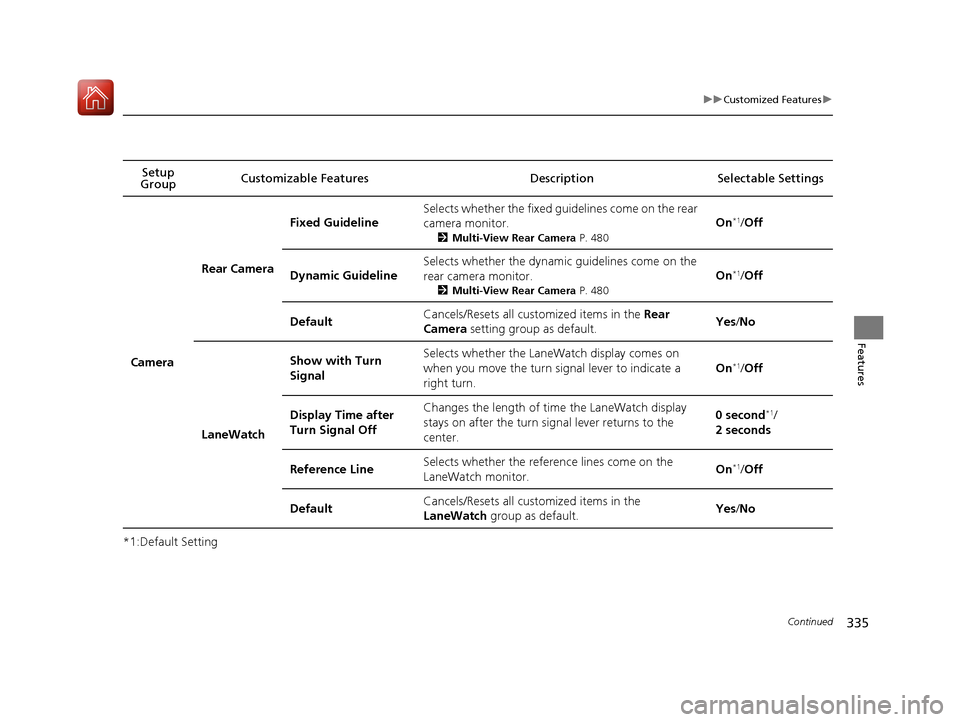
Camera
Rear Camera
Fixed Guideline
Selects whether the fixed guidelines come on the rear
camera monitor.
2
Multi-View Rear Camera P. 480
On*1/Off
Dynamic Guideline
Selects whether the dynamic guidelines come on the
rear camera monitor.
2 Multi-View Rear Camera P. 480
On*1/Off
DefaultCancels/Resets all cust omized items in the Rear
Camera setting group as default.Yes /No
LaneWatch
Show with Turn
SignalSelects whether the LaneWatch display comes on
when you move the turn si gnal lever to indicate a
right turn.
On*1/ Off
Display Time after
Turn Signal OffChanges the length of time the LaneWatch display
stays on after the turn signal lever returns to the
center.0 second*1/
2 seconds
Reference LineSelects whether the reference lines come on the
LaneWatch monitor.On*1/ Off
DefaultCancels/Resets all cust omized items in the
LaneWatch group as default.Yes/No
17 ACCORD FHEV-31T3W6200.book 335 ページ 2016年4月11日 月曜日 午後2時40分
Page 337 of 584
336
uuCustomized Features u
Features
*1:Default SettingSetup Group Customizable Features
Description Selectable Settings
Bluetooth/
Wi-Fi
Bluetooth
Bluetooth On/Off
StatusSelects to change the Bluetooth® status.On*1/Off
Bluetooth Device
ListPairs a new phone to HFL, edits or deletes a paired
phone.
2 Phone Setup P. 380
—
Edit Pairing CodeEdits a pairing code.
2To change the pairing code setting P. 381Random/Fixed*1
Wi-Fi
Wi-Fi On/Off StatusChanges the Wi-Fi mode.On*1/ Off
Wi-Fi Network ListConnects, disconnects, or deletes the Wi-Fi
device.—
Wi-Fi InformationShows the Wi-Fi information of the device.—
DefaultCancels/Resets all customized items in the
Bluetooth/Wi-Fi group as default.Yes/No
Smartphone Apple CarPlay /Android Auto Sets up the Apple CarPlay
®/Android Auto
TM
connection. Enable Once
/
Always Enable/
Cancel
17 ACCORD FHEV-31T3W6200.book 336 ページ 2016年4月11日 月曜日 午後2時40分
Page 338 of 584
337
uuCustomized Features uDefaulting All the Settings
Features
Defaulting All the Settings
Reset all the menu and customized settings as the factory defaults.
1.Select .
2. Select Settings .
3. Select System.
4. Select the Others tab.
5. Select Factory Data Reset .
u A confirmation message appears on the
screen.
6. Select Yes.
7. Select Yes again to reset the settings.
u After selecting Yes, the system will
reboot.1 Defaulting All the Settings
When you transfer the vehicle to a third party, reset
all settings to default a nd delete all personal data.
If you perform Factory Data Reset , it will reset the
preinstalled apps to their factory default.
If you perform Factory Data Reset , you cannot use
HondaLink ® because it becomes off line.
2 HondaLink® P. 267
17 ACCORD FHEV-31T3W6200.book 337 ページ 2016年4月11日 月曜日 午後2時40分
Page 345 of 584
344
uuBluetooth ® HandsFreeLink ®u HFL Menus
Features
*1: Appears only when a pho ne is connected to HFL. Turn the text message
function on and off.
New Text Message Alert
Message Auto Reading
Select whether a pop-up alert co mes on the screen when HFL
receives a new text message.
Set the system to automatically read an incoming text message.Text Messages*1
Default
Enable Text Message
Cancel/Reset all customized items in the Phone Settings group as default.
17 ACCORD FHEV-31T3W6200.book 344 ページ 2016年4月11日 月曜日 午後2時40分
Page 365 of 584

uuBluetooth ® HandsFreeLink ®u HFL Menus
364
Features
■To make a call using the call history
Call history is stored by All, Dialed ,
Received, and Missed.
1. Go to the Phone menu screen.
2Phone menu screen P. 378
2.Rotate to select Call History, then
press .
3. Rotate to select All, Dialed , Received ,
or Missed , then press .
4. Rotate to select a number, then press
.
u Dialing starts automatically.
■To make a call using a speed dial entry
1. Go to the Phone menu screen.
2Phone menu screen P. 378
2.Rotate to select Speed Dial, then press
.
3. Rotate to select a number, then press .
u Dialing starts automatically.
1To make a call using the call history
The call history disp lays the last 20 dialed, received, or
missed calls.
(Appears only when a phone is connected to HFL.)
1 To make a call using a speed dial entry
Select More Speed Dials to view another paired
phone’s speed dial list. You ca n make a call from that
list using the currently connected phone.
When a voice tag is stored, press the button to
call the number using the voice tag.
2 Speed Dial P. 358
Voice-tagged speed dial entries, phonebook name,
or number can be dialed by voice from any screen.
Press the button and follow the prompts.
To call stored speed dial entries 1-6, press the
corresponding preset buttons from the Phone
screen.
17 ACCORD FHEV-31T3W6200.book 364 ページ 2016年4月11日 月曜日 午後2時40分
Page 378 of 584
377
uuBluetooth ® HandsFreeLink ®u HFL Menus
Continued
Features
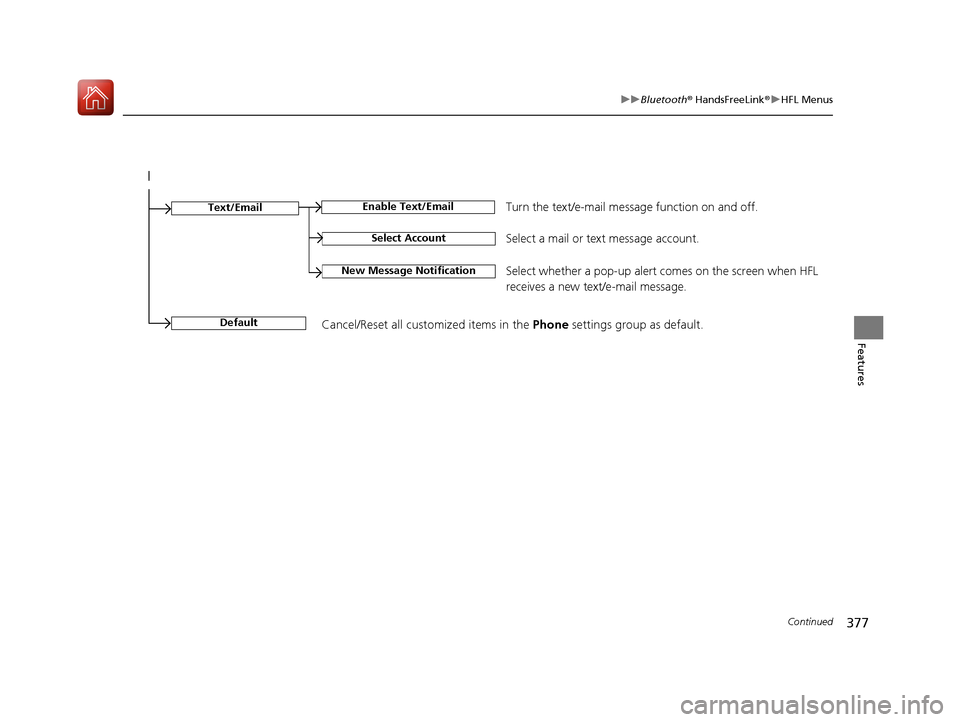
Select Account
Enable Text/EmailText/Email
New Message NotificationSelect whether a pop-up alert comes on the screen when HFL
receives a new text/e-mail message.
Turn the text/e-mail message function on and off.
Select a mail or te xt message account.
DefaultCancel/Reset all customized items in the Phone settings group as default.
17 ACCORD FHEV-31T3W6200.book 377 ページ 2016年4月11日 月曜日 午後2時40分
Page 460 of 584

459
uuWhen Driving uTire Pressure Monitoring System (TPMS)
Driving
You can calibrate the system from the
customized features on the multi-information
display.
1. Press the / button to select Vehicle
Settings, then press the SEL/RESET button.
u TPMS Calibration appears on the display.
2. Press the SEL/RESET button.
u The display swit ches to the
customization setup screen, where you
can select Cancel or Calibrate .
3. Press the / button and select
Calibrate , then press the SEL/RESET button.
u Calibration Started screen appears,
then the display returns to the
customization menu screen.
• If the Calibration Failed to Start message
appears, repeat steps 2-3.
• The calibration process finishes
automatically.
1TPMS Calibration
•The calibration process requires approximately 30
minutes of cumulative dr iving at speeds between
30-60 mph (48-97 km/h).
•During this period, if the power mode is set to ON
and the vehicle is not moved within 45 seconds,
you may notice the low ti re pressure indicator
comes on briefly. This is normal and indicates that
the calibration process is not yet complete.
You can calibrate the sy stem using the audio/
information screen
* or audio/information touch
screen*.
2 Customized Features P. 295, 314
If the snow chains are installed, remove them before
calibrating the TPMS.
If the low tire pressure/TPMS indicator comes on even
when the properly inflated specified regular tires are
installed, have your vehicle checked by a dealer.
We recommend that the tires be replaced with the
same brand, model, and size as the originals. Ask a
dealer for details.
4
4
* Not available on all models
17 ACCORD FHEV-31T3W6200.book 459 ページ 2016年4月11日 月曜日 午後2時40分