2017 GMC SIERRA oil pressure
[x] Cancel search: oil pressurePage 154 of 511

GMC Sierra/Sierra Denali Owner Manual (GMNA-Localizing-U.S./Canada/
Mexico-9955992) - 2017 - crc - 4/18/17
Instruments and Controls 153
Average Fuel Economy
The Average Fuel Economy display
shows the approximate average
liters per 100 kilometers (L/100 km)
or miles per gallon (mpg). This
number reflects only the
approximate average fuel economy
that the vehicle has right now, and
will change as driving conditions
change. This number is based on
the number of L/100 km (mpg)
recorded since the last time this
menu item was reset. Reset this
display by pressing the trip
odometer reset stem.
Tire Pressure
Turn the trip odometer reset stem
until a vehicle with the approximate
pressures of all four tires displays.
Tire pressure is displayed in either
kilopascal (kPa) or in pounds per
square inch (psi).
SeeTire Pressure Monitor System
0 410 andTire Pressure Monitor
Operation 0411. Remaining Oil Life
Turn the trip odometer reset stem
until REMAINING OIL LIFE
displays. An estimate of the oil's
remaining useful life is shown.
REMAINING OIL LIFE 99% means
99% of the current oil life remains.
When the remaining oil life is low,
the CHANGE ENGINE OIL SOON
message will appear on the display.
See
Engine Oil Messages 0159.
The oil should be changed as soon
as possible. See Engine Oil0364.
In addition to the engine oil life
system monitoring the oil life,
additional maintenance is
recommended in the Maintenance
Schedule. See Maintenance
Schedule 0455.
The Oil Life display must be reset
after each oil change. It will not
reset itself. Do not reset the Oil Life
display at any time other than when
the oil has just been changed.
It cannot be reset accurately until
the next oil change. To reset the
engine oil life system, see Engine
Oil Life System 0367. Transmission Fluid Temperature
The temperature of the automatic
transmission fluid displays in either
degrees Celsius (°C) or degrees
Fahrenheit (°F).
Trailer Brake
On vehicles with the Integrated
Trailer Brake Control (ITBC) system,
turn the trip odometer reset stem
until TRAILER GAIN and TRAILER
OUTPUT displays.
TRAILER GAIN shows the Trailer
Gain setting. This setting can be
adjusted from 0.0 to 10.0 with either
a trailer connected or disconnected.
TRAILER OUTPUT shows the
power output to the trailer anytime a
trailer with electric brakes is
connected. Output is displayed as a
bar graph. Dashes may appear in
the TRAILER OUTPUT display if a
trailer is not connected.
Hourmeter
This display shows the total number
of hours the engine has run.
Page 157 of 511

GMC Sierra/Sierra Denali Owner Manual (GMNA-Localizing-U.S./Canada/
Mexico-9955992) - 2017 - crc - 4/18/17
156 Instruments and Controls
system monitoring the oil life,
additional maintenance is
recommended in the Maintenance
Schedule. SeeMaintenance
Schedule 0455.
The Oil Life display must be reset
after each oil change. It will not
reset itself. Do not to reset the Oil
Life display at any time other than
when the oil has just been changed.
It cannot be reset accurately until
the next oil change. To reset the
engine oil life system, press and
hold
Vfor several seconds while
the Oil Life display is active. See
Engine Oil Life System 0367.
Tire Pressure : Shows the
approximate pressures of all four
tires. Tire pressure is displayed in
either kilopascal (kPa) or in pounds
per square inch (psi). If the pressure
is low, the value for that tire is
shown in amber.
See Tire Pressure Monitor System
0 410 andTire Pressure Monitor
Operation 0411. Best Fuel Economy :
Displays
average fuel economy, the best fuel
economy over the selected
distance, and a bar graph showing
instantaneous fuel economy.
Press
pto change the selected
distance. Press and hold
Vwhile
this display is active to reset the
best fuel economy and average fuel
economy. This display can also be
reset by selecting reset in the menu.
Top Consumers : Shows a list of
the features that are currently
impacting the fuel economy, in order
from highest to lowest. If a feature is
turned off, it will be removed from
the list.
Economy Trend : Shows history of
the Average Fuel Economy from the
last 50 km (30 mi). Each bar
represents about 5 km (3 mi) of
driving. During driving the bars will
shift to always reflect the most
recent distance on the right side.
Press and hold
Vto clear the graph
or press
pto reset through
the menu. ECO Index :
The bar graph
provides feedback on the efficiency
of current driving behavior. The
graph shows a value that is based
on current fuel consumption
compared to what is expected from
the vehicle with good and bad
driving habits. It also shows if the
Active Fuel Management is active
and in V4 mode, or inactive and in
V8 mode. See Active Fuel
Management 0281.
Engine Hours : Shows the total
number of hours the engine has run.
This display also shows the engine
idle hours.
Trailer Brake : On vehicles with the
Integrated Trailer Brake Control
(ITBC) system, the trailer brake
display appears in the DIC.
TRAILER GAIN shows the trailer
gain setting. This setting can be
adjusted from 0.0 to 10.0 with either
a trailer connected or disconnected.
OUTPUT shows the power output to
the trailer any time a trailer with
electric brakes is connected. Output
is displayed as a bar graph. Dashes
may appear in the OUTPUT display.
Page 161 of 511

GMC Sierra/Sierra Denali Owner Manual (GMNA-Localizing-U.S./Canada/
Mexico-9955992) - 2017 - crc - 4/18/17
160 Instruments and Controls
and allow the vehicle to idle until it
cools down. SeeEngine Coolant
Temperature Gauge 0138.
OIL PRESSURE LOW STOP
ENGINE
This message displays if low oil
pressure levels occur. Stop the
vehicle as soon as safely possible
and do not operate it until the cause
of the low oil pressure has been
corrected. Check the oil as soon as
possible and have the vehicle
serviced by your dealer. See Engine
Oil 0364.
Engine Power Messages
ENGINE POWER IS REDUCED
This message displays and a chime
may sound when the cooling system
temperature gets too hot and the
engine further enters the engine
coolant protection mode. See
Engine Overheating 0376 for more
information.
This message also displays when
the vehicle's engine power is
reduced. Reduced engine power
can affect the vehicle's ability to accelerate. If this message is on,
but there is no reduction in
performance, proceed to your
destination. The performance may
be reduced the next time the vehicle
is driven. The vehicle may be driven
at a reduced speed while this
message is on, but acceleration and
speed may be reduced. Anytime
this message stays on, or displays
repeatedly, the vehicle should be
taken to your dealer for service as
soon as possible.
Fuel System Messages
FUEL LEVEL LOW
This message displays and a chime
may sound if the fuel level is low.
Refuel as soon as possible.
See
Fuel Gauge 0136 andFuel
0 315.
TIGHTEN GAS CAP
This message may display along
with the malfunction indicator lamp
on the instrument cluster if the
vehicle's fuel cap is not tightened
properly. See Malfunction Indicator
Lamp (Check Engine Light) 0144. Reinstall the fuel cap fully. See
Filling the Tank
0317. The
diagnostic system can determine if
the fuel cap has been left off or
improperly installed. A loose or
missing fuel cap allows fuel to
evaporate into the atmosphere.
A few driving trips with the cap
properly installed should turn this
light and message off.
Key and Lock Messages
REPLACE BATTERY IN
REMOTE KEY
This message displays if a Remote
Keyless Entry (RKE) transmitter
battery is low. The battery needs to
be replaced in the transmitter. See
“Battery Replacement” under
Remote Keyless Entry (RKE)
System Operation 036.
Lamp Messages
TURN SIGNAL ON
This message displays and a chime
sounds if a turn signal is left on for
1.2 km (0.75 mi). Move the turn
signal lever to the off position.
Page 361 of 511

GMC Sierra/Sierra Denali Owner Manual (GMNA-Localizing-U.S./Canada/
Mexico-9955992) - 2017 - crc - 4/18/17
360 Vehicle Care
1. Positive (+) Terminal. SeeJump Starting - North America
0435.
2. Battery - North America 0383.
3. Coolant Surge Tank and Pressure Cap. See Cooling
System 0372.
4. Engine Air Cleaner/Filter 0371.
5. Automatic Transmission Dipstick (If Equipped). See
“How to Check Automatic
Transmission Fluid” under
Automatic Transmission Fluid
(6 Speed Transmission) 0368
or Automatic Transmission
Fluid (8 Speed Transmission)
0 371.
6. Remote Negative (–) Location. See Jump Starting - North
America 0435.
7. Engine Cooling Fans (Out of View). See Cooling System
0 372.
8. Engine Oil Fill Cap. See “When
to Add Engine Oil” under
Engine Oil 0364. 9. Engine Oil Dipstick. See
“Checking Engine Oil” under
Engine Oil 0364.
10. Brake Fluid Reservoir. See Brake Fluid 0381.
11. Windshield Washer Fluid Reservoir. See “Adding Washer
Fluid” under Washer Fluid
0 380.
12. Engine Compartment Fuse
Block 0393.
Page 363 of 511

GMC Sierra/Sierra Denali Owner Manual (GMNA-Localizing-U.S./Canada/
Mexico-9955992) - 2017 - crc - 4/18/17
362 Vehicle Care
1. Positive (+) Terminal. SeeJump Starting - North America
0435.
2. Battery - North America 0383.
3. Coolant Surge Tank and Pressure Cap. See Cooling
System 0372.
4. Engine Air Cleaner/Filter 0371.
5. Automatic Transmission Dipstick (If Equipped). See
“How to Check Automatic
Transmission Fluid” under
Automatic Transmission Fluid
(6 Speed Transmission) 0368
or Automatic Transmission
Fluid (8 Speed Transmission)
0 371.
6. Remote Negative (–) Location (Out of View). See Jump
Starting - North America 0435.
7. Engine Cooling Fans (Out of View). See Cooling System
0 372.
8. Engine Oil Fill Cap. See “When
to Add Engine Oil” under
Engine Oil 0364. 9. Engine Oil Dipstick. See
“Checking Engine Oil” under
Engine Oil 0364.
10. Windshield Washer Fluid Reservoir. See “Adding Washer
Fluid” under Washer Fluid
0 380.
11. Brake Fluid Reservoir. See Brake Fluid 0381.
12. Engine Compartment Fuse
Block 0393.
Page 365 of 511

GMC Sierra/Sierra Denali Owner Manual (GMNA-Localizing-U.S./Canada/
Mexico-9955992) - 2017 - crc - 4/18/17
364 Vehicle Care
1. Positive (+) Terminal. SeeJump Starting - North America
0435.
2. Battery - North America 0383.
3. Coolant Surge Tank and Pressure Cap. See Cooling
System 0372.
4. Engine Air Cleaner/Filter 0371.
5. Automatic Transmission Dipstick (If Equipped). See
“How to Check Automatic
Transmission Fluid” under
Automatic Transmission Fluid
(6 Speed Transmission) 0368
or Automatic Transmission
Fluid (8 Speed Transmission)
0 371.
6. Engine Oil Dipstick. See “Checking Engine Oil” under
Engine Oil 0364.
7. Engine Oil Fill Cap. See “When
to Add Engine Oil” under
Engine Oil 0364.
8. Engine Cooling Fan (Out of View). See Cooling System
0 372. 9. Remote Negative (–) Location.
See Jump Starting - North
America 0435.
10. Power Steering Fluid Reservoir.
SeePower Steering Fluid
(1500 Series) 0379 orPower
Steering Fluid (2500/3500
Series) 0379.
11. Windshield Washer Fluid Reservoir. See “Adding Washer
Fluid” under Washer Fluid
0 380.
12. Brake Fluid Reservoir. See Brake Fluid 0381.
13. Auxiliary Battery (If Equipped). SeeBattery - North America
0 383.
14. Engine Compartment Fuse
Block 0393.
If the vehicle has a diesel engine
and/or an Allison Transmission, see
the Duramax diesel supplement.
For an eAssist vehicle, see the
Silverado/Sierra supplement.Engine Oil
For diesel engine vehicles, see
“Engine Oil” in the Duramax diesel
supplement.
To ensure proper engine
performance and long life, careful
attention must be paid to engine oil.
Following these simple, but
important steps will help protect
your investment:
. Use engine oil approved to the
proper specification and of the
proper viscosity grade. See
“Selecting the Right Engine Oil”
in this section.
. Check the engine oil level
regularly and maintain the
proper oil level. See “Checking
Engine Oil” and“When to Add
Engine Oil” in this section.
. Change the engine oil at the
appropriate time. See Engine Oil
Life System 0367.
. Always dispose of engine oil
properly. See “What to Do with
Used Oil” in this section.
Page 376 of 511
GMC Sierra/Sierra Denali Owner Manual (GMNA-Localizing-U.S./Canada/
Mexico-9955992) - 2017 - crc - 4/18/17
Vehicle Care 375
Checking Coolant
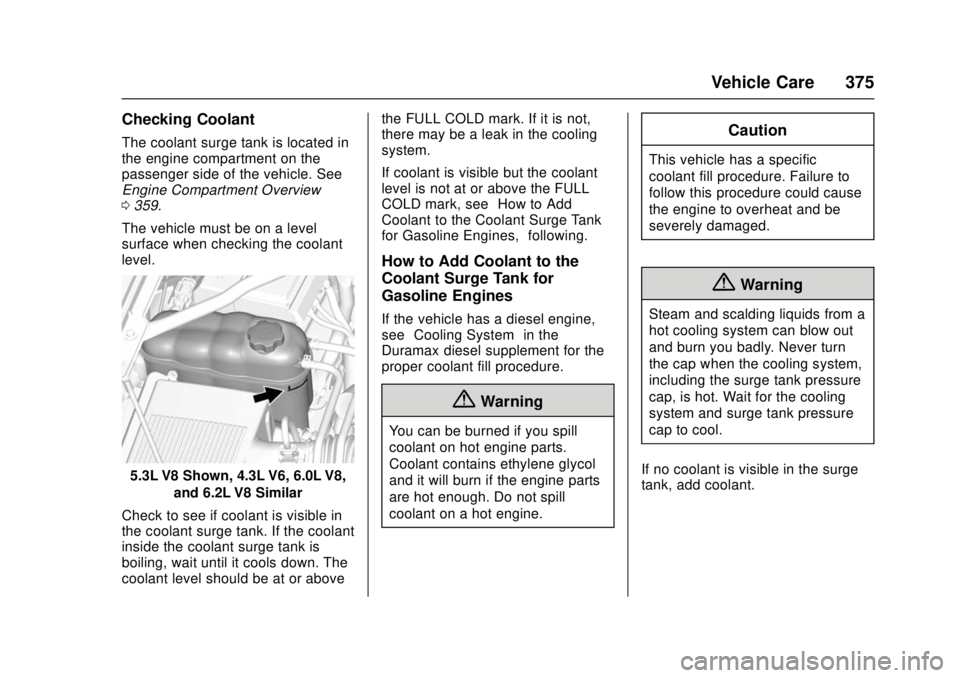
The coolant surge tank is located in
the engine compartment on the
passenger side of the vehicle. See
Engine Compartment Overview
0359.
The vehicle must be on a level
surface when checking the coolant
level.
5.3L V8 Shown, 4.3L V6, 6.0L V8, and 6.2L V8 Similar
Check to see if coolant is visible in
the coolant surge tank. If the coolant
inside the coolant surge tank is
boiling, wait until it cools down. The
coolant level should be at or above the FULL COLD mark. If it is not,
there may be a leak in the cooling
system.
If coolant is visible but the coolant
level is not at or above the FULL
COLD mark, see
“How to Add
Coolant to the Coolant Surge Tank
for Gasoline Engines,” following.
How to Add Coolant to the
Coolant Surge Tank for
Gasoline Engines
If the vehicle has a diesel engine,
see“Cooling System” in the
Duramax diesel supplement for the
proper coolant fill procedure.
{Warning
You can be burned if you spill
coolant on hot engine parts.
Coolant contains ethylene glycol
and it will burn if the engine parts
are hot enough. Do not spill
coolant on a hot engine.
Caution
This vehicle has a specific
coolant fill procedure. Failure to
follow this procedure could cause
the engine to overheat and be
severely damaged.
{Warning
Steam and scalding liquids from a
hot cooling system can blow out
and burn you badly. Never turn
the cap when the cooling system,
including the surge tank pressure
cap, is hot. Wait for the cooling
system and surge tank pressure
cap to cool.
If no coolant is visible in the surge
tank, add coolant.
Page 408 of 511

GMC Sierra/Sierra Denali Owner Manual (GMNA-Localizing-U.S./Canada/
Mexico-9955992) - 2017 - crc - 4/18/17
Vehicle Care 407
maximum capacity of fuel, oil,
and coolant, but without
passengers and cargo.
DOT Markings
:A code molded
into the sidewall of a tire
signifying that the tire is in
compliance with the U.S.
Department of Transportation
(DOT) Motor Vehicle Safety
Standards. The DOT code
includes the Tire Identification
Number (TIN), an alphanumeric
designator which can also
identify the tire manufacturer,
production plant, brand, and
date of production.
GVWR
:Gross Vehicle Weight
Rating. See Vehicle Load Limits
0 265.
GAWR FRT
:Gross Axle Weight
Rating for the front axle. See
Vehicle Load Limits 0265.
GAWR RR
:Gross Axle Weight
Rating for the rear axle. See
Vehicle Load Limits 0265. Intended Outboard Sidewall
:
The side of an asymmetrical tire
that must always face outward
when mounted on a vehicle.
Kilopascal (kPa)
:The metric
unit for air pressure.
Light Truck (LT-Metric) Tire
:A
tire used on light duty trucks and
some multipurpose passenger
vehicles.
Load Index
:An assigned
number ranging from 1 to 279
that corresponds to the load
carrying capacity of a tire.
Maximum Inflation Pressure
:
The maximum air pressure to
which a cold tire can be inflated.
The maximum air pressure is
molded onto the sidewall.
Maximum Load Rating
:The
load rating for a tire at the
maximum permissible inflation
pressure for that tire. Maximum Loaded Vehicle
Weight
:The sum of curb
weight, accessory weight,
vehicle capacity weight, and
production options weight.
Normal Occupant Weight
:The
number of occupants a vehicle
is designed to seat multiplied by
68 kg (150 lb). See Vehicle Load
Limits 0265.
Occupant Distribution
:
Designated seating positions.
Outward Facing Sidewall
:The
side of an asymmetrical tire that
has a particular side that faces
outward when mounted on a
vehicle. The side of the tire that
contains a whitewall, bears
white lettering, or bears
manufacturer, brand, and/or
model name molding that is
higher or deeper than the same
moldings on the other sidewall
of the tire.