2017 GMC SIERRA 1500 radio controls
[x] Cancel search: radio controlsPage 213 of 494
GMC Sierra/Sierra Denali Owner Manual (GMNA-Localizing-U.S./Canada/
Mexico-9955992) - 2017 - crc - 5/3/16
212 Infotainment System
Bluetooth Audio Quality
Turn off the Echo and Noise
cancellation feature on your phone,
if supported, for the best hands-free
performance.
See www.gm.com/bluetooth for U.S.
and Canada only.
Bluetooth (Infotainment
Controls - Base Radio)
For information about how to
navigate the menu system using the
infotainment controls, seeOverview
(Base Radio with Touchscreen)
0 178 orOverview (Base
Radio) 0179.
Switching to Handset or
Hands-Free Mode
To switch between handset mode
and hands-free mode, use the
OnStar command, “transfer call.”
Pairing
A Bluetooth-enabled cell phone
must be paired to the Bluetooth
system and then connected to the
vehicle before it can be used. See your cell phone manufacturer's user
guide for Bluetooth functions before
pairing the cell phone. If a Bluetooth
phone is not connected, calls can
be made using OnStar Hands-Free
Calling, if available. See
OnStar
Overview 0471, if equipped.
Pairing Information
. Up to five cell phones can be
paired to the Bluetooth system.
. The pairing process is disabled
when the vehicle is moving.
. Pairing only needs to be
completed once per phone,
unless the pairing information on
the cell phone changes or the
cell phone is deleted from the
system.
. Only one paired cell phone can
be connected to the Bluetooth
system at a time.
. If multiple paired cell phones are
within range of the system, the
system connects to the first
available paired cell phone in the
order that they were newly
paired to the system. To connect to a different paired phone, see
“Connecting to a Different
Phone”
later in this section.
Pairing a Phone or Device 1. From the Home Page, turn the MENU knob to access the
PHONE screen button, then
press the MENU knob to select
the PHONE screen button. If a
device has been previously
paired, the main Phone menu
will be shown. If no devices
have been paired, Step 2 can
be skipped.
2. Turn the MENU knob and press to select Manage
Phones.
3. Press the button just below the PAIR screen button. A four-digit
Personal Identification Number
(PIN) appears on the display.
The PIN is used in Step 5.
4. Start the pairing process on the cell phone to be paired to the
vehicle. See your cell phone
manufacturer's user guide for
information on this process.
Page 221 of 494
GMC Sierra/Sierra Denali Owner Manual (GMNA-Localizing-U.S./Canada/
Mexico-9955992) - 2017 - crc - 5/3/16
220 Infotainment System
To Transfer Audio to the Bluetooth
System from a Cell Phone
During a call with the audio on the
cell phone, press
g. The audio
transfers to the vehicle. If the audio
does not transfer to the vehicle, use
the audio transfer feature on the cell
phone. See your cell phone
manufacturer's user guide for more
information.
Voice Pass-Thru
Voice pass-thru allows access to the
voice recognition commands on the
cell phone. See your cell phone
manufacturer's user guide to see if
the cell phone supports this feature.
To access contacts stored in the cell
phone:
1. Press
g. The system responds
“Ready,” followed by a tone.
2. Say “Bluetooth.”
3. Say “Voice.”The system
responds “OK, accessing
messages will go through their cycle
according to the phone's operating
instructions.
Dual Tone Multi-Frequency
(DTMF) Tones
The Bluetooth system can send
numbers and the numbers stored as
name tags during a call. You can
use this feature when calling a
menu-driven phone system.
Account numbers can also be
stored for use.
Sending a Number or Name Tag
During a Call
1. Press
g. The system responds
“Ready,” followed by a tone.
2. Say “Dial.”
3. Say the number or name tag to send.
Clearing the System
Unless information is deleted out of
the in-vehicle Bluetooth system, it
will be retained indefinitely. This
includes all phone pairing information. For information on how
to delete this information, see
“Deleting a Paired Phone.”
Bluetooth (Infotainment
Controls - Base Radio
with Touchscreen)
To use infotainment controls to
access the menu system, see
Overview (Base Radio with
Touchscreen)
0178 orOverview
(Base Radio) 0179.
Pairing
A Bluetooth-enabled cell phone
must be paired to the Bluetooth
system and then connected to the
vehicle before it can be used. See
your cell phone manufacturer's user
guide for Bluetooth functions before
pairing the cell phone. If a Bluetooth
phone is not connected, calls will be
made using OnStar Hands-Free
Calling, if available. See OnStar
Overview 0471.
Page 381 of 494
GMC Sierra/Sierra Denali Owner Manual (GMNA-Localizing-U.S./Canada/
Mexico-9955992) - 2017 - crc - 5/3/16
380 Vehicle Care
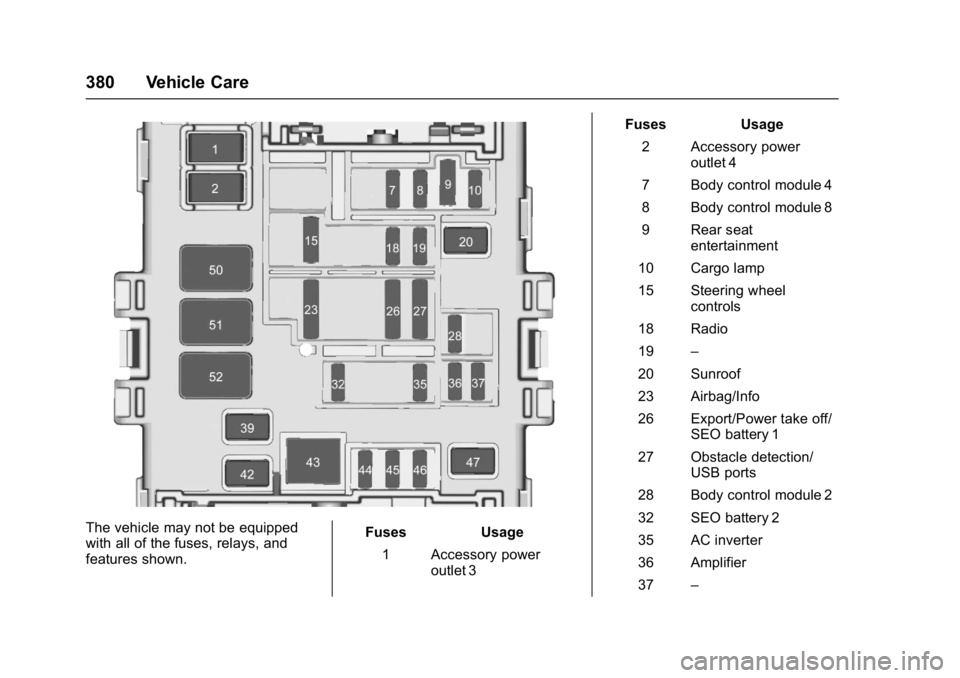
The vehicle may not be equipped
with all of the fuses, relays, and
features shown.Fuses Usage
1 Accessory power outlet 3 Fuses Usage
2 Accessory power outlet 4
7 Body control module 4
8 Body control module 8
9 Rear seat entertainment
10 Cargo lamp
15 Steering wheel controls
18 Radio
19 –
20 Sunroof
23 Airbag/Info
26 Export/Power take off/ SEO battery 1
27 Obstacle detection/ USB ports
28 Body control module 2
32 SEO battery 2
35 AC inverter
36 Amplifier
37 –
Page 486 of 494

GMC Sierra/Sierra Denali Owner Manual (GMNA-Localizing-U.S./Canada/
Mexico-9955992) - 2017 - crc - 5/3/16
Index 485
Entry Lighting . . . . . . . . . . . . . . . . . . . 174
Equipment, Towing . . . . . . . . . . . . . 324
Event Data Recorders . . . . . . . . . . 469
Exit Lighting . . . . . . . . . . . . . . . . . . . . 174
Extender, Safety Belt . . . . . . . . . . . . 65
Exterior Lamp Controls . . . . . . . . . 166
Exterior Lamps Off Reminder . . . 168
F
FanEngine . . . . . . . . . . . . . . . . . . . . . . . . 362
Fast Idle System . . . . . . . . . . . . . . . . 261
Features
Memory . . . . . . . . . . . . . . . . . . . . . . . . . 11
Filter, Engine Air Cleaner . . . . . . . . . . . 355
Fixed Mast Antenna . . . . . . . . . . . . 190
Flash-to-Pass . . . . . . . . . . . . . . . . . . . 169
Flashers, Hazard Warning . . . . . . 170
Flat Tire . . . . . . . . . . . . . . . . . . . . . . . . 406 Changing . . . . . . . . . . . . . . . . . . . . . 408
FlexFuel E85 . . . . . . . . . . . . . . . . . . . . . . . . . . . 301
Floor Console Storage . . . . . . . . . . 110
Floor Mats . . . . . . . . . . . . . . . . . . . . . . 435
Fluid AutomaticTransmission . . . . . . . . . . . 352, 354
Brakes . . . . . . . . . . . . . . . . . . . . . . . . 365 Fluid (cont'd)
Four-Wheel Drive
Transfer Case . . . . . . . . . . . . . . . 274
Power Steering . . . . . . . . . . . . . . . 363
Washer . . . . . . . . . . . . . . . . . . . . . . . 363
Fog Lamps . . . . . . . . . . . . . . . . . . . . . 171
Folding Mirrors . . . . . . . . . . . . . . . . . . 43
Forward Automatic Braking . . . . . 295
Forward Collision Alert (FCA) System . . . . . . . . . . . . . . . . . 293
Four-Wheel Drive . . . . . . . . . . 274, 367
Four-Wheel-Drive Light . . . . . . . . . 136
Frequency Statement Radio . . . . . . . . . . . . . . . . . . . . . . . . . 467
Front Axle . . . . . . . . . . . . . . . . . . . . . . 368
Front Fog Lamp Light . . . . . . . . . . . . . . . . . . . . . . . . . . 140
Front Seats
Heated and Ventilated . . . . . . . . . . 55
Fuel . . . . . . . . . . . . . . . . . . . . . . . . . . . . 300 Additives . . . . . . . . . . . . . . . . . . . . . 301
Economy Driving . . . . . . . . . . . . . . . 26
Filling a Portable FuelContainer . . . . . . . . . . . . . . . . . . . 304
Filling the Tank . . . . . . . . . . . . . . . 302
Foreign Countries . . . . . . . . . . . . 301
Gauge . . . . . . . . . . . . . . . . . . . . . . . . 125
Low Fuel Warning Light . . . . . . . 139 Fuel (cont'd)
Management, Active . . . . . . . . . . 266
Requirements, California . . . . . 301
System Messages . . . . . . . . . . . . 147
Full-Size Spare Tire . . . . . . . . . . . . 417
Fuses . . . . . . . . . . . . . . . . . . . . . . . . . . 376 Engine Compartment FuseBlock . . . . . . . . . . . . . . . . . . . . . . . . 376
Instrument Panel Fuse
Block . . . . . . . . . . . . . . . . . . . 379, 381
G
Garage Door Opener . . . . . . . . . . . 162Programming . . . . . . . . . . . . . . . . . 162
Gauges Engine CoolantTemperature . . . . . . . . . . . . . . . . 127
Engine Oil Pressure . . . . . . . . . . 126
Fuel . . . . . . . . . . . . . . . . . . . . . . . . . . 125
Odometer . . . . . . . . . . . . . . . . . . . . . 125
Speedometer . . . . . . . . . . . . . . . . . 125
Tachometer . . . . . . . . . . . . . . . . . . . 125
Transmission Temperature . . . . 128
Trip Odometer . . . . . . . . . . . . . . . . 125
Voltmeter . . . . . . . . . . . . . . . . . . . . . 128
Warning Lights and Indicators . . . . . . . . . . . . . . . . . . . 120
General Information
Service and Maintenance . . . . . 437