2017 GMC SAVANA Rke
[x] Cancel search: RkePage 29 of 350

GMC Savana Owner Manual (GMNA-Localizing-U.S./Canada-9967828) -
2017 - crc - 6/29/17
28 Keys, Doors, and Windows
Caution
When replacing the battery, do
not touch any of the circuitry on
the transmitter. Static from your
body could damage the
transmitter.
To replace the battery:1. Separate the transmitter with a flat, thin object, such as a flat
head screwdriver.
.Carefully insert the tool into
the notch located along the
parting line of the transmitter. Do not insert
the tool too far. Stop as
soon as resistance is felt.
. Twist the tool until the
transmitter is separated.
2. Remove the old battery. Do not use a metal object.
3. Insert the new battery, positive side facing down. Replace with
a CR2032 or equivalent
battery.
4. Snap the transmitter back together.
Remote Vehicle Start
This vehicle may have a remote
start feature. This feature allows you
to start the engine from outside the
vehicle. It may also start the
vehicle's heating or air conditioning
systems. See Climate Control
Systems 0160.
Laws in some local communities
may restrict the use of remote
starters. For example, some laws
may require a person using remote
start to have the vehicle in view when doing so. Check local
regulations for any requirements on
remote starting of vehicles.
Do not use the remote start feature
if the vehicle is low on fuel. The
vehicle may run out of fuel.
The RKE transmitter range may be
less while the vehicle is running.
There are other conditions which
can affect the performance of the
transmitter, see
Remote Keyless
Entry (RKE) System 026.
/:This button will be on the RKE
transmitter if you have remote start.
To start the engine using the remote
start feature:
1. Press and release
Qon the
transmitter.
2. Immediately press and hold
/
until the turn signal lamps
flash. If you cannot see the
vehicle's lamps, press and hold
for at least four seconds.
Page 31 of 350

GMC Savana Owner Manual (GMNA-Localizing-U.S./Canada-9967828) -
2017 - crc - 6/29/17
30 Keys, Doors, and Windows
Warning (Continued)
extreme heat and can suffer
permanent injuries or even
death from heat stroke.
Always lock the vehicle
whenever leaving it.
. Outsiders can easily enter
through an unlocked door
when you slow down or stop
the vehicle. Locking the
doors can help prevent this
from happening.
To lock the door from the inside,
slide the manual lever on the door
down. To unlock the door, slide the
manual lever up.
From the outside, use the key.
If the vehicle is equipped with
Keyless Entry, see Remote Keyless
Entry (RKE) System Operation 026.
Power Door Locks
If equipped, pressTto lock or
unlock the doors.
When a door is locked, the inside
door handle will not work.
Cargo Door Relocking
If the cargo door is open when the
lock button is pressed on the door
or the RKE transmitter, all doors will
lock except the cargo door. The
cargo door will lock immediately
when it is closed or when the
delayed locking feature functions.
Delayed Locking
When locking the doors with the
power lock switch and a door open,
the doors will lock five seconds after
the last door is closed. The horn
chirps to signal that the delayed
locking feature is in use.
Pressing
eorQon the RKE
transmitter will override the delayed
locking feature and immediately lock
all the doors.
This feature will not operate if the
key is in the ignition.
This feature can be programmed
using the Driver Information
Center (DIC). See “DELAY DOOR
LOCK” inVehicle Personalization
0 120.
Page 39 of 350

GMC Savana Owner Manual (GMNA-Localizing-U.S./Canada-9967828) -
2017 - crc - 6/29/17
38 Keys, Doors, and Windows
Manual Windows
Operate the manual windows by
turning the hand crank on each door
to raise or lower the side door
windows.
Power Windows
{Warning
Children could be seriously
injured or killed if caught in the
path of a closing window. Never
leave keys in a vehicle with
children. SeeKeys024.
If equipped with power windows,
press the switch to lower the
window and pull the switch up to
raise it.
The driver door also has a control to
operate the front passenger window.
The power windows will work when
the ignition is in ON/RUN or ACC/
ACCESSORY, or when Retained
Accessory Power (RAP) is active.
See Retained Accessory Power
(RAP) 0181.
Express-Down
The driver window switch has an
express-down feature that allows
the window to be lowered without
holding the switch. Press fully and
release the switch marked AUTO to
activate the express-down mode.
This mode can be canceled at any
time by pulling up on the switch. To
open the window part way, lightly
tap the switch until the window is at
the desired position.
Swing-Out Windows
Side Swing-Out Window
To open the side door swing-out
window, pull up on the latch at the
edge of the window. Swing the
window out and push down on the
latch to lock the window into place.
To close the window, pull the latch
toward you and push down on the
latch to lock it.
Page 45 of 350

GMC Savana Owner Manual (GMNA-Localizing-U.S./Canada-9967828) -
2017 - crc - 6/29/17
44 Seats and Restraints
Do not have a seatback reclined if
the vehicle is moving.
Rear Seats
Removing the Rear Seat
Disconnect the mini-latch plates for
the lap-shoulder belts on the bench
seat to be removed.
1. To do this, press the tip of akey into the release hole of the
safety belt buckle while pulling
up on the safety belt.
2. Locate the pins. On a three-passenger seat
there are two pins on the
inboard sides of the rear seats.
Three-Passenger Seat
The left side pin has a gray cap
with a black “L”marked on it.
Page 46 of 350

GMC Savana Owner Manual (GMNA-Localizing-U.S./Canada-9967828) -
2017 - crc - 6/29/17
Seats and Restraints 45
Three-Passenger Seat
The right side pin has a
black cap with a white “R”
marked on it.
On a four-passenger seat,
each half of the seat has a set
of pins. The left side has a set
marked “L”, and the right side
has a set marked “R”.
If the vehicle has floor mats,
the pins are under a flap that
has been cut into the mat.
3. Pull the pin handle up to disengage the pin from the
retaining clip, and then pull the
pin out. 4. Repeat this procedure for the
other pins.
5. Pull the seat rearward about 5 cm (2 in), and then lift the
seat from the floor rails.
6. Remove the seat from the vehicle.
7. For the second and third rowseats, stow the safety belt latch
by attaching the clip on the
safety belt latch to the trim just
inside the side door.
For the last row of seats, stow
the safety belt latch plate on
the clip at the window trim. Roll
the mini-latch into the safety
belt webbing and then hook the
safety belt latch plate on
the clip.
Reinstalling the Rear Seats
{Warning
A seat that is not locked into
place properly can move around
in a collision or sudden stop.
People in the vehicle could be
(Continued)
Page 47 of 350

GMC Savana Owner Manual (GMNA-Localizing-U.S./Canada-9967828) -
2017 - crc - 6/29/17
46 Seats and Restraints
Warning (Continued)
injured. Be sure to lock the seat
into place properly when
installing it.
{Warning
A safety belt that is improperly
routed, not properly attached,
or twisted will not provide the
protection needed in a crash. The
person wearing the belt could be
seriously injured. After raising the
rear seatback, always check to be
sure that the safety belts are
properly routed and attached, and
are not twisted.
1. Position the seat into the open slots in both rails. Push the
seat forward in the rail, hooking
both seat bases onto the pins
inside of the rails. 2. Locate the hole in the rail to
install the locking pins at the
rear of the seat base. If the
vehicle has floor mats, pull the
flap that has been cut into
the mat.
3. Insert the locking pins into the seat base and push the seat to
line up the pins with the base.
On a three-passenger seat, the
pin with the black cap
marked “R”must be installed
on the right side and the pin
with the gray cap marked “L”
must be installed on the
left side.
On a four-passenger seat, the
pins marked “R”must be
installed on the half of the seat
on the right side. The pins
marked “L”must be installed on
the half of the seat on the
left side.
Three-Passenger Seat
4. Push the pin(s) marked “R”
down until they are in the
retaining clip.
Page 48 of 350

GMC Savana Owner Manual (GMNA-Localizing-U.S./Canada-9967828) -
2017 - crc - 6/29/17
Seats and Restraints 47
Three-Passenger Seat
5. Push the pin(s) marked “L”
down until they are in the
retaining clip.
6. If the vehicle has a floor mat, put the flap back to its original
position. 7. Repeat this procedure for the
other seat base.
8. Connect the mini-latch plates for the lap-shoulder belts by
inserting the latch plates into
the mini-buckles attached at
the outboard positions of the
bench seat. Do not twist the
belts.
9. Check that all locking pins are locked into place before
operating the vehicle.
Safety Belts
This section of the manual
describes how to use safety belts
properly. It also describes some
things not to do with safety belts.
{Warning
Do not let anyone ride where a
safety belt cannot be worn
properly. In a crash, if you or your
passenger(s) are not wearing
safety belts, injuries can be much
worse than if you are wearing
safety belts. You can be seriously
injured or killed by hitting things
inside the vehicle harder or by
being ejected from the vehicle. In
addition, anyone who is not
buckled up can strike other
passengers in the vehicle.
It is extremely dangerous to ride
in a cargo area, inside or outside
of a vehicle. In a collision,
passengers riding in these areas
are more likely to be seriously
injured or killed. Do not allow
(Continued)
Page 110 of 350
GMC Savana Owner Manual (GMNA-Localizing-U.S./Canada-9967828) -
2017 - crc - 6/29/17
Instruments and Controls 109
Information Displays
Driver Information
Center (DIC)
This vehicle has a DIC.
All messages will appear in the DIC
display at the bottom of the
instrument cluster.
The DIC comes on when the ignition
is on. After a short delay, the DIC
will display the information that was
last displayed before the engine
was turned off.
The DIC displays trip, fuel, and
vehicle system information, and
warning messages if a system
problem is detected.
If the vehicle has these features, the
DIC also displays the compass
direction and the outside air
temperature when viewing the trip
and fuel information. The compass
direction appears on the top right
corner of the DIC display. The
outside air temperature
automatically appears in the bottom
right corner of the DIC display.If there is a problem with the system
that controls the temperature
display, the numbers will be
replaced with dashes. If this occurs,
have the vehicle serviced by your
dealer.
If the vehicle has a diesel engine,
see the Duramax diesel
supplement.
DIC Operation and Displays
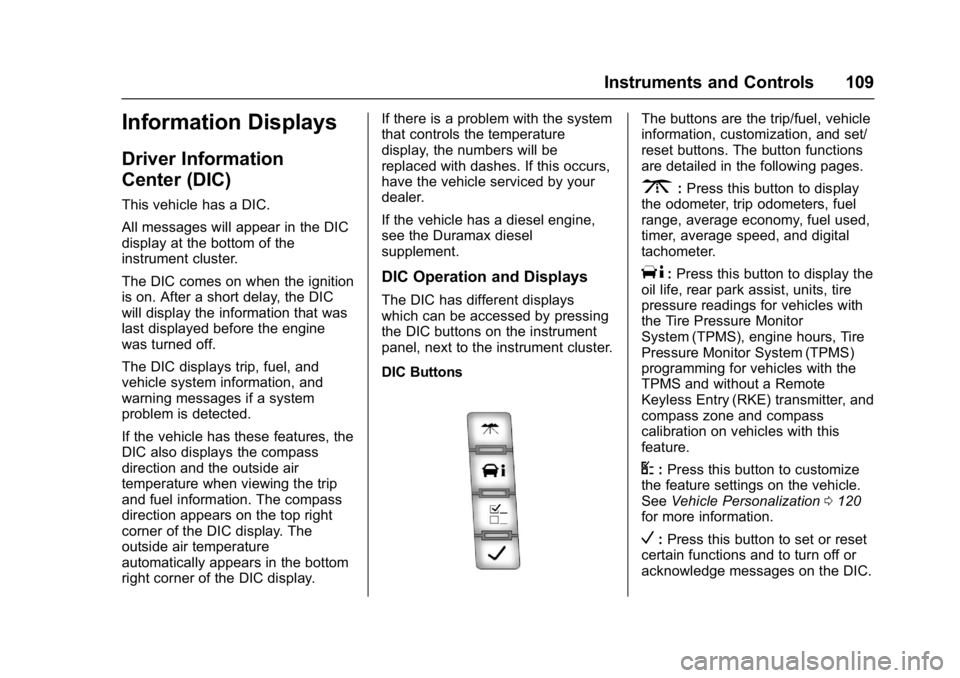
The DIC has different displays
which can be accessed by pressing
the DIC buttons on the instrument
panel, next to the instrument cluster.
DIC Buttons
The buttons are the trip/fuel, vehicle
information, customization, and set/
reset buttons. The button functions
are detailed in the following pages.
3:
Press this button to display
the odometer, trip odometers, fuel
range, average economy, fuel used,
timer, average speed, and digital
tachometer.
T: Press this button to display the
oil life, rear park assist, units, tire
pressure readings for vehicles with
the Tire Pressure Monitor
System (TPMS), engine hours, Tire
Pressure Monitor System (TPMS)
programming for vehicles with the
TPMS and without a Remote
Keyless Entry (RKE) transmitter, and
compass zone and compass
calibration on vehicles with this
feature.
U: Press this button to customize
the feature settings on the vehicle.
See Vehicle Personalization 0120
for more information.
V: Press this button to set or reset
certain functions and to turn off or
acknowledge messages on the DIC.