Page 5 of 339
GMC Acadia Limited Owner Manual (GMNA-Localizing-U.S.-10283134) -
2017 - crc - 3/30/16
4 Introduction
}:Power
/:Remote Vehicle Start
>:Safety Belt Reminders
7: Tire Pressure Monitor
_:Tow/Haul Mode
t:Traction Control/StabiliTrak®
a:Under Pressure
M: Windshield Washer Fluid
Page 8 of 339

GMC Acadia Limited Owner Manual (GMNA-Localizing-U.S.-10283134) -
2017 - crc - 3/30/16
In Brief 7
1.Air Vents 0158.
2. Windshield Wiper/Washer 098
(Out of View).
Turn Signal Lever. See Turn
and Lane-Change
Signals 0145.
3. Instrument Cluster 0104.
4. Head-Up Display (HUD) 0120
(If Equipped).
5. Instrument Panel Storage 092.
6. Infotainment 0150.
7. Passenger Airbag Status Indicator. See Passenger
Sensing System 068.
8. Hazard Warning
Flashers 0144.
9. Heated and Cooled Front
Seats 048 (If Equipped).
10. Rear Window Wiper/
Washer 099.
Traction Control/Electronic
Stability Control 0184.
Forward Collision Alert (FCA)
System 0192 (If Equipped). Lane Departure Warning
(LDW)
0195 (If Equipped).
Tow/Haul Button (If Equipped).
See Tow/Haul Mode 0181.
Power Liftgate Button (If
Equipped). See Liftgate031.
11. Power Outlets 0101.
12. USB Port. See the infotainment manual.
13. Shift Lever. See Automatic
Transmission 0179.
14. Dual Automatic Climate Control
System 0151.
15. Driver Information Center (DIC) Buttons. See Driver Information
Center (DIC) 0116.
16. Steering Wheel Controls 098
(If Equipped).
17. Horn 098.
18. Steering Wheel
Adjustment 098.
19. Cruise Control 0186.
20. Dome Lamp Override. See Dome Lamps 0146. Instrument Panel Illumination
Control
0146.
21. Data Link Connector (DLC) (Out of View). See Malfunction
Indicator Lamp (Check Engine
Light) 0109.
22. Parking Brake 0183.
23. Hood Release. See Hood 0211.
24. Exterior Lamp Controls 0143.
Page 10 of 339
GMC Acadia Limited Owner Manual (GMNA-Localizing-U.S.-10283134) -
2017 - crc - 3/30/16
In Brief 9
.Turn on the hazard warning
flashers.
. Turn the vehicle on and then off.
See Remote Vehicle Start 027.
Door Locks
To lock or unlock a door manually:
.
From the inside use the door
lock knob on the window sill.
. From the outside turn the key
toward the front or rear of the
vehicle, or press the
KorQ
button on the Remote Keyless
Entry (RKE) transmitter.
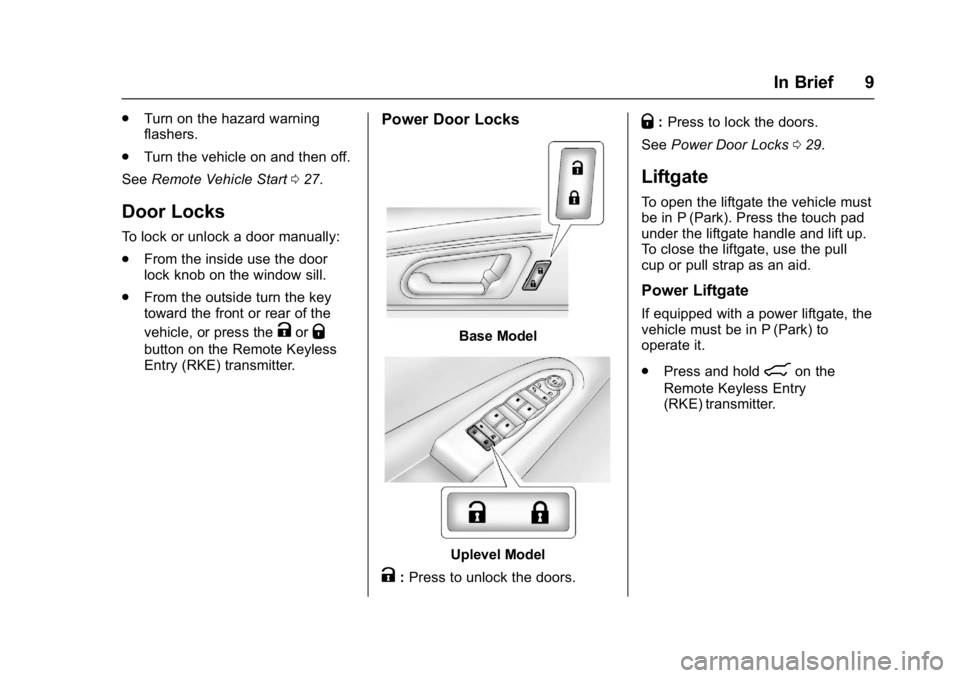
Power Door Locks
Base Model
Uplevel Model
K:Press to unlock the doors.
Q: Press to lock the doors.
See Power Door Locks 029.
Liftgate
To open the liftgate the vehicle must
be in P (Park). Press the touch pad
under the liftgate handle and lift up.
To close the liftgate, use the pull
cup or pull strap as an aid.
Power Liftgate
If equipped with a power liftgate, the
vehicle must be in P (Park) to
operate it.
.
Press and hold
8on the
Remote Keyless Entry
(RKE) transmitter.
Page 13 of 339
GMC Acadia Limited Owner Manual (GMNA-Localizing-U.S.-10283134) -
2017 - crc - 3/30/16
12 In Brief
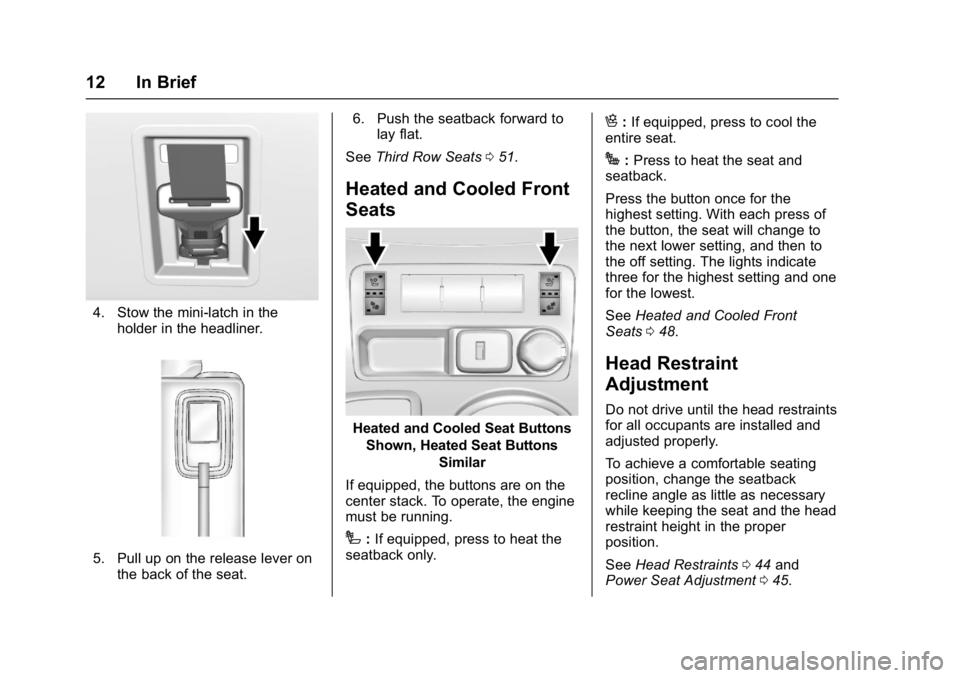
4. Stow the mini-latch in theholder in the headliner.
5. Pull up on the release lever onthe back of the seat. 6. Push the seatback forward to
lay flat.
See Third Row Seats 051.
Heated and Cooled Front
Seats
Heated and Cooled Seat Buttons
Shown, Heated Seat Buttons Similar
If equipped, the buttons are on the
center stack. To operate, the engine
must be running.
I: If equipped, press to heat the
seatback only.
H: If equipped, press to cool the
entire seat.
J: Press to heat the seat and
seatback.
Press the button once for the
highest setting. With each press of
the button, the seat will change to
the next lower setting, and then to
the off setting. The lights indicate
three for the highest setting and one
for the lowest.
See Heated and Cooled Front
Seats 048.
Head Restraint
Adjustment
Do not drive until the head restraints
for all occupants are installed and
adjusted properly.
To achieve a comfortable seating
position, change the seatback
recline angle as little as necessary
while keeping the seat and the head
restraint height in the proper
position.
See Head Restraints 044 and
Power Seat Adjustment 045.
Page 15 of 339

GMC Acadia Limited Owner Manual (GMNA-Localizing-U.S.-10283134) -
2017 - crc - 3/30/16
14 In Brief
Uplevel Model
To adjust the mirrors: 1. Press (1) or (2) to select a mirror.
2. Press the control pad to adjust the mirror.
3. Press (1) or (2) again to deselect the mirror.
Folding Mirrors
For vehicles with manual folding
mirrors, push the mirror toward the
vehicle. Pull the mirror out to return
to its original position. For vehicles with power folding
mirrors:
1. Press (1) to fold the mirrors out
to the driving position.
2. Press (2) to fold the mirrors in to the folded position.
See Folding Mirrors 037.
Interior Mirror
Adjustment
Adjust the rearview mirror to clearly
view the area behind the vehicle. Automatic Dimming Rearview
Mirror
If equipped, the mirror will
automatically reduce the glare of
headlamps from behind. The
dimming feature comes on when the
vehicle is started. See
Automatic
Dimming Rearview Mirror 038.
Steering Wheel
Adjustment
To adjust the steering wheel:
1. Pull the lever down.
2. Move the steering wheel up or down.
Page 18 of 339

GMC Acadia Limited Owner Manual (GMNA-Localizing-U.S.-10283134) -
2017 - crc - 3/30/16
In Brief 17
Climate Controls
1. Driver and Passenger SideTemperature Controls
2. Air Delivery Mode Controls
3. SYNC (Synchronized Temperature)
4. AUTO (Automatic Operation)
5. REAR (Rear Climate Control)
6. A/C (Air Conditioning)
7. Recirculation 8. Fan Control
9. Rear Window Defogger
10. Defrost
See Dual Automatic Climate Control
System 0151. For more information
about the rear climate control, see
Rear Climate Control System 0156
or Rear Climate Control System
(with Rear Seat Audio) 0157.
Transmission
Electronic Range Select
(ERS) Mode
ERS mode allows you to choose the
top-gear limit of the transmission
and the vehicle's speed while
driving downhill or towing a trailer.
The vehicle has an electronic shift
position indicator within the
instrument cluster. When using the
ERS mode a number will display
next to the L, indicating the current
gear that has been selected.
To use this feature:
1. Move the shift lever to L (Low).
2. Press the + (Plus) or −(Minus)
button on the shift lever, to
increase or decrease the gear
range available.
See Manual Mode 0180.
Page 39 of 339

GMC Acadia Limited Owner Manual (GMNA-Localizing-U.S.-10283134) -
2017 - crc - 3/30/16
38 Keys, Doors, and Windows
Park Tilt Mirrors
If equipped with memory seats, the
passenger and/or driver mirror tilts
to a preselected position when the
vehicle is in R (Reverse). This
allows the curb to be seen when
parallel parking.
The mirror(s) return to the original
position when:
.The vehicle is shifted out of
R (Reverse).
. The ignition is turned off.
To turn this feature on or off, see
Vehicle Personalization 0132.
Interior Mirrors
Interior Rearview Mirrors
Adjust the rearview mirror for a clear
view of the area behind your
vehicle.
If equipped with OnStar, the vehicle
may have three control buttons at
the bottom of the mirror. See your
dealer for more information about
OnStar and how to subscribe to it.
See OnStar Overview 0318
Do not spray glass cleaner directly
on the mirror. Use a soft towel
dampened with water.
Automatic Dimming
Rearview Mirror
If equipped, automatic dimming
reduces the glare of the headlamps
from behind. This feature comes on
when the vehicle is started.
Windows
{Warning
Never leave a child, a helpless
adult, or a pet alone in a vehicle,
especially with the windows
closed in warm or hot weather.
They can be overcome by the
extreme heat and suffer
permanent injuries or even death
from heat stroke.
The vehicle aerodynamics are
designed to improve fuel economy
performance. This may result in a
Page 50 of 339

GMC Acadia Limited Owner Manual (GMNA-Localizing-U.S.-10283134) -
2017 - crc - 3/30/16
Seats and Restraints 49
the off setting. The lights indicate
three for the highest setting and one
for the lowest.
The passenger heated seat may
take longer to heat up.
The heated and/or cooled seats are
canceled after the ignition is
turned off.
Remote Start Heated Seats
When it is cold outside, the heated
seats may turn on automatically
during a remote vehicle start. The
heated seats will be canceled when
the ignition is turned on. Press the
desired heated seat button to use
the heated seats after the vehicle is
started.
The heated seat button lights will
not turn on during a remote start.
The temperature of an unoccupied
seat may be reduced.
SeeRemote Vehicle Start 027.Rear Seats
1. Seat Adjustment Handle
2. Reclining Seatback Strap
3. Sliding Seat Lever
Entering and Exiting the
Third Row
{Warning
Using the third row seating
position while the second row is
folded, or folded and tumbled,
could cause injury in a sudden
(Continued)
Warning (Continued)
stop or crash. Be sure to return
the seat to the passenger seating
position. Push and pull on the
seat to make sure it is locked into
place.
Caution
Folding a rear seat with the safety
belts still fastened may cause
damage to the seat or the safety
belts. Always unbuckle the safety
belts and return them to their
normal stowed position before
folding a rear seat.