2017 GMC ACADIA LIMITED Blind
[x] Cancel search: BlindPage 195 of 339
GMC Acadia Limited Owner Manual (GMNA-Localizing-U.S.-10283134) -
2017 - crc - 3/31/16
194 Driving and Operating
display will light up in the
corresponding outside side mirror
and will flash if the turn signal is on.
{Warning
SBZA does not alert the driver to
vehicles rapidly approaching
outside of the side blind zones,
pedestrians, bicyclists,
or animals. It may not provide
alerts when changing lanes under
all driving conditions. Failure to
use proper care when changing
lanes may result in injury, death,
or vehicle damage. Before
making a lane change, always
check mirrors, glance over your
shoulder, and use the turn
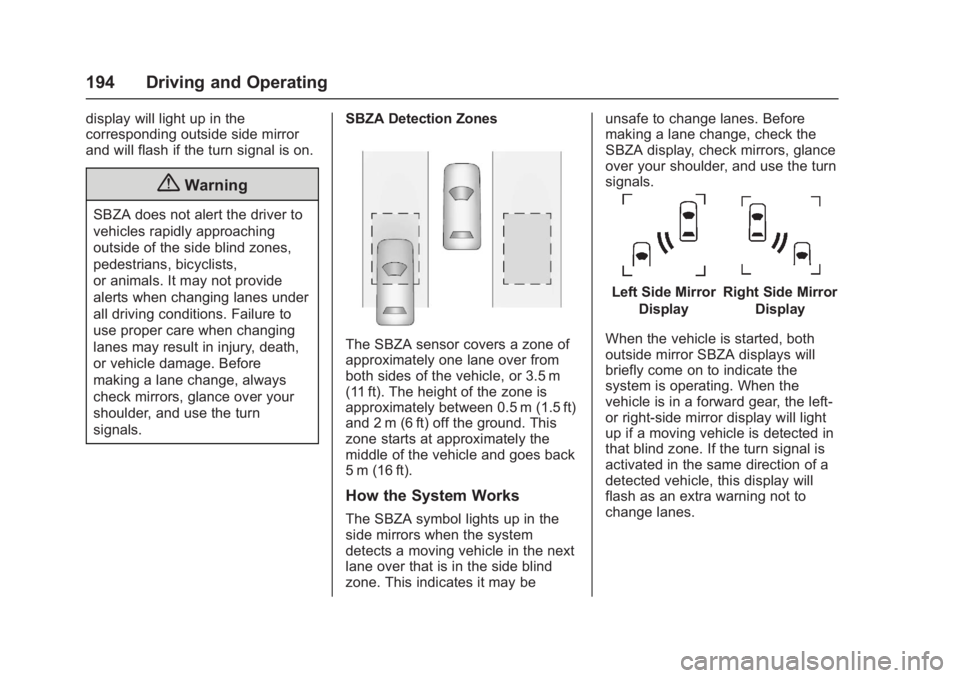
signals.SBZA Detection Zones
The SBZA sensor covers a zone of
approximately one lane over from
both sides of the vehicle, or 3.5 m
(11 ft). The height of the zone is
approximately between 0.5 m (1.5 ft)
and 2 m (6 ft) off the ground. This
zone starts at approximately the
middle of the vehicle and goes back
5 m (16 ft).
How the System Works
The SBZA symbol lights up in the
side mirrors when the system
detects a moving vehicle in the next
lane over that is in the side blind
zone. This indicates it may be unsafe to change lanes. Before
making a lane change, check the
SBZA display, check mirrors, glance
over your shoulder, and use the turn
signals.
Left Side Mirror
DisplayRight Side Mirror Display
When the vehicle is started, both
outside mirror SBZA displays will
briefly come on to indicate the
system is operating. When the
vehicle is in a forward gear, the left-
or right-side mirror display will light
up if a moving vehicle is detected in
that blind zone. If the turn signal is
activated in the same direction of a
detected vehicle, this display will
flash as an extra warning not to
change lanes.
Page 196 of 339
GMC Acadia Limited Owner Manual (GMNA-Localizing-U.S.-10283134) -
2017 - crc - 3/31/16
Driving and Operating 195
SBZA can be disabled through the
Driver Information Center (DIC). See
Driver Information Center (DIC)
0116. If SBZA is disabled by the
driver, the SBZA mirror displays will
not light up.
When the System Does Not
Seem to Work Properly
SBZA displays may not come on
when passing a vehicle quickly, for
a stopped vehicle, or when towing a
trailer. Keep in mind the SBZA
detection zones that extend back
from the side of the vehicle do not
move further back when a trailer is
towed. Use extra caution while
changing lanes when towing a
trailer. SBZA may alert you to
objects attached to the vehicle, such
as a trailer, bicycle, or object
extending out to either side of the
vehicle. This is normal system
operation; the vehicle does not need
service.
SBZA may not always alert the
driver to vehicles in the side blind
zone, especially in wet conditions.
The system does not need to be
serviced. The system may light up due to guardrails, signs, trees,
shrubs, and other non-moving
objects. This is normal system
operation; the vehicle does not need
service.
SBZA may not operate when the
SBZA sensors in the left or right
corners of the rear bumper are
covered with mud, dirt, snow, ice,
or slush, or in heavy rainstorms. For
cleaning instructions, see "Washing
the Vehicle" under
Exterior Care
0 278. If the DIC still displays the
system unavailable message after
cleaning both sides of the vehicle
toward the rear corners of the
vehicle, see your dealer.
If the SBZA displays do not light up
when vehicles are in the blind zone
and the system is clean, the system
may need service. Take the vehicle
to your dealer.
When SBZA is disabled for any
reason other than the driver turning
it off, the Side Blind Zone Alert ON
option will not be available on the
DIC menu.
FCC Information
See Radio Frequency
Statement 0314.
Lane Departure
Warning (LDW)
If equipped, LDW may help avoid
crashes due to unintentional lane
departures. It may provide an alert if
the vehicle is crossing a lane
without using a turn signal in that
direction. LDW uses a camera
sensor to detect the lane markings
at speeds of 56 km/h (35 mph) or
greater.
{Warning
The LDW system does not steer
the vehicle. The LDW system
may not:
. Provide enough time to
avoid a crash.
. Detect lane markings under
poor weather or visibility
conditions. This can occur if
(Continued)
Page 241 of 339

GMC Acadia Limited Owner Manual (GMNA-Localizing-U.S.-10283134) -
2017 - crc - 3/30/16
240 Vehicle Care
The vehicle may not be equipped
with all of the fuses, relays, and
features shown.Fuses Usage
# GMC Non-HID = low-beam
)GMC Non-HID =
high shutter
) )Chevy = fog lamps
) ) )Buick China = rear
fog lamp
AIRBAG Airbag AMP Amplifier
BCK
UP/STOP Reverse lamps/
Stoplamps
BCM Body control module
CNSTR VENT Canister vent
CTSY Courtesy lamps
DR LCK Door locks DRL/
LO BEAM Daytime running
lamps relay/
Low-beam
headlamps relay Fuses Usage
DSPLY Display
FRT WSW Front windshield washer
HTD/
COOL SEAT Heated/Cooling
seats
HVAC HVAC
INADV PWR INT LAMPS Inadvertent power/
Interior light pipe
lamps
INFOTMNT/ MSM Infotainment/
Memory seat
module
LT TRN SIG Left turn signal
OBS
DET/URS Rear park assist/
Side blind zone
alert/Forward
collision alert/
Universal remote
system
PDM Power mirrors/ Liftgate release
PWR MODE Power mode PWR MIR Power mirrors RDO Radio Fuses Usage
REAR WPR Rear wiper
RT TRN SIG Right turn signal
STR WHL ILLUM Steering wheel
illumination
USB CHRG USB charging
Page 273 of 339

GMC Acadia Limited Owner Manual (GMNA-Localizing-U.S.-10283134) -
2017 - crc - 3/30/16
272 Vehicle Care
Caution
Ignoring these steps could result
in costly damage to the vehicle
that would not be covered by the
vehicle warranty. Trying to start
the vehicle by pushing or pulling it
will not work, and it could damage
the vehicle.
1. Check the other vehicle. It must have a 12-volt battery
with a negative ground system.
Caution
If the other vehicle does not have
a 12-volt system with a negative
ground, both vehicles can be
damaged. Only use a vehicle that
has a 12-volt system with a
negative ground for jump starting.
2. Get the vehicles close enough so the jumper cables can
reach, but be sure the vehicles
are not touching each other.
If they are, it could cause a ground connection you do not
want. You would not be able to
start your vehicle, and the bad
grounding could damage the
electrical systems.
To avoid the possibility of the
vehicles rolling, set the parking
brake firmly on both vehicles
involved in the jump start
procedure. Put an automatic
transmission in P (Park) or a
manual transmission in Neutral
before setting the parking
brake. If one of the vehicles is
a four-wheel-drive vehicle, be
sure the transfer case is not in
Neutral.
Caution
If any accessories are left on or
plugged in during the jump
starting procedure, they could be
damaged. The repairs would not
be covered by the vehicle
warranty. Whenever possible, turn
off or unplug all accessories on
either vehicle when jump starting.
3. Turn off the ignition on both
vehicles. Unplug unnecessary
accessories plugged into the
cigarette lighter or the
accessory power outlets. Turn
off the radio and all lamps that
are not needed. This will avoid
sparks and help save both
batteries. And it could save the
radio!
4. Open the hoods and locate the positive (+) and negative (−)
terminal locations on the other
vehicle. Your vehicle has a
remote positive (+) and a
remote negative (−) jump
starting terminal. See Engine
Compartment Overview 0212
for the terminal locations.{Warning
Using a match near a battery can
cause battery gas to explode.
People have been hurt doing this,
and some have been blinded.
Use a flashlight if you need more
light.
(Continued)
Page 329 of 339

GMC Acadia Limited Owner Manual (GMNA-Localizing-U.S.-10283134) -
2017 - crc - 3/30/16
328 Index
IndexA
Accessories andModifications . . . . . . . . . . . . . . . . . . 209
Accessory Power . . . . . . . . . . . . . . . 175
Add-On Electrical Equipment . . . 207
Additional Information OnStar
®. . . . . . . . . . . . . . . . . . . . . . 323
Additional Maintenance and Care . . . . . . . . . . . . . . . . . . . . . . 295
Adjustments
Lumbar, Front Seats . . . . . . . . . . . . 45
Air Cleaner/Filter, Engine . . . . . . . 217
Air Filter, Passenger Compartment . . . . . . . . . . . . . . . . . 158
Air Vents . . . . . . . . . . . . . . . . . . . . . . . 158
Airbag System Check . . . . . . . . . . . . . . . . . . . . . . . . . . 73
How Does an AirbagRestrain? . . . . . . . . . . . . . . . . . . . . . 66
Passenger Sensing System . . . . 68
What Makes an Airbag Inflate? . . . . . . . . . . . . . . . . . . . . . . . . 66
What Will You See after an Airbag Inflates? . . . . . . . . . . . . . . . 66
When Should an Airbag Inflate? . . . . . . . . . . . . . . . . . . . . . . . . 65
Where Are the Airbags? . . . . . . . . 63 Airbags
Adding Equipment to the
Vehicle . . . . . . . . . . . . . . . . . . . . . . . . 72
Passenger Status Indicator . . . 108
Readiness Light . . . . . . . . . . . . . . 108
Servicing Airbag-Equipped Vehicles . . . . . . . . . . . . . . . . . . . . . . . 72
System Check . . . . . . . . . . . . . . . . . . 61
Alarm Vehicle Security . . . . . . . . . . . . . . . . 34
Alert
Side Blind Zone (SBZA) . . . . . . 193
All-Season Tires . . . . . . . . . . . . . . . . 243
All-Wheel Drive . . . . . . . . . . . . 182, 228
Antilock Brake System (ABS) . . . 182 Warning Light . . . . . . . . . . . . . . . . . .112
Appearance Care Exterior . . . . . . . . . . . . . . . . . . . . . . . 278
Interior . . . . . . . . . . . . . . . . . . . . . . . . 283
Armrest Storage . . . . . . . . . . . . . . . . . 93
Assistance Program, Roadside . . . . . . . . . . . . . . . . . . . . . . 308
Automatic Dimming Mirrors . . . . . . . . . . . . . . . . 37
Door Locks . . . . . . . . . . . . . . . . . . . . . 30
Transmission . . . . . . . . . . . . . . . . . 179
Transmission Fluid . . . . . . . . . . . 216
Page 337 of 339

GMC Acadia Limited Owner Manual (GMNA-Localizing-U.S.-10283134) -
2017 - crc - 3/30/16
336 Index
Safety Defects ReportingCanadian Government . . . . . . . . 315
General Motors . . . . . . . . . . . . . . . 315
U.S. Government . . . . . . . . . . . . . 315
Safety Locks . . . . . . . . . . . . . . . . . . . . . 30
Safety System Check . . . . . . . . . . . . 60
Scheduling Appointments . . . . . . . 310
Seats Head Restraints . . . . . . . . . . . . . . . . 44
Lumbar Adjustment, Front . . . . . . 45
Memory . . . . . . . . . . . . . . . . . . . . . . . . . 47
Power Adjustment, Front . . . . . . . 45
Rear . . . . . . . . . . . . . . . . . . . . . . . . . . . . 49
Reclining Seatbacks . . . . . . . . . . . . 46
Third Row Seat . . . . . . . . . . . . . . . . . 51
Securing Child Restraints . . . . 87, 89
Security
Light . . . . . . . . . . . . . . . . . . . . . . . . . . .115
Messages . . . . . . . . . . . . . . . . . . . . 129
OnStar
®. . . . . . . . . . . . . . . . . . . . . . 319
Vehicle . . . . . . . . . . . . . . . . . . . . . . . . . 34
Vehicle Alarm . . . . . . . . . . . . . . . . . . . 34
Service Accessories andModifications . . . . . . . . . . . . . . . . 209
Doing Your Own Work . . . . . . . . 210
Engine Soon Light . . . . . . . . . . . . 109
Maintenance Records . . . . . . . . 300 Service (cont'd)
Maintenance, General
Information . . . . . . . . . . . . . . . . . . 288
Parts Identification Label . . . . . 301
Publications Ordering
Information . . . . . . . . . . . . . . . . . . 313
Scheduling Appointments . . . . . 310
Vehicle Messages . . . . . . . . . . . . 130
Services
Special Application . . . . . . . . . . . 295
Servicing the Airbag . . . . . . . . . . . . . 72
Shift Lock Control Function Check, Automatic
Transmission . . . . . . . . . . . . . . . . . . 228
Shifting Into Park . . . . . . . . . . . . . . . . . . . . . . 176
Out of Park . . . . . . . . . . . . . . . . . . . 177
Side Blind Zone Alert (SBZA) . . . 193
Signals, Turn and
Lane-Change . . . . . . . . . . . . . . . . . 145
Spare Tire Compact . . . . . . . . . . . . . . . . . . . . . . 270
Special Application Services . . . . 295
Specifications and
Capacities . . . . . . . . . . . . . . . . . . . . . 302
Speedometer . . . . . . . . . . . . . . . . . . . 105
StabiliTrak Indicator Light . . . . . . . . . . . . . . . . .113 Start Assist, Hill . . . . . . . . . . . . . . . . . 184
Start Vehicle, Remote . . . . . . . . . . . 27
Starter Switch Check . . . . . . . . . . . 228
Starting the Engine . . . . . . . . . . . . . 173
Steering . . . . . . . . . . . . . . . . . . . . . . . . 162
Fluid, Power . . . . . . . . . . . . . . . . . . 224
Wheel Adjustment . . . . . . . . . . . . . . 98
Wheel Controls . . . . . . . . . . . . . . . . . 98
Storage Areas Armrest . . . . . . . . . . . . . . . . . . . . . . . . . 93
Cargo Cover . . . . . . . . . . . . . . . . . . . . 94
Cargo Management System . . . . 94
Center Console . . . . . . . . . . . . . . . . . 93
Convenience Net . . . . . . . . . . . . . . . 95
Glove Box . . . . . . . . . . . . . . . . . . . . . . 92
Instrument Panel . . . . . . . . . . . . . . . 92
Roof Rack System . . . . . . . . . . . . . . 95
Storage Compartments . . . . . . . . . . 92
Stuck Vehicle . . . . . . . . . . . . . . . . . . . 167
Summer Tires . . . . . . . . . . . . . . . . . . 243
Sun Visors . . . . . . . . . . . . . . . . . . . . . . . 40
Sunroof . . . . . . . . . . . . . . . . . . . . . . . . . . 41
Symbols . . . . . . . . . . . . . . . . . . . . . . . . . . 3
System Forward Collision
Alert (FCA) . . . . . . . . . . . . . . . . . . 192
Infotainment . . . . . . . . . . . . . 150, 317
Roof Rack . . . . . . . . . . . . . . . . . . . . . . 95