2017 GMC ACADIA LIMITED lock
[x] Cancel search: lockPage 183 of 339

GMC Acadia Limited Owner Manual (GMNA-Localizing-U.S.-10283134) -
2017 - crc - 3/31/16
182 Driving and Operating
While in the Electronic Range
Select (ERS) mode, grade braking
is deactivated, allowing the driver to
select a range and limiting the
highest gear available. Grade
braking is available for normal
driving and in Tow/Haul Mode.
SeeAutomatic Transmission 0179.Drive Systems
All-Wheel Drive
Vehicles with this feature transfer
engine power, as required, to all
four wheels. It is fully automatic, and
adjusts itself as needed for road
conditions.
When using a compact spare tire on
an AWD vehicle, the system
automatically detects the compact
spare and reduces AWD
performance to protect the system.
To restore full AWD operation and
prevent excessive wear on the
system, replace the compact spare
with a full-size tire as soon as
possible. See Compact Spare
Tire 0270.
Brakes
Antilock Brake
System (ABS)
This vehicle has an Antilock Brake
System (ABS), an advanced
electronic braking system that helps
prevent a braking skid.
When the vehicle begins to drive
away, ABS checks itself.
A momentary motor or clicking noise
may be heard while this test is going
on, and it may even be noticed that
the brake pedal moves a little. This
is normal.
If there is a problem with ABS, this
warning light stays on. See Antilock
Brake System (ABS) Warning
Light 0112.
Page 192 of 339

GMC Acadia Limited Owner Manual (GMNA-Localizing-U.S.-10283134) -
2017 - crc - 3/31/16
Driving and Operating 191
{Warning
The parking assist system does
not detect children, pedestrians,
bicyclists, animals, or objects
below the bumper or that are too
close or too far from the vehicle.
It is not available at speeds
greater than 8 km/h (5 mph). To
prevent injury, death, or vehicle
damage, even with parking assist,
always check the area around the
vehicle and check all mirrors
before backing.
How the System Works
RPA comes on automatically when
the shift lever is moved into
R (Reverse). A single beep sounds
to indicate the system is working.
An obstacle is indicated by audible
beeps. The interval between the
beeps becomes shorter as the
vehicle gets closer to the obstacle.
When the distance is less than
30 cm (12 in) the beeping is
continuous for five seconds.
Turning the System On and Off
The system can be disabled through
the Driver Information Center (DIC).
See“Park Assist” underDriver
Information Center (DIC) 0116.
Turn off RPA when towing a trailer.
RPA defaults to the on setting each
time the vehicle is started.
When the System Does Not
Seem to Work Properly
The following messages may be
displayed on the DIC:
SERVICE PARK ASSIST : If this
message occurs, take the vehicle to
your dealer to repair the system.
PARK ASST BLOCKED SEE
OWNERS MANUAL : This
message can occur under the
following conditions:
. The sensors are not clean. Keep
the vehicle's rear bumper free of
mud, dirt, snow, ice, and slush.
For cleaning instructions, see
Exterior Care 0278. .
The sensors are covered by
frost or ice. Frost or ice can form
around and behind the sensors
and may not always be seen;
this can occur after washing the
vehicle in cold weather. The
message may not clear until the
frost or ice has melted.
. A trailer was attached to the
vehicle, or an object was
hanging out of the liftgate during
the last drive cycle. Once the
object is removed, RPA will
return to normal operation.
. A tow bar is attached to the
vehicle.
. The bumper is damaged. Take
the vehicle to your dealer to
repair the system.
. Other conditions, such as
vibrations from a jackhammer or
the compression of air brakes on
a very large truck, are affecting
system performance.
Page 193 of 339

GMC Acadia Limited Owner Manual (GMNA-Localizing-U.S.-10283134) -
2017 - crc - 3/31/16
192 Driving and Operating
Forward Collision Alert
(FCA) System
If equipped, the FCA system may
help to avoid or reduce the harm
caused by front-end crashes. When
approaching a vehicle ahead too
quickly, FCA provides a red flashing
visual alert on the windshield and
rapidly beeps. FCA also lights an
amber visual alert if following
another vehicle much too closely.
FCA detects vehicles within a
distance of approximately 60 m
(197 ft) and operates at speeds
above 40 km/h (25 mph).
{Warning
FCA is a warning system and
does not apply the brakes. When
approaching a slower-moving or
stopped vehicle ahead too rapidly,
or when following a vehicle too
closely, FCA may not provide a
warning with enough time to help
avoid a crash. It also may not
provide any warning at all. FCA(Continued)
Warning (Continued)
does not warn of pedestrians,
animals, signs, guardrails,
bridges, construction barrels,
or other objects. Be ready to take
action and apply the brakes. See
Defensive Driving0161.
FCA can be disabled with the
[
button on the center stack.
Detecting the Vehicle Ahead
FCA warnings will not occur unless
the FCA system detects a vehicle
ahead. When a vehicle is detected,
the vehicle ahead indicator will
display green. Vehicles may not be
detected on curves, highway exit
ramps, or hills, due to poor visibility;
or if a vehicle ahead is partially
blocked by pedestrians or other objects. FCA will not detect another
vehicle ahead until it is completely
in the driving lane.
{Warning
FCA does not provide a warning
to help avoid a crash, unless it
detects a vehicle. FCA may not
detect a vehicle ahead if the FCA
sensor is blocked by dirt, snow,
or ice, or if the windshield is
damaged. It may also not detect a
vehicle on winding or hilly roads,
or in conditions that can limit
visibility such as fog, rain,
or snow, or if the headlamps or
windshield are not cleaned or in
proper condition. Keep the
windshield, headlamps, and FCA
sensors clean and in good repair.
Page 197 of 339

GMC Acadia Limited Owner Manual (GMNA-Localizing-U.S.-10283134) -
2017 - crc - 3/31/16
196 Driving and Operating
Warning (Continued)
the windshield or
headlamps are blocked by
dirt, snow, or ice; if they are
not in proper condition; or if
the sun shines directly into
the camera.
. Detect road edges.
. Detect lanes on winding or
hilly roads.
If LDW only detects lane
markings on one side of the road,
it will only warn you when
departing the lane on the side
where it has detected a lane
marking. Always keep your
attention on the road and
maintain proper vehicle position
within the lane, or vehicle
damage, injury, or death could
occur. Always keep the
windshield, headlamps, and
camera sensors clean and in
good repair. Do not use LDW in
bad weather conditions.
How the System Works
The LDW camera sensor is on the
windshield ahead of the rearview
mirror.
To turn LDW on and off, press
@on
the center stack. The control
indicator will light when LDW is on.
When LDW is on,
@is green if
LDW is available to warn of a lane
departure. If the vehicle crosses a
detected lane marking without using
the turn signal in that direction,
@
changes to amber and flashes.
Additionally, there will be three
beeps on the right or left, depending
on the lane departure direction.
When the System Does Not
Seem to Work Properly
The system may not detect lanes as
well when there are:
. Close vehicles ahead.
. Sudden lighting changes, such
as when driving through tunnels.
. Banked roads. If the LDW system is not functioning
properly when lane markings are
clearly visible, cleaning the
windshield may help.
LDW alerts may occur due to tar
marks, shadows, cracks in the road,
temporary or construction lane
markings, or other road
imperfections. This is normal system
operation; the vehicle does not need
service. Turn LDW off if these
conditions continue.
Page 200 of 339

GMC Acadia Limited Owner Manual (GMNA-Localizing-U.S.-10283134) -
2017 - crc - 3/31/16
Driving and Operating 199
The fuel cap is behind a hinged fuel
door on the driver side of the
vehicle. To open the fuel door, push
and release the rearward center
edge of the door.
To remove the fuel cap, turn it
slowly counterclockwise. The fuel
cap has a spring in it; if the cap is
released too soon, it will spring back
to the right.
While refueling, hang the fuel cap
from the hook on the fuel door.
{Warning
Overfilling the fuel tank by more
than three clicks of a standard fill
nozzle may cause:. Vehicle performance issues,
including engine stalling and
damage to the fuel system.
. Fuel spills.
. Potential fuel fires.
Be careful not to spill fuel. Wait a
few seconds after you have finished
pumping before removing the nozzle. Clean fuel from painted
surfaces as soon as possible. See
Exterior Care
0278.
When replacing the fuel cap, turn it
clockwise until it clicks. Make sure
the cap is fully installed. If the cap is
not properly installed, the
malfunction indicator lamp may
come on. See Malfunction Indicator
Lamp (Check Engine Light) 0109.
{Warning
If a fire starts while you are
refueling, do not remove the
nozzle. Shut off the flow of fuel by
shutting off the pump or by
notifying the station attendant.
Leave the area immediately.
Caution
If a new fuel cap is needed, be
sure to get the right type of cap
from your dealer. The wrong type
of fuel cap may not fit properly,
(Continued)
Caution (Continued)
may cause the malfunction
indicator lamp to light, and could
damage the fuel tank and
emissions system. See
Malfunction Indicator Lamp
(Check Engine Light)0109.
Filling a Portable Fuel
Container
{Warning
Filling a portable fuel container
while it is in the vehicle can cause
fuel vapors that can ignite either
by static electricity or other
means. You or others could be
badly burned and the vehicle
could be damaged. Always:
. Use approved fuel
containers.
. Remove the container from
the vehicle, trunk, or pickup
bed before filling.
(Continued)
Page 207 of 339

GMC Acadia Limited Owner Manual (GMNA-Localizing-U.S.-10283134) -
2017 - crc - 3/31/16
206 Driving and Operating
Safety Chains
Always attach chains between the
vehicle and the trailer. Cross the
safety chains under the tongue of
the trailer to help prevent the tongue
from contacting the road if it
becomes separated from the hitch.
Always leave just enough slack so
the rig can turn. Never allow safety
chains to drag on the ground.
Trailer Brakes
A loaded trailer that weighs more
than 450 kg (1,000 lb) needs to have
its own brake system that is
adequate for the weight of the
trailer. Be sure to read and follow
the instructions for the trailer brakes
so they are installed, adjusted, and
maintained properly.
Because the vehicle has antilock
brakes, do not try to tap into the
vehicle's hydraulic brake system.
If you do, both brake systems will
not work well, or at all.
Trailer Wiring Harness
Basic Trailer Wiring
The trailer wiring harness, with a
seven-pin connector, is located at
the rear of the vehicle and is tied to
the vehicle's frame. The harness
connector can be plugged into a
seven-pin universal heavy-duty
trailer connector available through
your dealer.
Use only a round, seven-wire
connector with flat blade terminals
meeting SAE J2863 specifications
for proper electrical connectivity.
The seven-wire harness contains
the following trailer circuits:
.Yellow: Left Stop/Turn Signal
. Dark Green: Right Stop/Turn
Signal
. Brown: Taillamps
. Black: Ground
. Light Green: Back-up Lamps
. Red/Black: Battery Feed
. Dark Blue: Trailer Brake* *The fuse for this circuit is installed
in the underhood electrical center,
but the wires are not connected.
They should be connected by your
dealer or a qualified service center.
If the back-up lamp circuit is not
functional, contact your dealer.
To help charge a remote
(non-vehicle) battery, press the Tow/
Haul Mode button at the end of the
shift lever. If the trailer is too light for
Tow/Haul Mode, turn on the
headlamps to help charge the
battery.
Electric Trailer Brake Control
Wiring Provisions
These wiring provisions for an
electric trailer brake controller are
included with the vehicle as part of
the trailer wiring package. The
instrument panel contains blunt cut
wires above the parking brake
assembly for the electric trailer
brake controller. The harness
contains the following wires:
.
Red/Black: Power Supply
. White: Brake Switch Signal
Page 209 of 339
GMC Acadia Limited Owner Manual (GMNA-Localizing-U.S.-10283134) -
2017 - crc - 3/30/16
208 Vehicle Care
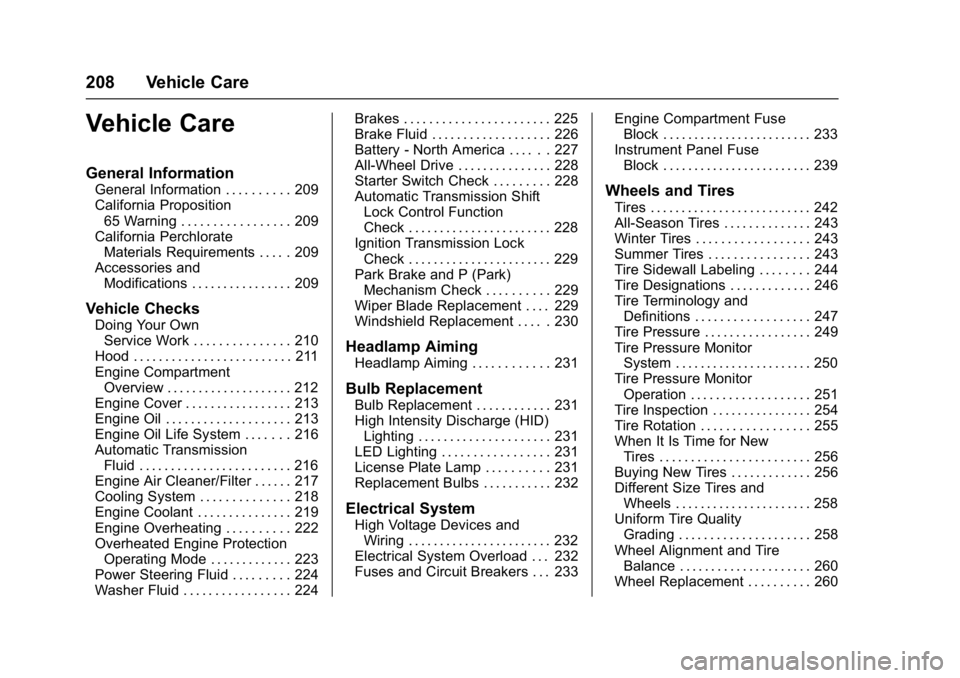
Vehicle Care
General Information
General Information . . . . . . . . . . 209
California Proposition65 Warning . . . . . . . . . . . . . . . . . 209
California Perchlorate Materials Requirements . . . . . 209
Accessories and Modifications . . . . . . . . . . . . . . . . 209
Vehicle Checks
Doing Your OwnService Work . . . . . . . . . . . . . . . 210
Hood . . . . . . . . . . . . . . . . . . . . . . . . . 211
Engine Compartment Overview . . . . . . . . . . . . . . . . . . . . 212
Engine Cover . . . . . . . . . . . . . . . . . 213
Engine Oil . . . . . . . . . . . . . . . . . . . . 213
Engine Oil Life System . . . . . . . 216
Automatic Transmission Fluid . . . . . . . . . . . . . . . . . . . . . . . . 216
Engine Air Cleaner/Filter . . . . . . 217
Cooling System . . . . . . . . . . . . . . 218
Engine Coolant . . . . . . . . . . . . . . . 219
Engine Overheating . . . . . . . . . . 222
Overheated Engine Protection Operating Mode . . . . . . . . . . . . . 223
Power Steering Fluid . . . . . . . . . 224
Washer Fluid . . . . . . . . . . . . . . . . . 224 Brakes . . . . . . . . . . . . . . . . . . . . . . . 225
Brake Fluid . . . . . . . . . . . . . . . . . . . 226
Battery - North America . . . . . . 227
All-Wheel Drive . . . . . . . . . . . . . . . 228
Starter Switch Check . . . . . . . . . 228
Automatic Transmission Shift
Lock Control Function
Check . . . . . . . . . . . . . . . . . . . . . . . 228
Ignition Transmission Lock Check . . . . . . . . . . . . . . . . . . . . . . . 229
Park Brake and P (Park) Mechanism Check . . . . . . . . . . 229
Wiper Blade Replacement . . . . 229
Windshield Replacement . . . . . 230
Headlamp Aiming
Headlamp Aiming . . . . . . . . . . . . 231
Bulb Replacement
Bulb Replacement . . . . . . . . . . . . 231
High Intensity Discharge (HID) Lighting . . . . . . . . . . . . . . . . . . . . . 231
LED Lighting . . . . . . . . . . . . . . . . . 231
License Plate Lamp . . . . . . . . . . 231
Replacement Bulbs . . . . . . . . . . . 232
Electrical System
High Voltage Devices and Wiring . . . . . . . . . . . . . . . . . . . . . . . 232
Electrical System Overload . . . 232
Fuses and Circuit Breakers . . . 233 Engine Compartment Fuse
Block . . . . . . . . . . . . . . . . . . . . . . . . 233
Instrument Panel Fuse Block . . . . . . . . . . . . . . . . . . . . . . . . 239
Wheels and Tires
Tires . . . . . . . . . . . . . . . . . . . . . . . . . . 242
All-Season Tires . . . . . . . . . . . . . . 243
Winter Tires . . . . . . . . . . . . . . . . . . 243
Summer Tires . . . . . . . . . . . . . . . . 243
Tire Sidewall Labeling . . . . . . . . 244
Tire Designations . . . . . . . . . . . . . 246
Tire Terminology andDefinitions . . . . . . . . . . . . . . . . . . 247
Tire Pressure . . . . . . . . . . . . . . . . . 249
Tire Pressure Monitor System . . . . . . . . . . . . . . . . . . . . . . 250
Tire Pressure Monitor Operation . . . . . . . . . . . . . . . . . . . 251
Tire Inspection . . . . . . . . . . . . . . . . 254
Tire Rotation . . . . . . . . . . . . . . . . . 255
When It Is Time for New Tires . . . . . . . . . . . . . . . . . . . . . . . . 256
Buying New Tires . . . . . . . . . . . . . 256
Different Size Tires and Wheels . . . . . . . . . . . . . . . . . . . . . . 258
Uniform Tire Quality Grading . . . . . . . . . . . . . . . . . . . . . 258
Wheel Alignment and Tire Balance . . . . . . . . . . . . . . . . . . . . . 260
Wheel Replacement . . . . . . . . . . 260
Page 211 of 339

GMC Acadia Limited Owner Manual (GMNA-Localizing-U.S.-10283134) -
2017 - crc - 3/30/16
210 Vehicle Care
safety, including such things as
airbags, braking, stability, ride and
handling, emissions systems,
aerodynamics, durability, and
electronic systems like antilock
brakes, traction control, and stability
control. These accessories or
modifications could even cause
malfunction or damage not covered
by the vehicle warranty.
Damage to suspension components
caused by modifying vehicle height
outside of factory settings will not be
covered by the vehicle warranty.Damage to vehicle components
resulting from modifications or the
installation or use of non-GM
certified parts, including control
module or software modifications, is
not covered under the terms of the
vehicle warranty and may affect
remaining warranty coverage for
affected parts.
GM Accessories are designed to
complement and function with other
systems on the vehicle. See your
dealer to accessorize the vehicle
using genuine GM Accessories
installed by a dealer technician.
Also, see
Adding Equipment to the
Airbag-Equipped Vehicle 072.Vehicle Checks
Doing Your Own
Service Work
{Warning
It can be dangerous to work on
your vehicle if you do not have
the proper knowledge, service
manual, tools, or parts. Always
follow owner manual procedures
and consult the service manual
for your vehicle before doing any
service work.
If doing some of your own service
work, use the proper service
manual. It tells you much more
about how to service the vehicle
than this manual can. To order the
proper service manual, see Service
Publications Ordering
Information 0313.
This vehicle has an airbag system.
Before attempting to do your own
service work, see Servicing the
Airbag-Equipped Vehicle 072.