2017 FORD POLICE INTERCEPTOR UTILITY warning
[x] Cancel search: warningPage 80 of 360

GENERAL INFORMATION
WARNING
Driving while distracted can result in
loss of vehicle control, crash and
injury. We strongly recommend that
you use extreme caution when using any
device that may take your focus off the
road. Your primary responsibility is the safe
operation of your vehicle. We recommend
against the use of any hand-held device
while driving and encourage the use of
voice-operated systems when possible.
Make sure you are aware of all applicable
local laws that may affect the use of
electronic devices while driving. You can control various systems on your
vehicle using the information display
controls on the steering wheel.
Corresponding information appears in the
information display.
This icon gives you the ability to
switch a feature on or off. A
check in the box indicates the
feature is enabled, and unchecked
indicates the feature is disabled. Information Display Controls
•
Press the up and down arrow buttons
to scroll through and highlight the
options within a menu.
• Press the right arrow button to enter a
submenu.
• Press the left arrow button to exit a
submenu.
• Press the OK button to choose and
confirm settings or messages.
Trip 1 & 2
You can access the menu using the
information display control.
Note: Some options may appear slightly
different or not at all if the items are
optional.
77
Police Interceptor (TUB) Canada/United States of America, Police, enUSA, First Printing Information DisplaysE204495 E194300
Page 84 of 360

AWD
Action
Message
The all wheel drive system has automatically disabled itselfdue to the system overheating.
AWD Temporarily
Disabled
The all wheel drive system has automatically disabled itself
due to the system overheating or you are using the spare tire.
AWD OFF
The all wheel drive system resumes normal function and
clears this message after driving a short distance with the road tire re-installed or after the system cools.
AWD Restored
The all wheel drive system is not operating properly and the
powertrain fault indicator illuminates. See Warning Lamps
and Indicators (page 72). If the warning stays illuminated
or continues to illuminate, contact an authorized dealer as soon as possible.
AWD Malfunction
Service Required
Displayed when the transfer case fluid requires service.
Change AWD Power
Transfer Unit Lube
Displayed when the transfer case fluid has been changed and reset to new.
AWD Power Transfer
Unit Lube Set to New
AdvanceTrac ™ Action
Message
Displayed when the system has detected a condition that
requires service. Contact your authorized dealer as soon as possible.
Service AdvanceTrac
The driver has disabled or enabled the traction control.
AdvanceTrac Off On
Alarm Action
Message
Unathorized entry triggered the alarm. See Anti-Theft Alarm (page
56).
Vehicle Alarm To Stop
Alarm, Start Vehicle.
81
Police Interceptor (TUB) Canada/United States of America, Police, enUSA, First Printing Information Displays
Page 85 of 360
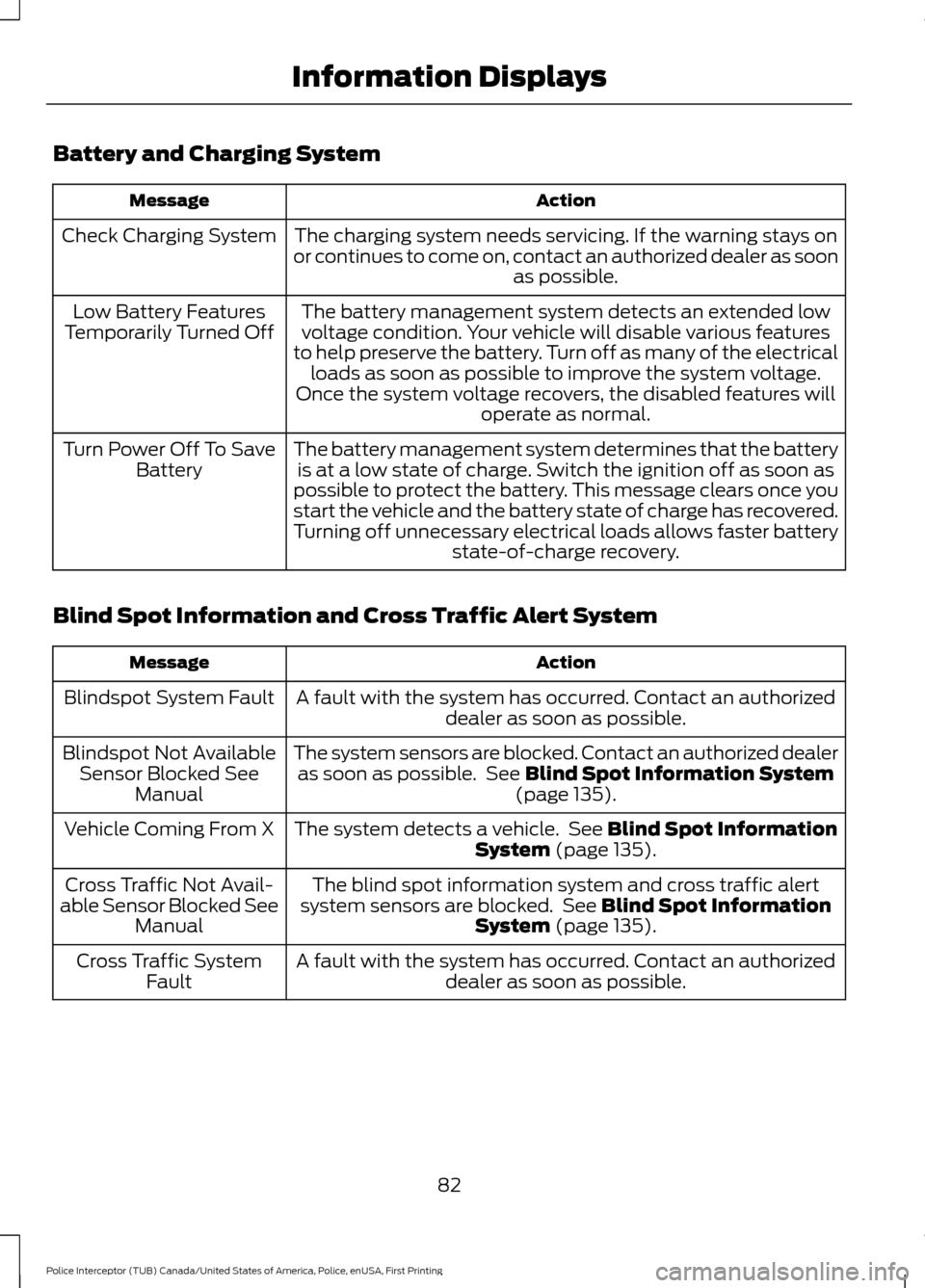
Battery and Charging System
Action
Message
The charging system needs servicing. If the warning stays on
or continues to come on, contact an authorized dealer as soon as possible.
Check Charging System
The battery management system detects an extended lowvoltage condition. Your vehicle will disable various features
to help preserve the battery. Turn off as many of the electrical loads as soon as possible to improve the system voltage.
Once the system voltage recovers, the disabled features will operate as normal.
Low Battery Features
Temporarily Turned Off
The battery management system determines that the batteryis at a low state of charge. Switch the ignition off as soon as
possible to protect the battery. This message clears once you
start the vehicle and the battery state of charge has recovered.
Turning off unnecessary electrical loads allows faster battery state-of-charge recovery.
Turn Power Off To Save
Battery
Blind Spot Information and Cross Traffic Alert System Action
Message
A fault with the system has occurred. Contact an authorizeddealer as soon as possible.
Blindspot System Fault
The system sensors are blocked. Contact an authorized dealeras soon as possible. See Blind Spot Information System
(page 135).
Blindspot Not Available
Sensor Blocked See Manual
The system detects a vehicle. See
Blind Spot Information
System (page 135).
Vehicle Coming From X
The blind spot information system and cross traffic alert
system sensors are blocked. See
Blind Spot Information
System (page 135).
Cross Traffic Not Avail-
able Sensor Blocked See Manual
A fault with the system has occurred. Contact an authorizeddealer as soon as possible.
Cross Traffic System
Fault
82
Police Interceptor (TUB) Canada/United States of America, Police, enUSA, First Printing Information Displays
Page 86 of 360

Brake System
Action
Message
The brake fluid level is low. Check the brake system immedi-ately. See Brake Fluid Check (page 192).
Brake Fluid Level Low
The brake system needs servicing. Stop the vehicle in a safeplace. Contact an authorized dealer.
Check Brake System
The parking brake is set, the engine is running and you drive
your vehicle more than
3 mph (5 km/h). If the warning stays
on after you release the parking brake, contact an authorized dealer as soon as possible.
Park Brake Engaged
Doors and Locks Action
Message
The driver door is not completely closed.
Driver Door Ajar
The passenger door is not completely closed.
Passenger Door Ajar
The rear left door is not completely closed.
Rear Left Door Ajar
The rear right door is not completely closed.
Rear Right Door Ajar
The liftgate is not completely closed.
Liftgate Ajar
The hood is not completely closed.
Hood Ajar
The system has disabled the door switches.
Switches Inhibited
Security Mode
83
Police Interceptor (TUB) Canada/United States of America, Police, enUSA, First Printing Information Displays
Page 89 of 360

Maintenance
Action
Message
Stop your vehicle as soon as safely possible. Switch off the
engine. Check the oil level. If the warning stays on or continues to come on with your engine running, contact an authorized dealer as soon as possible.
Low Engine Oil Pressure
The engine oil life remaining is 10% or less. See Engine Oil
Check (page 185).
Change Engine Oil Soon
The oil life left reaches 0%.
See Engine Oil Check (page 185).
Oil Change Required
The engine coolant temperature is excessively high.
Engine Coolant Over
Temperature
The washer fluid is low and needs refilling.
Washer Fluid Level Low
Indicates that your vehicle is still in Transport mode. This maynot allow some features to operate properly. Contact an authorized dealer.
Transport Mode Contact
Dealer
Indicates that your vehicle is still in Factory mode. This maynot allow some features to operate properly. Contact an authorized dealer.
Factory Mode Contact
Dealer
Park Aid Action
Message
The system has detected a condition that requires service.
Contact an authorized dealer. See
Principle of Operation
(page 128).
Check Park Aid
The system has detected a condition that requires service.
Contact an authorized dealer.
See Principle of Operation
(page 128).
Check Rear Park Aid
Displays the park aid status.
Front Park Aid On Off
Displays the park aid status.
Rear Park Aid On Off
86
Police Interceptor (TUB) Canada/United States of America, Police, enUSA, First Printing Information Displays
Page 90 of 360

Park Brake
Action
Message
You have set the parking brake and you have driven the vehiclemore than 3 mph (5 km/h). If the warning stays on after you
have released the parking brake, contact an authorized dealer.
Park Brake Engaged
Police Engine Idle feature Action
Message
Displayed when the Police Engine Idle feature conditions arenot correct for proper operation.
Engine Idle System Not
Available
Displayed when there is a fault detected in the Police EngineIdle feature and the system is not active.
Engine Idle System Fault
Displayed when there is a fault detected in the Police EngineIdle feature and the system is active.
Engine Idle System Fault
Restart Engine
Displayed when the Police Engine Idle feature is active.
Engine Idle Active Rein-
sert Key or Press Button
Power Steering Action
Message
The power steering system has detected a condition thatrequires service. Contact an authorized dealer.
Steering Fault Service
Now
The power steering system is not working. Stop your vehicleat a safe place. Contact an authorized dealer.
Service Power Steering
Now
The power steering system has detected a condition withinthe power steering system, or passive entry or passive start system requires service. Contact an authorized dealer.
Steering Assist Fault
Service Required
Seats Action
Message
Objects are by the passenger seat. After you move the objectsaway from the seat, if the warning stays on or continues to
come on, contact an authorized dealer as soon as possible.
Occupant Sensor
BLOCKED Remove
Objects Near Passenger Seat
87
Police Interceptor (TUB) Canada/United States of America, Police, enUSA, First Printing Information Displays
Page 91 of 360

Starting System
Action
Message
A reminder to apply the brake when starting your vehicle.
To START Press Brake
The starter has exceeded its cranking time in attempting tostart your vehicle.
Cranking Time Exceeded
The starter is attempting to start your vehicle.
Engine Start Pending
Please Wait
The system has cancelled the pending start.
Pending Start Cancelled
Tire Pressure Monitoring System Action
Message
One or more tires on your vehicle has low pressure. See Tire
Pressure Monitoring System (page 229).
Tire Pressure Low
The tire pressure monitoring system is malfunctioning. If thewarning stays on or continues to come on, contact an
authorized dealer.
See Tire Pressure Monitoring System (page 229).
Tire Pressure Monitor
Fault
A tire pressure sensor is malfunctioning, or your spare tire is
in use. If the warning stays on or continues to come on, contact
an authorized dealer as soon as possible. See Tire Pressure Monitoring System
(page 229).
Tire Pressure Sensor
Fault
Traction Control Action
Message
Displays the status of the traction control system. See UsingTraction Control
(page 125).
Traction Control Off
Displays the status of the traction control system. See UsingTraction Control
(page 125).
Traction Control On
88
Police Interceptor (TUB) Canada/United States of America, Police, enUSA, First Printing Information Displays
Page 96 of 360

SITTING IN THE CORRECT
POSITION
WARNINGS
Sitting improperly, out of position or
with the seatback reclined too far
can take weight off the seat cushion
and affect the decision of the passenger
sensing system, resulting in serious injury
or death in the event of a crash. Always sit
upright against your seat back, with your
feet on the floor. Do not recline the seatback as this
can cause the occupant to slide
under the safety belt, resulting in
serious injury in the event of a crash. Do not place objects higher than the
seatback to reduce the risk of serious
injury in the event of a crash or during
heavy braking. When you use them properly, the seat,
head restraint, safety belt and airbags will
provide optimum protection in the event
of a crash. We recommend that you follow these
guidelines:
•
Sit in an upright position with the base
of your spine as far back as possible.
• Do not recline the seatback more than
30 degrees.
• Adjust the head restraint so that the
top of it is level with the top of your
head and as far forward as possible.
Make sure that you remain
comfortable.
• Keep sufficient distance between
yourself and the steering wheel. We
recommend a minimum of 10 in
(25 cm) between your breastbone and
the airbag cover.
• Hold the steering wheel with your arms
slightly bent.
• Bend your legs slightly so that you can
press the pedals fully.
• Position the shoulder strap of the
safety belt over the center of your
shoulder and position the lap strap
tightly across your hips.
Make sure that your driving position is
comfortable and that you can maintain full
control of your vehicle.
HEAD RESTRAINTS WARNINGS
To minimize the risk of neck injury in
the event of a crash, the driver and
passenger occupants should not sit
in or operate the vehicle, until the head
restraint is placed in its proper position.
The driver should never adjust the head
restraint while the vehicle is in motion.
93
Police Interceptor (TUB) Canada/United States of America, Police, enUSA, First Printing SeatsE68595