2017 FORD POLICE INTERCEPTOR SEDAN ECO mode
[x] Cancel search: ECO modePage 254 of 358
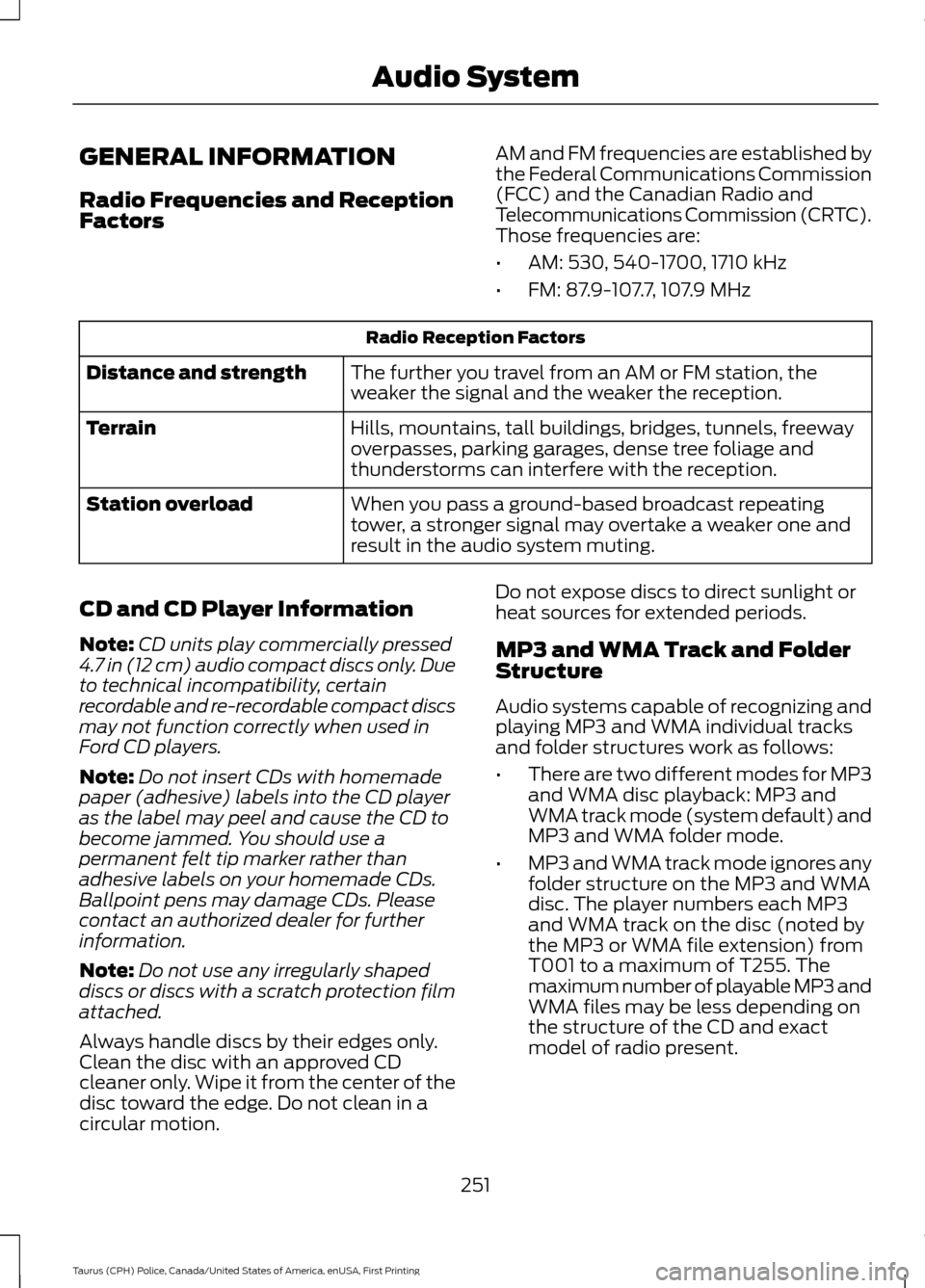
GENERAL INFORMATION
Radio Frequencies and Reception
Factors
AM and FM frequencies are established by
the Federal Communications Commission
(FCC) and the Canadian Radio and
Telecommunications Commission (CRTC).
Those frequencies are:
•
AM: 530, 540-1700, 1710 kHz
• FM: 87.9-107.7, 107.9 MHz Radio Reception Factors
The further you travel from an AM or FM station, the
weaker the signal and the weaker the reception.
Distance and strength
Hills, mountains, tall buildings, bridges, tunnels, freeway
overpasses, parking garages, dense tree foliage and
thunderstorms can interfere with the reception.
Terrain
When you pass a ground-based broadcast repeating
tower, a stronger signal may overtake a weaker one and
result in the audio system muting.
Station overload
CD and CD Player Information
Note: CD units play commercially pressed
4.7 in (12 cm) audio compact discs only. Due
to technical incompatibility, certain
recordable and re-recordable compact discs
may not function correctly when used in
Ford CD players.
Note: Do not insert CDs with homemade
paper (adhesive) labels into the CD player
as the label may peel and cause the CD to
become jammed. You should use a
permanent felt tip marker rather than
adhesive labels on your homemade CDs.
Ballpoint pens may damage CDs. Please
contact an authorized dealer for further
information.
Note: Do not use any irregularly shaped
discs or discs with a scratch protection film
attached.
Always handle discs by their edges only.
Clean the disc with an approved CD
cleaner only. Wipe it from the center of the
disc toward the edge. Do not clean in a
circular motion. Do not expose discs to direct sunlight or
heat sources for extended periods.
MP3 and WMA Track and Folder
Structure
Audio systems capable of recognizing and
playing MP3 and WMA individual tracks
and folder structures work as follows:
•
There are two different modes for MP3
and WMA disc playback: MP3 and
WMA track mode (system default) and
MP3 and WMA folder mode.
• MP3 and WMA track mode ignores any
folder structure on the MP3 and WMA
disc. The player numbers each MP3
and WMA track on the disc (noted by
the MP3 or WMA file extension) from
T001 to a maximum of T255. The
maximum number of playable MP3 and
WMA files may be less depending on
the structure of the CD and exact
model of radio present.
251
Taurus (CPH) Police, Canada/United States of America, enUSA, First Printing Audio System
Page 255 of 358

•
MP3 and WMA folder mode represents
a folder structure consisting of one
level of folders. The CD player numbers
all MP3 and WMA tracks on the disc
(noted by the MP3 or WMA file
extension) and all folders containing
MP3 and WMA files, from F001 (folder)
T001 (track) to F253 T255.
• Creating discs with only one level of
folders helps with navigation through
the disc files.
If you are burning your own MP3 and WMA
discs, it is important to understand how
the system reads the structures you create.
While various files may be present (files
with extensions other than MP3 and
WMA), only files with the MP3 and WMA
extension are played; other files are
ignored by the system. This enables you to
use the same MP3 and WMA disc for a
variety of tasks on your work computer,
home computer and your in-vehicle
system.
In track mode, the system displays and
plays the structure as if it were only one
level deep (all MP3 and WMA files play,
regardless of being in a specific folder). In
folder mode, the system only plays the
MP3 and WMA files in the current folder. AUDIO UNIT - VEHICLES WITH:
AM/FM/CD WARNING
Driving while distracted can result in
loss of vehicle control, crash and
injury. We strongly recommend that
you use extreme caution when using any
device that may take your focus off the
road. Your primary responsibility is the safe
operation of your vehicle. We recommend
against the use of any hand-held device
while driving and encourage the use of
voice-operated systems when possible.
Make sure you are aware of all applicable
local laws that may affect the use of
electronic devices while driving. Note:
Some features, such as SIRIUS
satellite radio, may not be available in your
location. Check with an authorized dealer.
Note: Depending on your vehicle option
package, your system may look different
from what you see here.
252
Taurus (CPH) Police, Canada/United States of America, enUSA, First Printing Audio System
Page 264 of 358
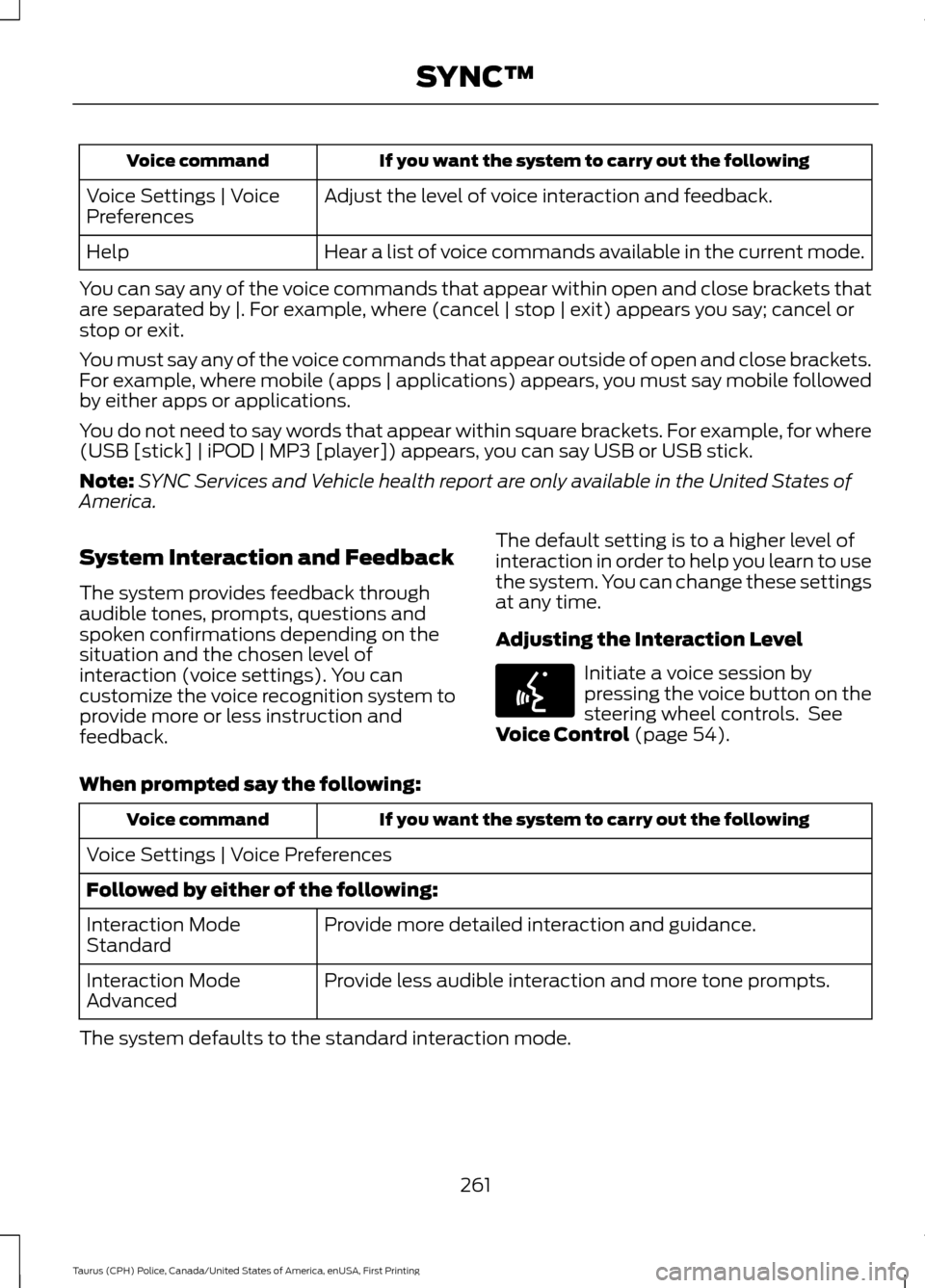
If you want the system to carry out the following
Voice command
Adjust the level of voice interaction and feedback.
Voice Settings | Voice
Preferences
Hear a list of voice commands available in the current mode.
Help
You can say any of the voice commands that appear within open and close brackets that
are separated by |. For example, where (cancel | stop | exit) appears you say; cancel or
stop or exit.
You must say any of the voice commands that appear outside of open and close brackets.
For example, where mobile (apps | applications) appears, you must say mobile followed
by either apps or applications.
You do not need to say words that appear within square brackets. For example, for where
(USB [stick] | iPOD | MP3 [player]) appears, you can say USB or USB stick.
Note: SYNC Services and Vehicle health report are only available in the United States of
America.
System Interaction and Feedback
The system provides feedback through
audible tones, prompts, questions and
spoken confirmations depending on the
situation and the chosen level of
interaction (voice settings). You can
customize the voice recognition system to
provide more or less instruction and
feedback. The default setting is to a higher level of
interaction in order to help you learn to use
the system. You can change these settings
at any time.
Adjusting the Interaction Level Initiate a voice session by
pressing the voice button on the
steering wheel controls. See
Voice Control (page 54).
When prompted say the following: If you want the system to carry out the following
Voice command
Voice Settings | Voice Preferences
Followed by either of the following: Provide more detailed interaction and guidance.
Interaction Mode
Standard
Provide less audible interaction and more tone prompts.
Interaction Mode
Advanced
The system defaults to the standard interaction mode.
261
Taurus (CPH) Police, Canada/United States of America, enUSA, First Printing SYNC™E142599
Page 290 of 358
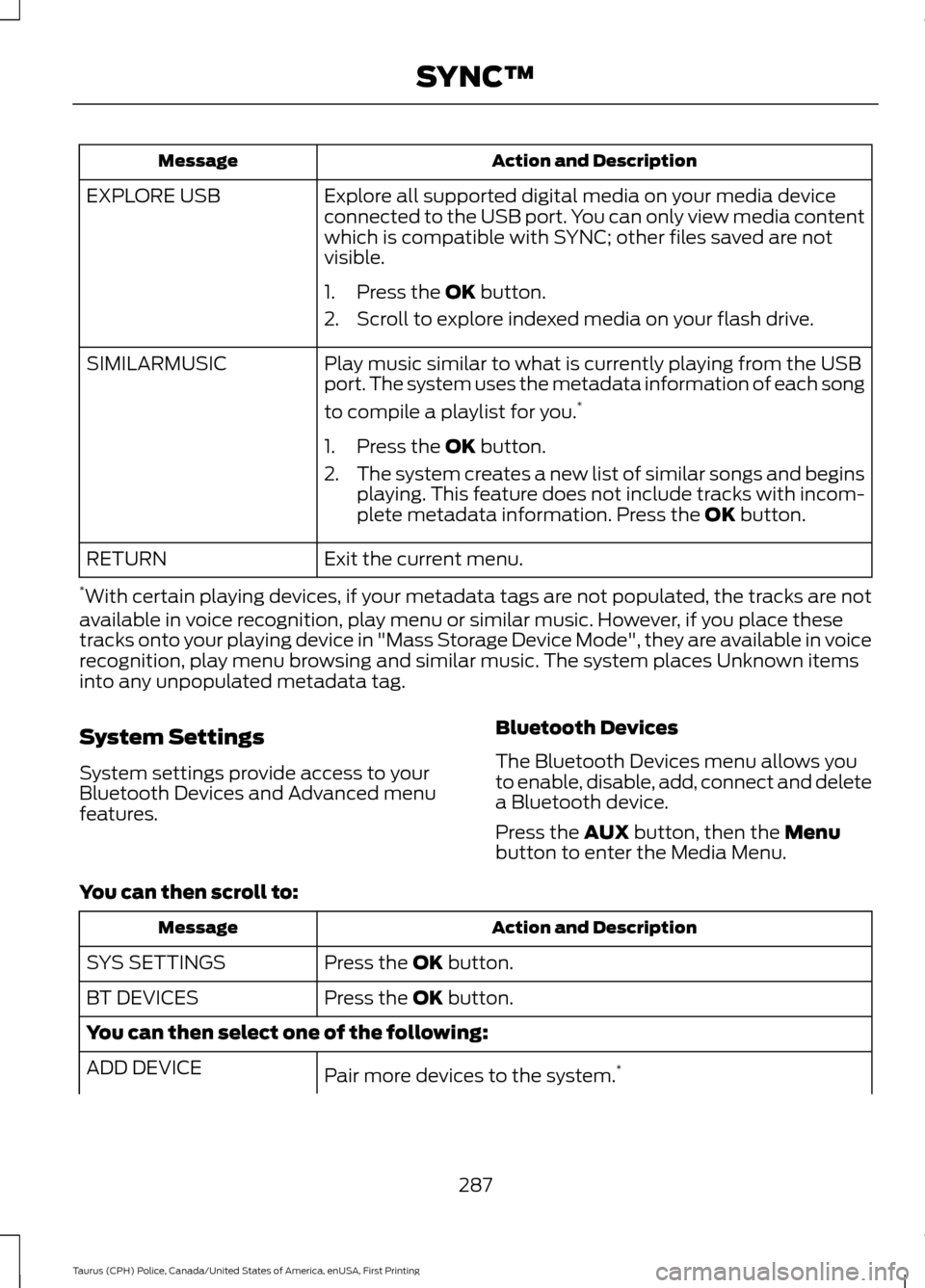
Action and Description
Message
Explore all supported digital media on your media device
connected to the USB port. You can only view media content
which is compatible with SYNC; other files saved are not
visible.
EXPLORE USB
1. Press the OK button.
2. Scroll to explore indexed media on your flash drive.
Play music similar to what is currently playing from the USB
port. The system uses the metadata information of each song
to compile a playlist for you. *
SIMILARMUSIC
1. Press the
OK button.
2. The system creates a new list of similar songs and begins
playing. This feature does not include tracks with incom-
plete metadata information. Press the
OK button.
Exit the current menu.
RETURN
* With certain playing devices, if your metadata tags are not populated, the tracks are not
available in voice recognition, play menu or similar music. However, if you place these
tracks onto your playing device in "Mass Storage Device Mode", they are available in voice
recognition, play menu browsing and similar music. The system places Unknown items
into any unpopulated metadata tag.
System Settings
System settings provide access to your
Bluetooth Devices and Advanced menu
features. Bluetooth Devices
The Bluetooth Devices menu allows you
to enable, disable, add, connect and delete
a Bluetooth device.
Press the
AUX button, then the Menu
button to enter the Media Menu.
You can then scroll to: Action and Description
Message
Press the
OK button.
SYS SETTINGS
Press the
OK button.
BT DEVICES
You can then select one of the following:
Pair more devices to the system. *
ADD DEVICE
287
Taurus (CPH) Police, Canada/United States of America, enUSA, First Printing SYNC™
Page 308 of 358
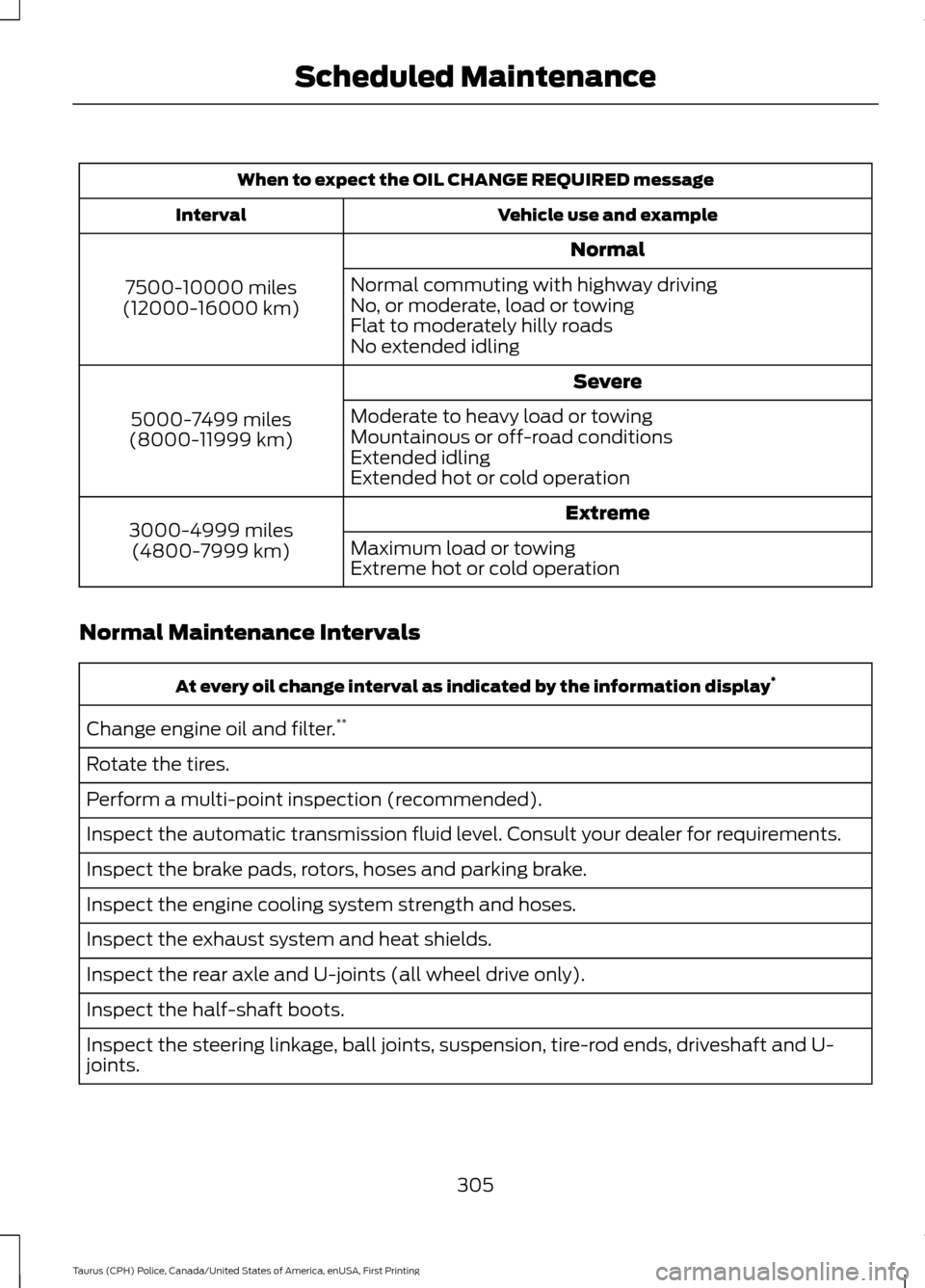
When to expect the OIL CHANGE REQUIRED message
Vehicle use and example
Interval
Normal
7500-10000 miles
(12000-16000 km) Normal commuting with highway driving
No, or moderate, load or towing
Flat to moderately hilly roads
No extended idling
Severe
5000-7499 miles
(8000-11999 km) Moderate to heavy load or towing
Mountainous or off-road conditions
Extended idling
Extended hot or cold operation
Extreme
3000-4999 miles
(4800-7999 km) Maximum load or towing
Extreme hot or cold operation
Normal Maintenance Intervals At every oil change interval as indicated by the information display
*
Change engine oil and filter. **
Rotate the tires.
Perform a multi-point inspection (recommended).
Inspect the automatic transmission fluid level. Consult your dealer for requirements.
Inspect the brake pads, rotors, hoses and parking brake.
Inspect the engine cooling system strength and hoses.
Inspect the exhaust system and heat shields.
Inspect the rear axle and U-joints (all wheel drive only).
Inspect the half-shaft boots.
Inspect the steering linkage, ball joints, suspension, tire-rod ends, driveshaft and U-
joints.
305
Taurus (CPH) Police, Canada/United States of America, enUSA, First Printing Scheduled Maintenance
Page 323 of 358
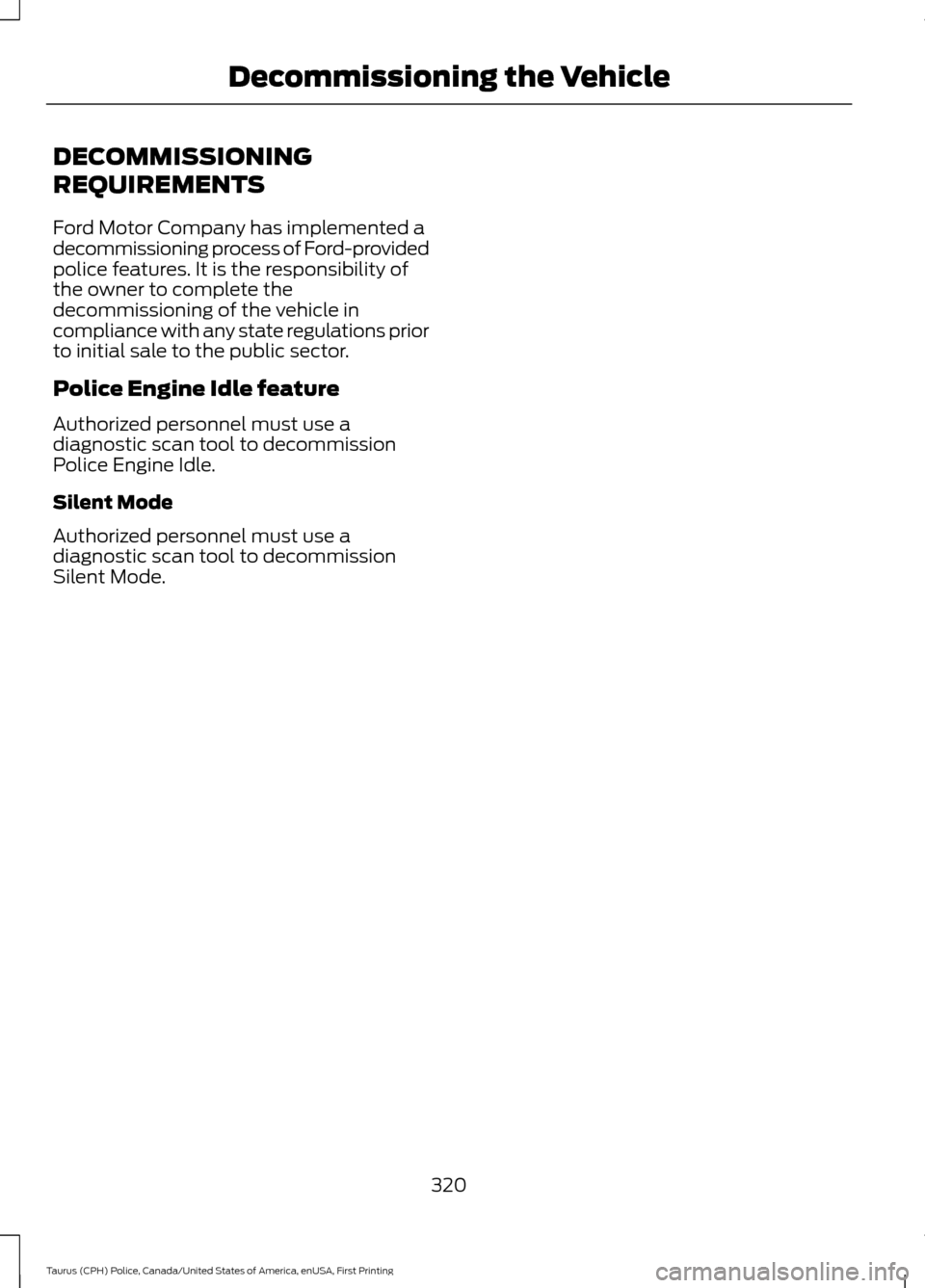
DECOMMISSIONING
REQUIREMENTS
Ford Motor Company has implemented a
decommissioning process of Ford-provided
police features. It is the responsibility of
the owner to complete the
decommissioning of the vehicle in
compliance with any state regulations prior
to initial sale to the public sector.
Police Engine Idle feature
Authorized personnel must use a
diagnostic scan tool to decommission
Police Engine Idle.
Silent Mode
Authorized personnel must use a
diagnostic scan tool to decommission
Silent Mode.
320
Taurus (CPH) Police, Canada/United States of America, enUSA, First Printing Decommissioning the Vehicle
Page 352 of 358

Proper Driver and Front Passenger Seating
Adjustment........................................................ 37
Driving Aids.....................................................126
Driving Hints...................................................143
Driving Through Water................................144
DRL See: Daytime Running Lamps......................... 59
E
Economical Driving......................................143
Emission Control System..........................102 On-Board Diagnostics (OBD-II)................... 103
Readiness for Inspection and Maintenance (I/M) Testing................................................... 103
End User License Agreement...................321 VEHICLE SOFTWARE END USER LICENSE
AGREEMENT (EULA) .................................. 321
Engine Block Heater
......................................92
Using the Engine Block Heater........................ 93
Engine Coolant Check.................................176 Adding Coolant..................................................... 177
Coolant Change................................................... 178
Engine Coolant Temperature Management................................................... 179
Fail-Safe Cooling................................................ 178
Recycled Coolant................................................ 178
Severe Climates.................................................. 178
Engine Oil Check...........................................174 Adding Engine Oil................................................ 175
Engine Oil Dipstick - 2.0L EcoBoost™..................................................174
Engine Oil Dipstick - 3.5L Duratec/3.5L Ecoboost™/3.7L.........................................174
Engine Specifications - 2.0L EcoBoost™.................................................224
Drivebelt Routing............................................... 224
Engine Specifications - 3.5L Duratec.........................................................224
Drivebelt Routing............................................... 225
Engine Specifications - 3.5L Ecoboost™.................................................225
Drivebelt Routing............................................... 225
Engine Specifications - 3.7L
.....................226
Drivebelt Routing............................................... 226
Environment
......................................................15
Essential Towing Checks...........................140 Before Towing a Trailer...................................... 141Hitches...................................................................
140
Launching or Retrieving a Boat or Personal Watercraft (PWC).......................................... 141
Safety Chains....................................................... 140
Trailer Brakes....................................................... 140
Trailer Lamps....................................................... 140
When Towing a Trailer....................................... 141
Event Data Recording See: Data Recording.............................................. 9
Export Unique Options.................................14
Exterior Mirrors
................................................63
Blind Spot Information System...................... 64
Fold-Away Exterior Mirrors............................... 63
Heated Exterior Mirrors ..................................... 63
Integrated Blind Spot Mirror............................. 63
Power Exterior Mirrors........................................ 63
F
Fastening the Seatbelts..............................30 Seatbelt Locking Modes..................................... 31
Using Seatbelts During Pregnancy...............30
Floor Mats
.......................................................144
Foot Pedals See: Adjusting the Pedals................................. 56
Ford Credit
..........................................................11
US Only...................................................................... 11
Ford Protect
..................................................299
Ford Protect Extended Service Plan
(CANADA ONLY).......................................... 300
Ford Protect Extended Service Plans (U.S. Only).................................................................. 299
Front Passenger Sensing System
............38
Fuel and Refueling.........................................95
Fuel Consumption........................................101
Calculating Fuel Economy............................... 101
Filling the Fuel Tank............................................ 101
Fuel Filler Funnel Location..........................97
Fuel Filter
.........................................................185
Fuel Quality - E85..........................................96 Choosing the Right Fuel - Flex Fuel
Vehicles.............................................................. 96
Switching Between E85 and Gasoline.........97
Fuel Quality - Gasoline.................................97 Choosing the Right Fuel..................................... 97
Fuel Shutoff
....................................................147
Fuses.................................................................158
349
Taurus (CPH) Police, Canada/United States of America, enUSA, First Printing Index
Page 357 of 358
Using Cruise Control....................................124
Switching Cruise Control Off.......................... 125
Switching Cruise Control On.......................... 124
Using Snow Chains......................................214
Using Stability Control................................119
Using SYNC™ With Your Media Player............................................................280
Accessing Your Play Menu............................. 285
Connecting Your Digital Media Player to the USB Port.......................................................... 280
Media Menu Features...................................... 283
Media Voice Commands................................. 282
System Settings................................................. 287
What's Playing?.................................................. 281
Using SYNC™ With Your Phone............263 Accessing Features Through the Phone
Menu.................................................................. 267
Accessing Your Phone Settings.................... 272
Making a Call....................................................... 266
Pairing a Cell Phone for the First Time................................................................... 263
Pairing Subsequent Cell Phones.................264
Phone Options during an Active Call.........266
Phone Voice Commands................................ 264
Receiving Calls................................................... 266
System Settings.................................................. 273
Text Messaging................................................... 270
Using Traction Control.................................117 Switching the System Off................................. 117
System Indicator Lights and Messages............................................................ 117
Using a Switch....................................................... 117
Using the Information Display Controls ............................................................... 117
Using Voice Recognition...........................260
Initiating a Voice Session............................... 260
System Interaction and Feedback...............261
Utilizing the Mediation/Arbitration Program (Canada Only)
.........................154
V
Vehicle Care
....................................................193
General Information.......................................... 193
Vehicle Certification Label
.......................232
Vehicle Identification Number.................231
Vehicle Storage
.............................................198
Battery.................................................................... 199Body........................................................................\
198
Brakes..................................................................... 199
Cooling system.................................................... 199
Engine..................................................................... 198
Fuel system.......................................................... 199
General................................................................... 198
Miscellaneous...................................................... 199
Removing Vehicle From Storage.................. 199
Tires........................................................................\
. 199
Ventilation See: Climate Control.......................................... 80
VIN See: Vehicle Identification Number.............231
Voice Control
...................................................54
W
Warning Lamps and Indicators.................67 Airbag readiness................................................... 67
Anti-Lock Braking System................................. 67
Brake System......................................................... 67
Charging System.................................................. 68
Cruise Control....................................................... 68
Direction Indicator............................................... 68
Door Ajar................................................................. 68
Engine Coolant Temperature.......................... 68
Engine Oil................................................................ 68
Fasten Seatbelt.................................................... 68
High Beam.............................................................. 68
Low Fuel Level...................................................... 68
Low Tire Pressure Warning............................... 69
Low Washer Fluid................................................ 69
Parking Lamps...................................................... 69
Police Engine Idle feature................................. 69
Powertrain Fault................................................... 69
Service Engine Soon........................................... 69
Silent Mode............................................................ 70
Stability Control.................................................... 70
Stability Control Off............................................ 70
Washer Fluid Check.....................................184
Washers See: Cleaning the Exterior............................... 193
See: Wipers and Washers.................................. 57
Waxing..............................................................194
Wheel Nuts See: Changing a Road Wheel........................ 218
Wheels and Tires........................................200 General Information......................................... 200
354
Taurus (CPH) Police, Canada/United States of America, enUSA, First Printing Index