2017 FORD GT instrument panel
[x] Cancel search: instrument panelPage 83 of 313

A/C: Press to switch the air conditioning on or off. Use A/C with recirculated
air to improve performance and efficiency.
E
Fan speed control:
Adjusts the volume of air circulated in the vehicle.
F
HINTS ON CONTROLLING THE
INTERIOR CLIMATE
General Hints
Note: Prolonged use of recirculated air may
cause the windows to fog up.
Note: You may feel a small amount of air
from the footwell air vents regardless of the
air distribution setting.
Note: To reduce humidity build-up inside
your vehicle, do not drive with the system
switched off or with recirculated air always
switched on.
Note: To improve the time to reach a
comfortable temperature in hot weather,
drive with the windows open until you feel
cold air through the air vents. Manual Climate Control
Note:
To reduce fogging of the windshield
during humid weather, adjust the air
distribution control to the windshield air
vents position.
Automatic Climate Control
Note: Adjusting the settings when your
vehicle interior is extremely hot or cold is
not necessary.
Note: The system adjusts to heat or cool
the interior to the temperature you select
as quickly as possible.
Note: For the system to function efficiently,
the instrument panel and side air vents
should be fully open.
Note: If you select
AUTO during cold
outside temperatures, the fan may run at a
slower speed until the engine warms up.
Quickly Heating the Interior Automatic climate control
Manual climate control
Press
AUTO.
Adjust the fan speed to the highest
setting.
1
Adjust the temperature control to the
desired setting.
Adjust the temperature control to the
full heat setting.
2
Direct air to the position you desire.
Direct air to the footwell using the air
distribution buttons.
3
80
Ford GT (CGX) Canada/United States of America, enUSA, First Printing Climate Control
Page 84 of 313

Recommended Settings for Heating
Automatic climate control
Manual climate control
Press AUTO.
Adjust the fan speed to the center
setting.
1
Adjust the temperature control to the
desired setting. Use
72°F (22°C) as a
starting point, then adjust the setting as
necessary.
Adjust the temperature control to the
midway point of the hot settings.
2
Direct air to the footwell and windshield
using the air distribution controls.
Direct air to the footwell using the air
distribution buttons.
3
Recommended Settings for Cooling Automatic climate control
Manual climate control
Press
AUTO.
Adjust the fan speed to the center
setting.
1
Adjust the temperature control to the
desired setting. Use
72°F (22°C) as a
starting point, then adjust the setting as
necessary.
Adjust the temperature control to the
midway point of the cold settings.
2
Direct air to the position you desire.
Direct air to the instrument panel using
the air distribution buttons.
3
Defogging the Side Windows in Cold Weather Automatic climate control
Manual climate control
Adjust the temperature control to the
desired setting. Use
72°F (22°C) as a
starting point, then adjust the setting as
necessary.
Direct air to the windshield using the air
distribution buttons.
1
Adjust the temperature control to the
desired setting.
2
Adjust the fan speed to the highest
setting.
3
81
Ford GT (CGX) Canada/United States of America, enUSA, First Printing Climate Control
Page 151 of 313

1.
Inside the vehicle, pull the hood release
handle located on the left side panel
left of the pedals.
2. Slightly lift the hood. 3. Release the hood latch by pulling up
on the secondary release lever. 4.
Open the hood and support it with the
prop rod. Closing the Front Hood
1. Remove the hood prop rod from the
under hood slot and securely place it
back in its holder.
2. Lower the hood and lightly press down
until closed.
Note: If you do not close the front hood
correctly, an indicator lamp displays in the
instrument cluster. See Warning Lamps
and Indicators (page 64).
Opening the Rear Hatch
Production Model
You can open the rear hatch by three
different methods:
• A button on your remote control. See
Remote Control
(page 41).
• A button on the headlamp switch. See
Lighting Control
(page 57).
• In the case of a dead battery or other
electrical concerns, use the key blade
in your remote control. See
Remote
Control (page 41).
After you release the rear hatch latch, lift
the rear hatch into the open position.
A hydraulic cylinder holds the rear hatch
open.
Competition Model
Use the following procedure to open the
rear hatch on your competition model GT.
1. Unlock rear hatch using your key.
148
Ford GT (CGX) Canada/United States of America, enUSA, First Printing MaintenanceE233210 E233828
Page 168 of 313

CLEANING THE WINDOWS AND
WIPER BLADES
Dirty windshield and wipers will result in
poor windshield wiper operation. Keep the
windshield and wiper blades clean to
maintain windshield wiper performance.
To clean exterior glass surfaces and wiper
blades:
•
Clean the exterior surface of the
windshield with a non-abrasive glass
cleaner.
• For windshields contaminated with
tree sap, chemicals, wax or bugs, clean
the outside surface of the windshield
with Motorcraft Bug and Tar Remover.
• Clean the wiper blades with isopropyl
rubbing alcohol or windshield washer
concentrate.
The interior glass surface of the windshield
and engine cover glass, and both the inner
and outer surface of the bulkhead glass,
have a laminate coating that requires
special care.
To clean interior glass surfaces:
• When cleaning the inside of the
windshield, avoid getting any glass
cleaner on the instrument panel or door
panels. Wipe any excess cleaner off
these surfaces immediately.
• Use a microfiber towel and plain water,
or a mixture of one-half water and
one-half white vinegar, to clean the
interior glass surfaces.
Note: Never use alcohol or ammonia based
cleaners, aerosol sprays or abrasive
compounds to clean the interior glass
surfaces of your vehicle. Using improper
cleaning products can cause damage to
your vehicle. CLEANING THE INTERIOR WARNING
Do not use cleaning solvents, bleach
or dye on the vehicle's seatbelts, as
these actions may weaken the belt
webbing. Clean safety belts with water applied with
a soft sponge. Let them dry naturally, away
from artificial heat.
Wipe carbon fiber surfaces with a clean,
damp and soft cloth to remove dust. Then
use a clean, dry and soft cloth to dry these
areas.
Cleaning Alcantara Microfiber
Cloth
Note:
Some models have Alcantara
microfiber cloth fabric on the seats,
headliner, instrument panel and door panels.
Use a soft brush, a clean, dry cloth or
vacuum cleaner to remove dust and loose
dirt from Alcantara cloth surfaces. Gently
wipe the cloth surfaces with a clean, damp
cotton cloth.
Note: Alcantara microfiber cloth fabric are
made of polyester microfiber with
micro-porous polyurethane. Using
commercially available fabric cleaners can
cause permanent damage.
Note: Do not use commercially available
leather and vinyl cleaning products on
Alcantara cloth fabric.
Depending on the type of stain, use water,
lemon juice or pure ethyl alcohol when
cleaning. For cleaning Alcantara microfiber
cloth, refer to the following chart:
165
Ford GT (CGX) Canada/United States of America, enUSA, First Printing Vehicle Care
Page 169 of 313
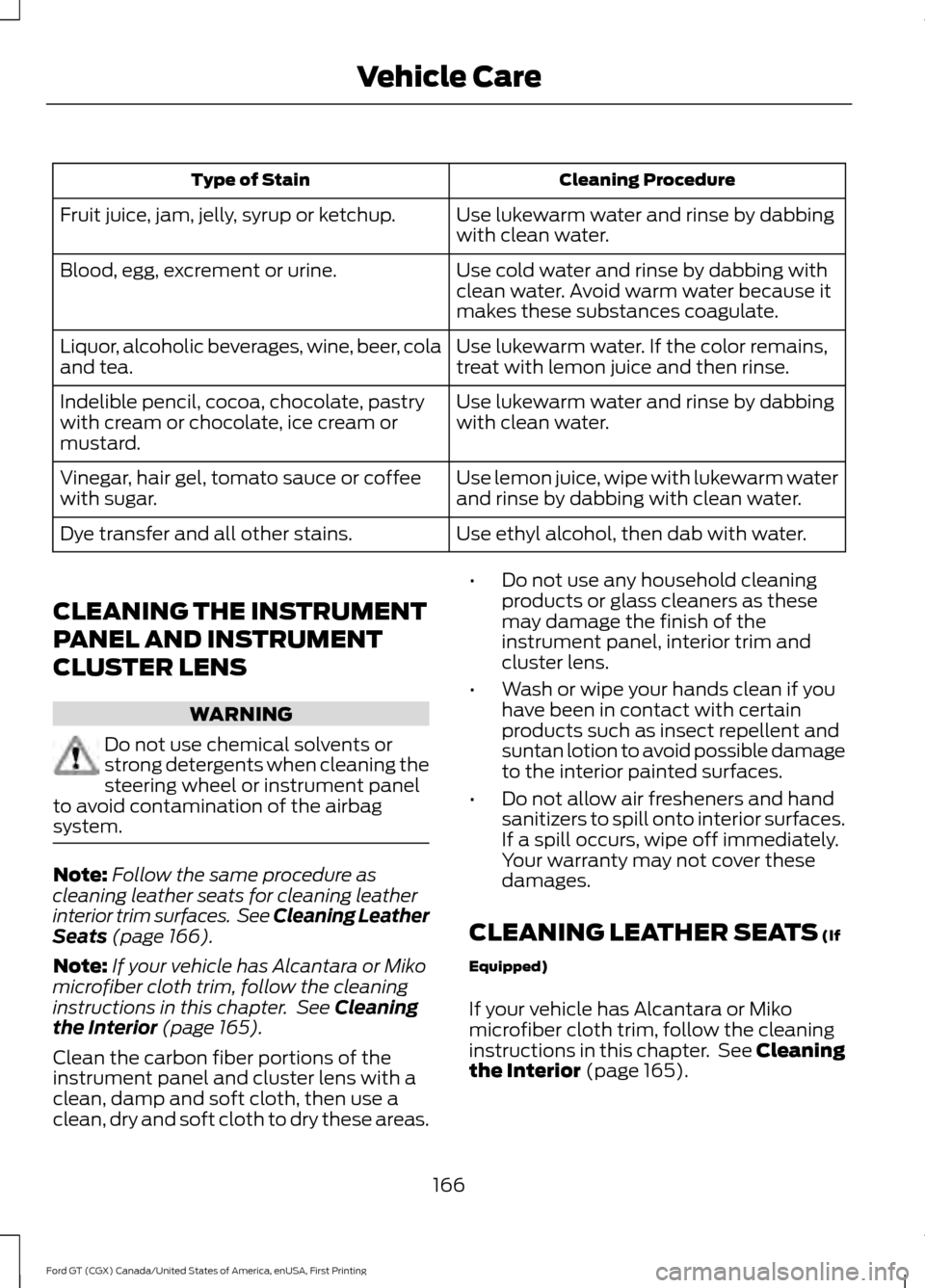
Cleaning Procedure
Type of Stain
Use lukewarm water and rinse by dabbing
with clean water.
Fruit juice, jam, jelly, syrup or ketchup.
Use cold water and rinse by dabbing with
clean water. Avoid warm water because it
makes these substances coagulate.
Blood, egg, excrement or urine.
Use lukewarm water. If the color remains,
treat with lemon juice and then rinse.
Liquor, alcoholic beverages, wine, beer, cola
and tea.
Use lukewarm water and rinse by dabbing
with clean water.
Indelible pencil, cocoa, chocolate, pastry
with cream or chocolate, ice cream or
mustard.
Use lemon juice, wipe with lukewarm water
and rinse by dabbing with clean water.
Vinegar, hair gel, tomato sauce or coffee
with sugar.
Use ethyl alcohol, then dab with water.
Dye transfer and all other stains.
CLEANING THE INSTRUMENT
PANEL AND INSTRUMENT
CLUSTER LENS WARNING
Do not use chemical solvents or
strong detergents when cleaning the
steering wheel or instrument panel
to avoid contamination of the airbag
system. Note:
Follow the same procedure as
cleaning leather seats for cleaning leather
interior trim surfaces. See Cleaning Leather
Seats (page 166).
Note: If your vehicle has Alcantara or Miko
microfiber cloth trim, follow the cleaning
instructions in this chapter. See
Cleaning
the Interior (page 165).
Clean the carbon fiber portions of the
instrument panel and cluster lens with a
clean, damp and soft cloth, then use a
clean, dry and soft cloth to dry these areas. •
Do not use any household cleaning
products or glass cleaners as these
may damage the finish of the
instrument panel, interior trim and
cluster lens.
• Wash or wipe your hands clean if you
have been in contact with certain
products such as insect repellent and
suntan lotion to avoid possible damage
to the interior painted surfaces.
• Do not allow air fresheners and hand
sanitizers to spill onto interior surfaces.
If a spill occurs, wipe off immediately.
Your warranty may not cover these
damages.
CLEANING LEATHER SEATS
(If
Equipped)
If your vehicle has Alcantara or Miko
microfiber cloth trim, follow the cleaning
instructions in this chapter. See Cleaning
the Interior
(page 165).
166
Ford GT (CGX) Canada/United States of America, enUSA, First Printing Vehicle Care
Page 175 of 313

* When inflation only is required
for a tire or other objects, the
selector must be in the Air
position.
What to do When a Tire Is
Punctured
You can repair a tire puncture within the
tire's tread area in two stages with the kit.
• In the first stage, inflate the tire with a
sealing compound and air. After you
inflate the tire, you will need to drive
the vehicle a short distance (about 4 mi
(6 km) to distribute the sealant in the
tire.
• In the second stage, check the tire
pressure and adjust, if necessary, to the
vehicle's specified tire inflation
pressure.
First Stage: Inflating the Tire with
Sealing Compound and Air WARNINGS
Do not stand directly over the kit
while inflating the tire. If you notice
any unusual bulges or deformations
in the tire's sidewall during inflation, stop
and call roadside assistance. If the tire does not inflate to the
recommended tire pressure within
15 minutes, stop and call roadside
assistance. Do not run the engine when
operating the air compressor unless
the vehicle is outdoors or in a
well-ventilated area. Preparation: Park the vehicle in a safe, level
and secure area, away from moving traffic.
Switch the hazard lights on. Apply the
parking brake and switch the engine off.
Inspect the flat tire for visible damage. Sealant compound contains latex. Use
appropriate precautions to avoid any
allergic reactions.
Do not remove any foreign object that has
pierced the tire. If a puncture is located in
the tire sidewall, stop and call roadside
assistance.
1. Remove the valve cap from the tire
valve.
2. Unwrap the dual purpose hose (black tube) from the back of the compressor
housing.
3. Fasten the hose to the tire valve by turning the connector clockwise.
Tighten the connection securely. 4. Plug the power cable into the 12-volt
power point located on the right side
of the floor console.
5. Remove the warning sticker found on the casing/housing and place it on the
top of the instrument panel or the
center of the dash.
172
Ford GT (CGX) Canada/United States of America, enUSA, First Printing Wheels and TiresE175978 E252191
Page 199 of 313

MOTORCRAFT PARTS
Part Number
Component
FA-1912-A*
Air filter element.
HG7Z-6731-A**
Oil filter.
HG7Z-10655-A**
Battery.
SP-542*
Spark plugs.
FP-70*
Cabin air filter.
HG7Z-17528-A (driver side)**
Windshield wiper blade.
HG7Z-17528-B (passenger side)**
*Motorcraft® part number
**Ford part number
We recommend Ford and Motorcraft®
replacement parts available at your Ford
dealer or at fordparts.com for scheduled
maintenance. These parts meet or exceed
Ford Motor Company ’s specifications and
are engineered for your vehicle. Use of
other parts may impact vehicle
performance, emissions and durability.
Your warranty may be void for any damage
related to use of other parts.
For spark plug replacement, contact an
authorized dealer. Replace the spark plugs
at the appropriate intervals.
VEHICLE IDENTIFICATION
NUMBER
You can find the vehicle identification
number at the following locations.
On the vehicle certification label inside the
driver's door opening. On the left-hand side of the instrument
panel.
196
Ford GT (CGX) Canada/United States of America, enUSA, First Printing Capacities and SpecificationsE227109
Page 205 of 313

AUDIO UNIT
WARNING
Driving while distracted can result in
loss of vehicle control, crash and
injury. We strongly recommend that
you use extreme caution when using any
device that may take your focus off the
road. Your primary responsibility is the safe
operation of your vehicle. We recommend
against the use of any hand-held device
while driving and encourage the use of
voice-operated systems when possible.
Make sure you are aware of all applicable
local laws that may affect the use of
electronic devices while driving. You can access your audio features with
the touchscreen and steering wheel
controls. See your SYNC information.
The power button is to the left of the
display screen.
USB PORT (If Equipped)
The USB port is on the bottom of the
instrument panel.
The USB port allows you to plug in media
playing devices, memory sticks and charge
devices (if supported). See your SYNC
information.
202
Ford GT (CGX) Canada/United States of America, enUSA, First Printing Audio System