2017 FORD FUSION ENERGI door lock
[x] Cancel search: door lockPage 4 of 526
Introduction
About This Manual...........................................7
Symbols Glossary.............................................7
Data Recording..................................................9
California Proposition 65..............................11
Perchlorate.........................................................11
Ford Credit..........................................................11
Replacement PartsRecommendation.......................................12
Special Notices................................................12
Mobile CommunicationsEquipment.....................................................13
Export Unique Options..................................13
Environment
Protecting the Environment........................15
Child Safety
General Information.......................................16
Installing Child Restraints.............................17
Booster Seats..................................................25
Child Restraint Positioning..........................27
Child Safety Locks.........................................28
Seatbelts
Principle of Operation..................................30
Fastening the Seatbelts................................31
Seatbelt Height Adjustment......................34
Seatbelt Warning Lamp and IndicatorChime.............................................................35
Seatbelt Reminder.........................................35
Child Restraint and SeatbeltMaintenance................................................37
Seatbelt Extension.........................................37
Personal Safety System™
Personal Safety System™..........................38
Supplementary RestraintsSystem
Principle of Operation..................................39
Driver and Passenger Airbags...................40
Front Passenger Sensing System.............41
Side Airbags.....................................................43
Driver and Passenger Knee Airbags........44
Safety Canopy™............................................44
Crash Sensors and Airbag Indicator.......46
Airbag Disposal...............................................47
Keys and Remote Controls
General Information on RadioFrequencies.................................................48
Remote Control..............................................48
Replacing a Lost Key or RemoteControl...........................................................53
MyKey™
Principle of Operation..................................54
Creating a MyKey............................................55
Clearing All MyKeys.......................................56
Checking MyKey System Status...............56
Using MyKey With Remote StartSystems.........................................................57
MyKey Troubleshooting...............................57
Doors and Locks
Locking and Unlocking.................................58
Keyless Entry.....................................................61
Interior Luggage CompartmentRelease..........................................................63
Security
Passive Anti-Theft System........................65
Anti-Theft Alarm............................................66
Steering Wheel
Adjusting the Steering Wheel....................67
Audio Control..................................................68
1
Fusion Energi / Fusion Hybrid (CC7) Hybrid Electric Vehicle (HEV)/Plug-In Hybrid Electric Vehicle (PHEV), Canada/United States of America, enUSA, Edition date: 201602, Second Printing
Table of Contents
Page 5 of 526
Voice Control...................................................69
Cruise Control.................................................69
Information Display Control.......................70
Heated Steering Wheel................................70
Wipers and Washers
Windshield Wipers..........................................71
Autowipers.........................................................71
Windshield Washers......................................72
Lighting
General Information......................................73
Lighting Control...............................................73
Autolamps........................................................74
Instrument Lighting Dimmer......................75
Headlamp Exit Delay.....................................75
Daytime Running Lamps.............................76
Automatic High Beam Control..................76
Front Fog Lamps............................................78
Direction Indicators........................................78
Interior Lamps.................................................78
Ambient Lighting...........................................80
Windows and Mirrors
Power Windows...............................................81
Global Opening and Closing......................82
Exterior Mirrors................................................82
Interior Mirror...................................................84
Sun Visors.........................................................84
Moonroof..........................................................84
Instrument Cluster
Gauges...............................................................86
Warning Lamps and Indicators................89
Audible Warnings and Indicators.............93
Information Displays
General Information.....................................94
Information Messages................................103
Climate Control
Automatic Climate Control - VehiclesWith: Sony Audio System.......................116
Automatic Climate Control - VehiclesWithout: Sony Audio System................118
Hints on Controlling the InteriorClimate..........................................................119
Heated Windows and Mirrors..................120
Cabin Air Filter.................................................121
Remote Start...................................................121
Seats
Sitting in the Correct Position..................122
Head Restraints.............................................122
Manual Seats.................................................124
Power Seats....................................................124
Memory Function.........................................126
Rear Seats.......................................................128
Heated Seats..................................................129
Climate Controlled Seats..........................130
Rear Seat Armrest.........................................131
Universal Garage DoorOpener
Universal Garage Door Opener................132
Auxiliary Power Points
Auxiliary Power Points................................137
Storage Compartments
Center Console..............................................139
Overhead Console.......................................140
Starting and Stopping theEngine
General Information.....................................141
Keyless Starting.............................................141
Starting a Gasoline Engine........................142
Engine Block Heater....................................144
2
Fusion Energi / Fusion Hybrid (CC7) Hybrid Electric Vehicle (HEV)/Plug-In Hybrid Electric Vehicle (PHEV), Canada/United States of America, enUSA, Edition date: 201602, Second Printing
Table of Contents
Page 11 of 526

Cabin air filter
Check fuel cap
Child safety door lock or unlock
Child seat lower anchor
Child seat tether anchor
Cruise control
Do not open when hot
Engine air filter
Engine coolant
Engine coolant temperature
Engine oil
Explosive gas
Fan warning
Fasten seatbelt
Flammable
Front airbag
Front fog lamps
Fuel pump reset
Fuse compartment
Hazard warning flashers
Heated rear window
Heated windshield
Interior luggage compartmentrelease
Jack
Keep out of reach of children
Lighting control
Low tire pressure warning
Maintain correct fluid level
Note operating instructions
Panic alarm
8
Fusion Energi / Fusion Hybrid (CC7) Hybrid Electric Vehicle (HEV)/Plug-In Hybrid Electric Vehicle (PHEV), Canada/United States of America, enUSA, Edition date: 201602, Second Printing
Introduction E71340 E71880 E231160 E67017 E161353
Page 31 of 526
WARNINGS
manufacturer. A safety seat that isimproperly installed or utilized, isinappropriate for your child's height, age,or weight or does not properly fit the childmay increase the risk of serious injury ordeath.
Never let a passenger hold a child onhis or her lap while your vehicle ismoving. The passenger cannotprotect the child from injury in a crash,which may result in serious injury or death.
Never use pillows, books, or towelsto boost a child. They can slidearound and increase the likelihoodof injury or death in a crash.
WARNINGS
Always restrain an unoccupied childseat or booster seat. These objectsmay become projectiles in a crash orsudden stop, which may increase the riskof serious injury.
Never place, or allow a child to place,the shoulder belt under a child's armor behind the back because itreduces the protection for the upper partof the body and may increase the risk ofinjury or death in a crash.
To avoid risk of injury, do not leavechildren or pets unattended in yourvehicle.
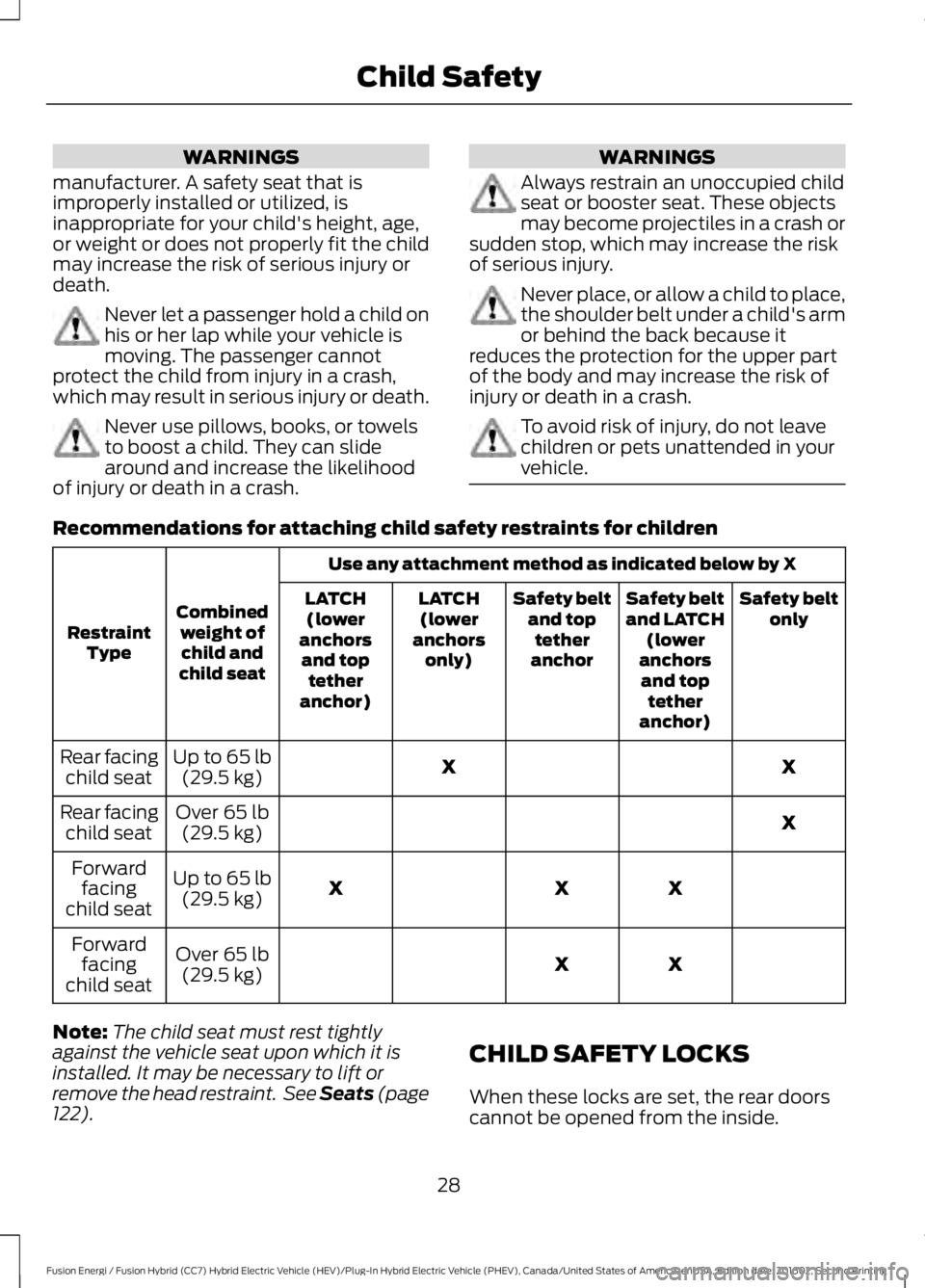
Recommendations for attaching child safety restraints for children
Use any attachment method as indicated below by X
Combinedweight ofchild andchild seat
RestraintType
Safety beltonlySafety beltand LATCH(loweranchorsand toptetheranchor)
Safety beltand toptetheranchor
LATCH(loweranchorsonly)
LATCH(loweranchorsand toptetheranchor)
XXUp to 65 lb(29.5 kg)Rear facingchild seat
XOver 65 lb(29.5 kg)Rear facingchild seat
XXXUp to 65 lb(29.5 kg)
Forwardfacingchild seat
XXOver 65 lb(29.5 kg)
Forwardfacingchild seat
Note:The child seat must rest tightlyagainst the vehicle seat upon which it isinstalled. It may be necessary to lift orremove the head restraint. See Seats (page122).
CHILD SAFETY LOCKS
When these locks are set, the rear doorscannot be opened from the inside.
28
Fusion Energi / Fusion Hybrid (CC7) Hybrid Electric Vehicle (HEV)/Plug-In Hybrid Electric Vehicle (PHEV), Canada/United States of America, enUSA, Edition date: 201602, Second Printing
Child Safety
Page 32 of 526

The childproof locks are located on therear edge of each rear door and must beset separately for each door.
Left-Hand Side
Turn counterclockwise to lock andclockwise to unlock.
Right-Hand Side
Turn clockwise to lock andcounterclockwise to unlock.
29
Fusion Energi / Fusion Hybrid (CC7) Hybrid Electric Vehicle (HEV)/Plug-In Hybrid Electric Vehicle (PHEV), Canada/United States of America, enUSA, Edition date: 201602, Second Printing
Child SafetyE112197
Page 51 of 526

GENERAL INFORMATION ON
RADIO FREQUENCIES
This device complies with Part 15 of theFCC Rules and with Industry Canadalicense-exempt RSS standard(s).Operation is subject to the following twoconditions: (1) This device may not causeharmful interference, and (2) This devicemust accept any interference received,including interference that may causeundesired operation.
Note:Changes or modifications notexpressively approved by the partyresponsible for compliance could void theuser's authority to operate the equipment.The term IC before the radio certificationnumber only signifies that Industry Canadatechnical specifications were met.
The typical operating range for yourtransmitter is approximately 33 feet (10meters). Vehicles with the remote startfeature will have a greater range. One ofthe following could cause a decrease inoperating range:
•Weather conditions.
•Nearby radio towers.
•Structures around the vehicle.
•Other vehicles parked next to yourvehicle.
The radio frequency used by your remotecontrol can also be used by other shortdistance radio transmissions, for exampleamateur radios, medical equipment,wireless headphones, remote controls andalarm systems. If the frequencies arejammed, you will not be able to use yourremote control. You can lock and unlockthe doors with the key.
Note:Make sure to lock your vehicle beforeleaving it unattended.
Note:If you are in range, the remote controlwill operate if you press any buttonunintentionally.
Intelligent Access (If Equipped)
The system uses a radio frequency signalto communicate with your vehicle andauthorize your vehicle to unlock when oneof the following conditions are met:
•You activate the front exterior doorhandle switch.
•You press the luggage compartmentbutton.
•You press a button on the transmitter.
If excessive radio frequency interferenceis present in the area or if the transmitterbattery is low, you may need tomechanically unlock your door. You canuse the mechanical key blade in yourintelligent access key to open the driverdoor in this situation. See RemoteControl (page 48).
REMOTE CONTROL
Intelligent Access Key
48
Fusion Energi / Fusion Hybrid (CC7) Hybrid Electric Vehicle (HEV)/Plug-In Hybrid Electric Vehicle (PHEV), Canada/United States of America, enUSA, Edition date: 201602, Second Printing
Keys and Remote ControlsE218399
Page 52 of 526

The intelligent access keys operate thepower locks and the remote start system.The key must be in your vehicle to use thepush button start.
Removable Key Blade
The intelligent access key also contains aremovable key blade that you can use tounlock your vehicle.
Push the release button and pull the keyblade out.
Note: Your vehicle keys came with asecurity label that provides important keycut information. Keep the label in a safeplace for future reference.
Using the Key Blade
The key cylinder is under a cap on the driverdoor handle.
To remove the cap:
1.Insert the key blade into the slot on thebottom of the handle and applyupward pressure.
2. While maintaining upward pressure,move the cap rearward to release it.Gently remove the key while doing so.
To install the cap:
49
Fusion Energi / Fusion Hybrid (CC7) Hybrid Electric Vehicle (HEV)/Plug-In Hybrid Electric Vehicle (PHEV), Canada/United States of America, enUSA, Edition date: 201602, Second Printing
Keys and Remote ControlsE218400 E151795 E151956 E151957
Page 55 of 526

StatusLED
Remote startsuccessfulSolid green
Remote stopsuccessfulSolid red
Request failed orstatus not receivedBlinking red
Status incompleteBlinking green
Remote Starting your Vehicle
Note:You must press each button withinthree seconds of each other. Your vehiclewill not remote start if you do not follow thissequence.
The label on your transmitter details thestarting procedure.
To remote start your vehicle:
1. Press the lock button to lock all thedoors.
2. Press the remote start button twice.The exterior lamps flash twice.
The horn sounds if the system fails to start,unless quiet start is on. Quiet start runs theblower fan at a slower speed to reducenoise. You can switch this feature on or offin the information display. See GeneralInformation (page 94).
Note:You must press the push buttonignition switch on the instrument panel oncewhile applying the brake pedal beforedriving your vehicle.
The power windows do not work duringremote start and the radio does not turnon automatically.
The parking lamps remain on and yourvehicle will run for 5, 10 or 15 minutes,depending on the setting.
Extending the Engine Running Time
To extend the engine running time durationof your vehicle during remote start, repeatsteps 1 and 2 while the engine is running. Ifthe duration is set to 10 minutes, theduration extends by another 10 minutes.For example, if your vehicle had beenrunning from the first remote start for 5minutes, your vehicle continues to run nowfor a total of 20 minutes. You can extendthe engine running time duration to amaximum of 30 minutes.
Wait at least five seconds before remotestarting after the engine stops running.
Turning Your Vehicle Off After RemoteStarting
Press the button once. Yourvehicle and the parking lampsturn off.
You may have to be closer to your vehiclethan when starting due to ground reflectionand the added noise of your runningvehicle.
You can switch this feature on or off in theinformation display. See GeneralInformation (page 94).
Memory Feature
You can program your intelligent accesskey to recall memory positions. SeeMemory Function (page 126).
52
Fusion Energi / Fusion Hybrid (CC7) Hybrid Electric Vehicle (HEV)/Plug-In Hybrid Electric Vehicle (PHEV), Canada/United States of America, enUSA, Edition date: 201602, Second Printing
Keys and Remote ControlsE138626 E138625