2017 FORD FOCUS spare tire
[x] Cancel search: spare tirePage 70 of 467

PASSIVE ANTI-THEFT
SYSTEM
Note:
The system is not compatible with
non-Ford aftermarket remote start systems.
Use of these systems may result in engine
starting problems and a loss of security
protection.
Note: Metallic objects, electronic devices
or a second coded key on the same key
chain may result in vehicle starting
problems, especially if they are too close to
the key when starting your vehicle. Prevent
these objects from touching the coded key
when starting your vehicle. If your vehicle
fails to start, switch the ignition off, move
all objects on the key chain away from the
key and start your vehicle.
Note: Do not leave a duplicate coded key
in your vehicle. Always take your keys and
lock all doors when leaving your vehicle.
SecuriLock
The system helps prevent the engine from
starting unless you use a coded key
programmed to your vehicle. A message
may appear in the information display.
If your vehicle fails to start, the system may
have a fault. Contact an authorized dealer.
A message may appear in the information
display.
Automatic Arming
The system arms when you switch the
ignition off.
Automatic Disarming
The system disarms when you switch the
ignition on with a coded key.
Replacement Keys
Note: Your vehicle comes with two keys. The intelligent access key functions as a
programmed key that operates the driver
door lock and turns on the intelligent
access with push button start system, as
well as a remote control.
If your intelligent access keys are lost or
stolen and you do not have an extra coded
key, you need to have your vehicle towed
to an authorized dealer. You need to erase
the key codes from your vehicle and
program new coded keys.
Store a spare intelligent access key away
from your vehicle in a safe place. Contact
an authorized dealer to purchase
additional spare or replacement keys.
Programming a Spare Integrated
Keyhead Transmitter
You can program your own integrated
keyhead transmitter or standard
SecuriLock coded keys to your vehicle. This
procedure will program both the vehicle
immobilizer keycode and the remote entry
portion of the remote control to your
vehicle.
Only use integrated keyhead transmitters
or standard SecuriLock keys.
You must have two previously
programmed coded keys and the new
unprogrammed key readily accessible.
Contact an authorized dealer to have the
spare key programmed if two previously
programmed keys are not available.
Make sure that the ignition is switched off
before beginning this procedure. Carry out
all steps within 30 seconds of starting the
sequence. Stop and wait for at least one
minute before starting again if you carry
out any steps out of sequence.
Note:
You can program a maximum of eight
coded keys to your vehicle. All eight can be
integrated keyhead transmitters.
Read and understand the entire procedure
before you begin.
67
Focus (CDH) Canada/United States of America, HM5J 19A321 AA enUSA, Edition date: 201608, First Printing Security
Page 71 of 467

1.
Insert the first previously programmed
coded key into the ignition.
2. Switch the ignition from off to on. Keep
the ignition on for at least 3 seconds,
but no more than 10 seconds.
3. Switch the ignition off and remove the
first coded key from the ignition.
4. After at least 3 seconds but within 10 seconds of switching the ignition off,
insert the second previously coded key
into the ignition.
5. Switch the ignition from off to on. Keep
the ignition on for at least 3 seconds,
but no more than 10 seconds.
6. Switch the ignition off and remove the
second previously programmed coded
key from the ignition.
7. After at least 3 seconds but within 10 seconds of switching the ignition off
and removing the previously
programmed coded key, insert the new
unprogrammed key into the ignition.
8. Switch the ignition from off to on. Keep
the ignition on for at least six seconds.
9. Remove the newly programmed coded
key from the ignition.
If you have successfully programmed the
coded key, it will start your vehicle and
operate the remote entry system.
If programming was unsuccessful, wait 10
seconds and repeat Steps 1 through 8. If
programming remains unsuccessful, have
your vehicle checked by an authorized
dealer.
Wait 20 seconds and repeat Steps 1
through 9 to program an additional key. Programming a Spare Intelligent
Access Key
You must have two previously
programmed coded keys and the new
unprogrammed key readily accessible.
Contact an authorized dealer to have the
spare key programmed if two previously
programmed keys are not available.
Make sure that the ignition is switched off
before beginning this procedure. Make sure
that you close all the doors before
beginning and that they remain closed
throughout the procedure. Carry out all
steps within 30 seconds of starting the
sequence. Stop and wait for at least one
minute before starting again if you carry
out any steps out of sequence.
Note:
You can program a maximum of eight
intelligent access keys to your vehicle.
Read and understand the entire procedure
before you begin. 1. Open the floor console storage
compartment lid.
2. Remove the tray.
68
Focus (CDH) Canada/United States of America, HM5J 19A321 AA enUSA, Edition date: 201608, First Printing SecurityE184385
21
Page 104 of 467

Starting System
Action
Message
Displays when you start your vehicle as a reminder to fully
press the brake pedal.
Press brake to start
Displays if your vehicle fails to start.
Cranking time exceeded
See Starting and Stopping the Engine (page 118).
Steering System Action
Message
The system has detected a fault that requires service. Have
your vehicle checked immediately.
Steering loss Stop safely
You will continue to have full steering but will need to exert
greater force on the steering wheel. Have your vehicle
checked as soon as possible.
Steering assist fault
Service required
The system has detected a fault that requires service. Have
your vehicle checked immediately.
Steering fault Service
now
Tire Pressure Monitoring System Action
Message
Displays if the tire pressure in one or more tires is below the
correct pressure.
Low Tire Pressure
See
Tire Pressure Monitoring System (page 261).
The system has detected a fault that requires service. Have
your vehicle checked as soon as possible.
Tire Pressure Monitor
Fault
Displays if the system detects a fault with a tire pressure
sensor or the spare tire is in use.
Tire Pressure Sensor
Fault
If the warning message remains on after you have checked
the tire pressures, the system has detected a fault that
requires service. Have your vehicle checked as soon as
possible.
Traction Control Action
Message
Displays when you switch the system off.
Traction control off
101
Focus (CDH) Canada/United States of America, HM5J 19A321 AA enUSA, Edition date: 201608, First Printing Information Displays
Page 156 of 467

ACTIVE PARK ASSIST
Parallel Parking, Perpendicular
Parking, Parallel Park Out Assist
WARNINGS
You must remain in your vehicle
when the system turns on. At all
times, you are responsible for
controlling your vehicle, supervising the
system and intervening, if required. Failure
to take care may result in the loss of
control of your vehicle, serious personal
injury or death. The sensors may not detect objects
in heavy rain or other conditions that
cause interference.
Active park assist does not apply the
brakes under any circumstances.
The system is designed to aid the
driver. It is not intended to replace
your attention and judgment. You are
still responsible to drive with due care and
attention. Note:
The Blind Spot Information System
does not detect traffic alongside or behind
your vehicle during an active park assist
maneuver.
The system detects an available parallel
or perpendicular parking space and
automatically steers your vehicle into the
space (hands-free) while you control the
accelerator, gearshift and brakes. The
system visually and audibly guides you to
park your vehicle.
If you are uncomfortable with the proximity
to any vehicle or object, you may choose
to override the system by grabbing the
steering wheel or pushing the active park
assist button. Parallel Park Out Assist automatically
steers your vehicle out of a parallel parking
space (hands-free) while you control the
accelerator, gearshift and brakes. The
system visually and audibly guides you to
enter traffic.
The system may not correctly operate in
any of the following conditions:
•
You use a spare tire or a tire
significantly worn more than the other
tires.
• One or more tires are improperly
inflated.
• You try to park on a tight curve.
• Something passes between the front
bumper and the parking space (a
pedestrian or cyclist).
• The edge of the neighboring parked
vehicle is high off the ground (for
example, a bus, tow truck or flatbed
truck).
• The weather conditions are poor
(heavy rain, snow, fog, etc).
Note: Keep the sensors, located on the
bumper or fascia, free from snow, ice and
large accumulations of dirt. Covered sensors
can affect the system's accuracy. Do not
clean the sensors with sharp objects.
Note: The sensors may not detect objects
with surfaces that absorb ultrasonic waves
or cause ultrasonic interference (motorcycle
exhaust, truck air brakes or horns).
Do not use the system if:
• You have attached a foreign object (for
example, a bike rack or trailer) close to
the sensors on the front or rear of your
vehicle.
• You have attached an overhanging
object (for example, a surfboard) to
the roof.
153
Focus (CDH) Canada/United States of America, HM5J 19A321 AA enUSA, Edition date: 201608, First Printing Parking Aids
Page 157 of 467

•
A foreign object damages or obstructs
the front or rear bumper or side
sensors.
• The correct tire size is not in use on your
vehicle (for example, a mini-spare tire).
Using Active Park Assist - Parallel
Parking Press the active park assist
button to search for a parallel
parking space.
When driving at a speed less than 22 mph
(35 km/h) the system automatically scans
both sides of your vehicle for an available
parking space. The system displays a
message and a corresponding graphic to
indicate it is searching for a parking space.
Use the direction indicator to select
searching either to the left-hand side or
right-hand side of your vehicle. If the
direction indicators are not used, the
system defaults to the passenger side of
your vehicle.Note:
You can also activate the Active Park
Assist system after you have already driven
partially or completely past a parking space.
To do so, press the Active Park button and
the system will inform you if you have
recently passed a suitable parking space.
When the system finds a suitable space,
it displays a message and a tone sounds.
Stop your vehicle and follow the
instructions on the screen. If your vehicle
is moving very slowly, you may need to pull
forward a short distance before the system
is ready to park.
Note: You must observe that the selected
space remains clear of obstructions at all
times during the maneuver.
Note: You should drive your vehicle within
5 ft (1.5 m) and as parallel as possible to
the other vehicles while passing a parking
space. Note:
The system always offers the last
detected parking space (for example, if your
vehicle detects multiple spaces while you
are driving, it offers the last one).
Note: If driven above approximately 22 mph
(35 km/h)
, the system shows a message to
alert you to reduce your vehicle speed.
Automatic Steering into Parking Space
Note: If your vehicle speed exceeds
approximately
6 mph (10 km/h) or the
maneuver is interrupted (driver input), the
system switches off and you need to take
full control of your vehicle.
When you shift the transmission into
reverse (R), with your hands off the wheel
(and nothing obstructing its movement),
your vehicle steers itself into the space.
The system displays instructions to move
your vehicle back and forth in the space.
154
Focus (CDH) Canada/United States of America, HM5J 19A321 AA enUSA, Edition date: 201608, First Printing Parking AidsE146186 E130107
Page 192 of 467
ROADSIDE ASSISTANCE
Vehicles Sold in the United States:
Getting Roadside Assistance
To fully assist you should you have a
vehicle concern, Ford Motor Company
offers a complimentary roadside
assistance program. This program is
separate from the New Vehicle Limited
Warranty. The service is available:
•
24 hours a day, seven days a week.
• For the coverage period listed on the
Roadside Assistance Card included in
your Owner's Manual portfolio.
Roadside Assistance covers:
• A flat tire change with a good spare, if
provided with the vehicle (except
vehicles supplied with a tire inflation
kit).
• Battery jump start.
• Lock-out assistance (key replacement
cost is the customer's responsibility).
• Fuel delivery — independent service
contractors, if not prohibited by state,
local or municipal law, shall deliver up
to 2 gal (7.6 L) of gasoline or 5 gal
(18.9 L) of diesel fuel to a disabled
vehicle. Roadside Assistance limits fuel
delivery service to two no-charge
occurrences within a 12-month period.
• Winch out — available within
100 ft
(30.5 m) of a paved or county
maintained road, no recoveries.
• Towing — independent service
contractors, if not prohibited by state,
local or municipal law, shall tow Ford
eligible vehicles to an authorized dealer
within
35 mi (56 km) of the
disablement location or to the nearest authorized dealer. If a member
requests a tow to an authorized dealer
that is more than
35 mi (56 km) from
the disablement location, the member
shall be responsible for any mileage
costs in excess of
35 mi (56 km).
Roadside Assistance includes up to $200
for a towed trailer if the disabled eligible
vehicle requires service at the nearest
authorized dealer. If the towing vehicle is
operational but the trailer is not, then the
trailer does not qualify for any roadside
services.
Vehicles Sold in the United States:
Using Roadside Assistance
Complete the roadside assistance
identification card and place it in your
wallet for quick reference. This card is in
the owner's information portfolio in the
glove compartment.
United States Ford vehicle customers who
require Roadside Assistance, call
1-800-241-3673.
If you need to arrange roadside assistance
for yourself, Ford Motor Company
reimburses a reasonable amount for
towing to the nearest dealership within
35 mi (56 km)
. To obtain reimbursement
information, United States Ford vehicle
customers call 1-800-241-3673.
Customers need to submit their original
receipts.
Vehicles Sold in Canada: Getting
Roadside Assistance
To fully assist you should you have a
vehicle concern, Ford Motor Company of
Canada, Limited offers a complimentary
roadside assistance program. This program
is eligible within Canada or the continental
United States.
189
Focus (CDH) Canada/United States of America, HM5J 19A321 AA enUSA, Edition date: 201608, First Printing Roadside Emergencies
Page 248 of 467
TIRE CARE
Important Information for
235/40R18 Low-Profile Tires
and Wheels
If your vehicle is equipped with
235/40R18 tires, they are
low-profile tires. These tires and
wheels are designed to give your
vehicle a sport appearance. With
low-profile tires, you may notice
an increase in road noise and
faster tire wear, depending on
road conditions and driving styles.
Due to their design, low-profile
tires and wheels are more prone
to road damage from potholes,
rough or unpaved roads, car wash
rails and curb contact than
standard tires and wheels.
Note:
Your vehicle ’s warranty does
not cover these types of damage.
Tires should always be kept at the
correct inflation pressures and
extra caution should be taken when
operating on rough roads to avoid
impacts that could cause wheel
and tire damage. Information About Uniform
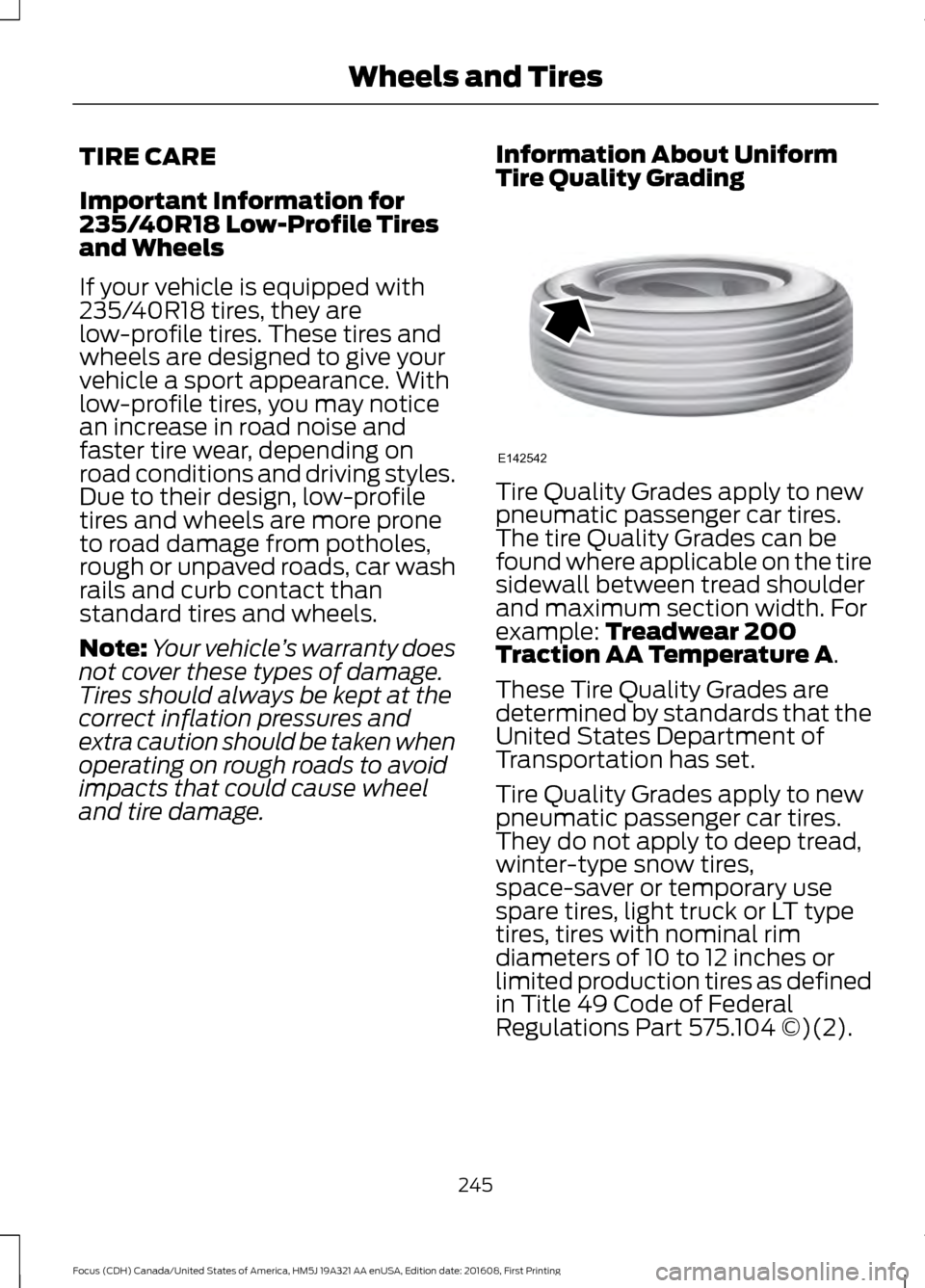
Tire Quality Grading Tire Quality Grades apply to new
pneumatic passenger car tires.
The tire Quality Grades can be
found where applicable on the tire
sidewall between tread shoulder
and maximum section width. For
example: Treadwear 200
Traction AA Temperature A.
These Tire Quality Grades are
determined by standards that the
United States Department of
Transportation has set.
Tire Quality Grades apply to new
pneumatic passenger car tires.
They do not apply to deep tread,
winter-type snow tires,
space-saver or temporary use
spare tires, light truck or LT type
tires, tires with nominal rim
diameters of 10 to 12 inches or
limited production tires as defined
in Title 49 Code of Federal
Regulations Part 575.104 ©)(2).
245
Focus (CDH) Canada/United States of America, HM5J 19A321 AA enUSA, Edition date: 201608, First Printing Wheels and TiresE142542
Page 255 of 467
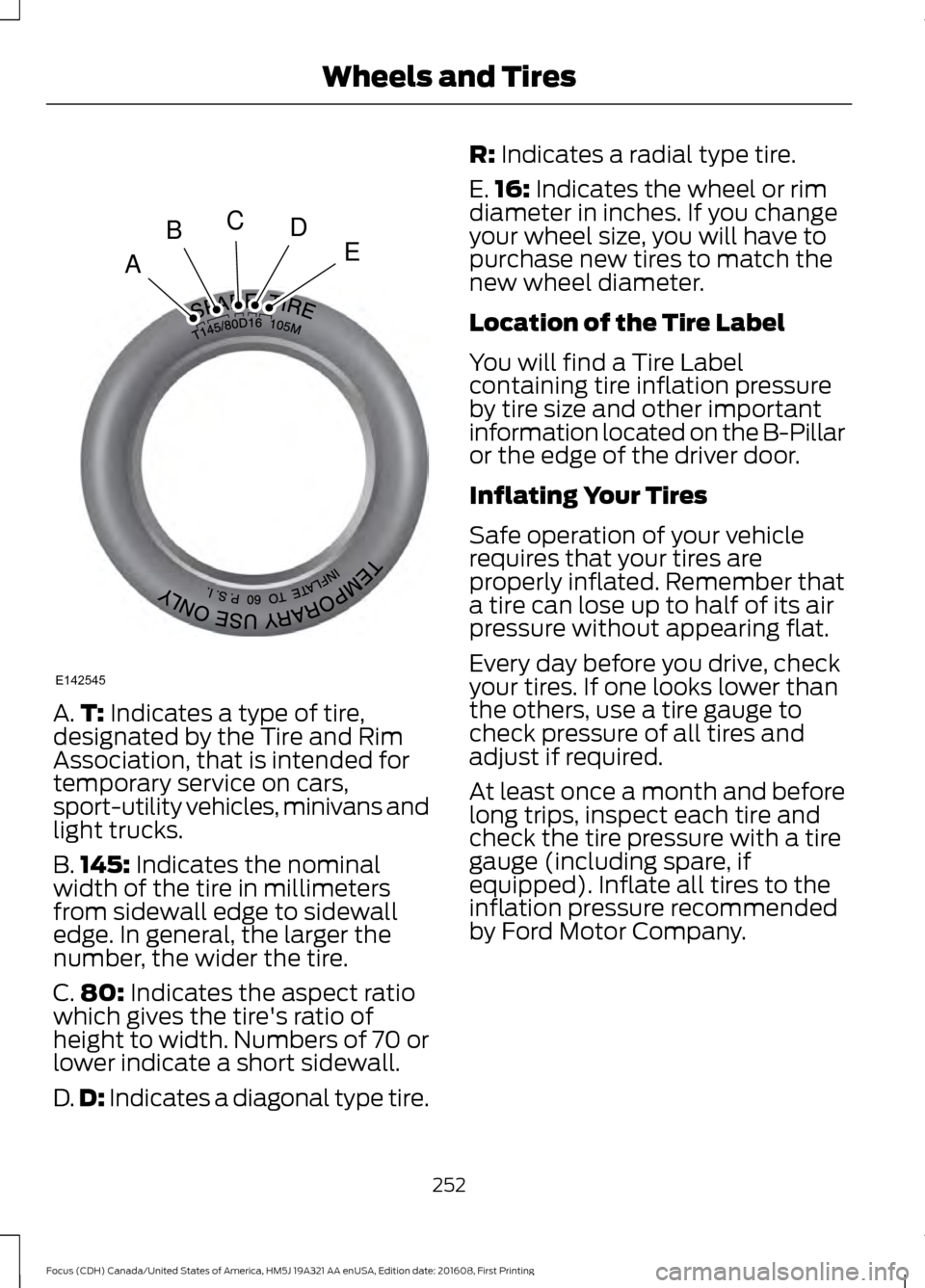
A.
T: Indicates a type of tire,
designated by the Tire and Rim
Association, that is intended for
temporary service on cars,
sport-utility vehicles, minivans and
light trucks.
B. 145:
Indicates the nominal
width of the tire in millimeters
from sidewall edge to sidewall
edge. In general, the larger the
number, the wider the tire.
C. 80:
Indicates the aspect ratio
which gives the tire's ratio of
height to width. Numbers of 70 or
lower indicate a short sidewall.
D. D:
Indicates a diagonal type tire. R:
Indicates a radial type tire.
E. 16:
Indicates the wheel or rim
diameter in inches. If you change
your wheel size, you will have to
purchase new tires to match the
new wheel diameter.
Location of the Tire Label
You will find a Tire Label
containing tire inflation pressure
by tire size and other important
information located on the B-Pillar
or the edge of the driver door.
Inflating Your Tires
Safe operation of your vehicle
requires that your tires are
properly inflated. Remember that
a tire can lose up to half of its air
pressure without appearing flat.
Every day before you drive, check
your tires. If one looks lower than
the others, use a tire gauge to
check pressure of all tires and
adjust if required.
At least once a month and before
long trips, inspect each tire and
check the tire pressure with a tire
gauge (including spare, if
equipped). Inflate all tires to the
inflation pressure recommended
by Ford Motor Company.
252
Focus (CDH) Canada/United States of America, HM5J 19A321 AA enUSA, Edition date: 201608, First Printing Wheels and TiresA
BCDE
E142545