2017 FORD FOCUS ELECTRIC clock
[x] Cancel search: clockPage 195 of 367
11.
After 4 miles (6 kilometers), stop and
check the tire pressure. See Second
Stage: Checking Tire Pressure.
Note: If you experience any unusual
vibration, ride disturbance or noise while
driving, reduce your speed until you can
safely pull off to the side of the road to call
for roadside assistance.
Note: Do not proceed to the second stage
of this operation.
Second Stage: Checking Tire
Pressure WARNINGS
If you are proceeding from the First
stage: Re–inflating the tire with
sealing compound and air section
and have injected sealant in the tire and
the pressure is below 20 psi (1.4 bar), stop
and call roadside assistance. If tire
pressure is above 20 psi (1.4 bar), continue
to the next step. The power plug may get hot after use
and should be handled carefully
while unplugging.
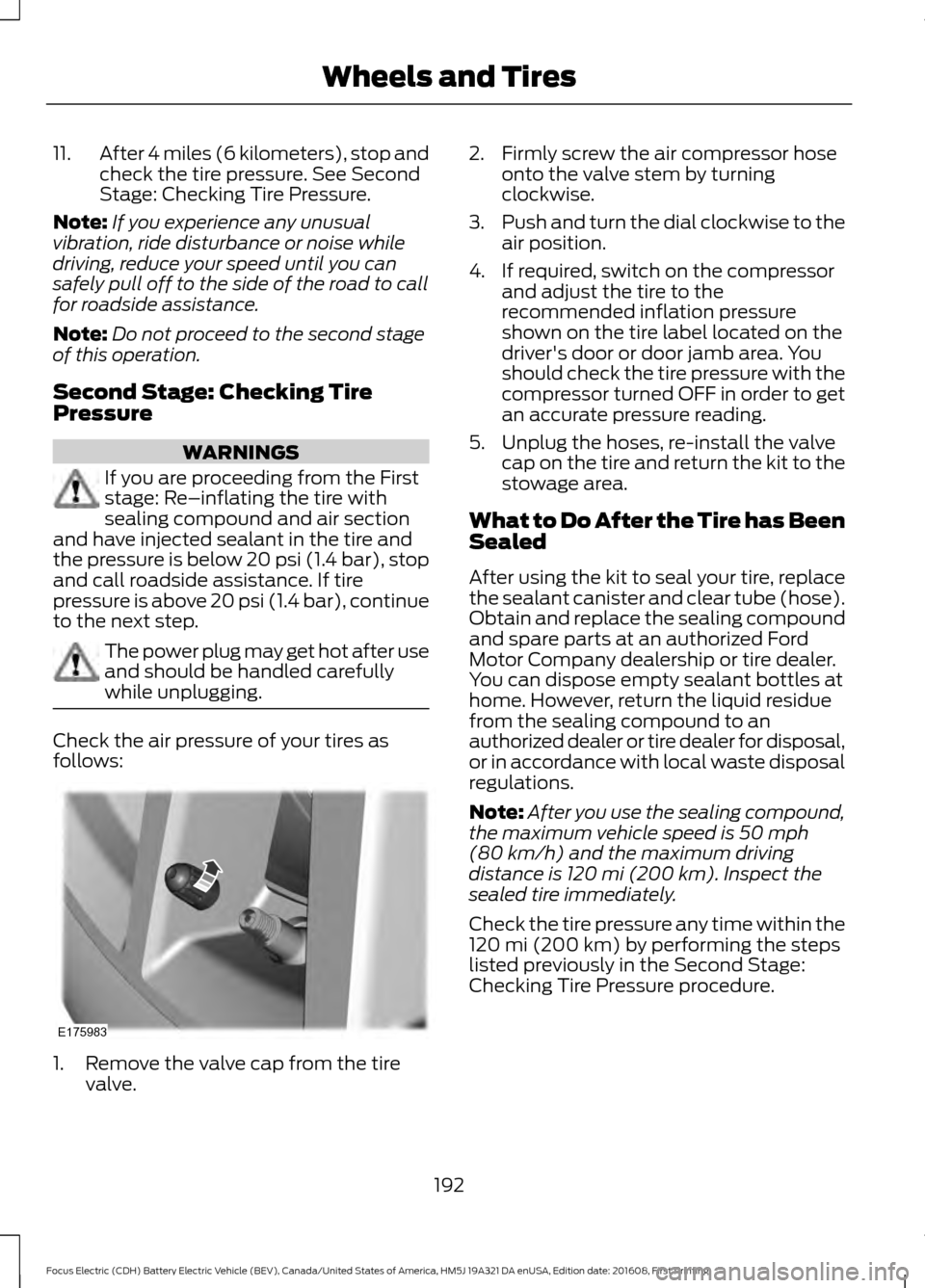
Check the air pressure of your tires as
follows:
1. Remove the valve cap from the tire
valve. 2. Firmly screw the air compressor hose
onto the valve stem by turning
clockwise.
3. Push and turn the dial clockwise to the
air position.
4. If required, switch on the compressor and adjust the tire to the
recommended inflation pressure
shown on the tire label located on the
driver's door or door jamb area. You
should check the tire pressure with the
compressor turned OFF in order to get
an accurate pressure reading.
5. Unplug the hoses, re-install the valve cap on the tire and return the kit to the
stowage area.
What to Do After the Tire has Been
Sealed
After using the kit to seal your tire, replace
the sealant canister and clear tube (hose).
Obtain and replace the sealing compound
and spare parts at an authorized Ford
Motor Company dealership or tire dealer.
You can dispose empty sealant bottles at
home. However, return the liquid residue
from the sealing compound to an
authorized dealer or tire dealer for disposal,
or in accordance with local waste disposal
regulations.
Note: After you use the sealing compound,
the maximum vehicle speed is 50 mph
(80 km/h) and the maximum driving
distance is 120 mi (200 km). Inspect the
sealed tire immediately.
Check the tire pressure any time within the
120 mi (200 km)
by performing the steps
listed previously in the Second Stage:
Checking Tire Pressure procedure.
192
Focus Electric (CDH) Battery Electric Vehicle (BEV), Canada/United States of America, HM5J 19A321 DA enUSA, Edition date: 201608, First Printing Wheels and TiresE175983
Page 228 of 367

Action and Description
Menu Item
Item
This bar displays icons and messages pertaining to current
system activities including climate settings, voice
commands and phone functions such as text messages.
Status Bar
A
This button is available on the main screens. Pressing it
takes you to the home screen view.
Home
B
This shows the current time. You can set the clock manually
or have it controlled by the vehicle's GPS location. See
Settings (page 287).
Clock
C
This displays the current outside temperature.
Outside
Temperature
D
You can touch any of the buttons on this bar to select a
feature.
Feature Bar
E
The touchscreen allows you quick access
to all of your comfort, navigation,
communication and entertainment
options. Using the status and feature bar
you can quickly select the feature you want
to use.
Note: Your system is equipped with a
feature that allows you to access and
control audio features for 10 minutes after
you switch the ignition off (and no doors
open). The Status Bar
Additional icons also display in the status
bar depending on market, vehicle options
and current operation. If a feature is not
active, the icon does not display. Certain
icons may move to the left or right
depending on what options are active.
225
Focus Electric (CDH) Battery Electric Vehicle (BEV), Canada/United States of America, HM5J 19A321 DA enUSA, Edition date: 201608, First Printing SYNC™ 3
Page 292 of 367
Action and Description
Menu Item
This allows you to view the version level of the Gracenote Database.
Gracenote® Data-
base Info
This allows you to view the manufacturer and model number of your
media device.
Device Informa-
tion
Erase the stored in media information in order to re-index.
Update Media
Index
Clock
To adjust the time, select the up and down
arrows on either side of the screen. The
arrows on the left adjust the hour and
arrows on the right adjust the minute. You
can then select AM or PM. You can adjust the following features: Action and Description
Menu Item
Select how time displays.
Clock Format
When active, the clock adjusts to time zone changes.
Auto Time Zone
Update This feature is only available in vehicles with navigation.
When selected, the vehicle clock resets to GPS satellite time.
Reset Clock to
GPS Time
The system automatically saves any
updates you make to the settings. Bluetooth
Pressing this button allows you to access
the following: Action
Menu Item
Turning Bluetooth off disconnects all devices and does not permit
new connections.
Bluetooth
You must activate Bluetooth to pair a
Bluetooth-enabled device.
The processes of pairing a Bluetooth
device is the same as pairing a phone. See
Pairing a Device in Phone settings for how
to pair a device and the available options. Phone
Pair your Bluetooth-enabled phone with
the system before using the functions in
hands-free mode.
Switch on Bluetooth on your device to
begin pairing. See your phone
’s manual if
necessary.
289
Focus Electric (CDH) Battery Electric Vehicle (BEV), Canada/United States of America, HM5J 19A321 DA enUSA, Edition date: 201608, First Printing SYNC™ 3
Page 365 of 367

Remote Start.........................................................
46
Sounding the Panic Alarm............................... 46
Remote Start...................................................97
Removing a Headlamp...............................175
Repairing Minor Paint Damage...............185
Replacement Parts Recommendation........................................10
Collision Repairs.................................................... 10
Scheduled Maintenance and Mechanical Repairs................................................................. 10
Warranty on Replacement Parts.................... 10
Replacing a Lost Key or Remote Control.............................................................47
Reporting Safety Defects (Canada Only)...............................................................152
Reporting Safety Defects (U.S. Only)...............................................................152
Roadside Assistance...................................142 Vehicles Sold in Canada: Getting Roadside
Assistance........................................................ 142
Vehicles Sold in Canada: Roadside Assistance Program Coverage.................. 143
Vehicles Sold in Canada: Using Roadside Assistance........................................................ 143
Vehicles Sold in the United States: Getting Roadside Assistance.................................... 142
Vehicles Sold in the United States: Using Roadside Assistance.................................... 142
Roadside Emergencies
...............................142
Running-In See: Breaking-In.................................................. 140
S
Safety Canopy ™
.............................................41
Scheduled Maintenance Record...........320
Scheduled Maintenance............................316
Seatbelt Extension
........................................33
Seatbelt Height Adjustment.....................30
Seatbelt Reminder
..........................................31
Belt-Minder™......................................................... 31
Seatbelts............................................................27 Principle of Operation......................................... 27
Seatbelt Warning Lamp and Indicator Chime..............................................................30
Conditions of operation...................................... 31
Seats...................................................................98
Security..............................................................58 Settings............................................................287
911 Assist............................................................... 292
Ambient Lighting................................................ 297
Bluetooth.............................................................. 289
Clock...................................................................... 289
Display................................................................... 298
General.................................................................. 296
Media Player........................................................ 288
Mobile Apps......................................................... 295
Navigation............................................................ 293
Phone..................................................................... 289
Radio...................................................................... 292
Sound..................................................................... 287
Valet Mode........................................................... 299
Vehicle.................................................................... 297
Voice Control....................................................... 299
Wi-Fi........................................................................\
297
Side Airbags.....................................................39
Sitting in the Correct Position...................98
Snow Chains See: Using Snow Chains................................. 209
Special Notices
................................................10
New Vehicle Limited Warranty........................ 10
On Board Diagnostics Data Link Connector
............................................................. 11
Special Instructions............................................. 10
Speed Control See: Cruise Control............................................ 129
Stability Control
............................................122
Principle of Operation....................................... 122
Starting and Stopping the Electric Motor.............................................................106
Starting the Electric Motor.......................106 Keyless Starting.................................................. 106
Starting Your Vehicle........................................ 106
Steering.............................................................131 Electric Power Steering..................................... 131
Steering Wheel................................................61
Storage Compartments
.............................105
Sun Visors..........................................................74
Illuminated Vanity Mirror.................................... 74
Supplementary Restraints System.........35 Principle of Operation......................................... 35
Switching Off the Electric Motor............107
Symbols Glossary.............................................5
SYNC™ 3
........................................................224
General Information......................................... 224
SYNC™ 3 Troubleshooting
......................299
362
Focus Electric (CDH) Battery Electric Vehicle (BEV), Canada/United States of America, HM5J 19A321 DA enUSA, Edition date: 201608, First Printing Index