2017 FORD FIESTA radio
[x] Cancel search: radioPage 374 of 450
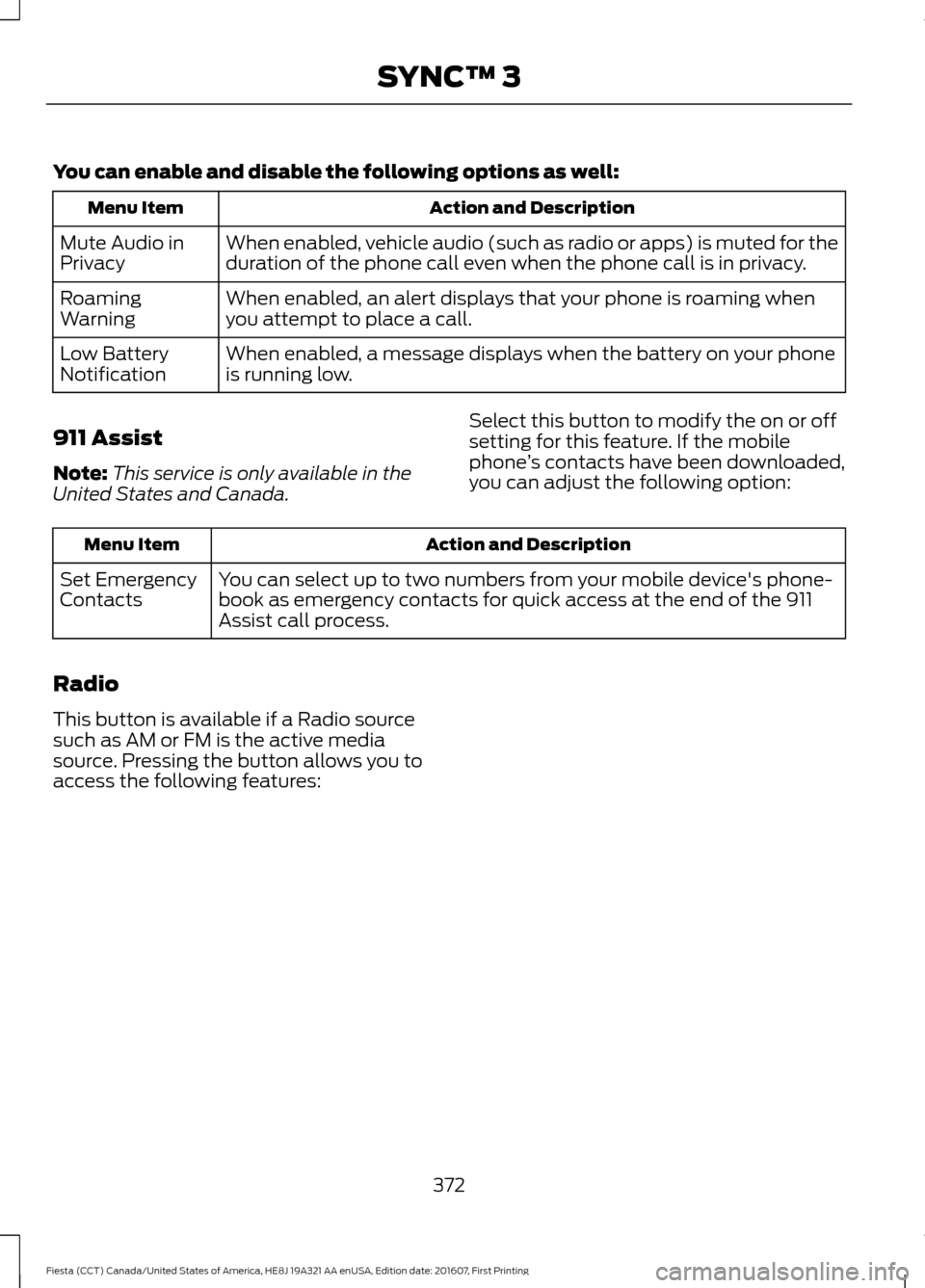
You can enable and disable the following options as well:
Action and Description
Menu Item
When enabled, vehicle audio (such as radio or apps) is muted for the
duration of the phone call even when the phone call is in privacy.
Mute Audio in
Privacy
When enabled, an alert displays that your phone is roaming when
you attempt to place a call.
Roaming
Warning
When enabled, a message displays when the battery on your phone
is running low.
Low Battery
Notification
911 Assist
Note: This service is only available in the
United States and Canada. Select this button to modify the on or off
setting for this feature. If the mobile
phone
’s contacts have been downloaded,
you can adjust the following option: Action and Description
Menu Item
You can select up to two numbers from your mobile device's phone-
book as emergency contacts for quick access at the end of the 911
Assist call process.
Set Emergency
Contacts
Radio
This button is available if a Radio source
such as AM or FM is the active media
source. Pressing the button allows you to
access the following features:
372
Fiesta (CCT) Canada/United States of America, HE8J 19A321 AA enUSA, Edition date: 201607, First Printing SYNC™ 3
Page 375 of 450
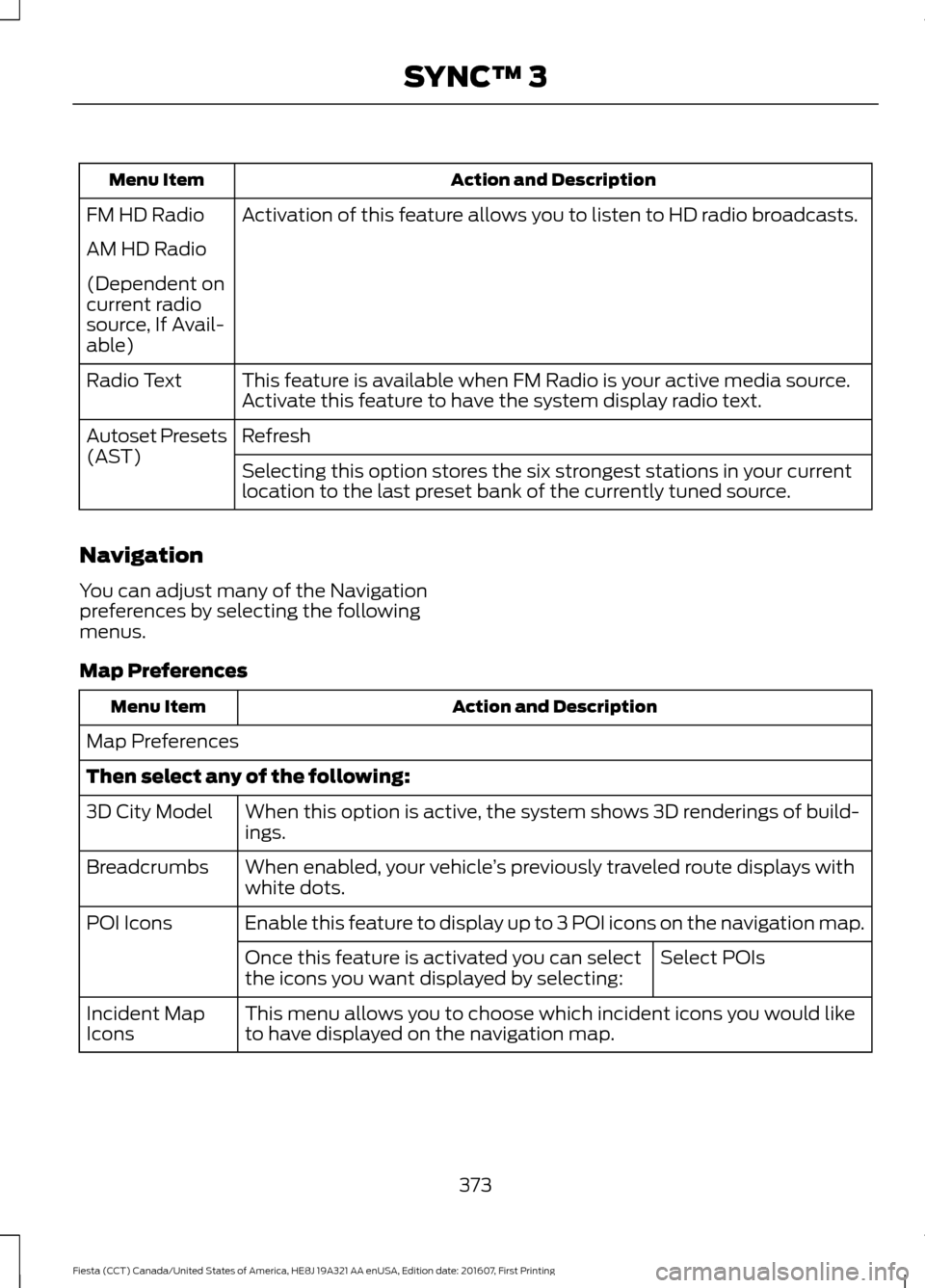
Action and Description
Menu Item
Activation of this feature allows you to listen to HD radio broadcasts.
FM HD Radio
AM HD Radio
(Dependent on
current radio
source, If Avail-
able)
This feature is available when FM Radio is your active media source.
Activate this feature to have the system display radio text.
Radio Text
Refresh
Autoset Presets
(AST)
Selecting this option stores the six strongest stations in your current
location to the last preset bank of the currently tuned source.
Navigation
You can adjust many of the Navigation
preferences by selecting the following
menus.
Map Preferences Action and Description
Menu Item
Map Preferences
Then select any of the following: When this option is active, the system shows 3D renderings of build-
ings.
3D City Model
When enabled, your vehicle ’s previously traveled route displays with
white dots.
Breadcrumbs
Enable this feature to display up to 3 POI icons on the navigation map.
POI Icons
Select POIs
Once this feature is activated you can select
the icons you want displayed by selecting:
This menu allows you to choose which incident icons you would like
to have displayed on the navigation map.
Incident Map
Icons
373
Fiesta (CCT) Canada/United States of America, HE8J 19A321 AA enUSA, Edition date: 201607, First Printing SYNC™ 3
Page 380 of 450
Door Keypad Code
Select this button to add or erase a
personal door keypad code. To add or
erase a personal code, you first need to
enter the five-digit factory set code. You
can find this code on the owner's wallet
card in the glove box or from your
authorized dealer.
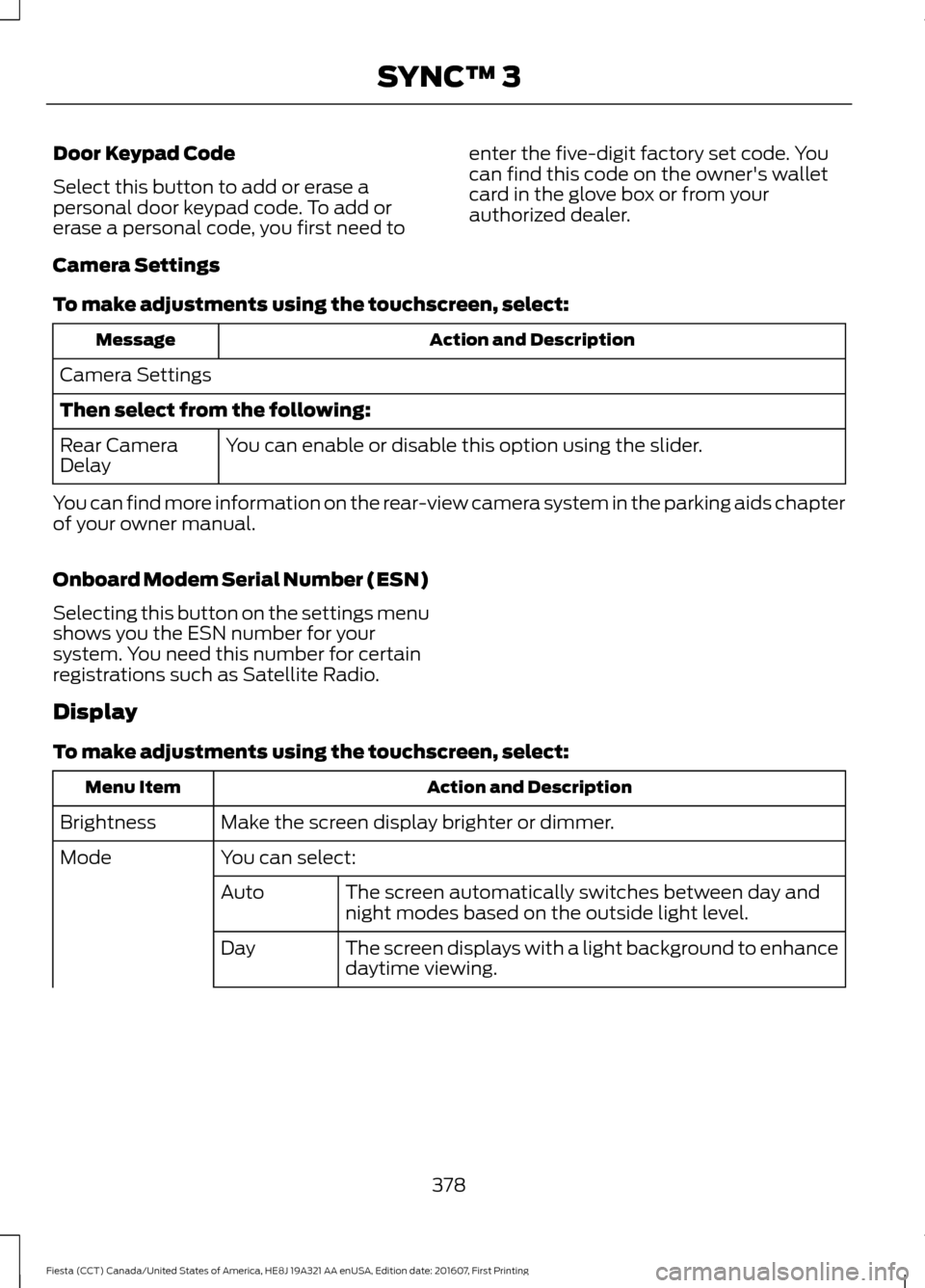
Camera Settings
To make adjustments using the touchscreen, select: Action and Description
Message
Camera Settings
Then select from the following: You can enable or disable this option using the slider.
Rear Camera
Delay
You can find more information on the rear-view camera system in the parking aids chapter
of your owner manual.
Onboard Modem Serial Number (ESN)
Selecting this button on the settings menu
shows you the ESN number for your
system. You need this number for certain
registrations such as Satellite Radio.
Display
To make adjustments using the touchscreen, select: Action and Description
Menu Item
Make the screen display brighter or dimmer.
Brightness
You can select:
Mode
The screen automatically switches between day and
night modes based on the outside light level.
Auto
The screen displays with a light background to enhance
daytime viewing.
Day
378
Fiesta (CCT) Canada/United States of America, HE8J 19A321 AA enUSA, Edition date: 201607, First Printing SYNC™ 3
Page 393 of 450
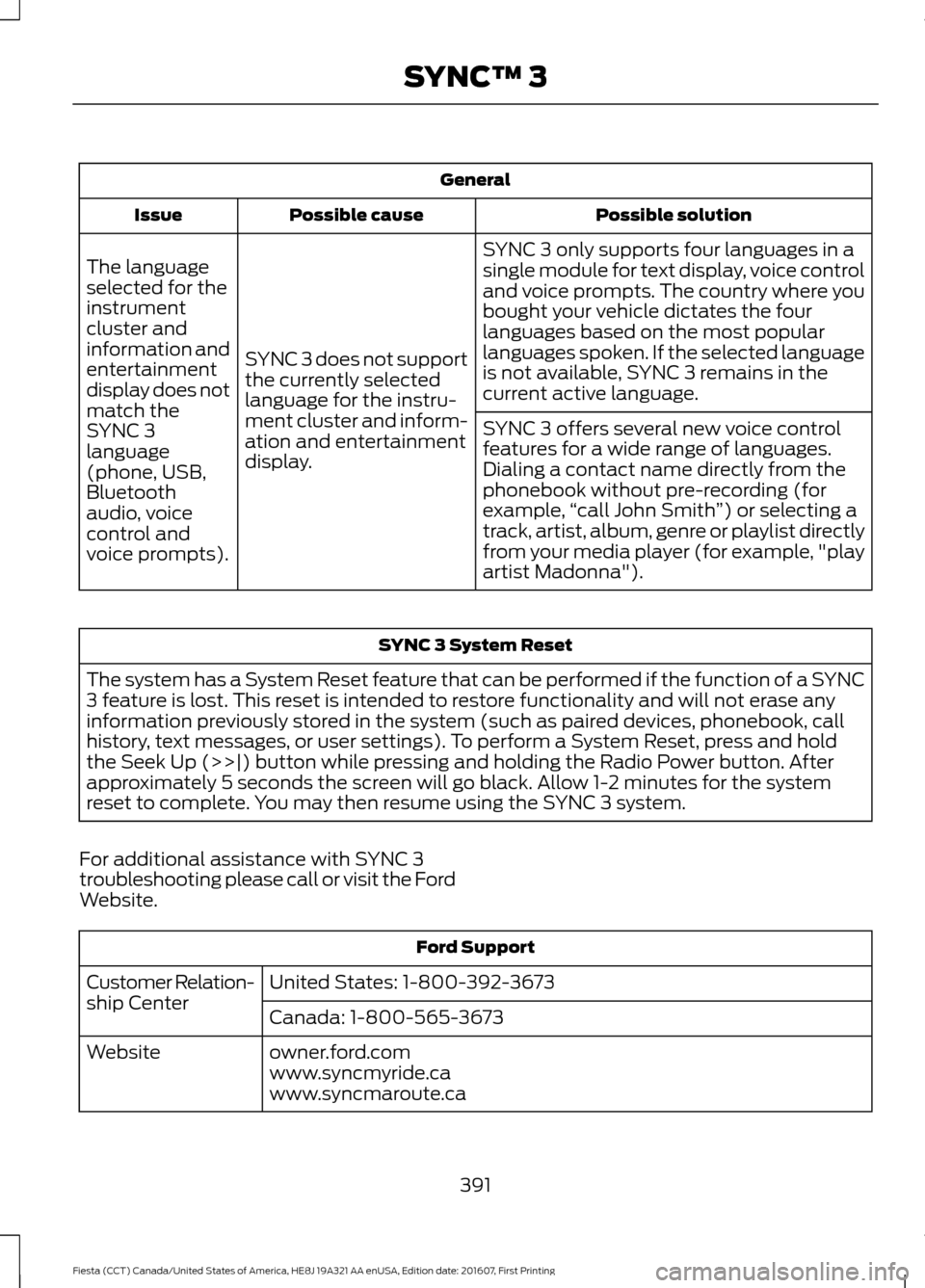
General
Possible solution
Possible cause
Issue
SYNC 3 only supports four languages in a
single module for text display, voice control
and voice prompts. The country where you
bought your vehicle dictates the four
languages based on the most popular
languages spoken. If the selected language
is not available, SYNC 3 remains in the
current active language.
SYNC 3 does not support
the currently selected
language for the instru-
ment cluster and inform-
ation and entertainment
display.
The language
selected for the
instrument
cluster and
information and
entertainment
display does not
match the
SYNC 3
SYNC 3 offers several new voice control
features for a wide range of languages.
Dialing a contact name directly from the
phonebook without pre-recording (for
example,
“call John Smith ”) or selecting a
track, artist, album, genre or playlist directly
from your media player (for example, "play
artist Madonna").
language
(phone, USB,
Bluetooth
audio, voice
control and
voice prompts). SYNC 3 System Reset
The system has a System Reset feature that can be performed if the function of a SYNC
3 feature is lost. This reset is intended to restore functionality and will not erase any
information previously stored in the system (such as paired devices, phonebook, call
history, text messages, or user settings). To perform a System Reset, press and hold
the Seek Up (>>|) button while pressing and holding the Radio Power button. After
approximately 5 seconds the screen will go black. Allow 1-2 minutes for the system
reset to complete. You may then resume using the SYNC 3 system.
For additional assistance with SYNC 3
troubleshooting please call or visit the Ford
Website. Ford Support
United States: 1-800-392-3673
Customer Relation-
ship Center
Canada: 1-800-565-3673
owner.ford.com
Website
www.syncmyride.ca
www.syncmaroute.ca
391
Fiesta (CCT) Canada/United States of America, HE8J 19A321 AA enUSA, Edition date: 201607, First Printing SYNC™ 3
Page 395 of 450
•
Do not exceed the total weight
capacity of the vehicle or of the front
or rear axle (GVWR or GAWR as
indicated on the Safety Compliance
Certification label). Ask an authorized
dealer for specific weight information.
• The Federal Communications
Commission (FCC) and Canadian
Radio Telecommunications
Commission (CRTC) regulate the use
of radio transmitter-equipped mobile
communications systems, for example,
two-way radios, telephones and theft
alarms. Any such equipment should
comply with Federal Communications
Commission (FCC) and Canadian
Radio Telecommunications
Commission (CRTC) regulations and
an authorized dealer should install this
equipment.
• An authorized dealer should install
mobile communications systems.
Improper installation may harm the
operation of your vehicle, particularly
if their manufacturer did not design the
mobile communication system
specifically for automotive use.
• If you or an authorized dealer add any
non-Ford electrical or electronic
accessories or components to your
vehicle, you may adversely affect the
performance of other electrical
systems in the vehicle.
393
Fiesta (CCT) Canada/United States of America, HE8J 19A321 AA enUSA, Edition date: 201607, First Printing Accessories
Page 438 of 450
GRACENOTE SERVERS OR GRACENOTE
CONTENT. GRACENOTE COLLECTIVELY
AND SEPARATELY RESERVE THE RIGHT
TO DELETE DATA AND/OR CONTENT
FROM THE COMPANIES' RESPECTIVE
SERVERS OR, IN THE CASE OF
GRACENOTE, CHANGE DATA
CATEGORIES FOR ANY CAUSE THAT
GRACENOTE DEEMS SUFFICIENT. NO
WARRANTY IS MADE THAT EITHER
GRACENOTE CONTENT OR THE
GRACENOTE SOFTWARE OR
GRACENOTE SERVERS ARE ERROR-FREE
OR THAT THE FUNCTIONING OF THE
GRACENOTE SOFTWARE OR
GRACENOTE SERVERS WILL BE
UNINTERRUPTED. GRACENOTE IS NOT
OBLIGATED TO PROVIDE YOU WITH ANY
ENHANCED OR ADDITIONAL DATA TYPES
THAT GRACENOTE MAY CHOOSE TO
PROVIDE IN THE FUTURE AND IS FREE
TO DISCONTINUE ITS ONLINE SERVICES
AT ANY TIME. GRACENOTE DISCLAIM ALL
WARRANTIES EXPRESS OR IMPLIED,
INCLUDING, BUT NOT LIMITED TO,
IMPLIED WARRANTIES OF
MERCHANTABILITY, FITNESS FOR A
PARTICULAR PURPOSE, TITLE, AND
NON-INFRINGEMENT. NEITHER
GRACENOTE WARRANTS THE RESULTS
THAT WILL BE OBTAINED BY YOUR USE
OF THE GRACENOTE SOFTWARE OR ANY
GRACENOTE SERVER. IN NO CASE WILL
GRACENOTE BE LIABLE FOR ANY
CONSEQUENTIAL OR INCIDENTAL
DAMAGES OR FOR ANY LOST PROFITS
OR LOST REVENUES FOR ANY REASON
WHATSOEVER. © Gracenote 2007.
Radio Frequency Statement
FCC ID: ACJ-SYNCG3-L
IC: 216B-SYNCG3-L
This device complies with Part 15 of the
FCC Rules and with RSS-210 of Industry
Canada. Operation is subject to the
following two conditions:
(1) This device may not cause harmful
interference, and
(2)
this device must accept any
interference received, including
interference that may cause undesired
operation.
Note: Changes or modifications not
expressively approved by the party
responsible for compliance could void the
user's authority to operate the equipment.
The antenna used for this transmitter must
not be co-located or operating in
conjunction with any other antenna or
transmitter.
SUNA TRAFFIC CHANNEL – TERMS
AND CONDITIONS
By activating, using and/or accessing the
SUNA Traffic Channel, SUNA Predictive or
other content or material provided by
Intelematics (together, SUNA Products
and/or Services
), you must accept
certain terms and conditions. The following
is a brief summary of the terms and
conditions that apply to you. To view the
full terms and conditions relevant to your
use of the SUNA Products and/or Services,
please consult: Website
www.sunatraffic.com.au/termsandcon- ditions/
1. Acceptance
By using SUNA Products and/or Services,
you will be deemed to have accepted and
agreed to be bound by the terms and
conditions fully detailed at:
436
Fiesta (CCT) Canada/United States of America, HE8J 19A321 AA enUSA, Edition date: 201607, First Printing Appendices
Page 443 of 450

Cleaning the Windows and Wiper
Blades............................................................214
Clearing All MyKeys.......................................52
Climate Control..............................................95
Clock...................................................................86 Type 1........................................................................\
86
Type 2....................................................................... 86
Clutch Fluid Check - Manual Transmission...............................................192
Coolant Check See: Engine Coolant Check............................ 188
Crash Sensors and Airbag Indicator.......44
Creating a MyKey............................................52 Programming/Changing Configurable
Settings............................................................... 52
Cruise Control.................................................68 Principle of Operation....................................... 143
Cruise control See: Using Cruise Control................................ 143
Customer Assistance
..................................165
D
Data Recording
..................................................9
Event Data Recording.......................................... 10
Service Data Recording........................................ 9
Daytime Running Lamps
.............................73
Digital Radio..................................................269
HD Radio Reception and Station
Troubleshooting............................................ 270
Direction Indicators........................................74
Doors and Locks
.............................................56
Drive Belt Routing - 1.0L EcoBoost™
..................................................210
Drive Belt Routing - 1.6L Duratec-16V Ti-VCT (Sigma)
.........................................210
Driver and Passenger Airbags...................38 Children and Airbags.......................................... 38
Proper Driver and Front Passenger Seating Adjustment........................................................ 38
Driver Knee Airbag.........................................42
Driving Aids.....................................................145
Driving Hints
....................................................157
Driving Through Water................................157
DRL See: Daytime Running Lamps......................... 73E
Eco Mode.........................................................145
Resetting Eco Mode........................................... 145
Type 1....................................................................... 145
Economical Driving
.......................................157
Emission Control System...........................122 On-Board Diagnostics (OBD-II).................... 123
Readiness for Inspection and Maintenance (I/M) Testing.................................................... 124
End User License Agreement..................414 VEHICLE SOFTWARE END USER LICENSE
AGREEMENT (EULA) .................................. 414
Engine Block Heater
.....................................114
Using the Engine Block Heater....................... 115
Engine Coolant Check................................188 Adding Coolant................................................... 188
Coolant Change.................................................. 190
Engine Coolant Temperature Management.................................................... 191
Fail-Safe Cooling................................................ 190
Recycled Coolant............................................... 189
Severe Climates.................................................. 190
Engine Cooling Fan
......................................188
Engine Immobilizer See: Passive Anti-Theft System..................... 64
Engine Oil Check..........................................186 Adding Engine Oil............................................... 186
Engine Oil Dipstick - 1.0L EcoBoost™.................................................186
Engine Oil Dipstick - 1.6L Duratec-16V Ti-VCT (Sigma)
.........................................186
Engine Specifications - 1.0L EcoBoost™.................................................243
Engine Specifications - 1.6L Duratec-16V Ti-VCT (Sigma)
.........................................243
Entertainment...............................................341 AM/FM Radio...................................................... 342
Apps....................................................................... 350
Bluetooth Stereo or USB................................ 349
CD........................................................................\
.... 348
HD Radio ™ Information (If
Available)........................................................ 345
SIRIUS® Satellite Radio (If Activated)........................................................ 343
Sources.................................................................. 342
Supported Media Players, Formats and Metadata Information................................ 350
441
Fiesta (CCT) Canada/United States of America, HE8J 19A321 AA enUSA, Edition date: 201607, First Printing Index
Page 444 of 450

USB Ports.............................................................
350
Environment......................................................15
Event Data Recording See: Data Recording.............................................. 9
Export Unique Options..................................13
Exterior Mirrors
.................................................77
Fold-Away Exterior Mirrors............................... 78
Integrated Blind Spot Mirrors........................... 78
Power Exterior Mirrors......................................... 77
F
Fan See: Engine Cooling Fan.................................. 188
Fastening the Seatbelts..............................30 Seatbelt Locking Modes..................................... 31
Using Seatbelts During Pregnancy...............30
Floor Mats
.......................................................158
Fog Lamps - Front See: Front Fog Lamps......................................... 74
Ford Credit
..........................................................11
US Only...................................................................... 11
Ford Protect...................................................394 Ford Protect Extended Service Plan
(CANADA ONLY).......................................... 395
Ford Protect Extended Service Plans (U.S. Only).................................................................. 394
Front Fog Lamps.............................................74
Front Parking Aid..........................................139 Sensing System Audible Warnings..............140
Switching the Parking Aid System
Off....................................................................... 140
Front Passenger Sensing System............39
Front Wiper Blades See: Changing the Front Wiper Blades.......195
Fuel and Refueling........................................116
Fuel Consumption.........................................121 Calculating Fuel Economy............................... 122
Filling the Fuel Tank............................................ 121
Fuel Filler Funnel Location..........................117
Fuel Quality
......................................................117
Choosing the Right Fuel.................................... 117
Fuel Shutoff.....................................................161
Fuses..................................................................172
Fuse Specification Chart............................172 Engine Compartment Fuse Box..................... 172
Passenger Compartment Fuse Box.............176 G
Gauges...............................................................80
Compass (If Equipped)..................................... 80
Engine Coolant Temperature Gauge.............81
Fuel Gauge............................................................... 81
Low Fuel Reminder............................................... 81
General Information on Radio Frequencies...................................................46
Intelligent Access................................................. 46
General Maintenance Information.......396 Multi-Point Inspection..................................... 398
Owner Checks and Services.......................... 397
Protecting Your Investment.......................... 396
Why Maintain Your Vehicle?......................... 396
Why Maintain Your Vehicle at Your Dealership?..................................................... 396
Getting Assistance Outside the U.S. and Canada..........................................................168
Getting the Services You Need...............165 Away From Home............................................... 165
H
Handbrake See: Parking Brake.............................................. 132
Hazard Warning Flashers...........................161
Headlamp Adjusting See: Adjusting the Headlamps...................... 195
Headlamp Exit Delay.....................................73
Headlamp Removal See: Removing a Headlamp........................... 197
Head Restraints
............................................102
Adjusting the Head Restraint......................... 103
Heated Seats.................................................106
Heated Windows and Mirrors.................100 Heated Exterior Mirrors.................................... 100
Heated Windows............................................... 100
Heating See: Climate Control........................................... 95
Hill Start Assist..............................................132 Switching the System On and Off................133
Using Hill Start Assist........................................ 133
Hints on Controlling the Interior Climate
............................................................97
Cooling the Interior Quickly.............................. 99
General Hints......................................................... 97
Heating the Interior Quickly............................. 98
442
Fiesta (CCT) Canada/United States of America, HE8J 19A321 AA enUSA, Edition date: 201607, First Printing Index