2017 FORD FIESTA ECO mode
[x] Cancel search: ECO modePage 362 of 450
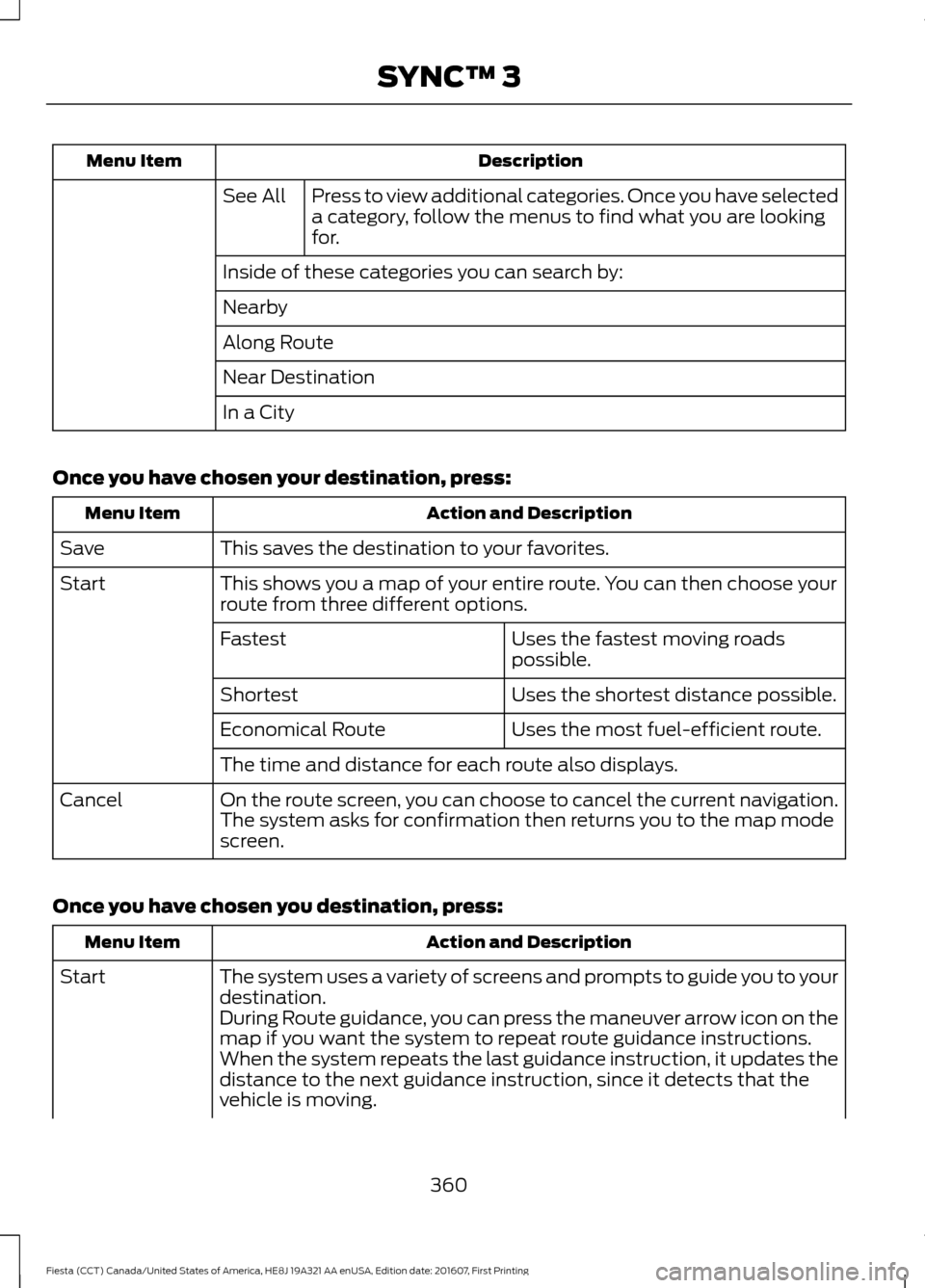
Description
Menu Item
Press to view additional categories. Once you have selected
a category, follow the menus to find what you are looking
for.
See All
Inside of these categories you can search by:
Nearby
Along Route
Near Destination
In a City
Once you have chosen your destination, press: Action and Description
Menu Item
This saves the destination to your favorites.
Save
This shows you a map of your entire route. You can then choose your
route from three different options.
Start
Uses the fastest moving roads
possible.
Fastest
Uses the shortest distance possible.
Shortest
Uses the most fuel-efficient route.
Economical Route
The time and distance for each route also displays.
On the route screen, you can choose to cancel the current navigation.
The system asks for confirmation then returns you to the map mode
screen.
Cancel
Once you have chosen you destination, press: Action and Description
Menu Item
The system uses a variety of screens and prompts to guide you to your
destination.
Start
During Route guidance, you can press the maneuver arrow icon on the
map if you want the system to repeat route guidance instructions.
When the system repeats the last guidance instruction, it updates the
distance to the next guidance instruction, since it detects that the
vehicle is moving.
360
Fiesta (CCT) Canada/United States of America, HE8J 19A321 AA enUSA, Edition date: 201607, First Printing SYNC™ 3
Page 366 of 450
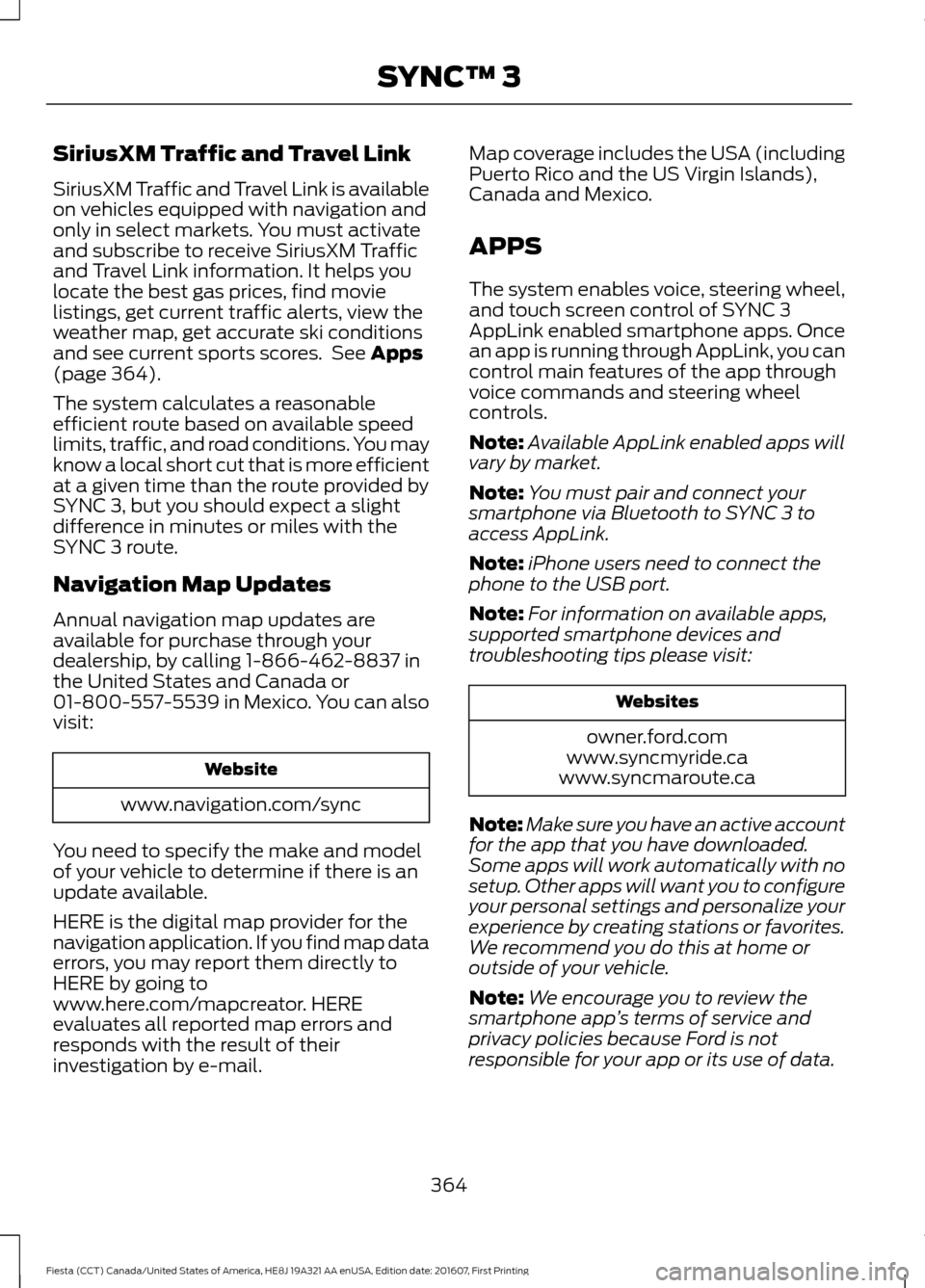
SiriusXM Traffic and Travel Link
SiriusXM Traffic and Travel Link is available
on vehicles equipped with navigation and
only in select markets. You must activate
and subscribe to receive SiriusXM Traffic
and Travel Link information. It helps you
locate the best gas prices, find movie
listings, get current traffic alerts, view the
weather map, get accurate ski conditions
and see current sports scores. See Apps
(page 364).
The system calculates a reasonable
efficient route based on available speed
limits, traffic, and road conditions. You may
know a local short cut that is more efficient
at a given time than the route provided by
SYNC 3, but you should expect a slight
difference in minutes or miles with the
SYNC 3 route.
Navigation Map Updates
Annual navigation map updates are
available for purchase through your
dealership, by calling 1-866-462-8837 in
the United States and Canada or
01-800-557-5539 in Mexico. You can also
visit: Website
www.navigation.com/sync
You need to specify the make and model
of your vehicle to determine if there is an
update available.
HERE is the digital map provider for the
navigation application. If you find map data
errors, you may report them directly to
HERE by going to
www.here.com/mapcreator. HERE
evaluates all reported map errors and
responds with the result of their
investigation by e-mail. Map coverage includes the USA (including
Puerto Rico and the US Virgin Islands),
Canada and Mexico.
APPS
The system enables voice, steering wheel,
and touch screen control of SYNC 3
AppLink enabled smartphone apps. Once
an app is running through AppLink, you can
control main features of the app through
voice commands and steering wheel
controls.
Note:
Available AppLink enabled apps will
vary by market.
Note: You must pair and connect your
smartphone via Bluetooth to SYNC 3 to
access AppLink.
Note: iPhone users need to connect the
phone to the USB port.
Note: For information on available apps,
supported smartphone devices and
troubleshooting tips please visit: Websites
owner.ford.com
www.syncmyride.ca
www.syncmaroute.ca
Note: Make sure you have an active account
for the app that you have downloaded.
Some apps will work automatically with no
setup. Other apps will want you to configure
your personal settings and personalize your
experience by creating stations or favorites.
We recommend you do this at home or
outside of your vehicle.
Note: We encourage you to review the
smartphone app ’s terms of service and
privacy policies because Ford is not
responsible for your app or its use of data.
364
Fiesta (CCT) Canada/United States of America, HE8J 19A321 AA enUSA, Edition date: 201607, First Printing SYNC™ 3
Page 381 of 450
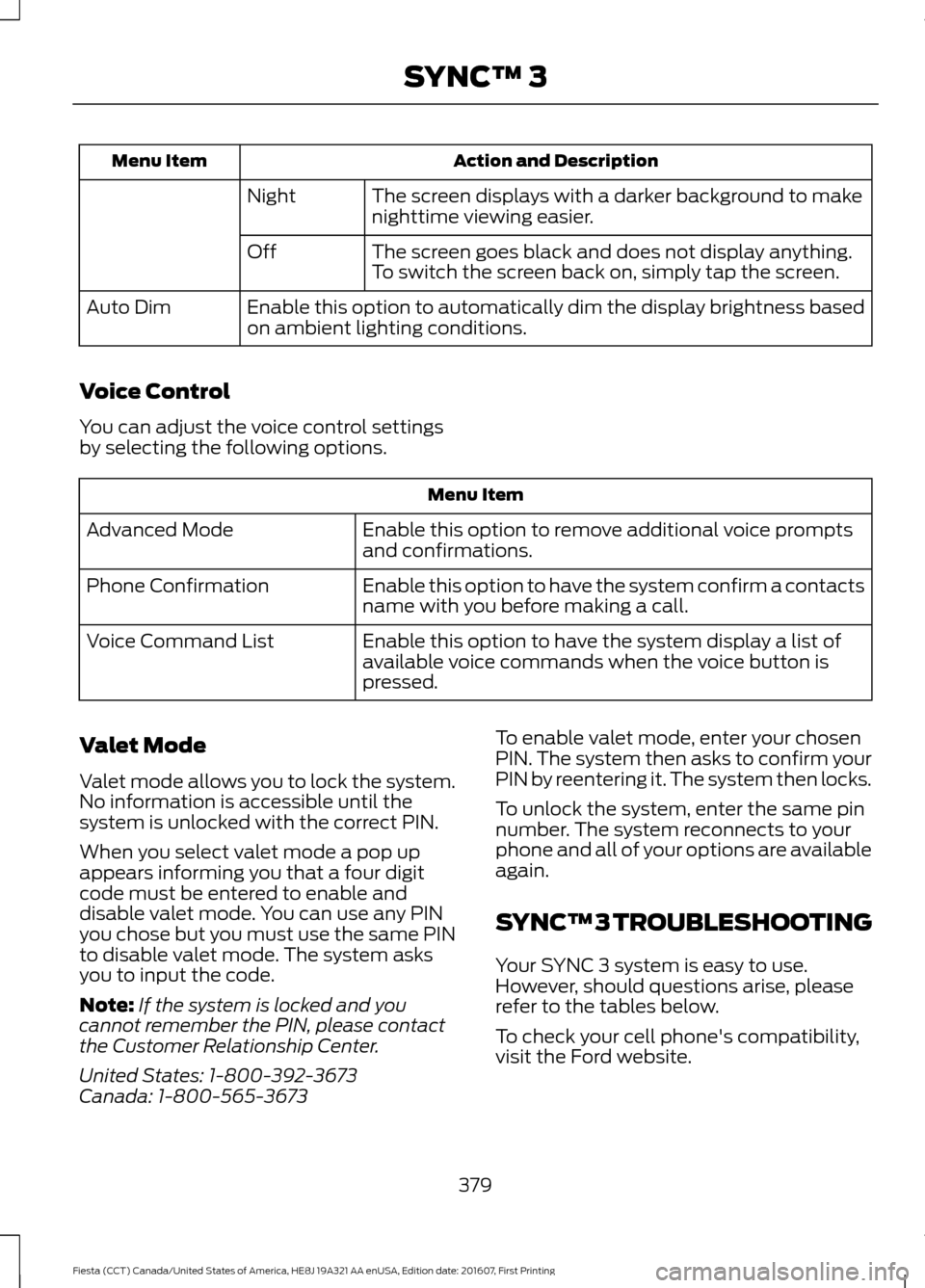
Action and Description
Menu Item
The screen displays with a darker background to make
nighttime viewing easier.
Night
The screen goes black and does not display anything.
To switch the screen back on, simply tap the screen.
Off
Enable this option to automatically dim the display brightness based
on ambient lighting conditions.
Auto Dim
Voice Control
You can adjust the voice control settings
by selecting the following options. Menu Item
Enable this option to remove additional voice prompts
and confirmations.
Advanced Mode
Enable this option to have the system confirm a contacts
name with you before making a call.
Phone Confirmation
Enable this option to have the system display a list of
available voice commands when the voice button is
pressed.
Voice Command List
Valet Mode
Valet mode allows you to lock the system.
No information is accessible until the
system is unlocked with the correct PIN.
When you select valet mode a pop up
appears informing you that a four digit
code must be entered to enable and
disable valet mode. You can use any PIN
you chose but you must use the same PIN
to disable valet mode. The system asks
you to input the code.
Note: If the system is locked and you
cannot remember the PIN, please contact
the Customer Relationship Center.
United States: 1-800-392-3673
Canada: 1-800-565-3673 To enable valet mode, enter your chosen
PIN. The system then asks to confirm your
PIN by reentering it. The system then locks.
To unlock the system, enter the same pin
number. The system reconnects to your
phone and all of your options are available
again.
SYNC™ 3 TROUBLESHOOTING
Your SYNC 3 system is easy to use.
However, should questions arise, please
refer to the tables below.
To check your cell phone's compatibility,
visit the Ford website.
379
Fiesta (CCT) Canada/United States of America, HE8J 19A321 AA enUSA, Edition date: 201607, First Printing SYNC™ 3
Page 383 of 450
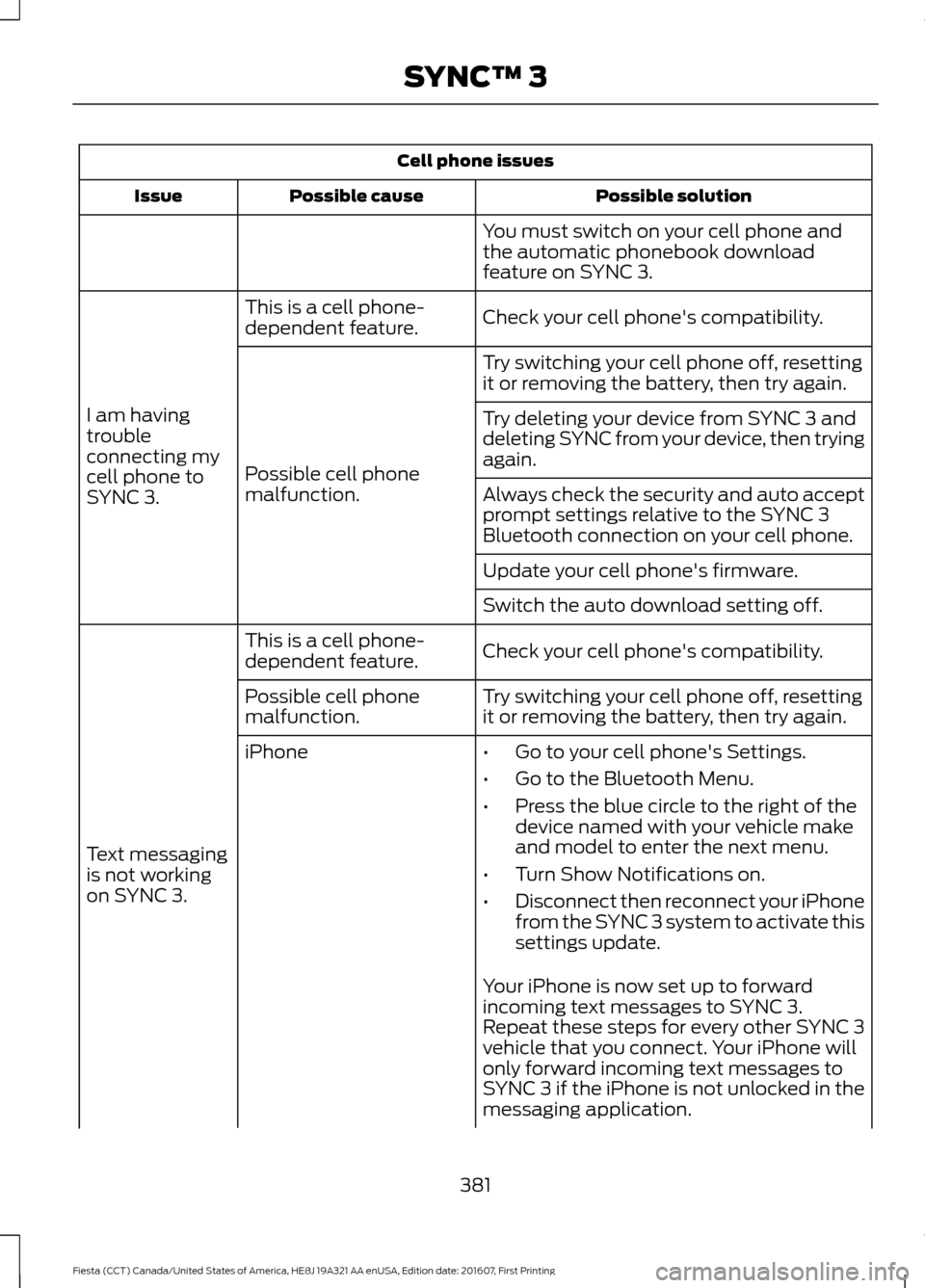
Cell phone issues
Possible solution
Possible cause
Issue
You must switch on your cell phone and
the automatic phonebook download
feature on SYNC 3.
Check your cell phone's compatibility.
This is a cell phone-
dependent feature.
I am having
trouble
connecting my
cell phone to
SYNC 3. Try switching your cell phone off, resetting
it or removing the battery, then try again.
Possible cell phone
malfunction. Try deleting your device from SYNC 3 and
deleting SYNC from your device, then trying
again.
Always check the security and auto accept
prompt settings relative to the SYNC 3
Bluetooth connection on your cell phone.
Update your cell phone's firmware.
Switch the auto download setting off.
Check your cell phone's compatibility.
This is a cell phone-
dependent feature.
Text messaging
is not working
on SYNC 3. Try switching your cell phone off, resetting
it or removing the battery, then try again.
Possible cell phone
malfunction.
iPhone
•Go to your cell phone's Settings.
• Go to the Bluetooth Menu.
• Press the blue circle to the right of the
device named with your vehicle make
and model to enter the next menu.
• Turn Show Notifications on.
• Disconnect then reconnect your iPhone
from the SYNC 3 system to activate this
settings update.
Your iPhone is now set up to forward
incoming text messages to SYNC 3.
Repeat these steps for every other SYNC 3
vehicle that you connect. Your iPhone will
only forward incoming text messages to
SYNC 3 if the iPhone is not unlocked in the
messaging application.
381
Fiesta (CCT) Canada/United States of America, HE8J 19A321 AA enUSA, Edition date: 201607, First Printing SYNC™ 3
Page 384 of 450
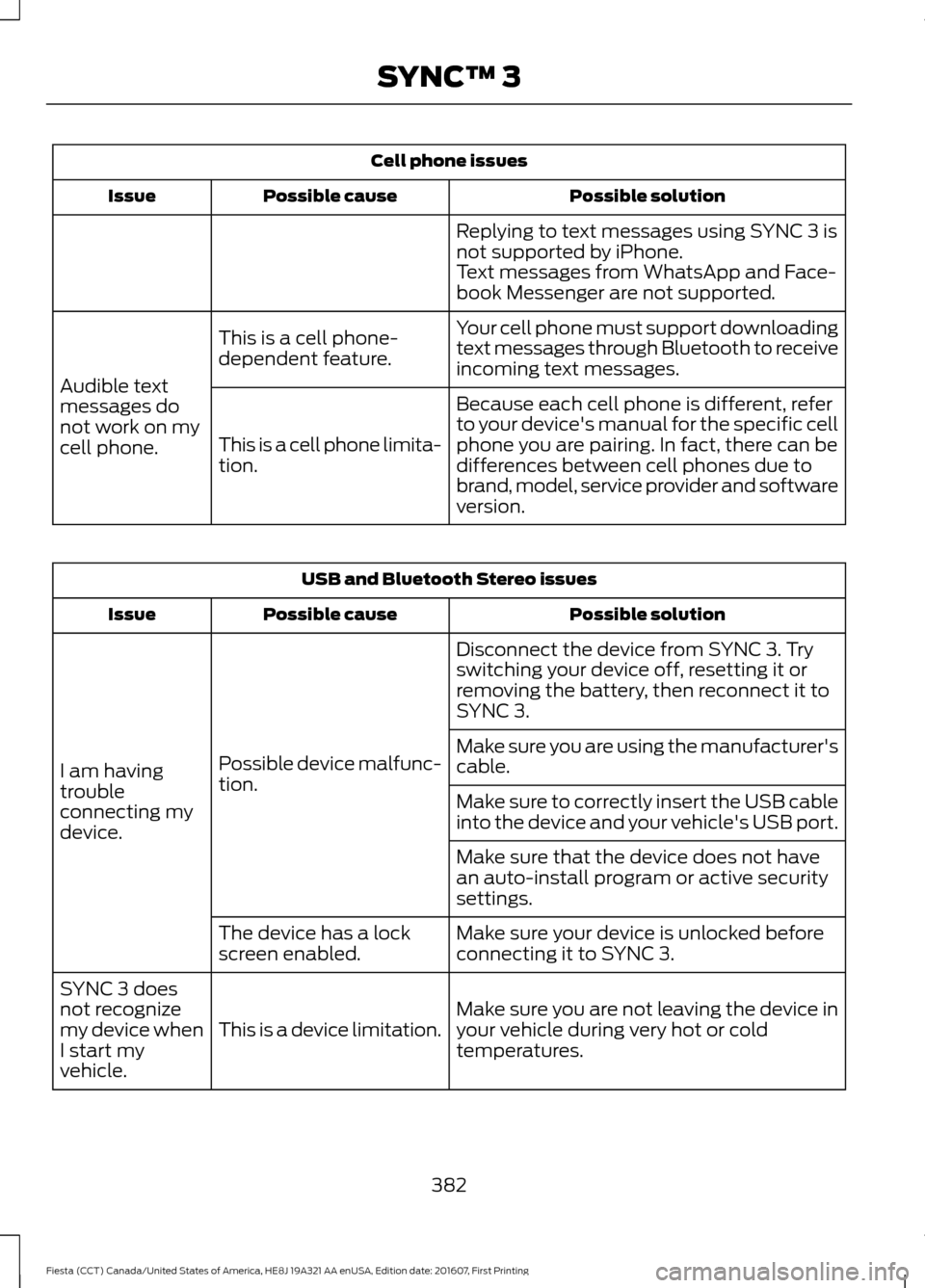
Cell phone issues
Possible solution
Possible cause
Issue
Replying to text messages using SYNC 3 is
not supported by iPhone.
Text messages from WhatsApp and Face-
book Messenger are not supported.
Your cell phone must support downloading
text messages through Bluetooth to receive
incoming text messages.
This is a cell phone-
dependent feature.
Audible text
messages do
not work on my
cell phone. Because each cell phone is different, refer
to your device's manual for the specific cell
phone you are pairing. In fact, there can be
differences between cell phones due to
brand, model, service provider and software
version.
This is a cell phone limita-
tion. USB and Bluetooth Stereo issues
Possible solution
Possible cause
Issue
Disconnect the device from SYNC 3. Try
switching your device off, resetting it or
removing the battery, then reconnect it to
SYNC 3.
Possible device malfunc-
tion.
I am having
trouble
connecting my
device. Make sure you are using the manufacturer's
cable.
Make sure to correctly insert the USB cable
into the device and your vehicle's USB port.
Make sure that the device does not have
an auto-install program or active security
settings.
Make sure your device is unlocked before
connecting it to SYNC 3.
The device has a lock
screen enabled.
Make sure you are not leaving the device in
your vehicle during very hot or cold
temperatures.
This is a device limitation.
SYNC 3 does
not recognize
my device when
I start my
vehicle.
382
Fiesta (CCT) Canada/United States of America, HE8J 19A321 AA enUSA, Edition date: 201607, First Printing SYNC™ 3
Page 441 of 450
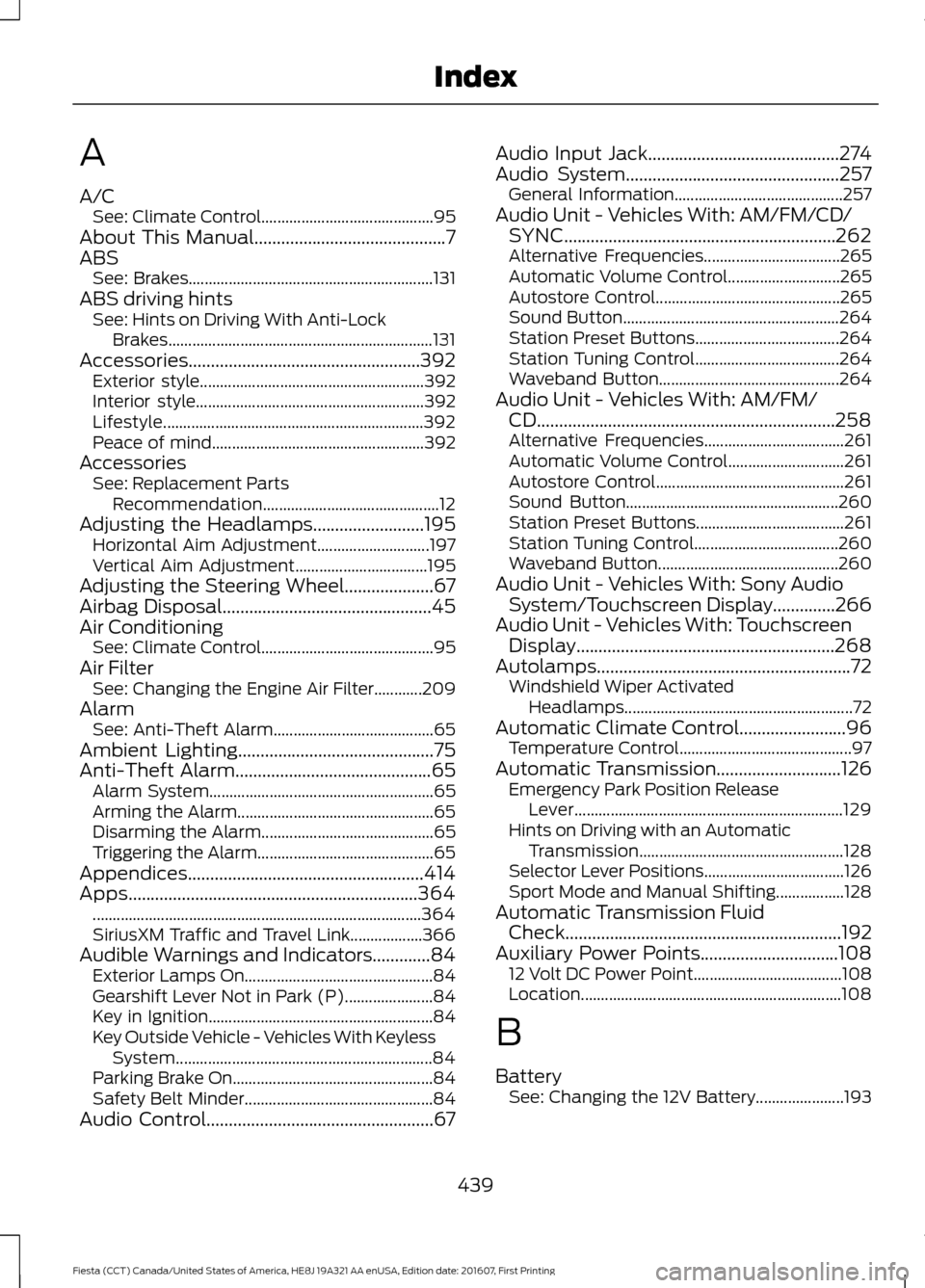
A
A/C
See: Climate Control........................................... 95
About This Manual...........................................7
ABS See: Brakes............................................................. 131
ABS driving hints See: Hints on Driving With Anti-Lock
Brakes.................................................................. 131
Accessories
....................................................392
Exterior style........................................................ 392
Interior style......................................................... 392
Lifestyle................................................................. 392
Peace of mind..................................................... 392
Accessories See: Replacement Parts
Recommendation............................................ 12
Adjusting the Headlamps.........................195 Horizontal Aim Adjustment............................ 197
Vertical Aim Adjustment................................. 195
Adjusting the Steering Wheel
....................67
Airbag Disposal...............................................45
Air Conditioning See: Climate Control........................................... 95
Air Filter See: Changing the Engine Air Filter............209
Alarm See: Anti-Theft Alarm........................................ 65
Ambient Lighting
............................................75
Anti-Theft Alarm............................................65
Alarm System........................................................ 65
Arming the Alarm................................................. 65
Disarming the Alarm........................................... 65
Triggering the Alarm............................................65
Appendices
.....................................................414
Apps.................................................................364
........................................................................\
.......... 364
SiriusXM Traffic and Travel Link.................. 366
Audible Warnings and Indicators.............84 Exterior Lamps On............................................... 84
Gearshift Lever Not in Park (P)...................... 84
Key in Ignition........................................................ 84
Key Outside Vehicle - Vehicles With Keyless System................................................................ 84
Parking Brake On..................................................84
Safety Belt Minder............................................... 84
Audio Control...................................................67 Audio Input Jack...........................................274
Audio System
................................................257
General Information.......................................... 257
Audio Unit - Vehicles With: AM/FM/CD/ SYNC.............................................................262
Alternative Frequencies.................................. 265
Automatic Volume Control............................ 265
Autostore Control.............................................. 265
Sound Button...................................................... 264
Station Preset Buttons.................................... 264
Station Tuning Control.................................... 264
Waveband Button............................................. 264
Audio Unit - Vehicles With: AM/FM/ CD...................................................................258
Alternative Frequencies................................... 261
Automatic Volume Control............................. 261
Autostore Control............................................... 261
Sound Button..................................................... 260
Station Preset Buttons..................................... 261
Station Tuning Control.................................... 260
Waveband Button............................................. 260
Audio Unit - Vehicles With: Sony Audio System/Touchscreen Display..............266
Audio Unit - Vehicles With: Touchscreen Display..........................................................268
Autolamps.........................................................72 Windshield Wiper Activated
Headlamps......................................................... 72
Automatic Climate Control........................96 Temperature Control........................................... 97
Automatic Transmission
............................126
Emergency Park Position Release
Lever................................................................... 129
Hints on Driving with an Automatic Transmission................................................... 128
Selector Lever Positions................................... 126
Sport Mode and Manual Shifting.................128
Automatic Transmission Fluid Check
..............................................................192
Auxiliary Power Points...............................108 12 Volt DC Power Point..................................... 108
Location................................................................. 108
B
Battery See: Changing the 12V Battery...................... 193
439
Fiesta (CCT) Canada/United States of America, HE8J 19A321 AA enUSA, Edition date: 201607, First Printing Index
Page 443 of 450

Cleaning the Windows and Wiper
Blades............................................................214
Clearing All MyKeys.......................................52
Climate Control..............................................95
Clock...................................................................86 Type 1........................................................................\
86
Type 2....................................................................... 86
Clutch Fluid Check - Manual Transmission...............................................192
Coolant Check See: Engine Coolant Check............................ 188
Crash Sensors and Airbag Indicator.......44
Creating a MyKey............................................52 Programming/Changing Configurable
Settings............................................................... 52
Cruise Control.................................................68 Principle of Operation....................................... 143
Cruise control See: Using Cruise Control................................ 143
Customer Assistance
..................................165
D
Data Recording
..................................................9
Event Data Recording.......................................... 10
Service Data Recording........................................ 9
Daytime Running Lamps
.............................73
Digital Radio..................................................269
HD Radio Reception and Station
Troubleshooting............................................ 270
Direction Indicators........................................74
Doors and Locks
.............................................56
Drive Belt Routing - 1.0L EcoBoost™
..................................................210
Drive Belt Routing - 1.6L Duratec-16V Ti-VCT (Sigma)
.........................................210
Driver and Passenger Airbags...................38 Children and Airbags.......................................... 38
Proper Driver and Front Passenger Seating Adjustment........................................................ 38
Driver Knee Airbag.........................................42
Driving Aids.....................................................145
Driving Hints
....................................................157
Driving Through Water................................157
DRL See: Daytime Running Lamps......................... 73E
Eco Mode.........................................................145
Resetting Eco Mode........................................... 145
Type 1....................................................................... 145
Economical Driving
.......................................157
Emission Control System...........................122 On-Board Diagnostics (OBD-II).................... 123
Readiness for Inspection and Maintenance (I/M) Testing.................................................... 124
End User License Agreement..................414 VEHICLE SOFTWARE END USER LICENSE
AGREEMENT (EULA) .................................. 414
Engine Block Heater
.....................................114
Using the Engine Block Heater....................... 115
Engine Coolant Check................................188 Adding Coolant................................................... 188
Coolant Change.................................................. 190
Engine Coolant Temperature Management.................................................... 191
Fail-Safe Cooling................................................ 190
Recycled Coolant............................................... 189
Severe Climates.................................................. 190
Engine Cooling Fan
......................................188
Engine Immobilizer See: Passive Anti-Theft System..................... 64
Engine Oil Check..........................................186 Adding Engine Oil............................................... 186
Engine Oil Dipstick - 1.0L EcoBoost™.................................................186
Engine Oil Dipstick - 1.6L Duratec-16V Ti-VCT (Sigma)
.........................................186
Engine Specifications - 1.0L EcoBoost™.................................................243
Engine Specifications - 1.6L Duratec-16V Ti-VCT (Sigma)
.........................................243
Entertainment...............................................341 AM/FM Radio...................................................... 342
Apps....................................................................... 350
Bluetooth Stereo or USB................................ 349
CD........................................................................\
.... 348
HD Radio ™ Information (If
Available)........................................................ 345
SIRIUS® Satellite Radio (If Activated)........................................................ 343
Sources.................................................................. 342
Supported Media Players, Formats and Metadata Information................................ 350
441
Fiesta (CCT) Canada/United States of America, HE8J 19A321 AA enUSA, Edition date: 201607, First Printing Index
Page 444 of 450

USB Ports.............................................................
350
Environment......................................................15
Event Data Recording See: Data Recording.............................................. 9
Export Unique Options..................................13
Exterior Mirrors
.................................................77
Fold-Away Exterior Mirrors............................... 78
Integrated Blind Spot Mirrors........................... 78
Power Exterior Mirrors......................................... 77
F
Fan See: Engine Cooling Fan.................................. 188
Fastening the Seatbelts..............................30 Seatbelt Locking Modes..................................... 31
Using Seatbelts During Pregnancy...............30
Floor Mats
.......................................................158
Fog Lamps - Front See: Front Fog Lamps......................................... 74
Ford Credit
..........................................................11
US Only...................................................................... 11
Ford Protect...................................................394 Ford Protect Extended Service Plan
(CANADA ONLY).......................................... 395
Ford Protect Extended Service Plans (U.S. Only).................................................................. 394
Front Fog Lamps.............................................74
Front Parking Aid..........................................139 Sensing System Audible Warnings..............140
Switching the Parking Aid System
Off....................................................................... 140
Front Passenger Sensing System............39
Front Wiper Blades See: Changing the Front Wiper Blades.......195
Fuel and Refueling........................................116
Fuel Consumption.........................................121 Calculating Fuel Economy............................... 122
Filling the Fuel Tank............................................ 121
Fuel Filler Funnel Location..........................117
Fuel Quality
......................................................117
Choosing the Right Fuel.................................... 117
Fuel Shutoff.....................................................161
Fuses..................................................................172
Fuse Specification Chart............................172 Engine Compartment Fuse Box..................... 172
Passenger Compartment Fuse Box.............176 G
Gauges...............................................................80
Compass (If Equipped)..................................... 80
Engine Coolant Temperature Gauge.............81
Fuel Gauge............................................................... 81
Low Fuel Reminder............................................... 81
General Information on Radio Frequencies...................................................46
Intelligent Access................................................. 46
General Maintenance Information.......396 Multi-Point Inspection..................................... 398
Owner Checks and Services.......................... 397
Protecting Your Investment.......................... 396
Why Maintain Your Vehicle?......................... 396
Why Maintain Your Vehicle at Your Dealership?..................................................... 396
Getting Assistance Outside the U.S. and Canada..........................................................168
Getting the Services You Need...............165 Away From Home............................................... 165
H
Handbrake See: Parking Brake.............................................. 132
Hazard Warning Flashers...........................161
Headlamp Adjusting See: Adjusting the Headlamps...................... 195
Headlamp Exit Delay.....................................73
Headlamp Removal See: Removing a Headlamp........................... 197
Head Restraints
............................................102
Adjusting the Head Restraint......................... 103
Heated Seats.................................................106
Heated Windows and Mirrors.................100 Heated Exterior Mirrors.................................... 100
Heated Windows............................................... 100
Heating See: Climate Control........................................... 95
Hill Start Assist..............................................132 Switching the System On and Off................133
Using Hill Start Assist........................................ 133
Hints on Controlling the Interior Climate
............................................................97
Cooling the Interior Quickly.............................. 99
General Hints......................................................... 97
Heating the Interior Quickly............................. 98
442
Fiesta (CCT) Canada/United States of America, HE8J 19A321 AA enUSA, Edition date: 201607, First Printing Index